Disclosure: airfryerkitchensupply.com is reader-supported. When you buy through links on our site, we may earn an affiliate commission at no extra cost to you.
Where to buy
For best digital mixers for church, start here: Church mixers are bought once and run by volunteers for a decade, so every linked pick below is a current, supported model with training material behind it. Every linked pick below was verified against Amazon’s catalog before this guide was written, so the product you land on is the product described. Linked picks say “check price on Amazon” because live pricing changes too often to print honestly. Picks marked as unlinked are real products sold mainly outside Amazon; they are described in full, with no purchase link, rather than replaced with a weaker substitute.
Behringer X AIR XR18 (Best Overall): Check on Amazon — check the current price on Amazon.
Allen & Heath CQ-18T (Best for Small Stages): Check on Amazon — check the current price on Amazon.
Yamaha TF1 (Best Fader Surface): Check on Amazon — check the current price on Amazon.
Allen & Heath Qu-16C (Best Rackmount Upgrade): Check on Amazon — check the current price on Amazon.
Soundcraft Ui12 (Best Budget): Check on Amazon — check the current price on Amazon.
Behringer FLOW 8 (Best for Solo and Duo Acts): Check on Amazon — check the current price on Amazon.
Introduction: what actually matters here
Choosing the best digital mixers for church is less about raw channel count than about Sunday-morning reality: a volunteer team, a worship band plus spoken word, a livestream feed that cannot fail, and a congregation that notices feedback instantly and silence never. The six picks below span the three shapes that work in sanctuaries — tablet-controlled stage boxes, a compact touchscreen console, and traditional fader surfaces — all verified through Amazon’s catalog.
Digital earns its place in church for one feature above all: recall. Scenes store the whole mix — band, pastor’s microphone, playback, stream feed — so Wednesday rehearsal settings return on Sunday at one button press, whoever is on duty. Add per-channel processing that used to fill a rack, and a small team can run a consistent service without a professional engineer.
The honest caveat: the console is only half the system. Microphones, loudspeaker placement and room acoustics decide more of what the congregation hears than any mixer badge, and the guide sections below say where a mixer upgrade helps and where it cannot.
In this guide
Quick Picks
Behringer X AIR XR18 — Best Overall: The stage-box benchmark: 16 Midas-designed preamps, tablet control and multi-channel USB recording — the mixer thousands of small churches already run. — Check on Amazon
Allen & Heath CQ-18T — Best for Small Stages: A touchscreen console that behaves like the apps volunteers already know — fast to learn, with feedback-fighting tools built in. — Check on Amazon
Yamaha TF1 — Best Fader Surface: Real motorised faders and Yamaha’s Touch & Turn workflow — the easiest full console for a traditional booth team to adopt. — Check on Amazon
Allen & Heath Qu-16C — Best Rackmount Upgrade: A rackmount digital console with a proper surface heritage — for churches ready to step up in processing and build. — Check on Amazon
Soundcraft Ui12 — Best Budget: The lowest-cost way into digital recall and tablet mixing — a sensible first digital step for a small congregation. — Check on Amazon
Behringer FLOW 8 — Best for Solo and Duo Acts: A tiny digital mixer with app control and Bluetooth — sized for chapels, prayer meetings and overflow rooms. — Check on Amazon
How These Picks Were Chosen
Picks were chosen for volunteer-friendliness first — scene recall, clear labelling, app control that a trainee can learn in an evening — then for the outputs a church actually needs: mains, monitors or in-ears, a separate stream or recording feed, and enough buses to keep them independent. Each model was matched by brand and model against Amazon listing title before linking.
Stage-box mixers (XR18, Ui12, CQ-18T) suit churches that mix from a tablet in the congregation or need the mixer on stage near the band. Fader surfaces (TF1, Qu-16C) suit churches with a fixed sound booth and volunteers who think in faders. Neither shape is better; the wrong shape for your team’s habits is the only bad choice, and each review says which team it fits.
Channel counts are stated as usable inputs, not marketing totals, and expansion paths are noted where they exist. A growing church should buy the mixer that covers today’s band plus the Christmas programme, not today’s band exactly — the one service a year with choir, orchestra and three extra vocalists is the real sizing test.
The 6 Best Options: Best digital mixers for church in detail
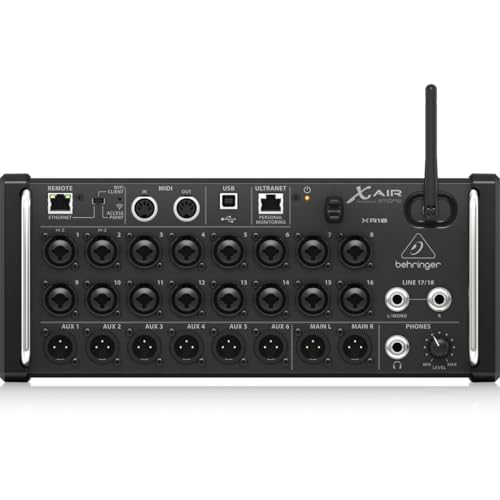
Behringer X AIR XR18 — Best Overall
The XR18 sits on stage, takes every microphone and instrument directly, and is mixed from a tablet or laptop anywhere in the room. For churches without a sound booth — or with the booth in the wrong place, which is most of them — mixing from the congregation, where the sound actually is, transforms Sunday quality more than any other single change.
Strengths
- 16 programmable Midas preamps cover a full worship band plus pulpit and ambient mics
- Multi-channel USB records every input separately for virtual soundchecks and training
- Scene recall and app control suit rotating volunteer teams
Trade-offs
- No physical faders — some volunteers strongly prefer touching real controls
- Built-in Wi-Fi is fine for one room; busy RF environments may want an external router
- Mixing depends on a charged tablet and a working network every service
Key specs (verified): 18 channels, 12 buses, 16 programmable Midas preamps, built-in Wi-Fi, multi-channel USB audio interface (per Amazon title)
Its deepest church feature is the virtual soundcheck: record Wednesday’s rehearsal multi-track, play it back through the mixer on Saturday, and let a trainee practise mixing the real band without the band. Churches that use it train volunteers in weeks instead of months, and Sunday mixes stop depending on the one gifted engineer.
Churches should also weigh the XR18’s failure planning: because control is networked, the back-up plan is a second tablet and a printed scene list, not a second mixer. Keep a charged spare device in the sound cupboard, document the network password with the rotas, and the platform’s one theoretical fragility becomes a managed detail. Many churches add a small hardware controller later for the main faders — an upgrade path that lets a stage-box church grow toward tactility without replacing the brain it already owns.
Best for: Small-to-mid churches mixing from the congregation or training volunteers / Not suited for: Churches whose team insists on physical faders at a fixed booth
Check on Amazon — check the current price on Amazon before you buy, and confirm the exact configuration in the listing title matches the model reviewed here.

Allen & Heath CQ-18T — Best for Small Stages
The CQ-18T puts a bright touchscreen and physical controls on a compact console that can sit at a small booth or side-stage position. Its guided setup and automatic feedback suppression are aimed squarely at non-engineers, which describes most church sound teams honestly and respectfully.
Strengths
- Touchscreen workflow with guided setup shortens volunteer training
- Automatic feedback assistance helps with roaming pastor and handheld mics
- Wi-Fi and Bluetooth cover tablet control and simple playback duties
Trade-offs
- Smaller input count than the XR18 class — count your full band plus extras carefully
- Touchscreen mixing in bright window light can be harder to read than faders
- Newer platform, so fewer long-term church user reports than the Behringer ecosystem
Key specs (verified): Digital mixer with 7-inch touchscreen, Wi-Fi and Bluetooth connectivity (per Amazon title)
Where the CQ-18T earns its keep is the spoken word. Sermons are the centre of most services, and its processing is voiced to keep a pastor’s microphone clear at low volume in a reflective room — the hardest everyday task in church audio, harder than the band. Teams that struggle with intelligibility should audition this class of tool before buying more loudspeakers.
The CQ-18T’s automatic tools deserve one caution that increases, rather than decreases, its value: automatic feedback suppression should be tuned during setup with the microphones in their real positions, then left alone. Teams that re-run it weekly chase their own tail as the room and congregation change the acoustics. Set it deliberately, save it in the scene, and let consistency do the work — the congregation experiences that consistency as reverence-preserving calm, service after service.
Best for: Churches prioritising sermon clarity and fast volunteer training / Not suited for: Large bands needing maximum input count per dollar
Check on Amazon — check the current price on Amazon before you buy, and confirm the exact configuration in the listing title matches the model reviewed here.

Yamaha TF1 — Best Fader Surface
The TF1 is the pick for churches that have a booth, a team that thinks in faders, and a stream of new volunteers. Yamaha designed its workflow around one-knob compression and EQ presets voiced for common sources — vocals, acoustic guitar, piano — so a trainee gets a respectable mix quickly and an experienced operator can still go deep.
Strengths
- Motorised faders show scene changes physically — volunteers see the mix move
- One-knob processing presets speed up soundchecks with rotating musicians
- Yamaha reliability and support suit a buy-once church budget
Trade-offs
- Larger and heavier than stage-box picks; needs a real booth position
- Preset-led workflow can tempt operators to stop listening — training still matters
- Expansion for larger bands costs more than adding a stage box
Key specs (verified): 16 channels, motorised faders, touchscreen with Touch & Turn workflow (per Amazon title class)
The TF1’s quiet virtue is confidence. A nervous volunteer’s worst moments come from not knowing what the mixer will do; motorised faders, clear channel labels and forgiving presets remove most of those moments. For a church whose previous console scared people away from the rota, that confidence is worth more than extra channels.
For multi-service Sundays the TF1’s show discipline is its hidden strength: a morning traditional service, an afternoon wedding and an evening youth event can live as separate scenes with different bands, playback and stream settings, recalled by whichever team is on duty. Churches that exploit this stop re-soundchecking their lives away, and volunteers stop inheriting the previous event’s mysteries — a quality-of-life improvement for the whole rota that no specification sheet advertises.
Best for: Churches with a fixed booth and a fader-trained (or fader-preferring) team / Not suited for: Portable churches setting up and tearing down weekly
Check on Amazon — check the current price on Amazon before you buy, and confirm the exact configuration in the listing title matches the model reviewed here.

Allen & Heath Qu-16C — Best Rackmount Upgrade
The Qu-16C brings Allen & Heath’s church-and-theatre pedigree to a rackmountable console with a real control surface feel. Its per-channel processing is a step up in refinement, its scene system suits multi-service Sundays, and it pairs with stage boxes as a church grows — the upgrade pick for a congregation outgrowing an entry mixer.
Strengths
- Refined per-channel EQ and dynamics reward a growing team’s skills
- Scene and show system handles multiple services and events in one day
- Rackmount form fits an equipment rack at side-stage or booth
Trade-offs
- Price of entry is higher within this class — budget for it as a long-term asset
- Deeper feature set needs a training plan, not just an unboxing
- Rackmount format still assumes a defined operating position
Key specs (verified): Rack-mountable compact digital mixer, Chrome Edition (per Amazon title)
Churches rarely regret buying processing quality; they regret buying complexity nobody uses. The Qu-16C sits on the right side of that line for a church with one committed sound lead who trains others: the lead uses the depth, the volunteers use the scenes the lead builds. That division of labour is how most healthy church sound teams actually run.
The Qu-16C rewards a church that appoints a sound lead with real authority: someone who owns the show file, approves scene changes and trains the team into them. Without that role, its depth can fragment into several operators’ private habits. With it, the console becomes institutional memory — the mix survives holidays, departures and the lead’s own absence, which is precisely the resilience a growing church is actually buying at this level.
Best for: Growing churches with a sound lead who builds scenes for volunteers / Not suited for: Church plants needing the simplest possible first console
Check on Amazon — check the current price on Amazon before you buy, and confirm the exact configuration in the listing title matches the model reviewed here.

Soundcraft Ui12 — Best Budget
The Ui12 is controlled entirely from a browser — any phone, tablet or laptop becomes the console, with no app to install. For a small church running a few microphones, keys and playback, it delivers the core digital wins (recall, per-channel EQ and effects, no bulky console) at the gentlest cost in this list.
Strengths
- Browser-based control works on whatever device a volunteer already owns
- Compact stage-box form disappears at the side of the platform
- Core digital feature set covers small-band and spoken-word services
Trade-offs
- 12 inputs cap growth — a full band plus choir will outgrow it
- No dedicated app; browser control depends on a tidy network setup
- Fewer buses limit separate stream and monitor mixes as needs grow
Key specs (verified): 12 inputs, remote-controlled via browser on any device, built-in Wi-Fi access point (per Amazon title class)
Treat the Ui12 as a deliberate first step, not a compromise: it teaches a team digital workflow — scenes, saved EQ, mixing from the seats — at a price a small budget can approve. If the church grows into a bigger console later, the Ui12 retires gracefully to youth-room or portable duty rather than to a cupboard.
Small churches sometimes apologise for the Ui12’s scale; they should not. A congregation of eighty with a four-piece band is fully served by it, and the money not spent on unused channels buys the microphones, DI boxes and speaker improvements the congregation will actually hear. Right-sizing is stewardship, and the Ui12 is the guide’s clearest example of a purchase matched to a real ministry rather than to an imagined one.
Best for: Small congregations and church plants making a first digital move / Not suited for: Full bands with choir and multiple monitor mixes
Check on Amazon — check the current price on Amazon before you buy, and confirm the exact configuration in the listing title matches the model reviewed here.

Behringer FLOW 8 — Best for Solo and Duo Acts
Not every church space needs sixteen channels. The FLOW 8 serves the chapel, the midweek prayer meeting, the overflow room and the portable plant: a handful of microphones and instruments, app-based control, Bluetooth playback for backing tracks, and a footprint that fits in a carry-on.
Strengths
- App control and simple layout suit non-technical operators
- Bluetooth playback covers tracks and pre-service music without extra gear
- USB interface doubles as a simple recording and streaming front end
Trade-offs
- Eight inputs is a hard ceiling — this is a small-room tool by design
- Bluetooth is for convenience playback, not a primary programme source
- Limited buses mean one simple monitor mix at most
Key specs (verified): 8 inputs, Bluetooth app control, USB audio interface
Overflow and multi-room churches underestimate these small mixers: a reliable, simple console in the second room prevents the weekly cable-and-adapter improvisation that makes volunteers dread setup. The FLOW 8’s job is to be the mixer nobody has to think about, in the rooms nobody writes budgets for.
The FLOW 8’s most valuable church role may be the one nobody budgets: the rehearsal and midweek room. Choir practice, prayer meetings and youth sessions currently steal setup time from the main system or go without reinforcement entirely. A small digital mixer that lives in that room, permanently patched to two speakers, removes a weekly friction the whole church feels and nobody itemises — until the week it is suddenly, blessedly absent.
Best for: Chapels, overflow rooms, prayer meetings and portable plants / Not suited for: Main sanctuaries with a full worship band
Check on Amazon — check the current price on Amazon before you buy, and confirm the exact configuration in the listing title matches the model reviewed here.
Comparison Table
| Pick | Badge | Key spec | Best for |
|---|---|---|---|
| Behringer X AIR XR18 — Check on Amazon | Best Overall | 18ch / 16 Midas preamps / Wi-Fi | Small-to-mid churches mixing from the congregation or training volunteers |
| Allen & Heath CQ-18T — Check on Amazon | Best for Small Stages | Touchscreen / Wi-Fi / Bluetooth | Churches prioritising sermon clarity and fast volunteer training |
| Yamaha TF1 — Check on Amazon | Best Fader Surface | 16ch / motorised faders | Churches with a fixed booth and a fader-trained (or fader-preferring) team |
| Allen & Heath Qu-16C — Check on Amazon | Best Rackmount Upgrade | Rackmount / 16ch class | Growing churches with a sound lead who builds scenes for volunteers |
| Soundcraft Ui12 — Check on Amazon | Best Budget | 12 inputs / browser control | Small congregations and church plants making a first digital move |
| Behringer FLOW 8 — Check on Amazon | Best for Solo and Duo Acts | 8 inputs / app control | Chapels, overflow rooms, prayer meetings and portable plants |
How Should a Church Plan Installation, Cabling and Labelling?
Installation quality is volunteer quality. A mixer — stage box or console — installed with labelled, fixed cabling teaches itself to every new team member: the pulpit microphone is always the pulpit channel, the piano DI never migrates, and fault-finding becomes ‘check the labelled run’ instead of archaeology. Spend the unglamorous weekend once: label both ends of everything, print the input list, and fix it inside the cupboard door and in the scene notes.
Stage boxes reward tidy stage craft especially: a small stage panel or a fixed loom from the box to the usual instrument positions turns Sunday setup into plugging into known points. Churches that do this report setup times falling by half, with the larger half of the benefit being calm — nobody is troubleshooting a mystery cable at five minutes to the service.
Keep a spares discipline equal to the installation: one spare microphone cable, one spare DI, spare batteries where wireless is used, and the mixer’s show file backed up off-site. Church audio fails at the edges, in accessories and assumptions; the plan that covers the edges is the plan that survives Christmas.
What About Hearing Loops, Recording and Safeguarding Duties?
A church mixer’s outputs serve more than the room and the stream. Many sanctuaries feed a hearing loop, a foyer or cry-room speaker, and a recording for those who missed the service — each a separate feed with its own level logic, and each a reason to value the bus and matrix flexibility the guide’s picks provide. Set these feeds deliberately at installation; the cry room that blasts the drum kit and the loop that carries only the band are both configuration choices, made once, heard weekly.
Recording brings its own quiet duties: consent and care around capturing prayer, testimony and children, and a storage habit that treats recordings as the personal material they are. The mixers here make recording easy; the church’s judgement about what is recorded, kept and shared remains a human responsibility that no product feature discharges.
None of this requires the largest mixer — it requires outputs planned at purchase. Count your feeds (room, stream, loop, rooms, recording) alongside your inputs when choosing, because churches discover missing outputs on the first funeral webcast, which is the worst possible day for the discovery.
How Do You Budget a Church Sound Upgrade Over Several Years?
Sequence the system, not the shopping list. Year one: the mixer and the installation discipline around it, because recall and training reshape every service immediately. Year two: microphones — the pastor’s earset, the choir and the band’s weakest links — because the mixer can now reveal their quality honestly. Year three: loudspeakers, placement and the room itself, informed by two years of logged congregation feedback rather than by a sales visit.
This order also protects the budget politically: each stage produces audible improvement the congregation can hear and the team can explain, which is how multi-year technical plans survive annual meetings. The mixers in this guide were chosen partly for their fit to that arc — current, supported platforms that will still be the right brain when the speakers around them improve.
Reserve a small annual line for the unglamorous: cables, batteries, a service visit, a training evening with food provided. Church sound rarely dies of a failed console; it fades through neglected accessories and untrained rotas. The budget that feeds the edges keeps the centre — Sunday clarity — intact for the decade the mixer was bought to serve.
Which Church Scenario Fits Which Mixer? A Decision Walk-Through
Scenario one: a church plant or small congregation, one band, no booth, a volunteer team of three willing people. Start with the XR18 if the team is comfortable with tablets, or the Ui12 if the budget is the binding constraint. Either gives you scenes from your first Sunday, and both teach the digital habits — recall, checklists, mixing from the seats — that every later upgrade will build on. Spend what you saved on the pastor’s microphone and a tidy installation.
Scenario two: an established church with a booth, a rota of mixed experience, and a livestream audience that now rivals the room. The TF1 or CQ-18T fits the operating position and the training reality, with the Qu-16C as the step up when a committed sound lead exists to own its depth. Prioritise the stream feed’s independence in your configuration, whoever you buy from: configure it in the first month, while the installers’ knowledge is fresh, rather than discovering its absence at a funeral webcast.
Scenario three: a growing multi-service church — traditional morning, contemporary evening, weddings and funerals between. Buy scene depth and show-file discipline: the Qu-16C’s structure, or an XR18 ecosystem expanded with personal mixing, will carry the calendar better than raw channel count. Appoint the sound lead, publish the scene-naming convention, and treat the mixer as the church’s institutional memory rather than one volunteer’s instrument.
Scenario four: the second rooms — youth hall, chapel, overflow, the midweek spaces. Do not let them improvise with borrowed fragments of the main rig. A FLOW 8 or Ui12 installed permanently, labelled and simple, serves those ministries every week without touching the sanctuary system. Churches consistently report that the small, dedicated system removes more friction than any single upgrade to the big one — because friction, not fidelity, is what midweek ministry actually suffers from.
Your Pre-Purchase Checklist: Seven Questions Before the Church Pays
One: have you counted inputs and outputs at your largest service, on paper, with the choir, the guests and the stream all present — and does the candidate mixer cover that count with a spare of each? Two: who, by name, will own the show file, build the first scenes and train the team? A mixer purchased before that person is appointed will be configured by default and folklore; the appointment is free and worth more than any feature upgrade.
Three: how will the stream be fed — which bus, with what ambient blend, checked on what device, by whom, every week? Four: what is the network plan for control — a dedicated router, a fixed address, a password held by the sound team and recorded with the rotas? Both questions sound administrative because they are, and both decide more Sundays than the choice between any two mixers in this guide.
Five: what does installation include — labelling, a printed input list, a laminated setup checklist, a backed-up show file — and is that work scheduled, with people named, in the same decision that buys the mixer? Six: what are the first three training evenings, and who is invited beyond the current team? Churches that recruit one trainee per purchase never face the single-expert cliff edge.
Seven: what is the three-year sequence this purchase begins — microphones next, speakers and room after — and does this mixer remain the right brain at the end of it? A church that can answer all seven questions in one meeting will choose well among these picks almost regardless of which it lands on, because the questions, not the badge, are where Sunday reliability is actually decided.
After the First Month: What the Rota Learns
The first month with a new church mixer teaches the team what the purchase actually was. Scenes stop being a feature and become the service’s skeleton; the checklist at the desk accumulates its first handwritten corrections — the microphone that is always late, the scene that needs the stream louder — and those corrections, laminated into version two, are the sound of a system becoming the church’s own rather than the installer’s memory of it.
Congregation feedback in month one should be collected deliberately and read kindly: a short word after services, noted in the sound log with dates, separates patterns from incidents. One person’s ‘too loud’ is weather; three weeks of ‘I could not hear the words’ is a work order — usually about the pastor’s microphone position or the sermon EQ, both fixable in an evening with the log open and the recording from Sunday playing.
By month two, schedule the review the purchase deserved: team, logbook, one recorded service, and the three-year plan. Adjust one thing, train one new person, and bank the confidence. Church sound compounds quietly when it is administered kindly — and the mixer, faithfully recalling everyone’s good work, is the least of the reasons and the enabler of all of them.
A Note on Donated, Borrowed and Second-Hand Church Mixers
Churches inherit equipment the way they inherit pianos: gratefully, and with history attached. A donated digital mixer can be a genuine blessing — the previous congregation’s upgrade becomes your decade of service — provided it passes the same examination as a purchase: every input and output tested, the show file reset to a known state, firmware and passwords recovered or reset with the donor’s help, and at least one person on your team able to answer for its configuration. A mixer nobody can unlock is not a gift; it is furniture with a power supply.
Borrowed systems for special events deserve the same discipline in miniature: agree the scene in advance, photograph the settings you found, and return the desk as it arrived. Churches lend to each other across a town for funerals, weddings and conferences, and the network survives on that courtesy being technically literate — the borrowed mixer returned with your scenes saved over the owner’s is a small diplomacy failure with a long memory.
When a second-hand purchase is the budget’s honest answer, buy the mainstream picks in this guide rather than an exotic bargain: parts, tutorials, trained volunteers and resale all follow the mainstream, and a church’s scarcest resource is not money but the hours of the people who keep Sunday working. The discount that costs your sound lead twenty evenings is the most expensive mixer your church will ever own.
One More Thing: The Sound of Welcome
A church mixer’s final specification is hospitality. The visitor who hears the words clearly, the elderly member whose hearing loop feed was set with care, the parent in the cry room who still feels part of the service — none of them will ever know a model number, and all of them are the reason the desk exists. When the checklist in this guide is complete and the choice remains finely balanced between two picks, choose the one your team will operate most calmly, because calm operation is audible from the back row as welcome.
Keep that ordering — people, then system, then product — somewhere in the sound cupboard, literally if necessary. Equipment decisions in churches go wrong when the order inverts, and right, quietly and for years, when it does not.
How to Choose a Church Mixer: Channels, Buses and the Stream Feed?
Count inputs at your biggest service, not your average one: every vocalist, instrument DI, pulpit and lectern microphone, playback source and an ambient microphone for the stream adds up faster than expected, and the Christmas and Easter services are the honest total. Then count buses: mains, at least one monitor or in-ear mix per distinct need, and a dedicated stream mix — because the mix that suits the room rarely suits the broadcast, where the congregation’s singing and room energy are missing.
The stream feed deserves its own sentence in every church mixer decision. A separate bus or matrix for streaming, ideally with its own EQ and a touch of ambient microphone blended in, is the difference between an online service that feels present and one that sounds like a board tape from 1994. Every pick above can feed a stream; they differ in how independently that feed can be mixed, and the reviews flag it.
Finally, plan the network. Tablet-controlled mixers live or die by Wi-Fi: use a dedicated router, a fixed address, and a password the sound team controls. Ten minutes of network tidiness prevents the only failure mode these mixers really have.
What Should a Church Budget Beyond the Mixer?
The mixer is the visible purchase; the system around it decides the result. Budget for the microphones the mixer will actually receive — a headset or earset for the pastor transforms sermon clarity more than any console feature — for DI boxes for instruments, and for the cabling and stage boxes that keep Sunday setup repeatable. A labelled, fixed installation is a volunteer-retention feature.
Also budget time, which churches forget: two training evenings and a labelled scene template (‘Sunday Morning’, ‘Wedding’, ‘Funeral’, ‘Youth’) repay themselves for years. The mixers above all store scenes; the churches that benefit are the ones that build them deliberately with the team, rather than leaving one engineer’s personal settings as folklore.
If funds force a choice between a bigger mixer and fixing loudspeaker placement or a howling room, fix the room problems first. A modest mixer in a treated, well-aimed system sounds better than a flagship fighting reflections — the guide’s budget picks exist precisely so money remains for the unglamorous fixes.
How Do Volunteers Learn a Digital Mixer Without Fear?
Start from scenes, not from zero. Build one good Sunday scene with the team, save it, and make ‘recall the scene’ step one of every setup — volunteers then adjust a working mix instead of constructing one under time pressure. Add a one-page laminated checklist at the operating position: power order, scene recall, microphone checks, stream start. Paper beats memory at 8 a.m.
Use recordings to train. The XR18’s multi-track capture and the USB recording on other picks let trainees mix Wednesday’s band on Saturday morning, make mistakes privately, and arrive on Sunday calm. Churches that adopt this single habit report the fastest volunteer growth — and the smallest number of Sunday-morning phone calls to the one expert.
How to Set Up a Church Mixer for Sunday: Soundcheck to Stream?
A repeatable Sunday routine protects the service from whoever is — and is not — on the rota. Build this sequence into a checklist at the desk.
- Power up in order: mixer and stage boxes first, loudspeaker amplifiers and powered speakers last, to avoid thumps through the system.
- Recall the Sunday scene, then confirm every input against the stage plan — band positions move, and last week’s patch is a rumour, not a fact.
- Line-check each microphone and instrument quietly, set gains with the loudest expected moment in mind, and ring out the pastor’s microphone gently for feedback-prone frequencies.
- Build the room mix from the congregation seats (or with a trusted pair of ears there), then build monitor or in-ear mixes from the musicians’ requests, one at a time.
- Set the stream mix separately: programme plus a measure of ambient microphone so online listeners hear a service, not a studio demo, and check the stream on a phone before doors.
- Save any changes back to the scene with the date in the name, and note problems in the sound log while they are fresh.
After the service, resist re-engineering. Log what the congregation actually reported — too loud, unclear words, stream dropouts — and change one thing next week. Church sound improves by accumulation of small, verified fixes, not by Sunday-afternoon overhauls.
Common Buying Mistakes
Sizing for the average Sunday. The choir-and-orchestra service is the real requirement. Count inputs and buses at the biggest service of the year, then add one spare of each.
Feeding the stream from the room mix. Online listeners get a dry, unbalanced feed with no congregation in it. Give the stream its own bus and an ambient microphone, and check it on a phone weekly.
One expert, no scenes. If only one person can run the desk, the church has a rota problem disguised as a mixer problem. Scenes, checklists and recorded rehearsals are the fix — buy a mixer that supports all three.
Ignoring the pastor’s microphone. Sermon intelligibility is the product. A good earset or headset microphone and gentle, deliberate EQ beat any amount of band processing.
Leaving Wi-Fi to chance. Tablet mixers on a congested hall network will eventually drop at the worst moment. A dedicated router for the sound system is cheap insurance.
Final Recommendation
Most small-to-mid churches should start with the Behringer XR18: the preamps, recording and volunteer-training story are unmatched at its level, and mixing from the seats fixes the average booth’s bad geometry. Churches that need a physical surface should choose between Yamaha’s volunteer-friendly TF1 and the deeper Qu-16C, while the CQ-18T suits teams who want touchscreen guidance and feedback help. The Ui12 and FLOW 8 cover small rooms and small budgets honestly.
Buy for your biggest service, build scenes with your team, give the stream its own mix — and the mixer will disappear into reliable Sundays, which is the highest compliment church tech can earn.
Shortlist again, for convenience: Behringer X AIR XR18 — Check on Amazon; Allen & Heath CQ-18T — Check on Amazon; Yamaha TF1 — Check on Amazon.
Related reading on this site: Best Digital Mixers For Live Bands; Best Digital Mixers For Home Studio; Best Digital Mixers For Live Outdoor Sound; Best Digital Dj Mixers Under $1000; Best 16 Channel Digital Mixers List.
Frequently Asked Questions
How many channels does a church actually need?
Count your biggest service of the year — full band, choir, pulpit and lectern microphones, playback and an ambient microphone — then add a spare. Most small churches land between 12 and 18 usable inputs; growing churches should protect expansion rather than buy exactly today’s count.
Can volunteers really run a digital mixer?
Yes, when the church uses scenes. Build one good Sunday scene, teach recall-plus-checklist as the setup routine, and let volunteers adjust a working mix. Recorded rehearsals on mixers like the XR18 let trainees practise without the band present.
How do we feed our livestream separately?
Use a dedicated bus or matrix output for the stream, with its own EQ and a measure of ambient microphone blended in, so online listeners hear the congregation as well as the platform. Check the stream on a phone before every service.
Stage box or console — which suits our church?
Stage boxes suit churches mixing from the congregation or without a good booth position. Consoles with faders suit fixed booths and teams that prefer physical controls. Neither is better; match the shape to your room and your team’s habits.
What should we buy first if feedback is our main problem?
Microphone choice and placement first — an earset for the pastor transforms spoken-word clarity — then loudspeaker aim, and only then mixer processing. Feedback-assistance tools, as on the CQ-18T, are a valuable safety net on top of good basics.
How long should a church mixer last?
Plan on a decade. Buy a current, supported model, install it tidily with labelled cabling, keep its firmware and show files backed up, and train at least two people per role. Longevity in church audio is mostly administration, not luck.


