Disclosure: airfryerkitchensupply.com is reader-supported. When you buy through links on our site, we may earn an affiliate commission at no extra cost to you.
Where to buy
If you are shopping for the best 16 channel digital mixers list, start with the shortlist below. Every mixer in this guide is a current model sold through Amazon, which is where we recommend buying digital consoles: firmware generation and exact variant matter, and the listings make both checkable before you commit. Start with the Behringer XR18 if you want the class benchmark, and check the current price on Amazon under the full model name — several brands here sell the same platform in 12, 16 and 24 channel versions.
- Behringer X Air XR18 — check the current price on Amazon and confirm the exact configuration on the listing before you order.
- Soundcraft Ui16 — check the current price on Amazon and confirm the exact configuration on the listing before you order.
- Mackie DL16S — check the current price on Amazon and confirm the exact configuration on the listing before you order.
- Allen & Heath CQ-18T — check the current price on Amazon and confirm the exact configuration on the listing before you order.
- Yamaha TF1 — check the current price on Amazon and confirm the exact configuration on the listing before you order.
- Allen & Heath Qu-16 (Chrome Edition) — check the current price on Amazon and confirm the exact configuration on the listing before you order.
Any honest best 16 channel digital mixers list has to start with a format confession: at sixteen channels, ‘digital mixer’ mostly means a stagebox with no faders, controlled from a tablet, because that is the design that won. It won on processing, on price, and on the simple liberation of mixing from where the audience sits. This list therefore leads with the rack-format machines most buyers actually purchase, and includes the two fader-equipped consoles that remain the right answer for buyers who think with their hands.
The channel counting rule still applies, in digital form: sixteen channels usually means sixteen microphone-capable inputs on the stagebox picks — a genuine step up from the analogue class — but check each model’s split, because some count stereo returns and USB channels toward the headline. Every review below states its machine’s real input story. The other digital dividend is uniform: every channel gets full EQ, compression, gating and effects, and the whole show saves as a scene you can recall next week.
All six picks were verified as current Amazon listings on 2026-11-20. Between them they cover the class completely: the benchmark stagebox, the value stagebox, the app-polished alternative, the touchscreen machine that splits the difference, and two true consoles with motorised or physical faders for traditional operators. If you are cross-shopping analogue, our 12-channel guides cover that world; this list is the digital case, made properly.
In this guide
Quick Picks
Best Overall — Behringer X Air XR18. The benchmark of the class: sixteen Midas-designed preamps, twelve buses, full per-channel processing, multitrack USB recording, and apps for every platform, in the stagebox that defined the category. More small-venue shows are mixed on this format than on all its rivals combined.
Best Value and Easiest Control — Soundcraft Ui16. The friendliest control story in the class: the Ui16 is run from a browser on any device — no app to install, update or abandon — with processing drawn from Soundcraft’s Lexicon, dbx and DigiTech stablemates. The value pick for buyers who fear app dependency, rightly.
Best App Experience — Mackie DL16S. The app-polished contender: sixteen channels with recallable Onyx+ preamps, multitrack recording, and Mackie’s Master Fader control app, which many operators consider the most thoughtfully designed in the class. For buyers who will live in the app, the app is the product.
Best Touchscreen Compromise — Allen & Heath CQ-18T. The answer to the stagebox dilemma: a compact digital mixer with a real 7-inch touchscreen on the unit itself, plus Wi-Fi app control and Bluetooth, so the show survives a dead tablet and setup happens at the box. Allen & Heath’s processing pedigree included.
Best with Real Faders — Yamaha TF1. The traditionalist’s digital console: sixteen channels behind real motorised faders and a touchscreen, with Yamaha’s TouchFlow workflow designed to make digital mixing feel like the analogue craft it replaced. For operators who mix with their hands, this is the list’s centre of gravity.
Best Premium Console — Allen & Heath Qu-16 (Chrome Edition). The premium console in compact form: a rack-mountable 16-channel digital desk with real faders, deep processing and multitrack recording to USB storage, from the company whose large consoles define the British touring sound. The connoisseur’s end of this list.
How These Picks Were Chosen
We chose these six by ranking what digital buyers actually live with: the control app’s quality and platform freedom, processing completeness per channel, multitrack recording provision, wireless reliability planning, and the manufacturer’s update track record — because a digital mixer is a software product as much as a hardware one. Raw channel counts were the last criterion, since every pick here is honestly sixteen-class.
Verification followed the standard discipline: each model was matched to a live Amazon listing, and specs in the mini boxes come from those listings. We excluded digital mixers whose apps have been abandoned by their makers — a real failure mode in this class — and hybrid products that are analogue boards with a digital badge. Where a pick depends on your own network discipline, the trade-offs say so in terms a first-time digital buyer can act on.
The 6 Best 16 Channel Digital Mixers List
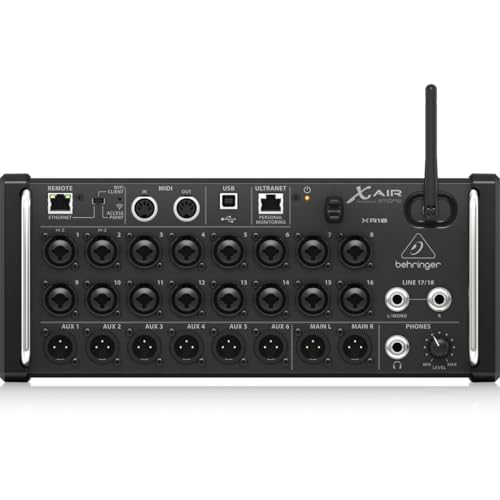
Behringer X Air XR18 — Best Overall
The XR18 is the default digital answer for bands, venues and worship teams stepping up from analogue. Sixteen real mic inputs cover a full small band with drums properly miked; the processing on every channel — proper parametric EQ, compression, gating — is the stuff that used to require a rack of outboard; and multitrack USB turns every gig into a mixable recording. Its enormous user base means every question has a forum answer and every venue tech has seen one before.
Strengths
- 16 genuine Midas preamps and 12 buses — a full band’s worth of desk
- Multitrack USB recording of every channel
- Apps on all platforms and a vast, experienced user community
Trade-offs
- Built-in Wi-Fi is a convenience, not a plan — serious users add an external router
- No physical controls at all; a dead tablet is a stopped show
- The app rewards learning; the first setup takes an evening, not a minute
| Spec | Detail |
|---|---|
| Inputs | 16 programmable Midas preamps (per listing) |
| Buses | 12-bus digital mixing (per listing) |
| Control | iPad/Android tablet apps; integrated Wi-Fi module (per listing) |
| Recording | Multi-channel USB audio interface (per listing) |
The XR18’s dominance is a case study in giving buyers the whole product: preamps with a respected name and performance to match, buses enough for stereo monitors and subgroups, recording that captures everything, and control software that runs on whatever tablet you own. Its known weakness is equally public — the internal access point is fine for rehearsal and optimistic for a crowded venue — and the community’s standard fix, an inexpensive external router, is part of owning one. Budget that router from day one, learn the app at rehearsal rather than at soundcheck, and this is the most capability per unit of money in live sound today.
Best for: Bands, venues and worship teams wanting the complete digital package / Not suited for: Operators who need physical faders or refuse to manage a network
Check the current price on Amazon for the Behringer X Air XR18.

Soundcraft Ui16 — Best Value and Easiest Control
Choose the Ui16 if the app question worries you. Every other stagebox here depends on a maker’s app surviving years of operating-system updates; the Ui16 serves its interface as a web page, so any tablet, phone or laptop — including the venue’s dusty spare — can run the show. Its processing pedigree is professional, its format identical in spirit to the XR18’s, and its price position has made it the quiet favourite of small venues, schools and houses of worship that value resilience over raw specification.
Strengths
- Browser control on any device — immune to app-store abandonment
- Professional processing lineage from Lexicon and dbx
- Simple, legible interface that volunteers learn quickly
Trade-offs
- Recording provision is stereo-oriented rather than full multitrack
- Fewer buses and less routing depth than the XR18
- Like all stageboxes, it needs your network discipline to shine
| Spec | Detail |
|---|---|
| Inputs | 16 inputs, remote-controlled digital stagebox |
| Control | Browser-based — any device, no app to install |
| Processing | Full digital processing with Lexicon, dbx and DigiTech lineage (Ui series) |
| Form | Stagebox with integrated Wi-Fi |
The Ui16 makes an argument the spec sheet cannot capture: longevity through simplicity. Browser control means the mixer you buy today is controllable by the devices of five years from now, and the interface’s clarity means the operator pool is anyone who can use a web page. Against that, it concedes the recording crown and some routing depth to the Behringer. For a venue whose nightmare is a show stopped by technology, that trade is not a compromise — it is the entire point. For a band whose ambition includes multitrack live albums, the XR18 above is the honest recommendation instead.
Best for: Venues, schools and worship teams prioritising resilient, simple control / Not suited for: Bands who need multitrack recording of every channel
Check the current price on Amazon for the Soundcraft Ui16.

Mackie DL16S — Best App Experience
The DL16S suits bands and engineers who mix actively all night and want the control surface — a tablet — to feel like an instrument rather than a settings page. Recallable preamps mean gain settings save with the scene, a detail analogue converts underrate until they have used it. Mackie’s ecosystem thinking also shows in how the system grows: this is a platform purchase, and buyers who like a manufacturer’s way of working tend to stay for the speakers and the bigger desks.
Strengths
- Master Fader app is a class-leading control experience
- Recallable preamps save gain with every scene
- Multitrack recording for gigs and rehearsals
Trade-offs
- App-centric control ties you to Mackie’s software roadmap
- Stagebox rules apply: your network, your responsibility
- Smaller user community than the XR18’s when troubleshooting at midnight
| Spec | Detail |
|---|---|
| Inputs | 16 channels in a rack/stagebox format |
| Preamps | Onyx+ recallable mic preamps (DL series design) |
| Control | Master Fader app control |
| Recording | Multitrack USB recording (DL series capability) |
Digital mixers are software products wearing hardware, and the DL16S is the pick for buyers who have internalised that. Its hardware is fully competitive — sixteen channels, respected preamps, multitrack capture — but the reason to choose it is the daily experience of mixing on Master Fader, which is fast, visual and clearly designed by people who mix shows. The corresponding risk is the mirror of the Ui16’s virtue: an app-dependent product lives and dies by its maker’s support, and Mackie’s commitment to this platform is the bet you are making. It is a reasonable bet, and for app-led mixers it pays out nightly.
Best for: Active mixers who want the best tablet mixing experience and recallable preamps / Not suited for: Buyers wary of app dependency — the browser-controlled Ui16 exists for you
Check the current price on Amazon for the Mackie DL16S.

Allen & Heath CQ-18T — Best Touchscreen Compromise
The CQ-18T is for buyers who want digital power without digital fragility. The touchscreen means the mixer is a complete instrument on its own — you can set up, soundcheck and even run a simple show at the box — while the app adds the mix-from-the-room freedom when you want it. Gigging bands who set up fast, engineers who assist less technical owners, and anyone burned by a pure-stagebox failure will recognise this as the format’s maturing. It is the newest design language in this guide and it shows.
Strengths
- Onboard touchscreen removes the single-point-of-failure problem
- Allen & Heath processing quality and workflow design
- Bluetooth and modern connectivity for playback and control
Trade-offs
- Premium positioning among the stagebox-format picks
- Touchscreen mixing is still screen mixing — fader traditionalists should read on
- Compact format concentrates many functions into menus
| Spec | Detail |
|---|---|
| Inputs | 18 inputs in the CQ format, 16-channel class |
| Control | 7-inch touchscreen on the unit plus Wi-Fi app control (per listing) |
| Connectivity | Wi-Fi and Bluetooth built in (per listing) |
| Recording | USB and SD multitrack recording (CQ series design) |
Every format war ends in a synthesis, and the CQ series is the stagebox war’s synthesis: the box regained a screen, the screen kept the app, and the buyer stopped having to choose between resilience and freedom. Allen & Heath’s contribution is taste — the CQ’s processing, its quick channels and its workflow shortcuts reflect a company that has watched thousands of small shows being mixed and designed for the ninety percent case. For a band buying its first digital desk in the current market, this is arguably the most future-shaped pick in the guide; the XR18 counters with community, price position and maturity, and the choice between them is the class’s live debate.
Best for: Gigging bands who want digital power with an onboard screen as insurance / Not suited for: Budget-led buyers and strict fader traditionalists
Check the current price on Amazon for the Allen & Heath CQ-18T.

Yamaha TF1 — Best with Real Faders
Choose the TF1 if your mixer is run by a person, in a place, as a performance: theatres, worship teams with a dedicated operator, schools with a sound desk position, and engineers who read a room with faders under their fingers. Scene recall moves the motorised faders to last week’s show; the touchscreen handles the deep settings; and there is no network between the operator and the sound unless you add one deliberately. It is bigger, heavier and more expensive than a stagebox — and for its buyers, worth every bit of all three.
Strengths
- Physical motorised faders with scene recall — the real console feel
- TouchFlow workflow is genuinely beginner-guiding for a digital desk
- Yamaha reliability and institutional support
Trade-offs
- Console footprint and weight; it needs a mix position and a case
- Premium positioning versus stagebox capability
- Mixing from the audience requires the optional app workflow, not the desk itself
| Spec | Detail |
|---|---|
| Inputs | 16 channels in a true console format (per listing) |
| Control | Motorised faders and touchscreen console surface |
| Design | TouchFlow operation for fast, guided workflow (TF series) |
| Use | Live console for operators who mix hands-on |
The TF1 exists because a large class of buyers tried stageboxes and discovered they are operators, not app managers. Yamaha’s answer is a console that keeps everything digital — recall, processing, recording options — while restoring the physical surface the craft is built on, and softening the digital learning curve with a workflow that guides gain and EQ setup intelligently. In an institutional setting, where the desk must be runnable by this year’s volunteer and next year’s, that combination of recall and familiarity is worth its premium. It is not the future the stageboxes promise; it is the present, perfected, and for many venues that is the correct purchase.
Best for: Theatres, worship and school desks with a dedicated hands-on operator / Not suited for: Self-mixing performers and anyone counting size, weight or budget first
Check the current price on Amazon for the Yamaha TF1.

Allen & Heath Qu-16 (Chrome Edition) — Best Premium Console
The Qu-16 suits engineers and venues who want a console that behaves like the big desks: instant physical access, serious processing, and recordings of every channel without a computer attached. Its rack-mountable compactness makes it a favourite for installations and touring small acts alike — it can live in a rack, travel in a case, and still present a proper surface to whoever mixes. Buyers choosing between it and the TF1 are choosing between two excellent console philosophies: Allen & Heath’s engineer-first depth against Yamaha’s guided accessibility.
Strengths
- Console depth — processing and routing that reward skilled operators
- Multitrack recording direct to USB storage, no laptop required
- Rack-mountable format suits installs and touring racks
Trade-offs
- Premium tier of this list in every sense
- Depth means a learning curve for casual operators
- Larger ecosystem commitment — stageboxes and accessories are platform purchases
| Spec | Detail |
|---|---|
| Inputs | 16 channels, rack-mountable compact console (per listing) |
| Control | Physical faders with per-channel strip displays (Qu series design) |
| Processing | Full digital processing and effects per channel (Qu series) |
| Recording | Multitrack recording to USB storage (Qu series design) |
The Qu-16 is what a digital mixer looks like when a touring-console company builds it without condescension. Its surface gives an engineer the things they reach for instinctively; its recording removes the laptop from the live chain; its ecosystem — remote stageboxes, personal mixing — lets a venue grow the system rather than replace it. None of that matters to a buyer who needs a band rehearsal desk, and this guide will not sell it to them. It matters enormously to the buyer building a small venue’s five-year sound system, for whom this is frequently the last mixer purchase of the decade.
Best for: Engineers and venues building a serious, expandable console system / Not suited for: Casual and budget-led buyers, who are better served by every other pick here
Check the current price on Amazon for the Allen & Heath Qu-16 (Chrome Edition).
Comparison Table
| Pick | Badge | Key spec | Best for |
|---|---|---|---|
| Behringer X Air XR18 | Best Overall | 16 Midas preamps, 12 buses, multitrack USB, tablet control | Bands, venues and worship teams wanting the complete digital package |
| Soundcraft Ui16 | Best Value and Easiest Control | Browser-controlled 16-input stagebox, no app needed | Venues, schools and worship teams prioritising resilient, simple control |
| Mackie DL16S | Best App Experience | 16 channels with Onyx+ preamps and polished app control | Active mixers who want the best tablet mixing experience and recallable preamps |
| Allen & Heath CQ-18T | Best Touchscreen Compromise | Touchscreen on the box plus app control and multitrack | Gigging bands who want digital power with an onboard screen as insurance |
| Yamaha TF1 | Best with Real Faders | A real 16-channel console with motorised faders | Theatres, worship and school desks with a dedicated hands-on operator |
| Allen & Heath Qu-16 (Chrome Edition) | Best Premium Console | Rack-mountable 16-channel console with multitrack recording | Engineers and venues building a serious, expandable console system |
How to Choose a 16 Channel Digital Mixer
Stagebox or console: the format decision comes first
Before comparing models, choose your format honestly. Stageboxes — XR18, Ui16, DL16S — put connections on stage and control in your hands anywhere in the room, at the lowest cost per channel and with zero physical surface. Touchscreen stageboxes like the CQ-18T split the difference. True consoles — TF1, Qu-16 — give a dedicated operator physical faders and a fixed mix position. Your operator model decides: self-mixing performers belong in stageboxes; dedicated engineers belong behind consoles; everyone else should try both before spending.
Your network is part of the mixer now
Every stagebox pick depends on Wi-Fi, and the internal access points in this class are rehearsal-grade, not venue-grade. The professional habit is universal: run a dedicated external router, place it high and central, keep its network name hidden or passworded, and soundcheck the connection from the furthest seat. Budget the router with the mixer, treat the tablet as equipment — charged, updated, with a spare — and digital mixing becomes more reliable than the analogue snake it replaced. Skip these steps and no brand choice will save you.
Processing per channel is the digital dividend
What digital actually buys you: on every channel, a high-pass filter, full parametric EQ, a compressor and a gate — simultaneously, recalled instantly. On analogue boards at this size you get a fixed 3-band EQ and, if you are lucky, one-knob compression on some channels. For drums, problem rooms and inexperienced vocalists, that processing gap is the difference between managing and struggling. When you compare digital models, compare the processing and the app that wields it, because that is the product.
Recording: stereo, multitrack-to-computer, multitrack-to-storage
Digital recording comes in three grades in this class. Stereo capture serves streams and archives. Multitrack over USB to a computer — the XR18 and DL16S pattern — serves bands who mix their gigs afterwards. Multitrack direct to USB storage — the Qu-16 pattern — serves venues that want recordings without a laptop in the chain. Decide which grade your work needs; it separates this list more cleanly than any other spec, and it cannot be upgraded later.
Scenes, shows and the discipline of recall
Recall is digital’s quiet superpower: last week’s service, tonight’s band and tomorrow’s theatre show as three scenes, each a tap away. It only pays if you maintain it — save after every soundcheck, name scenes like you mean it, and back up the mixer’s files the way you back up recordings. Buyers coming from analogue should expect one evening of setup and learning per format, at rehearsal, with the manual open. That evening is tuition every digital owner pays exactly once.
Budget tiers in this category
The value tier is the stagebox heartland: Ui16 and XR18 deliver sixteen channels of full processing for what a mid-range analogue board costs, with the XR18 adding multitrack as its premium within the tier. The touchscreen CQ-18T sits a step up, charging for resilience and design. The consoles — TF1 and Qu-16 — are the premium tier, and their price buys surface, immediacy and ecosystem rather than channels. Across all tiers, add the honest extras to your budget: a router, a tablet you can dedicate, and a case. The mixer is most of the cost, not all of it.
The 16 Channel Digital Shortlist by Buyer Type
Six strong machines is still a list that needs narrowing. This section maps the buyer types we meet most in this class to their shortest honest shortlist, so the reviews above can be read with a decision already half-made.
The gigging band that mixes itself
You need processing, recall and a recording of the night, operated by a member between songs. The XR18 is your default — community, multitrack, maturity — with the CQ-18T as the modern alternative if an onboard screen reassures the member doing the mixing. Whichever you choose, assign one owner of the system: digital rigs thrive under a single pair of hands and suffer under a committee.
The church, school or venue with volunteers
Your scarcest resource is not channels but confident operators. The Ui16’s browser simplicity is the safest start; the TF1 is the answer if you have a fixed desk and want the volunteers’ hands on faders with guided setup. Decide by where your operator sits — in the congregation with a tablet, or at a desk with a surface — and the choice makes itself.
The engineer building a small production system
You are buying a platform for years: processing depth, expandability, recordings without compromises. The Qu-16 is your console; the DL16S is your stagebox if your work is tablet-native. Your evaluation should include the ecosystem — stageboxes, personal monitoring, the manufacturer’s update cadence — because you are marrying a system, and this guide’s reviews flag those commitments deliberately.
The theatre or performing-arts space
Cues, scenes and repeatability are your world: tonight’s show must sound like last night’s, run by whoever is on the book. Consoles earn their premium here — the TF1 for guided accessibility across rotating operators, the Qu-16 for depth in a dedicated technician’s hands. Scene discipline, covered in the buying guide, matters more to you than any single feature in this list.
Digital Ownership: Updates, Backups and the Long Game
A digital mixer is the first sound purchase that behaves like software, and it rewards owners who treat it that way. This section covers the ownership disciplines that keep a digital desk an asset across years of shows.
Firmware: a policy, not an event
Decide your update policy in advance: follow the manufacturer’s releases, read what each changes, and update at home with time to test — never in a venue, never on show day, and ideally not in the same week as an important show. Keep the previous firmware’s notes and your scene backups from before the update. Owners who treat firmware as routine maintenance get features and fixes; owners who treat it as an emergency get neither, plus a story.
Backups: scenes are your real product
The mixer can be replaced in a day; your scenes — a season of soundchecks, per-act settings, per-venue corrections — cannot. Export them after every show you care about, keep copies in two places, and name them like a professional: venue, act, date. When the desk is eventually replaced or upgraded within the same platform family, those files are the continuity. This is the digital equivalent of the analogue engineer’s notebook, and it is worth more than the hardware it describes.
The tablet is equipment now
Dedicate a tablet to the rig if you possibly can: no games, no children’s accounts, a charger that lives in the mixer case, and a screen protector bought before the first drop rather than after it. A second device — even an old phone — with the control app installed and tested is your insurance policy. Stagebox owners who treat control devices casually are borrowing reliability from a future show, and the debt always comes due at the worst available moment.
How to Set Up a 16 Channel Digital Mixer for Your First Show
Digital setup is ninety percent preparation done once, calmly, before any audience exists. The sequence below assumes a stagebox-format mixer — the class’s majority — with notes where console buyers differ. Do it in order the first time and your show-day setup becomes a ten-minute recall.
- At home or rehearsal, before any gig: update the mixer’s firmware, install or bookmark the control app, and learn where the main settings live. Never update firmware on show day.
- Set up your dedicated router: its own network name and password, placed high near the stage. Connect the mixer to it by cable where the model allows, and save the configuration.
- Label every input on the stagebox with your fixed channel order — drums, bass, guitars, keys, vocals — in the app and on the hardware with tape.
- Build your first scene from silence: gains per channel at rehearsal volume, high-pass filters on everything except kick and bass, then EQ and compression per source.
- Set up monitor mixes before the house mix; on digital boards this is where the processing earns its keep, with EQ available on every send.
- Save the scene with a real name and back it up. Then deliberately recall it, to prove the recall works before you depend on it.
- Start the recording — multitrack or stereo per your model — and capture a full rehearsal song. Play it back and confirm every channel is present.
- Walk the room with the tablet during rehearsal and mix from the seats. This is the moment the format justifies itself; learn what your room does to the sound from where the audience sits.
- Charge everything the night before a show: tablet, spare tablet, and keep a phone with the control app as a third option. Power discipline is the digital equivalent of spare cables.
- At the venue, the routine compresses: connect, recall the scene, line-check each channel, adjust for the room, save as tonight’s scene. Ten minutes, no improvisation.
Console buyers follow the same logic at the desk: firmware and scenes prepared in advance, a labelled surface, and a recording test before doors. In both formats, preparation is not overhead — it is the product feature you actually bought.
Troubleshooting
Problem: the tablet loses connection mid-show. Stay calm — the mixer keeps passing audio with its last settings; only your control is interrupted. Move toward the router’s line of sight, reconnect, and afterwards fix the cause properly: external router placement, a less crowded channel, and a dedicated network for the rig. If dropouts persist at one venue, that venue’s radio environment is the problem, and a wired control option or a console from this list is the honest answer.
Problem: the recording has some channels missing. Multitrack routing is a setting, not a default everywhere: confirm each channel is assigned to the USB or storage recording, and that the tap point is where you expect — pre-fader if you want to mix later. The full-song rehearsal capture in our setup routine exists to catch exactly this while the fix is free.
Problem: scenes recall with wrong gains or a silent channel. Scenes store what was saved, including the mistake. Recall, correct the error at its source — the gain, the mute, the routing — and re-save immediately with the same name. Keep one known-good baseline scene for every act you serve, protected from edits, as the recovery point when experimentation goes wrong at soundcheck.
Common Buying Mistakes
Trusting the built-in Wi-Fi at a real venue
The most common digital-mixer failure is not a mixer failure at all: it is a phone-crowded room overwhelming a stagebox’s internal access point mid-show. The fix is known, cheap and universal — a dedicated external router, set up in advance. Every experienced digital owner in this class runs one; join them before your first show, not after it.
Updating firmware or learning the app at soundcheck
Digital mixers reward preparation and punish improvisation. A firmware update with an audience arriving, or a first encounter with the app while a band waits, converts a capable system into a stressful one. Do the learning at rehearsal, where mistakes are free.
No backup control device
A stagebox with one tablet has a single point of failure that a dropped screen can trigger. A spare tablet, a laptop, or even a phone with the app costs little and converts a catastrophe into a pause. The CQ-18T’s onboard screen is the designed-in version of this insurance; stagebox owners must supply their own.
Mixing only from the stage
Performers who mix from where they stand balance the show for the one place the audience is not. The entire point of remote control is the room: walk it, mix from the seats, and return to the stage knowing what the audience hears. Skipping the walk wastes the format’s main advantage.
Forgetting that scenes are files
Scenes live in the mixer and, on most platforms, export to files. Owners who never back them up eventually lose a season of soundchecks to a reset, a repair or a replacement unit. Export after every show you care about; storage is free and regret is not.
Final Recommendation
The default digital answer is the Behringer XR18: the complete stagebox package, with multitrack recording and the largest community in the class — plus a router you budget alongside it. Resilience-first venues should take the browser-controlled Soundcraft Ui16; app-led mixers the Mackie DL16S; buyers who want a screen on the box the Allen & Heath CQ-18T; and dedicated operators the Yamaha TF1 for guided console workflow or the Allen & Heath Qu-16 for engineer-grade depth.
Sixteen digital channels is the point where a small rig stops compromising. Choose your format by your operator, prepare your network like you mean it, and the mixer will repay you every single show — in processing, in recall, and in recordings you actually get to keep.
Buyer-type shortlist: gigging bands, the Behringer X Air XR18 or the Allen & Heath CQ-18T; volunteer venues, the Soundcraft Ui16; engineers building a system, the Allen & Heath Qu-16 (Chrome Edition). If none of those is you, the XR18 is the class default for a reason.
A closing calibration for readers weighing this list against an analogue past: the transition to digital at sixteen channels is not really about sound. A good analogue board and a good digital board, set flat, are closer than their partisans admit. The transition is about memory and multiplication — every channel carrying the processing that used to be shared, every show recallable, every performance recorded by default. Those are workflow revolutions wearing an audio costume, and they explain both the converts’ enthusiasm and the traditionalists’ resistance: if your work is one room, one act, one operator with golden ears, analogue’s immediacy remains a rational love. If your work is several acts, several operators, venues that change and shows that must be repeated exactly, digital’s memory is not a convenience but the product itself. The six machines in this list were chosen to serve both temperaments — the stageboxes for the new world, the consoles for the old craft with new memory — and the honest way to choose is to decide which kind of work you actually do, then let the format follow. Do that, prepare your network and your scenes like the professional you are becoming, and sixteen channels will feel less like a purchase and more like an upgrade to the way you work.
Keep exploring the cluster: Best 16 Channel Mixers Best 12 Channel Mixers Best 12 Channel Audio Mixers Best 10 Channel Mixers Best 12channel Mixers Best 10 Top Mixers
Frequently Asked Questions
Are 16 channel digital mixers hard to learn?
They have a learning evening, not a learning month. The concepts — gain, EQ, compression — are the same as analogue; the app or touchscreen is a new surface for them. Most buyers are soundchecking confidently after one rehearsal session, and consoles like the Yamaha TF1 actively guide the process. What you should not do is learn at a show; prepare at rehearsal and the format feels easy quickly.
Do I need an iPad for a stagebox mixer?
You need some control device: most apps run on iPads and Android tablets, several on phones and computers too, and the Soundcraft Ui16 runs in any browser. A tablet is strongly recommended for screen space, and a backup device is professional practice. The Allen & Heath CQ-18T is the exception that needs nothing, thanks to its onboard touchscreen.
Can a 16 channel digital mixer record every channel separately?
Several can. The XR18 and DL16S in this guide record multitrack over USB to a computer; the Qu-16 records multitrack to USB storage without one; the Ui16 is stereo-oriented. If multitrack matters, it should drive your shortlist, because it is a designed-in capability, not an upgrade.
Digital or analogue at 16 channels — which is better?
Digital wins on processing per channel, recall, recording and cost per feature; analogue wins on immediacy, zero network dependency and any-operator familiarity. At sixteen channels the digital case is at its strongest, which is why this class is mostly digital — but a venue with rotating volunteers may still rationally choose analogue or a fader console from this list.
What else do I need to budget for with a digital mixer?
A dedicated external router for stagebox models, a tablet you can commit to the rig plus a backup control device, and a case or rack for transport. None is expensive next to the mixer, and together they are the difference between a system that feels professional and one that feels fragile.
Which 16 channel digital mixer is best for a church?
For a volunteer team, the Soundcraft Ui16’s browser control and simple interface are the safest start, with the XR18 as the step up when recording services matters. If the church has a dedicated sound operator and a fixed desk position, the Yamaha TF1’s guided console workflow is often the best long-term home. Match the desk to the team, not to the spec sheet.
Can a digital mixer replace my analogue board and outboard rack?
Yes — that is precisely its design brief. The compressors, gates, parametric EQ and effects that filled an outboard rack live inside every pick in this guide, on every channel, with recall. The honest losses are tactile immediacy and the ability to fix a failure with a spare cable; the gains in capability, consistency and recording are why the class has taken over this channel count.
How many monitor mixes can these mixers provide?
It varies by model and is a spec to check against your band’s needs: stagebox picks in this class typically offer several aux buses that can be configured as monitor sends, and consoles offer their own mix outputs. Count your required separate monitor mixes — one per singer who wants their own balance is the usual demand — and verify the specific model’s bus configuration on its listing before ordering.
Will a digital mixer become obsolete quickly?
Slower than the phone in your pocket, faster than an analogue board. The hardware in this guide will pass audio for a decade; the question is control software, which is why this guide weighted control architecture — browser-based, onboard-screen, or app — as heavily as sound. A mixer you can still control in seven years is not obsolete in any way that matters, and the picks here were chosen partly on that horizon.


