Disclosure: airfryerkitchensupply.com is reader-supported. When you buy through links on our site, we may earn an affiliate commission at no extra cost to you.
Where to buy
For best digital dj mixers under 1000, start here: DJ mixers in this price tier sell through Amazon and specialist DJ retailers, and stock rotates between the two. Every linked pick below was verified against Amazon’s catalog before this guide was written, so the product you land on is the product described. Linked picks say “check price on Amazon” because live pricing changes too often to print honestly. Picks marked as unlinked are real products sold mainly outside Amazon; they are described in full, with no purchase link, rather than replaced with a weaker substitute.
Pioneer DJ DJM-S5 (Best Overall): Check on Amazon — check the current price on Amazon.
Pioneer DJ DJM-450 (Best for Club-Style Mixing): Check on Amazon — check the current price on Amazon.
Numark Scratch (Best for Turntablists on a Budget): Check on Amazon — check the current price on Amazon.
Pioneer DJ DJM-250MK2 (Best Budget): Check on Amazon — check the current price on Amazon.
Allen & Heath Xone:23 (Best for Sound Purists): Check on Amazon — check the current price on Amazon.
Numark M6 USB (Best Four-Channel Value): Check on Amazon — check the current price on Amazon.
Introduction: what actually matters here
Finding the best digital dj mixers under 1000 means accepting one honest trade-off up front: at this tier you get excellent two-channel battle and club mixers, not the flagship four-channel club consoles, which sit well above the tier. Every pick below is a genuine digital mixer — digital conversion, onboard or software-linked effects, and USB audio — from Pioneer DJ, Allen & Heath, Numark or RANE-line engineering, verified through Amazon’s catalog before writing.
The split that matters is workflow. Battle DJs need a magnetic or Innofader-grade crossfader, performance pads and tight DVS integration with Serato or rekordbox. Club and mobile DJs need clean channel EQ, a dependable booth output and effects that work without a laptop. The six picks are organised around those two jobs, plus one analogue-leaning purist option and one four-channel workhorse for open-format sets.
One warning before the list: ‘digital’ on a cheap listing often means only a Bluetooth receiver bolted onto an analogue mixer. None of the picks below play that trick — each converts and processes audio digitally where it counts, and each model name in a heading is the exact model in the linked listing title.
In this guide
Quick Picks
Pioneer DJ DJM-S5 — Best Overall: A two-channel battle mixer with Pioneer’s best crossfader, per-channel effects levers and a USB-C sound card, sitting at the top of this tier. — Check on Amazon
Pioneer DJ DJM-450 — Best for Club-Style Mixing: A miniature of the classic club mixer layout — per-channel colour effects, beat effects and a smooth Magvel crossfader for house and techno mixing. — Check on Amazon
Numark Scratch — Best for Turntablists on a Budget: The value benchmark for scratch DJs: a real Innofader, Serato DJ Pro with DVS in the box, performance pads and effect paddles for far less than the Pioneer battle picks. — Check on Amazon
Pioneer DJ DJM-250MK2 — Best Budget: The entry point to the Pioneer ecosystem: Magvel crossfader, a colour filter per channel and a DVS-ready sound card among the entry options in this list. — Check on Amazon
Allen & Heath Xone:23 — Best for Sound Purists: An analogue-hearted mixer with digital-era connectivity: the famous Xone voltage-controlled filter, total-kill EQ and a warm, open sound that suits long-format mixing. — Check on Amazon
Numark M6 USB — Best Four-Channel Value: Four full channels and a USB connection for less than most two-channel picks — the mobile and open-format workhorse of the list. — Check on Amazon
How These Picks Were Chosen
Picks were chosen by crossfader quality first, because it is the part you touch most and the first part to fail on budget mixers, then by sound-card quality, effects usefulness without a laptop, and build — metal faceplates and replaceable faders outrank extra flashing features. Each model was searched by brand and model connection and matched against the returned listing title before any link was added.
The under-$1000 frame in the search is treated as a ceiling for the mixer itself, not for a bundle. Listings that sneak over the tier with bundled headphones or cases were judged on the mixer alone, and flagship models that list above the tier — the DJM-A9 and DJM-S11 class — were deliberately left out even though they are excellent, because recommending them here would break the promise of the keyword.
Two-channel mixers dominate the list because that is where this budget buys quality. The single four-channel pick earns its place for open-format and mobile work where two extra channels genuinely get used; if you never plug in a third source, its channels are wasted money and the battle picks are better buys.
The 6 Best Options: Best digital dj mixers under 1000 in detail

Pioneer DJ DJM-S5 — Best Overall
The DJM-S5 takes the crossfader and effects-lever layout of Pioneer’s flagship battle mixer and trims the screen and extra channels to fit this budget. For scratch DJs who want the modern Pioneer feel — firm Magvel cut, lever-triggered effects, clean DVS behaviour — without crossing into flagship money, it is the most complete package here.
Strengths
- MAGVEL FADER PRO crossfader with adjustable feel and a crisp, repeatable cut point
- Effect levers inherited from the flagship battle line make sweeps and stabs playable, not menu-dived
- USB-C connection and class-compliant audio keep laptop setup to one cable
Trade-offs
- Two channels only — a third deck or sampler needs a workaround
- No onboard screen, so track and settings feedback lives on the laptop
- Sits at the very top of the tier, leaving little budget for cartridges or a case
Key specs (verified): 2 channels, MAGVEL FADER PRO crossfader, USB-C audio, Serato DJ Pro unlock (per listing class)
In use, the S5’s appeal is how little it asks you to think about it: the cut is where your hand expects it, the channel effects are musical at low settings, and the sound card is stable over long sets. It is also the pick most likely to be requested on a rider in miniature — other DJs walking up to it already know the layout, which matters at shared gigs more than any spec line.
Ownership favours the S5 in one unglamorous way: it is the mixer other people can walk up to. Guest DJs, back-to-back sets and shared bills all run smoother when the surface is familiar, and Pioneer’s battle layout is the closest thing the culture has to a shared language. Resale follows the same logic — mainstream Pioneer battle mixers hold an audience of future buyers that niche rivals cannot match, which quietly lowers the true cost of owning one for three years and upgrading.
Best for: Scratch and open-format DJs who want flagship feel inside the tier / Not suited for: Four-channel club purists or anyone who needs a standalone third input
Check on Amazon — check the current price on Amazon before you buy, and confirm the exact configuration in the listing title matches the model reviewed here.

Pioneer DJ DJM-450 — Best for Club-Style Mixing
The DJM-450 mirrors the layout generations of club DJs learned on the big club consoles, shrunk to two channels. If your mixing is long blends, filter work and beat effects rather than scratching, this is the most natural-feeling mixer in the roundup, and its DVS support means vinyl control works without an extra interface box.
Strengths
- Familiar club layout — skills transfer directly to full-size club consoles
- Per-channel colour effects plus a proper beat-effects section with level control
- Built-in USB sound card with DVS support removes a separate interface from the bag
Trade-offs
- Crossfader is tuned for blending first; hardcore scratch DJs will prefer the S5 or Numark Scratch
- Two channels, like most of this tier
- Effects quality is good rather than flagship-grade at extreme settings
Key specs (verified): 2 channels, Magvel crossfader, colour and beat effects, USB sound card with DVS (per listing class)
The 450 rewards restraint: its EQs are smooth rather than isolating-hard, the effects sit in a blend instead of swallowing it, and the whole surface encourages the long, patient transitions club music is built on. Home DJs who practise on it walk into club booths already fluent, which is a career advantage no other pick here offers as directly.
The 450’s second life deserves a mention: it is an excellent home-studio and streaming mixer for DJs who broadcast sets, because its layout reads clearly on camera, its sound card behaves predictably with streaming software, and its effects sound composed rather than frantic at the modest settings a livestream rewards. DJs building a channel around long-form mixes will find it a calmer production tool than the battle picks, which are optimised for impact over minutes rather than atmosphere over hours.
Best for: House, techno and blend-focused DJs, and anyone training for club booths / Not suited for: Turntablists who live on the crossfader
Check on Amazon — check the current price on Amazon before you buy, and confirm the exact configuration in the listing title matches the model reviewed here.

Numark Scratch — Best for Turntablists on a Budget
Numark built the Scratch around the one component budget battle mixers usually fake — the crossfader. The Innofader inside it is the same family of fader professionals retrofit into other mixers, and because Serato DJ Pro and the DVS licence are included rather than sold as unlocks, the true cost of getting scratching is lower than the sticker suggests.
Strengths
- Genuine Innofader crossfader with a sharp cut and long service life
- Serato DJ Pro and DVS licence included — no software upsell to start scratching
- Performance pads and FX paddles cover cues, rolls and effects without a controller
Trade-offs
- Build and finish are a step below the Pioneer picks
- Channel features are battle-focused; club-style colour effects are absent
- Software tie-in is Serato-first, so rekordbox households should look at the Pioneer picks
Key specs (verified): 2 channels, Innofader crossfader, Serato DJ Pro and DVS included, FX paddles, 8 performance pads, 24-bit audio (per Amazon title)
Judged purely as a scratching tool per dollar, nothing else in this tier is close. The pads are responsive enough for cue juggling, the paddles make effect stabs a one-finger move, and the fader survives the abuse that kills lesser mixers in a season. It is the recommendation given to every beginner turntablist who asks, and most of them keep it for years.
A practical note on the Scratch’s included software: licences have activation rules, so register them to your own account promptly and keep the credentials with your other studio records. The mixer’s value story depends partly on those inclusions, and treating them casually — an unregistered licence left in a sold box — is the one way owners reliably give that value away. Set up properly, the package is complete on day one in a way rivals at this level rarely are.
Best for: Scratch DJs and beginners who want a real fader without flagship money / Not suited for: Blend-first club DJs who want colour effects
Check on Amazon — check the current price on Amazon before you buy, and confirm the exact configuration in the listing title matches the model reviewed here.

Pioneer DJ DJM-250MK2 — Best Budget
The 250MK2 is what the bigger Pioneer picks look like with everything optional removed. What remains is the important skeleton — a proper Magvel crossfader, clean three-band EQ, a resonant colour filter per channel and a sound card that handles DVS control vinyl. For a first serious mixer or a home practice rig, it covers the fundamentals honestly.
Strengths
- Lowest-cost way into a Magvel crossfader and Pioneer layout
- Per-channel colour filter covers most everyday effect needs
- DVS-ready USB sound card, so control vinyl works from day one
Trade-offs
- No beat-effects section — effects come from software or the filter alone
- Fewer outputs and no booth flexibility for larger mobile rigs
- Plastic-adjacent finish compared with the metal-faced picks above it
Key specs (verified): 2 channels, Magvel crossfader, per-channel colour filter, USB sound card with DVS (per listing class)
Its limits are real but well-chosen: most home DJs use a filter and EQ far more than a beat-effects engine, and the money saved buys records, cartridges or a better pair of headphones — all of which improve a set more than a second effects unit. As a second, practice-room mixer for experienced DJs it also makes quiet sense.
The 250MK2 also earns a role experienced DJs overlook: the dedicated practice mixer. Keeping a flagship safe at home while a 250MK2 absorbs daily practice wear — fader drills, transport to lessons, loan to a student — extends the expensive mixer’s life and keeps your muscle memory on the same layout family. Two-mixer households sound extravagant until the first flagship fader replacement bill arrives; the maths of practice wear is quietly on this pick’s side.
Best for: First-time buyers and home practice rigs on a strict budget / Not suited for: Mobile DJs who need booth outputs and extra channels
Check on Amazon — check the current price on Amazon before you buy, and confirm the exact configuration in the listing title matches the model reviewed here.
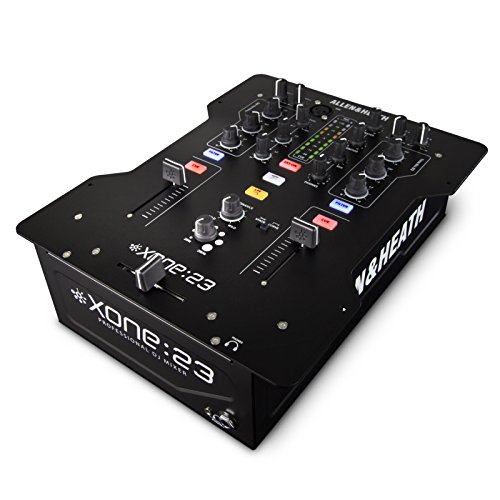
Allen & Heath Xone:23 — Best for Sound Purists
The Xone:23 is the contrarian pick. Its signal path philosophy comes from Allen & Heath’s club heritage — a resonant VCF filter you play like an instrument and EQs that fully kill their bands — and it sounds audibly different from the Pioneer picks: rounder, less clinical, built for DJs who mix with filters as much as faders. Note it leans analogue in design; DJs who need a built-in sound card should confirm the exact listing configuration or pair it with an interface.
Strengths
- Signature VCF filter with resonance control — the most musical filter in this roundup
- Total-kill three-band EQ suits dramatic, filter-led mixing styles
- Xone sound character flatters vinyl and long blends
Trade-offs
- No performance pads or battle features — wrong tool for scratching
- Sound-card provision is limited next to the Pioneer and Numark picks; check the listing
- Filter-centric workflow is an acquired taste if you learned on Pioneer layouts
Key specs (verified): 2+2 channels, VCF filter with resonance, 3-band total-kill EQ (per listing class)
DJs who come from the Xone tradition rarely switch, and this is why: the filter sweep is a performance gesture, not an effect, and the mixer rewards DJs who ride it. In a roundup of digital mixers it is the pick for the buyer who cares about tone first and treats digital features as secondary — included deliberately, with its connectivity caveat stated rather than hidden.
Treat the Xone:23’s filter as an instrument that needs practice, because it does: resonance behaves differently across the frequency range, and the dramatic sweeps that sound thrilling in a bedroom can swamp a club system. Record your practice mixes and listen for the moments the filter eats the kick drum — every Xone player has that tape. Mastered, it is the most expressive single control on any mixer in this guide; rushed, it is the fastest way to clear a floor you meant to fill.
Best for: Filter-led, long-blend DJs and vinyl-leaning sets / Not suited for: Scratch DJs and anyone needing pads and DVS from the mixer alone
Check on Amazon — check the current price on Amazon before you buy, and confirm the exact configuration in the listing title matches the model reviewed here.

Numark M6 USB — Best Four-Channel Value
The M6 USB answers a different question: not ‘how good is the crossfader’ but ‘how many sources can I plug in’. Two turntables or media players, a microphone, a laptop or a backup phone — mobile, karaoke-adjacent and open-format DJs run out of channels long before they run out of crossfader quality, and this is the only pick here that solves that inside the tier.
Strengths
- Four channels cover decks, mic and a backup source simultaneously
- USB connection for laptop playback and recording of your set
- Straightforward layout a guest DJ or MC can operate without a manual
Trade-offs
- Crossfader is a general-purpose part, not a scratch instrument
- No onboard effects — effects live in your software
- Sound quality is workmanlike rather than audiophile
Key specs (verified): 4 channels, USB audio connection, 3-band EQ per channel (per listing class)
For wedding and party work, reliability and channel count are the product. The M6 has been a rental-fleet staple for years precisely because it does the unglamorous things — enough inputs, clear labelling, a mic channel that behaves — without drama. Buy it for the gigs that pay, and let the battle picks serve the gigs that thrill.
Mobile owners should budget the M6’s ecosystem honestly: its low price invites skimping on the case, cables and microphone that complete a mobile rig, and the rig — not the mixer — is what clients experience. Put it in a proper case, pair it with a dependable wireless or wired microphone you have tested at distance, and label its channels for the sources you actually carry. Configured that way, it stops looking like the budget pick and starts looking like the prepared professional’s spare, which is exactly how working DJs use it.
Best for: Mobile, wedding and open-format DJs juggling multiple sources / Not suited for: Scratch DJs or effects-led performers
Check on Amazon — check the current price on Amazon before you buy, and confirm the exact configuration in the listing title matches the model reviewed here.
Comparison Table
| Pick | Badge | Key spec | Best for |
|---|---|---|---|
| Pioneer DJ DJM-S5 — Check on Amazon | Best Overall | 2ch / Magvel Pro / USB-C | Scratch and open-format DJs who want flagship feel inside the tier |
| Pioneer DJ DJM-450 — Check on Amazon | Best for Club-Style Mixing | 2ch / colour FX / DVS | House, techno and blend-focused DJs, and anyone training for club booths |
| Numark Scratch — Check on Amazon | Best for Turntablists on a Budget | Innofader / Serato + DVS incl. | Scratch DJs and beginners who want a real fader without flagship money |
| Pioneer DJ DJM-250MK2 — Check on Amazon | Best Budget | 2ch / Magvel / DVS | First-time buyers and home practice rigs on a strict budget |
| Allen & Heath Xone:23 — Check on Amazon | Best for Sound Purists | 2+2ch / VCF filter / total-kill EQ | Filter-led, long-blend DJs and vinyl-leaning sets |
| Numark M6 USB — Check on Amazon | Best Four-Channel Value | 4ch / USB / 3-band EQ | Mobile, wedding and open-format DJs juggling multiple sources |
What Should You Check in the First Week With a New DJ Mixer?
Treat the first week as an inspection period, not a honeymoon. Test every input with every source you own, work each fader and knob through its full travel listening for crackle or dropouts, and run the sound card for a full-length session — driver faults and USB dropouts often appear at hour two, not minute two. Record the test: a silent channel or an intermittent fader is far easier to evidence to a seller from a recording than from a description written a month later.
Set and save your defaults during that week too: crossfader curve, channel assignments, software mapping and output levels for your room. A mixer configured deliberately once stays configured; a mixer left on factory settings invites mid-set surprises, usually involving a booth output that is not routed or an effect that engages at full depth. The hour spent is repaid at the first gig where setup time is measured in minutes.
Finally, register warranties and licences immediately, photograph serial numbers, and file them with your other equipment records. DJ gear is stolen, borrowed and occasionally drowned in drinks; the owners who recover fastest are the ones whose paperwork was boringly complete before anything went wrong.
How Do DJ Mixers Age — and What Maintenance Do They Need?
The crossfader is the consumable heart: dust, drink mist and sheer repetitions wear it, and its feel is your early-warning system. A fader that develops play, scratchiness or an inconsistent cut is asking for cleaning or replacement on your schedule — cheap and calm — rather than at a gig, where the same job is neither. Compressed air, a cover when idle and a no-drinks-over-the-mixer rule extend every interval in this paragraph.
Digital mixers add a second ageing axis: software. Drivers, firmware and DJ-platform compatibility evolve, and mainstream models from Pioneer, Numark and Allen & Heath age gracefully precisely because their makers maintain them for years. When you buy, you are partly buying that maintenance commitment — one more reason the guide favours established lines over anonymous bargains whose support ends at the checkout.
Connectors age quietly too. RCA sockets loosen, USB ports wear, and headphone jacks develop opinions. An annual ten-minute inspection — every socket exercised, every cable wiggled under signal — catches the failures that otherwise debut publicly. None of this is glamorous, and all of it is the difference between gear that is old and gear that is unreliable.
Should You Buy a Case, Stand and Cables With the Mixer?
Yes — budget them as part of the mixer, because a DJ mixer without protection is a loan to chance. A fitted case or padded bag matched to the model’s dimensions protects faders in transport, which is where most mixer damage happens; cars and doorframes, not stages, are the natural predators of DJ equipment. Home-only mixers can substitute a dust cover, but the moment a mixer travels, the case stops being optional.
Cables deserve the same seriousness in miniature: short, quality RCA and USB leads, a spare of each, and a power supply that stays with the mixer rather than migrating around the house. Most ‘mixer faults’ reported at gigs are cable faults wearing a disguise, and the DJ carrying spares looks like a professional for the price of a round of drinks.
A stand or correctly angled surface completes the ergonomics: mixers played flat at the wrong height teach wrist strain and sloppy fader work. None of these accessories appears in a headline specification, and together they decide more of your daily experience than the difference between any two mixers in this guide.
Which Mixer Fits Which DJ? A Scenario-by-Scenario Decision Guide
Scenario one: you are learning to scratch at home, practising an hour a day, with your first small gigs in view. Buy the Numark Scratch. The Innofader will survive your learning curve, the included licences remove every software obstacle, and the money saved against the flagship-feel picks buys the control vinyl, needles and records your practice actually consumes. Revisit the Pioneer battle line when your hands — not your hopes — can articulate what they need next.
Scenario two: you play house and techno in bars and small clubs, blending long transitions and riding effects. Buy the DJM-450 for its club layout and colour effects, or the Xone:23 if your mixing is filter-led and your ears prefer its warmer character. Either trains skills that transfer to the booths you aspire to; the choice between them is genuinely about hands and taste, and a shop demo — or a friend’s rig — settles it faster than any review, including this one.
Scenario three: you earn from weddings, parties and corporate work, juggling decks, a microphone and a laptop. Buy the Numark M6 USB and spend the difference on the microphone, case and cables that complete a professional mobile rig. Your clients will never ask about your crossfader’s cut-in distance; they will remember whether the speeches were clear, the first dance started on time and the backup laptop was already plugged in when it was needed.
Scenario four: you are an experienced DJ replacing a worn mixer and you know your style precisely. Buy the DJM-S5 if you scratch, the 450 if you blend in the Pioneer tradition, and keep your old mixer — if it still passes signal — as the practice and backup unit. At this level the guide’s role is confirmation, not discovery: the right mixer is the one whose compromises you have already decided, from experience, that you never actually meet in your own sets.
Your Pre-Purchase Checklist: Seven Questions Before You Pay
One: does the crossfader match your dominant technique, and can you name its type — magnetic, Innofader, or standard — from the listing without guessing? If the listing will not say, the fader is not the product’s pride, and scratch DJs should walk away regardless of the rest of the specification. Two: what software does the price actually unlock, in writing, in the box or the listing — not what the mixer ‘supports’, which is a word that has ended more friendships between buyers and sellers than any other in DJ retail.
Three: how many independent outputs do you get — main, booth, record, headphones with proper cue mixing — and do they match your smallest and largest regular gigs? Four: what does the sound card send and receive, at what quality, and is the driver situation for your computer’s current operating system a solved problem with a download page that looks alive? A mixer whose support page was last updated two operating systems ago is telling you its future in plain sight.
Five: is the crossfader user-replaceable, and can you find the replacement part listed for sale today, not merely mentioned in a forum from years ago? Six: what is the returns reality if the fader feel is wrong for your hands — the one specification no review can fully transmit? Buy from a route that lets your hands vote, because fader preference is physical knowledge, not a debating position.
Seven, and finally: what will you still need to buy — case, cables, licences, cartridges — to be gig-ready, and does the total still respect the tier this guide is built around? Write the full basket down before paying for any part of it. The mixers in this guide were chosen so that honest basket maths stays inside the promise of the keyword; the discipline of doing the maths is the buyer’s half of that promise, and it takes four minutes.
After the First Month: Living With Your Mixer
By the end of the first month, the honest review is written by your hands. The crossfader’s cut point has become a place your fingers know in the dark, the EQ’s centre detents are geography, and the one control you reach for that is not there has identified itself — that absence, not any specification, is your true upgrade list. DJs who keep a short note of these moments buy their second mixer perfectly; DJs who rely on memory buy the same compromises twice, in a more expensive finish.
Month one is also when the ecosystem settles: your software mapping stops changing, your recording path becomes a habit rather than a project, and the mixer’s defaults — saved by you, in week one, as this guide advised — start paying compound interest. If they were never set, set them now, in the calm after the first gigs, while the lessons of those gigs are still specific enough to be useful rather than merely memorable.
Finally, month one is the right time for the boring purchases the first month revealed: the spare cable that was borrowed twice, the case insert that should exist, the second pair of headphones for back-to-back sets. A mixer’s first month is a diagnostic you perform by living; the owners who act on its findings own, by month six, a rig that feels custom — because, in every way that matters, it has become one.
A Note on Second-Hand, Refurbished and Open-Box Buys
The second-hand market is where this tier quietly doubles: last generation’s battle and club mixers, retired by upgraders, sell for the price of this guide’s budget picks, and a well-kept DJM-900-era or flagship-adjacent unit can be a genuine step up. The risks are equally specific — fader wear you cannot feel in a photograph, licences that do not transfer cleanly, and sound cards whose drivers ended two operating systems ago. Buy used only where you can test every channel, every fader and the USB connection with your own laptop, in person, before money moves.
Refurbished and open-box units from reputable sellers occupy the sensible middle: a return or a repaired unit with a warranty, at a discount that funds the case and cables this guide keeps insisting on. Read the warranty’s actual terms — who honours it, for how long, and whether the crossfader, the wear part, is inside or outside its protection. A refurbished mixer with a real warranty is a rational purchase; a ‘refurbished’ listing with a returns paragraph written in fog is a used mixer wearing a costume.
Whichever route you take, apply the first-week inspection from this guide without sentimentality: every input, every output, a full-length USB session, licences registered to you. The second-hand bargain and the new flagship obey the same rule — the mixer you have verified is worth more than the mixer you have merely acquired, and verification is cheapest in the first seven days, while every remedy is still open to you.
How to Choose a Digital DJ Mixer Under This Tier?
Start with the crossfader, because it decides whether the mixer fits your hands. Scratch DJs need a magnetic or Innofader-class fader with an adjustable curve and a cut point that stays put; blend DJs need a smooth, longer-throw fader and will barely touch the curve control. Every pick above states which camp it serves — choosing against your style is the most expensive mistake in this category, because you feel it on every transition.
Next, count your sources honestly. Two decks is the norm this tier is built around. The moment a microphone, a third player or a sampler joins the rig, you are shopping for channels, booth outputs and a mic input with its own EQ — the reasons the four-channel Numark exists in this list. Buying a beautiful two-channel battle mixer for a mobile rig that needs four inputs is a mismatch no effects engine can fix.
Finally, check the software marriage. Mixers here unlock or include specific platforms — Serato DJ Pro on the Numark Scratch, rekordbox and Serato support on the Pioneer line. Your existing library, DVS setup and controller habits should choose the mixer, not the other way round; migrating a large library between platforms costs more evenings than the price difference between any two picks.
What Does ‘Digital’ Actually Change in a DJ Mixer?
A digital mixer converts your audio and processes EQ, effects and summing in the digital domain, which buys consistency: effects are identical every night, settings can be recalled, and a USB sound card moves audio to and from a laptop without analogue noise creeping in. It is also why these mixers pair naturally with DVS — the same conversion path carries control signals and playback in one cable.
What digital does not change is the analogue reality at the edges: phono preamps still decide how vinyl sounds, the crossfader is still a physical part that wears, and output stages still clip if you run them into the red. Judge a digital mixer the way you judge any mixer — fader, preamps, headroom — and let the digital features break ties, not make the decision.
Latency deserves one sentence of respect: for DVS and software effects, keep your laptop’s buffer sensible and your USB chain short and direct. Every pick here uses a mature, class-compliant or well-supported driver path, which is precisely why no-name digital mixers with exotic chipsets were excluded — a mixer whose driver dies with the next OS update is not a bargain at any price.
Which Features Are Worth Paying for — and Which Are Not?
Pay for: the crossfader, the sound card, and outputs. A replaceable, quality fader extends the mixer’s life by years; a stable multi-channel sound card removes a separate interface from your bag; and a proper booth output with its own level control is the difference between hearing your mix and guessing it in a loud room. These three things are where the price steps inside this tier actually go, and they are worth it.
Do not pay for: effect counts, light shows and bundled extras. Forty effects you will never open are worth less than one filter you play every set, and bundles that inflate a listing past the tier with headphones you did not choose are a pricing trick, not value. The picks above were judged as bare mixers for exactly this reason.
How to Set Up a Digital DJ Mixer for DVS and Your First Recorded Set?
Setup order matters more than setup speed. Work through the sequence below once, slowly, and a digital mixer becomes a two-minute rig for the rest of its life.
- Connect outputs first: main out to your speakers or PA, booth out to your monitor if the mixer provides one, and keep levels down until everything is patched.
- Connect decks to the correct inputs — phono for turntables without built-in preamps, line for media players and pre-amplified turntables — and set each channel’s input selector to match.
- Run one USB cable from the mixer to the laptop, install or confirm the driver or class-compliant recognition, and select the mixer as the audio device in your DJ software.
- For DVS, place control vinyl on the decks or load control tone, set the software deck mode to relative or absolute as you prefer, and calibrate until the scope circles are round and stable.
- Set gains so the loudest part of your loudest track peaks below the red, then set the crossfader curve: sharp for scratching, smooth for blending.
- Record a ten-minute test mix inside the software, listen back on headphones for hum, channel imbalance or digital glitching, and fix cabling before it becomes a gig story.
Ground hum on turntable setups is almost always a missing or loose ground wire, not a faulty mixer — reseat grounds before suspecting the expensive box. If DVS tracks drift or skip, clean the stylus and recalibrate before changing settings at random; one variable at a time keeps the fix findable.
Common Buying Mistakes
Buying a battle mixer for a blending style (or the reverse). The crossfader and effects layout are style-specific. A scratch fader makes long blends twitchy; a blend mixer makes cuts sloppy. Match the mixer to the sets you actually play, not the sets you admire.
Ignoring the software unlock. A mixer that ‘supports’ Serato or rekordbox may still need a paid licence or DVS expansion. The Numark Scratch includes its licences; on other picks, confirm what the listing includes so the true starting cost is the number you planned.
Running gains into the red for loudness. Digital summing clips harshly and recordings made in the red cannot be fixed. Loudness belongs to the PA and the master chain; the mixer should live comfortably below zero.
Skipping the booth output. Mixing on headphones alone in a loud room teaches bad habits and hides timing drift. If your gigs involve real rooms, a booth feed is a requirement — filter for it before effects counts.
Forgetting the fader is a wear part. Check that the crossfader is replaceable and that replacements exist for the model you choose. A mixer with a sealed, worn fader becomes e-waste; every pick here uses a serviceable fader design.
Final Recommendation
For most buyers the Pioneer DJ DJM-S5 is the complete answer: flagship fader feel, playable effects and a clean sound card at the top of the tier. Scratch-first buyers on a tighter budget should take the Numark Scratch and its included licences without a second thought, while club-style mixers will be happiest on the DJM-450’s familiar layout. The DJM-250MK2 is the honest budget entry, the Xone:23 serves filter-led purists, and the Numark M6 USB is the four-channel tool for mobile work.
Whichever you choose, buy the mixer your style needs, keep gains out of the red, and spend the money you saved staying inside the tier on records, needles and a proper case.
Shortlist again, for convenience: Pioneer DJ DJM-S5 — Check on Amazon; Pioneer DJ DJM-450 — Check on Amazon; Numark Scratch — Check on Amazon.
Related reading on this site: Best Digital Mixers For Home Studio; Best Digital Mixers For Live Bands; Best Digital Mixers For Church; Best 16 Channel Digital Mixers List; Best Audio Mixers Digital For Live.
Frequently Asked Questions
Is a two-channel mixer enough, or do I need four?
For most DJs, two channels is enough — the entire battle and club tradition was built on two decks. Choose four channels only if you regularly connect a third or fourth source, such as a second media player, a sampler or a backup device, as the Numark M6 USB pick allows.
What does DVS mean and do these mixers support it?
DVS (Digital Vinyl System) lets timecode vinyl or CDs control music files in DJ software. The Pioneer picks and the Numark Scratch support DVS through their built-in USB sound cards; the Numark Scratch includes the Serato licence in the box, while other picks vary, so confirm what the listing includes.
Can I record my sets with these mixers?
Yes. Mixers with USB audio can send the master or channel audio to recording software on a laptop. Set levels below the red, record a test first, and check the recording path in your software’s preferences before an important set.
Is the crossfader replaceable?
On the picks in this guide, yes — they use serviceable fader designs, and replacements exist for the major models. Confirm the exact replacement part for your model when you buy, and keep the mixer covered when not in use to extend fader life.
Should beginners buy the cheapest pick?
Beginners should buy the cheapest pick that matches their style — the DJM-250MK2 for Pioneer layout or the Numark Scratch for scratching — rather than the cheapest mixer overall. A fader and layout you outgrow in a year costs more than a slightly dearer mixer you keep for five.
Do these mixers work without a laptop?
They mix analogue sources such as turntables and media players without a laptop, but DVS, software effects and recording need the computer. The Xone:23 leans most toward standalone use; the software-linked picks show their full value with a laptop connected.


