Disclosure: airfryerkitchensupply.com is reader-supported. When you buy through links on our site, we may earn an affiliate commission at no extra cost to you.
Where to buy
Every product in this guide to the best audio mixers digital for live was verified against Amazon’s own catalog data before it earned a place here, and Amazon is where we recommend buying in this category: the listing states the exact variant, the returns window protects you if a unit arrives with a fault, and marketplace pricing in this category moves often enough that a printed figure would mislead you. Use the links below to check the current price on Amazon for each pick.
- Behringer X AIR XR18 — Best Overall Digital for Live: check price on Amazon
- Allen & Heath CQ-18T — Best Touchscreen Console: check price on Amazon
- Soundcraft Ui12 — Best Budget Digital: check price on Amazon
- Yamaha TF1 — Best for Installed Venues: check price on Amazon
- Behringer FLOW 8 — Best Compact Digital: check price on Amazon
- Allen & Heath QU-16C — Best Rackmount Step-Up: check price on Amazon
Digital mixers have quietly taken over live sound at every level below the arena, and the best audio mixers digital for live work now divide into two physical ideas: the stagebox, a box of preamps that lives on stage and is mixed from a tablet anywhere in the room, and the compact console, which keeps a surface under the engineer’s hands while storing every setting digitally. This guide covers both, because the right choice depends on your venue and your operator, not on fashion.
What digital buys you is memory and position. Memory: the entire mix — gains, EQ, effects, routing — stored as a scene and recalled perfectly, so Tuesday’s soundcheck survives to Friday’s show. Position: the engineer stands where the audience stands, hearing the truth instead of a translation of it. What digital costs you is discipline: control devices charged, networks configured, firmware maintained. Every pick below was verified against catalog data; every warning below was earned by somebody’s ruined show, so you do not have to earn it yourself.
No prices are printed — digital mixer pricing moves with bundles and platform promotions. Tiers are described in words; check the current price on Amazon through the links before you commit.
In this guide
Quick Picks
- Behringer X AIR XR18 — Best Overall Digital for Live. Bands that mix from the audience and record multitrack from the same box — Check on Amazon
- Allen & Heath CQ-18T — Best Touchscreen Console. Engineers who want digital power with a real surface under their hands — Check on Amazon
- Soundcraft Ui12 — Best Budget Digital. The lowest-cost credible entry into digital live mixing — Check on Amazon
- Yamaha TF1 — Best for Installed Venues. Venues and churches that need a real console volunteers can be trained on — Check on Amazon
- Behringer FLOW 8 — Best Compact Digital. Small acts wanting digital recall in the smallest credible package — Check on Amazon
- Allen & Heath QU-16C — Best Rackmount Step-Up. Production companies and venues ready for a professional digital platform — Check on Amazon
How These Picks Were Chosen
Candidates were restricted to current digital platforms verifiable against the retailer’s catalog data — exact model, format and control method confirmed. We required, for inclusion, recallable scenes, a credible remote or surface workflow, and preamps from a platform with a live-sound track record. Products we could not verify were excluded regardless of forum reputation.
Judging weighted the control workflow first — because a digital mixer is its interface — then preamp quality, processing depth per channel, monitor capability, network reliability and the manufacturer’s platform support. Budget and tier notes are given in words; no prices or scored ratings are printed.
The 6 Best Digital Audio Mixers for Live Sound
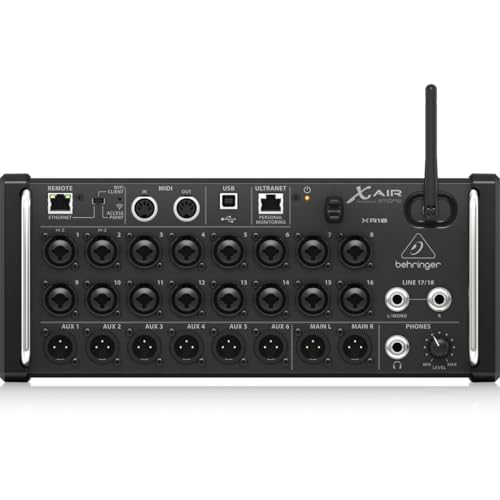
Behringer X AIR XR18 — Best Overall Digital for Live
The XR18 changed what small bands could own: a stagebox with sixteen Midas-designed preamps, twelve buses, tablet control and multitrack USB recording, in a format that sits on stage where the cables are short. The band mixes from a tablet in the audience — the only place the mix actually exists — and stores a scene for every venue. It suits self-engineered bands and small production companies completely. It demands commitment in return: no physical surface at all, so a dead tablet battery is a real failure mode, and the WiFi discipline in the setup section below is not optional reading.
Strengths
- Sixteen Midas preamps with full digital recall
- Mix from the audience position by tablet or phone
- Multitrack USB recording of every input
- Stagebox format keeps cable runs short
Trade-offs
- No physical faders — total dependence on the control device
- Integrated WiFi needs disciplined setup in crowded venues
- Learning curve for engineers raised on analog boards
| Specification | Detail |
|---|---|
| Channels | 18-channel, 12-bus |
| Preamps | 16 programmable Midas preamps |
| Control | iPad/Android app, integrated WiFi |
| USB | Multi-channel interface |
The revelation of stagebox mixing is positional: standing in the room with a tablet, you hear what the audience hears and fix it in real time, instead of translating between a mix position and the floor. The Midas preamps are the second revelation — they are genuinely good, with recall, so the soundcheck you perfected is the show you get. Bands that adopt the XR18 rarely return to a board at the back of the room; the workflow is simply more honest.
Best for: Self-engineered bands and small production rigs / Not suited for: Engineers who require a physical control surface
Check on Amazon — check the current price on Amazon before you decide, because bundles and variants change.

Allen & Heath CQ-18T — Best Touchscreen Console
The CQ-18T answers the stagebox objection: digital processing, scene memory and remote capability, but with a 7-inch touchscreen surface you can walk up to and mix on without pairing anything. Allen & Heath’s processing pedigree shows in the details — sensible defaults, fast workflows, and tools that assist gain and feedback management rather than burying them in menus. It suits venues, schools and bands that want digital benefits with console confidence. It costs the commitment every digital platform asks: learn its logic once, properly, and keep its firmware current.
Strengths
- Real touchscreen surface — no tablet required to mix
- Fast, assisted workflows suit mixed-experience teams
- A&H processing quality and effects
- WiFi and Bluetooth built in for remote and playback duties
Trade-offs
- Touchscreen mixing divides engineers raised on faders
- Digital platform means firmware and update discipline
- Compact format still caps very large acts
| Specification | Detail |
|---|---|
| Format | Compact digital console |
| Screen | 7-inch touchscreen |
| Connectivity | WiFi and Bluetooth |
| Processing | Modern A&H digital platform |
Where the CQ earns its badge is speed of competence: a new operator can produce a good mix on it quickly because the surface presents the important things prominently and automates the fiddly ones. The touchscreen debate is real but miscast — the question is not fingers versus faders in the abstract, it is whether your team mixes better with recall, assistance and a compact footprint. For most small venues in this decade, the answer has quietly become yes.
Best for: Venues and bands wanting digital benefits with a physical surface / Not suited for: Purists committed to fader-per-channel analog control
Check on Amazon — check the current price on Amazon before you decide, because bundles and variants change.

Soundcraft Ui12 — Best Budget Digital
The Ui12’s idea is democratic: a stagebox mixer controlled from any device with a browser — no app store, no dedicated tablet, the phone in your pocket will do. That makes it the budget door into digital live sound: recall, remote mixing and Soundcraft’s processing for acts that cannot justify the XR18’s class. Twelve inputs fit small bands and presentation work. The compromises are scale and speed — fewer inputs, less processing depth, and browser control that depends on the same WiFi discipline as every stagebox. As a first digital board, it teaches the workflow honestly at the lowest stakes.
Strengths
- Browser control works from almost any device
- Digital recall and remote mixing at an entry tier
- Soundcraft processing heritage
- Ideal first step from analog to digital
Trade-offs
- Twelve inputs limit growing bands
- Browser interface is functional rather than luxurious
- WiFi setup discipline is essential, as with all stageboxes
| Specification | Detail |
|---|---|
| Channels | 12-input |
| Control | Browser-based, any device |
| Format | Stagebox |
| Connectivity | Built-in WiFi |
The Ui12’s best feature is what it removes: the excuse. Acts that suspect digital would improve their shows but fear the cost and complexity can test the entire workflow — remote mixing, scenes, saved soundchecks — at entry stakes, on devices they already own. Many discover the workflow suits them and later graduate to the XR18 or CQ class with their habits already formed. A product that teaches a category this well deserves its badge.
Best for: Small acts taking a first step into digital mixing / Not suited for: Bands needing more than twelve inputs
Check on Amazon — check the current price on Amazon before you decide, because bundles and variants change.

Yamaha TF1 — Best for Installed Venues
The TF1 is the digital console for institutions: a proper surface with motorised faders and a touch panel, Yamaha’s training-friendly design language, and presets that let a novice produce a respectable mix while the expert’s scenes wait underneath. It suits churches, schools and theatres where the operator changes weekly and the standard must not. Sixteen channels cover the house band and the school musical. It is the largest commitment in this guide — a console, not a box — and venues with no fixed mix position should take the stagebox picks instead.
Strengths
- Motorised faders and a real console surface
- Preset-driven workflows train volunteers quickly
- Yamaha reliability and support heritage
- Scenes protect the standard across rotating operators
Trade-offs
- Console footprint needs a fixed mix position
- Overkill for self-mixing small bands
- Digital learning curve remains, however friendly
| Specification | Detail |
|---|---|
| Channels | 16-channel |
| Format | Surface console |
| Control | Touch panel operation |
| Heritage | Yamaha digital console line |
Institutions buy consoles differently from bands: the question is whether the tenth operator, two years from now, can still produce Sunday’s sound. The TF1’s answer is its preset and scene architecture — expertise stored in the desk, recalled by whoever is rostered. That is the entire case, and for a venue it outweighs every specification argument in this guide. Bands should buy boxes; institutions should buy standards, and this is the standard-bearer here.
Best for: Churches, schools and theatres with rotating operators / Not suited for: Touring small bands without a fixed mix position
Check on Amazon — check the current price on Amazon before you decide, because bundles and variants change.

Behringer FLOW 8 — Best Compact Digital
The FLOW 8 is digital for people who like faders: an eight-input digital mixer with real 60 mm channel faders, app control when you want it, two effects processors and full scene recall. It suits duos, small worship teams, streamers who also perform live, and presenters whose setups repeat exactly. Eight inputs is a firm ceiling — this is a small-act product and knows it. Within that ceiling it offers the digital workflow at its most approachable: learn it in an afternoon, recall forever, and mix from the room when the app comes out.
Strengths
- Physical faders plus app control — both workflows in one box
- Scene recall transforms repeat setups
- Two effects processors at a compact tier
- USB interface doubles it as a recording front end
Trade-offs
- Eight inputs cap any growth
- App features assume a charged, updated control device
- Small format means small controls in dark rooms
| Specification | Detail |
|---|---|
| Format | 8-input digital |
| Control | App plus 60 mm faders |
| FX | 2 processors |
| USB | Audio interface |
Repeatability is the FLOW 8’s whole argument, and for its audience it is decisive: the duo that plays the same venue monthly, the streamer whose EQ took an hour to dial, the church hall team with one setup — all of them trade the soundcheck ritual for a recall button. The physical faders keep the performance tactile, which matters more than spec sheets admit: mixing is a motor skill, and this is the digital board that respects it at this size.
Best for: Duos, streamers and small teams with repeating setups / Not suited for: Acts with any ambition beyond eight inputs
Check on Amazon — check the current price on Amazon before you decide, because bundles and variants change.

Allen & Heath QU-16C — Best Rackmount Step-Up
The QU-16C is where this guide steps toward the professional tier: a rack-mountable digital mixer from Allen & Heath’s Qu platform, with the processing depth, remote ecosystem and build standard that production work assumes. It suits small production companies, serious venues and bands who employ an engineer and want the platform to stop being the limitation. It asks professional commitments in return — networking discipline, an operator who learns it properly, and a budget tier above the rest of this guide. For teams at that threshold, it is the pick that ends the upgrade cycle for years.
Strengths
- Professional digital platform with deep processing
- Rackmount format suits production and installation
- Remote mixing ecosystem for engineers and performers
- Build and support at a professional standard
Trade-offs
- Demands a trained operator to justify it
- Highest commitment in this guide
- Rack format still wants a planned control position
| Specification | Detail |
|---|---|
| Channels | 16 |
| Format | Rack-mountable |
| Control | Surface plus remote ecosystem |
| Heritage | Qu series digital platform |
The step-up question is really about ceilings. The stageboxes above are superb until an act needs more processing per channel, more sophisticated routing or a platform a hired engineer already knows — and then the QU class stops being a luxury and becomes the tool. Its rackmount Chrome format disappears into a production rack while the engineer mixes from wherever the room sounds worst, which is to say, wherever the truth is.
Best for: Production companies and serious venues stepping up / Not suited for: Casual acts buying their first digital mixer
Check on Amazon — check the current price on Amazon before you decide, because bundles and variants change.
Comparison Table
| Pick | Badge | Key spec | Best for |
|---|---|---|---|
| Behringer X AIR XR18 | Best Overall Digital for Live | Stagebox digital mixer, tablet control | Bands that mix from the audience and record multitrack from the same box |
| Allen & Heath CQ-18T | Best Touchscreen Console | Digital mixer with 7-inch touchscreen | Engineers who want digital power with a real surface under their hands |
| Soundcraft Ui12 | Best Budget Digital | Remote-controlled digital mixer | The lowest-cost credible entry into digital live mixing |
| Yamaha TF1 | Best for Installed Venues | Digital console with touch panel | Venues and churches that need a real console volunteers can be trained on |
| Behringer FLOW 8 | Best Compact Digital | Digital mixer with physical faders | Small acts wanting digital recall in the smallest credible package |
| Allen & Heath QU-16C | Best Rackmount Step-Up | Rackmount digital mixer, Chrome Edition | Production companies and venues ready for a professional digital platform |
How to Choose a Digital Mixer for Live Sound
Stagebox or surface: the decision that decides everything else
A stagebox (XR18, Ui12) puts preamps on stage, shortens every cable run, and moves the engineer into the audience with a tablet. It is cheaper per channel, tours in a small rack, and fails if its control chain fails — hence the networking rules in the setup section. A surface console (CQ-18T, TF1, QU-16C) costs more and travels bigger, but can be mixed by walking up to it, which institutions and hired engineers often require. Neither is better; they are answers to different working lives, and choosing wrong is the one mistake no feature list can rescue.
Hybrid thinking helps: the FLOW 8 keeps faders and adds app control, suiting small acts that want recall without surrendering touch. If your team argues about this choice, they are really arguing about how they work — settle that honestly first.
Processing depth: what digital actually adds
Beyond recall, digital platforms give every channel its own full processing — parametric EQ, compression, gating — where analog boards share one effects engine and fixed EQ. For live work the practical wins are gates that silence noisy stage inputs between songs, per-channel compression that handles each singer individually, and graphic EQ on outputs to tame the room. Judge platforms by these working tools, not by preset counts.
Monitor capability scales with buses: count how many independent monitor mixes your performers need — each in-ear or wedge mix consumes a bus — and confirm the platform provides them before the input count seduces you.
The network is part of the mixer now
For app-controlled platforms, the WiFi link is a component as real as a preamp. Integrated WiFi is adequate for rehearsals and small rooms; busy venues with hundreds of audience phones reward an external router, a hidden network name and a control device that never leaves the engineer’s hand. Budget for the router when you budget for the mixer, keep a wired or surface fallback where the platform allows one, and update firmware at home on a quiet afternoon — never at the venue, never on show day.
How to Set Up a Digital Mixer for a Live Show
[‘Digital setup is ninety percent preparation done before the venue. This sequence assumes a stagebox or compact console from this guide.’]
- Build the show file at home. Create the scene in the app or on the surface: name every input, set starting gains from your last show, route monitors, and save it. Arrive with a show, not a blank desk.
- Connect the network deliberately. Power the mixer, connect your control device to the mixer’s network (or your external router), and confirm control from the farthest seat before a single cable is run.
- Run the stage cables short. Stagebox on stage, instruments and mics into it with the shortest practical XLR runs. Check each input against its named channel on screen.
- Ring out monitors first. Set each performer’s mix at rehearsal volume and notch the frequencies that feed back while the room is empty and forgiving.
- Soundcheck, then save immediately. The moment the mix is right, store the scene under the venue’s name. That save is the entire point of digital — do not leave it for later.
- Charge and park the control device. Full battery, updates off, notifications silenced, and a second device paired if the platform allows. Your mixer now has a cockpit; treat it like one.
Common Buying Mistakes
Trusting venue WiFi for show control
Never. Your mixer rides its own network — integrated or a dedicated router — with a name the audience cannot join. The night the room’s network fills with phones is the night this rule explains itself.
Updating firmware on show day
Updates change behaviour, reset preferences and occasionally break pairings. Update at home, test with a rehearsal, and freeze the system for the run of shows.
Skipping the analogue fallback plan
A charged spare device, a printed channel list and starting gain settings turn a control failure into a pause. Without them, it is a cancellation. Digital discipline includes planning for digital failure.
Mixing only from the stage
The performer-engineer’s tablet shows the stage mix, not the room. Walk the audience area during soundcheck with the tablet, or station a trusted ear out front — the mix exists where the audience sits.
Buying inputs and forgetting buses
Performers hear monitors, not your input count. Confirm the platform’s bus count covers your monitor mixes before the channel count closes the sale.
Final Recommendation
For most bands, the Behringer X AIR XR18 remains the digital live benchmark: Midas preamps, multitrack recording and audience-position mixing in one stagebox. Engineers who want a surface should take the Allen & Heath CQ-18T; institutions, the Yamaha TF1; first steps into digital, the Soundcraft Ui12; small repeating acts, the FLOW 8; and teams stepping up to professional production, the QU-16C. Choose the workflow your team will actually master — in digital live sound, the workflow is the product.
Related guides in this series: Best Audio Mixers · Best Audio Mixers For Live Performance · Best Small Digital Mixers · Best Audio Mixers For Beginners
What a Scene Actually Contains — and Why It Changes Everything
A scene is not a preset in the guitar-amp sense; it is the entire state of the mixer — every preamp gain, EQ curve, compressor setting, effects level, routing decision and fader position — stored and recalled as one object. The practical consequence is that expertise becomes portable and permanent. The mix your best engineer built for the Christmas concert can be recalled by a trainee in March. The band that plays four venues monthly stops soundchecking from zero and starts soundchecking from last time at this room, which is a twenty-minute head start that buys a calmer band and a better show.
Scenes also change how engineers learn. Because any experiment can be saved, compared and discarded safely, digital operators iterate faster: try the aggressive vocal compression, store it as an alternative, A/B it in rehearsal, keep the winner. Analog mixing teaches by consequence; digital mixing teaches by comparison, and comparison is the faster teacher. The discipline scenes demand is housekeeping — name them by venue and date, back them up off the mixer, and never overwrite the known-good show file in a hurry at midnight.
Per-Channel Processing: The Quiet Revolution
Analog boards in the companion guide share one effects engine among all channels and offer fixed EQ per strip. Digital platforms give every input its own parametric EQ, compressor and gate, and the difference is not luxury — it is problem-solving capacity. The kick drum’s gate silences the ringing stage between hits. The bassist’s compressor evens out the enthusiastic choruses. The lead vocal’s EQ carves a different curve from the backing vocal’s, because they are different voices doing different jobs. None of these moves requires a rack of outboard gear anymore; they ship inside every pick in this guide, waiting for an operator who learns to use two or three of them well.
Restraint remains the professional skill. A channel with every processor engaged usually signals an engineer entertaining themselves; the working method is to fix the source first — microphone choice, position, the instrument itself — then apply the minimum processing that solves the remaining problem. Digital makes processing free, which makes discipline more valuable, not less. The best digital mixes are often surprisingly plain on screen, because the engineer understood that the platform’s power is headroom for the moments that need it.
In-Ear Monitors and the Digital Stage
Digital mixers and in-ear monitoring grew up together, and the pairing explains much of the platform’s spread. Each performer with in-ears needs a dedicated stereo or mono bus, mixed to their taste, ideally adjusted by themselves from a phone. The step-up picks in this guide support that ecosystem properly; the compact picks cover a couple of mixes for small acts. The stage-volume benefit is transformative for the audience mix — wedges disappear, the stage quiets, feedback margins widen, and the front-of-house engineer finally controls what the room hears.
The costs are real and belong in the plan: earphones for every performer, a learning curve for musicians who have never played on ears, and a soundcheck that spends its minutes on monitor mixes before the room. Acts that make the transition rarely return, because the consistency is addictive — the same mix in every venue, at safe levels, with the click and cues the performance needs. If your act is heading toward in-ears, let the bus count, stated in each pick’s notes, lead your shortlist.
Reliability, Redundancy and the Professional Mindset
Analog boards fail gradually — a scratchy fader, a tired channel — and announce their decline. Digital systems fail differently: rarely, but categorically, when a network drops or a control device dies. Professional practice therefore builds redundancy in layers. The mixer itself keeps passing audio on its last settings if control is lost, which converts most failures into inconvenience. The next layer is a second control device, paired and charged. The third is preparation: saved scenes, a printed input list, and starting settings that let any competent engineer reconstruct the show on a borrowed board.
None of this should frighten a small act away from digital; it should simply be priced into the decision like cables and cases. The bands that thrive on these platforms treat show files like setlists — prepared, backed up, and boring in their reliability. Excitement belongs in the performance. A digital rig run with that mindset is, night for night, the most consistent live-sound tool small acts have ever been able to buy, and the six platforms in this guide are its current best arguments.
Latency, Drivers and Recording From a Digital Desk
Digital mixers that record — the XR18 most completely in this guide — blur the line between live board and studio interface, and a few concepts govern the experience. Latency, the small delay between a sound entering and leaving a digital system, is inaudible in these platforms’ live paths because the processing is local and fast; it only becomes a conversation when a computer joins the chain for recording or plug-in processing, where buffer settings trade delay against stability. For live recording the rule is simple: set a conservative buffer, record the show, and never ask the show’s computer to do anything clever in real time.
Multitrack recordings from a live desk have a character studio purists underestimate: the performance is real, the bleed between microphones is the room’s truth, and mixing the files later is an education in what the audience actually heard. Bands use these recordings for live releases, content and honest self-assessment. Even stereo-only platforms earn their place here — a saved scene plus a stereo recording means every show produces both a document and a better starting point for the next one.
Firmware and Platform Longevity: Buying Into an Ecosystem
A digital mixer is a computer with a roadmap, and the manufacturer’s commitment to that roadmap is part of the product. The platforms in this guide come from makers who update their ecosystems — new app features, refined processing, compatibility with current tablets and operating systems. Before buying any digital platform, check when its app was last updated and whether its control software runs on the devices you own today. A platform abandoned by its maker becomes a time capsule: still functional, increasingly isolated.
Your own update discipline completes the picture. Update promptly at home, where a problem is an inconvenience; freeze the system during runs of shows, where a problem is a headline. Keep the previous known-good configuration backed up before any update, and keep one control device on the older, proven setup if the stakes justify it. This is not paranoia — it is the same respect musicians pay to a guitar’s setup before a tour, applied to the instrument that now mixes the band.
Training the Team on a Digital Platform
The institutions in this guide’s audience face a specific challenge: the platform’s power is only real if the roster can use it. The working method is layered access. Build the expert scene — gains, EQ, monitor sends, effects — and save it as the house standard. Train operators to run the show from that scene: faders, mutes, minor adjustments, and a strict rule that structural changes happen with the expert present. Most platforms allow scenes to be stored safely away from casual editing, which turns the mixer into a appliance for the many and an instrument for the few.
Rehearsal is the training ground: roster the trainee alongside the expert for two events, let them drive the third with supervision, and keep a one-page house guide — power-up order, scene name, who to call — taped inside the rack. Digital platforms reward this investment disproportionately, because the trainee inherits the expert’s settings rather than reinventing them. The TF1 and CQ picks were chosen with exactly this institutional reality in mind.
The Hybrid Rig: Digital Desk, Analog Habits
Many real-world rigs end up hybrid in practice even when the desk is fully digital, and planning for that is wise. Engineers keep a hardware compressor on the lead vocal because their hands know it; a beloved analog reverb rides an effects return; the drummer’s click lives outside the desk entirely. Digital platforms accommodate this through their inserts, returns and routing — the step-up picks most gracefully — and the result is often better than ideological purity in either direction: digital memory and routing underneath, familiar analog tools where touch matters most.
The lesson generalises beyond gear. Adopt digital for what it is genuinely superior at — recall, remote position, per-channel processing, recording — and keep analog habits where they remain superior: listening first, touching sparingly, and never letting a screen mediate what your ears should decide. The engineers who thrive on these platforms are not the most technical; they are the ones who remember the platform works for the music, in that order, every show.
Show Day Timeline: A Digital Rig From Arrival to Encore
Two hours out, the rig arrives and the stagebox takes its place on stage before backline, because every cable in the building will route to it. Ninety minutes: power, network, control confirmed from the back row, monitors rung out while the room is empty and honest. One hour: line check against the named input list, gains recalled from the venue scene and trimmed to tonight’s sources. Thirty minutes: full-band soundcheck, one song mixed from the audience, scene saved under tonight’s date, house music on through the desk while the room fills.
Showtime is the quiet part, and that is the point. The engineer mixes from the room, the performers adjust their own monitor details where the platform allows, and the recording — multitrack on the XR18 class, stereo elsewhere — captures the night for tomorrow’s review. Load-out reverses the morning: save the final scene before anything powers down, because tonight’s file is the next visit’s head start. Bands describe this rhythm as the moment live sound stopped feeling like gambling, and it is available at every tier in this guide, scaled to the platform’s depth.
What Digital Cannot Do — Yet
Honesty about limits protects buyers better than enthusiasm. Digital platforms in this class do not remove the need for good microphones, sensible speaker placement or a performer who can hear themselves think; they amplify competence and expose its absence with equal fidelity. Automatic tools — gain assistants, feedback suppression, one-touch presets — genuinely help novices reach acceptable, and they plateau there: the last twenty percent of a great mix remains an ear, a room and a judgement call. Nor do these platforms repeal physics: a stagebox cannot make a loud stage quiet, only manage its consequences more precisely.
Buy digital, then, for the things it provably does — memory, position, processing, recording — and keep investing in the analog fundamentals around it. The rigs that sound best in this class are never the ones with the most processing engaged; they are the ones where a good performance, in a sensibly arranged room, passes through a platform that remembers how it was done last time and lets the engineer stand where the truth is.
Backing Up the Show: Files, Exports and Insurance
A digital show file is an asset with the same status as the setlist and the merchandise money, and it should be handled with the same care. Export scenes to the control device and to a second location — a laptop, a cloud folder, a USB stick in the engineer’s bag — because a file that exists in one place exists provisionally. Name files by venue, date and act, and keep the known-good version read-only in practice: new experiments save as new files, never over the standard the team depends on.
Rehearse the restore, once, at home. An engineer who has never loaded a backup under calm conditions will not enjoy learning during a show with the audience arriving. The five minutes that rehearsal costs is the cheapest insurance in the digital workflow, and it converts the platform’s one genuine fragility — dependence on files and devices — into a managed detail. Bands that treat their show files this way speak about their rig the way institutions speak about the TF1’s scenes: as a standard that survives personnel, venues and the occasional dropped tablet.
A Note for Analog Engineers Making the Move
If your hands learned mixing on faders and knobs, the first digital show will feel like playing piano in gloves — and the second will feel like the future. The transferable skills are all of them: gain staging, EQ judgement, effects restraint and room reading are identical crafts on a new surface. What changes is only where the controls live and the fact that the desk remembers. Give the platform one honest month, including the humility of reading its manual, before judging it against twenty years of analog muscle memory.
Keep one analog habit deliberately: listen before you look. Screens invite mixing with the eyes — curves admired, meters chased — while the audience experiences only sound. The engineers who make digital platforms sing are the ones who glance at the surface to confirm what their ears already decided. Bring that discipline across, and the platform’s memory, position and processing become what they were designed to be: not a replacement for the engineer, but the first desk that finally works the way engineers always wished the old ones would.
And when the first show on the new platform ends with the room happy and the scene saved, resist the urge to keep improving the file that night. Note the two changes you want, make them at the next rehearsal with fresh ears, and let consistency compound. Digital live sound rewards the patient exactly as analog did — it simply keeps the receipts, so the patience is never wasted.
The through-line of every pick and every warning in this guide is respect for preparation. Digital platforms have moved the work of live sound earlier — into the show file, the network plan and the saved scene — and in exchange they have made the show itself calmer, more consistent and better documented than analog ever allowed. Teams that embrace that trade sound professional sooner and stay professional longer. That, more than any specification, is what you are buying.
Frequently Asked Questions
Is digital really better than analog for live sound?
For recall, remote mixing and per-channel processing, yes — decisively, once the workflow is learned. Analog retains advantages in immediacy and zero network dependence. Most small acts gain more from digital’s memory than they lose in simplicity.
Can I mix a whole show from a phone?
On the stagebox picks, technically yes and practically for small adjustments. A tablet’s screen is the sensible minimum for a full show; the phone is the backup and the monitor-mix tool for performers.
What happens if the WiFi drops mid-show?
The mixer keeps passing audio with its last settings — the show continues, control pauses. Reconnect calmly; this is why gains and scenes are saved before the show, and why a second paired device is cheap insurance.
Do digital mixers record multitrack?
Some do — the XR18 class records every input over USB, which is a genuine studio-grade capability. Others record stereo only. The picks state their class; check the badge notes before assuming.
How many monitor mixes can these provide?
It follows the bus count, which varies by platform from a couple of mixes on compact models to a full set on the step-up pick. Count your performers’ needs first, then read the platform’s bus specification against them.
Should a church choose a console or a stagebox?
A console surface, usually — volunteers roster better onto a physical desk with stored scenes, as the TF1 pick argues. A stagebox suits a church with one consistent tech operator who mixes from the congregation.


