Disclosure: airfryerkitchensupply.com is reader-supported. When you buy through links on our site, we may earn an affiliate commission at no extra cost to you.
Where to buy
For best digital mixers for home studio, start here: A home-studio mixer is really three products in one box — mixer, audio interface and recorder — so judge listings on all three jobs. Every linked pick below was verified against Amazon’s catalog before this guide was written, so the product you land on is the product described. Linked picks say “check price on Amazon” because live pricing changes too often to print honestly. Picks marked as unlinked are real products sold mainly outside Amazon; they are described in full, with no purchase link, rather than replaced with a weaker substitute.
Tascam Model 12 (Best Analogue-Feeling Digital Desk): Check on Amazon — check the current price on Amazon.
Zoom LiveTrak L-12 (Best for Recording Every Session): Check on Amazon — check the current price on Amazon.
Behringer X AIR XR18 (Best Overall): Check on Amazon — check the current price on Amazon.
Allen & Heath CQ-18T (Best for Small Stages): Check on Amazon — check the current price on Amazon.
Soundcraft Ui12 (Best Budget): Check on Amazon — check the current price on Amazon.
Behringer FLOW 8 (Best for Solo and Duo Acts): Check on Amazon — check the current price on Amazon.
Introduction: what actually matters here
The best digital mixers for home studio solve a specific frustration: you want to jam, record and mix without re-patching cables or choosing between a mixer and an interface. A good digital desk takes microphones, synths and guitars, sends multi-track audio to your DAW over USB, records a safety copy without the computer, and gives your hands real faders while it does it. The six picks below were verified through Amazon’s catalog and chosen for exactly that triple job.
Home studios differ from live rigs in one crucial way: the room is small and the user is usually also the performer. That favours compact desks with quiet preamps, per-channel recording, and headphone mixes that can be built without a second engineer. It also punishes fan noise, fiddly menus and drivers that break — every pick here is fanless-class, desk-friendly and built on mature USB implementations.
An honest boundary first: if you only ever record one or two sources at a time and mix entirely in the DAW, a plain audio interface is cheaper and simpler, and no mixer below will beat it at that narrow job. These mixers earn their space when bands, hardware synths, podcast guests or hybrid workflows enter the picture.
In this guide
Quick Picks
Tascam Model 12 — Best Analogue-Feeling Digital Desk: A mixer that thinks like a tape studio: every channel records, faders stay physical, and the DAW is a guest rather than the boss. — Check on Amazon
Zoom LiveTrak L-12 — Best for Recording Every Session: Live-desk layout with a recorder inside: five separate headphone mixes make it the band-rehearsal favourite. — Check on Amazon
Behringer X AIR XR18 — Best Overall: The producer’s stage box: 16 quality preamps, multi-track USB and total recall, mixed from the screen you already stare at. — Check on Amazon
Allen & Heath CQ-18T — Best for Small Stages: Touchscreen mixing with automatic feedback help — equally at home on a podcast desk or a small project studio. — Check on Amazon
Soundcraft Ui12 — Best Budget: The budget door into multi-source home recording — browser control, tiny footprint, honest limits. — Check on Amazon
Behringer FLOW 8 — Best for Solo and Duo Acts: A pocket digital desk for voice, guitar and keys — app-controlled, Bluetooth-fed and genuinely portable. — Check on Amazon
How These Picks Were Chosen
Picks were ranked on preamp quietness and USB multi-track capability first — a home-studio mixer that only sends a stereo mix to the computer is an interface with extra steps — then on standalone recording, monitor flexibility and footprint. Each model was matched by brand and model against its Amazon listing title before a link was added; no mixer with a stereo-only USB path is presented as multi-track.
The list deliberately spans working styles: the Tascam and Zoom desks for record-everything musicians, stage-box mixers (XR18, Ui12, CQ-18T) for producers who mix on screen and want the desk off the desktop, and the FLOW 8 for small synth-and-voice setups. Your workflow, not a spec league table, should pick between them.
Prices are not printed because they move; the guidance is structural instead. Spend first on the number of simultaneously recordable inputs you truly need, because that is the one specification you cannot upgrade later without replacing the desk.
The 6 Best Options: Best digital mixers for home studio in detail

Tascam Model 12 — Best Analogue-Feeling Digital Desk
The Model 12 is built for musicians who want to capture a performance the way studios always did — arm the tracks, play, and have a multi-track recording whether or not the computer behaved. It mixes with real faders and knobs, records to SD, and still serves as a USB interface and DAW controller when you want to finish in software.
Strengths
- Standalone multi-track recording to SD — the computer is optional at capture time
- Physical faders and one-function-per-knob layout keep mixing tactile and fast
- DAW controller mode bridges hardware capture and software finishing
Trade-offs
- Twelve tracks cap larger band recordings — plan drum miking economically
- Analogue-style workflow means fewer recall tricks than full digital desks
- Takes real desk space compared with stage-box alternatives
Key specs (verified): 12-track digital multitrack mixer/recorder, USB audio interface and DAW controller (per Amazon title)
Its charm is commitment: because recording is always one button away, ideas get captured instead of configured. Songwriters and bands rehearsing in the studio benefit most — the take you played while ‘just testing levels’ is often the take, and the Model 12 is the pick least likely to have missed it.
The Model 12’s DAW-controller mode deserves a practical footnote: map it once to your template — transport, faders, the handful of commands you actually use — and resist remapping it monthly. Its value is muscle memory, and muscle memory is built by sameness. Studios that treat the surface as a fixed instrument finish mixes faster than studios with theoretically superior controllers reconfigured for every project; the Tascam’s restraint is a workflow philosophy, and it works when honoured.
Best for: Bands and songwriters who record performances, not just overdubs / Not suited for: Producers who mix entirely in the box and need no hardware surface
Check on Amazon — check the current price on Amazon before you buy, and confirm the exact configuration in the listing title matches the model reviewed here.

Zoom LiveTrak L-12 — Best for Recording Every Session
The LiveTrak L-12 was designed for the exact room this article is about: a band in a home studio, each player wanting their own headphone balance, everything recorded. It provides multiple independent monitor mixes, records the multi-track to SD while streaming USB audio to the DAW, and runs scenes for different projects.
Strengths
- Multiple independent headphone/monitor mixes — rare and valuable at this level
- Simultaneous SD recording and USB interface duties cover belt and braces
- Scene recall suits studios shared between projects and people
Trade-offs
- Preamps are good rather than boutique — quiet rooms and hot mics still reward care
- Small faders demand a lighter touch for fine rides
- Podcast-style users may prefer the CQ or XR18’s app ecosystems
Key specs (verified): 12 channels, records to SD card while mixing, USB audio interface (per listing class)
Rehearsal economics decide home studios: the desk that lets a four-piece hear themselves properly gets used nightly, and the L-12’s monitor section is its headline act. Drummers especially should count inputs before buying — twelve channels disappear quickly under a full kit plus band — but within its count, few desks serve a working band room better.
LiveTrak owners should exploit its scene memory per project rather than per song: a band scene, a podcast scene, a solo-writing scene, each with gains and monitor balances stored. The desk then greets each kind of work already dressed for it, and the friction that kills home-studio momentum — twenty minutes of setup before the first idea — quietly disappears. Few features in this guide repay their learning curve as directly as this unglamorous one.
Best for: Rehearsing bands and multi-musician home studios / Not suited for: Solo producers recording one source at a time
Check on Amazon — check the current price on Amazon before you buy, and confirm the exact configuration in the listing title matches the model reviewed here.
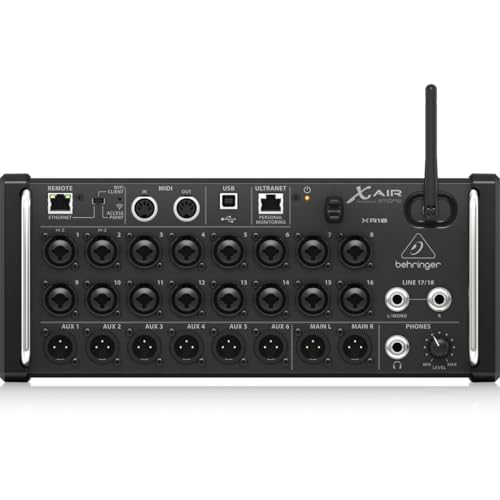
Behringer X AIR XR18 — Best Overall
In a home studio the XR18 hides in a rack or under the desk and turns your tablet or computer into the console. Sixteen Midas-designed preamps feed multi-track USB recording, every setting is recallable per project, and the desk surface stays clear for instruments and controllers — a layout many electronic producers prefer to any physical mixer.
Strengths
- 16 preamps record a full band or a wall of synths simultaneously
- Total recall per song or project — no photographing knob positions
- Mature app ecosystem on every platform you might mix from
Trade-offs
- No physical faders — mixing is a screen activity, full stop
- Needs a reliable network; a dedicated router is strongly advised
- Headphone and monitor mixes require deliberate bus planning
Key specs (verified): 18 channels, 12 buses, 16 programmable Midas preamps, built-in Wi-Fi, multi-channel USB audio interface (per Amazon title)
For hybrid studios — hardware synths, drum machines, guitars and vocals all patched at once — recall is the feature that changes behaviour. You stop avoiding complex patches because you can save them, and sessions start where the last one ended. That, more than any preamp specification, is why the XR18 anchors so many project studios.
The XR18’s app depth rewards one disciplined habit: build your project templates on the computer at leisure, not at the session. Channel names, colours, default EQ starting points and monitor routings saved as starting scenes mean a session begins at the music. Engineers who skip this describe the XR18 as fiddly; engineers who do it describe it as invisible. Both are reviewing their own preparation, and the desk is happy to be either — choose the second review.
Best for: Hybrid and electronic producers, and studios short on desk space / Not suited for: Hands-on mixers who need faders under their fingers
Check on Amazon — check the current price on Amazon before you buy, and confirm the exact configuration in the listing title matches the model reviewed here.

Allen & Heath CQ-18T — Best for Small Stages
The CQ-18T brings a modern touchscreen surface to the project studio: quick setup wizards, per-channel processing that is hard to make sound bad, Bluetooth for reference playback, and recording options that suit podcast and video work as much as music. It is the most approachable desk here for creators who record people talking as often as people playing.
Strengths
- Guided setup and forgiving processing suit creator-style recording
- Touchscreen plus physical controls balance speed and precision
- Bluetooth reference playback from a phone is a small daily luxury
Trade-offs
- Input count sits below the XR18 — count a full band carefully
- Touchscreen-first design suits some hands better than others
- Newer platform with a still-growing user community
Key specs (verified): Digital mixer with 7-inch touchscreen, Wi-Fi and Bluetooth connectivity (per Amazon title)
Podcast and video creators will feel the design intent immediately: the desk assumes speech matters, that guests are not engineers, and that setup should take minutes. Musicians get a capable, compact console; talkers get the closest thing here to a studio engineer in a box.
For creators, the CQ-18T’s Bluetooth reference playback is more than a convenience: checking a mix or a podcast edit against familiar commercial references, instantly, from the phone in your pocket, is a professional habit made frictionless. Studios that reference constantly make better loudness and tonal decisions; a desk that removes the cable-and-converter ceremony from referencing quietly improves every production that passes through it.
Best for: Podcast, streaming and mixed music-and-speech studios / Not suited for: Large-format band recording needing maximum inputs
Check on Amazon — check the current price on Amazon before you buy, and confirm the exact configuration in the listing title matches the model reviewed here.

Soundcraft Ui12 — Best Budget
The Ui12 puts a small stage box on the floor or shelf and your browser in charge. For a home studio built around a singer-songwriter, a duo, or a synth rig of modest size, it covers multi-source recording and monitor mixing at the lowest cost in this list, with no app installs and no desk space surrendered.
Strengths
- Browser control on any device — nothing to install or update
- Small footprint suits bedrooms, spare rooms and closet studios
- Core EQ, effects and recall cover small-rig recording properly
Trade-offs
- 12 inputs and fewer buses cap band-sized ambitions
- USB recording path is simpler than the multi-track leaders here — verify your exact workflow
- No physical controls at all if the network misbehaves
Key specs (verified): 12 inputs, remote-controlled via browser on any device, built-in Wi-Fi access point (per Amazon title class)
Buy the Ui12 with clear eyes: it is the right desk for a small rig today, priced so that upgrading later is not a tragedy. Studios grow by adding sources; starting with a desk matched to the sources you own — rather than the studio you daydream about — keeps money available for the microphones and treatment that improve recordings more.
The Ui12’s browser control has a hidden home-studio virtue: it ages well. Apps get abandoned; browsers persist, and a desk controlled by any device with a browser is unusually immune to the software rot that dates studio gear. For a small studio buying on a long horizon, that boring resilience is a genuine feature — the mixer you can still control in eight years, from whatever replaced your current tablet, is worth more than a prettier interface with an expiry date.
Best for: Singer-songwriters, duos and small synth rigs / Not suited for: Full bands wanting separate headphone mixes for everyone
Check on Amazon — check the current price on Amazon before you buy, and confirm the exact configuration in the listing title matches the model reviewed here.

Behringer FLOW 8 — Best for Solo and Duo Acts
The FLOW 8 is the smallest honest answer to the home-studio mixer question: a few quality inputs, app control, Bluetooth playback for practice tracks, USB to the computer, and effects that flatter a voice without a plug-in chain. For a creator corner rather than a studio room, it is sized correctly where bigger desks are furniture problems.
Strengths
- App workflow is fast for one-person record-and-release routines
- Bluetooth backing-track playback suits practice and livestreams
- USB interface covers the solo creator’s recording needs
Trade-offs
- Eight inputs is the whole story — no expansion path
- One simple monitor path limits band use
- App dependence for deep settings
Key specs (verified): 8 inputs, Bluetooth app control, USB audio interface
Small desks succeed by disappearing into a routine: sit down, open the app, sing. The FLOW 8’s restraint is its feature — every control a solo creator needs weekly, nothing that needs a manual monthly. If your studio is a corner and your output is songs, lessons or streams, it respects both facts.
FLOW 8 owners get the most from it by treating it as an instrument station rather than a shrunken studio: voice chain saved, guitar input gained, practice playback paired, one button between sitting down and making sound. Its effects are voiced for immediacy — a teaching session, a livestream lesson, a demo sung straight to the computer — and judged on that immediacy, rather than on studio depth it never claimed, it is the most honest small desk in this guide.
Best for: Solo creators, teachers and practice corners / Not suited for: Anyone recording a drum kit or a full band
Check on Amazon — check the current price on Amazon before you buy, and confirm the exact configuration in the listing title matches the model reviewed here.
Comparison Table
| Pick | Badge | Key spec | Best for |
|---|---|---|---|
| Tascam Model 12 — Check on Amazon | Best Analogue-Feeling Digital Desk | 12-track / DAW controller | Bands and songwriters who record performances, not just overdubs |
| Zoom LiveTrak L-12 — Check on Amazon | Best for Recording Every Session | 12ch / SD multitrack recording | Rehearsing bands and multi-musician home studios |
| Behringer X AIR XR18 — Check on Amazon | Best Overall | 18ch / 16 Midas preamps / Wi-Fi | Hybrid and electronic producers, and studios short on desk space |
| Allen & Heath CQ-18T — Check on Amazon | Best for Small Stages | Touchscreen / Wi-Fi / Bluetooth | Podcast, streaming and mixed music-and-speech studios |
| Soundcraft Ui12 — Check on Amazon | Best Budget | 12 inputs / browser control | Singer-songwriters, duos and small synth rigs |
| Behringer FLOW 8 — Check on Amazon | Best for Solo and Duo Acts | 8 inputs / app control | Solo creators, teachers and practice corners |
How Do You Gain-Stage a Home Studio Mixer for Clean Recordings?
Gain staging is the whole recording craft in miniature: each source loud enough to sit well above the noise floor, never so loud it clips the converter. Set gains with the performer playing or singing at genuine performance level — the whispered soundcheck that becomes a belted chorus is the classic home-studio clipping story — and leave headroom for the moment enthusiasm arrives, because it always arrives in the best take.
Use the mixer’s meters as instruments, not decorations: peaks living comfortably below the top of the scale, averages healthy, and the DAW’s input meters agreeing with the desk’s. Where they disagree, believe the recording — play it back and listen for the flat-topped crunch of digital clipping, which no plug-in downstream can honestly remove.
Finally, write your gains down or save them in scenes. The songwriter who finds last month’s vocal chain exactly as it was — same gain, same EQ starting point — records more music than the one who rebuilds the chain each session. Consistency is a creative feature, and digital recall is how a home studio buys it.
What Monitors and Headphones Should Pair With a Studio Mixer?
A studio mixer feeds two listening worlds: speakers for shared judgement and headphones for performers and detail work. Budget for both honestly — a dependable pair of closed headphones for tracking (so click and backing do not leak into microphones) matters before a second set of speakers, and the mixer’s headphone output quality and level deserve a test with your actual headphones before purchase day ends.
Monitor mixes are only as good as the headphones wearing them: a band tracking live needs enough sets, a splitter or distribution plan where the mixer provides one mix, or a desk — like the LiveTrak pick — whose multiple mixes assume several listeners. Plan the whole chain on paper; headphone logistics discovered mid-session are momentum poison.
Speaker placement then does the quiet work: nearfields at ear height, symmetric in the room, far enough from walls to keep bass honest. A modest mixer feeding well-placed speakers teaches your ears faster than a flagship feeding a corner — the recurring theme of this guide, because it keeps being true.
How Should a Home Studio Handle Backups, Templates and Files?
A digital mixer multiplies files: scenes, templates, SD recordings, DAW sessions. Give them one naming habit — project, date, version — and one backup habit, weekly to a second location, and the studio’s memory becomes an asset instead of an anxiety. The desk’s recall is only half the system; the other half is your discipline about the files recall depends on.
Templates deserve the same care as instruments: a recording template with tracks named, coloured and routed, a mixing template with your usual buses waiting, and the mixer’s matching scene for each. Songwriters measure studios in minutes-to-first-take, and templates are where those minutes are won before the session starts.
Keep firmware and driver updates on a deliberate schedule — never mid-project, always with the previous version’s installer kept. Studio computers reward conservatism: the setup that recorded last month’s song is a known-good instrument, and novelty is best auditioned between projects, with time to retreat.
Which Studio Scenario Fits Which Desk? A Decision Walk-Through
Scenario one: you write songs alone, recording voice, guitar and keys one layer at a time, and you want the desk to disappear. The FLOW 8 or CQ-18T serves you — app or touchscreen speed, a saved voice chain, zero setup ceremony. Resist the band desks: their extra inputs are not ambition, they are furniture, and the money they cost buys the microphone your recordings will actually be judged by.
Scenario two: your home studio is a band room — rehearsals that become demos, demos that become releases. The LiveTrak L-12 is built for your exact evenings: everyone hearing themselves properly, everything recorded, scenes per project. If the band’s input count outgrows it, the XR18’s sixteen preamps and recall take over the same role with the surface moved onto a screen — a change of religion worth rehearsing before it is forced on you mid-project.
Scenario three: you produce hybrid electronic music — hardware synths and drum machines patched permanently, vocals and guitar visiting. The XR18 is your desk: recall is the feature your workflow is made of, and the clear desktop is a creative tool in itself. Build templates ruthlessly, name everything, and the studio starts each session where the last one ended, which is the closest a home setup gets to a professional room’s discipline.
Scenario four: you record other people — podcasts, lessons, small sessions for clients — and reliability is your reputation. The Tascam Model 12’s computer-independent recording is your insurance policy, with the CQ-18T as the speech-optimised alternative. Clients remember the session that lost a take forever and the engineer who never has. Choose the desk whose failure modes you have eliminated, and keep the backup recording running even when — especially when — everything seems fine.
Your Pre-Purchase Checklist: Seven Questions Before You Pay
One: how many sources must record simultaneously in your most ambitious real session — not your imagined one — and does the candidate desk record that many separate tracks, verified in its specification rather than inferred from its input count? Two: where will mixing physically happen — on faders, on a screen, in the DAW — and does the desk’s shape honour that answer instead of arguing with it every session?
Three: how many independent headphone or monitor mixes do your sessions genuinely need, counting the drummer’s well-known opinions? Four: what is the desk’s standalone story when the computer misbehaves — can it record to card, pass a rehearsal, save the evening — or does a driver update own your calendar? Home studios run on goodwill and evenings; resilience is a creative feature.
Five: does the desk fit the room’s physical truth — the desk space, the rack, the corner — with cables dressed permanently, or will it live in a cupboard between sessions, which is where studio equipment goes to retire early? Six: are firmware, drivers and control software maintained for your computer’s current system, on a support page that shows recent signs of life?
Seven: what else does the same money need to cover — headphones for tracking, treatment for the room’s worst corner, the microphone upgrade your recordings keep requesting? The desks in this guide were sequenced so an honest answer to question seven survives the purchase. A studio is a system of small correct decisions; the checklist exists so the largest one does not consume the rest.
After the First Month: What Your Recordings Will Tell You
A month of recordings is the only review of a studio mixer that cannot be argued with. Listen back across the month in order and you will hear the desk disappear: the early takes carry setup friction — levels hunted, chains rebuilt — and the later ones carry performances, because recall and templates quietly removed the friction. If the friction is still audible at week four, the problem is workflow, not equipment, and it is fixable in an afternoon of template work rather than a season of upgrades.
Month one also reveals your real input count, which is rarely the one you bought for. The synth that never gets recorded, the second guitar input that became permanent, the guest microphone that earned its channel — let the evidence reorganise the patchbay and the scenes. Studios that re-plan from their own recordings stop carrying theoretical capacity and start fitting their actual music, which is a smaller, happier, more productive place.
Keep the month’s best accident: the take recorded while testing, the monitor balance discovered by a guest, the EQ starting point that flattered an unlikely source. Save them, named, into the template. A home studio’s sound is the sum of its kept accidents, organised — and the mixer’s memory is where that organisation physically lives.
A Note on Second-Hand Desks and Studio Hand-Me-Downs
Home studios run on hand-me-downs: the bandmate’s old desk, the marketplace bargain, the interface a friend outgrew. Digital mixers reward this economy when they pass a short examination — every preamp recorded and listened to, every fader travelled, the USB connection stress-tested with a full multi-track session, and the control software confirmed alive on your computer’s current system. Twenty minutes of testing separates the bargain from the inheritance of someone else’s intermittent fault, which is the most expensive fault class in any studio.
Licences, registrations and app accounts are the used market’s quiet print: a desk whose previous owner never registered it is a different purchase from one locked to a stranger’s account. Ask, in writing where money is significant, and register your ownership the day the desk arrives — the same boring discipline this guide recommends for new purchases, applied with extra reason.
Finally, let a good used desk reset your budget’s priorities rather than merely shrinking them: the money a careful second-hand purchase saves belongs, by this guide’s recurring argument, to the room and the microphones. A studio that buys its desk used and its treatment new has understood the economics of recording better than most — the desk captures the sound, but the room is the sound, and rooms are rarely sold second-hand in your size.
One More Thing: The Studio Is the Sessions, Not the Specs
A month of honest recording will teach you more about your desk than this guide, three forums and a specification sheet combined — provided the sessions happen. Protect them structurally: the desk patched and ready, the template one click away, the recording light easier to reach than the excuse. Home studios do not fail for lack of channels; they fail in the twenty minutes between an idea and a setup that was not ready for it, repeated until the habit of playing quietly replaces the habit of recording.
So let the final purchase criterion be friction, counted in your own room: how many actions stand between sitting down and a red light? The picks in this guide each minimise that count for a different kind of musician. Choose the one that minimises it for you, set it up once with unreasonable care, and then hold yourself to the only resolution that matters in a home studio — that the desk’s memory fills with your music faster than its manual fills with your intentions.
A Final Word on Patience
Every experienced home recordist owns a story about the upgrade bought one month too early — the desk replaced for a fault that was a cable, the channels added for a band that had already quietly become a duo, the flagship bought to impress a collaborator who cared only about the songs. Let your recordings, reviewed honestly over a season, write your shopping list. The desk you already own, fully learned, is a formidable instrument; the desk you replace it with should have to argue its case against evidence, not against restlessness — and when the evidence is real, this guide’s picks will be waiting, unchanged in their order of merit.
One Practical Promise to Make Yourself
Promise this: for the first month, no new plug-ins, no new instruments, no new anything — only the desk, learned completely, and a recording finished every week, however rough. A month of finished rough recordings teaches more than a year of polished beginnings, and the desk you know completely at day thirty will still be teaching you at year three. The studio you are building is not the equipment list; it is the pile of finished work, growing weekly, in a folder you can open with pride.
How to Choose a Home Studio Mixer: Inputs, USB Tracks and Monitors?
Count simultaneous sources at your most ambitious session, then protect that number. A drum kit alone can consume eight microphones; a synth rig can consume eight line inputs without a single microphone. The decisive specification is how many of those sources the mixer records separately over USB or to card — stereo-only USB desks were excluded from the multi-track claims in this guide, and you should apply the same suspicion to any listing you read elsewhere.
Monitor mixes are the second decider. Recording a band where everyone shares one headphone balance produces compromise performances; desks like the LiveTrak that offer several independent mixes exist because that compromise is audible on tape. Solo recordists can ignore this entirely and buy smaller — which is why the list ends with two compact desks rather than six band desks.
Finally, decide where mixing happens. If you finish in a DAW, the mixer is a capture device and recall engine — stage boxes shine. If you mix on hardware, faders and knobs are your instrument and the Tascam and Zoom desks earn their footprint. Neither answer is more professional; mismatching desk to habit is the only wrong answer.
What Makes a Mixer Quiet Enough for Home Recording?
Home rooms are quiet until they are not: a fridge hum, a computer fan, a neighbour’s schedule. A mixer’s contribution is preamp self-noise, and the practical test is gain — recording a quiet voice or fingerpicked guitar at distance needs clean gain more than any other specification. The desks here use preamp designs from live-sound lines where quiet gain is a solved problem, which is one reason live-derived mixers outperform novelty ‘studio’ mixers at similar money.
Your technique matters as much: record sources closer and louder (acoustically), keep gain lower, and treat the room’s worst reflection with whatever soft material the room allows. A modest desk in a calmer room out-records a flagship in a tiled box, every time — spend accordingly, treatment before channels.
Do You Still Need an Audio Interface With a Digital Mixer?
For the desks in this guide, generally no — the mixer is the interface, sending multi-track or stereo audio to the computer over USB while also handling monitoring without software latency. Keeping a separate interface makes sense in two cases: you own a beloved converter or preamp chain you refuse to retire, or your mixer choice is a stage box whose USB path is simpler than your recording ambitions. Read the recording specification of your exact pick before assuming — the reviews above flag where a path is basic.
How to Set Up a Home Studio Mixer for Recording and Monitoring?
A clean setup routine separates studios that record daily from studios that troubleshoot daily. Do this once, label everything, and protect it.
- Patch permanently: leave microphones, synths and instruments connected, label both ends of every cable, and photograph the rear panel for future you.
- Set the mixer as your computer’s audio device, confirm the DAW sees individual input channels (not just a stereo pair), and record-arm one track per source.
- Gain-stage each source at its loudest realistic moment, leaving headroom — digital clipping at capture cannot be repaired later.
- Build monitor mixes: the performer’s headphone balance first, control-room speakers second, and save both as the default scene.
- Record thirty seconds of everything at once, listen back critically for hum, bleed and clipping, and fix one problem at a time.
- Save the session as a named scene or template so tomorrow’s setup is a recall, not a rebuild.
If hum appears, suspect unbalanced cables near power supplies and laptop chargers before suspecting the mixer. Move one cable at a time; studios are debugged by patience, not by purchases.
Common Buying Mistakes
Buying stereo-USB by accident. A mixer that sends only its main mix to the computer cannot give you separate tracks to fix later. Verify multi-track USB or card recording on your exact model.
Counting inputs you cannot record together. Marketing input counts may include playback channels. Count microphone and line inputs you can arm simultaneously.
One headphone mix for a whole band. Compromise monitoring produces compromise takes. If you record groups, monitor mixes are a headline feature, not a luxury.
Ignoring the room to afford more channels. Two treated corners beat four extra preamps. Budget something — anything — for the space your microphones actually hear.
Re-patching every session. Studios that stay patched get used. Label, leave it connected, and let recall do the remembering.
Final Recommendation
Choose by workflow: the Tascam Model 12 for tape-style capture, the Zoom LiveTrak L-12 for band headphone mixes, the XR18 for recall-driven hybrid studios, the CQ-18T for creators mixing speech and music, and the Ui12 or FLOW 8 for small rigs that deserve honest tools at honest sizes.
Then patch it once, treat the room a little, and make the recording light the easiest button in the building to press.
Shortlist again, for convenience: Tascam Model 12 — Check on Amazon; Zoom LiveTrak L-12 — Check on Amazon; Behringer X AIR XR18 — Check on Amazon.
Related reading on this site: Best Digital Mixers For Church; Best Digital Mixers For Live Bands; Best Digital Mixers For Live Outdoor Sound; Best Digital Dj Mixers Under $1000; Best Audio Mixers Digital For Live.
Related guides
Frequently Asked Questions
Can a digital mixer replace my audio interface?
For the desks in this guide, generally yes — they send audio to the computer over USB while handling monitoring. Check whether your chosen model sends separate multi-track channels or only a stereo mix; that single specification decides whether it truly replaces an interface for your workflow.
How many inputs do I need for recording a band at home?
A full kit alone can take eight microphones; add bass, guitars, keys and vocals and 12–16 simultaneous inputs is a realistic band total. Solo and duo work fits comfortably in the compact picks. Buy for your most ambitious real session, not your average evening.
What is a virtual soundcheck or standalone recording useful for?
Standalone multi-track recording (Tascam, Zoom) captures performances without a computer and lets you practise mixing later from real material. It is the fastest honest teacher a home studio can own, and it rescues the take you played while merely testing levels.
Do I need separate headphone mixes?
If you record groups, yes — performers who cannot hear themselves properly give worse takes. Desks like the LiveTrak L-12 offer several independent mixes for this reason. Solo recordists can safely ignore the feature and buy smaller.
Will a live-sound mixer sound good enough for recording?
The preamp designs in these desks come from mature live lines where quiet gain is a solved problem, and they record cleanly in real rooms. Your room’s acoustics and microphone placement will limit quality long before these preamps do.
Where should the mixer live in a small studio?
Stay patched. A desk or stage box that remains connected, labelled and recallable gets used daily; one that must be assembled gets avoided. Stage-box picks exist precisely for studios where desk space belongs to instruments and controllers.


