Disclosure: airfryerkitchensupply.com is reader-supported. When you buy through links on our site, we may earn an affiliate commission at no extra cost to you.
Where to buy
Podcast mixers divide into two species: dedicated podcast consoles that record, process and trigger sounds in one box, and traditional mixers that feed a computer. Every model below was confirmed for its exact listing before earning a link, because podcast gear is frequently bundled, revised and renamed. Check that the listing matches the model discussed — especially where a product line spans a compact and a full-size version — and remember the mixer is one part of a chain that starts with the microphone and the room.
RØDE RØDECaster Pro II — check price on Amazon
RØDE RØDECaster Duo — check price on Amazon
Tascam Mixcast 4 — check price on Amazon
Zoom PodTrak P4 — check price on Amazon
MAONO Maonocaster AME2 — check price on Amazon
Yamaha MG10XU — check price on Amazon
The best sound mixers for podcasting solve a specific problem: several voices, recorded together, must sound polished without an engineer present. That is why the category has moved away from plain mixers toward podcast consoles — devices that combine microphone preamps with processing, sound pads, phone and remote-guest inputs, and multitrack recording, so the file you finish recording is most of the way to the episode you publish.
The six picks cover the real shapes podcasting takes. Solo and two-person shows need simplicity and processing that flatters a single voice. Panel and video podcasts need four microphone inputs, individual headphone mixes and camera-friendly operation. Portable and budget setups need battery power or a low tier without embarrassing sound. One traditional mixer earns its place for podcasters who already own interfaces and prefer a hands-on desk feeding their existing software.
Honesty about the chain matters more here than anywhere: a podcast mixer cannot fix a noisy room or a poor microphone, and its processing is polish, not rescue. Every pick below was cross-checked against its Amazon listing, and each review states what the device genuinely adds — and what you should spend on first if you do not have it yet.
In this guide
Quick Picks
RØDE RØDECaster Pro II — Best Overall. The podcast console standard: four excellent preamps, broadcast voice processing, sound pads and multitrack recording in a unit a solo producer can run alone. Check the current price on Amazon
RØDE RØDECaster Duo — Best Compact. The Pro II’s philosophy in a two-voice size: same processing family and multitrack workflow for solo hosts and pairs who will never seat a panel. Check the current price on Amazon
Tascam Mixcast 4 — Best for Video Podcasts. A four-input podcast station with a bright touchscreen and video-friendly workflow — the RØDE rival that many video podcasters prefer. Check the current price on Amazon
Zoom PodTrak P4 — Best Portable. A podcast studio that runs on batteries and fits in a jacket pocket: four mic inputs and four headphone outputs, anywhere you can sit people down. Check the current price on Amazon
MAONO Maonocaster AME2 — Best Budget Studio. The starter console that launches a thousand shows: one good microphone input, sound pads, Bluetooth and effects at an entry tier. Check the current price on Amazon
Yamaha MG10XU — Best Traditional Mixer. For podcasters who prefer a real mixer: Yamaha D-PRE preamps, hands-on faders and USB to the computer, with recording handled by your software. Check the current price on Amazon
How These Picks Were Chosen
Preamps and processing led the selection. Podcast microphones, especially popular dynamic models, are gain-hungry, so clean gain without hiss was a threshold requirement. Onboard processing — compression, gating, de-essing and tonal shaping — was judged by whether a non-engineer could get a good result from presets and gentle controls, because most podcasters are their own engineers.
Workflow came second: multitrack recording so each voice can be edited separately, sound pads for intros and effects, a clean way to bring in a remote guest by phone or computer without echo, and headphone outputs with individual levels for every participant. Video podcasting added weight for models that integrate with cameras and streaming software.
Finally, the picks respect growth. A two-person show that becomes a four-person panel should not need a new desk, and a podcaster moving into video or streaming should find the features waiting. Where a device is deliberately a starter with a ceiling, the review says so plainly and names the step-up.
The 6 Best Sound Mixers for Podcasting, Reviewed

RØDE RØDECaster Pro II — Best Overall
The RØDECaster Pro II is the device that defined the modern podcast console, and it remains the benchmark. Four studio-grade preamps drive even quiet dynamic microphones cleanly, APHEX processing gives voices broadcast weight and clarity with presets a beginner can use confidently, and the eight programmable pads fire intros, ads and effects in real time so episodes are produced as they are recorded, not assembled afterwards.
Multitrack recording to computer, card or USB storage means every voice lands on its own track for editing — the single feature that most separates a podcast console from a simple mixer. Remote guests connect by Bluetooth or USB with automatic mix-minus, so a phone guest never hears their own echo, and individual headphone control keeps a four-person panel comfortable through a long record.
It is a premium-tier, desk-sized commitment, and podcasters who only ever record one voice will use a fraction of it. But for shows with guests, panels, live elements or any ambition to sound like radio, it removes more friction per session than any other device here — which compounds across hundreds of episodes.
Strengths
- Four quiet, powerful studio preamps
- Broadcast APHEX processing with usable presets
- True multitrack recording plus sound pads
Trade-offs
- Premium tier and a full desktop footprint
- Solo podcasters will underuse it
- Deep features reward an initial setup session
Key specs: 4 studio preamps, APHEX voice processing, 8 programmable sound pads, multitrack recording to computer, card or USB storage, Bluetooth and USB guest inputs
Best for: guest, panel and video podcasts up to four voices / Not suited for: single-voice shows on a starter budget
Check the current price on Amazon
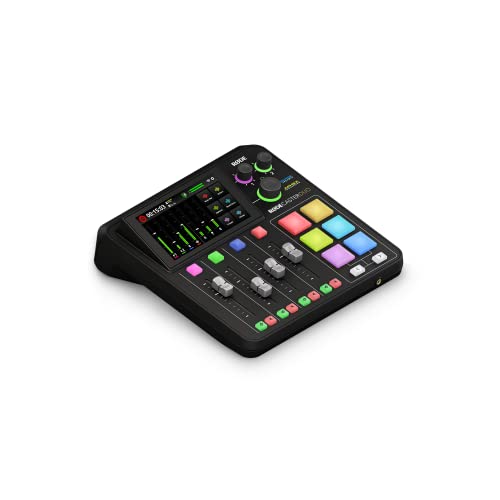
RØDE RØDECaster Duo — Best Compact
The RØDECaster Duo answers the most common podcast shape — one host, one guest — without asking buyers to fund four preamps they will never plug into. It keeps the family essentials: quiet studio preamps with real gain for dynamic microphones, APHEX voice processing, programmable pads and multitrack recording, in a chassis that fits the desks podcasting actually happens on.
For co-hosted shows it is arguably the sweet spot of the whole category. Each voice gets its own track and headphone control, remote guests join by Bluetooth or USB with mix-minus handled, and the touchscreen workflow will feel familiar to anyone who has seen the larger model in a studio. Streamers who podcast get a device fluent in both worlds.
The ceiling is honest: two microphone inputs is two. A show that regularly seats three or four voices should buy the Pro II instead and skip a replacement cycle. For the far larger number of shows built around one or two voices, the Duo delivers the flagship experience at a saner tier and footprint.
Strengths
- Flagship processing in a compact body
- Perfect two-voice workflow with multitrack
- Remote guest handling built in
Trade-offs
- Hard ceiling of two microphone inputs
- Still a premium-tier device
- Fewer pads and controls than the Pro II
Key specs: 2 studio preamps, APHEX processing, programmable pads, multitrack recording, Bluetooth and USB connectivity in a compact chassis
Best for: solo hosts and two-person podcasts / Not suited for: panels of three or more voices
Check the current price on Amazon

Tascam Mixcast 4 — Best for Video Podcasts
The Mixcast 4 takes the podcast-console formula and aims it squarely at creators who record on camera. Four microphone inputs with combo jacks, a clear touchscreen, sound pads and multitrack recording cover the audio completely, while its operation stays visual and direct enough to run mid-conversation without breaking eye contact with a lens — a real consideration that audio-only reviews ignore.
Voice processing, auto-mixing assistance and per-input control help panels stay balanced when guests lean in and out of their microphones, and the phone input brings remote guests in cleanly. Recorded multitrack files drop straight into editing software, and the same unit serves as a USB interface for streaming, so a video podcast and a live show share one desk.
Against the RØDECaster Pro II it trades a little ecosystem polish for its touchscreen-first approach and creator focus. Podcasters embedded in RØDE’s microphone and software world may prefer the flagship; video-first creators comparing the two on workflow often choose the Tascam. Either is a professional tool — the deciding factor is how you record, not which badge is better.
Strengths
- Four mic inputs with a clear touchscreen
- Strong fit for video podcast production
- Multitrack recording and streaming in one unit
Trade-offs
- Ecosystem polish trails the RØDE flagship
- Full-size footprint on camera desks
- Processing presets need initial dialling-in
Key specs: 4 XLR/TRS mic inputs, touchscreen, sound pads, multitrack recording, USB interface, phone input for remote guests
Best for: video podcasts and four-voice panels / Not suited for: audio-only solo shows wanting minimal gear
Check the current price on Amazon

Zoom PodTrak P4 — Best Portable
The PodTrak P4 removes the studio from podcasting. Battery powered and genuinely pocketable, it records four microphones to card with four independent headphone outputs, sound pads for intros and stingers, and phone or USB inputs for remote interviews — a complete panel podcast recorded at a kitchen table, a conference or a festival green room, with no laptop and no mains power.
Sound quality is honest Zoom: clean and entirely publishable, a step below the flagship consoles’ preamp polish, and entirely sufficient for speech in a decent room. Operation is button-and-menu simple, which suits producers who record in the field and edit later at a desk. As a backup recorder for a studio show it also earns its keep — many producers run one silently alongside the main rig.
Its limits are the portable format’s limits: small controls, screen-led workflow, and processing that is functional rather than broadcast-lush. As a primary studio desk for a daily show it would tire you; as the device that makes location podcasting trivially easy, nothing else here competes.
Strengths
- Battery-powered four-mic recording anywhere
- Four headphone outputs for panels
- Doubles as USB interface and backup recorder
Trade-offs
- Preamps a step below flagship consoles
- Small controls and menu-led workflow
- Processing is functional, not luxurious
Key specs: 4 XLR mic inputs, 4 headphone outputs, battery powered, sound pads, phone and USB guest inputs, records to card, USB interface mode
Best for: location, travel and field podcasting / Not suited for: a fixed studio’s only desk for daily shows
Check the current price on Amazon

MAONO Maonocaster AME2 — Best Budget Studio
The Maonocaster AME2 is built for the podcaster starting with one microphone and a phone’s worth of other sources. A proper XLR input with phantom power accepts real podcast microphones — condenser or dynamic — while Bluetooth brings in a phone for guests or music, eleven customisable pads fire your intro and effects, and a built-in battery frees the whole setup from the wall.
Its voice effects and processing are aimed at live and lightly-edited shows: presenters who stream or record straight to a finished file get reverb, voice changing and noise control that keep production simple. For a first show, a school programme or a community podcast, it compresses the buying list to one box plus a microphone, which is exactly what a starter budget needs.
Growth is the honest caveat. One microphone input is a hard ceiling for in-person guests, and its preamp and processing sit below the dedicated consoles above. Treat it as the first rung it is designed to be — excellent value for launching, with a clear step-up path when the show outgrows one voice.
Strengths
- Complete one-box starter for a single voice
- Customisable pads and Bluetooth guest input
- Built-in battery for flexible recording spots
Trade-offs
- One microphone input only
- Preamp quality below dedicated consoles
- Effects lean live-first rather than studio-deep
Key specs: XLR input with 48V phantom power, Bluetooth input, 11 customisable sound pads, built-in battery, effects and voice features for live and recorded shows
Best for: new solo podcasters and streamers / Not suited for: in-person multi-guest recording
Check the current price on Amazon

Yamaha MG10XU — Best Traditional Mixer
Not every podcaster wants a podcast console. Producers who already edit in full software, own an interface workflow, or mix other things — music, events, a house of worship — often prefer a traditional mixer, and the MG10XU is the category’s benchmark. Yamaha’s D-PRE preamps are quiet and honest, the layout is a real mixer’s layout, and USB carries the stereo mix to your recording software.
In podcast service it behaves like a small broadcast desk: four microphone channels with compression on the first two, effects for a touch of space on voices, and aux routing flexible enough to build a mix-minus for a remote guest with a little knowledge. It also moonlights — the same desk mixes a small live event or a band rehearsal, which dedicated podcast consoles cannot do.
What it does not do is record multitrack by itself or fire sound pads; your computer and software carry those jobs, and each voice will not get its own track unless you add an interface strategy. Podcasters who understand that trade and value a genuine, durable mixer will be served for a decade. Podcasters who want the console to be the studio should buy the consoles above.
Strengths
- Quiet, respected D-PRE preamps
- A real mixer that serves other duties too
- Durable metal build and simple USB workflow
Trade-offs
- No multitrack recording or sound pads
- Mix-minus for guests is a manual setup
- Stereo USB only — voices share one track
Key specs: 10 inputs, 4 mic preamps with D-PRE design, onboard SPX effects, USB audio interface, metal chassis
Best for: podcasters who also mix music or events / Not suited for: producers wanting one-box multitrack recording
Check the current price on Amazon
Comparison Table
| Pick | Badge | Key spec | Best for |
|---|---|---|---|
| RØDE RØDECaster Pro II | Best Overall | 4 preamps, APHEX processing, multitrack | guest, panel and video podcasts up to four voices |
| RØDE RØDECaster Duo | Best Compact | 2 preamps, compact, multitrack | solo hosts and two-person podcasts |
| Tascam Mixcast 4 | Best for Video Podcasts | 4 mic inputs, touchscreen, multitrack | video podcasts and four-voice panels |
| Zoom PodTrak P4 | Best Portable | 4 inputs, battery, portable recorder | location, travel and field podcasting |
| MAONO Maonocaster AME2 | Best Budget Studio | 1 XLR input, pads, Bluetooth, battery | new solo podcasters and streamers |
| Yamaha MG10XU | Best Traditional Mixer | 10-in analog mixer, USB, SPX FX | podcasters who also mix music or events |
How to Choose a Podcast Mixer by Show Format
Start with your largest regular recording, not your average one. A solo show needs one excellent preamp and processing; a co-hosted show needs two of everything, including headphone control; a panel needs four microphone inputs, four headphone outputs and multitrack recording so a coughing guest can be edited without surgery on the whole file. Buy for the panel you actually seat each month.
Decide where recording happens. Dedicated consoles record internally or over USB with each voice separate, and they work without a computer — valuable for reliability and for recording in rooms where a laptop fan and notifications are unwelcome. A traditional mixer plus software suits producers who already live in their editing suite and want the desk purely as front end.
Then check the guest path. Remote guests are the norm: look for Bluetooth or USB/phone inputs with automatic mix-minus, which prevents the guest hearing their own voice delayed. Building mix-minus manually on a plain mixer is possible but is the kind of friction that eventually gets a recording wrong at the worst moment.
Preamps, Processing and the Rest of the Chain
Dynamic podcast microphones are quiet by design and need substantial clean gain. A preamp that hisses at podcast gain will put a noise floor under every episode, so clean gain is the first specification to respect — it is why the flagship consoles justify themselves to serious shows. Condenser microphones need less gain but demand phantom power and a treated room, since they hear the room as faithfully as the voice.
Processing is the podcast console’s real product. Compression evens out a guest who drifts from the microphone, a gate or expander quiets the room between sentences, de-essing tames harsh consonants, and a touch of tonal shaping adds broadcast presence. Learn to use less than feels fun: heavy-handed processing fatigues listeners across a forty-minute episode, and you cannot un-bake it from a mixed recording — another argument for multitrack.
Spend in chain order. Room treatment and microphone placement beat everything; the microphone comes next; the mixer or console third. A mid-tier console in a quiet room with a well-placed microphone will out-record a flagship in an echoing kitchen every single episode.
Multitrack, Pads and Workflow Details That Matter Weekly
Multitrack recording is the feature podcasters most often wish they had bought sooner. Separate tracks per voice make editing humane: fix one guest’s level, remove one cough, rebalance a crosstalk moment. If your show has more than one regular voice, treat multitrack as a requirement, not an upgrade.
Sound pads shape a show’s identity and pace — intros, segment stingers, a live ad read’s backing, the occasional well-timed effect. Pads you can trigger confidently mid-conversation keep energy in the recording and minutes out of the edit. Check how pads are loaded and whether they can be customised with your own audio.
Small weekly frictions decide satisfaction: headphone mixes each guest controls themselves, a mute button reachable without looking, meters you can read at arm’s length, and a record indicator nobody can miss. The best podcast mixer is the one whose operation disappears by episode ten.
How to Set Up a Podcast Mixer for Your First Recording
Set the room before the gear: soft furnishings, curtains drawn, the quietest room in the building, and microphones placed a hand’s width from each mouth, slightly off-axis to soften plosives. Connect microphones with balanced XLR cables, seat every participant with headphones, and confirm each person hears themselves and the others at a comfortable level before anything records.
Set gain per voice with each speaker talking at real recording energy — people speak more quietly in a check than in conversation, so ask for a story, not a count. Aim for healthy peaks with clear headroom, engage gentle compression and processing presets if your console offers them, and record thirty seconds of test from every position. Listen back on headphones: hiss means gain staging needs work; echo means the room or microphone distance does.
Configure the guest path before the guest arrives. Connect the phone or computer, confirm the guest hears the studio without hearing themselves, and record a test exchange. Load your intro and effects onto the pads, label each microphone channel with the speaker’s name, and set the recorder to multitrack so every voice is separate in the edit.
During the record, watch levels rather than performing for them — a glance per minute keeps surprises rare. Note timestamps for edits as you go. Afterwards, back the files up in two places before anyone leaves; the most professional sentence in podcasting is ‘we have the recording, twice.’
Common Buying Mistakes
Buying a mixer before fixing the room — echo recorded through expensive preamps is still echo.
Recording a panel as a single stereo mix, then discovering one guest is unfixable in the edit.
Skipping the remote-guest test and meeting mix-minus echo live, on air, with the guest already talking.
Maxing out processing presets; over-compressed, over-gated voices fatigue listeners and cannot be un-baked.
Forgetting headphone comfort — guests who cannot hear themselves properly shout, drift off-mic and tire quickly.
Final Recommendation
For most podcasters the RØDECaster Pro II is the complete answer, and the RØDECaster Duo delivers the same philosophy sized for one or two voices. Video podcasters should compare the Tascam Mixcast 4 closely, field recorders will love the Zoom PodTrak P4, starters get real value from the Maonocaster AME2, and traditionalists are well served by the Yamaha MG10XU feeding their existing software.
Continue the build-out with Best Sound Mixers, Best Sound Mixers For Streaming, Best Audio Mixers Under $500, Best Usb Mixers and Best Sound Mixers For Musical Theatre. Buy for the show you record every week, treat the room first, and the mixer will repay you every episode.
Microphones, Rooms and the Decisions That Outrank Your Mixer
Every experienced podcast producer gives the same advice in the same order, and this guide will not pretend otherwise: treat the room, place the microphone, then choose the electronics. A closet of clothes, a room with curtains and soft furniture, or a few blankets hung for the session will improve a recording more than any console in this guide, because echo recorded at the microphone cannot be removed by processing — only disguised, badly. Dynamic microphones forgive lively rooms by hearing mostly what is close; condensers reward treated rooms with detail. Match the microphone family to the room you actually record in, not the room in the brochure.
Placement is the free upgrade nobody buys. A microphone a hand’s width from the mouth, slightly off-axis, with a pop filter or foam between, delivers the proximity and clarity listeners describe as ‘professional’ — and it does so through a budget console as surely as through a flagship. Producers who record guests should treat placement as hospitality: set the guest’s microphone for them, show them the distance with a hand gesture, and check their headphone level before the conversation starts. Guests relax when the technology is visibly handled, and relaxed guests sound better through any chain.
Only then does the mixer decision bite, and it bites on workflow rather than raw fidelity. The consoles in this guide differ less in how a single well-placed voice sounds than in how reliably a whole show gets recorded — multitrack safety, guest handling, processing that forgives a wandering talker. Choose the console whose workflow matches your show’s shape, and spend any money left over on the room and the microphones, where the audience will actually hear it.
Editing, Publishing and the Workflow After the Recording
A podcast mixer’s job ends at the recording; the episode’s life continues in the edit, and the choices made at the desk decide how heavy that edit is. Multitrack files from the consoles above let an editor work surgically — riding a quiet guest, muting a cough, tightening a crosstalk — while a stereo mix forces global compromises. Producers should decide their editing depth honestly: shows that publish nearly raw can lean on console processing and pads to produce in the moment, while interview shows with heavy edits should record clean multitracks and process in software, using the console as a pristine front end.
Levels and loudness deserve a shared language between desk and edit. Record with headroom — peaks healthy but never clipping, since clipped speech is the one flaw no edit repairs — and let the publishing stage bring the episode to the loudness listeners expect, consistent from episode to episode. Consistency is a subscription feature: audiences forgive many things, but reaching for the volume control between your episodes is a quiet reason to drift away, and it is entirely within the producer’s control.
Backups and file discipline complete the professional picture. Name files by episode and voice at the moment of recording, keep the raw multitracks after publishing, and store two copies in two places. Consoles that record to card and computer simultaneously — or a portable recorder like the PodTrak P4 running as a silent backup — convert the category’s worst day, the lost interview, into a non-event. The best podcast mixer is partly the one whose recording you never have to apologise for.
Growing a Show: From First Console to Small Studio
Podcast gear purchases go wrong most often at the growth seams — the second microphone, the first video camera, the move from remote guests to an in-person panel. Buyers can protect themselves by choosing consoles whose ceilings sit one growth stage beyond the current show. A solo host planning a co-host should skip single-input devices entirely; a two-person show with panel ambitions should weigh the four-input consoles now rather than after the first four-person recording goes wrong on a borrowed interface.
Video changes the desk’s job description. Cameras want clean audio feeds, operators want controls they can run without breaking eye contact, and streaming software wants a USB device that behaves. The Mixcast 4 and the RØDE consoles were picked partly for this trajectory, because the modern podcast’s growth path almost always passes through video, and a console that serves both stages saves a full replacement cycle.
Treat the first console kindly when you outgrow it: it becomes the travel rig, the backup recorder, the second-room desk for a new show. Podcast equipment bought with that cascade in mind is never wasted, which reframes the budget conversation — the question is not which console is cheapest today, but which sequence of consoles costs least across the show’s whole life. The picks in this guide were ordered with those sequences in mind.
Video Podcasting: The Mixer’s Second Job
The modern podcast’s growth path runs through video, and the mixer’s role quietly doubles when cameras arrive. It must still record pristine multitracks, but it must also feed cameras or a switcher a clean mix, give the host controls operable without breaking eye contact, and behave on a desk that is now also a set. The picks in this guide were weighed for this second job: the Mixcast 4’s touchscreen directness, the RØDE consoles’ compact footprints and pad layouts, and the PodTrak P4’s ability to record a video podcast’s audio anywhere a camera can be carried.
Audio-for-video has its own disciplines. Sync is the first: record the console’s audio and the camera’s scratch audio simultaneously, and the edit aligns them in seconds; skip the scratch track and you will align by lip-reading, once, and never skip it again. Levels are the second: video platforms reward the same consistent loudness as audio feeds, and the console’s meters plus a test upload to a private link will teach you your chain’s real behaviour faster than any tutorial.
Lighting and set design reach back into audio choices more than expected — a host who cannot see their co-host past a forest of boom arms converses worse, and worse conversation is worse audio. Compact consoles, low-profile microphone arms and headphone cables routed off-camera are production design decisions with sonic consequences. Buy the mixer as part of the set, not despite it, and the show will look the way it sounds: considered.
Monetisation, Sponsorship and Professional Polish
Podcasting’s economics reward polish in a specific way: sponsors and networks buy shows that sound like media, and the audible markers of professionalism are consistent levels, clean edits, confident processing and zero technical accidents. A dedicated console contributes to every one of those markers — not through magic, but by making the correct thing the easy thing, session after session. The producer who never loses a take, never clips a guest and never publishes a lopsided mix is practising a commercial discipline as much as a technical one.
Live-read advertisements and host-read sponsorships raise the desk’s value further. Pads that fire a backing bed at the right level, a mute that covers a cough mid-read, processing that keeps the host’s voice at broadcast weight through a forty-minute record — these are revenue features wearing technical clothes. Shows planning sponsorship should weigh them as such when choosing between the starter tier and the consoles above it.
None of this argues for buying polish before content. It argues for sequencing: establish the show’s voice and cadence on honest starter gear, then let the first sponsorship conversations — not the first unboxing videos — tell you when the flagship console has become a business expense rather than a hobby indulgence. The picks in this guide are ordered to make that sequence easy to follow in either direction.
Solo Podcasting: Doing More With One Voice
Solo podcasters are this guide’s quiet majority, and their needs deserve direct treatment rather than a scaled-down panel answer. One voice, recorded well, repeatedly, with minimum friction: that is the whole brief, and it favours different virtues — a superb single preamp, processing that keeps a lone voice present and consistent, pads for structure, and a setup that can be live within a minute of sitting down. The RØDECaster Duo is the deluxe answer; the Maonocaster class is the honest starter; and a simple traditional mixer into good software serves producers who already live in their editor.
Consistency is the solo show’s production value. Without guests to vary the sound, the host’s voice becomes the brand, and small drifts — a different microphone distance, a processing preset nudged and forgotten — are audible across episodes in a way panel shows forgive. Solo producers should photograph their settings, mark their microphone position physically, and resist mid-season gear churn; the audience bonds with a sound, and stability is a feature they can hear.
The solo format’s growth path is guests, and it arrives by phone before it arrives in person. A solo buyer should therefore check the remote-guest path even when buying for one voice today: Bluetooth or USB mix-minus on the consoles above converts the first interview from a technical expedition into a calendar invitation. Buy the solo desk whose second chapter you already like.
Podcast Networks, Classrooms and Shared Desks
Some podcast mixers serve institutions rather than individuals — a school media programme, a company’s content team, a community studio with six shows sharing one desk — and shared use rewrites the buying criteria. Presets and scene memories become the headline feature: each show’s settings recalled in seconds, each host’s processing stored under their name, so Monday’s history podcast and Thursday’s sports show inherit the same hardware without inheriting each other’s sound. The flagship consoles in this guide earn institutional premiums exactly here.
Durability and simplicity trade places in shared environments. Controls will be operated by the least experienced user on the rota, microphones will be plugged by optimists, and the desk that survives is the one whose correct operation is obvious and whose incorrect operation is hard. Institutions should weight the touchscreen-and-preset generation of consoles heavily, keep a one-page house setup laminated at the desk, and treat the portable recorder as the overflow room’s complete studio.
Finally, shared desks need shared discipline: a booking habit for the recorder’s cards, a naming convention for files, and a single person who owns firmware updates. None of that is purchasable — but the consoles that support presets, profiles and clear labelling make the discipline achievable, which is the closest a buying guide can come to selling it.
Sponsorship-Ready Audio: What Networks and Advertisers Hear
Shows rarely hear themselves the way a network or sponsor does, and the difference is instructive. A professional listener scans for the tells in the first ninety seconds: consistent loudness, a voice that sits forward without strain, room tone that disappears beneath speech, edits that do not announce themselves, and the total absence of technical accidents. Every one of those tells is influenced at the mixer — by processing set once and left alone, by levels recorded with headroom, by multitracks that let an editor work invisibly — which is why this guide treats console discipline as a commercial asset rather than a hobbyist’s fussiness.
Advertisers also buy predictability. A show that sounds identical in March and October, whose host reads a sponsorship in the same polished voice as the interview around it, is a safe placement; a show whose sound wanders with its producer’s experiments is a risk wearing a media kit. The presets and profiles on the flagship consoles in this guide are, in this light, brand-consistency tools: they freeze the show’s sound so the content can vary without the production wobbling.
None of this requires a flagship on day one, and this guide has been careful to order its picks as a ladder. It requires only that each upgrade be made when the show’s ambitions — a network conversation, a live tour, a video expansion — have genuinely reached the current desk’s ceiling. Bought in that order, podcast equipment stops being a cost centre and becomes what it is for working shows: the machinery of being taken seriously.
Hearing the Difference: A Simple Self-Test Before You Buy
Podcast gear is unusually testable, and producers should exploit that before spending flagship money. Record the same two minutes of your own voice — a passage you can read identically — through your current setup and through any candidate console a dealer, a friend or a rental can provide, at matched levels, in your real room. Listen the next day, on the headphones your audience’s phones imitate, and score three things only: how much hiss sits under your quietest sentence, how your voice survives your loudest laugh, and how tired your ears are after ten minutes of your own show. Those three scores predict your satisfaction with a podcast console more accurately than any specification comparison, because they are the show your listeners actually hear.
Run the workflow test in the same sitting. Time yourself from sitting down to a recording you trust: microphone placed, levels set, guest path checked, pads loaded. The consoles in this guide separate themselves here more than in raw fidelity — the flagship that is ready in ninety seconds will be used correctly on the tired Tuesday in November, and the complicated rig will be used approximately, which listeners hear as inconsistency across a season. Buy the desk whose correct operation is easiest to repeat, and let that discipline, compounded across hundreds of episodes, be your definition of the best podcast mixer.
Frequently Asked Questions
Do I need a mixer or an audio interface for podcasting?
A podcast console is effectively an interface plus mixer plus recorder with podcast-specific processing and pads. If you record multiple voices, want processing without plugins, or record away from a computer, choose a console. A simple interface suffices for a solo voice recorded straight into editing software.
Why does multitrack recording matter so much?
Because each voice gets its own track, you can fix levels, remove noises and rebalance guests independently in the edit. A panel recorded as one stereo file locks every mistake in permanently. For any show with regular guests, multitrack is the single most valuable feature.
What is mix-minus and do I need it?
Mix-minus sends remote guests the full programme minus their own voice, preventing the disorienting echo of hearing themselves delayed. Any podcast with phone or online guests needs it; dedicated consoles provide it automatically, while plain mixers require manual routing.
How much gain do podcast microphones need?
Popular dynamic podcast microphones need substantial clean gain — more than many basic interfaces provide without hiss. This is a core strength of the flagship consoles here. If you use a quiet dynamic mic with a weak preamp, an inline gain booster is the common remedy.
Can a podcast mixer also live-stream?
Yes. Most picks here double as USB interfaces for streaming software, and several include pads, processing and guest inputs designed for live shows. Podcasters who also stream often choose the RØDECaster Duo or Mixcast 4 for exactly this overlap.
Should I buy a traditional mixer like the MG10XU instead?
If you already record and edit in full software, own your workflow, and want a desk that also mixes music or events, a traditional mixer is a durable, honest choice. If you want recording, processing and pads in one box with no computer required, a podcast console fits better.


