Disclosure: airfryerkitchensupply.com is reader-supported. When you buy through links on our site, we may earn an affiliate commission at no extra cost to you.
Where to buy
Musical theatre mixing is unforgiving: dozens of wireless voices, a live band, sound effects and an audience that notices a single missed cue. The consoles below were confirmed for their exact models, because theatre purchases are usually committee decisions — a board, a school or a venue signs off, and the model on the invoice must be the model that arrives. Buy from listings that name the full model, and budget for the case, networking and expansion your production actually needs alongside the desk itself.
Behringer X32 — check price on Amazon
Midas M32 LIVE — check price on Amazon
Allen & Heath SQ-5 — check price on Amazon
Allen & Heath QU-24C — check price on Amazon
PreSonus StudioLive 32S — check price on Amazon
Behringer X32 RACK — check price on Amazon
Choosing the best sound mixers for musical theatre means choosing for the hardest mixing job in live sound. A theatre mixer — the A1 — rides lead vocals line by line, sometimes following the script fader-by-fader for two hours, while a second operator may handle the band. The console must recall scenes instantly and identically every night, manage large wireless counts without fuss, and fail, if it ever fails, in ways the show can survive. Those demands, not raw channel counts, drive every pick below.
All six picks are digital, and that is deliberate. Scene recall, per-channel processing, digital snakes and remote iPad control have become the working grammar of theatre sound; an analog desk, however lovely, cannot snapshot forty channels of EQ and dynamics between a rehearsal note and tonight’s performance. Within digital, the picks split by scale: full production consoles for mainstage work, mid-size desks for regional and large school theatres, and rackmount brains that put the processing in a rack and the control on a tablet.
A note on honesty: theatre consoles are long-lived institutional purchases, and listings change as revisions evolve. Every model below was cross-checked against its Amazon listing before earning a link. Where your production needs a specific expansion card, stagebox or network protocol, verify that exact accessory separately — the console is the heart of the system, not the whole of it.
In this guide
Quick Picks
Behringer X32 — Best Overall. The theatre workhorse of the last decade: deep scene recall, motorised faders and an enormous trained-operator base at a community-theatre-friendly tier. Check the current price on Amazon
Midas M32 LIVE — Best Sound Quality. The X32 workflow’s upmarket sibling: the same theatre-friendly architecture built around Midas PRO preamps and a more roadworthy chassis. Check the current price on Amazon
Allen & Heath SQ-5 — Best for Growing Companies. A step-up console with genuine headroom: 48 channels and 36 buses in a compact frame that ambitious companies will not outgrow next season. Check the current price on Amazon
Allen & Heath QU-24C — Best Mid-Size Value. The approachable mid-size desk: motorised faders and scene recall in a format volunteer operators learn quickly, plus multitrack recording for cast albums and archives. Check the current price on Amazon
PreSonus StudioLive 32S — Best for Recording the Show. For theatres that record everything: a capable live desk whose recording and software integration are the strongest in this roundup. Check the current price on Amazon
Behringer X32 RACK — Best Rackmount Brain. All the X32 processing in a rack, controlled from a tablet: the answer for booths with no room for a desk and designers who mix from the stalls. Check the current price on Amazon
How These Picks Were Chosen
Selection started with theatre workflow, not concert workflow. Scene and snapshot recall had to be deep, fast and safe — theatre operators store cues per song, per scene, sometimes per line. DCA and mute-group architecture mattered because riding eight ensemble DCAs while soloing a lead is the actual job. Theatre software features — cue lists, channel naming and colour coding, remote control for the designer in the stalls — were weighted as heavily as preamp quality.
Input strategy came second. A school production with sixteen body packs and a six-piece band needs a different desk from a regional theatre running thirty-two wireless channels and a full orchestra pit. The picks therefore span frame sizes and expansion paths, and each review states the production scale it genuinely suits, including the point at which you should step up to the next console rather than stretch this one.
Reliability and support closed the list. Consoles with long production runs, deep rental-house familiarity and strong user communities are safer institutional buys than exotic desks, because the person mixing your next show may not be the person who mixed the last one. Training material, show-file compatibility and hire availability all count as features in theatre.
The 6 Best Sound Mixers for Musical Theatre, Reviewed

Behringer X32 — Best Overall
The X32 earned its theatre dominance honestly. Its scene system stores the full console state and recalls it in a button press, its motorised faders show the A1 exactly where every level sits, and its DCA layout maps naturally onto leads, ensemble, band and effects. For schools, community theatres and regional companies, it covers a full musical — twenty-plus wireless channels, a band, playback and effects — without exotic expansion.
The ecosystem is the second half of the argument. Digital stageboxes extend inputs over a single network cable, personal monitor mixers serve the pit, and the remote apps let the designer adjust from the auditorium while the operator stays at the desk. Because so many venues own one, operators are easy to find, show files travel between productions, and a generation of tutorials answers most questions before you ask them.
Its limits are scale and age. Very large productions will outgrow its input count and bus architecture, and its interface, while logical, rewards training — budget real rehearsal time for a new operator to learn cue workflow. Within its class, though, nothing combines capability, community and price tier as completely, which is why it remains the default recommendation for most theatres.
Strengths
- Deep, dependable scene and cue recall
- Huge operator and tutorial community
- Expandable with digital stageboxes
Trade-offs
- Large shows can outgrow input and bus counts
- Interface rewards formal training time
- Accessory ecosystem adds to total cost
Key specs: 40 inputs, 25 buses, 32 mic preamps, motorised faders, scene recall, digital snake expansion, remote app control
Best for: schools, community and regional theatres / Not suited for: very large productions needing 48+ wireless channels
Check the current price on Amazon
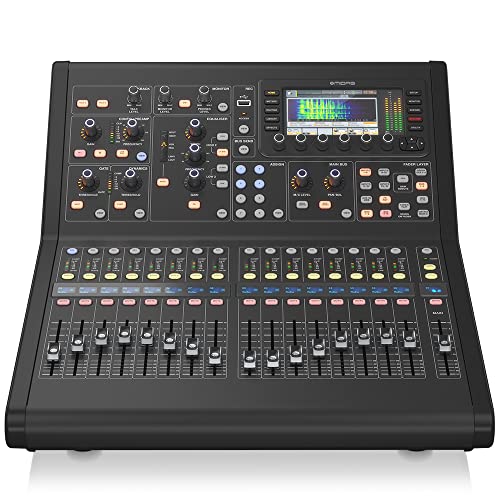
Midas M32 LIVE — Best Sound Quality
The M32 LIVE answers the most common X32 question — what if we love the workflow but want better sound and build? Its 32 Midas PRO preamplifiers are the headline: quiet, detailed and flattering to voices, which is precisely what a theatre desk spends its life amplifying. Wireless receivers for principal singers reveal their differences through good preamps, and the M32 makes modest microphones sound like considered choices.
Operationally it will feel familiar to any X32 operator, which protects a theatre’s training investment while upgrading the hardware. The chassis, faders and screen are built to a visibly higher standard, suiting venues where the console tours between spaces or anchors a flagship mainstage. Scene management, DCAs and remote control carry the same theatre logic, deepened rather than reinvented.
The decision between M32 and X32 is therefore about budget allocation, honestly stated. If your wireless fleet and loudspeakers are already strong, the M32’s preamps and build are a real upgrade. If the same money would transform your microphones instead, transform the microphones first — the chain is only as strong as its first link.
Strengths
- Midas PRO preamps flatter theatrical voices
- Familiar workflow for X32-trained operators
- Premium build for flagship venues
Trade-offs
- Costs meaningfully more than the X32
- Same broad input ceiling as its sibling
- Best appreciated with a strong mic fleet
Key specs: 40 inputs, 32 Midas PRO mic preamps, motorised faders, premium build, scene recall, network expansion
Best for: regional theatres upgrading sound quality / Not suited for: first-console buyers on tight budgets
Check the current price on Amazon

Allen & Heath SQ-5 — Best for Growing Companies
The SQ-5 is the console for the theatre that keeps getting bigger. Forty-eight channels and thirty-six buses swallow a large-cast musical — principals, ensemble, full band, effects returns and playback — while the compact frame still fits a cramped booth or a school hall’s control position. Its processing is fast and modern, with the responsive touchscreen workflow operators praise on long tech rehearsals.
Theatre strengths are specific. Scene memories are comprehensive, channel libraries speed up building a show file from scratch, and the DCA and group architecture scales gracefully from a two-hander to a full company number. Expansion options let the system grow — more stage inputs, more outputs for distributed loudspeakers — without replacing the desk, which is how institutional budgets prefer to grow.
It sits a tier above the X32 family in price and capability, and its depth means a new operator faces a real learning curve. For a company whose productions have started to strain a smaller desk — running out of buses before running out of ideas — the SQ-5 is the natural next decade of console.
Strengths
- 48 channels and 36 buses give real headroom
- Modern, responsive touchscreen workflow
- Expansion path avoids future replacement
Trade-offs
- Higher tier than entry digital consoles
- Depth requires structured operator training
- Compact frame means fader count is modest
Key specs: 48 channels, 36 buses, 17 motorised faders, high-resolution processing, extensive I/O expansion options
Best for: growing regional and large school theatres / Not suited for: small productions with simple cue structures
Check the current price on Amazon

Allen & Heath QU-24C — Best Mid-Size Value
The QU-24C suits the theatre reality that the operator may be a talented volunteer rather than a career A1. Its layout is deliberately console-like — a fader per channel, clear sections, limited menu-diving — so a new operator can mix a show confidently after focused training, while scene recall still gives the designer full cue control. That balance of approachability and depth is rare and valuable.
Multitrack USB recording is a genuine theatre feature, not a bonus: record the band and vocals separately at a dress rehearsal, and the team can practise mixes, prepare understudy tracks or produce an archival recording without a separate rig. Remote app control lets the designer walk the auditorium during tech and adjust from the seats.
Choose it when your channel counts sit comfortably inside its frame — a typical school or community musical fits well — and when operator approachability outranks expansion ambition. Companies planning rapid growth in wireless counts should look at the SQ-5 instead; companies valuing a desk the whole team can learn will be happy here for years.
Strengths
- Approachable layout for volunteer operators
- Multitrack recording for rehearsals and archives
- Motorised faders with full scene recall
Trade-offs
- Fixed frame limits very large shows
- Fewer expansion options than SQ series
- Chrome finish shows booth wear honestly
Key specs: 30 inputs / 24 outputs, motorised faders, scene recall, multitrack USB recording, remote app control
Best for: schools and community theatres with volunteer crews / Not suited for: productions needing 40+ input channels
Check the current price on Amazon
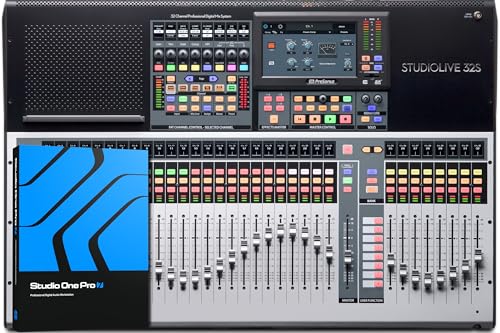
PreSonus StudioLive 32S — Best for Recording the Show
Some theatres treat recording as a side task; others — training programmes, companies producing cast albums, venues archiving every production — treat it as core work. The StudioLive 32S is built for the second group. Its integration with studio software turns the console into the front end of a recording studio, capturing multitrack performances that can be mixed properly after the run, not merely documented.
As a live theatre desk it holds its own: motorised faders, scene management and networked audio expansion cover standard musical workflow, and the Fat Channel processing gives each voice a complete channel strip of EQ, dynamics and effects. Schools with media programmes particularly benefit, because students learn one ecosystem that spans the stage and the studio.
The trade-off is focus. Its theatre-specific cue culture is thinner than the X32’s enormous community knowledge base, and operators from other ecosystems face a fuller relearn. If recording is central to your programme, that investment pays back every production; if it is incidental, the more theatre-native desks above are the straighter path.
Strengths
- Outstanding multitrack recording integration
- Complete per-channel processing strips
- One ecosystem for stage and studio learning
Trade-offs
- Smaller theatre-specific user community
- Fuller learning curve for new operators
- Recording strengths wasted if unused
Key specs: 32 channels, motorised faders, network audio, deep recording integration with included studio software, scene recall
Best for: theatres and schools that record productions seriously / Not suited for: venues that never record beyond a stereo archive
Check the current price on Amazon

Behringer X32 RACK — Best Rackmount Brain
The X32 RACK reframes the theatre console: the processing lives in a rack — ideally at stage side with the wireless receivers, shortening every cable run — and the operator mixes from a tablet or laptop wherever the listening is best. For black-box theatres, school halls without a booth, and designers who want to sit in row F during tech, that freedom is transformative rather than gimmicky.
Because it runs the X32 ecosystem, scenes, show files and operator knowledge transfer directly from the full console, and the same stageboxes and personal monitoring expand it. A small physical controller can be added for operators who want real faders for the principals while the ensemble rides tablet DCAs — a hybrid many small companies find ideal.
The dependency is the trade: your console is now only as reliable as your tablet, battery and Wi-Fi. Discipline is mandatory — a dedicated router, a charged backup device, and a tested wired fallback. Companies unwilling to enforce that discipline should buy a surface; companies that embrace it gain a full theatre desk at the lowest footprint and tier in this guide.
Strengths
- Full X32 power in a tiny footprint
- Mix from the best seat in the house
- Shares show files with X32 consoles
Trade-offs
- Depends on tablet, battery and Wi-Fi discipline
- No physical faders without an add-on controller
- Front-panel control is emergency-only
Key specs: Rackmount digital mixer, 32 input channels via expansion, full X32 processing, tablet and computer control, scene recall
Best for: black-box spaces and booth-less venues / Not suited for: operators who insist on a full physical surface
Check the current price on Amazon
Comparison Table
| Pick | Badge | Key spec | Best for |
|---|---|---|---|
| Behringer X32 | Best Overall | 40-in digital, scenes, motorised faders | schools, community and regional theatres |
| Midas M32 LIVE | Best Sound Quality | 40-in, Midas PRO preamps | regional theatres upgrading sound quality |
| Allen & Heath SQ-5 | Best for Growing Companies | 48ch / 36-bus digital | growing regional and large school theatres |
| Allen & Heath QU-24C | Best Mid-Size Value | 30-in digital, multitrack USB | schools and community theatres with volunteer crews |
| PreSonus StudioLive 32S | Best for Recording the Show | 32ch digital, studio-grade recording | theatres and schools that record productions seriously |
| Behringer X32 RACK | Best Rackmount Brain | Rackmount X32 processing, app control | black-box spaces and booth-less venues |
How to Choose a Theatre Console by Production Scale
Count your largest realistic show, then add headroom. List wireless channels for principals and ensemble, band inputs (keyboards are stereo and multiply fast), playback devices, effects returns and spare channels for the microphone that fails in act two. Most school musicals land between sixteen and twenty-four inputs; regional productions run twenty-four to forty. Buy the frame that covers your largest show plus roughly a quarter again — consoles are decade purchases, and casts grow.
Buses matter as much as inputs. Ensemble groups, band groups, reverb sends, foldback to the pit and stage, and outputs for front fills, delays and under-balcony speakers all consume architecture. A desk that fits your inputs but starves your buses will fight you every tech week; the SQ-5’s generous bus count is why growing companies choose it.
Finally, budget the system, not the desk: stageboxes, network cable, a router for remote control, cases, and training time. A slightly smaller console with its full ecosystem serves a theatre better than a flagship desk starved of the accessories that make it theatrical.
Scenes, Cues and the A1’s Craft
Theatre mixing is cue-driven. Build scenes the way the show is structured: a base scene per song or scene of dialogue, with incremental changes layered carefully so a missed cue degrades gracefully rather than catastrophically. Use scene safes to protect channels that must never jump — the conductor’s foldback, the playback level, the god mic — from recall surprises.
DCAs are the A1’s hands. Assign principals individually, ensemble in logical groups (by section, by side of stage, by costume-change availability), band as a group with keys separate, and effects as their own control. In performance the operator rides a handful of DCAs and the current lead, following the script’s marked lines; good DCA architecture is what makes that humanly possible across two hours.
Rehearse the failure modes. Know what you do when a body pack dies mid-song (spare on a known channel, a handheld at the stage manager’s position, a scene that rebalances), when the tablet disconnects, when playback glitches. The console features in this guide — fast scene access, clear labelling, remote control — earn their keep precisely in those thirty seconds.
Wireless, Playback and the Rest of the Theatre Chain
A theatre desk is only as good as its wireless fleet. Budget and plan channels together: the finest console cannot rescue overloaded RF or failing transmitter batteries. Coordinate frequencies for your venue, keep receivers at stage side with short antenna runs where possible, and let the digital snake carry audio to the desk — one reason rackmount and stagebox architectures suit theatre so well.
Playback deserves console-level respect. Sound effects and click or backing tracks should arrive on clearly labelled channels with their own DCA, a backup playback device ready on spare inputs, and levels rehearsed against the band, not guessed at the half-hour call. Many theatres run playback through dedicated software with the console handling routing and final balance.
Foldback completes the picture: the pit, the stage and the dressing rooms all need to hear what they need — conductor, principals, cues — and personal or distributed monitoring from the console’s buses is what delivers it. When comparing desks, count your foldback needs as seriously as your front-of-house ones.
How to Set Up a Theatre Console for a Production
Begin at load-in with the system, not the show file: stageboxes placed, network runs tested, wireless receivers racked and frequency-coordinated, loudspeakers connected and the console updated and reset to a known state. Label every input at both ends before a single microphone is checked; theatre troubleshooting at tech rehearsal is won or lost on labelling done calmly days earlier.
Build the show file in layers. Create the base channel layout — principals, ensemble, band, playback, effects — with names, colours and icons that a relief operator can read at a glance. Set gains during sound check with singers at performance energy, store a sound-check scene, and only then begin programming production cues on top of that foundation.
Program cues with the stage manager’s book open beside you. Each cue gets a number matching the book, a scene name that describes it (‘Act 1 — Opening — full company’), and safes set for foldback and playback. Walk the full cue list in a dry tech before adding the cast, pressing GO through the show and confirming every recall lands where the book says it should.
Finally, protect the file. Save copies off the console — a USB drive in the prompt book, a cloud copy with the production folder — and record the console’s settings for RF, network and output routing. The show file is weeks of work; treat it with the same respect as the set and the costumes.
Common Buying Mistakes
Buying inputs but not buses — running out of groups and foldback paths in tech week despite channels to spare.
Programming cues without scene safes, so one recall slams the conductor’s foldback or the playback level mid-show.
Skipping operator training time; a deep console mixed by guesswork sounds worse than a simple desk mixed with confidence.
Treating wireless as an afterthought while overspending on the console — the chain fails at its weakest link.
Keeping the only copy of the show file on the console itself.
Final Recommendation
Most theatres should start the conversation at the Behringer X32: it is the proven, affordable centre of modern musical-theatre sound, and the Midas M32 LIVE upgrades the same workflow for venues that prize vocal sound. Growing companies belong on the Allen & Heath SQ-5, approachable mid-size productions on the QU-24C, recording-focused programmes on the StudioLive 32S, and booth-less spaces on the X32 RACK.
Keep researching the wider system with Best Sound Mixers, Best Sound Mixers For Churches, Best 16 Channel Mixers, Best Digital Mixers and Best Sound Mixers For Streaming. In theatre, the best console is the one your whole team can run flawlessly on a wet Tuesday in February — choose for that night, not for the brochure.
The A2, the Pit and the Rest of the Theatre Sound Team
Console choice ripples through the whole sound team, and a wise theatre buys for the team rather than the chair. The A2 — the backstage engineer who fits, checks and swaps microphones — lives in the console’s ecosystem too: wireless receivers racked with the stagebox, spare channels pre-built in the show file, and a talkback path that lets the desk reach the wings instantly. When a principal’s microphone fails mid-number, the rescue is a choreography between A1 and A2 that the console either supports gracefully — a spare channel one fader away, labelled and gained — or obstructs. Build those rescue channels into every show file as a matter of doctrine.
The pit has its own console relationship. The conductor needs a foldback mix they can trust absolutely — principals, click or backing where used, and their own communication path — and musicians increasingly take personal monitor mixes from the console’s ecosystem, which the X32 family’s personal mixers exemplify. A console decision is therefore also a pit decision: count the monitor worlds you must serve (conductor, band sections, stage foldback, dressing-room programme) as seriously as the audience mix, because a show the band cannot hear properly cannot be mixed into sounding right.
Front-of-house is only one of the console’s audiences. Stage managers need cue lights and calls fed by programme sound; access performances may need hearing-enhancement feeds; the archive or stream, where licences allow, needs its own balanced mix rather than a copy of a room mix tuned for loudspeakers. The desks in this guide earn their theatre status partly on this invisible architecture — outputs, buses and routing that serve five audiences at once without breaking the A1’s concentration on the one in the seats.
Budgeting a Theatre Console Across a Decade
Theatres buy consoles the way they buy roofs: rarely, and for a long time. That horizon changes the arithmetic. A desk that costs more but serves twelve years of productions, with show files, training and accessories accumulating around it, is usually cheaper per production than a bargain replaced twice — and the mid-run replacement is the truly expensive path, because it strands the training, the files and the spares bought for its predecessor. When a committee compares consoles, insist the comparison runs across the expected service life, including the expansion the growth plan implies.
Accessories are not accessories. The stagebox that shortens every cable run, the personal mixers that free the pit, the case that protects the desk between venues, the router that makes remote control trustworthy and the training days that make the operator fluent — these belong in the console budget line, presented to the board as one system. Theatres that fund the desk alone routinely discover the truth in tech week, the most expensive classroom in the building.
Protect the investment institutionally. Keep a service and firmware log with the show files; budget a modest annual line for cables, batteries for the ecosystem and the occasional repair; and record who is trained on the desk, because a console only one person alive can operate is a risk wearing a bargain’s clothes. The picks in this guide were chosen partly for the depth of their user communities — in a decade-long purchase, the crowd that answers questions at midnight is a feature with a real cash value.
Sound Design Versus Mixing: What the Console Owes Each Craft
A musical’s sound is two crafts sharing one desk. The sound designer builds the world — choosing microphones and loudspeakers, voicing effects and playback, deciding how the band and the voices should meet — and expresses that design in the console’s architecture: its scenes, its processing, its routing. The A1 then performs that design nightly, riding voices against the band with a concentration closer to playing an instrument than operating equipment. A theatre console serves both crafts or it serves neither: the designer needs depth and precision in programming; the operator needs clarity and forgiveness in performance.
This is why scene architecture and labelling discipline, discussed earlier in this guide, matter beyond tidiness. The designer’s intentions survive contact with a Tuesday-night relief operator only when the show file communicates them — scene names that describe, DCA assignments that match the score’s logic, safes that protect the design’s load-bearing choices. When a theatre evaluates consoles, it should rehearse this handoff mentally: can a designer build clearly here, and can an operator perform safely here, on the same file?
Playback and effects deserve a designer’s respect at purchase time. Count the playback channels your designer actually uses — modern productions layer atmosphere, spot effects and musical reinforcement across many channels — and confirm the console’s scene system can choreograph them with the voices rather than against them. The desks above were chosen with this dual citizenship in mind; the cheapest console that satisfies the operator but frustrates the designer will be paid for twice, once in money and once in every tech rehearsal that runs long.
Tech Week: Turning a Console Into a Show
Tech week is where a theatre console purchase is truly judged, and its lessons deserve recording for any company choosing a desk. The pattern that works is boring in the best way: the show file is built before the cast arrives, cue by cue from the stage manager’s book, with levels roughed from the band call and vocal sound checks rather than invented under pressure. Consoles with fast, legible scene management — the quality this guide weighted heavily — save hours across a tech, and hours in tech week are measured in overtime, morale and the cast’s remaining voices.
The operator’s physical setup matters as much as the file. Script marked with every cue and every line-ride, a lamp that lights the book without lighting the auditorium, talkback tested to stage management, band and dressing rooms, and a chair the A1 can inhabit for three hours without drifting attention — these are console features in the only sense that matters, and a desk whose layout fights the book will lose to a lesser desk whose layout serves it. When your theatre demos consoles, bring the prompt book and a scene list, not just a microphone.
Previews are the file’s final education. Levels that balanced in an empty room shift against an audience’s absorption and energy; cues that seemed leisurely compress when costumes and nerves arrive. A console culture that treats the file as a living document — adjusted nightly, saved religiously, versioned clearly — is what turns a good desk into a great production. The hardware enables it; the discipline delivers it.
Training the Next Operator: Consoles as Teaching Tools
Every theatre eventually faces the handover: the A1 who built the show leaves, and the production’s sound must survive them. Consoles differ enormously in how teachable they are, and this guide’s picks reflect that hidden criterion. Desks with vast user communities — the X32 above all — come with an informal curriculum of tutorials, shared show files and local operators who can step in, which for schools and community theatres is worth more than a specification advantage. A student can learn theatre mixing on an X32 from the internet at midnight; that ecosystem is a training department you do not have to fund.
Structure the teaching deliberately. New operators should learn in layers: first the signal path and gain, then the base mix, then DCA riding against a recording of the show, and only then live cue execution with the book. Recording a performance’s multitrack or stereo feed and letting a trainee mix against it at a rehearsal desk is the closest thing theatre has to a flight simulator, and consoles with easy recording — the QU-24C and StudioLive in this guide — quietly excel as teaching machines for exactly this reason.
Document as you teach. The venue’s own notes — this room’s quirks, this production’s danger cues, this desk’s local settings — become the curriculum for the next handover. Theatres that keep them discover their console investment compounding; theatres that rely on one person’s memory discover the opposite, usually during a sold-out Saturday. Choose the desk your whole organisation can learn, and then teach it like you mean it.
Amateur, School and Professional Tiers: Scaling the Same Craft
The craft of theatre mixing is identical at every tier; only the scale and the safety nets change, and consoles should be chosen with that continuity in mind. A school production with twelve wireless channels and a five-piece band is practising the same DCA discipline, the same cue architecture and the same failure choreography as a regional flagship — which is why this guide’s picks form a ladder rather than separate worlds. Skills learned on the QU-24C transfer to the SQ-5; show-file thinking learned on the X32 transfers everywhere, including to desks not yet invented.
Schools deserve one specific warning: buy for the largest show in your calendar, not the average one, because the spring musical will find every missing channel and bus in the building. The modest premium for the frame size above your current need is the cheapest insurance in educational theatre, repaid the first time a director adds a choir, a second keyboard and three principals’ worth of understudies in the same production meeting.
Professional and regional companies should scale by architecture rather than channels alone. Bus counts, output distribution for complex loudspeaker designs, network redundancy and the depth of the scene system decide whether a desk survives a flagship production — the SQ-5’s case in this guide. At every tier, the question is the same and it is not ‘how many channels’ but ‘can our team perform this show, safely, nightly, on this desk’.
Accessibility, Relaxed Performances and the Console’s Wider Duties
Modern theatres serve audiences whose needs reach the console directly, and a purchasing decision should reckon with those duties. Hearing-enhancement systems — induction loops, infrared or streaming feeds — take their signal from the desk, and they deserve a properly balanced, speech-forward mix rather than an afterthought copy of the house mix; consoles with flexible output routing and spare buses, a theme throughout this guide, make that a setting rather than a workaround. The operator who can ride a dedicated access mix during a relaxed performance is practising the same DCA craft in the audience’s service.
Relaxed and signed performances add their own console notes: house-light states change what the operator can see, interpreters and caption positions may need programme feeds, and the sound design itself is sometimes adjusted — gentler effects, tamed peaks — through scenes the desk must store and recall as faithfully as the standard show. A console with deep, trustworthy scene management is therefore an accessibility tool, and theatres should say so in funding applications, because it is true.
Backstage access matters too: dressing-room programme, stage management calls and the show relay all flow from the console’s outputs in most buildings. Count them when you count buses. The desk that serves the whole building’s listening — audience, access audience, cast, crew and pit — is the desk this guide has been describing all along, under its shorter name: a theatre console.
Orchestral and Pit Considerations for Theatre Desks
The pit is the console’s second stage, and its needs shape theatre purchases more than brochures admit. Orchestral parts arrive as many delicate channels — strings that punish harsh preamps, woodwinds that vanish under heavy-handed compression, a rhythm section that needs its own group logic — and the desk must present them to the audience mix as a coherent ensemble rather than a collection of close microphones. This is why bus architecture and group discipline, this guide’s recurring theme, matter as much for the pit as for the voices above it.
Conductor and musician monitoring is a world of its own. The conductor’s mix is a safety system: principals, click or track where used, stage management communication and their own sense of the house balance. Musicians’ personal mixes, increasingly served from the console’s ecosystem, free the A1 from a dozen compromise foldback sends and let each player protect their own hearing and timing. When a theatre counts a console’s monitor capacity, it should count these worlds individually, because ‘enough auxes’ has ended more tech rehearsals than any channel shortage.
Amplified and acoustic balance is the pit’s final lesson. A musical’s orchestra is partly a loudspeaker product and partly the room’s own sound leaking over the pit rail, and the console’s job includes blending the two without a visible seam. Engineers who master that blend — riding the pit as one DCA organism against the voices — are practising the highest form of the theatre craft, and the desks in this guide were chosen partly for how gracefully they put that organism under two hands.
Frequently Asked Questions
How many channels does a school musical need?
Most school musicals run comfortably on 24 to 32 channels: twelve to twenty wireless microphones, a small band with stereo keyboards, playback and effects returns. Count your largest cast number, add spares for failures, then choose a frame with headroom rather than an exact fit.
What is a DCA and why do theatre operators rely on it?
A DCA is a remote-control group for channel levels. The A1 assigns principals, ensemble groups, band and effects to DCAs and rides a handful of controls instead of dozens of faders, following the script line by line. Good DCA architecture is the core skill of theatre mixing.
Can one person mix a whole musical alone?
Yes, and most productions are mixed by a single A1, sometimes with an A2 backstage managing microphones. Console features — scenes, DCAs, clear labelling — exist precisely to make one-operator mixing reliable. Very large productions may add a second operator for the band.
Do we need a digital snake and stagebox?
For most theatres, yes, eventually. A stagebox at stage side shortens microphone and wireless cable runs, cleans up the auditorium, and expands inputs over one network cable. Rackmount consoles like the X32 RACK are designed around exactly this architecture.
Should our theatre buy analog to save money?
For musical theatre, rarely. Scene recall, per-channel processing and remote control are not luxuries in cue-driven mixing; they are the workflow. A modest digital desk serves a musical better than a larger analog one, which is why every pick in this guide is digital.
How do we record our production for the cast?
Use a console with multitrack recording — the QU-24C and StudioLive 32S are the strongest here — capture a dress rehearsal, and mix it afterwards. Check your performance licence first: recording rights for musicals are restricted and usually limited to archival or private use.


