Disclosure: airfryerkitchensupply.com is reader-supported. When you buy through links on our site, we may earn an affiliate commission at no extra cost to you.
Where to buy
Every pick in this guide to the best usb mixers is a current model sold through Amazon and verified through Amazon listing, so you can check price on Amazon for the exact channel count and USB configuration you need. Use the Check on Amazon link under any pick to confirm the listing before ordering — and read the USB specification on the listing carefully, because two mixers with identical channel counts can differ completely in what their USB connection actually records.
Yamaha MG10XU 10-Input Stereo Mixer with Effects — Check on Amazon
Mackie ProFX12v3 12-Channel Mixer with USB and Effects — Check on Amazon
Behringer XENYX X1204USB 12-Input Mixer — Check on Amazon
Soundcraft Notepad-12FX with USB I/O and Lexicon Effects — Check on Amazon
Allen & Heath ZED-10FX with USB I/O — Check on Amazon
Behringer XENYX 302USB 5-Input Mixer — Check on Amazon
Introduction: The One Specification That Decides Everything
A USB mixer promises two products in one box: a live mixing console and a computer audio interface. The best usb mixers deliver both honestly, but the category hides a distinction that decides whether a given board fits your life, and it is almost never the headline feature. Nearly every compact USB mixer records its stereo main mix to the computer — two channels, everything blended. A smaller, more serious class records each channel separately, as multitrack, letting you mix the performance later. If you are streaming, podcasting or recording a live stereo mix, the first class is perfect. If you are producing music you intend to mix properly, the second class is the entire point. Confusing them is the most expensive beginner error in this category, and this guide will keep the distinction visible in every review.
It is also worth naming who should not buy a USB mixer at all, in the spirit of this guide’s honesty. Pure live acts that never record are paying for an interface they will never open — the unpowered analog equivalents cost less and do the live job identically. Pure producers who never perform live are buying faders they will never ride, when an interface would give them multitrack and better conversion for the same spend. The USB mixer is the champion of the overlap — people who perform and publish, teach and record, stream and play — and it is a genuinely large overlap, which is why this category thrives.
Beyond that divide, USB mixers are judged like all mixers — preamp quality, EQ, build — plus the interface questions: conversion quality, driver stability, monitoring flexibility and whether the board can play back from the computer while recording to it, which streaming and overdubbing both require. The six picks below are the strongest verified options across the realistic budgets and use cases, from the tiny Behringer 302USB that gives a single microphone a clean path into a laptop, to the Allen & Heath ZED-10FX that treats the USB connection as one feature of a genuinely premium small console.
Every pick was verified as a current listing. Where a board’s USB is stereo-only, we say so in its review without apology — stereo USB is a feature with a real audience, and it only becomes a flaw when a buyer needed multitrack and nobody told them.
In this guide
Quick Picks
- Best Overall USB Mixer — Yamaha MG10XU: ten inputs, quality preamps, SPX effects and clean 2-channel USB recording in the most dependable compact package here. Check on Amazon
- Best for Live Plus Recording — Mackie ProFX12v3: twelve channels, Onyx preamps, a deep GigFX effects engine and USB recording built for working acts. Check on Amazon
- Best Value — Behringer XENYX X1204USB: twelve inputs, compressors on the mic channels and USB at the friendliest tier in this guide. Check on Amazon
- Best Compact Sound Quality — Soundcraft Notepad-12FX: Soundcraft preamps and Lexicon effects with USB I/O in a small-format console that punches above its size. Check on Amazon
- Best Premium — Allen & Heath ZED-10FX: British console quality, proper faders, DI inputs and USB for small rigs that take sound seriously. Check on Amazon
- Best Ultra-Compact — Behringer XENYX 302USB: one good mic preamp and USB in a near-pocketable box for podcasters and solo streamers. Check on Amazon
How These Picks Were Chosen
Criteria, in order: the honesty and usefulness of the USB implementation for its class (stereo mix recording done well beats a broken multitrack promise); mic preamp quality, since the USB path immortalizes whatever the preamps produce; effects and routing for the live half of the board’s life; driver reputation and class-compliant behavior with current operating systems; and build quality for gear that travels between desk and stage. Every model is a current, verified Amazon listing from a brand with real support.
One more filter shaped this list quietly: phantom power and input flexibility. Creators increasingly use condenser microphones that need phantom power, guitarists need proper high-impedance inputs, and keyboards and phones arrive as stereo line sources. A USB mixer that handles all three source types without adapters or compromises — as the stronger picks here do — saves its owner a drawer of workaround hardware within the first year. It is an unglamorous criterion that predicts daily satisfaction better than any headline specification.
We also weighted the playback path, not just recording. A USB mixer that can return computer audio into the mix — for backing tracks, stream alerts, remote guests and overdub monitoring — serves the modern hybrid workflow that most buyers actually have. Boards differ subtly here, and the reviews note where each one stands.
The 6 Best USB Mixers

Yamaha MG10XU 10-Input Stereo Mixer with Effects — Best Overall USB Mixer
The MG10XU takes Yamaha’s most trusted compact analog board and adds the two things the modern user asks for: SPX effects and a USB audio interface. Four mic/line inputs with Yamaha’s D-PRE-derived preamps, pads and high-pass filters, three stereo channels, a footswitchable effects section with reverbs that genuinely flatter a vocal, and clean stereo USB recording and playback at quality that holds up in finished work. It is the board that music teachers, churches, small bands and serious streamers converge on, because it makes no bad compromises anywhere.
Strengths
- The most balanced package in this guide: preamps, EQ, effects, routing and USB all done properly, none done cheaply.
- One-knob compressors on the first channels tame a dynamic singer or speaker without engineering knowledge.
- Yamaha’s build and driver discipline — the board that disappears into the workflow and stays there for years.
Trade-offs
- USB records the stereo mix, not multitrack — producers who need per-channel files should look at dedicated multitrack interfaces.
- No per-channel USB routing flexibility; the interface is deliberately simple.
- Sits in the upper-mid tier of compact mixers; the quality is the reason.
For the majority of buyers — a band that also records its gigs, a church that streams, a creator who performs and publishes — the MG10XU is the USB mixer to buy. Its stereo USB is a deliberate, well-executed choice for live-capture workflows, and everything around it is built to a standard that makes the purchase boring in the best way.
Best for: bands, churches, streamers and teachers wanting one dependable board / Not suited for: multitrack music production
Check on Amazon — check price on Amazon for the current MG10XU listing.

Mackie ProFX12v3 12-Channel Mixer with USB and Effects — Best for Live Plus Recording
Mackie’s ProFX line is built for the working act that records, and the v3 generation sharpened both halves: Onyx mic preamps with generous headroom on four channels, the GigFX effects engine with a deep library of usable reverbs, delays and choruses, a 3-band EQ with a proper character, and USB recording of the stereo mix at up to 24-bit/192kHz-class conversion — specification headroom that keeps the recorded side honest. Twelve channels cover a full small band with keyboards and playback to spare.
Strengths
- Onyx preamps deliver clean, high-headroom gain that records as well as it sounds live.
- GigFX is the deepest effects offering in this guide — working vocalists will live in it.
- High-resolution USB conversion and a layout designed for fast live decisions under stage pressure.
Trade-offs
- Stereo-mix USB recording, like the Yamaha — the multitrack caveat applies equally.
- The feature density means a first evening of learning; this is a performer’s console, not a toaster.
- Larger footprint than the compact picks; it earns the space only if you use the channels.
Choose the ProFX12v3 if your mixer earns its living: gigs on weekends, content during the week, and a recorded stereo mix good enough to publish from every performance. It is the most performance-oriented board in this guide.
Best for: working bands, singing performers, live-streamed acts / Not suited for: minimal desks or multitrack producers
Check on Amazon — check price on Amazon for the current ProFX12v3 listing.

Behringer XENYX X1204USB 12-Input Mixer — Best Value
The X1204USB is the board that put a real feature set within reach of nearly every budget: four XENYX mic preamps with one-knob compressors, British-style 3-band EQ, two auxiliary sends, a 24-bit effects processor, and USB audio for recording the stereo mix — a specification that reads like boards a full tier above it. For rehearsal rooms, starter studios, school programs and community venues, it remains the value benchmark of the USB category.
Strengths
- Feature density per dollar that no rival in this guide matches: compressors, two auxes, effects and USB.
- British-voiced EQ is musical and forgiving for inexperienced hands.
- Twelve inputs cover a small band properly, with routing flexibility beyond its class.
Trade-offs
- Build and long-term durability trail Mackie and Yamaha; treat it kindly and it serves, tour it hard and it ages.
- Preamps are good for the tier rather than great in absolute terms; quiet sources reveal the gap.
- USB is stereo-mix class, consistent with its price peers.
Buy the X1204USB when the budget is real and the channel need is too. It has launched more rehearsal rooms and first studios than any board in this guide, and its compromises are the honest kind — visible, understood and priced in.
Best for: budget-conscious bands, schools, starter studios / Not suited for: heavy touring or critical recording
Check on Amazon — check price on Amazon for the current X1204USB listing.

Soundcraft Notepad-12FX — Best Compact Sound Quality
Soundcraft’s Notepad series distills a legendary live-console name into desktop format, and the 12FX is its fullest expression: four Soundcraft mic preamps, a 3-band EQ with the company’s characteristic voicing, Lexicon effects — a name that carries real weight in reverb — and USB I/O for recording and playback, in a metal chassis that feels like equipment rather than accessory. It is the audiophile’s compact USB mixer.
Strengths
- Lexicon reverbs are the finest built-in effects in this guide; vocalists notice immediately.
- Soundcraft preamps and EQ voicing flatter acoustic instruments and voices in particular.
- Compact metal build suits a permanent desk that occasionally travels.
Trade-offs
- USB is a stereo-class implementation; the multitrack caveat applies.
- Rotary layout and compact panel reward a settled setup more than fast live mixing.
- Premium-for-size pricing; you pay for the names on the effects and preamps, deservedly.
The Notepad-12FX is for the buyer whose ears lead: a songwriter’s desk, an acoustic duo, a voice-over and streaming setup where the recorded sound is the product. Among compact boards, its output is the one most likely to make you stop shopping.
Best for: songwriters, acoustic acts, quality-first streamers / Not suited for: fast live mixing or multitrack production
Check on Amazon — check price on Amazon for the current Notepad-12FX listing.

Allen & Heath ZED-10FX — Best Premium USB Mixer
The ZED-10FX is what a premium console maker builds when it takes the small format seriously: four mic/line inputs with Allen & Heath preamps, two of them with proper guitar DI inputs, three stereo channels, a studio-quality effects section, USB I/O for recording and playback, and — the signature — real faders and a control surface that feels like a scaled-down professional desk rather than an enlarged accessory. Everything about it communicates that your small rig is a real rig.
Strengths
- The finest build, faders and control feel in this guide; mixing on it is a tactile pleasure.
- Guitar DIs and thoughtful routing make it a superb performer’s and presenter’s hub.
- Effects quality and preamp voicing carry genuine large-console DNA.
Trade-offs
- Premium pricing for a 10-input board; the spec-per-dollar crowd will shop elsewhere happily.
- USB remains stereo-class; premium money buys quality here, not multitrack count.
- Weight and finish encourage a settled home more than a gig-bag life.
Buy the ZED-10FX if your setup is small, permanent and taken seriously — a home studio’s front end, a duo’s touring-grade desk that lives in a proper case, a streamer’s forever board. It is the pick for buyers who keep equipment for a decade and want to enjoy touching it the whole time.
Best for: premium small rigs, guitar-vocal performers, long-term owners / Not suited for: budget builds or multitrack seekers
Check on Amazon — check price on Amazon for the current ZED-10FX listing.
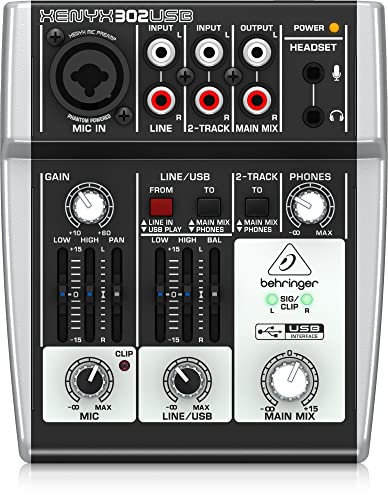
Behringer XENYX 302USB 5-Input Mixer — Best Ultra-Compact
The 302USB reduces the USB mixer to its essence: one XENYX mic preamp with phantom power, one stereo line input, USB audio in and out, and a headphone output with its own level — in a box small enough to disappear into a laptop bag. For the podcaster with one good microphone, the solo streamer, the voice artist’s travel rig, it is not a compromise at all; it is the correct amount of mixer.
Strengths
- A real mic preamp with phantom power and clean USB conversion at the smallest size and friendliest tier here.
- Dead simple: a guest can be recording within minutes of unboxing.
- Bus-powered convenience for mobile and travel setups.
Trade-offs
- One microphone is the ceiling — a second voice ends its usefulness.
- Minimal EQ and no effects; polish must come from the software side.
- Lightweight build suits desks, not stage floors.
Choose the 302USB when your channel count is honestly two and portability is a feature. It is also the best “gateway” in this guide: the board that starts a podcast, survives as a travel spare when you upgrade, and never embarrasses itself in between.
Best for: solo podcasters, streamers, voice work, travel rigs / Not suited for: any multi-microphone work
Check on Amazon — check price on Amazon for the current 302USB listing.
Comparison Table
| Pick | Badge | Key Spec | Best For |
|---|---|---|---|
| Yamaha MG10XU | Best Overall | 10 in, 4 mic pres, SPX FX, stereo USB | Most hybrid live/record rigs |
| Mackie ProFX12v3 | Best Live + Recording | 12 ch, Onyx pres, GigFX, hi-res USB | Working acts |
| Behringer X1204USB | Best Value | 12 in, compressors, 2 aux, USB | Budgets with real channel needs |
| Soundcraft Notepad-12FX | Best Compact Sound | Lexicon FX, USB I/O, metal chassis | Quality-first desks |
| Allen & Heath ZED-10FX | Best Premium | Faders, guitar DIs, USB I/O | Small serious rigs |
| Behringer 302USB | Best Ultra-Compact | 5 in, 1 mic pre, USB | Solo podcast/stream |
How to Choose a USB Mixer
Answer the multitrack question first, because it can eliminate the entire category. If you need to record each microphone and instrument to its own track for later mixing, you need a multitrack interface or one of the rare multitrack mixers — a different shopping trip from this guide, and it is better to know now. If you record a finished stereo mix — live gigs, streams, podcasts, rehearsals, demos — every pick here serves, and you can shop on the mixer’s live merits.
Second, count microphones as always, then look at the USB return path. Streamers and overdubbers live on playback: computer audio coming back into the board for monitors and mixes. All six picks handle playback, but their routing flexibility differs, and a board that lets you keep the computer return out of the recording (avoiding feedback loops of your own stream audio) is worth real money to a creator. Third, weigh effects if a vocalist performs live through the board; built-in reverb quality varies from serviceable to the Lexicon and SPX libraries in this guide, and it is audible in every recording you publish.
Third-and-a-half, because it hides inside the effects question: decide whether your recordings need the same polish as your live sound. A board’s effects print into the USB recording on most compact designs — the reverb you add for the room is the reverb on the file. In a live room that is usually desirable; in a dry studio recording it can be a commitment you regret. If you record dry and add effects in software, confirm your board lets you take the USB feed before the effects or simply run them off during capture takes. This single routing detail separates the boards that serve both masters gracefully from those that force a choice, and it is worth a line in your notes for every pick you audition.
Fourth, consider the computer itself. Class-compliant USB boards work with tablets and phones as well as laptops, which matters for mobile creators; boards needing proprietary drivers tie you to desktop operating systems and their update cycles. Finally, buy the desk you will still respect in three years: preamps and build are forever, while a marginal extra channel you never patch is just weight.
How to Set Up a USB Mixer for Recording and Streaming
Connect the board by USB and select it as both the input and output device in your system and your recording software — using the board for input and the computer’s speakers for output invites the echo and latency confusion that fills forum threads. Set your recording level at the mixer, not in the software: gain-stage each channel as you would live, watch the board’s meters, and leave headroom — a peak comfortably below clipping — because digital distortion cannot be un-recorded, while a slightly quiet file can always be raised later.
Before any of that, do the physical setup with the same care as a live rig: the board on a stable surface, USB cable short and known-good, microphones on stands rather than handheld where possible, and headphones you trust. Streaming and recording punish the small sloppinesses — a bumped desk, a cable brushing a mic stand, a phone buzzing on the same surface — that a live room forgives, because the microphone hears your setup as faithfully as it hears your voice. Five quiet minutes of arrangement is production value no purchase can add later.
For streaming, build the mix you want the audience to hear and monitor it on headphones from the board, which is the truth your audience receives. If your platform returns your own audio to you (a guest on a call, a game with voice), route the computer return to a channel you can exclude from the recording path where the board allows, or keep its level disciplined; the dreaded self-echo is a routing error, not a broken mixer. Record a thirty-second test, play it back on different speakers, and adjust once — that small ritual separates creators who sound professional from those who merely own professional gear.
Latency deserves one calm paragraph: monitoring through the board (direct monitoring) is effectively instant, while monitoring through software adds delay. Singers and instrumentalists should monitor from the board; podcasters editing later will never notice either way. Set your software’s buffer as low as your computer handles without crackling, and if crackles appear, raise the buffer before blaming the mixer — in nine cases out of ten the computer, not the board, is the bottleneck.
Stereo USB vs. Multitrack: The Full Honest Comparison
Since this distinction governs the category, here it is without shorthand. A stereo USB mixer sends the computer exactly what the audience hears: the finished two-channel mix. Its virtues are simplicity, zero post-production obligation, and a recording that exists the moment the performance ends — which is why live acts, streamers and podcasters overwhelmingly prefer it. Its limit is finality: a buried vocal or a loud keyboard is baked in forever, correctable only at the margins.
A multitrack setup records every channel separately, trading immediacy for control: mix on Tuesday what you played on Saturday, rescue the take where the singer was perfect and the guitarist was loud. Its costs are complexity, storage, driver and software demands, and a mixing workload that someone must actually do. Dedicated multitrack interfaces and a handful of larger digital mixers serve this need; compact analog USB boards, with rare exceptions, do not, and none of the six picks here should be bought under that illusion.
There is also a budget truth inside this comparison: stereo USB boards deliver their savings honestly. The multitrack hardware, conversion channels and driver engineering that per-channel recording requires are real costs, and a board that omits them can spend the difference on preamps, effects and build — which is precisely the trade visible across this guide’s picks. Choosing stereo is not choosing less mixer; it is choosing a mixer whose entire budget serves the jobs you actually do.
The mature way to choose is by your publishing habit, not your aspiration. If your recordings go out live or same-day, stereo is not the compromise — it is the workflow. If your recordings are productions with release dates, buy multitrack properly rather than hoping a stereo board will stretch. Many serious home studios end up owning both paths eventually: the USB mixer for live and capture, an interface for production. Knowing which purchase you are making today is the entire skill this section exists to teach.
The Effects Engines, Compared Honestly
Built-in effects are where compact USB mixers most visibly differentiate, and where brand heritage actually reaches your ears. Yamaha’s SPX library (MG10XU, and its smaller siblings) descends from processors that defined studio reverb in the digital era; its halls and plates are smooth, dense and forgiving of heavy-handed application, which is why teachers and churches love it. Lexicon’s algorithms in the Soundcraft Notepad-12FX carry the other great reverb bloodline — a slightly more spacious, hi-fi character that flatters acoustic instruments and voice-over work. Mackie’s GigFX in the ProFX12v3 takes the performer’s route: more variety, including delays and choruses voiced for stage use, with the practicality of presets a working singer can call up between songs.
Behringer’s processors in the X1204USB and Allen & Heath’s effects in the ZED-10FX occupy the respectable middle: entirely usable reverbs and delays that serve a mix without headlining it. The honest hierarchy matters less than the honest usage rule: effects should be mixed like seasoning, from the return level up, and a vocal that sounds “produced” at soundcheck will sound drowned by the second song as the room fills. Every engine in this guide can cross that line; the better ones simply make the territory before the line more beautiful.
One structural note: on every board here, effects are a shared resource — one engine, blended into channels in proportion — rather than a private processor per channel. That is the correct design at this size and price, but it means two singers share one reverb character. Acts who truly need distinct processing per voice are shopping for digital consoles, and should know it before the analog ceiling surprises them mid-tour.
Podcasting and Streaming on a USB Mixer: Where This Category Shines
It is worth stating why so many creators choose a USB mixer over a bare interface, because the reasons are workflow, not specifications. Physical faders and knobs let you ride a guest’s level, mute a cough and fade music under speech in real time, with your eyes on the conversation instead of a mouse. Hardware monitoring means zero-latency confidence in your headphones. A second input stands ready for a co-host, a phone call or a soundboard. The recording that results is the show, mixed as it happened — and for the enormous majority of podcasts and streams, that immediacy is worth more than multitrack flexibility they would never use.
The picks scale to the formats honestly. A solo host needs the 302USB and nothing more. Two voices plus music call for the MG10XU or Notepad-12FX class, where spare channels and better preamps pay off in every episode. A streamed band or a church service uses the ProFX12v3’s headroom and effects. The failure mode to avoid is the middle error: buying a large board for a two-person show and spending every session managing unused channels, or buying the tiny board for a four-person show and spending it apologizing. Count your voices the way you count microphones — because here, they are the same number.
Drivers, Longevity and the Five-Year View
A USB mixer is a relationship with a computer, and computers change. The safest long-term bets in this guide are the boards that behave as class-compliant USB audio devices — recognized by current operating systems without fragile proprietary drivers — and the brands with a record of maintaining support across OS generations. Yamaha, Mackie, Soundcraft and Allen & Heath all have institutional incentives to keep their boards working; that invisible support is part of what their prices buy, and it is a rational thing to pay for in a device whose second job is talking to a machine that updates itself monthly.
The analog half of the board ages independently and more gracefully: preamps, EQ and faders from a good maker work for decades, and a USB mixer whose interface standard someday dates still functions as a complete live console. That dual lifespan is the category’s quiet value proposition — the purchase degrades, if it ever does, into a still-useful mixer rather than into e-waste. Protect the relationship with the small disciplines: a known-good USB cable (intermittent audio is a cable until proven otherwise), a surge-protected power strip, and a photograph of your working settings before any software update touches the system.
Troubleshooting USB Audio: The Four Fixes That Solve Almost Everything
Problem: the computer does not see the mixer. → Change the cable first — USB cables fail silently and often, and a charging-grade cable may carry no data at all. Then try a direct port rather than a hub, confirm the board is selected in the operating system’s sound settings (not just the app’s), and only then investigate drivers. In our experience the cable and the hub account for the overwhelming majority of “dead mixer” reports.
Problem: crackling, popping or dropouts in the recording. → This is the computer asking for breathing room. Raise the audio buffer size in your software, close the browser tabs and background applications competing for the processor, and connect the mixer to a port that is not sharing a hub with a hungry external drive. The mixer is almost never the bottleneck; it is simply the device that reports the bottleneck audibly.
Problem: you hear yourself twice, or the stream hears an echo. → Two monitoring paths are open at once — the board’s direct monitoring and the software’s — or the computer’s return audio is being re-recorded into the stream. Monitor from one place only (the board, for zero latency), and route the computer return so it reaches your headphones and speakers without re-entering the recording path, as the setup section describes.
Problem: recordings are distorted even though the live sound is clean. → The board’s mix is leaving too hot for the digital stage. Analog headroom and digital headroom are different countries: a mix that sounds gloriously loud through speakers can clip the USB converter. Pull the master down until the recording peaks sit comfortably below the top of the software meter; the file can be raised in post, but clipped peaks are permanent.
Reading a USB Mixer’s Spec Sheet Without Being Fooled
Spec sheets in this category reward a skeptical reader, and three numbers deserve translation. The first is the input count, which counts every stereo pair twice and adds tape returns; the honest figure is the number of channels you can adjust independently, and above it, the number of microphone preamps. A “12-input” board with four preamps is a four-microphone mixer with generous line capacity — a fine thing, as long as that is what you meant to buy.
The second is the USB specification itself, usually buried in smaller print than the channel count: look for the words that describe what travels over the cable. “2-in/2-out” or “stereo mix” means the finished blend; “multitrack” or a channel count matching the board’s inputs means per-channel recording. Sample-rate and bit-depth figures (such as 24-bit) describe conversion quality, not channel count, and confusing the two is the exact error this guide has flagged from its first paragraph.
The third is effects quantity, where a long preset list can conceal a single shared engine of modest quality — or, in the case of the SPX, Lexicon and GigFX implementations here, a genuinely musical one. Read for the effects’ provenance and for whether the board lets you adjust more than a preset number and a level; a dozen editable, good-sounding programs serve a performer better than a hundred fixed curiosities. None of this requires engineering knowledge — only the habit of reading the small print with the same attention as the badge, which is the whole of spec-sheet literacy in any category.
Common Buying Mistakes
The first mistake is the multitrack assumption — buying a stereo USB board for per-channel recording. It is the category’s number-one return reason, and it is entirely preventable by reading the USB specification rather than the channel count. The second mistake is the inverse: buying a complex multitrack rig to record a podcast that a 302USB would have handled in an afternoon, then drowning the show in post-production it never needed.
The third mistake is judging preamps by live sound alone. A board that sounds fine through bar speakers records its hiss faithfully into every quiet passage; the preamp quality differences in this guide matter more through the USB cable than through the PA. The fourth mistake is ignoring the return path and discovering, mid-stream, that your board cannot play back the computer’s audio without also re-recording it. The fifth mistake is driver neglect — never updating, or updating an operating system the week of a big session without testing the board first. Working creators freeze a working setup and test changes on a quiet day, and that habit is worth more than any feature in this guide.
A final, modern mistake: assuming the newest connection standard is automatically the right one and dismissing proven boards for lacking it. USB audio standards are stable and backward-compatible in practice; a board with a mature, well-supported implementation of an older connector generation will serve you better than a flaky implementation of the newest one. Judge the implementation’s reputation, not the port’s novelty.
The sixth mistake is buying channels for a hypothetical band. A USB mixer lives on a desk as often as a stage, and the 16-channel monument to a band that never formed crowds out the work that actually happens. Buy for your real inputs, plus one.
Final Recommendation
Whichever board you choose, plan the first session as a rehearsal rather than a debut: record something disposable, stream to nobody, make the routing mistakes in private and write down the configuration that worked. A USB mixer has more interacting settings than any other piece of small audio gear — board, operating system, application — and the owners who document their one working setup are the ones who never lose a session to a mystery checkbox again.
The Yamaha MG10XU is the best usb mixer for most buyers: dependable, balanced and honest about its stereo USB. Working acts who record every gig should take the Mackie ProFX12v3; ears-first desk users, the Soundcraft Notepad-12FX; premium small rigs, the Allen & Heath ZED-10FX; real budgets with real channel counts, the Behringer X1204USB; and solo creators, the 302USB without a second thought. If your heart is set on multitrack, take this guide’s advice and shop that category deliberately rather than compromising here.
Focused companions: Best Usb Mixers For Home Studio re-ranks this field for studio desks specifically, Best Usb Mixers For Guitar covers the guitarist’s particular needs, and Best Small Usb Mixers handles the ultra-compact end in depth. For the analog-only alternative, see Best Unpowered Mixers.
Frequently Asked Questions
Do USB mixers record each channel separately?
Most compact USB mixers record the stereo main mix only — two channels with everything blended. Multitrack recording, where each input gets its own track, requires a multitrack interface or a larger digital mixer. Check the USB specification of any board before buying if multitrack matters to you.
Can I use a USB mixer for live sound without a computer?
Yes. Every pick in this guide is a full analog mixer that works standalone for live sound; the USB connection is an addition, not a requirement. The board powers up, mixes and feeds powered speakers exactly like a non-USB mixer when no computer is attached.
What sample rate and bit depth should a USB mixer have?
For podcasts, streaming and live capture, standard CD-quality conversion is audibly sufficient, and all picks here meet or exceed it. Higher rates on boards like the ProFX12v3 give headroom for production work. Workflow fit — stereo versus multitrack — matters far more than the numbers.
How many inputs do I need for a two-person podcast with music?
Four working channels cover it comfortably: two microphone channels, one stereo channel for music or a soundboard, and a spare for a phone guest or a third voice. That maps to the MG10XU or Notepad-12FX class in this guide; the 302USB serves a solo host, and two hosts on it means sharing compromises you will feel in every episode.
Why does my USB mixer recording sound quiet or noisy?
Usually gain staging: the board’s mix is leaving too quietly (raise channel gains and mix level, leaving headroom below clipping) or a single stage is doing all the amplification (rebuild the gain structure). Set levels at the board’s meters, and select the mixer — not the computer’s microphone input — as the recording device.
Will a USB mixer improve my microphone’s sound?
It gives the microphone what it needs to sound like itself: clean gain, phantom power if it is a condenser, and EQ to fit it to your voice and room. A good mixer will not rescue a bad microphone or a bad room, but it removes the electronic bottleneck — the hissy, weak input — that makes many decent microphones sound cheap through a computer’s built-in jack.
Can a USB mixer work with a phone or tablet?
Class-compliant boards generally can, with the right adapter, which makes them popular for mobile streaming. Boards requiring proprietary drivers are limited to computers. If mobile use matters, confirm class compliance for the specific model before buying.
Do I need special software to record with a USB mixer?
No special purchase is required: every computer ships with or freely offers recording software that will capture the mixer’s stereo output, and all major recording and streaming applications recognize a USB mixer as a standard audio device. Paid software adds editing depth and production tools, not basic compatibility.
Can I use a USB mixer with powered speakers and record at the same time?
Yes — that simultaneous live-plus-record duty is the category’s defining use. The board feeds your powered speakers from its main outputs while the USB connection carries the same mix to the computer, and playback from the computer can return into the board for monitoring or backing tracks.
Is a USB mixer better than an audio interface?
They solve different problems. A USB mixer is a live console that also records a stereo mix — best for performers, streamers and podcasters. An interface records individual channels with no live mixing surface — best for music production. Many studios own both, each doing the job it is shaped for.


