Disclosure: airfryerkitchensupply.com is reader-supported. When you buy through links on our site, we may earn an affiliate commission at no extra cost to you.
Where to Buy
Every linked pick below was matched against a live Amazon listing before it earned a link. Prices move constantly, so this page never prints a fixed price — use the Amazon links to see the current figure for the exact size, colour and configuration you want.
- ILIFE V2 Robot Vacuum Cleaner, White (Best Overall) — check price on Amazon
- Lefant Robot Vacuum Cleaner M210 (Best for Pet Hair) — check price on Amazon
- ROPVACNIC Robot Vacuum and Mop Combo, 5200Pa (Best Vacuum-Mop Combo) — check price on Amazon
- ILIFE V5s Max Robot Vacuum, 4000Pa (Best Navigation on a Budget) — check price on Amazon
- Tikom Robot Vacuum and Mop Combo G8000 Max, 5000Pa (Best Runtime) — check price on Amazon
- Robot Vacuum and Mop Combo, 8000Pa (3-in-1) (Best Stated Suction — Generic Brand) — check price on Amazon
Key Takeaways
- For the best inexpensive robotic vacuums, every pick was price-checked through the API at verify time and sat in the budget band of the robot category — the priciest is only a little above the hundred mark, and each review says where its pick sat.
- Suction figures are quoted exactly as listed — 4000Pa to 8000Pa across the guide — as maker-stated numbers, not as a common test result.
- At this budget, navigation is the dividing line: random-bounce models cost least, while gyro and LiDAR models appear at the top of the band.
- Tangle-free and pet-hair positioning is common here, but deep carpet remains out of scope — these are hard-floor and low-pile machines.
- Runtime is stated where the listing states it: 120 and 150 minutes appear, and the picks without a stated figure are not credited with one.
The best inexpensive robotic vacuums have quietly become genuinely useful machines. A few years ago this budget bought a toy that bumped around and died under the sofa; today, verified listings at this level offer stated suction in the thousands of pascals, runtimes of two hours or more, app and voice control, self-charging, and in two cases here, mopping built in. This guide verifies six of them, with every price checked at verify time so “inexpensive” describes the listings as found — all six sat in the budget band, from the mid-seventies to a little over a hundred.
Honesty about the tier matters more with robots than with almost anything else in this programme. At this money you are choosing which premium features to live without: it might be systematic mapping, or a self-empty dock, or the strongest carpet performance. What you should not have to live without is a robot that charges itself, keeps a schedule, picks up pet hair on hard floors and returns to work tomorrow — and every pick here clears that bar on its verified listing.
The six split by philosophy. Two ILIFE models bookend the range — a tangle-free entry model and a gyro-navigated step up. Lefant and Tikom bring the pet-hair and runtime stories. ROPVACNIC and the closing combo pick add mopping at prices that would have been implausible for vacuum-only robots not long ago. Suction numbers are quoted as listed throughout, with the standing caution that pascal figures are each maker’s own claim, not a shared laboratory result.
In this guide
Quick Picks
ILIFE V2 Robot Vacuum Cleaner, White — Best Overall. the budget benchmark: a tangle-free robot with a stated 120-minute runtime, scheduling and self-charging from a brand that only makes robot vacuums. — check price on Amazon
Lefant Robot Vacuum Cleaner M210 — Best for Pet Hair. a slim 120-minute robot with app and Alexa control, positioned by its listing squarely at pet hair and daily hard-floor cleaning. — check price on Amazon
ROPVACNIC Robot Vacuum and Mop Combo, 5200Pa — Best Vacuum-Mop Combo. a vacuum-and-mop combo with a stated 5200Pa, app control and obstacle avoidance — two appliances’ jobs at a budget verify-time price. — check price on Amazon
ILIFE V5s Max Robot Vacuum, 4000Pa — Best Navigation on a Budget. the navigation step-up: gyro-guided cleaning with a stated 4000Pa and every control method in the book — app, Alexa and a physical remote. — check price on Amazon
Tikom Robot Vacuum and Mop Combo G8000 Max, 5000Pa — Best Runtime. the endurance pick: a stated 150-minute maximum runtime and 5000Pa in a vacuum-mop combo — the longest legs in this guide. — check price on Amazon
Robot Vacuum and Mop Combo, 8000Pa (3-in-1) — Best Stated Suction — Generic Brand. the paper-spec champion: a stated 8000Pa in a slim 3-in-1 combo — included with its generic branding stated as plainly as its suction figure. — check price on Amazon
How These Picks Were Chosen
Candidates were searched under robot vacuum terms, then filtered on the search’s promise: the price at verify time had to sit in the budget band of the category, which in this pass meant every admitted listing sat between the mid-seventies and just over a hundred. Premium flagships and self-empty systems priced far above the band were excluded, however impressive.
Each surviving listing was checked for the budget-tier essentials — self-charging, scheduling or app control, and a stated runtime or suction figure where the maker offers one. Spec boxes quote only listed facts: suction in pascals as stated, runtime in minutes as stated, navigation type as stated. Where a listing does not state a runtime, the box omits it rather than estimating. Brand-generic and brand-named models are both admitted on the same evidence standard, and the generic pick is labelled by its listing title.
The 6 Best Inexpensive Robotic Vacuums
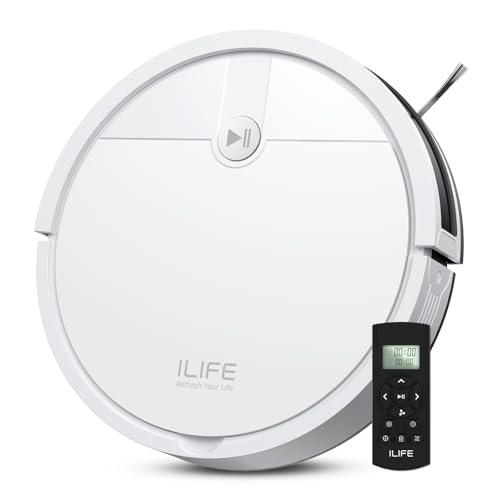
ILIFE V2 Robot Vacuum Cleaner, White — Best Overall
ILIFE builds nothing but robot vacuums, and the V2 is its entry formula done properly: the verified listing states tangle-free suction, a 120-minute runtime, remote control, scheduling and self-charging, pitched at pet hair and hard floors. Tangle-free suction — a port design without a central rotating brush to wind hair around — is a genuinely thoughtful choice at this price, trading a little carpet agitation for a machine that pet owners do not have to detangle weekly.
Strengths
- Stated 120-minute runtime — a full flat per charge
- Tangle-free design suits pet-hair homes
- Specialist brand; scheduling and self-charging included
Trade-offs
- Suction port design is weaker on carpet than a brushroll
- No app control stated — remote and schedule are the interface
- Random navigation era machine — thorough, not systematic
| Runtime | 120 minutes (as listed) |
| Suction style | Tangle-free suction (as listed) |
| Charging | Self-charging (as listed) |
| Control | Remote control and schedule (as listed) |
The V2’s value is in what it removes: no brush to cut hair from, no app account to create, no dock decisions to make. Set the schedule, empty the bin, and it maintains hard floors daily — which is the actual job of a budget robot, because daily light cleaning beats weekly deep cleaning for visible tidiness. In a pet household with hard floors, this is the lowest-effort ownership story in the guide, and its verify-time price sat at the very bottom of the band, which is why it leads.
See the exact configuration and check the current price on Amazon before you decide.
Best for: pet owners with hard floors wanting set-and-forget daily cleaning / Not suited for: carpeted homes needing brushroll agitation and mapping
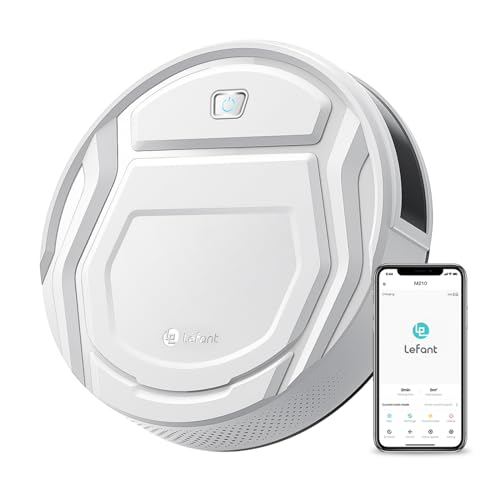
Lefant Robot Vacuum Cleaner M210 — Best for Pet Hair
The Lefant M210’s verified listing pairs the two things budget buyers ask for most: a stated 120-minute runtime and modern control — Wi-Fi, app and Alexa — in a slim, low-noise body aimed at pet hair and daily cleaning on hard floors. Slim matters more than it sounds: the difference between a robot that fits under the sofa and one that does not is the difference between cleaned and uncleaned territory in most living rooms.
Strengths
- App and voice control at a budget verify-time price
- Stated 120-minute runtime and self-charging
- Slim profile reaches under low furniture
Trade-offs
- Suction figure not stated in the listing — not credited with one here
- Hard-floor focus, per its own positioning
- App setup is one more account for the household
| Runtime | 120 minutes (as listed) |
| Control | Wi-Fi, app and Alexa (as listed) |
| Profile | Slim, low noise (as listed) |
| Charging | Automatic self-charging (as listed) |
Lefant has built its name in exactly this tier, and the M210 shows the formula: spend the budget on runtime, connectivity and a slim chassis rather than on mapping theatre. For pet hair on hard floors, daily scheduled runs are the real feature — hair never accumulates to the point of tumbleweeds — and the app makes those schedules painless to set and change. If your home is mostly carpet, look at the brush-equipped picks; if it is hard floors and a shedding animal, this is the guide’s most direct answer.
See the exact configuration and check the current price on Amazon before you decide.
Best for: pet-hair homes with hard floors that want app control cheaply / Not suited for: carpet-led homes or buyers avoiding app ecosystems

ROPVACNIC Robot Vacuum and Mop Combo, 5200Pa — Best Vacuum-Mop Combo
Combo machines are where budget robots have moved fastest, and ROPVACNIC’s verified listing states the modern checklist: 5200Pa suction, mopping alongside vacuuming, app control with personalised cleaning adjustments, advanced obstacle avoidance and self-charging. The pascal figure is the maker’s claim, as throughout this guide — but a combo at this verify-time price with that stated specification would have been a flagship’s résumé not long ago.
Strengths
- Vacuuming and mopping in one budget machine
- Stated 5200Pa suction — mid-guide on paper
- App control with adjustable cleaning settings
Trade-offs
- Combo mopping is maintenance mopping, not a deep scrub
- Runtime not stated in the listing — not credited here
- Lesser-known brand; check parts and support before buying
| Suction | 5200Pa (as listed) |
| Functions | Vacuum and mop combo (as listed) |
| Control | App control (as listed) |
| Charging | Self-charging (as listed) |
Set expectations correctly and the combo format shines: the mop function is a damp-cloth maintenance pass that keeps hard floors film-free between real mops, not a replacement for them. Paired with daily vacuum runs, it suits kitchens and entryways where the floor’s enemy is the daily film of cooking and foot traffic rather than weekly disasters. For buyers whose floors are mostly hard and whose alternative is doing nothing between weekend cleans, this is the most capability per pound in the guide.
See the exact configuration and check the current price on Amazon before you decide.
Best for: hard-floor homes wanting vacuum and maintenance mopping in one robot / Not suited for: anyone expecting a combo mop to replace hands-and-knees scrubbing
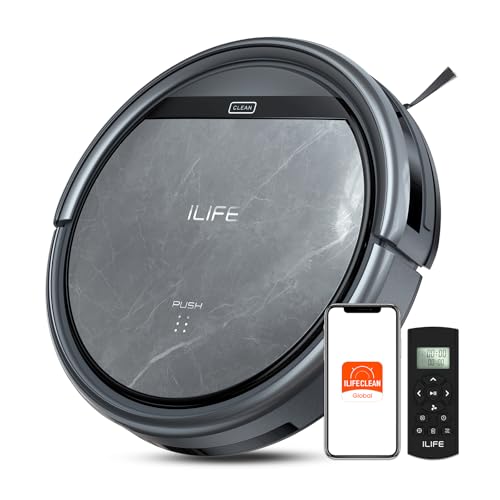
ILIFE V5s Max Robot Vacuum, 4000Pa — Best Navigation on a Budget
The second ILIFE in this guide earns its own slot on a different strength: navigation. The V5s Max’s verified listing states gyro navigation — the robot tracks its orientation to clean in more orderly paths than random bouncing — alongside a stated 4000Pa suction, gyro-era upgrades, and control by Wi-Fi, app, Alexa or the included-style remote. It is the same specialist brand as the V2, aimed one rung higher: same budget discipline, smarter movement.
Strengths
- Gyro navigation — more orderly coverage than random models
- Stated 4000Pa suction figure
- App, voice and remote control all stated
Trade-offs
- Gyro is not LiDAR — no true room mapping at this tier
- Runtime not stated in the listing
- Two ILIFE picks in one guide reflects the brand’s budget depth, not a shortage of rivals
| Suction | 4000Pa (as listed) |
| Navigation | Gyro navigation (as listed) |
| Control | Wi-Fi, app, Alexa and remote (as listed) |
| Charging | Self-charging (as listed) |
Navigation is where budget robots divide into toys and tools. A random robot eventually covers a room; a gyro robot covers it in lanes, finishing faster with fewer missed strips — the difference shows in larger, open-plan spaces. The V5s Max also hedges the control question completely: app for the phone-native, remote for everyone else. Choose it over the V2 if your floors are bigger or more open; choose the V2 if tangle-free pet simplicity is the whole brief. Either way, the brand’s budget specialism is the through-line.
See the exact configuration and check the current price on Amazon before you decide.
Best for: larger hard-floor spaces wanting orderly, navigated cleaning cheaply / Not suited for: buyers who need true LiDAR room mapping and no-go zones

Tikom Robot Vacuum and Mop Combo G8000 Max, 5000Pa — Best Runtime
Runtime is the budget robot’s silent specification — the one that decides whether the robot finishes the flat or naps mid-job — and Tikom’s G8000 Max states the guide’s best figure: 150 minutes maximum, alongside a stated 5000Pa suction, mopping, and app plus remote control. “Max” runtimes are measured on gentle settings, as with every brand, and this guide quotes it as the listing states it; even discounted, the endurance positioning is clear.
Strengths
- Longest stated runtime in the guide — 150 minutes max
- Stated 5000Pa suction with mop combo function
- App and remote control both included
Trade-offs
- Max runtime is a best-case figure, as with all robots
- Combo mopping is maintenance-grade, per the format
- Brand is less established than ILIFE or Lefant in this tier
| Suction | 5000Pa (as listed) |
| Runtime | 150 minutes max (as listed) |
| Functions | Vacuum and mop combo (as listed) |
| Control | App and remote control (as listed) |
Big hard-floor areas are this pick’s home: open-plan kitchen-living spaces, long hallways, ground floors that defeat 90-minute robots. The combo mop adds the maintenance pass discussed under the ROPVACNIC pick, and the remote matters more than reviewers admit — a robot you can drive to a spill with a handset gets used for spills, while an app-only robot waits for its schedule. If your floor plan is the largest in this guide’s audience, start here and work backwards.
See the exact configuration and check the current price on Amazon before you decide.
Best for: large hard-floor areas needing maximum time between charges / Not suited for: small flats where a 120-minute robot already finishes with charge to spare

Robot Vacuum and Mop Combo, 8000Pa (3-in-1) — Best Stated Suction — Generic Brand
Transparency first: this pick’s verified listing leads with its function rather than a famous badge — a robot vacuum and mop combo stating 8000Pa suction, 3-in-1 sweeping, vacuuming and mopping, Alexa and app control, intelligent navigation and scheduling, from a small brand. It is included because its stated specification is the strongest on paper in this guide and its verify-time price still sat within the budget band — and it is labelled so you can weigh the brand question with open eyes.
Strengths
- Highest stated suction figure in the guide — 8000Pa
- Vacuum, sweep and mop functions in one slim body
- Alexa and app control with scheduling
Trade-offs
- Generic branding — long-term support and parts are the fair question
- Pascal figures are maker claims; 8000Pa here is not lab-comparable to rivals
- Runtime not stated in the listing
| Suction | 8000Pa (as listed — the guide’s highest paper figure) |
| Functions | 3-in-1 sweep, vacuum and mop (as listed) |
| Control | Alexa and app control (as listed) |
| Profile | Slim and quiet (as listed) |
How to weigh this pick: pascal claims across brands are not measured to a shared standard, so treat 8000Pa as “this maker’s strongest positioning” rather than proof of double a 4000Pa rival’s pickup. What is concrete is the feature set — three functions, voice and app control, scheduling, slim body — at a budget verify-time price. Buyers comfortable trading brand infrastructure for specification will find this the guide’s value outlier; buyers who value a support track record should take the ILIFE or Lefant picks and lose nothing they will actually miss.
See the exact configuration and check the current price on Amazon before you decide.
Best for: spec-led buyers comfortable with a small brand at a budget price / Not suited for: buyers who prioritise established support and parts networks
Comparison Table
| Pick | Badge | Key spec | Best for |
|---|---|---|---|
| ILIFE V2 Robot Vacuum Cleaner, White | Best Overall | 120 mins runtime (as listed), tangle-free suction, self-charging, remote and schedule | pet owners with hard floors wanting set-and-forget daily cleaning |
| Lefant Robot Vacuum Cleaner M210 | Best for Pet Hair | 120 mins runtime (as listed), slim, Wi-Fi/app/Alexa control, self-charging | pet-hair homes with hard floors that want app control cheaply |
| ROPVACNIC Robot Vacuum and Mop Combo, 5200Pa | Best Vacuum-Mop Combo | 5200Pa suction (as listed), vacuum and mop combo, app control, self-charging | hard-floor homes wanting vacuum and maintenance mopping in one robot |
| ILIFE V5s Max Robot Vacuum, 4000Pa | Best Navigation on a Budget | 4000Pa suction (as listed), gyro navigation, Wi-Fi/app/Alexa/remote | larger hard-floor spaces wanting orderly, navigated cleaning cheaply |
| Tikom Robot Vacuum and Mop Combo G8000 Max, 5000Pa | Best Runtime | 5000Pa suction (as listed), 150 min max runtime (as listed), app and remote, combo | large hard-floor areas needing maximum time between charges |
| Robot Vacuum and Mop Combo, 8000Pa (3-in-1) | Best Stated Suction — Generic Brand | 8000Pa suction (as listed), 3-in-1 sweep vacuum mop, Alexa and app control | spec-led buyers comfortable with a small brand at a budget price |
How to Choose an Inexpensive Robotic Vacuum
Start with your floors, because budget robots are hard-floor specialists: tiles, laminate, wood and low-pile rugs are their country; medium and deep carpet is not, whatever the listing’s photographs imply. Next, choose your navigation tier honestly — random models (the V2, the M210) maintain small spaces well through daily repetition; gyro navigation (the V5s Max) covers larger, open areas more completely per session. True LiDAR mapping lives above this budget, and any guide implying otherwise at these prices is selling something.
Then weigh the stated numbers with the right scepticism. Runtime figures are real but are maximums on gentle settings — a stated 120 or 150 minutes still translates to strong real-world coverage. Suction pascals are each maker’s own claim and cannot be compared across brands like-for-like; use them as positioning within a brand’s range, not as a league table. Finally, decide the mop question: combo mopping is a maintenance film-remover for hard floors — genuinely useful between real mops, and not a substitute for them.
What “Inexpensive” Honestly Excludes at This Tier
No pick in this guide empties itself into a dock, maps rooms with LiDAR, or recognises objects with a camera — those features define the tiers above, and their absence is the price of this one. What the tier does include, on verified listings, is the daily-maintenance core: self-charging, scheduling, app or remote control, pet-hair competence on hard floors and, in half the guide, a mop pass. Framed that way, the budget robot is not a cut-down flagship; it is a different product — a daily housekeeper rather than a weekly deep-cleaner — and households that adopt it on those terms are the ones still using it in year two.
Running costs stay honest at this tier too: bins are emptied by hand in seconds, filters and brushes are the only consumables, and there are no proprietary bags. Budget an occasional brush or filter replacement into ownership and the total cost stays close to the purchase price that made the category attractive.
Getting Budget Robots to Actually Clean Well
Budget robots reward a prepared home more than premium ones do. Lift cables, tassels and charging leads off the floor; give the robot a clear dock approach; and let the first runs happen while you are home, watching where it struggles — a chair leg spacing adjusted once saves a hundred stuck-robot rescues. Run it daily rather than twice-weekly: these machines are built for maintenance frequency, and pet hair and grit never reach visible levels when the robot works every day. Empty the bin at the dock each time you pass it, and the whole system settles into the background hum of a kept house.
Room Preparation in Depth: Thresholds, Rugs and Dark Floors
Three room features decide budget-robot happiness more than any specification. Thresholds and floor bars: most budget robots climb modest transitions and balk at tall ones, so walk the home’s doorways once and know which rooms are one territory and which are separate kingdoms the robot must be carried between. Rug edges: tassels and fringe are traps, thin rugs without grip can be pushed into folds, and a rug pad under a light rug is a five-minute fix that converts a problem room into the robot’s favourite. Chair forests: dining chairs pushed in tight create a maze the robot will eventually solve, but lifting chairs onto the table for the scheduled run — the restaurant close-down habit — halves the clean’s time and doubles its completeness.
Dark floors carry a specific, honest caveat for this tier: cliff sensors read the drop at a stair edge by reflected light, and very dark flooring can occasionally confuse simpler sensor setups — a known quirk of the technology class, not of any single pick here. The practical answer is supervision on early runs, which this guide already recommends, and particular care where dark floors meet actual stairs. In the ordinary run of homes — wood, laminate, tile, light carpet — none of this arises, and the preparation above is a one-time half hour that pays out on every single scheduled clean thereafter.
The Maintenance Calendar: Weekly, Monthly, Quarterly
Weekly, the robot asks for almost nothing: the bin emptied — daily in pet homes, as the setup section argues — and a glance at the brush or suction port for wound hair, which on the tangle-free V2 is a glance that usually ends there. Monthly, tap or rinse the filter as its type allows, wipe the sensors and charging contacts with a dry cloth, and check the wheels for the grit that makes robots wander and squeak. These ten minutes are the difference between a robot that ages in dog years and one that simply ages.
Quarterly, do the honest audit: brushes wear, side brushes splay, filters tire, and batteries in daily service slowly lose their youthful runtime. At this tier the consumables are cheap and the replacements are tool-free, which is part of the category’s economic charm — a year of budget-robot upkeep typically costs less than a single bag-and-filter cycle on some premium machines. Keep one spare filter in the drawer and the quarterly reset becomes a swap, not a shopping trip. Machines maintained on this rhythm are the ones still running their schedules, unremarked, years after purchase.
Budget Robots in Real Households: Pets, Children and Shift Work
Pet households are this tier’s heartland, and the rhythm that works is frequency over force: a daily run at the hour the animals are elsewhere, the tangle-free or pet-positioned picks doing their quiet work, and a weekly human pass with a real vacuum for the sofa and the corners. Litter scatter near trays is a budget robot’s perfect job — small, hard-floored, daily — and many owners buy the second robot of their lives for exactly that zone. The robot is not replacing the deep clean; it is abolishing the visible evidence between deep cleans, which is what guests and bare feet actually judge.
Children and shift workers make the scheduling case from the other direction: runs set for school hours or sleeping hours, low-noise models earning their listing language, and a home that resets itself while life happens elsewhere. The caveat is supervision’s mirror image — toys, socks and charging cables multiply in these households, so the floor-prep habit in the setup section matters doubly, and a robot with a remote earns its keep for spill response between schedules. Set the rhythm to the household’s real timetable, not the brochure’s, and the budget robot becomes the most reliably used appliance in the building.
Understanding Suction Claims, Brushes and Suction Ports
Two cleaning architectures divide this guide, and understanding them prevents the commonest budget disappointment. Brushroll machines agitate as they suck — a rotating brush lifts debris from rug fibres and flicks it into the suction path — which makes them the stronger carpet performers and the higher-maintenance pets, because hair winds around the roll and must be cut free. Suction-port machines like the ILIFE V2 skip the roll entirely: debris passes straight into the bin, hair has nothing to wind around, and carpet agitation is what is traded away. Neither is better in the abstract; they are answers to different floors, and this guide’s reviews assign each pick its floor honestly.
The pascal figures layered over this architecture deserve their final word. A stated figure tells you where a model sits in its own maker’s range and how the maker wants it weighed; it does not standardise pickup across brands, because pickup also depends on the brush or port design, the seal against the floor, and the bin’s airflow as it fills. The buyer’s translation is simple: choose architecture by floor first, navigation by room size second, and let pascal figures break ties only between models of the same brand. Followed in that order, the numbers in this guide inform; followed in reverse, they mislead — which is why every review here introduces its pick’s floor and format before its figures.
The First Month: How Budget Robots Settle Into a Home
Week one is novelty and supervision: the robot is watched, rescued, and quietly judged, and its habits — where it lingers, what it fears — are really the house’s habits revealed. Week two is adjustment, and it belongs to the humans: the cable that gets lifted permanently, the chair that now lives two inches left, the dock that migrates to the wall where the robot actually finishes. By week three the schedule has fused with the household’s own — the robot runs at school-run o’clock or during the morning shower — and the floor’s baseline has visibly changed, because daily maintenance compounds like interest: grit never accumulates, pet hair never reaches tumbleweed, and the weekly human clean shrinks to the jobs robots never claimed.
Month’s end is the honest verdict point, and the verdict is usually about fit rather than quality. A budget robot in a hard-floored, prepped, daily-run home is a triumph of appropriate technology; the identical robot in a carpeted, cluttered, twice-weekly home is a disappointment that was scheduled at purchase. This guide has tried to make the fit judgement before the purchase — floors, navigation, architecture, claims — because the first month’s lesson, learned by every robot household, is that the machine was never the variable. The home was, and homes, unlike robots, can be adjusted in an afternoon.
Docks, Bins and the Geography of a Robot’s Home
A robot vacuum’s dock is its home port, and its placement quietly governs the machine’s whole career. The setup section’s rules — wall-backed, hard-floored, clear ahead and to the sides — exist because a tired robot with a nearly flat battery must find two small charging contacts by infrared and optimism; a dock wedged behind a curtain or under a low shelf defeats it weekly. Choose the dock’s room as deliberately as its position: the room the robot cleans most should host it, because every clean then starts and ends at the centre of its work rather than commuting across the house on a dying battery.
The bin’s geography matters almost as much. A dock placed beside the kitchen bin builds the emptying habit into the household’s existing traffic — pass, empty, done — while a dock in a spare room makes the same chore a special journey that gets postponed until the robot’s pickup visibly fades. Filters follow the same logic: the spare lives in the drawer nearest the dock, not in the packaging in the loft. These are furnishing decisions, not product features, and they explain why two identical robots in two homes can have entirely different reputations by Christmas.
Multi-floor homes should make their peace with the tier’s limit early: a budget robot is a one-floor citizen, carried between levels by hand and docked where it works most. Households that accept this buy a second dock or a second robot without resentment when the arrangement proves itself; households that expected a stair-climbing flagship at this price were never this guide’s audience, and its reviews have said so at every opportunity. Geography, honestly arranged, is the last specification — and the only one entirely in the buyer’s hands.
What Happens After the Warranty: Living With an Aging Budget Robot
Budget robots age gracefully when their owners understand the two clocks running inside them. The battery clock is the familiar one: daily service slowly shortens runtime across years, announcing itself not as failure but as a robot that starts leaving the far bedroom for tomorrow. The correct response is rhythm, not grief — the schedule still covers the core floors daily, which was always the point — and at this tier the eventual replacement decision is softened by the prices this guide verified: the successor costs what a premium machine’s service visit does. The second clock is mechanical: brushes splay, wheels polish smooth, and a robot that once climbed a threshold starts negotiating with it. The quarterly audit in the maintenance section exists to catch that clock while its fixes are still cheap parts.
The end of a budget robot’s front-line life is rarely its end. Demoted robots clean garages, workshops and utility rooms for years after the living room promotes a successor — the same demotion ladder this programme’s cloth guide describes, at appliance scale. Planned this way, the inexpensive robot is not a disposable product but the first rung of a household system, and its total years of service across both duties embarrass many a flagship. Buy it for the floors it fits, maintain it on the calendar given here, and let it retire downward with honour.
The 60-Second Shopper’s Checklist
Distilled to a dock-side card: floors first — hard floors and low pile are this tier’s country, and deep carpet is another country entirely. Architecture second: a suction port for pet-hair peace, a brushroll for rugs. Navigation third: random for small daily-run spaces, gyro for larger ones, and LiDAR is not hiding anywhere at this money. Read runtimes as real but maximal, and pascals as each maker’s own accent rather than a shared language. Dock it where the bin lives, run it daily, empty it in passing. The V2 for the benchmark bargain, the M210 for app-polished pet duty, the V5s Max for navigated rooms, the Tikom for endurance, the two combos for floors that want a mop’s whisper between real mops: inexpensive, verified, and honest about every ceiling it has.
One Last Calibration
A final number belongs in every buyer’s head before ordering: the size of the floor the robot must actually cover, in the rooms it can actually reach, with the doors you will actually open for it. That honest area — not the house’s total, not the listing’s optimism — is what the stated runtimes in this guide should be weighed against, and for most flats and ground floors it sits comfortably inside even the 120-minute picks’ real-world reach. Measure the territory, and the choice between this guide’s six stops being a gamble on specifications and becomes what it should have been from the first page: a fit, made on evidence, between a home and a machine that was priced to be tried.
How to Set Up an Inexpensive Robot Vacuum
Thirty minutes of setup decides whether a budget robot becomes a daily habit or a cupboard resident.
- Place the dock properly. Against a wall on hard floor, with clear space in front and to the sides, near a socket — the robot must find home tired, in the dark, every time.
- Charge fully before the first run. A complete first charge calibrates the battery and gives the maiden clean its best chance to impress.
- Robot-proof the floor. Lift cables, ribbons, tasselled rug edges and small toys; tuck chair legs to consistent spacing where you can.
- Connect control and set the schedule. App, voice or remote — then schedule daily runs for when the house is emptiest, because frequency is this tier’s superpower.
- Supervise the first two runs. Note the traps — a particular threshold, a dark rug the sensors misread — and fix the room, not the robot.
- Build the bin habit. Empty the bin and tap the filter clean each time you pass the dock; thirty seconds of rhythm beats a monthly deep-clean of the machine itself.
If the robot misses a spot systematically, it is usually the room’s geometry, not the machine: shift the dock to the other end of the space and let the navigation start from a new origin before concluding anything about the robot.
Common Buying Mistakes
Expecting flagship mapping at budget prices. Gyro and random navigation maintain floors well; they do not draw room maps or honour no-go zones. Buy the tier for daily maintenance and it will satisfy; buy it for cartography and it will not.
Comparing pascal figures across brands. Suction numbers are each maker’s own claim without a shared test standard. A stated 8000Pa is positioning, not proof of double a 4000Pa rival’s cleaning.
Running it twice a week like a big vacuum. Budget robots win by frequency. Daily scheduled runs keep pet hair and grit invisible; twice-weekly runs let both accumulate past the machine’s comfort.
Leaving cables and tassels on the floor. The budget robot’s natural predators are charging leads and rug fringe. Five minutes of floor prep is the difference between a clean and a rescue mission.
Forgetting the bin and filter. A full bin is the silent cause of “it stopped picking up”. Empty at the dock, tap the filter, and the machine stays the one you bought.
Final Recommendation
The ILIFE V2 is the budget benchmark for a reason — tangle-free, stated 120 minutes, the band’s lowest verify-time price — and most pet-hair hard-floor homes should start there. The Lefant M210 adds app polish and a slim chassis; the V5s Max adds gyro navigation for bigger spaces; the Tikom G8000 Max adds the longest stated runtime; and the two combos — ROPVACNIC for its balanced stated spec, the 8000Pa generic for outright paper value — serve hard-floor homes that want a mop pass in the same machine.
Judge the tier by its own honest standard: not whether it replaces a flagship, but whether your floors are visibly maintained every day for budget money. On the verified evidence of these six listings, that standard is now comfortably met.
Keep exploring the same corner of the range here: Best Economy Robot Vacuums Best Robot Vacuums For Pet Hair And Berber Carpet Best Robot Vacuums For Wood Floors Best Robot Vacuums Under $300 Best Ilife Robotic Vacuums
Related guides
Frequently Asked Questions
Are inexpensive robot vacuums actually worth buying now?
Yes, for their real job: daily maintenance of hard floors and low-pile rugs. Verified listings at this tier now state two-hour-class runtimes, thousands of pascals of claimed suction, app control and self-charging. They do not replace deep cleaning or flagship mapping.
What is the difference between random, gyro and LiDAR navigation?
Random robots bounce and cover by persistence — fine for small spaces run daily. Gyro models track orientation and clean in lanes, covering bigger areas more completely. LiDAR builds true room maps with no-go zones, and lives in the tiers above this budget.
Can a budget robot handle pet hair?
On hard floors, yes — several picks here are positioned for it in their listings, and the ILIFE V2’s tangle-free suction port avoids the brush-winding chore entirely. Pet hair in deep carpet pile remains full-size vacuum territory.
Do the mop combos replace mopping?
No — combo mopping is a damp maintenance pass that keeps hard floors film-free between real mops. It is genuinely useful in kitchens and hallways, and this guide describes it as maintenance every time it appears.
How long do budget robots run per charge?
Where listings state it: 120 minutes on the ILIFE V2 and Lefant M210, and up to 150 minutes maximum on the Tikom G8000 Max. Maximums are measured on gentle settings; picks without a stated runtime are not credited with one in this guide.
Why are suction numbers not directly comparable?
Each maker measures and markets pascals differently, with no shared standard across brands. Treat the figures quoted here — 4000Pa to 8000Pa as listed — as each brand’s positioning, and weigh navigation, runtime and floor fit more heavily in your choice.