Disclosure: airfryerkitchensupply.com is reader-supported. When you buy through links on our site, we may earn an affiliate commission at no extra cost to you.
Where to buy
Shopping for the best dj mixers under 500 complete software comes down to the listings below. Every pick below is sold on Amazon, and the software story is the whole point of this shortlist: each unit either unlocks a full DJ application by plugging it in, ships with a complete (not trial) licence, or includes the DVS licence that scratch DJs normally pay extra for. Use the links to check the current price on Amazon and to confirm exactly which software edition is bundled with the listing you are looking at, because bundle contents do change between production runs.
- Pioneer DJ DDJ-FLX4 (Best Overall) — check price on Amazon
- Numark Scratch (Best Complete Software Licence) — check price on Amazon
- Pioneer DJ DDJ-REV1 (Best for Serato and Battle Style) — check price on Amazon
- Hercules DJControl Inpulse 500 (Best for Structured Learning) — check price on Amazon
- Hercules DJControl Inpulse 300 MK2 (Best Step-Up Value) — check price on Amazon
- Numark Party Mix II (Best Budget) — check price on Amazon
Finding the best dj mixers under 500 complete software is harder than it sounds, because the sticker on the hardware is only half the transaction. A cheap controller that leaves you paying a monthly subscription — or a one-off upgrade fee — for the full version of its DJ software can end up costing more over a year than a slightly pricier unit that unlocks everything the moment you plug it in. This guide exists to sort the genuinely complete packages from the ones that quietly hand you a stripped-down ‘Lite’ edition and a credit-card form.
Under the $500 ceiling in this search, the market splits into two camps. The first is 2-deck controllers from Pioneer DJ, Hercules and Numark that pair with rekordbox, Serato or DJUCED. The second is real DJ mixers — the Numark Scratch is the standout — that sit between two turntables or media players and carry a full Serato DJ Pro licence plus DVS in the box. Both camps can be the right answer; it depends on whether you already own decks. What every pick here shares is a software path that does not dead-end at a paywall for core mixing features.
One honest warning before the picks: ‘complete software’ marketing is slippery. Serato DJ Lite and rekordbox’s free plan are genuinely usable, but they lock features — recording, some FX, DVS, extra decks — behind paid tiers. Where a pick only includes a Lite edition, we say so plainly and explain what the upgrade path costs you in hassle, so you can decide with open eyes rather than discover it mid-set.
In this guide
Quick Picks
Six packages that stay under the $500 tier of the keyword and give you a workable, complete software setup. Badges match the detailed reviews further down.
- Pioneer DJ DDJ-FLX4 — Best Overall. The default recommendation for most buyers: plugging it in unlocks rekordbox’s full performance mode, and it doubles as a Serato controller, so your software options stay open. — Check on Amazon
- Numark Scratch — Best Complete Software Licence. A real 2-channel battle mixer that includes the full Serato DJ Pro licence and the DVS licence in the box — the most literally ‘complete software’ package on this page. — Check on Amazon
- Pioneer DJ DDJ-REV1 — Best for Serato and Battle Style. A battle-layout Serato controller with horizontal pitch faders and big jogs in the turntable tradition — the open-format and scratch learner’s pick. — Check on Amazon
- Hercules DJControl Inpulse 500 — Best for Structured Learning. The teacher of the group: built-in beatmatch guides, a full copy of DJUCED, and hardware that feels a class above its tier. — Check on Amazon
- Hercules DJControl Inpulse 300 MK2 — Best Step-Up Value. The Inpulse 500’s teaching system and DJUCED bundle in a smaller, cheaper-feeling frame — 16 pads and pre-mapped stems control included. — Check on Amazon
- Numark Party Mix II — Best Budget. The cheapest honest way into real DJ software here: Serato DJ Lite, touch jogs, filter FX knobs and a built-in light show for parties. — Check on Amazon
How These Picks Were Chosen
We started from the software licence and worked backwards to the hardware. Each candidate was checked against the Amazon catalogue for the exact model and bundle, and we only kept units where the included software covers the core job — mixing two decks with EQ, filters, hot cues and performance pads — without an immediate paid unlock. Units whose ‘included software’ turned out to be a 30-day trial were cut.
Hardware still had to earn its place. We weighed jog wheel feel and size, whether the mixer section is a real hardware mixer or a MIDI surface, audio interface quality, mic input for streaming and mobile work, and whether the unit keeps working as a standalone mixer when the laptop closes. Crossfader quality mattered most for the scratch-leaning picks; for the learning picks, we favoured beatmatch guidance and layouts that mirror club gear so skills transfer.
Finally, we applied the standing rules of this site: no invented prices (check price on Amazon on the listing), no fixed ratings, and only ASINs verified through the API carry purchase links. Every pick below passed that check, so this is one of the rare roundups where all six picks are fully linked.
The 6 Best DJ Mixers Under $500 With Complete Software
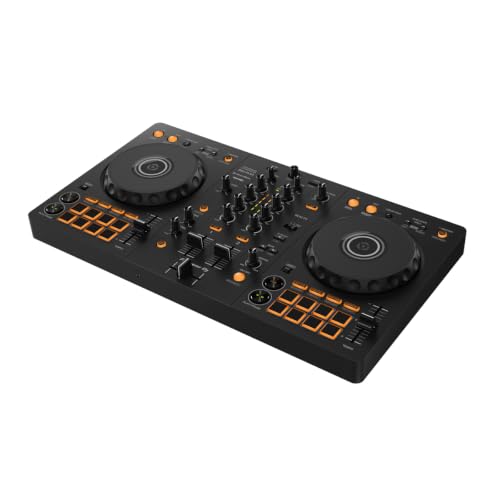
Pioneer DJ DDJ-FLX4 — Best Overall
The DDJ-FLX4 suits the beginner or returning DJ who wants one box that works with the two biggest software ecosystems and will still feel familiar when they step up to club CDJs and a DJM mixer. Its layout deliberately mirrors Pioneer’s professional gear, so muscle memory built here transfers directly.
Strengths
- Hardware-unlock for rekordbox performance mode — no subscription needed for full features
- Also works with Serato DJ, so you are not locked into one ecosystem
- Smart Fader and Smart CFX help new DJs sound smooth while they learn the fundamentals
Trade-offs
- Jog wheels are compact and light compared with larger controllers
- Serato side starts at the Lite edition; the full Serato upgrade is a separate purchase
- Plastic build keeps weight down but asks for a case if you travel weekly
| Format | 2-channel, 2-deck DJ controller |
| Performance pads | 16 |
| Software | rekordbox (hardware unlock) and Serato DJ |
| Extras | Smart Fader, streaming-ready audio routing, mic input for livestreaming |
The FLX4’s software deal is the cleanest in this price tier. Rekordbox treats the controller as a hardware unlock device: connect it and the full performance feature set — pads, FX, recording — is simply there, with no recurring fee. For a buyer whose budget is the whole point of the keyword, that removes the biggest hidden cost in entry-level DJing.
As hardware it is equally well judged. The tempo sliders, browse knob and pad layout sit where a Pioneer club setup puts them, the USB audio interface routes streaming audio from services inside rekordbox, and the mic input feeds the master output for livestreaming without extra boxes. It is not a scratch weapon — the jogs are small — but as a complete, no-surprises package under the tier ceiling, nothing else here is as balanced.
One practical detail worth knowing before you buy: because the FLX4’s licence value lives in the hardware unlock, keep the controller registered to your own Pioneer account and keep your proof of purchase. If you ever sell it, the unlock travels with the unit — a genuine resale advantage over licence-code bundles, and one reason used FLX4s hold their value unusually well in this tier.
Best for: new and returning DJs who want full rekordbox features with zero subscription / Not suited for: turntablists who need large, heavy jog wheels or a standalone hardware mixer
Check on Amazon — check the current price on Amazon before you buy, as bundles and included accessories change over time.

Numark Scratch — Best Complete Software Licence
The Numark Scratch is for the DJ who already owns turntables or media players — or plans to — and wants a mixer whose software is finished business: full Serato DJ Pro, not Lite, plus the DVS expansion that lets control vinyl steer digital files.
Strengths
- Full Serato DJ Pro licence included, not the Lite edition
- DVS licence included, so turntables and control vinyl work out of the box
- Innofader crossfader is the scratch standard and is replaceable
Trade-offs
- It is a mixer only — you still need turntables, media players or a controller as sources
- Two channels only; four-deck ambitions need a different mixer
- Pad section is compact compared with dedicated battle mixers above this tier
| Format | 2-channel DJ scratch mixer |
| Crossfader | Innofader |
| Software | Serato DJ Pro included, DVS licence included |
| Extras | FX paddles, pad mode, loop encoder, plug-and-play USB |
Read the Amazon listing title again: ‘Serato DJ Pro Included, DVS License’. Those two inclusions are exactly what ‘complete software’ should mean. Bought separately, the Pro licence and DVS expansion are significant purchases; here they ride along with a mixer that itself sits comfortably inside the search’s budget tier. For a vinyl or DVS DJ, the maths is not close.
The hardware backs it up. The Innofader is the crossfader scratch DJs retrofit into lesser mixers, the FX paddles give performance-style effects control without menu-diving, and the loop encoder and pad modes cover the Serato performance workflow. If your setup starts with decks rather than a laptop-and-controller, this is the pick that respects both your budget and your software future.
Ownership detail: because the Serato DJ Pro and DVS licences are the headline value, activate them on your own Serato account the day the mixer arrives and store the licence confirmation with your other music paperwork. The Innofader is also user-replaceable and its curve is adjustable, so the mixer can be tuned as your scratch technique sharpens — small things that separate a two-year purchase from a ten-year one.
Best for: turntable and DVS DJs who want full Serato DJ Pro with no extra licence spend / Not suited for: laptop-only beginners who still need jog wheels and a controller surface
Check on Amazon — check the current price on Amazon before you buy, as bundles and included accessories change over time.

Pioneer DJ DDJ-REV1 — Best for Serato and Battle Style
The DDJ-REV1 suits DJs learning in the Serato, open-format and hip-hop tradition. Its battle layout — horizontal tempo sliders, jog wheels styled after turntable platters, a mixer section modelled on Pioneer’s scratch mixers — teaches the movements that style of DJing is built on.
Strengths
- Battle-style layout mirrors Pioneer’s professional scratch mixers
- Large jog wheels for a controller in this tier, with a turntable feel
- Dedicated Serato design with performance pads and lever-style FX
Trade-offs
- Ships with Serato DJ Lite; the Pro upgrade is an extra cost to plan for
- Battle layout is less intuitive for house/techno four-on-the-floor mixing styles
- No hardware unlock for rekordbox — this is a Serato-first unit
| Format | 2-deck DJ controller |
| Software platform | Serato DJ |
| Layout | Battle style, horizontal tempo sliders |
Plenty of controllers claim to suit scratching; the REV1 actually arranges its controls for it. The tempo sliders run horizontally above the jogs, exactly as on a battle mixer between two turntables, so your hands learn the right geography from day one. The jog wheels are generously sized for the class and the mixer section borrows the lever FX and pad layout of Pioneer’s S-series mixers.
The software honesty note: the box includes Serato DJ Lite. Lite mixes fine and is a legitimate starting point, but recording, expanded FX and DVS live in Pro. Budget for that upgrade if you commit to the REV1 — even with it, the total package stays relevant to this search’s tier for most buyers, and the hardware will not hold you back when you make the jump.
A note on workflow: the REV1’s mixer section borrows its pad and FX layout from Pioneer’s S-series battle mixers, including lever-style FX that reward rhythmic, in-time triggering. If you later graduate to a DJM-S mixer, the hand movements come with you. Buy a decksaver-style cover with it if your practice space is dusty — jog-wheel sensors and dust are enemies everywhere, but especially in a battle layout that lives close to the turntables.
Best for: Serato learners and open-format DJs who practise scratching / Not suited for: rekordbox-first DJs or anyone who refuses any future software upgrade cost
Check on Amazon — check the current price on Amazon before you buy, as bundles and included accessories change over time.

Hercules DJControl Inpulse 500 — Best for Structured Learning
The Inpulse 500 is for the self-taught beginner who wants the gear itself to coach them. Light guides under the jogs and tempo sliders show you where the beat is and which way to nudge, while DJUCED — Hercules’ own full DJ application — is included outright.
Strengths
- DJUCED full software included, plus Serato DJ Lite in the box
- Beatmatch Guide light system actively teaches timing and tempo matching
- Solid-feeling jog wheels, metal plate touches and a proper audio interface with mic input
Trade-offs
- DJUCED’s library ecosystem is smaller than rekordbox or Serato communities
- Serato path still starts at Lite if you later switch
- Slightly larger footprint than ultra-portable controllers
| Format | 2-deck DJ controller |
| Software | DJUCED and Serato DJ |
| Learning aids | Beatmatch Guide light guides |
Hercules takes ‘complete software’ in a different direction: instead of unlocking someone else’s app, it ships its own. DJUCED is a complete DJ application — library, FX, recording, streaming-service support — and the full version comes with the controller. Pair that with the Inpulse 500’s light-guide teaching system and you get the most self-contained learning package in this roundup.
The hardware is not a toy, either. The jogs have a reassuring weight, the mixer section includes filter knobs and 3-band EQ, and the audio interface covers master, headphones and microphone properly. Mobile and wedding-leaning beginners also appreciate the auxiliary input for a phone or backup source. If you like the idea of learning inside one walled garden before graduating to club-standard software, start here.
The detail that owners mention most is the audio section: the Inpulse 500’s interface includes a microphone input and an auxiliary input alongside the master and headphone outputs, which makes it a natural hub for livestreamed sets and small parties where a phone needs to play music during breaks. It is the only pick here whose maker designs the software, the coaching system and the hardware as one product — and that integration shows in how little configuration a first setup needs.
Best for: self-taught beginners who want coaching lights and a full included app / Not suited for: DJs set on rekordbox or Serato Pro from day one
Check on Amazon — check the current price on Amazon before you buy, as bundles and included accessories change over time.

Hercules DJControl Inpulse 300 MK2 — Best Step-Up Value
The Inpulse 300 MK2 fits the beginner who wants the Hercules learning system and complete DJUCED software but does not need the 500’s larger jogs and upgraded audio section — or the bedroom DJ short on desk space.
Strengths
- Same DJUCED full software and Beatmatch Guide LEDs as the bigger Inpulse 500
- 16 performance pads with stems control pre-mapped — modern feature, no configuration
- Compact and light enough for a laptop bag
Trade-offs
- Smaller jog wheels than the Inpulse 500
- Audio interface is more basic; fewer input options
- Build is lighter throughout, as expected at this step down
| Format | 2-deck DJ controller |
| Performance pads | 16, with pre-mapped stems control |
| Software | Serato DJ and DJUCED |
| Learning aids | Beatmatch Guide LEDs |
Think of the 300 MK2 as the same syllabus in a smaller classroom. The Beatmatch Guide LEDs still coach your tempo corrections, DJUCED still arrives in full, and the pad section is arguably more modern than its bigger sibling’s, with stems separation mapped out of the box — a feature learners increasingly expect when they remix on the fly.
Where the savings show is in the jogs and the audio hardware, which are perfectly serviceable rather than confidence-inspiring. For a first controller that will live on a desk and teach fundamentals for a year or two, that trade is rational. Buy the 500 if you already gig at house parties; buy the 300 MK2 if you are equipping a practice corner.
Worth knowing: the stems feature mapped to its pads splits a playing track into vocal and instrumental elements in DJUCED and Serato workflows, which a few years ago required flagship money. For learners, stems are more than a toy — muting a vocal to practise an acapella blend, or isolating drums to hear how two kicks interact, is ear training disguised as a party trick. The 300 MK2 puts that training tool in the cheapest complete package in this guide after the Party Mix II.
Best for: beginners who want guided learning and stems pads in a compact body / Not suited for: mobile DJs who need the stronger audio interface of the Inpulse 500
Check on Amazon — check the current price on Amazon before you buy, as bundles and included accessories change over time.

Numark Party Mix II — Best Budget
The Party Mix II is for the curious first-timer, the parent buying for a teenager, or the house-party DJ who wants real software and real controls at the lowest sensible spend in this roundup.
Strengths
- Lowest-cost route here into the Serato ecosystem
- Built-in light show syncs to the music — genuinely fun at parties
- Touch-capacitive jog wheels and filter FX knobs teach real technique
Trade-offs
- Serato DJ Lite only; no full-software unlock path bundled
- Small jogs and short pitch sliders limit precision as skills grow
- Built for fun first; gigging DJs will outgrow it within a year
| Format | 2-deck DJ controller |
| Software | Serato DJ Lite included |
| Controls | Touch-capacitive jog wheels, 2 filter FX knobs |
| Extras | Built-in light show, integrated audio interface |
Every roundup needs an honest floor, and the Party Mix II is it. The light show gets the headlines, but the substance is that this is a real Serato controller: touch-sensitive jogs, sync and cue controls, filter FX knobs and a proper headphone output. A beginner learns genuine workflow on it, in the software most open-format DJs eventually use.
Be clear-eyed about the ceiling, though. Serato DJ Lite is where the included software ends, the jogs are small, and the pitch sliders are short. Treat it as a one-to-two-year starter or a party spare and it is excellent value; treat it as a five-year main controller and you will shop twice.
Two ownership notes keep Party Mix II owners happy. First, the light show can be switched off or dimmed — fun at a party, distracting in a practice room, and the manual shows how. Second, because it is a class-compliant Serato Lite controller, it doubles as an emergency backup surface for a more serious setup: if your main controller fails before a house party, this little unit and a laptop will finish the night without embarrassment.
Best for: first-timers and party DJs on the tightest budget / Not suited for: anyone who needs full software features or precision jog control today
Check on Amazon — check the current price on Amazon before you buy, as bundles and included accessories change over time.
Comparison Table
| Pick | Badge | Key spec | Best for |
|---|---|---|---|
| Pioneer DJ DDJ-FLX4 | Best Overall | 2-channel controller, rekordbox hardware unlock | Most beginners and home DJs |
| Numark Scratch | Best Complete Software Licence | 2-channel mixer, Serato DJ Pro + DVS included | Scratch and DVS setups |
| Pioneer DJ DDJ-REV1 | Best for Serato and Battle Style | 2-deck Serato controller, battle layout | Scratch learners on Serato |
| Hercules DJControl Inpulse 500 | Best for Structured Learning | 2-deck controller, DJUCED full version included | Guided first-year learning |
| Hercules DJControl Inpulse 300 MK2 | Best Step-Up Value | 2-deck controller, 16 pads, stems pre-mapped | Compact learning setups |
| Numark Party Mix II | Best Budget | 2-deck controller with built-in lights | Parties and first controllers |
How to Choose the Best DJ Mixers Under 500 Complete Software
Start with the licence, not the logo. ‘Complete software’ should mean one of three things: a hardware unlock that switches on the full application (the DDJ-FLX4 with rekordbox), a full licence code in the box (the Numark Scratch with Serato DJ Pro), or a complete first-party application (Hercules with DJUCED). If the box says ‘Lite’, ‘LE’ or ‘Intro’, the software is a starter edition — usable, but not complete — and you should price the upgrade into your decision even though we never print prices here.
Second, decide your format before your brand. Controllers fold the decks and mixer into one USB surface and are the fastest route to mixing. A standalone mixer like the Numark Scratch assumes you own, or will buy, turntables or media players — but then rewards you with hardware that outlasts several laptops. Neither is better; they are different budgets wearing similar clothes.
Third, check the upgrade path. Ask: if I love this in six months, what does the full version cost me, and does my hardware unlock any of it? Also check DVS support if vinyl is in your future, recording if you want to publish mixes, and stems if your style leans on live remixing. The cheapest controller that forces a full-price software purchase later is rarely the cheapest package.
- Licence type: hardware unlock, full code, first-party app, or Lite edition
- Format: all-in-one controller vs standalone mixer plus sources
- Decks and channels: two is the norm at this tier; four costs more
- Audio interface: master + headphone outputs, mic input if you stream
- Upgrade path: what the full software and DVS cost later
Controllers vs Standalone Mixers: Which Package Suits You?
Controllers win on immediacy. One USB cable, one laptop, and you are mixing with jog wheels, pads and a mixer section that mimics the real thing. For bedrooms, livestreams and first parties, that simplicity is the entire argument, and modern controllers like the FLX4 feel close enough to club gear that the skills transfer when you upgrade.
Standalone mixers win on longevity and feel. A battle mixer like the Numark Scratch has a crossfader built for thousands of hours of cuts, works with any source you plug in — vinyl, CDJs, a phone for breaks — and keeps functioning with the laptop shut. The cost is literal: you must also own the sources. Buy a mixer first only if decks are already in your life or firmly in your plan.
There is also a hybrid reality worth naming: many working DJs own both, using a controller for mobile gigs and a mixer-and-decks rig at home. Under this search’s budget you cannot do both at once, so buy for the setup you will actually use weekly, not the fantasy rig.
Understanding DJ Software Editions Without the Marketing Fog
Serato DJ Lite is free with supported hardware and covers basic two-deck mixing, but recording, DVS, many FX and advanced features require Serato DJ Pro. Rekordbox’s free plan is generous for library prep, and performance mode unlocks fully with hardware-unlock devices like the FLX4; subscription tiers mainly add cloud and advanced features most home DJs never touch. DJUCED, bundled in full with Hercules controllers, sits between: complete for mixing and recording, with a smaller third-party ecosystem.
DVS — digital vinyl system — deserves its own sentence because it is the licence beginners most often buy twice. If you plan to control digital files with turntables and control vinyl, the licence must include DVS. The Numark Scratch includes it; most controllers at this tier do not, and adding it later means buying the expansion. Know your five-year format before you celebrate a cheap first year.
Finally, trials are not inclusions. A 30-day Pro trial that expires mid-learning is a demo, not a software package, and no pick in this guide relies on one. When you check price on Amazon, scroll the listing for the exact software wording — ‘includes’, ‘unlocks’ and ‘compatible with’ mean three different things.
Budget Tiers Within the Under-$500 Frame
The search sets one ceiling, but inside it there are three honest tiers. The entry tier buys the Party Mix II class: real software, real controls, obvious ceilings. The middle tier — where the Inpulse models and DDJ-REV1 live — buys better jogs, better audio and layouts you will not outgrow in a year. The top of the frame buys either the FLX4’s complete rekordbox unlock or the Numark Scratch’s full Pro-plus-DVS licence, which is why those two anchor this guide.
Spend the tier money on the licence first and the lights last. A built-in light show is fun; a software ceiling is forever. If your total budget must also cover headphones and speakers, protect those too — the best software package in the world sounds terrible through laptop speakers, and no controller fixes that.
What ‘Hardware Unlock’ and ‘Included Licence’ Mean at Resale and Upgrade Time
Software value behaves differently depending on how it was bundled, and it matters when you upgrade. A hardware unlock (the DDJ-FLX4’s rekordbox arrangement) lives in the device: sell the controller and the next owner gets the same complete software, which supports resale prices. A licence code (the Numark Scratch’s Serato DJ Pro) lives in your account: the software stays yours when the hardware goes, which is better if you plan to keep using Serato with a different mixer later. Neither is superior — they reward different futures, and knowing which future you are buying is part of buying well.
Trials and Lite editions, by contrast, hold no transferable value at all, which is why this guide treats them as starting points rather than assets. When you compare two packages in this tier, run the two-year test: what will I own, outright, in twenty-four months — and the FLX4, the Scratch and the Hercules DJUCED bundles answer that question with something concrete, while a Lite-only package answers it with an upgrade invoice.
Your First Month: A Practice Plan That Makes the Software Pay
Week one is library and basics: import fifty tracks you love, learn the browse, load, cue and sync controls, and practise starting every track from a hot cue rather than the beginning. Week two is EQ mixing: blend with the three EQ knobs only, no filter, no FX, until you can hand over between two house tracks without a volume lurch. Week three adds the filter and your first recorded mix — recording is where complete software earns its name, because Lite editions that block recording block your best teacher.
Week four is format week: scratch learners spend it on the REV1’s or Scratch’s crossfader drills; open-format learners build a 30-minute set across genres; Hercules owners work through DJUCED’s guided features with the light guides switched off to test what has actually been learned. By the end of the month you will know precisely which software ceiling, if any, you are approaching — and that knowledge, not a spec sheet, should time your upgrade.
Connectivity Check: Laptop Ports, Hubs and Audio Routing That Actually Work
Modern DJ hardware lives on USB, and the small print of that sentence decides whether your first gig setup sings or crackles. Every pick in this guide connects by USB and draws its audio through that same cable, so your laptop needs one free port that is truly free — not shared with a failing hub, a phone charger and an external drive. Connect the controller or mixer directly to the laptop, especially while you are learning; hubs introduce the exact class of intermittent dropout that beginners misdiagnose as software bugs.
Audio routing deserves ten minutes of setup care. In each application you will choose the hardware as the audio device, then assign the master output to your speakers and the cue output to your headphones — the two must be independent, or cueing (pre-listening to the next track) is impossible. The Hercules and Pioneer controllers here also route a microphone and, on the Hercules models, streaming or auxiliary audio; set those input levels once, conservatively, because a livestream audience forgives a quiet mic far more readily than a distorted one.
Finally, the unglamorous kit that completes the package: a spare USB cable in the bag (the single most common point of failure in laptop DJing), headphones with a proper cue-friendly seal, and a surge-protected power strip if your sets happen in venues with creative wiring. Complete software deserves a complete chain, and the chain is only ever as strong as its cheapest cable.
Renting, Borrowing and Second-Hand: Smart Ways to Test Before You Commit
DJ gear has an unusually healthy second-hand market, and complete-software packages interact with it in ways worth understanding before you buy used. A used DDJ-FLX4 carries its rekordbox unlock in the hardware, so a second-hand unit delivers the same complete software as a new one — one reason they are sought after. A used Numark Scratch is equally attractive, but verify the Serato licences: if the original owner activated Pro and DVS to their account, ask whether the licences transfer or remain with the seller, because the mixer’s headline value rides on that answer.
Hercules bundles sit between the two: DJUCED is tied to the product family rather than a scarce licence, so used Inpulse controllers generally deliver their software story intact. With any used controller, budget a test session into the purchase: every pad, both jog wheels (including touch sensitivity), the crossfader for bleed, and every output. Ten minutes of methodical testing separates the bargains from the returns queue.
Borrowing deserves a mention too, because DJing is social: a friend’s controller for one weekend teaches you more about your format preference — battle layout versus club layout, Serato versus rekordbox feel — than a month of reviews. This guide included. Buy after that weekend and the badge you choose will be the right one, because it will be based on your hands rather than our words.
How to Set Up Your DJ Software Package the First Night
A complete-software package only feels complete if the first setup goes smoothly. This sequence works for every pick in this guide and prevents the three classic first-night failures: silent outputs, unregistered licences and jog wheels that do nothing.
- Create the software account (Pioneer, Serato or Hercules) before you plug anything in, using the email you will still have in five years — licences live there.
- Download and install the DJ application and any driver or firmware updater the manufacturer lists for your exact model.
- Connect the controller or mixer by USB, power it on, and run any firmware update the software offers before your first mix.
- In the software’s audio settings, confirm your hardware is selected as the audio device, then set master and headphone outputs so cueing works independently of the speakers.
- Register or activate the included licence or hardware unlock, then verify the feature that proves it: try recording a mix, enabling DVS, or opening the full FX list.
- Import a small folder of music first — twenty tracks you know well — and set cue points, rather than importing your whole library into an untested setup.
- Record a ten-minute practice mix and listen back on headphones; this one step catches latency, level and cueing mistakes before an audience does.
Keep the licence emails and a photo of any in-box licence card in cloud storage. If you replace your laptop mid-career, that five-minute habit is the difference between re-activating in minutes and arguing with support before a gig.
Common Buying Mistakes
Assuming ‘Serato included’ means Serato DJ Pro. Most controllers at this tier include Lite. The words that matter are ‘Pro included’, ‘hardware unlock’ or ‘full version’ — check them on the listing before you buy.
Buying a mixer with nothing to plug into it. A standalone DJ mixer is not a controller. Without turntables, media players or another source, it makes a very handsome paperweight.
Ignoring the DVS question until you own turntables. DVS is a licence tier, not a cable. If vinyl control is your plan, buy the package that includes it, like the Numark Scratch, instead of paying twice.
Spending the whole budget on the controller. Headphones you can cue with and speakers you can actually hear are part of the package. A mid-tier controller plus decent headphones beats a flagship controller through laptop speakers every night of the week.
Judging jog wheels by diameter alone. Tension, surface texture and how the software maps rotation matter more than raw size once you pass the beginner stage. Read the review sections above for how each pick actually feels in use.
Final Recommendation
If you want one recommendation: buy the Pioneer DJ DDJ-FLX4. Its rekordbox hardware unlock is the cleanest interpretation of ‘complete software’ in this tier, and the hardware teaches club-standard layout while it entertains you. If your world is turntables, the answer flips: the Numark Scratch includes full Serato DJ Pro and DVS in the box, which no controller here matches for a deck-based rig.
Learners who want the gear to teach should choose between the Hercules Inpulse 500 (better hardware) and Inpulse 300 MK2 (same coaching, smaller spend), while Serato-first scratch students belong on the DDJ-REV1 — with eyes open about the later Pro upgrade. The Party Mix II remains the honest budget floor for parties and first experiments.
Whichever you choose, check price on Amazon on the exact listing, confirm the software wording in that listing, and you will own a package whose software is as complete as its hardware.
Shop the linked picks again here: Pioneer DJ DDJ-FLX4, Numark Scratch, Pioneer DJ DDJ-REV1, Hercules DJControl Inpulse 500, Hercules DJControl Inpulse 300 MK2, Numark Party Mix II — each opens its Amazon listing so you can check the current price and the exact bundle on offer.
Keep researching the cluster: Best Dj Mixers Under $500 Best Dj Mixers For Beginners Best Dj Mixers With Filters Best Dj Rotary Mixers Best 2 Channel Dj Mixers Best Dj Mixers For Scratching
Frequently Asked Questions
What does ‘complete software’ actually mean for a DJ mixer or controller?
It means the included software covers the full mixing job without a further paid unlock: all decks, recording, the standard FX and — where relevant — DVS. In practice that is a hardware unlock (DDJ-FLX4 with rekordbox), a full licence in the box (Numark Scratch with Serato DJ Pro), or a complete first-party app (Hercules DJUCED). ‘Lite’ and ‘Intro’ editions are starter versions, not complete ones.
Is Serato DJ Lite enough for a beginner?
For learning beatmatching, EQ and basic transitions, yes — Lite is a legitimate starting point and it is what the DDJ-REV1 and Party Mix II include. You will want Pro when you start recording sets seriously, want the full FX set, or add turntables with DVS. Plan the upgrade as a known future cost rather than a surprise.
Can I use a standalone mixer like the Numark Scratch without turntables?
You can feed it media players, another controller’s output or even a phone for background music, but its purpose is to sit between two DJ sources. If you own no decks and plan a laptop-only setup, a controller such as the DDJ-FLX4 is the better buy.
Do any of these work without a laptop?
No — every pick here is part of a laptop-based software setup. Standalone all-in-one systems that mix from USB drives exist, but not inside this search’s budget tier with complete software, which is why none appears in the picks.
Which pick is best if I want to scratch?
For controller scratching, the DDJ-REV1’s battle layout and larger jogs are designed for it. For real turntables, the Numark Scratch pairs an Innofader crossfader with full Serato DJ Pro and DVS included, making it the strongest scratch package in this guide.
Will the DDJ-FLX4 work with Serato as well as rekordbox?
Yes. The FLX4 is a dual-ecosystem controller: it hardware-unlocks rekordbox performance mode and also works with Serato DJ (starting at Lite). That flexibility is a major reason it takes Best Overall — your hardware survives a change of software heart.
Can I DJ from a tablet or phone instead of a laptop with these?
Some combinations allow it — Hercules controllers are commonly used with DJUCED and djay on mobile, and the FLX4 supports mobile workflows with compatible apps — but the complete-software story in this guide is the laptop one. Mobile apps are usually separate purchases with their own feature sets, so if phone-based DJing is your plan, verify the exact app pairing on the listing rather than assuming the desktop bundle applies.
What else do I need besides the controller or mixer to start?
A laptop with the software installed, headphones you can cue with (closed-back, one-ear monitoring is the DJ way), powered speakers or a connection to a home system, and music — either your own files or a streaming service your software supports. Everything else, from cases to stands, can follow once you know the hobby has taken hold.


