Disclosure: airfryerkitchensupply.com is reader-supported. When you buy through links on our site, we may earn an affiliate commission at no extra cost to you.
Where to buy
Streaming audio lives or dies on one detail: you hear yourself one way, and your audience hears another. Every mixer below was confirmed for its exact model before earning a link, because streaming gear is revised quietly and listings blur model generations. Confirm the exact model and revision on the listing, and think of the purchase as a chain — microphone, mixer, software — where the mixer is the piece your hands and your audience both live with for years.
TC-Helicon GoXLR — check price on Amazon
Yamaha AG06MK2 — check price on Amazon
RØDE RØDECaster Duo — check price on Amazon
Behringer FLOW 8 — check price on Amazon
TC Helicon GoXLR MINI — check price on Amazon
FIFINE Ampligame SC3 — check price on Amazon
The best sound mixers for streaming are not small PA desks, and treating them as such is why so many streams sound worse than the money spent on them. A streaming mixer has a specific job: take a broadcast microphone, game or console audio, music, alerts and voice chat, and deliver two different mixes at once — one for the stream, one for your own headphones — without echo, feedback or your party chat leaking onto the broadcast. The six picks below are built, or proven, for exactly that.
They split into three families. Dedicated broadcast platforms give you motorised or tactile channel control, sound boards and voice processing designed for creators. Streaming-first interfaces from music brands bring loopback routing and studio preamps in compact forms. Podcast consoles moonlight superbly for talk and variety streams, and one digital mixer serves streamers who also run live events. Each review names the stream format it suits — solo gameplay, music performance, talk shows, dual-PC rigs — rather than pretending one box wins everything.
Every model was cross-checked against its Amazon listing before earning a link. Where a feature depends on software or a companion app, the review says so, because a streamer’s mixer is a hardware-software system and should be bought as one.
In this guide
Quick Picks
TC-Helicon GoXLR — Best Overall. The streaming mixer that defined the category: motorised faders for mic, game, music and chat, a sound board, voice FX and routing your audience never hears you fight. Check the current price on Amazon
Yamaha AG06MK2 — Best for Music Streamers. Yamaha’s streaming mixer for performers: two mic/instrument inputs, loopback, DSP polish and guitar amp simulation for music streams that also talk. Check the current price on Amazon
RØDE RØDECaster Duo — Best for Talk Streams. A podcast console that streams beautifully: two broadcast-quality voices, pads for drops, remote guests by Bluetooth and processing that makes talk sound like radio. Check the current price on Amazon
Behringer FLOW 8 — Best Compact Digital. A real digital mixer shrunk for streamers: eight inputs, app-controlled processing, Bluetooth and USB — also the only pick that can mix a small live event. Check the current price on Amazon
TC Helicon GoXLR MINI — Best Compact Streaming Deck. GoXLR’s routing and processing in a small, simpler deck: four channels, a Midas preamp and the essential controls for focused streamers. Check the current price on Amazon
FIFINE Ampligame SC3 — Best Budget. The entry ticket: an XLR input, a real fader, mute control and plug-and-play USB at a tier any new streamer can justify. Check the current price on Amazon
How These Picks Were Chosen
Selection began with the two-mix problem. A streaming mixer must feed the broadcast and the streamer’s headphones independently, route computer audio back for monitoring without re-broadcasting it (loopback, handled correctly), and keep voice chat, game audio and music on separate, reachable controls. Devices that force streamers into software workarounds for basic routing scored below devices designed around it.
Microphone performance came next: clean gain for quiet dynamic broadcast microphones, phantom power for condensers, and processing — compression, EQ, noise control — that a creator can apply live without an audio engineering background. Sound boards, mute behaviour (muting the stream but not your call, and vice versa) and physical controls sized for use mid-game were all weighted as performance features, because they are.
Finally, ecosystem honesty: companion software quality, firmware support history and whether the platform is still actively developed. Streaming gear ages through software as much as hardware, and a discontinued app can strand a good mixer. Picks favour platforms with living software and broad creator adoption.
The 6 Best Sound Mixers for Streaming, Reviewed

TC-Helicon GoXLR — Best Overall
GoXLR remains the reference streaming mixer because it was designed from the streamer’s chair outward. Four motorised faders — microphone, game, music and chat by default — move themselves when you switch profiles, the sound board fires drops and effects without alt-tabbing, and the voice section gives a broadcast microphone compression, EQ, gating and playful effects from one app. Mid-stream, everything is one glance and one reach away.
The routing is its quiet genius. Dual-PC setups, console capture and single-PC streams all route through its app with the mix-minus and loopback logic handled invisibly, so Discord stays in your ears and off the broadcast unless you choose otherwise. The preamp drives popular dynamic broadcast microphones properly, with phantom power available when a condenser rotates in.
The considerations are platform ones: it is a Windows-centred, app-dependent ecosystem in the premium tier, and streamers who want a hardware-only, OS-agnostic box should look below. For the creator who streams daily and wants the desk to feel like it was built for the job — because it was — GoXLR is still the one to beat.
Strengths
- Motorised faders and a true sound board
- Routing that hides dual-PC complexity
- Complete live voice processing suite
Trade-offs
- Premium tier and app-dependent
- Windows-centred ecosystem
- Larger desk footprint than mini interfaces
Key specs: 4 channels with motorised faders, sound board, voice effects, broadcast preamp with phantom power, app-based routing and processing
Best for: full-time gameplay and variety streamers / Not suited for: hardware-only or Mac-only minimalists
Check the current price on Amazon

Yamaha AG06MK2 — Best for Music Streamers
Music streamers need a different mixer from gameplay streamers: instruments and voices together, zero-fuss loopback so the audience hears the performance mix, and monitoring that does not lag behind your own playing. The AG06MK2, from a company that has built mixers for half a century, is shaped exactly for that — two microphone/instrument inputs, one with amp simulation for a direct guitar, plus stereo line and loopback channels for backing tracks and computer audio.
Onboard DSP — compression, EQ, reverb and Yamaha’s polished presets — lets a singer-songwriter sound produced without a plugin chain, and the loopback switch decides cleanly whether computer audio joins the broadcast. Build quality and knob feel reflect its mixer heritage; it feels like equipment, not a gadget, and it doubles as a respectable recording interface off-stream.
It lacks the gaming family’s theatre: no sound board, no motorised faders, fewer game/chat conveniences. Performers will not miss them; gameplay creators might. Choose it when the stream is fundamentally a performance with talking, rather than talking with occasional performance.
Strengths
- Two quality inputs for voice plus instrument
- Clean loopback and musical DSP presets
- Mixer-grade build and recording ability
Trade-offs
- No sound board or gaming conveniences
- Compact controls for mid-stream riding
- Fewer channels than full streaming decks
Key specs: 6 channels, 2 mic inputs (one with phantom power and amp simulation), loopback for streaming, onboard DSP effects, USB interface
Best for: music performers and singer-streamers / Not suited for: gameplay streamers wanting a sound board
Check the current price on Amazon
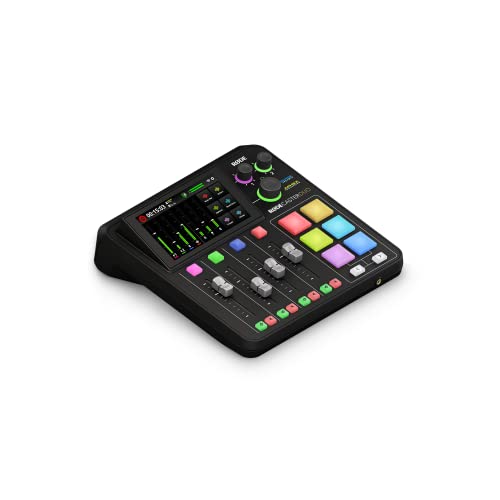
RØDE RØDECaster Duo — Best for Talk Streams
Talk, interview and variety streams are podcasts with an audience watching live, and the RØDECaster Duo treats them that way. Two studio preamps with APHEX processing make voices sound finished without plugins, the pads fire music, drops and effects in the moment, and a co-host or call-in guest joins by Bluetooth or USB with mix-minus handled — the complete talk-stream desk in a compact footprint.
It records multitrack while it streams, which quietly transforms a channel’s workflow: every live show becomes a podcast episode and a source of clips with each voice separate for the edit. Streamers building across platforms — live first, on-demand forever — get both products from one performance and one desk.
Gameplay-first streamers should note what it is not: there are no game/chat fader pairs or gaming sound-board culture here, and routing game audio is a simpler affair than on the GoXLR. For talk-led channels, podcasts that stream, and creators whose voice is the content, it is the most complete small desk in this guide.
Strengths
- Broadcast voice quality with APHEX processing
- Records multitrack while streaming
- Remote guests join without echo fuss
Trade-offs
- Not shaped for game/chat fader workflows
- Two mic inputs cap in-room guests
- Premium tier for a compact unit
Key specs: 2 studio preamps, APHEX processing, programmable pads, multitrack recording, Bluetooth/USB guests, streaming-ready USB interface
Best for: talk, interview and podcast-style streams / Not suited for: dual-PC gameplay routing power users
Check the current price on Amazon

Behringer FLOW 8 — Best Compact Digital
The FLOW 8 comes at streaming from the live-sound direction: a genuine eight-input digital mixer with per-channel processing, two effects engines and app control, wearing physical 60mm faders for the channels your hands use most. Streamers who outgrow creator gadgets — a microphone, an instrument, a console feed, a guest — find real mixer headroom here instead of a new purchase.
Bluetooth audio brings a phone’s music or a guest call in without cables, the USB interface carries the stream mix to the computer, and the app exposes the deep controls — full EQ, dynamics, routing — that the compact surface summarises. Off-stream, the same box mixes a small gig, a worship team or a panel event, which no other pick here can claim.
The trade is immediacy. App-led depth means more setup thought than a GoXLR’s streamer-first surface, and gaming-specific conveniences are absent. Streamers whose setups keep growing — or who genuinely work both sides of the camera and the stage — will find the FLOW 8 the most expandable compact choice.
Strengths
- Real digital mixer depth in a compact box
- Bluetooth input and USB streaming interface
- Doubles as a small live-event mixer
Trade-offs
- App-led depth means a learning curve
- No gaming sound board or motorised faders
- Surface controls summarise rather than expose all
Key specs: 8 inputs, digital processing with app control, 60mm channel faders, 2 FX processors, Bluetooth audio, USB interface
Best for: streamers with growing, multi-source setups / Not suited for: plug-and-play single-PC beginners
Check the current price on Amazon

TC Helicon GoXLR MINI — Best Compact Streaming Deck
The GoXLR MINI distils the flagship’s idea — microphone, game, music and chat under your fingers, routed properly, processed live — into a compact deck for streamers who do not need motorised faders or the full sound board. The Midas-designed preamp is a genuine highlight, giving dynamic broadcast microphones the clean gain they demand, and the app carries the same routing intelligence as its bigger sibling.
On the desk it is admirably focused: channel faders and mutes where your hand expects them, a small footprint that suits crowded streamer desks, and profiles that recall your setup between sessions. For a single-PC gameplay or just-chatting stream it covers the complete brief without the flagship’s price tier or sprawl.
What you give up is the theatre and the depth: no motorised faders, a reduced hardware sound board experience, and the same Windows-centred ecosystem. Streamers who know the flagship’s extras would go unused will find the MINI the smart buy in the family; streamers building a showpiece desk should step up instead.
Strengths
- Midas preamp with proper dynamic-mic gain
- Flagship routing logic in a compact deck
- Focused controls, small desk footprint
Trade-offs
- No motorised faders or full sound board
- Windows-centred, app-dependent
- Fewer physical controls than the flagship
Key specs: 4-channel mixing via app, Midas preamp, compact hardware faders, voice processing, Windows support
Best for: single-PC gameplay and chatting streams / Not suited for: showpiece desks or Mac-only setups
Check the current price on Amazon

FIFINE Ampligame SC3 — Best Budget
Every streaming category needs an honest first step, and the Ampligame SC3 is this one’s. It takes a real XLR microphone — the upgrade path every streamer eventually takes — and adds the controls streaming actually uses: an individual fader, volume control, a decisive mute button and USB plug-and-play connection that simply works with a PC and streaming software.
Within its tier the experience is well judged. The fader gives your hand the microphone control that software sliders cannot, muting is instant and physical — invaluable the first time a household emergency happens off-camera — and the styling matches the gaming desks it will live on. For a new channel, it converts a good microphone into a controlled broadcast chain for very little money.
Its ceiling is clear and should be respected: one microphone, basic processing, and none of the multi-source routing of the decks above. That is not a flaw at its tier — it is the definition of a starter. Stream it hard, learn what your show actually needs, and let that knowledge choose your upgrade.
Strengths
- Real XLR input at an entry tier
- Physical fader and instant mute
- True plug-and-play with PC software
Trade-offs
- Single microphone input
- Basic processing and routing
- Plastic build reflects the tier
Key specs: XLR microphone preamp, individual fader and volume control, mute button, USB plug-and-play for PC, RGB styling
Best for: new streamers making their first XLR upgrade / Not suited for: multi-source or dual-PC setups
Check the current price on Amazon
Comparison Table
| Pick | Badge | Key spec | Best for |
|---|---|---|---|
| TC-Helicon GoXLR | Best Overall | 4ch motorised faders, sound board, voice FX | full-time gameplay and variety streamers |
| Yamaha AG06MK2 | Best for Music Streamers | 6ch loopback mixer/interface | music performers and singer-streamers |
| RØDE RØDECaster Duo | Best for Talk Streams | 2 preamps, pads, APHEX processing | talk, interview and podcast-style streams |
| Behringer FLOW 8 | Best Compact Digital | 8-in digital, app control, Bluetooth | streamers with growing, multi-source setups |
| TC Helicon GoXLR MINI | Best Compact Streaming Deck | 4ch compact, Midas preamp | single-PC gameplay and chatting streams |
| FIFINE Ampligame SC3 | Best Budget | XLR input, individual fader, USB PnP | new streamers making their first XLR upgrade |
How to Choose a Streaming Mixer by Stream Type
Gameplay streams need channel separation above all: microphone, game, music and chat as independent, reachable controls, with routing that keeps voice chat out of the broadcast by default. Talk and podcast-style streams need voice quality, guest handling and pads. Music streams need instrument inputs, low-latency monitoring and loopback. Name your stream type honestly before shopping — the families in this guide diverge precisely along those lines.
Single-PC and dual-PC rigs choose differently. A dual-PC setup benefits most from a hardware-centred deck like the GoXLR that lives between the machines; a single-PC streamer may be served by a compact interface with strong software. Console streamers add a capture wrinkle: the mixer must accept the console’s audio cleanly and return chat audio, which favours decks with flexible USB and line routing.
Budget by bottleneck. If your microphone is entry-level, a mid-tier mixer plus a microphone upgrade usually beats a flagship mixer alone. If your audio chain is already strong and your frustration is control — reaching for software sliders mid-game — the flagship deck is the correct spend.
Loopback, Mix-Minus and Monitoring: The Routing That Matters
Loopback lets computer audio — game, music, alerts — travel into the mixer and back out to the stream under your control. Done well, you ride the game’s volume against your voice in real time. Done badly or not at all, streamers resort to software patching that breaks at the worst moments. Any streaming mixer you buy should explain its loopback story in one sentence; if it cannot, it does not have one.
Mix-minus protects your calls. Voice-chat partners must hear you and the game without hearing themselves echoed back, and the stream should hear them only when you decide. Dedicated streaming decks handle this invisibly; simpler interfaces may need software help. Test the full call path before your first live show, with a friend, at stream volume.
Your own monitoring mix is a separate product from the broadcast mix. You need your voice in your headphones at a confidence-giving level (sidetone), game audio at playing level, and alerts audible but not deafening — none of which should dictate what the audience hears. Two-mix thinking is the whole discipline of streaming audio; the right mixer makes it physical.
Microphones and Processing for Live Voices
Streaming microphones divide into dynamic models — forgiving of untreated rooms, quiet output needing real preamp gain — and condensers, which are sensitive, detailed and demanding of the room. Match the preamp to the choice: dynamic users should prioritise clean gain (the GoXLR family’s preamps and the RØDE consoles are benchmarks), condenser users should prioritise phantom power and a quiet space.
Live processing is a safety net, not a costume. Gentle compression keeps whispers and laughter in range, a gate or expander hushes the room between sentences, and modest EQ adds clarity. Voice effects and changers are show tools — fun in doses, fatiguing as a default. Set your clean voice first; add character second.
Finally, rehearse the mute. Every streamer eventually coughs, answers a door or handles a household moment live. A physical, instant, certain mute — ideally one that can mute the broadcast while keeping your call, or both — is a professional feature. Judge mixers by their mute behaviour as seriously as by their sound.
How to Set Up a Streaming Mixer for Your First Broadcast
Wire the chain with everything powered down: microphone into the mixer’s XLR input, mixer to PC by USB, headphones into the mixer’s headphone output — not the PC’s — so you hear the mixer’s own monitoring. In your streaming software, select the mixer as both input and monitoring device according to its manual, and disable the software’s own microphone processing so the two do not fight.
Build the two mixes deliberately. Set your broadcast levels first: voice as the loudest, most consistent element, game beneath it, music and alerts lower still. Then set your headphone mix for playing comfort — your own voice present but not loud, game at playing level. Speak at real stream energy while a test recording plays back; the recording, not your headphones, is what the audience gets, so judge by it.
Test the social paths before going live. Bring a friend into voice chat and confirm they hear you and the game without echo, and that the test recording contains their voice only if you intend it to. Fire every alert and pad you plan to use. Check the mute: press it mid-sentence and confirm the recording goes silent.
Save the configuration as a profile, export or photograph the settings, and write down your gain and level numbers. Streaming setups drift — updates, new games, borrowed microphones — and the streamer who can rebuild their sound in ten minutes from notes never loses a show night to audio archaeology.
Common Buying Mistakes
Monitoring from the PC instead of the mixer, then wondering why your voice feels delayed and disconnected.
Letting voice chat leak onto the broadcast — or echo back to your friends — because mix-minus was never tested.
Buying a flagship mixer while keeping an entry microphone; the chain improves at its weakest link first.
Stacking software processing on top of the mixer’s processing until the voice sounds like a robot in a tunnel.
Never making a test recording — judging your stream sound only by your own headphones, which are a different mix.
Final Recommendation
Most streamers should start at the TC-Helicon GoXLR for the complete creator desk, or its MINI sibling for a focused single-PC setup. Music performers belong on the Yamaha AG06MK2, talk-led channels on the RØDECaster Duo, growing multi-source rigs on the Behringer FLOW 8, and new channels get an honest start with the FIFINE Ampligame SC3.
Complete the research with Best Sound Mixers, Best Sound Mixers For Podcasting, Best Usb Mixers, Best Audio Mixers Under $500 and Best Sound Mixers For Dj. Set the routing up once, test it with recordings, and your audio will quietly become the reason viewers stay.
Audio Latency, Monitoring and the Feel of a Live Stream
Latency is the streaming problem viewers never name and always feel. Your voice in your headphones must arrive essentially instantly — which is why this guide insists on monitoring from the mixer itself, whose direct monitoring path is immediate — while the broadcast chain tolerates delay because the audience receives audio and video together. Problems begin when streamers monitor through software, hear themselves late, and unconsciously slow their speech to chase the echo. Every deck in this guide provides direct monitoring; using it correctly is the difference between a stream that feels live and one that feels like a phone call to another continent.
Video sync is latency’s public face. Capture chains delay video and audio by different amounts, and the fix — a small audio delay in the streaming software, set once by clapping on camera and checking the recording — belongs in every streamer’s setup ritual. Mixers cannot solve sync for you, but stable, single-device audio routing through one deck makes the offset constant and therefore correctable, while sprawling software routing makes it drift.
Judge your setup by recordings, again. Watch a minute of your own test stream at normal volume and listen for the three tells: your voice’s timing against your mouth, the game’s volume against your commentary in a loud moment, and whether alerts startle. Ten honest minutes of test footage will teach you more about your audio than a month of chat feedback, because chat is kind and recordings are not.
Voice Chat, Communities and the Social Audio Layer
Modern streams are social performances, and the mixer’s handling of other people’s voices is a content decision. Voice chat should sit in your mix like guests on a talk show — present, intelligible, and under your control — which is why channel separation for chat appears throughout this guide’s picks. A deck that lets you dip chat under a story, mute it for a sponsored segment, or lift it for a community game night turns community management into a fader move instead of a settings expedition.
Protect your collaborators as carefully as your audience. Mix-minus discipline — guests never hearing themselves echoed — is basic respect for the friends and fellow creators in your call, and streamers who get it wrong develop a reputation that costs them guests. Test the call path with the same friend, at the same volumes, before the first collaborative stream, and write the working configuration down; collaboration setups have a unique talent for breaking between sessions.
Moderation has an audio layer too. A hardware mute you trust, a chat channel you can kill instantly, and a sound board that can cover an awkward pause are community-safety tools as much as performance tools. When comparing streaming mixers, weigh these controls as seriously as preamp specifications — on the night they matter, they will matter more than any specification on the box.
From First Stream to Career Desk: Upgrading in the Right Order
Streaming audio upgrades obey a ruthless order of operations. The room and microphone placement come first and cost the least. The microphone itself comes second — the move to a good XLR dynamic or condenser is the single largest audible jump most channels ever make. The mixer or interface comes third, unlocking that microphone and adding control. Everything after that — flagship decks, outboard processing, acoustic treatment panels — refines a foundation that must already exist. Streamers who buy in the published order (flagship mixer first, microphone later) routinely end up with an expensive desk faithfully amplifying a mediocre chain.
Know the signs that the mixer has become your bottleneck, because they are specific: you are reaching for software sliders mid-game, your chat routing breaks between sessions, your dynamic microphone hisses at usable gain, or your show’s format has outgrown your inputs. Any one of these justifies the step to the GoXLR class. Their absence means your next improvement lives elsewhere in the chain, whatever the marketing calendar says.
Keep the old gear working when you upgrade. A first interface becomes the travel kit, the console-streaming solution or the backup that saves a show night. Streamers build careers across years of broadcasts, and the desks in this guide were chosen partly for how gracefully they cascade — today’s flagship becomes tomorrow’s second room, and nothing bought honestly is ever wasted.
Sound Boards, Alerts and the Theatre of Streaming
The sound board is streaming’s native instrument, and its use separates channels that feel produced from channels that feel merely broadcast. A drop at the right moment — a sting under a victory, a bed under a story, a silence where a sound used to be — is pacing, and pacing is retention. The GoXLR family’s board and the RØDE consoles’ pads were weighted heavily in this guide because they put that pacing under your fingers, at performance distance, without a software window between you and the moment.
Discipline is what keeps the theatre tasteful. Sounds should be few, level-matched to your voice rather than to each other, and rehearsed; an alert that startles the streamer will startle ten thousand headphones. Set every pad’s level against your speaking voice in a test recording, keep the board’s vocabulary small enough to play blind, and retire sounds before your audience starts retiring them for you. The board is an instrument, and like every instrument in this guide it rewards practice and punishes novelty-seeking.
Alerts deserve the same production care as the board. Text-to-speech donations, subscriber sounds and follower chimes all pass through your mixer’s routing, and their levels relative to game and voice decide whether they read as celebration or interruption. Route them deliberately, test them at stream volume, and remember that you will hear them ten thousand times — choose sounds you can love that long.
Two Rooms, One Stream: IRL, Events and Hybrid Broadcasting
Streaming increasingly leaves the bedroom: IRL broadcasts, event coverage, convention floors and hybrid shows where a live room and an online audience share one performance. The mixer’s job expands accordingly — a microphone for the room, a feed for the stream, monitoring that works in a noisy hall — and the picks in this guide scale differently into that world. The Behringer FLOW 8, a genuine small mixer, is the natural event tool here; the podcast consoles handle talk-format events gracefully; the gaming decks stay champions of the fixed desk.
Hybrid events teach the same lesson as every other section of this guide: test the whole chain in the venue, with the venue’s power, network and noise, before the audience exists in either room. Event audio fails at interfaces — a ground loop from a hall’s power, a Wi-Fi network that collapses under a crowd, a cable one metre short — and the streamer who arrives with spares, a backup recorder and a printed settings sheet is practising the profession, not being paranoid.
For most channels the fixed desk remains the centre of gravity, and the right strategy is a home flagship that cascades: today’s back-up interface becomes the event kit, today’s event mixer knowledge becomes the live show’s insurance. Buy the desk your main show deserves, learn it completely, and let its ecosystem grow outward — that is how a streaming setup becomes a broadcasting operation without ever being rebuilt from zero.
Troubleshooting Streaming Audio Like a Professional
Every streamer’s audio will fail publicly at least once; professionals are distinguished by how the failure goes. Work the chain in order and say so in your notes: source (is the microphone itself alive — test it into a local recording), mixer (meters moving, correct input selected, mute states as expected), routing (the streaming software receiving the device you think it is), and only then the platform. Most ‘mystery’ failures are a device selection changed by an update or a mute pressed in a panic — which is why the physical mute you trust, and a settings sheet you can rebuild from, appear so often in this guide.
Keep a known-good fallback warm. A spare cable, the old interface in a drawer with its settings intact, a phone ready to carry the stream’s audio for ten humbling minutes — these convert a cancelled show into a story. Streamers who broadcast for income should treat redundancy as a business cost, and the cascade strategy described earlier, where yesterday’s desk becomes today’s backup, is the cheapest redundancy programme in the industry.
After any failure, write the post-mortem while it stings: what broke, what fixed it, what would have caught it in the pre-stream check. Then add that check to the ritual. A pre-stream checklist — test recording, call test, alert test, mute test — takes four minutes and is the entire difference between streamers who fear audio and streamers who merely respect it.
Accessibility and Audience Comfort in Stream Audio
Stream audio serves audiences listening in more ways than the dashboard shows: on speakers in shared rooms, on earbuds in loud trains, through captions when hearing is limited, and at volumes constrained by sleeping households. Mixing for that audience is a craft choice with settings attached. Consistent voice levels matter most — compression used gently and constantly, so no whisper is lost and no laugh is a jump scare — and the processing suites in this guide’s decks exist substantially for this purpose.
Loudness consistency across a whole stream, and between streams, is the second comfort. Viewers who set a volume for your voice should not ride it for your game, your alerts or your guests; the two-mix discipline and per-source control this guide has emphasised are, from the audience’s side, simply respect. Test on the worst playback device you own — a phone speaker in a kitchen — because a meaningful share of your audience lives there permanently.
Finally, say what your audio is doing. Noting in your channel information that streams are mixed for headphone and speaker listening, warning before a deliberately loud segment, and keeping captions enabled where platforms allow are small courtesies that compound into loyalty. The best streaming mixer is partly the one whose controls make those courtesies easy to deliver every single broadcast.
Growing Into Teams: Duo Streams, Podcasts and Shared Desks
Successful channels rarely stay solo, and the mixer’s second life often begins when a second chair appears — a duo partner, a regular guest, a producer in the room. Desks bought with that chapter in mind save a full replacement: a spare microphone input with real processing, headphone capacity for a second listener, and pads or profiles that can hold a second show’s settings. The RØDECaster Duo and FLOW 8 in this guide serve that growth natively; the gaming flagships serve it through their spare channels and app profiles, provided the second voice’s routing is tested before it is live.
Shared desks need shared discipline, as the podcast guide in this series also argues: profiles named and dated, a settings sheet that survives the other person’s session, and a rule that nobody updates firmware on a show day. Teams that adopt those habits discover their audio becomes a house style — consistent across hosts and formats — which audiences experience as professionalism without ever naming it.
The end-state for many channels is a small studio: a flagship desk at the main position, yesterday’s mixer running the second room or the travel kit, and a producer who can rebuild either from notes. Streamers reach it by cascading purchases in the order this guide recommends — bottleneck first, flagship when the format demands it — rather than by replacing everything at each growth spurt. The desks above were chosen to cascade gracefully; plan the cascade and the budget follows.
The Streamer’s Pre-Show Ritual
Professionals in every broadcast discipline share one habit the hobbyist finds tedious: the pre-show ritual, performed identically whether the audience is ten people or ten thousand. For a streamer it takes four minutes and has four beats. First, the local test recording — thirty seconds of voice, game and an alert, played back and actually listened to. Second, the social test — a call partner or a recording of the chat path confirming mix-minus still behaves after whatever updated overnight. Third, the physical sweep — mute tested, faders where the profile says, water placed, door handled. Fourth, the glance at the backup: spare cable located, fallback device present, settings sheet within reach.
The ritual’s value compounds in a way gear cannot imitate. It converts the stream’s opening minutes — where most audio disasters live — into the calmest part of the broadcast, and it teaches the streamer’s hands the desk so thoroughly that mid-show adjustments stop being decisions and become reflexes. Every mixer in this guide rewards the ritual differently, but all of them assume it; the decks were designed by people who broadcast. Adopt the ritual with whatever you own today, and you will discover your true bottleneck within a week — which is the only honest way to choose the next desk.
A Note on Second-Hand Streaming Desks
Streaming hardware has a healthy used market, and it rewards the same discipline as every other category in this series — with one streaming-specific twist. Test the software, not just the hardware: a used streaming deck is a hardware-software system, and its value depends on the companion app installing cleanly, recognising the unit and holding its profiles on your machine today, not on the day it was manufactured. Bring a laptop to the inspection, connect the desk, run the app, move every fader and save a profile before money changes hands; a deck that passes that test is a genuine bargain, and one that fails it is a paperweight with motorised faders.
Check the consumables of the streaming desk as you would a DJ mixer’s faders: the mute buttons that have absorbed ten thousand presses, the USB port that has carried the cable’s weight for years, the headphone jack that crackles when the cable moves. These are the parts a streamer’s hands live on, and their condition predicts your daily satisfaction more honestly than the unit’s cosmetic state. Buy the used desk whose working surfaces are sound, keep your old interface as its backup, and the second-hand market becomes what it should be — the patient streamer’s discount on exactly the right tool.
Frequently Asked Questions
What does a streaming mixer do that an interface does not?
It manages multiple sources — microphone, game, music, chat — as separate physical controls, routes them differently to the stream and to your headphones, and typically adds sound boards, live voice processing and mute logic designed for broadcasting. An interface mainly converts one or two inputs well.
Do I need a streaming mixer for a dual-PC setup?
It is where a streaming mixer helps most. A hardware deck between the two machines carries the microphone, returns game audio, manages chat routing and feeds the stream PC a finished mix, replacing a fragile web of software cables. The GoXLR family is built around exactly this topology.
What is loopback and why do streamers need it?
Loopback routes computer audio through the mixer so you can control game, music and alert levels physically and send them to the stream in balance with your voice. Without it, those levels live in software menus you cannot reach mid-game.
Can I use a podcast console for streaming?
Yes — talk, interview and variety streams are essentially live podcasts. Consoles like the RØDECaster Duo add broadcast voice processing, guests and multitrack recording of the live show. Gameplay-heavy channels usually prefer a gaming deck’s chat and game channel layout.
How important is preamp gain for streaming microphones?
Very, if you use a popular dynamic broadcast microphone: they output a quiet signal and reveal hiss from weak preamps. Check that your chosen mixer or interface is known to drive dynamic microphones cleanly, or budget for an inline gain booster.
Should beginners start with the FIFINE or save for a flagship?
Start where your bottleneck is. If your microphone and room are new, the budget deck plus a decent XLR microphone transforms your sound immediately. Save the flagship for when your show’s format — dual-PC, sound board, multiple sources — genuinely demands it.


