Disclosure: airfryerkitchensupply.com is reader-supported. When you buy through links on our site, we may earn an affiliate commission at no extra cost to you.
Where to buy
Every mixer in this guide is sold through Amazon, and availability shifts between the standalone units and the bundles that add microphones, boom arms, or headphones. Use the links below to check the current configuration before you buy — a bundle is only a deal if you actually need the extras in the box. All six picks were confirmed as live Amazon listings on the date this guide was prepared.
- RØDE RØDECaster Pro II — check price on Amazon
- TC-Helicon GoXLR — check price on Amazon
- RØDE RØDECaster Duo — check price on Amazon
- Yamaha ZG01 — check price on Amazon
- Mackie ProFX6v3+ — check price on Amazon
- MAONO MaonoCaster AME2 — check price on Amazon
If you are shopping for the best streaming mixers in 2026, the first thing to understand is that “streaming mixer” is really three different products wearing one label. There are all-in-one production consoles built for podcasters who also stream, like the RØDECaster line. There are broadcast-style control surfaces built for gamers who need to ride four separate volume sources with physical faders, like the GoXLR. And there are ordinary small analog mixers with a USB output bolted on, which work fine for a single microphone and a music feed but give you none of the stream-specific tools — no sound pads, no submixes for your audience versus your own headphones, no one-button cough mute that streamers lean on constantly. This guide covers all three families honestly, because the right answer depends entirely on what your stream actually looks like.
The second thing to understand is that your microphone matters more than your mixer. Every pick below has a clean enough preamp for a modern dynamic broadcast microphone, and the audible differences between them are smaller than the difference a treated room and good mic technique make. What you are really buying is workflow: how fast you can mute, how many sources you can balance without opening software, whether you can record a backup while you stream, and whether the unit keeps working when your streaming PC is busy doing something else. Buy the workflow that matches your show, not the longest feature list.
One market reality worth naming: this category moves fast and software support is the real lifespan of these products. A streaming mixer from a brand that ships firmware updates and maintains its companion app will serve for years; a no-name board with abandoned software becomes e-waste the day an operating system update breaks its driver. Every pick below comes from a manufacturer with an active product line and an established support organization standing behind it, and that support record — not a launch-day feature list — is what separates the recommendations here from the dozens of lookalike streaming consoles sold under rotating brand names.
In this guide
Quick Picks
- Best Overall — RØDE RØDECaster Pro II: Four proper studio preamps, APHEX voice processing, eight programmable SMART pads, and multitrack recording to computer, microSD, or USB storage — the most complete streaming-and-podcast console here. Check the current price on Amazon
- Best for Dual-PC Gaming Streams — TC-Helicon GoXLR: Four motorized faders mapped to mic, music, game, and chat, a built-in sound board, and vocal effects, designed around the two-computer setup serious game streamers run. Check the current price on Amazon
- Best for Solo Creators — RØDE RØDECaster Duo: The RØDECaster formula shrunk for one or two people — the same processing and pads philosophy in a compact body that leaves desk space for a camera and keyboard. Check the current price on Amazon
- Best for Game Chat — Yamaha ZG01: A gaming-first mixer built around voice chat and game audio balance, from the company that understands game sound better than anyone. Check the current price on Amazon
- Best Hybrid for Streams and Small Gigs — Mackie ProFX6v3+: A real analog mixer with Onyx preamps and a USB-C interface mode, so the same board that runs your stream can run a small live PA on the weekend. Check the current price on Amazon
- Best Budget — MAONO MaonoCaster AME2: XLR input with 48V phantom power, Bluetooth accompaniment input, and eleven custom sound pads at an entry-level tier — the sensible first mixer for a new streamer. Check the current price on Amazon
How These Picks Were Chosen
We started by separating true streaming mixers from ordinary compact mixers with a USB socket. A pick had to offer at least one capability a streamer uses every session: assignable submixes, sound pads, hardware mute for the microphone, loopback for bringing computer audio into the show, or multitrack recording as a safety net. Products that were simply small live-sound mixers were only included when they added something the streaming-native units lack — in this guide, that is the Mackie, which doubles as a gigging board.
Every product name and ASIN in this guide was cross-checked against Amazon’s own catalog data before a link was attached. Where a well-known streaming product could not be confirmed — one popular control-deck-style unit returned no matching listing at all — it was left out rather than linked on guesswork. Specs quoted in the mini spec boxes come from the verified listing titles and the manufacturers’ published descriptions of the same models, and we deliberately avoid printing prices or rating counts, which change too often to be trustworthy in a written guide.
Finally, we weighted reliability and software support heavily. A streaming mixer is a computer peripheral as much as an audio device; driver quality, firmware updates, and whether the companion app is still maintained matter as much as preamp noise. That is why established audio brands dominate this list and why we flag platform limits — such as Windows-only support — wherever they exist.
The 6 Best Streaming Mixers

RØDE RØDECaster Pro II — Best Overall
The RØDECaster Pro II is the unit to buy if your stream is really a show: a podcast that broadcasts live, a multi-guest interview stream, a music-and-talk format, or any setup with more than one microphone. It suits creators who record as seriously as they stream, because it is a recorder first and a streaming interface second. It is not the right buy for a pure gaming streamer who only ever touches one microphone and three volume sliders — that buyer is paying for preamps and recording features they will never open.
Strengths
- Four studio-grade preamps with enough clean gain for low-output dynamic broadcast microphones, so two hosts and two guests all sound consistent.
- APHEX voice processing built in — the classic broadcast chain of exciter and big-bottom warmth plus compression and gating, applied per channel without plug-ins.
- Eight SMART pads that trigger sounds, effects, MIDI commands, and mixer actions, plus multitrack recording to computer, microSD, or USB storage as a backup when the stream software misbehaves.
Trade-offs
- It is a premium-tier purchase, and solo streamers will leave half the hardware unused.
- The touchscreen-and-menu workflow takes an evening to learn; it is not a plug-in-and-go appliance on day one.
- It is large for a streaming desk that also holds a keyboard, Stream Deck-style controller, and two monitors.
Key specs (from the verified listing): 4 studio preamps · APHEX processing · 8 SMART pads · multitrack recording to computer, microSD or USB · standalone operation.
The deeper reason the Pro II wins is redundancy. Streaming live means your recording and your broadcast are the same fragile event; when the streaming PC drops frames or the platform hiccups, a console that is simultaneously writing a multitrack backup to a card has saved more shows than any encoder setting. The dual USB-C connections let a main and backup computer — or a computer and a phone — stay attached, and the Bluetooth input handles call-ins cleanly. For a gaming-only desk this is overkill, and we say so plainly; for anyone whose stream is also their podcast, their video, and their archive, it is the most complete single box in this guide. Check the current price on Amazon
Best for: podcast-streamers, multi-mic shows, creators who need a recorded backup / Not suited for: single-mic gaming desks watching the budget

TC-Helicon GoXLR — Best for Dual-PC Gaming Streams
The GoXLR was designed around one specific desk: a gaming PC and a streaming PC side by side, with game audio, music, chat, and a microphone all needing independent, grabbable volume control mid-match. If that is your setup, nothing else here matches it. If you stream from a single PC and mostly play story games, its advantages shrink and its Windows-only software becomes a real constraint to weigh.
Strengths
- Four motorized faders assigned to microphone, chat, music, and system/game audio — the faders physically move when profiles change, so what you see is always the true level.
- A proper sound board with sample pads, plus TC-Helicon vocal effects (reverb, echo, pitch and gender effects) that game streamers actually use on air.
- Optical input for console audio and a workflow built for separating what the stream hears from what you hear.
Trade-offs
- Officially supported on Windows only — Mac streamers should look elsewhere in this list.
- One microphone input; co-hosts and in-person guests are not part of the design.
- The companion app carries a lot of the configuration, so your setup lives partly in software profiles.
Key specs (from the verified listing): 4-channel mixer · motorized faders · sound board and vocal effects · Windows support.
What sells the GoXLR in daily use is speed. When a raid arrives, a song is too loud, or Discord erupts mid-game, you grab a physical fader without alt-tabbing — and the motorized faders mean switching profiles never leaves the hardware lying to you about levels. The smaller GoXLR MINI (also verified on Amazon) covers single-PC streamers who want the same routing idea with one fader and a lower tier price; we list the full-size unit here because the four-fader layout is the entire point of the design. Buy the GoXLR for a gaming desk, not for a podcast desk. Check the current price on Amazon
Best for: two-PC gaming streamers, variety streamers riding music and chat levels live / Not suited for: Mac users, multi-microphone shows
RØDE RØDECaster Duo — Best for Solo Creators
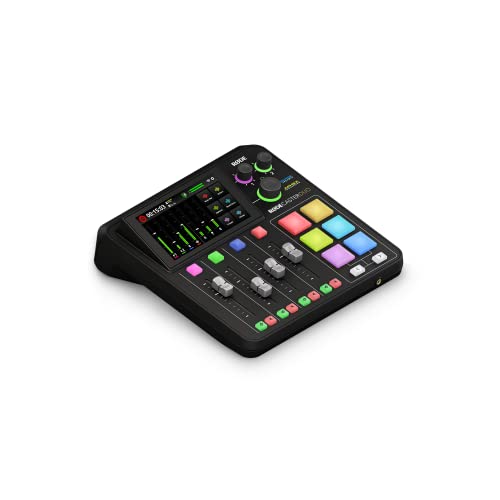
The Duo takes the RØDECaster formula — real preamps, real processing, pads, onboard recording — and cuts it down to the size a solo creator or two-person show actually needs. It suits streamers who felt the Pro II was right in spirit but wrong in footprint and price tier. It does not suit four-person in-person panels; that is exactly the job its bigger sibling exists for.
Strengths
- The same Revolution preamp and APHEX-style processing philosophy as the Pro II, so a solo voice sounds broadcast-finished without plug-in chains.
- Compact body that coexists with a keyboard, control deck, and camera on a normal desk.
- Onboard recording and flexible USB connectivity carry over, keeping the backup-recording safety net.
Trade-offs
- Fewer physical inputs and pads than the Pro II — growing into a bigger show means replacing it, not expanding it.
- Still a mid-to-premium tier purchase next to budget streaming mixers.
- Like the Pro II, the touchscreen workflow rewards an hour of setup rather than instant use.
Key specs (from the verified listing): compact all-in-one production studio · podcasting, streaming and music production focus · standalone recording.
The Duo is the honest middle of the streaming market: most streams have one voice, occasionally two, and a pile of computer audio. The Duo covers that reality with the processing quality of the flagship and none of the unused channels. Paired with a good dynamic microphone, it is the setup we would hand a serious solo streamer who wants to stop thinking about audio. If there is any chance your show grows to three or four in-person voices within a year, skip straight to the Pro II instead and buy once. Check the current price on Amazon
Best for: solo streamers, two-person shows, podcasters who stream their recording sessions / Not suited for: four-mic panels, buyers who need the cheapest possible start

Yamaha ZG01 — Best for Game Chat
The ZG01 comes at streaming from the opposite direction to RØDE: not from broadcast, but from game audio. It is built for the player whose stream lives or dies on voice chat — squad games, co-op streams, and multiplayer nights where balancing game sound against teammates is a constant, physical task. Podcasters and musicians will find it too narrowly focused; gamers will find it refreshingly honest about what it is for.
Strengths
- A dedicated game/chat balance workflow that treats voice chat as a first-class source, not an afterthought input.
- Yamaha’s long experience in game and home audio shows in the headphone monitoring design — what you hear is easy to get right.
- Compact, desk-friendly form with big, grabbable controls suited to mid-game adjustments.
Trade-offs
- Narrower feature set than the RØDECaster line: no multitrack show recording, no sound-pad production layer.
- One-voice focus — it is a personal gaming mixer, not a show console.
- Effects and processing are aimed at chat clarity and fun voice options rather than broadcast finishing.
Key specs (from the verified listing): gaming mixer for voice chat and game streaming · also sold in a headset pack configuration.
Think of the ZG01 as the mixer for the streamer’s own ears. Its job is to make sure you hear the game, hear your team, and are heard by both your team and your audience at sane levels — and to make those three balances one-knob simple. Streamers who play with friends nightly will use its core feature more in a week than they would use a podcast console’s guest preamps in a year. It is a specialist tool, recommended as such. Check the current price on Amazon
Best for: multiplayer and squad-game streamers, console-and-PC hybrid desks / Not suited for: podcast production, multi-guest formats

Mackie ProFX6v3+ — Best Hybrid for Streams and Small Gigs
The ProFX6v3+ is the pick for the streamer who also does things in rooms: runs sound for a church stream, a school event, a small band, or community theater, and wants one board that lives both lives. As a pure streaming appliance it lacks pads and submix tricks; as an honest analog mixer with a modern USB-C interface mode and Mackie’s GigFX+ effects, it outlasts and out-flexes the streaming-native boxes in every non-streaming situation.
Strengths
- Onyx mic preamps with a reputation earned in live sound, plus a real analog signal path that works with the computer off.
- GigFX+ effects with presets stored and shown on a built-in LCD, per the verified listing — usable reverb and delay without a plug-in host.
- USB-C interface mode for streaming and recording, in a chassis built to be carried to actual events.
Trade-offs
- No sound pads, no stream-specific submix layer, no motorized anything — level riding is manual and old-school.
- Its streaming workflow depends on your streaming software’s routing more than the RØDE or GoXLR ecosystems do.
- Overbuilt and oversized if it will never leave a gaming desk.
Key specs (from the verified listing): 6-channel analog mixer · USB-C interface · GigFX+ effects engine with LCD preset display.
There is a durability argument here that streamers underestimate: analog mixers from live-sound brands are repaired, resold, and repurposed for decades, while app-dependent streaming gadgets age with their software. If your streaming is one part of a broader audio life — services, gigs, rehearsals, events — the ProFX6v3+ is the only pick in this guide that follows you out of the house. Streamers who only stream should choose a streaming-native unit above it on this page. Check the current price on Amazon
Best for: church and event streamers, musicians who stream, buyers wanting one board for desk and venue / Not suited for: gamers wanting pads, faders-per-source control, or app-driven profiles

MAONO MaonoCaster AME2 — Best Budget
The AME2 is the sensible first step into streamed audio: a podcast console with an XLR input, phantom power for a condenser microphone, Bluetooth for backing music from a phone, and eleven programmable sound pads for the stingers and effects that make a small stream feel produced. It suits new streamers who do not yet know which features they will actually use — which is most new streamers. It does not suit anyone who already knows they need multitrack recording or multiple microphone channels.
Strengths
- XLR input with 48V phantom power, so it grows with you from a starter microphone to a proper broadcast dynamic or condenser.
- Eleven custom sound pads and Bluetooth accompaniment input cover the entertainment layer streamers actually use nightly.
- Entry-level tier pricing that leaves budget for the microphone, which matters more.
Trade-offs
- Single microphone channel — co-hosts need a different product.
- Build and preamps are entry-tier; heavy users will outgrow it within a year or two.
- Processing is preset-driven rather than the deep per-channel control of the RØDE consoles.
Key specs (from the verified listing): XLR input with 48V phantom power · Bluetooth · 11 custom sound pads · PC and smartphone streaming support.
Every experienced streamer gives the same advice: spend the first year learning your show, then buy the console your show actually needs. The AME2 is built for exactly that year. It makes a starter stream sound intentional — leveled voice, music underneath, effects on pads — at a tier where a mistake costs little. When you outgrow it, it becomes a perfectly good backup or travel rig. That is the right way to enter this category. Check the current price on Amazon
Best for: new streamers, budget podcast-streamers, mobile and phone-based shows / Not suited for: multi-mic formats, buyers who want a five-year flagship
Comparison Table
| Pick | Badge | Key spec | Best for |
|---|---|---|---|
| RØDE RØDECaster Pro II | Best Overall | 4 preamps, APHEX processing, 8 SMART pads, multitrack recording | Podcast-streamers and multi-mic shows |
| TC-Helicon GoXLR | Best for Dual-PC Gaming Streams | 4 motorized faders, sound board, vocal effects, Windows | Two-PC gaming desks |
| RØDE RØDECaster Duo | Best for Solo Creators | Compact production console with onboard recording | Solo and two-person shows |
| Yamaha ZG01 | Best for Game Chat | Game/voice-chat balance workflow | Multiplayer streamers |
| Mackie ProFX6v3+ | Best Hybrid for Streams and Small Gigs | 6-channel analog mixer, USB-C, GigFX+ effects | Desk plus venue use |
| MAONO MaonoCaster AME2 | Best Budget | XLR with phantom power, Bluetooth, 11 sound pads | New streamers |
How to Choose the Right Streaming Mixer for Your Show
Count your voices first, not your features. The single biggest fork in this category is how many microphones you will ever run at once. One voice points you to the GoXLR, ZG01, Duo, or AME2. Two voices rule out the GoXLR and AME2 entirely. Three or four in-person voices leave the RØDECaster Pro II standing alone in this guide. Streamers routinely buy a one-mic unit, invite a co-host within three months, and replace the whole desk — decide this one honestly before anything else.
Decide whether you need separate mixes for you and your audience. The defining streaming feature is the submix: your viewers should hear the game loud and your alerts louder, while you hear your own voice low and your teammates clear. Streaming-native units (RØDECaster, GoXLR) build this in. A traditional mixer like the Mackie can approximate it with aux sends and software routing, but you will spend setup time the streaming units spend for you. If you have never thought about what your audience hears versus what you hear, that difference — not preamp quality — is what you are paying for.
Match the unit to your computer platform and layout. The GoXLR is officially a Windows product. Dual-PC setups benefit from optical or multiple USB connections; single-PC laptop streamers benefit from compact units with one cable. Console streamers capturing through a capture card need a mixer whose outputs can feed both the card and their own headphones without a splitter nest. Draw your actual signal path on paper — microphone, mixer, computer, capture card, headphones — before ordering anything.
Think about recording as insurance. If your stream is also your podcast or your video content, onboard multitrack recording (RØDECaster family) is worth real money: it survives encoder crashes, platform outages, and your own muted-microphone mistakes, because each voice is captured separately for repair. If your stream is ephemeral entertainment, a simple stereo feed into your streaming software is fine and the budget units serve well.
Budget in tiers, and fund the microphone first. Entry tier (the AME2’s class) buys a clean single-mic setup with entertainment features. Mid tier (ZG01, Duo, ProFX6v3+) buys either gaming specialization, compact production quality, or gig flexibility. Premium tier (Pro II, and the GoXLR at its level) buys multiple preamps, motorized or pad-driven control, and recording redundancy. In every tier, reserve money for a decent dynamic microphone and a boom arm before upgrading the mixer — the audience hears the microphone and the room, not the mixer’s spec sheet.
How to Set Up a Streaming Mixer Without Feedback, Echo, or Double Audio
Most streaming audio disasters are routing mistakes, not equipment failures. Set up in this order. First, connect the mixer by USB and set it as both the input and output device in your operating system, then set your streaming software to use the mixer’s microphone channel only — never “desktop audio plus microphone” if the mixer is already sending a mix, or your audience hears everything twice with a slight delay. Second, turn off monitoring of the microphone inside the streaming software; monitor yourself through the mixer’s own headphone output, which has no perceptible delay. Third, if you use voice chat, route the chat application to its own channel or device where your mixer supports it, so teammates do not end up on your stream at game volume. Fourth, set microphone gain with the loudest laugh and shout you will realistically produce, peaking comfortably below the top of the meter, then leave it alone and ride faders for balance instead. Fifth, record a private two-minute test stream or local recording and listen on a phone — the device most of your audience uses — before going live. Finally, save the working configuration as a profile or preset in the mixer or its app; streaming setups break most often when a setting is changed for a call or a game and never changed back.
Streaming Mixer vs Audio Interface vs Live Mixer: What Actually Differs
These three boxes all take a microphone in and send audio to a computer, which is why buyers confuse them — but they optimize for different failures. An audio interface optimizes for recording quality per dollar: excellent converters and preamps, almost no live controls, and the assumption that mixing happens later in software. It is the right tool for a musician recording tracks, and a frustrating tool for a streamer, because every live adjustment becomes a mouse hunt inside a control panel. A live mixer optimizes for rooms: many channels, EQ per channel, auxiliary sends for monitors and effects, and outputs meant for power amplifiers and speakers. It assumes a sound engineer standing at it, adjusting continuously, and it records — if at all — as an afterthought stereo feed. A streaming mixer optimizes for a one-person broadcast: few channels, but each one mapped to a source the streamer juggles (microphone, game, chat, music), with hardware mute, pads, and submixes, and the assumption that the operator is also the talent, the producer, and the engineer, all while playing a game or hosting a show.
The practical test is to list what you adjust mid-session. If the answer is “nothing, I set levels and record,” an interface is cheaper and better. If the answer involves speaker zones, monitor wedges, or a band, you need a live mixer. If the answer is “I mute my mic to cough, drop the music when someone talks, trigger a sting when a subscriber arrives, and keep my teammates out of the broadcast mix,” you need a streaming mixer — and no interface or live board will give you those moves as gracefully, whatever their audio quality. Hybrids exist at the edges of this guide for a reason: the Mackie serves people whose mid-session adjustments happen in rooms as often as on streams, and the RØDECaster serves people whose stream is simultaneously a recording session. Choose by the adjustments you make, not by category labels on the box.
Gain, Processing, and the Chain That Makes a Voice Sound Finished
New streamers blame their mixer for a thin or noisy voice when the real culprit is gain staging — where the level is set at each step of the chain. The correct order is mechanical before electronic: get the microphone close, roughly a hand’s width from your mouth for a dynamic broadcast mic, slightly off-axis so plosives pass beside the capsule. Then set the mixer’s preamp gain so your loudest natural speech peaks well below clipping, with your normal voice sitting in the comfortable middle of the meter. Only after that should processing enter: a high-pass filter to remove desk rumble and handling thumps, gentle compression to narrow the gap between your whispers and your laughter, a noise gate set conservatively so it catches room tone between sentences without chopping word endings, and EQ last, in small moves — a little presence lift is usually all a close-miked dynamic needs.
This is where the picks in this guide differ in philosophy. The RØDECaster consoles and the GoXLR put that whole chain inside the box as presets and per-channel processing, so a beginner can sound finished by choosing a voice profile and adjusting intensity. The Mackie gives you the live-sound subset — EQ and one-knob-style compression thinking, plus effects — and expects your streaming software to do the rest. The budget AME2 offers preset voice effects rather than a tunable chain. None of these approaches is wrong; they trade learning curve against control. What is wrong, at any tier, is stacking processing on top of bad gain: compression applied to a signal that was recorded too quietly will pump the room noise up between your words, and no preset can repair that after the fact. Set the analog gain right first, and every mixer in this guide will sound like itself at its best.
The Supporting Gear Nobody Budgets For
A streaming mixer is the center of a small system, and the system fails at its cheapest links. Budget for the following alongside the mixer itself. A balanced XLR cable of sensible length for each microphone — unbalanced cables and bargain no-name XLR leads are the most common source of buzz that buyers misdiagnose as a faulty preamp. Closed-back headphones for monitoring: open-back models leak game audio and your own voice back into the microphone, and earbuds hide the low-level hums and fan noise your audience will hear clearly. A boom arm or low-profile mic stand, because a microphone on a desk stand picks up every keyboard thump through the desk itself, and because keeping the mic close and off-axis is what makes the gain staging described above possible. If your mixer records to a card, buy a card from the manufacturer’s tested list and format it in the unit — streaming consoles are fussier about media than cameras are. Console streamers need to think about ground loops: a mixer, a console, and a PC on different outlets can hum through the capture chain, and an optical connection or a ground-loop isolator on the analog feed solves what no software setting will. None of this is glamorous, and all of it together typically costs less than stepping up one mixer tier — while improving the result more. The streamers whose audio gets complimented in chat are rarely the ones with the most expensive mixer; they are the ones whose whole chain, cable to headphone, was chosen on purpose.
One more supporting decision: where the mixer physically lives. It must sit within arm’s reach — a mixer across the desk might as well be software — and its headphone cable must not cross your mouse path. RØDECaster owners should leave clearance behind the unit for its rear connections and card slot; GoXLR owners should plan for its faders to become the right-hand control surface and put the mouse accordingly. Ten minutes of desk planning prevents the daily friction that makes streamers stop using the hardware features they paid for.
Routing Patterns for Two-PC and Console Streaming Setups
The two-PC setup exists to keep the game machine’s performance pure, and its audio routing follows one rule: the mixer belongs to the streaming PC, and the gaming PC is treated as an audio source, like a console. The gaming PC’s output feeds a line input on the mixer — over optical on the GoXLR, or analog line-in on the RØDE consoles — so game sound becomes one fader among many. Voice chat is the subtle part: if your teammates’ voices live on the gaming PC, they arrive inside that same feed, which is why the GoXLR’s chat channel and the ZG01’s chat-balance design exist, splitting chat onto its own control by using a second lightweight connection. Decide deliberately whether your audience should hear your teammates at all; many streamers keep team chat in their own ears only, both for content control and because teammates did not consent to be broadcast.
Console streaming adds a capture card to the chain and one more decision: the mixer’s main output feeds the streaming PC, while console audio reaches the mixer either through the capture card’s passthrough in the PC or through an HDMI audio extractor ahead of it. The extractor path keeps console audio independent of PC software and is the more reliable of the two. In every pattern, the discipline is the same — each source enters the mixer exactly once, each listener (you, the stream, the recording) gets a deliberate mix, and the test recording on a phone catches the mistakes your studio headphones forgive. Draw your pattern before you buy; the right mixer is the one whose inputs match your drawing.
Common Buying Mistakes
- Buying channels you will never use — or too few. Both directions waste money. Map your show’s voices honestly for the next twelve months, then buy for that map.
- Ignoring platform support. A Windows-only flagship is a paperweight on a Mac desk. Check official support, not forum workarounds, before ordering.
- Chasing preamp specs while using a headset mic in an echoey room. A better microphone, closer to your mouth, in a softer room beats any mixer upgrade. Fix the chain in order: room, microphone, placement, then mixer.
- Double-routing computer audio. Feeding desktop audio into streaming software while also sending the mixer’s combined output is the classic echo mistake. One path for each source, chosen deliberately.
- Skipping the backup recording. Streamers who publish their streams elsewhere and record nothing locally eventually lose a great show to a crash. If that is you, onboard recording belongs on your must-have list.
- Buying a live-sound mixer for a gaming desk. A fine analog mixer gives a gamer no pads, no per-source faders for chat and music, and no profiles. Buy the tool shaped like your actual activity.
Final Recommendation
For most people building a serious stream, the RØDE RØDECaster Pro II is the buy-once answer: it records, processes, and streams a multi-voice show with a safety net, and nothing in this guide is more complete or more forgiving of a chaotic live moment. Solo creators should save the difference and take the RØDECaster Duo, which keeps the sound and the recording insurance in a smaller box. Two-PC gamers should take the GoXLR and its motorized faders without a second thought, while squad-focused players who mostly need game-and-chat balance will be happiest with the Yamaha ZG01. If the same board must also run live events, the Mackie ProFX6v3+ is the durable hybrid choice, and brand-new streamers should start on the MAONO AME2, learn their show for a season, and upgrade with knowledge instead of guesses.
Keep researching the rest of your audio chain with our related guides: Best Analog Mixers, Best Audio Mixers Under $500, Best Studio Mixers, Best Thunderbolt Mixers, and Best 10 Channel Mixers.
Frequently Asked Questions
Do I need a mixer for streaming, or is a USB microphone enough?
A USB microphone is enough for a single voice and simple gameplay audio, and many successful streamers never go further than that first simple setup. A mixer earns its place when you add a second voice, need separate control of game, music, and chat levels, want sound effects on hardware pads, or want a recording backup independent of your streaming software. Buy the mixer when a specific one of those needs appears, not before.
What is a submix and why do streamers talk about it?
A submix is a separate balance of your sources for a separate listener. The classic streaming case: your audience hears game, music, and your voice in one balance, while your headphones carry a different balance with teammates louder and your own voice lower. Streaming-native mixers create submixes in hardware or their apps; without one, you and your audience are stuck hearing the identical mix. Once you have streamed with a proper submix for a week, mixing any other way feels like driving with the mirrors folded in — possible, but needlessly blind.
Dynamic or condenser microphone with a streaming mixer?
Dynamic microphones reject room noise and suit untreated rooms, which describes most streaming spaces; they need healthy preamp gain, which every pick here provides. Condensers capture more detail and more of your room — wonderful in a treated space, unforgiving in a bare one — and need the phantom power that units like the AME2, Duo, and Pro II supply. Room first, then microphone type.
Can one mixer run both my stream and a podcast?
Yes — that dual life is exactly what the RØDECaster Pro II and Duo were built for, since they record multitrack audio locally while feeding the stream. Record the podcast-quality tracks during the live show, edit from the local files rather than the stream archive, and your audio quality stops depending on the platform’s compression.
Why do some streaming mixers only support Windows?
Their routing magic — splitting game, chat, music, and system audio into separate virtual devices — is built on Windows audio drivers, and the manufacturers chose not to build a Mac equivalent. The GoXLR is the well-known example in this guide. Mac streamers should choose from the RØDE, Yamaha, Mackie, or MAONO picks, all of which work as standard USB audio devices on macOS.
Should I buy a bundle with a microphone, arm, and headphones included?
Bundles make sense when you are starting from zero and the included microphone is a known model rather than anonymous bundle filler — several RØDECaster bundles, for example, package the console with the manufacturer’s own microphones and arms, which removes the compatibility guessing entirely. Bundles make less sense when you already own a decent microphone or headphones, because you pay for duplicates and the accessories are usually chosen to hit a bundle price rather than to match the console. Price the console alone first, then add only the extras you would genuinely buy separately.
How do I stop hearing my own voice with a delay?
That delay is software monitoring: your voice travels into the computer, through the streaming or chat application, and back out. Turn off input monitoring in the software and listen to yourself through the mixer’s own headphone output instead, which is a direct analog or near-zero-latency path. Every pick in this guide is designed to be monitored at the mixer; if you are hearing an echo of yourself, the routing — not the hardware — is wrong, and the setup walkthrough above fixes it.


