Disclosure: airfryerkitchensupply.com is reader-supported. When you buy through links on our site, we may earn an affiliate commission at no extra cost to you.
Where to buy
Thunderbolt audio gear is sold on Amazon through manufacturer and pro-audio dealer listings; bundles with plug-in collections or headphones are common in this category, so compare the core unit’s configuration before valuing a bundle. Each pick below was verified as a current Amazon listing during this guide’s research.
- Universal Audio Apollo x8p Gen 2 — check price on Amazon
- MOTU 848 — check price on Amazon
- Antelope Audio Orion Studio Synergy Core — check price on Amazon
- MOTU 10pre — check price on Amazon
- MOTU 16A — check price on Amazon
- Apogee Symphony I/O Mk II 8×8 (Thunderbolt) — check price on Amazon
Before the picks, this guide owes you a straight answer about what the best thunderbolt mixers actually are — because a Thunderbolt mixing console, in the traditional faders-and-knobs sense, essentially does not exist. What exists, and what engineers mean when they search this term, is the Thunderbolt audio interface with a real mixer inside it: a rack unit whose inputs and outputs are routed, mixed, equalized, and monitored through an onboard DSP mixer or a companion console application, connected to the computer by Thunderbolt’s high-bandwidth, low-latency pipe. Universal Audio’s Apollo line with its Console application is the archetype; MOTU’s interfaces carry a full onboard mixer with effects; Antelope and Apogee build their flagships around the same idea. The “mixer” is software-surfaced and DSP-powered rather than a bank of faders — and for recording studios, that trade is usually a win: total recall of every routing and level, monitor mixes with effects at near-zero latency, and channel counts no desktop console could host.
So this guide reviews the six Thunderbolt mixing systems worth buying, judged as mixers: how completely their internal mixing replaces a console for tracking and monitoring, how their preamps and conversion perform, and how gracefully they scale. If what you actually want is physical faders, our studio mixer and summing guides cover that world; if you want the modern Thunderbolt center of a studio, you are in the right place. One more framing note: every pick here is a rackmount or rack-scale unit from a professional line, because Thunderbolt’s bandwidth story only becomes interesting at channel counts that live in racks. Desktop two-channel Thunderbolt units exist and some are lovely, but they are interfaces in the simple sense, and including them in a “mixers” guide would repeat the category confusion this introduction exists to clear up.
In this guide
Quick Picks
- Best Overall — Universal Audio Apollo x8p Gen 2: Eight Unison preamps, Thunderbolt 3, and the Console mixing environment with real-time UAD plug-ins — the most complete Thunderbolt mixing system for tracking. Check the current price on Amazon
- Best for Large and Networked Studios — MOTU 848: A 28×32 Thunderbolt 4 interface with onboard mixing, effects, and networking — the scalable hub for serious rooms. Check the current price on Amazon
- Best for Conversion and Effects Depth — Antelope Orion Studio Synergy Core: Twelve preamps, Antelope’s clocking and conversion reputation, and a large real-time effects library on Thunderbolt 3. Check the current price on Amazon
- Best for Tracking Bands — MOTU 10pre: Ten microphone preamps on Thunderbolt 4 — a full drum kit and a band, captured through one cable. Check the current price on Amazon
- Best for Hybrid and Summing Rigs — MOTU 16A: Thirty-two line-level channels in and out on Thunderbolt 4 — the interface that feeds summing mixers and outboard properly. Check the current price on Amazon
- Best Premium Conversion — Apogee Symphony I/O Mk II 8×8: Apogee’s flagship modular conversion in an 8×8 Thunderbolt configuration — the choice when converters are the point. Check the current price on Amazon
How These Picks Were Chosen
We required a true Thunderbolt connection — not USB wearing a similar-looking port — and a genuine internal mixing capability: routing, monitor mixes, and DSP or console-based control that lets the unit function as a studio’s mixer during tracking. Pure two-channel audiophile interfaces were excluded regardless of quality. Every product and ASIN was verified against Amazon’s catalog before linking, and spec boxes quote the verified listings. Two honest notes about this category’s market: product generations turn over quickly (the Apollo line’s Gen 2 and Heritage editions coexist in listings, as do MOTU’s USB-era and Thunderbolt-era flagships), so confirm the exact generation in the listing title; and one famous Thunderbolt line — PreSonus’s original Quantum series — has been succeeded by USB-C models, so it appears in this guide as history, not as a pick, because we link only what we could verify as current Thunderbolt listings.
The 6 Best Thunderbolt Mixers

Universal Audio Apollo x8p Gen 2 — Best Overall
The Apollo x8p is the unit that defined this category, and the Gen 2 keeps it on top: eight microphone preamps with Unison technology — which models the impedance and gain behavior of classic preamps and channel strips in real time — feeding a Console application that is, functionally, a recording studio’s mixer: cue mixes with plug-ins printed or monitored, talkback, and near-zero-latency monitoring while the DAW stays at a comfortable buffer. It suits tracking-focused studios that record bands and vocals and want the console experience without the console. It does not suit engineers who dislike ecosystems; Apollo’s power is inseparable from the UAD plug-in world, and its DSP is shared between Console duties and plug-in processing.
Strengths
- Unison preamps plus real-time UAD processing in Console — singers track through a modeled classic chain with no perceptible delay, which changes performances.
- Eight preamps cover a drum kit or a full small ensemble in one rack unit, expandable with more Apollos.
- The Console workflow is the most mature “mixer inside the interface” in the business, with total recall per session.
Trade-offs
- Premium tier, and the plug-in library it tempts you toward is a second, ongoing budget.
- DSP capacity is finite; huge plug-in counts at mixdown may still lean on the native versions and the computer.
- Eight preamps is a ceiling for bigger tracking without expansion units.
Key specs (from the verified listing): Apollo x8p Gen 2 · Thunderbolt 3 audio interface · bundled UAD Analog Classics (per listing).
What makes the x8p the default answer is that its mixing is not a utility panel but the session’s center: cue mixes are built like mixes, effects are the real plug-ins rather than courtesy reverbs, and the whole configuration saves with the project. Engineers migrating from analog consoles consistently report that Apollo is where the interface stopped feeling like a compromise. That is the highest praise this category offers. It also explains the x8p’s particular strength for vocal production, the highest-stakes tracking most studios do: a singer hearing a finished-sounding chain in their headphones, with the clean performance safely recorded underneath, sings differently — more confidently, with fewer apologetic takes — and that difference survives every subsequent mix decision. Check the current price on Amazon
Best for: tracking studios, vocal production, engineers wanting a console workflow in a rack / Not suited for: ecosystem-averse buyers, huge channel counts on one unit
MOTU 848 — Best for Large and Networked Studios
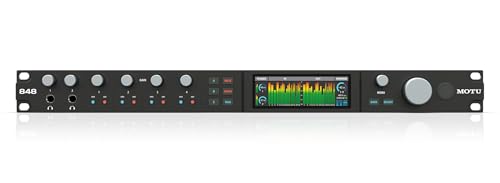
The 848 is MOTU’s modern flagship statement: 28 inputs and 32 outputs on Thunderbolt 4 (with USB4 compatibility, per the verified listing), an onboard mixer with effects, and networking for systems that grow. Where Apollo sells a console experience, MOTU sells infrastructure — pristine, plentiful I/O with mixing and routing deep enough to run a room, in a platform designed to expand over a network as the studio does. It suits serious project and commercial rooms that count channels in dozens. It does not suit a songwriter’s desk, where its scale is mostly dormant.
Strengths
- Thunderbolt 4 bandwidth with a large channel count — full productions through one cable, with room to grow.
- Onboard mixing, effects, and networking make it a system hub, not just a converter box.
- MOTU’s driver reputation on both Mac and Windows is among the industry’s steadiest.
Trade-offs
- Fewer onboard preamps than tracking-first rivals at this class; line-level sources are its home turf.
- Its control ecosystem is powerful but less plug-in-glamorous than UAD’s.
- Flagship pricing for capability small studios will not touch.
Key specs (from the verified listing): 28×32 Thunderbolt 4/USB4 audio interface · mixing, effects, and networking (per listing).
The 848 is the pick for the studio that thinks in systems: converters here, a digital console there, rooms linked by network, everything recallable. MOTU has served that studio for decades, and the 848’s combination of current-generation connectivity and deep onboard mixing is why the brand remains the infrastructure choice even in rooms that also own an Apollo for its plug-ins. Check the current price on Amazon
Best for: commercial and large project studios, networked rooms, expansion-minded engineers / Not suited for: small desks, plug-in-first buyers

Antelope Audio Orion Studio Synergy Core — Best for Conversion and Effects Depth
Antelope built its name on clocking — the invisible foundation of digital audio — and the Orion Studio Synergy Core wraps that heritage in a Thunderbolt 3 interface with twelve discrete preamps and a large library of real-time Synergy Core effects: modeled compressors, EQs, guitar amps, and more, running on the unit’s own DSP and FPGA processing. It suits engineers who obsess over conversion quality and want tracking effects without a plug-in ecosystem subscription habit. It does not suit buyers who want the simplest possible software experience; Antelope’s depth comes with a learning curve.
Strengths
- Twelve preamps — the most in this guide’s front-line picks — with Antelope’s conversion and clocking pedigree behind them.
- A deep real-time effects library included in the platform, per the verified listing, rather than metered out one plug-in at a time.
- Thunderbolt 3 and USB connectivity cover both modern and transitional computer setups.
Trade-offs
- The control software rewards study; casual users may find it dense at first.
- Antelope’s dealer and support footprint is smaller than UA’s or MOTU’s in some regions.
- Premium tier, as befits a flagship conversion piece.
Key specs (from the verified listing): 12 preamps · Thunderbolt 3 · DSP processing with real-time plug-ins (per listing: 50 real-time plug-ins).
The Orion Studio’s argument is that the two things engineers claim to hear — conversion quality and clocking stability — should be bought from the company that built its reputation on exactly those, and that tracking effects should be a library, not a toll road. Studios that have compared flagships on conversion alone frequently land here. If your ears and your workflow lean that way, this is your pick. Check the current price on Amazon
Best for: conversion-focused engineers, effect-rich tracking, 12-preamp sessions / Not suited for: simplicity-first users, UAD-committed studios
MOTU 10pre — Best for Tracking Bands
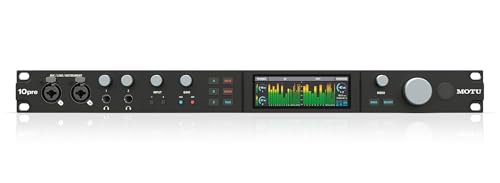
The 10pre answers the most practical question in this category: how many microphone preamps can one Thunderbolt cable carry? Ten, in this case, in a 26×28 Thunderbolt 4 interface per the verified listing — enough for a fully miked drum kit plus bass and a scratch vocal, or a complete live band capture, without an external preamp rack. It suits project studios whose sessions are bands rather than overdubs. It does not suit studios whose work is mostly stereo sources and line-level synths, where the 16A’s line I/O serves better.
Strengths
- Ten quality mic preamps in one unit — drum kits stop requiring expansion hardware.
- Thunderbolt 4 connectivity with MOTU’s onboard mixing for cue mixes during tracking.
- Per-channel value is the best in this guide for microphone-heavy work.
Trade-offs
- Line-level and digital expansion is more modest than the 848 flagship’s.
- No plug-in ecosystem theater — its virtues are capture and reliability.
- Ten preamps still will not cover an orchestra; know your ceiling.
Key specs (from the verified listing): 26×28 Thunderbolt 4/USB4 interface · 10 mic inputs (per listing).
Band-tracking studios live and die on preamp count, and they usually solve it with a rack of external preamps feeding line inputs — a fine solution that costs more and patches slower. The 10pre collapses that rack into the interface without embarrassing the sound, and its cue mixing keeps a five-piece band comfortable while they play together. For the money-is-real project studio, this is the Thunderbolt mixer that earns its keep fastest. Check the current price on Amazon
Best for: band tracking, drum recording, preamp-hungry project studios / Not suited for: synth and line-level-focused rigs

MOTU 16A — Best for Hybrid and Summing Rigs
The 16A is the specialist’s pick: 32 line-level inputs and 34 outputs (per the verified listing’s 32×34 configuration) on Thunderbolt 4, with onboard mixing, effects, and networking — and not a microphone preamp in sight, by design. Its natural habitat is the hybrid studio: sixteen channels out to a summing mixer or outboard rack, sixteen back in, with patchbay-grade routing handled in its mixer. It suits engineers whose preamps are outboard and whose bottleneck is line I/O. It does not suit anyone who needs to plug a microphone straight in; pair it with preamps or choose the 10pre.
Strengths
- The channel count summing mixers dream about — a 16-channel summing rig fed and captured by one unit.
- Onboard mixing and networking make it a routing hub for complex hybrid setups.
- MOTU conversion quality across a lot of channels at a per-channel cost specialists appreciate.
Trade-offs
- Zero preamps is a hard requirement to plan around, not a footnote.
- Its value only appears in systems with outboard or summing gear to connect.
- Thunderbolt 4-era machine assumed; older computers need the compatibility check.
Key specs (from the verified listing): 32×34 Thunderbolt 4/USB4 audio interface · mixing, effects, networking (per listing).
Readers of our summing mixer guide will recognize the 16A as the missing half of those reviews: every 16-channel summing box needs sixteen clean outputs and a stereo-plus capture path, and the 16A provides them with channels to spare for outboard inserts. In a hybrid studio it is not an accessory to the mixer — it is what makes the mixer possible. Check the current price on Amazon
Best for: hybrid studios, summing rigs, outboard-heavy rooms / Not suited for: direct microphone capture, simple setups

Apogee Symphony I/O Mk II 8×8 (Thunderbolt) — Best Premium Conversion
Apogee’s Symphony line is the conversion aristocracy: a modular flagship platform whose sound has anchored top-tier studios for years, offered here in an 8×8 Thunderbolt configuration with the optional mic preamp module path the platform is known for. It suits engineers for whom conversion is not a spec but the signature of the studio — mix engineers capturing summing returns, mastering-adjacent rooms, and producers whose work is judged on sonics alone. It does not suit channel-count shoppers; eight channels of Symphony cost what sixteen channels of lesser conversion do, and that is precisely the point its buyers are making.
Strengths
- Reference-grade conversion that engineers consistently place at or near the top of any comparison.
- Modular platform: the chassis concept lets the I/O configuration evolve with the studio.
- Apogee’s software integration and build quality match the flagship brief.
Trade-offs
- The highest per-channel cost in this guide, by design.
- 8×8 is a deliberate constraint — tracking a band means expansion or a different pick.
- Its mixing facilities serve its conversion mission rather than competing with Console-style ecosystems.
Key specs (from the verified listing): Symphony I/O Mk II · 8×8 configuration · Thunderbolt audio interface.
Every category has a pick that exists to answer “what if money followed ears alone,” and in Thunderbolt audio it is the Symphony. Studios buy it to capture the stereo return of a summing rig or a mix bus and hear nothing between the console and the file but truth. If your room has reached the point where conversion is the remaining variable, you already know whether this is your pick. Check the current price on Amazon
Best for: conversion-first studios, summing capture, mastering-grade monitoring chains / Not suited for: channel-count value, band tracking on one unit
Comparison Table
| Pick | Badge | Key spec | Best for |
|---|---|---|---|
| Universal Audio Apollo x8p Gen 2 | Best Overall | 8 Unison preamps, Thunderbolt 3, Console + UAD | Tracking and vocal production |
| MOTU 848 | Best for Large Studios | 28×32, Thunderbolt 4, mixing + networking | System hubs, expansion |
| Antelope Orion Studio Synergy Core | Best Conversion + Effects | 12 preamps, Thunderbolt 3, real-time FX library | Conversion-focused tracking |
| MOTU 10pre | Best for Tracking Bands | 26×28, Thunderbolt 4, 10 mic inputs | Drums and full bands |
| MOTU 16A | Best for Hybrid Rigs | 32×34 line I/O, Thunderbolt 4, networking | Summing and outboard |
| Apogee Symphony I/O Mk II 8×8 | Best Premium Conversion | 8×8 modular flagship conversion, Thunderbolt | Sonics-first studios |
How to Choose a Thunderbolt Mixer (Interface) Without Regrets
Start with the honest question: mixer, or interface with mixing? If you want physical faders and knobs, stop here and read our studio mixer guide — no Thunderbolt unit will scratch that itch, and pretending a control surface is the same thing helps no one. If you want recall, routing depth, cue mixes with real effects, and a studio that fits in a rack, continue: that is what these six machines actually sell.
Count preamps and line inputs separately, because they are different budgets. Tracking bands is preamp-limited (10pre, Orion Studio, x8p). Hybrid mixing is line-I/O-limited (16A, 848). Studios that do both either buy the balanced flagship (848, x8p plus expansion) or pair a preamp-rich unit with a line-rich one over the network. Write your largest session and your largest mix setup on paper; the two lists choose the unit between them.
Choose your processing philosophy. Apollo’s Console plus UAD plug-ins is an ecosystem you join — glorious if you commit, annoying if you dabble. Antelope includes a deep effects library in the platform. MOTU’s onboard DSP mixing and effects are utilitarian and strong, leaving plug-in choices to your DAW. None is objectively best; the right one is the one whose software you will still enjoy opening in year three.
Check the computer side with unusual care. Thunderbolt generations and cable quality matter: use certified Thunderbolt cables of the right generation, keep runs short, and confirm your machine’s ports are true Thunderbolt rather than USB-C lookalikes. Windows buyers should verify their specific motherboard or laptop’s Thunderbolt implementation against the manufacturer’s compatibility notes — the category’s few horror stories live almost entirely in that gap.
Budget for the second cable’s worth of reality. The interface is the center, but the system includes a quality Thunderbolt cable (plus a spare), possibly a dock or hub rated for audio duty, and — for the line-I/O rigs — the DB25 snakes that connect summing mixers and patchbays. Price the working system. In tiers: mid-tier money buys excellent two-to-eight-preamp Thunderbolt units below this guide’s flagships; this guide’s six are the professional tier, where the differences are conversion, count, and ecosystem rather than basic competence.
Think about the second year, not the first session. Interfaces reveal their true cost over time: driver support through operating-system upgrades, the price of the expansion unit you will want in eighteen months, and the resale strength of the platform if your studio pivots. The manufacturers in this guide have multi-decade track records of supporting working studios, which is not a coincidence but a selection criterion. A cheaper interface abandoned by its maker after one OS cycle is the most expensive interface in this entire discussion.
How to Set Up a Thunderbolt Mixing System for Tracking Day
Connect the interface with a certified Thunderbolt cable directly to the computer — no unpowered hubs in the audio path — and install the manufacturer’s driver and control software before opening the DAW. In the control software, build the tracking scene first: name every input for what will actually be plugged in (kick, snare, vocal, guitar DI), set sample rate and clock source deliberately (the interface as clock master for simple rigs), and build cue mixes for the performers with the monitoring effects they will track through — reverb on the voice, a little compression where the platform offers it — routed so those effects can be monitored without being printed, unless printing them is a deliberate production choice. Set the DAW’s buffer low for tracking if you monitor through the DAW at all; with DSP monitoring from the interface, you can raise the DAW buffer and let the interface handle the latency-critical path, which is the workflow these machines were designed around. Record a full-band test take, play it back through the main monitors, and check three things: no input clipped on the loudest hit, the cue mixes are what the performers think they are, and the session’s file naming and backup are running. Save the entire configuration — interface scene plus DAW template — under the band’s name. Tracking day should start from a load, not from a blank routing grid and optimism.
Latency, Explained Without the Folklore
Thunderbolt’s marketing leans on latency, so here is what the numbers mean in a tracking room. Latency is the round trip your sound takes: into the interface, through the computer if you monitor through the DAW, and back out to your headphones. Singers begin to feel a delay as a strange doubling at surprisingly small values, and drummers are more sensitive still. Thunderbolt’s contribution is a fast, consistent pipe that lets the DAW side of that trip stay short even at high channel counts. But the deeper truth of this category is that the flagship workflow avoids the trip entirely: DSP monitoring inside the interface mixes your live inputs straight to your ears with effects, at latencies too small to perceive, while the DAW records at whatever buffer the session’s plug-ins demand. That is why the “mixer inside” matters more than the protocol badge — a USB interface with great DSP monitoring can feel faster in a session than a Thunderbolt unit monitored clumsily through software. Buy Thunderbolt for channel count, stability, and future headroom; buy the mixing architecture for the feel. The six picks here were chosen because they offer both, in different proportions your session type should arbitrate.
Sample rate interacts with all of this and deserves one clear sentence: higher sample rates reduce converter latency slightly and increase file sizes and plug-in load significantly, and for most recording work the audible returns diminish quickly — track at the rate your project standard dictates, and spend the saved processing on the music.
Clocking and Conversion: The Two Specs That Are Not Specs
Buyers comparing these six units will find near-identical numbers on paper and genuinely different sounds in the room, because conversion quality lives in analog design, power supplies, and clock stability as much as in converter chips. Clocking — the timing precision that tells converters when each sample happens — is Antelope’s founding claim and a real contributor to imaging and depth; conversion design is Apogee’s lifelong argument; UA and MOTU stake their claims on the complete system rather than a single component. The honest buyer’s method is not to memorize jitter figures but to understand the hierarchy: in a well-treated room with good monitors, flagship conversion differences are audible and worth money to the engineers in this guide’s audience; in an untreated room, they are the last thing to fix. This is the same sequencing sermon as our summing guide, preached from the digital side: room, monitors, then conversion flagships. The Symphony and Orion Studio sit at the top of this guide’s conversion hierarchy; the Apollo and MOTU flagships sit close enough behind that ecosystem and channel count should usually decide between them.
Control Surfaces: Getting Your Hands Back
The one honest grief of the Thunderbolt mixing world is tactile: dragging a fader with a mouse is slower and less musical than pushing one with a finger, and mixing is partly a physical act. The mature solution is a DAW control surface — a bank of motorized faders that mirrors your software mixer — which pairs naturally with every interface in this guide, since the mixing itself lives in the DAW and Console-style software the surface controls. Studios that track through an Apollo and mix on a surface routinely describe the combination as the console experience, disassembled into its best parts: recall and routing from the software, touch from the surface, conversion from the rack. Budget-wise, a mid-tier interface plus a good surface can serve a mix-focused studio better than a flagship interface alone; tracking-focused studios should reverse the priority, because tracking lives in preamps and cue mixes, not faders. Either way, the existence of the surface option should free you to buy the Thunderbolt unit on its audio merits without mourning the faders — they are available separately, in exactly the size your desk and hands prefer.
Building the Rest of the Thunderbolt Studio Around the Interface
An interface at this level reorganizes the studio around itself, and a few companion decisions determine whether the result feels like a system or a pile. Monitoring comes first: the interface’s main outputs deserve the best monitors and controller path you own, because every judgment the studio makes passes through them; several picks here offer monitor-control facilities good enough to retire a separate controller, which simplifies the chain and removes a layer of conversion from your listening. Headphone distribution comes second: tracking a band through one interface means cue mixes must reach four or five sets of ears, and a simple headphone amplifier fed from the interface’s cue outputs is the unglamorous purchase that makes the flagship feel professional. Third, word-clock and digital cabling discipline: in single-interface rigs the unit is its own clock master and life is simple, but the moment a second digital device joins — an external converter, a digital console, a summing rig’s capture unit — clocking must be designed, with one master and proper termination, or the system will click and drift in ways that masquerade as software bugs. Finally, backup: session audio should mirror to a second drive automatically, because a studio whose center is a computer is a studio whose archive is a setting, not a habit. None of these companions is expensive next to the interfaces in this guide; all of them decide whether the interface’s quality survives contact with daily work.
A Word for Streaming and Content Studios
A growing share of Thunderbolt interface buyers are not recording bands at all — they are building high-end streaming and content studios, and they arrive at this category asking whether flagship recording hardware serves a broadcast life. It does, with eyes open about the division of labor. What a Thunderbolt interface gives a streamer is superb microphone capture, DSP-monitored confidence, and pristine feeds into the streaming software — the front end of the chain at a level no USB microphone approaches. What it does not give is the streaming mixer’s furniture: sound pads, per-source hardware faders for game and chat, and broadcast submix tricks, which live in our streaming mixer guide’s picks. The hybrid setups that serious creators converge on pair the two: a flagship interface as the voice chain and recording heart, with streaming software — or a compact streaming mixer downstream — handling show control. If your content is music performance, long-form podcasting with guests on separate channels, or anything where the recording is the product and the stream is its window, the Thunderbolt route in this guide is the professional answer. If your content is gameplay-first, start with the streaming guide and let a great dynamic microphone carry the audio until your show’s recording ambitions catch up with its broadcast ones.
Laptop-Only Studios: The Thunderbolt Dock Reality
Most modern studios run on a laptop, and that fact quietly shapes Thunderbolt purchases. A laptop offers one or two ports for everything — interface, drives, displays, power — so the interface’s arrival usually coincides with a dock decision. The working rule: the audio interface gets a direct port or the dock’s highest-priority downstream path, storage gets the dock, and charging gets planned rather than assumed, because a session that ends when a battery does is a session designed by nobody. Thunderbolt docks rated for the same generation as your interface handle this gracefully; bargain docks introduce the intermittent disconnects that owners then misdiagnose as interface faults for months. Buy the dock with the same seriousness as the cable — which is to say, as part of the interface system — and your laptop studio gains the one thing it actually lacked: a fixed home where everything plugs in the same way every time. Studios that standardize that home position, with the interface racked or parked in a permanent spot, report the same benefit console owners have always known: the room is ready before the idea cools.
Common Buying Mistakes
- Shopping for a “Thunderbolt mixer” and expecting faders. The category is interfaces with DSP mixing. Buy a console if your hands want faders; buy these if your sessions want recall.
- Confusing USB-C with Thunderbolt. Same connector, different protocol and performance. Verify the port on both the interface and your computer before the order ships, not after the session fails.
- Counting total I/O instead of preamps. A “32-input” interface may have four mic preamps. Your drum kit does not care about the other twenty-eight, and neither does your vocalist.
- Ignoring the ecosystem bill. Plug-in libraries, expansion units, and cables are part of the purchase. Total them before choosing the flagship.
- Cheap cables on a premium interface. Intermittent Thunderbolt links from bargain cables mimic every symptom of a dying interface. Certified cable, spare in the drawer.
- Buying conversion your monitoring cannot reveal. Flagship converters deserve flagship monitors and a treated room; sequence the studio’s upgrades honestly.
- Updating drivers the morning of a session. Thunderbolt systems are computers wearing rack ears. Freeze the system before important work, update in the quiet weeks, and keep the previous installer — the same discipline this series recommends for digital consoles applies here with interest.
- Treating the control software as an accessory. You will live in the interface’s mixer application daily; spend an hour with each candidate’s software model — videos, manuals, forums — before the hardware decision, because ergonomics you dislike will outlast specifications you admire.
Final Recommendation
For most tracking studios, the Universal Audio Apollo x8p Gen 2 is the best Thunderbolt mixer: its Console environment is the closest thing to a recording console this category has produced, and its preamps and plug-ins make tracking feel finished at the source. Band rooms should weigh the MOTU 10pre for its ten preamps, conversion-led studios the Antelope Orion Studio, and growing facilities the MOTU 848 as a networked hub. Hybrid engineers feeding summing mixers need the MOTU 16A, and studios for whom conversion is the signature should buy the Apogee Symphony I/O Mk II and stop apologizing for it. Choose by the session you run most, verify your computer’s Thunderbolt, and keep a spare certified cable in the rack. Do those three things and the unit you choose stops being a purchase and becomes the studio’s center of gravity — which is what a mixer, in any century, is supposed to be.
Complete the picture with our related guides: Best Studio Mixers, Best Summing Mixers, Best Analog Mixers, Best Streaming Mixers, and Best Studio Rack To Go With Presonus Mixers.
Frequently Asked Questions
Is there a mixing console with a Thunderbolt connection?
Not in the traditional sense — no major manufacturer sells a fader console whose primary computer link is Thunderbolt. The category instead consists of Thunderbolt interfaces with full internal DSP mixing and console-style software, which is what this guide reviews. A few digital consoles offer Thunderbolt as an expansion option, but the mainstream, supported path to “Thunderbolt mixing” is the interface route covered here. If a seller advertises a “Thunderbolt mixer” that turns out to be a USB unit with a USB-C plug, you have found the exact confusion this guide opened with — walk away and buy by protocol, not by port shape.
Thunderbolt or USB for a studio interface?
Thunderbolt offers higher bandwidth and lower, more consistent latency, which matters most at high channel counts and when running DSP-monitored tracking at large DAW buffers. For small channel counts, modern USB interfaces are genuinely excellent and cheaper. The picks in this guide are Thunderbolt because the search asks for it and because at 26-plus channels the protocol earns its keep. One more practical distinction: Thunderbolt systems tend to be built as platforms — expansion, networking, and ecosystems — while USB units tend to be built as products. Studios planning to grow should weigh the platform behavior as heavily as the protocol speed.
What is DSP monitoring and why does it matter?
DSP monitoring lets the interface itself mix your inputs to your headphones — with effects — without waiting for the computer. The delay is effectively imperceptible, so singers and drummers hear themselves naturally even while the DAW runs a large, plug-in-friendly buffer. It is the feature that makes an interface feel like a mixer during tracking, and every pick in this guide is built around some form of it. The practical test when auditioning any unit: sing through it while the DAW is loaded with a heavy session. If you hear yourself in the present tense, the monitoring architecture is right.
Can I expand a Thunderbolt interface later?
Usually, yes — that is a design goal of this class. Apollo units chain with other Apollos, MOTU’s AVB-capable units network together, and ADAT or digital expansion adds channels on most flagships. Expansion paths are ecosystem-shaped, which is one more reason to choose the platform deliberately at the first purchase. A practical tip: buy the expansion before you desperately need it, at a session’s planning stage rather than its eve, because integrating a second unit — clocking, aggregation, cue routing — deserves one calm afternoon, not a band standing in the room.
Do I need Thunderbolt 4, or is Thunderbolt 3 enough?
For audio, Thunderbolt 3’s bandwidth already exceeds what even large channel counts require; Thunderbolt 4 mainly standardizes capabilities and cabling. The Apollo and Antelope picks here are Thunderbolt 3 machines and are in no way bandwidth-limited. Match the cable and port generations correctly and either serves a studio fully. The generation question matters more for resale and for sharing docks with other peripherals than for anything your microphones will ever notice.
What happened to the PreSonus Quantum Thunderbolt interfaces?
The original Quantum line was a genuine Thunderbolt success, but PreSonus’s current Quantum models — the HD and ES series that appear in today’s listings — connect over USB-C rather than Thunderbolt. We verified those USB-C listings during research for this guide and therefore discuss the Quantum story as background rather than linking the current models as Thunderbolt picks. If a clean used Quantum appears from a reputable seller, it remains a fine interface; buy it knowing its generation.
Mac or Windows for a Thunderbolt studio?
Both work, with different homework. Macs offer uniform Thunderbolt implementation across the line, which is why so many studios default to them. Windows machines range from flawless to frustrating depending on the specific Thunderbolt controller and drivers in the individual model — the interface is rarely the variable. Windows buyers should confirm their exact machine against the interface maker’s compatibility list before ordering, and then expect the same performance Mac owners enjoy.
How long a Thunderbolt cable can I use?
Short — passive Thunderbolt cables at full speed are limited to well under a meter at the highest rates, with slightly longer options at reduced bandwidth that still serve audio fully. Plan the rack so the interface lives near the computer, or use an approved optical/active solution for distance. Studios that need the computer in another room should solve that as a design problem — quiet machine placement, KVM extension — rather than with a bargain long cable and hope.


