Disclosure: airfryerkitchensupply.com is reader-supported. When you buy through links on our site, we may earn an affiliate commission at no extra cost to you.
Where to buy
If you are shopping for the best audio mixers for xbox and pc dual setups, buy through Amazon and confirm the exact variant on the listing — several picks here have platform-specific editions, and the platform line in the title decides what your console will accept. For a single device that genuinely serves both machines, start with the SteelSeries GameDAC Gen 2 in its Xbox version and work toward the streaming decks as your ambitions grow.
- SteelSeries GameDAC Gen 2 (Xbox Version) — check the current price on Amazon and confirm the exact configuration on the listing before you order.
- Sound Blaster G8 — check the current price on Amazon and confirm the exact configuration on the listing before you order.
- TC-Helicon GoXLR — check the current price on Amazon and confirm the exact configuration on the listing before you order.
- Rode Rodecaster Duo — check the current price on Amazon and confirm the exact configuration on the listing before you order.
- Yamaha AG06MK2 — check the current price on Amazon and confirm the exact configuration on the listing before you order.
- FIFINE SC8 Gaming Audio Mixer — check the current price on Amazon and confirm the exact configuration on the listing before you order.
The Xbox-and-PC desk is now the normal gaming desk: the console for exclusives and the couch-friendly library, the PC for everything else, one headset and one microphone expected to serve both, and Discord living on the PC while party chat lives on the console. The mixer for this desk has an unglamorous job description — be the one place all that audio meets, with the right balance, without re-cabling, and without hum. This guide tests six ways to build that meeting point, from a licensed console DAC to full broadcast decks.
Two architectures compete. The console-native architecture puts a licensed DAC-mixer at the center: the GameDAC Gen 2 (Xbox version) or the dual-input Sound Blaster G8 owns the headset, the Xbox connects as a licensed device, and the PC joins as a second source. The streaming architecture puts the PC at the center: a GoXLR, Rodecaster or Yamaha AG owns the microphone and the mix, and the Xbox arrives through a capture card or optical chain. The first is simpler and cheaper; the second is what streaming, recording and multi-microphone futures are built on.
What neither architecture tolerates is the wrong variant. Xbox licensing makes platform editions real products, not marketing: the GameDAC exists with and without Xbox support, and only one of them belongs in this guide. Every linked listing here was verified on 2026-11-20 with its platform wording captured, and the reviews repeat the warning because it remains the costliest click in the category.
This guide prints no prices — check the current price on Amazon under the full model name — and it prints no shortcuts around the variant question. A dual-setup mixer bought right is a five-year desk fixture; bought wrong, it is a return label.
In this guide
Quick Picks
- Best Overall for Dual Desks — SteelSeries GameDAC Gen 2 (Xbox Version): one licensed DAC-mixer whose verified listing names PC, Xbox, PS5 and PS4 — the simplest honest center for a two-platform headset.
- Best for Simultaneous Xbox + PC Audio — Sound Blaster G8: a dual-USB DAC-amp that keeps Xbox and PC connected at once — Discord in one ear’s background, game in the foreground, no re-cabling.
- Best for Xbox Streamers on PC — TC-Helicon GoXLR: the broadcast deck for the streaming version of this desk: console audio in by optical or capture, voice by Midas preamp, four motorized faders over everything.
- Best Premium Dual-Platform Studio — Rode Rodecaster Duo: dual USB connects game and stream PCs — or PC and console chain — with broadcast preamps, APHEX processing and multitrack recording.
- Best Traditional Mixer for Both Platforms — Yamaha AG06MK2: a six-channel streaming mixer that takes the Xbox on a line input, your voice on a preamp, and the PC over USB-C with loopback — on Windows, Mac or iPad.
- Best Budget Bridge — FIFINE SC8 Gaming Audio Mixer: optical input for the Xbox, an XLR input for your voice, game/chat balance and USB to the PC — the dual desk’s budget bridge.
How These Picks Were Chosen
Screening required each pick to serve both platforms in a way its verified listing supports: licensed Xbox connection for console-native devices, or a credible PC-centered chain (dual USB, optical, capture-friendly routing) for streaming decks. We then weighed the balance controls a dual gamer uses — game/chat on the console side, source mixing on the PC side — headphone amplification, microphone path quality for players who stream or record, and the cable count at the end of setup, because a dual desk succeeds or fails on daily friction.
Excluded were PlayStation-only variants, PC interfaces with no console story at all, and console DACs with no PC path. The six survivors form a ladder from one-box simplicity to a broadcast desk, and each review states which architecture it belongs to so no reader buys across the line by accident.
The 6 Best Audio Mixers for Xbox and PC

SteelSeries GameDAC Gen 2 (Xbox Version) — Best Overall for Dual Desks
The GameDAC Gen 2 in its Xbox edition is the dual desk reduced to one box. On the console it connects as a licensed Xbox device and provides the game/chat balance dial and hi-res DAC conversion; on the PC, the same unit becomes a Sonar-driven audio hub with parametric EQ, spatial audio and microphone noise cancellation. One wired headset plugs into one device, and switching platforms stops being a cable ritual.
The ESS Sabre Quad-DAC and the headphone amplifier are the substance beneath the convenience: cleaner conversion and more drive than either a controller jack or a typical motherboard output provides, audible with any serious wired headset. For the player whose mixing needs are balance, EQ and quality — not broadcasting — this is the complete dual-platform answer, and the guide’s default recommendation.
Strengths
- Verified listing names Xbox and PC — one SKU honestly serving both
- Hardware game/chat balance plus a genuinely good DAC and amp
- Sonar software adds deep EQ and mic processing on the PC side
Trade-offs
- The non-Xbox GameDAC variant exists and looks identical — the title’s platform line is the product
- No XLR input; streaming microphones need a PC interface or a streaming deck
- Wired headsets only
| Specification | Detail |
|---|---|
| DAC | ESS Sabre Quad-DAC, hi-res certified |
| Platforms | PC, Xbox, PS5, PS4 (Xbox version, per Amazon title) |
| Controls | Volume, game/chat mix |
| Software | Sonar EQ, spatial audio, AI mic noise cancellation (PC) |
Buy the headset and the GameDAC as a system. A demanding wired headset that a controller under-drives becomes a different product on this amplifier, and the balance dial changes how squad play feels within one session. If budget forces a sequence, headset first, GameDAC second — and keep the controller-jack weeks as your comparison baseline.
Best for: dual-platform players who want one headset, one DAC and hardware game/chat balance / Not suited for: streamers needing an XLR broadcast microphone path — see the GoXLR and Rodecaster picks
Check the current price on Amazon for the SteelSeries GameDAC Gen 2 (Xbox Version).

Sound Blaster G8 — Best for Simultaneous Xbox + PC Audio
The G8’s dual-USB design answers the dual desk’s most specific annoyance: two machines, one headset, and a voice app that lives on the wrong one. With both the Xbox-side source and the PC connected simultaneously, game audio and Discord coexist in one headset with the balance under your control, and Creative’s hi-res DAC and headphone amp feed demanding wired headsets properly from either source.
As a mixer it blends sources rather than broadcasting them, and for the non-streaming dual gamer that is the honest requirement. Add Creative’s acoustic processing for games that benefit from it, keep it off for the ones that do not, and the G8 becomes the quiet center of a two-platform desk — the device you stop thinking about, which is the highest praise audio infrastructure earns.
Strengths
- Simultaneous dual-device connection is the dual desk’s killer feature
- Hi-res DAC and amplification serve both platforms equally
- Compact desktop form with physical controls
Trade-offs
- Xbox chat mixing follows the console path rather than a licensed on-device dial
- No microphone preamp for streaming — pair with a PC interface if you broadcast
- Desktop-only practicality; not a living-room device
| Specification | Detail |
|---|---|
| DAC | Hi-res USB DAC |
| Inputs | 2 × USB device connections |
| Amplifier | Headphone amp for high-impedance models |
| Extras | Creative acoustic processing suite |
Choose the G8 over the GameDAC when simultaneity is the point — both machines live at once — and the GameDAC when alternation is the pattern: tonight Xbox, tomorrow PC, one at a time with a balance dial. The distinction sounds small and decides satisfaction entirely, so answer it from last week’s actual habits, not from an imagined setup.
Best for: players who run Discord on PC while gaming on Xbox, at the same desk, every night / Not suited for: couch players — this is a desktop unit for a desk-shaped problem
Check the current price on Amazon for the Sound Blaster G8.

TC-Helicon GoXLR — Best for Xbox Streamers on PC
When the dual desk grows a broadcast, the GoXLR becomes its center. The Xbox feeds the streaming PC’s capture chain — and the GoXLR’s own optical input can take console audio directly in many setups — while your microphone rides the Midas preamp and four motorized faders balance mic, game, chat and music with separate mixes for your headphones and your audience. Sound pads and vocal effects complete the streamer’s toolkit in the same box.
The GoXLR’s demand is commitment: an evening of routing setup in its Windows app, after which the desk simply works every night. For an Xbox player who streams seriously, that trade is the correct one — the console becomes one well-behaved source among four, and the production quality jump over console-native streaming is not subtle.
Strengths
- Optical input plus capture routing gives the Xbox a first-class channel
- Motorized faders with separate stream and monitor mixes
- Broadcast voice processing and sound board built in
Trade-offs
- Windows-only official support
- A streaming-PC architecture — console-only players gain nothing here
- Single XLR input; a second in-room voice needs another solution
| Specification | Detail |
|---|---|
| Faders | 4 motorized, assignable |
| Inputs | XLR mic, optical, line, USB |
| Connection | USB to Windows PC |
| Extras | Sound board, vocal FX, sampler |
Plan the console path before purchase: capture card over HDMI for video-plus-audio, or optical for audio with a separate video path — either lands the Xbox on its own fader, which is the point. Streamers who make that plan once describe the GoXLR desk as the moment their Xbox streams started sounding like their PC streams, because architecturally they finally were the same desk.
Best for: Xbox streamers broadcasting from a Windows PC who want per-source faders and a sound board / Not suited for: non-streamers and Mac users — its app is Windows-only and its talents are broadcast talents
Check the current price on Amazon for the TC-Helicon GoXLR.
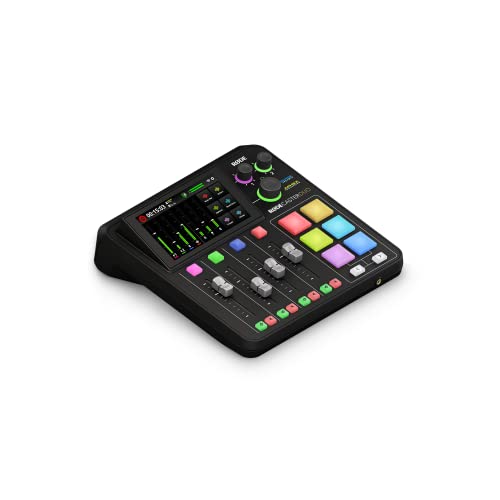
Rode Rodecaster Duo — Best Premium Dual-Platform Studio
The Rodecaster Duo’s dual USB-C connections were designed for two-computer workflows, and the Xbox-and-PC creator desk is exactly that workflow with a console standing in for one computer: the gaming source and the production PC meet at the Duo, your voice (and a guest’s) ride its studio preamps with APHEX processing, and everything can be recorded multitrack for VODs, clips and podcasts. Bluetooth adds a phone guest or a music feed without another cable.
Mac support, standalone recording to microSD or USB, and Rode’s wireless microphone integration widen the desk beyond either platform’s rules. The Duo is the premium answer for the player whose Xbox-and-PC setup is also a small studio — and an honest extravagance for the player whose setup is only a place to play.
Strengths
- Dual USB architecture is purpose-built for two-machine desks
- Broadcast preamps and APHEX processing for up to two voices
- Multitrack recording serves clips, VODs and podcasts from the same sessions
Trade-offs
- Premium tier — check the current price on Amazon and buy it for recording, not for playback alone
- Console audio still arrives via capture or interface routing; plan the chain
- Two microphone inputs is the ceiling
| Specification | Detail |
|---|---|
| Mic inputs | 2 × XLR combo, studio preamps |
| Connection | 2 × USB-C, Bluetooth |
| Recording | Multitrack to PC, microSD or USB |
| Extras | SMART pads, APHEX processing, wireless mic receiver |
The Duo-versus-GoXLR decision for dual-platform creators: GoXLR for Windows gameplay streaming with fader choreography and a sound board; Duo for recorded content, guests, Mac compatibility and two-PC purity. Both sit at the premium tier, both will serve for years, and the tiebreaker is whether your channel’s center of gravity is live performance or produced content.
Best for: creator-streamers who record, podcast and stream across both platforms / Not suited for: players who never record — its recording depth would go unused
Check the current price on Amazon for the Rode Rodecaster Duo.

Yamaha AG06MK2 — Best Traditional Mixer for Both Platforms
The AG06MK2 serves the dual desk the mixer way: the Xbox’s audio arrives on a stereo line input (from a capture card, a display’s output or an extractor), your microphone and a second source — a co-player’s mic, a guitar, a second console — take the input channels, and the PC connects over USB-C with loopback folding everything into the stream or recording. DSP compression, EQ and reverb polish the voice in hardware, and bus power keeps the desk free of another brick.
Cross-platform support is its quiet superpower in this category: the same desk serves a Windows gaming PC, a Mac laptop and an iPad without a variant hunt. Players whose dual setup includes making music, or whose second platform is Apple rather than a second Windows machine, will find the AG06MK2 the most natural fit in this guide.
Strengths
- Real mixer channels for console, voice and a second source simultaneously
- Windows, Mac and iOS support — no variant anxiety
- Loopback and DSP cover streaming without plugin chains
Trade-offs
- Console input is analog line-level — the capture/extractor chain is yours to build
- One main fader; source balancing is knobs plus software
- No sound pads for stinger-heavy shows
| Specification | Detail |
|---|---|
| Channels | 6 inputs, 2 mic preamps |
| Connection | USB-C, bus-powered |
| DSP | Compressor, EQ, reverb, amp sim |
| Extras | Loopback, Steinberg software bundle |
The AG06MK2 is the pick for the desk that refuses to be only a gaming desk. If your Xbox-and-PC corner also hosts a guitar, a keyboard or a second person with something to say, its channels absorb all of it gracefully, and its Yamaha gain staging keeps the result clean. Pure gamers should save toward the GameDAC or G8; hybrid creators should start here.
Best for: dual-platform players who also play instruments, host a second voice, or use a Mac / Not suited for: players wanting per-source motorized faders and a sound board
Check the current price on Amazon for the Yamaha AG06MK2.

FIFINE SC8 Gaming Audio Mixer — Best Budget Bridge
The SC8 bridges the two platforms with the two connectors that matter at its tier: optical in, for the Xbox’s digital audio (via the console chain or an HDMI extractor), and USB out to the PC, with your streaming microphone on its XLR input in between. A dedicated game/chat balance control sits on the panel, headphone monitoring is direct, and the whole dual-platform streaming workflow functions at a budget tier — check the current price on Amazon.
Its surround processing and RGB are garnish; its routing is the meal. For a first dual desk — Xbox for play, PC for stream, one microphone, one headset — the SC8 covers every essential connection without a premium invoice, and its compromises (preamp refinement, build feel) are the kind a growing creator upgrades past later rather than suffers under now.
Strengths
- Optical input is the budget tier’s only clean console-audio path
- Game/chat balance plus XLR streaming input in one box
- Lowest-cost complete bridge between the two platforms in this guide
Trade-offs
- Optical chain on Series X|S usually needs an extractor — plan cables before ordering
- Preamp and build are budget-grade next to Yamaha, Rode and TC-Helicon
- Surround effect is headphone processing, not true multi-channel audio
| Specification | Detail |
|---|---|
| Inputs | Optical, XLR (48V), USB |
| Controls | Game/chat balance, volume, mute |
| Processing | 7.1 surround effect, 3 EQ modes |
| Extras | Headphone preamp, RGB |
Sequence the purchase sensibly: SC8 and a decent microphone now, and the upgrade path (GoXLR or Duo) later reuses the microphone, the cables and everything you learned about routing. Budget bridges earn their keep by teaching the workflow cheaply — and by still working as a backup the day the premium deck’s firmware update lands mid-season.
Best for: budget dual setups and first streaming desks built around an Xbox and a PC / Not suited for: players wanting licensed console-direct connection or premium preamps
Check the current price on Amazon for the FIFINE SC8 Gaming Audio Mixer.
Comparison Table
| Pick | Badge | Key spec | Best for |
|---|---|---|---|
| SteelSeries GameDAC Gen 2 (Xbox Version) | Best Overall for Dual Desks | ESS Sabre Quad-DAC, Xbox licensed, Sonar on PC | dual-platform players who want one headset, one DAC and hardware game/chat balance |
| Sound Blaster G8 | Best for Simultaneous Xbox + PC Audio | Dual USB inputs, hi-res DAC, strong headphone amp | players who run Discord on PC while gaming on Xbox, at the same desk, every night |
| TC-Helicon GoXLR | Best for Xbox Streamers on PC | 4 motorized faders, optical input, Midas preamp | Xbox streamers broadcasting from a Windows PC who want per-source faders and a sound board |
| Rode Rodecaster Duo | Best Premium Dual-Platform Studio | Dual USB-C, 2 studio preamps, multitrack record | creator-streamers who record, podcast and stream across both platforms |
| Yamaha AG06MK2 | Best Traditional Mixer for Both Platforms | 6 channels, 2 mic inputs, loopback, USB-C | dual-platform players who also play instruments, host a second voice, or use a Mac |
| FIFINE SC8 Gaming Audio Mixer | Best Budget Bridge | Optical input, game/chat balance, XLR 48V | budget dual setups and first streaming desks built around an Xbox and a PC |
How to Choose the Best Audio Mixers for Xbox and PC
Choose your architecture before you choose a product. Console-native (GameDAC, G8) centers the headset on a licensed DAC and treats the PC as a guest; it is simpler, cheaper and sufficient for players who do not broadcast. PC-centered (GoXLR, Rodecaster Duo, AG06MK2, SC8) centers the mix on the computer and treats the Xbox as a honored source; it costs more and does more, and it is mandatory the moment streaming, recording or an XLR broadcast microphone enters the plan. Most dual-desk regret is an architecture bought by accident.
Then verify the variant like your money depends on it, because it does. Xbox licensing splits product lines into platform SKUs; the GameDAC’s Xbox edition is verified in this guide with its platforms in the Amazon title, and any listing you buy from should state its platforms with the same clarity. A cheaper listing for the same product name is often the other platform’s device wearing a familiar face.
- Simultaneous or alternating? Both machines live at once points to the G8’s dual inputs or a PC-centered deck; one at a time points to the GameDAC.
- Microphone ambition: headset mics stay with DAC-mixers; XLR broadcast mics require the PC-centered family.
- Console audio path: licensed USB (simplest), optical (needs a chain plan), or capture-card HDMI (the streamer’s default).
- Operating system: GoXLR is Windows-only; Yamaha and Rode serve Mac desks as well.
- Headset: wired is the assumption of every pick here; a wireless headset keeps its own link and changes the whole calculation.
Budget order of operations for a growing dual desk: good wired headset first, console-native DAC second (GameDAC class), streaming deck third when broadcasting becomes real (GoXLR or Duo class). Each step remains useful after the next arrives, which is the definition of a sane upgrade path.
Routing Without Hum: The Dual-Desk Ground Rules
Two machines, one audio system and mains power from two outlets is the classic recipe for ground-loop hum — a low buzz that appears the moment console and PC share an analog path. The cures, in order of elegance: keep the console’s journey digital as long as possible (licensed USB, optical, or HDMI capture), power both machines from the same outlet strip, and use balanced connections on the PC side where the gear offers them. Every architecture in this guide can be made silent; hum is a routing symptom, not a product defect.
Test methodically when hum appears: disconnect sources one at a time until the buzz leaves, and the last cable removed is the loop’s location. Fix that junction — a different power source, an optical hop, a ground-loop isolator as a last resort — rather than turning everything down and living with a quieter buzz under your game audio forever.
One Microphone, Two Machines: Making Your Voice Work Everywhere
The dual desk’s subtlest problem is the microphone’s citizenship. On the console-native architecture, your voice reaches Xbox party chat through the headset microphone and the console’s own path, while the PC hears you through whatever the PC has — which is why so many dual players sound excellent on Discord and muffled in party chat, or the reverse. The clean solutions are architectural: either accept the headset microphone for console chat and reserve the good microphone for PC duties (the GameDAC pattern, honestly lived), or center the good microphone on the PC and route your voice to the console through the streaming chain when it matters (the GoXLR and Duo pattern, at streaming-desk cost).
What does not work is the improvised middle: splitters, double-plugged microphones and hope. Decide which platform gets your best voice in which context — ranked play with friends, streamed matches, recorded content — and build the single path that serves the top of that list properly. The mixers in this guide each embody one coherent answer; the incoherence buyers regret almost always comes from trying to make one device embody two answers at once.
Desk Ergonomics: The Setup You Will Still Love in Month Six
Dual-platform desks fail ergonomically long before they fail electronically. The winning layout puts the device that owns the headset within arm’s reach of the playing position — not behind the console, not under the second monitor — with its balance control oriented so a glance reads it. Cable runs between platforms should cross behind the desk once, labeled, with enough slack that either machine can be pulled forward for cleaning without unplugging the audio system by accident. If your setup requires a flashlight and a prayer to change one cable, it will not be maintained, and unmaintained dual desks decay into single-platform desks with expensive ornaments.
Build in the boring accessories from the start: a headphone hook so the wired headset has a home that is not the floor, a small powered USB hub if the PC’s ports are contested, and surge protection shared by both machines from one strip — which, as the guide’s hum section notes, is also an audio-quality measure. The mixers here are the heart of the desk; these habits are its skeleton, and skeletons decide how long hearts keep beating.
When the Dual Desk Becomes a Streaming Studio
Most dual desks evolve, and the purchase that survives evolution is the one whose architecture anticipated it. The signals that a console-native setup is being outgrown are specific: you start recording clips and wishing the voice were better; a second person begins appearing in your content; Discord calls become interviews. Each signal maps to a PC-centered feature — an XLR broadcast path, a second microphone input, multitrack recording — and the ladder in this guide (GameDAC or G8 today, GoXLR or Duo tomorrow) is designed so the first purchase remains useful as the second arrives: the DAC becomes the console-side specialist, the deck takes over production, and nothing is sold at a loss to fund the upgrade.
The reverse discipline matters equally. If a year of dual-platform play produces no recording, no guests and no streaming ambition, the console-native setup was not a stepping stone but the destination, and its owner should feel no pressure from this guide or any other to climb. The best audio mixer for xbox and pc use is the one matched to the desk’s real life — a sentence that is easy to print and, judging by resale listings, remarkably hard to follow.
Audio Settings That Must Match Across Both Platforms
A dual desk quietly maintains two audio civilizations, and the settings that must agree across them are few but unforgiving. Sample-rate mismatches between a PC’s output setting and a streaming deck’s project rate produce the classic slow drift and crackle that players debug for evenings; set the PC, the deck and the streaming software to one rate and leave it there. Volume philosophy must also match: the healthiest chain sets each device near its designed operating level — console output healthy, DAC or deck input unpadded, final level set at the last stage — rather than one device whispering and the next shouting to compensate, which is how noise floors are manufactured in systems built from silent components.
Finally, keep a written record of the matched state: a single note with the sample rate, the per-platform balance positions, the EQ preset names and the microphone gain figure. Dual desks are reconfigured by updates, by borrowed cables and by helpful friends more often than their owners admit, and the note converts every such incident from an archaeology expedition into a two-minute restoration. The mixers in this guide all hold their own settings well; the note covers the spaces between them, which is where dual-platform setups actually live.
Future-Proofing: Ports, Standards and the Five-Year Desk
A dual-platform mixer should outlive at least one console generation’s mid-cycle refresh and two PC builds, so its connections deserve a cold eye. USB-C where offered (the Rodecaster Duo, the Yamaha AG06MK2) ages better than legacy ports; optical, for all its bandwidth limits, remains a stable lingua franca between consoles and audio gear; and licensed platform support — the GameDAC’s Xbox edition — is the one feature that cannot be added later by any adapter, which is why this guide treats the variant question as structural rather than clerical. When a listing offers both a current and a legacy connection standard at similar tiers, the current standard is the five-year answer.
Software is the other half of the horizon. The ecosystems behind these picks — TC-Helicon’s routing app, Rode’s firmware program, SteelSeries Sonar, Yamaha’s utilities — have track records of maintaining their hardware across operating-system generations, and that maintenance, invisible in a specification table, is what a five-year desk actually runs on. Buy the company’s support culture along with the mixer; the box is the smaller half of the product, and the dual desk, which must reconcile two platforms’ update cycles forever, feels that truth sooner than any other setup in audio.
The Shared Desk and Other People: Households, Partners and Housemates
Dual-platform desks rarely belong to one person alone, and the mixer that survives a shared household is the one whose state a second person can read at a glance. Physical controls with visible positions (the Yamaha’s layout, the GoXLR’s faders) forgive the partner who borrows the desk for a work call; profile-based systems forgive nothing unless the profiles are named like instructions rather than inside jokes. Save a scene literally called with the household’s name for “everything normal,” teach the one-button return to it, and the dual desk stops generating the small domestic frictions — the mysteriously silent headset, the microphone broadcasting to the wrong platform — that sour people on shared technology. The best mixer for a shared desk is the one that returns to normal fastest, and that quality is in this guide’s reviews wherever a pick stores and recalls its state.
Cable Management as an Audio Decision
It sounds cosmetic and is not: on a dual desk, cable routing is signal routing. Keep platform audio cables separated from power bricks and their wall-warts, whose electromagnetic noise analog lines can collect; cross power and audio at right angles where they must meet; and give every inter-platform cable a label at both ends naming its job in plain words. The payoff is measured in decibels of silence and in the five-minute fault-finding session instead of the fifty-minute one. When — not if — something in the dual setup misbehaves at 11 p.m., the labeled, separated, documented cable plant is what lets you find the fault before it finds your evening. The mixers in this guide deserve that plant; more importantly, so does the person who has to live with the desk.
Keeping the Peace With Latency: Competitive Play on a Dual Desk
Competitive players measure audio in milliseconds and forgive nothing that adds delay, so the dual desk deserves a latency audit. The wired paths in this guide — licensed USB to the GameDAC, dual USB to the G8, optical or capture into the streaming decks — are all effectively instantaneous beside the delays that actually govern play: the display’s processing, the game’s own audio engine and any wireless link in the chain. If a dual setup feels late, the mixer is the last suspect, not the first; check the television’s game mode and any soundbar’s processing before touching the audio desk. What the mixer can add is monitoring delay on the PC side when software monitoring is misconfigured — use the deck’s direct or low-latency monitoring for your own voice, as the setup sections describe, and the microphone will feel as immediate as the game sounds. A dual desk tuned this way asks for no competitive compromises at all, which is the standard ranked players should hold it to.
How to Set Up One Headset and Microphone for Both Xbox and PC
The goal state: sit down, put on one headset, and play either platform with correct balance and a working microphone, touching at most one control. Build toward it in this order.
- Choose the center: the DAC-mixer (console-native) or the streaming deck (PC-centered), and plug the headset and microphone into that center and nothing else.
- Connect the Xbox by its cleanest available path — licensed USB for the GameDAC, dual-USB for the G8, optical or capture for PC-centered decks — and verify game audio alone first.
- Connect the PC and verify its audio alone: game or video, Discord test call, microphone level in the app your friends actually use.
- Set balances per platform and save them as profiles or scenes where the device allows; the Xbox party balance and the PC Discord balance are different numbers and both deserve saving.
- Run the hum test: both machines on, no audio playing, volume at gaming level — silence is the pass mark; chase any buzz with the ground rules in the guide above.
- Do a final cross-check with a friend: one party chat on Xbox, one Discord call on PC, confirming your microphone reaches both paths as designed before a real session depends on it.
Label the two or three cables that carry platform audio. Dual desks fail socially, not electronically — someone unplugs the wrong cable for a vacuum cleaner and the setup “breaks.” Labels and a phone photo of the finished wiring restore order in minutes instead of an evening.
Common Buying Mistakes
Dual-platform desks generate a distinctive set of expensive lessons; here is the collection, prepaid.
- Buying the wrong platform variant of a two-SKU product — the GameDAC lesson, repeated in every console audio forum weekly.
- Building two audio centers: headset split between a console DAC and a PC interface guarantees a nightly cable ritual and eventual surrender.
- Analog-linking two mains-powered machines and accepting the hum as “just how it is” — it is a routing fault with known cures.
- Letting both the console and the PC send the same audio (HDMI capture plus optical) and debugging the echo as a network problem.
- Upgrading the streaming deck before the headset: on a dual desk the transducer at your ears outranks every box beneath it.
- Ignoring profile saving: balances that live only in knob positions die at the first desk cleaning.
Final Recommendation
For most Xbox-and-PC players, the recommendation is the SteelSeries GameDAC Gen 2 in its Xbox version: one licensed, verified box that owns the headset, balances chat, and upgrades the sound of both platforms without a streaming PC or a cable farm. Players who live on both machines simultaneously should take the Sound Blaster G8. Players who broadcast should center the PC: the GoXLR for Windows gameplay streaming, the Rodecaster Duo for recorded and guest-driven content, the Yamaha AG06MK2 for cross-platform and musical desks, and the FIFINE SC8 as the budget bridge that teaches the workflow.
Check the current price on Amazon under the full model name, and — one last time, because it matters more than any other sentence in this guide — confirm the platform line in the listing title before you order. The right dual-platform mixer disappears into your routine; the wrong variant never does.
Start your shortlist with SteelSeries GameDAC Gen 2 (Xbox Version), Sound Blaster G8, TC-Helicon GoXLR — check the current price on Amazon for each and compare the exact configurations side by side before you decide.
Related guides in this series: Best Audio Mixers For Xbox · Best Audio Mixers For Pc · Best Audio Mixers For Streaming Twitch · Best Audio Mixers For Podcasting · Best Audio Mixers Live
Frequently Asked Questions
Can one mixer really serve both an Xbox and a PC?
Yes, in two ways. A licensed console DAC-mixer like the GameDAC Gen 2 (Xbox version) connects to the Xbox natively and to the PC over USB, owning one headset for both. Or a PC-centered streaming deck (GoXLR, Rodecaster Duo, AG06MK2) takes the PC as its hub and receives the Xbox through optical or capture routing. Both are legitimate; streaming ambitions decide between them.
Why are there separate Xbox and PC/PlayStation versions of the same mixer?
Xbox USB audio requires licensed hardware, so makers build platform-specific SKUs. The hardware looks identical and the names nearly are, which is why this guide insists on the platform line in the listing title — the GameDAC’s verified Xbox listing names PC, Xbox, PS5 and PS4 outright.
How do I hear Discord from my PC while playing on Xbox?
Use a dual-input DAC like the Sound Blaster G8, which keeps both devices connected simultaneously, or route the Xbox into a PC-centered mixer so Discord and game audio mix on the PC. Either way, one device must own the headset and receive both sources — a headset cannot serve two masters directly.
Do I need a capture card for the Xbox side of a streaming setup?
For video, yes, in most PC-streaming setups; for audio alone, optical routing (often via an HDMI extractor) can suffice. Decks like the GoXLR accept optical console audio directly, while the Rodecaster Duo typically receives the console through the capture chain — plan which path your desk uses before ordering cables.
Will these mixers work with a wireless Xbox headset?
Wireless headsets keep their own licensed wireless link to the console and bypass wired DAC-mixers. The picks in this guide assume a wired headset. If wireless freedom is non-negotiable, your audio upgrade path is a better wireless headset itself, not a mixer.
Mac instead of Windows PC — which picks still work?
The Yamaha AG06MK2 and Rodecaster Duo support Mac fully; the GameDAC’s Sonar features are PC-oriented though the DAC serves consoles regardless; the GoXLR app is officially Windows-only. Mac-based dual desks should shortlist Yamaha and Rode first.
Which setup is better for ranked play with friends on both platforms?
For pure play, the console-native architecture wins on friction: GameDAC-class balance control, one headset, no PC required in the loop for Xbox nights, and the PC served by the same DAC on its nights. The PC-centered decks only overtake it when production — streaming, recording, guests — enters the ranked-play picture. Choose by the calendar you actually keep, and let the production ambitions you have demonstrated, not the ones you daydream about, break any tie.
Can I keep my current headset when I add a mixer?
Usually yes, if it is wired: DAC-mixers accept standard wired headsets, and streaming decks accept the headset’s microphone only if it has a detachable or separate microphone path — most gaming headsets feed their mic through the same 3.5mm connection, which suits DAC-mixers directly and streaming desks via adapters or a dedicated microphone. Check your headset’s connector against the pick’s inputs before ordering; it is a two-minute check that prevents the commonest return in this category.


