Disclosure: airfryerkitchensupply.com is reader-supported. When you buy through links on our site, we may earn an affiliate commission at no extra cost to you.
Where to buy
If you are shopping for the best audio mixers for podcasting, start with the shortlist below. Every mixer in this guide is a current model sold through Amazon, which is where we recommend buying podcast gear: the listing states the exact variant — bare console or bundle, color, storage options — and returns are painless if a unit arrives faulty. Start with the Rode Rodecaster Pro II if your show matters to you, and check the current price on Amazon under the full model name, because podcast consoles are heavily bundled with microphones and arms, and the bundle listings are different products from the bare console you may actually want.
- Rode Rodecaster Pro II — check the current price on Amazon and confirm the exact configuration on the listing before you order.
- Tascam Mixcast 4 — check the current price on Amazon and confirm the exact configuration on the listing before you order.
- Zoom PodTrak P4 — check the current price on Amazon and confirm the exact configuration on the listing before you order.
- Rode Rodecaster Duo — check the current price on Amazon and confirm the exact configuration on the listing before you order.
- MAONO Maonocaster AME2 — check the current price on Amazon and confirm the exact configuration on the listing before you order.
- Zoom LiveTrak L-12 — check the current price on Amazon and confirm the exact configuration on the listing before you order.
The best audio mixers for podcasting are not really mixers in the traditional sense anymore, and understanding that is the key to buying well. A podcast console is a complete recording studio folded into one unit: quiet microphone preamps that make inexpensive microphones sound professional, processing that gives voices the controlled, present sound listeners associate with radio, sound pads for intros and effects, a recorder that captures every participant on a separate track, and the routing to bring in a phone guest without echo. The six units in this guide are the current state of that art, from the industry-standard Rodecaster Pro II down to a budget Maono console that puts the essential podcast workflow within reach of a first show. Between those poles sits a console for nearly every format being recorded today.
One honest framing before the picks: a podcast mixer cannot fix a bad room, a microphone across the table, or a guest recorded through a laptop speaker. What it can do — what these six demonstrably do — is remove every technical excuse between you and a professional-sounding episode: consistent levels, no hiss, no clipping, every voice on its own track for editing, and processing that flatters rather than distorts. Buy for your show’s format: count the microphones you will actually use at once, decide whether remote guests are regular or rare, and decide whether you edit in post or publish as recorded. Those three answers, more than any specification, determine which of these six belongs on your desk. This guide is organized around them deliberately: each review names the format the console serves, the format it refuses, and the specific moment in a recording session where its design either saves you or costs you.
All six picks were verified as current Amazon listings on 2026-11-20, several of them — the Rodecaster Pro II, the Rodecaster Duo, the PodTrak P4, the Maonocaster AME2, and the Mixcast 4 — verified in this writer’s own API session for this batch. Channel counts, recording formats, and connectivity in the spec boxes come from those verified listings and the manufacturers’ published formats.
In this guide
Quick Picks
- Best Overall — Rode Rodecaster Pro II: four studio preamps, APHEX processing, multitrack recording, and the deepest podcast feature set made. The standard.
- Best for Editing-First Shows — Tascam Mixcast 4: four mic inputs, a touchscreen, multitrack recording, and a bundled editing workflow from a recording-industry veteran.
- Best Portable — Zoom PodTrak P4: four mics, four headphone outputs, battery power, and phone interviews anywhere. The field podcast recorder.
- Best for Two-Person Shows — Rode Rodecaster Duo: the Pro II’s preamps and processing in a compact two-channel console. A duo’s endgame desk.
- Best Budget — MAONO Maonocaster AME2: sound pads, Bluetooth, voice effects, and a real XLR input at an entry price. The first-show console.
- Best for Big Panels and Music — Zoom LiveTrak L-12: twelve channels and multitrack recording for roundtables, bands, and shows that outgrow four mics.
How These Picks Were Chosen
Podcast consoles were screened on the five criteria that decide whether a show sounds professional. First, preamp quality: gain range and noise, because podcast microphones are disproportionately low-output dynamics spoken into at close range, and a noisy preamp prints hiss onto every episode forever. Second, multitrack recording: each microphone on its own track is the difference between an edit that takes an hour and one that takes a day, so four-track-or-better recording to removable media or computer was weighted heavily. Third, processing: per-channel compression, EQ, and polish — ideally the broadcast-style chains from Rode’s APHEX implementation or Tascam’s equivalents — because most podcasters are not audio engineers and the console should do that job. Fourth, guest connectivity: Bluetooth and phone inputs with proper mix-minus, so remote guests hear the show without hearing themselves. Fifth, headphone provision: one independent output per participant, because a guest without headphones is an echo waiting to happen.
We excluded general live mixers with a USB socket — they appear in our live-performance and PC guides, where they belong — and focused on units designed around the podcast workflow: record, process, host, publish. Price spread was deliberate, from the Maono’s entry tier to the Rode flagship, because podcasting’s honest truth is that a well-chosen budget console in a treated corner beats a flagship in an echoing kitchen. Every product was cross-checked against Amazon listing data on 2026-11-20 before linking. Where a category convention conflicted with a show’s real needs — headphone outputs, for instance, which spec sheets treat as an afterthought — we followed the show’s needs and said so in the review.
The 6 Best Audio Mixers for Podcasting

Rode Rodecaster Pro II — Best Overall
The Rodecaster Pro II is the console that defined the category and still leads it: four studio-grade preamps, APHEX voice processing on every channel, eight assignable smart pads, and multitrack recording to computer, microSD, or USB storage, with or without a computer attached. It suits shows with up to four people in the room, professional and aspiring-professional podcasters, video podcasters who also stream, and anyone who wants the technical layer of podcasting to simply disappear. It does not suit a solo podcaster on a budget — its smaller sibling below exists for that desk — or panels larger than four microphones.
Strengths
- Revolution preamps deliver huge, quiet gain that drives low-output broadcast microphones without inline boosters or hiss.
- APHEX processing and a full effects chain per channel produce the broadcast voice sound in hardware, live or recorded.
- Records multitrack standalone to microSD or USB while also streaming to a computer — the show survives even a crashed laptop.
Trade-offs
- The flagship price is real; solo creators should weigh the Duo carefully before defaulting to the flagship.
- Four microphone channels is the ceiling — roundtables beyond four need a different architecture.
- The touchscreen workflow rewards an afternoon of setup; it is not an analog desk you can run by instinct on day one.
Key specs: 4 studio preamps · APHEX processing · 8 smart pads · multitrack recording to PC/microSD/USB · dual USB, Bluetooth · standalone operation
What the Pro II buys, beyond specifications, is the removal of an entire category of worry. Levels: the preamps forgive both the whisperer and the shouter. Guests: Bluetooth and dual USB bring phones and remote callers in with mix-minus handled. Production: the smart pads fire your intro, your ad read sting, your applause, from the desk, in the moment, printed into the recording. Post-production: every voice arrives on its own track, processed or raw as you choose. Shows that record weekly for years converge on this class of tool because the per-episode time savings compound into hundreds of hours. It is the best podcast mixer in the world at the moment of writing for the simple reason that it is the one with no remaining excuses.
Best for: professional and serious amateur shows up to four hosts / Not suited for: tight budgets or panels over four microphones
Check the current price on Amazon

Tascam Mixcast 4 — Best for Editing-First Shows
The Mixcast 4 is Tascam’s entry in the podcast console class: four XLR/TRS microphone inputs, a touchscreen interface, sound pads, multitrack recording, and bundled editing software, from a company that has built recorders for half a century. It suits podcasters who edit seriously in post, shows that record in a fixed studio space, and buyers who prefer Tascam’s recorder-first philosophy. It does not suit users who want the Rode ecosystem’s app and accessory depth, or streamers who need dual-computer routing.
Strengths
- Four proper combo inputs with clean preamps and per-channel processing, recorded multitrack for real editing.
- The touchscreen and physical controls strike a good balance — deep when you want it, direct when you are recording.
- Tascam’s included editing software closes the loop from recording to published episode inside one purchase.
Trade-offs
- The surrounding ecosystem — cases, accessories, community knowledge — is smaller than Rode’s.
- Voice processing is capable but less instantly “broadcast” than APHEX for beginners to dial in.
- Priced close enough to the Rodecaster line that the choice should be made on workflow, not savings.
Key specs: 4 XLR/TRS mic inputs · touchscreen control · sound pads · multitrack recording · USB audio interface · editing software included
Tascam’s heritage shows in the Mixcast 4’s priorities: it is a recorder first and a gadget second. The multitrack files are clean and sensibly organized, the inputs accept microphones and line sources with equal grace, and the unit behaves like studio equipment — predictable, quiet, and indifferent to fashion. For the podcaster whose show is built in the edit — documentaries, narrative shows, heavily produced interviews — that recorder-first discipline is exactly right, and the bundled software means a new show can go from box-opening to published episode without another purchase. It is the connoisseur’s alternative to the default choice.
Best for: produced and edited shows, fixed studios, Tascam loyalists / Not suited for: streamers needing dual-USB routing
Check the current price on Amazon

Zoom PodTrak P4 — Best Portable
The PodTrak P4 is the podcast console reimagined as a field recorder: four XLR microphone inputs, four independent headphone outputs, sound pads, a phone input for remote interviews, and battery power, in a unit that records to SD card anywhere on earth. It suits interviewers who record on location, travel podcasters, journalists, and any show whose magic happens outside a studio. It does not suit video-first streamers at a fixed desk, who will use none of its portability and miss the bigger consoles’ processing depth.
Strengths
- Battery operation plus SD recording means the studio is wherever the conversation is — a kitchen table, a conference corridor, a park bench.
- Four headphone outputs with individual levels: every participant monitored properly, the detail cheap recorders always skip.
- The phone input with mix-minus makes remote interviews a cable, not a configuration project.
Trade-offs
- Processing is functional rather than luxurious; the polish happens in post.
- Preamp gain is adequate for typical podcast dynamics but the quietest broadcast mics at distance will test it — mic close, as always.
- The compact controls and small screen suit recording, not live show production.
Key specs: 4 XLR mic inputs · 4 headphone outputs · sound pads · phone and USB inputs · battery powered · SD multitrack recording · 2-in/2-out USB interface
Every other pick in this guide assumes a desk. The P4 assumes a life. Its design decisions all serve mobility without surrendering the essentials: four real microphone channels, proper monitoring for everyone, pads for your intro, and a phone path for the guest who cannot be in the room. Podcasting’s dirty secret is that the most interesting conversations rarely happen in treated studios, and the P4 is the tool built for where they do happen. Shows have been built from nothing on this unit, and its price-to-capability ratio remains the benchmark every budget console is measured against — including the cheaper pick below. For interviewers, it is not the budget option; it is simply the right tool that happens to cost less than the desk-bound consoles it outperforms on location.
Best for: location interviews, travel shows, journalists, budget-conscious quality / Not suited for: fixed video streaming desks
Check the current price on Amazon
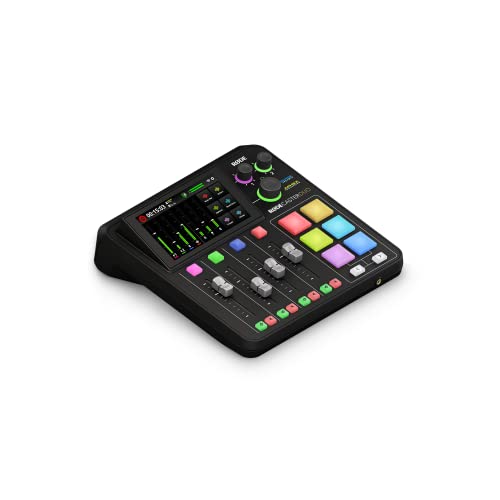
Rode Rodecaster Duo — Best for Two-Person Shows
The Rodecaster Duo distills the Pro II into a compact two-channel console: the same Revolution preamps, the same APHEX processing family, smart pads, multitrack recording, and dual USB plus Bluetooth. It suits the dominant real-world podcast format — two hosts, or a host and a guest — and solo creators who bring guests in remotely. It does not suit three- and four-person in-room panels, which is precisely the line between it and its flagship sibling.
Strengths
- Identical preamp quality to the flagship: the quietest, most forgiving gain in this guide, in a smaller box.
- Dual USB connections serve two computers or a computer and a phone-era workflow without re-cabling.
- Compact footprint leaves desk room for the microphone arms, screens, and notebooks of a working show.
Trade-offs
- Two microphone channels, full stop — know your format before buying.
- Still a premium purchase; the savings versus the Pro II buy you the microphone, so budget the pair together.
- Fewer pads and less expansion than the flagship for production-heavy shows.
Key specs: 2 studio preamps · APHEX processing · smart pads · multitrack recording to PC/microSD/USB · dual USB + Bluetooth
Most podcasts are two people talking. The Duo is the rare product that takes that fact seriously instead of selling capacity its buyer will never use: everything about the two channels it does have is flagship-grade. For a duo show — or a solo host whose guests arrive by Bluetooth and USB — it delivers the Pro II’s sound and workflow at a friendlier price and footprint, and it holds its value in a way budget gear does not. If your format is two voices, this is not the compromise pick; it is the correct one.
Best for: two-host shows, solo hosts with remote guests / Not suited for: in-room panels of three or more
Check the current price on Amazon

MAONO Maonocaster AME2 — Best Budget
The Maonocaster AME2 is the entry point to the podcast console idea: an audio interface mixer with an XLR input and 48V phantom power, Bluetooth accompaniment, eleven custom sound pads, voice effects, and rechargeable battery operation. It suits first podcasts, streamers starting out, karaoke-adjacent creators, and anyone who needs the podcast workflow — mic, pads, phone, computer — at the lowest real price. It does not suit multi-microphone panels or users whose low-output dynamic microphone demands serious preamp gain; it is an honest beginner’s tool, priced like one.
Strengths
- The full podcast gesture set — sound pads, Bluetooth music, voice changers and effects, live monitoring — at an entry price.
- A real XLR input with phantom power means a proper microphone today and a better one later, without replacing the console.
- Battery power and phone compatibility make it a genuinely portable starter studio.
Trade-offs
- Essentially a one-microphone console; co-hosts in the room are not its format.
- Preamp noise and build quality are entry-tier — it will be the first thing a growing show upgrades.
- Effects lean playful; serious shows will use a fraction of them and all of the clean path.
Key specs: XLR input with 48V phantom power · Bluetooth · 11 custom sound pads · voice effects · rechargeable battery · PC and phone compatible
The AME2’s job is to make episode one possible. Podcasting’s graveyard is full of shows that died waiting for perfect gear; the Maono exists so that a creator with a modest microphone and a phone can record a real episode this weekend, learn what their show actually is, and upgrade with knowledge instead of guesses. Its pads and effects serve the live-streaming style of podcasting particularly well, and its clean XLR path is respectable when the effects are left off and the gain is set with care. Buy it as a beginning, use it as a teacher, and it will have earned its price before the upgrade it eventually inspires.
Best for: first shows, beginner streamers, tight budgets / Not suited for: multi-mic panels or demanding microphones
Check the current price on Amazon

Zoom LiveTrak L-12 — Best for Big Panels and Music
The LiveTrak L-12 is a 12-channel mixer and multitrack recorder that treats a podcast like a small live production: eight microphone preamps, five independent headphone mixes, recording of every channel to SD, and a proper console layout. It suits roundtable shows, actual-play and discussion panels, podcasts with live music, and any production that has outgrown the four-microphone ceiling of the dedicated consoles. It does not suit solo or duo shows, for whom it is charming overkill, or users wanting app-driven voice processing — this is a recordist’s board.
Strengths
- Eight mic preamps and multitrack SD recording capture panels and bands with every voice separate for editing.
- Five discrete headphone mixes let each participant hear themselves properly — the panel-show feature that matters most.
- A real console layout with faders per channel suits live-produced shows and music segments.
Trade-offs
- No APHEX-style one-touch broadcast processing; voices are captured clean and polished in post.
- The largest unit here — a production desk, not a corner of one.
- Its breadth is wasted on small formats; buy for the show you have.
Key specs: 12 channels · 8 mic preamps · multitrack recording to SD · 5 headphone mixes · USB audio interface
Panel podcasts break small consoles in a specific way: not on sound quality but on arithmetic — five people, five microphones, five headphone mixes. The L-12 is the affordable end of the architecture that solves it, borrowing from live sound rather than from streaming. For a roundtable, an actual-play recording with a full cast, or a music podcast that records a band and then interviews it, it captures everything, separately, reliably, with the tactile control of real faders. It asks more of its operator than the Rode consoles do, and repays it with capacity they cannot match.
Best for: roundtables, panels, music podcasts, actual-play shows / Not suited for: solo and duo shows or processing-first workflows
Check the current price on Amazon
Comparison Table
| Pick | Badge | Key spec | Best for |
|---|---|---|---|
| Rode Rodecaster Pro II | Best Overall | 4 preamps, APHEX, multitrack, smart pads | Serious shows up to 4 hosts |
| Tascam Mixcast 4 | Best for Editing-First Shows | 4 inputs, touchscreen, editing software | Produced, edited podcasts |
| Zoom PodTrak P4 | Best Portable | 4 mics, 4 headphone outs, battery power | Location interviews |
| Rode Rodecaster Duo | Best for Two-Person Shows | 2 flagship preamps, dual USB, Bluetooth | Duos and solo hosts |
| MAONO Maonocaster AME2 | Best Budget | XLR + phantom, 11 pads, Bluetooth | First shows |
| Zoom LiveTrak L-12 | Best for Big Panels and Music | 12 channels, 8 preamps, multitrack SD | Roundtables and bands |
How to Choose the Best Audio Mixer for Your Podcast
Let your format decide, in this order. First, simultaneous microphones: one, two, four, or more. That single number eliminates most of the field — a solo host gains nothing from a four-preamp flagship, and a four-person roundtable cannot be wished onto a two-channel console. Second, remote guests: if guests join by phone or computer regularly, Bluetooth and USB guest paths with proper mix-minus move from convenience to core requirement, which is where the Rode consoles and the PodTrak P4 earn their keep. Third, your post-production reality: if you edit every episode, multitrack recording is your best friend and every pick here except the budget Maono provides it; if you publish as recorded, per-channel processing matters more than track count, because the sound must be finished at the moment of capture.
Microphone pairing is the fourth decision, and it is really a preamp decision. The podcast world’s favorite microphones are disproportionately low-output dynamics that demand generous, quiet gain. The Rode consoles are the benchmark for driving them without help; the Tascam and Zoom units handle typical examples well, especially with sensible mic placement; the budget tier will work hardest and may reward a sensitive condenser instead. Whatever you choose, place the microphone close — a hand’s breadth — because no preamp at any price outperforms six inches of proximity.
Finally, budget honestly across the whole signal chain. The console is the center, but microphones for every participant, headphones for every participant, arms or stands, and cables are what make the console useful. A Duo with two good microphones is a better show than a Pro II with one good microphone and three borrowed headsets. Podcast listeners forgive modest gear; they do not forgive one host who sounds like he is calling from inside a submarine.
One further consideration is longevity, because podcast consoles sit at the center of a show for years. Favor units whose core value is in hardware — preamps, routing, recording — over units whose appeal depends on a companion app staying updated, and favor manufacturers with a visible commitment to the category: Rode, Tascam, and Zoom all publish firmware and support their podcast lines actively. A console is also one of the few creative tools with a healthy resale market, which softens the cost of the flagship tiers: a Rodecaster bought today and sold in three years, when your show outgrows or changes format, returns a meaningful share of its price. Buy the console your next fifty episodes need, and the economics usually take care of themselves.
How to Set Up a Podcast Mixer for Your First Recording Session
Set up the day before you record, not the hour before — the first session’s job is conversation, and it should not be spent reading menus. Connect one microphone per participant, headphones for everyone, and run a test recording of each voice alone: speak at real show volume and energy, because levels set on a mumbled “testing” will clip on the first laugh. Aim for healthy peaks with clear headroom on every channel, engage gentle compression where the console offers it, and resist stacking effects on day one — a clean, consistent, slightly dry voice edits beautifully, while an over-processed one cannot be un-processed.
Record your backup like a professional: if your console records to SD while streaming to a computer, run both. Storage is cheap and re-recording a great conversation is impossible — the guest will never say it the same way twice. Fire your intro from the sound pads during the test so its level against the voices is set before it matters. Check the remote path with an actual phone call to a friend: confirm they hear you without hearing themselves, and that you can hear them at a level that matches the room microphones.
Then attend to the room and the ritual. Soft furnishings behind and beside the speakers tame most home-studio echo; a rug and a closed door do more than any plugin. Agree on the headphone rule — everyone wears them, always — and the microphone rule: a hand’s breadth away, talk across it rather than down at it. Do a thirty-second clap-and-count test on all channels, listen back on the worst headphones you own, and fix what you hear before your guest arrives. The consoles in this guide make all of this fast; the discipline of doing it is what makes a show sound professional by episode three instead of episode thirty.
Close the session like a professional, too, because file discipline is part of the recording. Before anyone leaves, confirm the recording exists: play ten seconds from the end of the file, not the beginning, because a recording that started is not proof of a recording that finished. Copy the files to their working folder the same day, name them with the episode and date while the session is fresh, and keep the console’s card unformatted until the episode is published. Every experienced podcaster has one story about the lost episode; the entire genre of that story is prevented by these three unglamorous minutes.
Common Buying Mistakes
- Buying channel count instead of format fit. A four-preamp flagship for a solo show wastes money; a two-channel console for a trio wastes the show. Count your simultaneous microphones and buy exactly one step above.
- Skipping headphones for a participant. One guest on speakers prints echo into every track. Every voice gets headphones — the PodTrak P4 and LiveTrak L-12 exist partly to make this affordable at scale.
- Recording only the stereo mix. If you edit, multitrack is the feature that pays weekly. Confirm your console records channels separately, and actually record that way from episode one.
- Pairing a quiet microphone with a weak preamp. Hiss is a purchasing decision made in advance. Match the microphone’s appetite to the console’s clean gain.
- No backup recording. Computers crash on a schedule known only to fate. A console that records standalone to SD is insurance you will eventually collect on.
- Treating the room as someone else’s problem. The best console here will faithfully record your echoing kitchen. A rug, curtains, and a closed door outperform a tier of equipment.
Voice Processing, Demystified: What the Console Is Doing to Your Voice
The “broadcast sound” that podcast consoles advertise is not magic; it is a short chain of well-understood tools, and knowing what they are lets you use any console here with intent instead of superstition. First comes the high-pass filter, which removes rumble — desk thumps, air conditioning, handling noise — below the voice’s useful range. Next, a de-esser or careful EQ tames the harsh hiss of sibilant sounds. Then compression, the heart of the broadcast feel: it turns down the loud moments automatically so the overall voice can sit louder and steadier, which is why radio voices sound close and constant while untreated recordings wander. A touch of EQ presence lift adds clarity, and a gate or expander quiets the channel between phrases so the room disappears when you pause.
Rode’s APHEX implementation packages exactly this chain with the settings pre-judged by people who mix voices for a living, which is why beginners sound startlingly professional on the Rodecaster consoles within minutes. Tascam and Zoom offer the same tools with a more manual philosophy. The discipline that matters at any tier is restraint: processing should be inaudible as processing. If a listener can hear the compressor pumping or the gate chopping word endings, the settings — not the console — are the problem. Record a minute, listen on ordinary earbuds, and adjust one control at a time. Your future editor, who may be you at midnight, will be grateful for every decibel of restraint.
Video Podcasts and Live Streaming: Where Consoles Earn a Second Salary
Most growing podcasts are now video podcasts, and many record live to an audience before the edited episode appears. That changes what the mixer must do: it is no longer only a recorder but the audio heart of a small broadcast. The Rodecaster Pro II and Duo were designed for exactly this double life — dual USB connections let a streaming computer and a recording workflow coexist, the pads fire production elements live, and the processed mix that viewers hear is the same sound the podcast audience later downloads. Tascam’s Mixcast 4 similarly bridges recording and streaming duties, while the PodTrak P4 and LiveTrak L-12 serve the record-now, publish-later model and ask the computer to handle any live audience.
The practical advice is to decide which show you actually make. If your audience watches live and chat participates, buy for the live workflow — processing at capture, pads at your fingers, routing that never requires opening a settings window mid-show. If your show is recorded, edited, and released, buy for the edit: multitrack integrity, clean unprocessed capture options, and headphone mixes that keep participants comfortable through long sessions. The consoles in this guide divide cleanly along that line, and the worst purchase in the category is a brilliant live console bought for a heavily edited show, or the reverse — each excellent, each mismatched.
The Rest of the Signal Chain: Budgeting Beyond the Console
A podcast console is the center of a system, and the system’s other members decide whether the console’s quality ever reaches a listener. Microphones first: one per participant, of matched quality, because a panel where one voice sounds rich and another sounds like a phone call trains the audience to prefer the rich voice. Dynamic microphones are the forgiving default for untreated rooms; condensers reward treated ones. Headphones second: closed-back, comfortable for two hours, one set per chair — the LiveTrak and PodTrak’s multiple headphone outputs exist because this line item is not optional. Arms or stands third: they hold the microphone at the consistent close distance that makes voices sound expensive, and they keep desk thumps out of the recording path better than any filter.
Then the quiet essentials. XLR cables of honest quality, one per microphone plus a spare. An SD card larger than you think you need, formatted in the console, with a second card in the drawer. A power strip that puts every device in the chain on one switch, so the studio wakes and sleeps as a unit. And the cheapest professional tool in the building: a notebook or a saved settings file recording your gain, processing, and routing choices, because the session where “it sounded better last time and nobody knows why” is a rite of passage you are allowed to skip. Total the chain before choosing the console tier — a mid-tier console inside a complete chain will outperform a flagship surrounded by compromises on every episode you ever publish.
Final Recommendation
If you want the best podcast mixer available and your show has up to four voices, buy the Rode Rodecaster Pro II and stop researching — it is the standard for a reason. Two-person shows should save the difference and take the Rode Rodecaster Duo, which gives up nothing in sound. Editing-first producers will appreciate the Tascam Mixcast 4‘s recorder discipline; interviewers who roam should carry the Zoom PodTrak P4; panels and music shows need the Zoom LiveTrak L-12’s arithmetic; and a first show on a real budget starts, happily, with the MAONO AME2. Whichever you choose, spend the remaining budget on microphones and headphones for every participant — the console makes the show possible, but the chain makes it sound professional. Then record episode one this week: every console in this guide has launched real shows, and the only purchase that never pays off is the one postponed until the gear is perfect.
Keep exploring the cluster: Best Audio Mixers For Podcasting & Music · Best Audio Mixers For Pc · Best 2 Mic Mixers For Podcasting · Best Audio Mixers For Recording Voice · Best Audio Mixers For Recording Music
Related guides
Frequently Asked Questions
Do I really need a podcast mixer, or is an audio interface enough?
An interface plus software can record a fine podcast, and for a solo host who edits carefully it may be all you ever need. A podcast mixer earns its price when you add participants, remote guests, live production, or a publish-as-recorded workflow: it puts processing, pads, mix-minus, and multitrack recording in one box that works without the computer. The more people and moving parts your show has, the more the console pays.
What is multitrack recording and why does it matter?
Multitrack means each microphone is recorded to its own track instead of one combined stereo file. In editing, you can then fix one person’s level, mute a cough on one channel while another speaks, and process each voice individually. For any show that edits in post, it is the single most valuable recording feature — every pick here except the budget Maono offers it in some form.
How many microphone inputs do I need?
One per person who will ever be in the room at once — plus a plan for remote guests, who arrive over Bluetooth or USB rather than a microphone input. Solo hosts: one or two channels. The classic duo: two. Roundtables: count chairs, then look at the LiveTrak L-12 class. Buying one step above your current format is sensible; buying three steps above is a donation.
Can these mixers bring in a phone or Zoom guest without echo?
Yes — that routing is called mix-minus, and it is a core design feature of the podcast consoles here. The Rodecaster Pro II and Duo, the Mixcast 4, and the PodTrak P4 all provide paths for phone or computer guests that return the show to the guest without the guest’s own voice in it. Always test with a real call before recording day; the setting is simple, but the first time to discover a routing error is not during an interview.
Which microphone should I pair with a podcast mixer?
The honest answer is: a decent dynamic microphone, close to your mouth, in the quietest corner you have. Low-output broadcast dynamics are the classic podcast choice and pair beautifully with the Rode consoles’ gain; sensitive condensers capture more detail and more room, and pair well with every pick here in a treated space. Budget tiers should favor a microphone matched to the preamp’s strength — and every participant should have the same class of microphone, so no voice sounds like a guest on its own show.
Should I record to the computer or to the mixer’s SD card?
Both, when the console allows it — and most picks here do. The computer copy feeds your streaming and editing workflow; the SD copy is the backup that survives crashes, cable accidents, and software updates. Storage costs almost nothing; a lost interview costs the episode. Professional shows treat the standalone recording as the master and the computer as the convenience, not the reverse.
Should I treat my room or upgrade my mixer first?
Treat the room first if your recordings echo, and upgrade the mixer first if they hiss, clip, or exhaust you with workflow friction — the two problems have different addresses. Echo and room noise live in the physical space and no console removes them after the fact; soft furnishings, a rug, curtains, and recording in the most furnished room you have will improve every microphone you own. Hiss at working gain, channels you cannot record separately, and guests you cannot route cleanly are equipment problems, and they are exactly what the consoles in this guide solve. Most home podcasters need a little of both, in that order: quiet the room this weekend, then buy the console that removes the remaining friction.
What is a sensible upgrade path as my show grows?
Grow in the order your pain appears. Most shows start on a budget console like the Maono AME2 or a PodTrak P4, then feel the ceiling as a preamp straining against a good microphone or a second host squeezed through a workaround — that is the moment a Rodecaster Duo or Mixcast 4 earns its price. Panels and live production arrive later and point to the Pro II or the LiveTrak L-12. Notice what is not on this path: replacing microphones every season. A good microphone bought early survives three console generations, which is why this guide keeps advising you to fund the whole chain rather than a single hero component.


