Disclosure: airfryerkitchensupply.com is reader-supported. When you buy through links on our site, we may earn an affiliate commission at no extra cost to you.
Where to buy
All six of the best 2 mic mixers for podcasting in this guide are current products sold on Amazon, verified against each manufacturer’s own listing before a single claim was written. If you want the one-box answer, it is the RØDE RØDECaster Duo — two broadcast-grade mic inputs, processing that makes ordinary voices sound like radio, and recording built in. If your budget or your style points elsewhere, the Mackie ProFX6v3 covers the traditional mixer route and the Zoom PodTrak P4 covers the record-anywhere route. We never print fixed prices in these guides, because podcast gear pricing moves with stock and promotions; every pick links to its Amazon listing so you can check the current price on Amazon yourself. One category warning: “2 mic” is the requirement, but the products that satisfy it come in three species — podcast production consoles, compact live mixers, and portable recorders — and they are not interchangeable. This guide keeps the species separate and tells you exactly which job each pick is for. That clarity matters more than any single feature, because the most expensive podcast purchase is the wrong architecture bought twice — once in hope, and once in replacement, after a season of fighting a workflow that was never designed for your show.
Introduction: the two-microphone problem, solved six ways
Two voices is the natural size of a podcast: host and co-host, interviewer and guest, partners building a show together. Finding the best 2 mic mixers for podcasting sounds like a narrow search, but it hides the most important decision in small-scale audio — where the processing, recording and monitoring should live. In a production console like the RØDECaster Duo, everything lives in one box: preamps, voice processing, recording, sound pads, phone and guest connections. In a compact mixer like the Mackie ProFX6v3 or Behringer FLOW 8, the box handles voices and levels while a computer does the recording and editing. In a portable recorder like the Zoom PodTrak P4, the box is the studio — batteries, SD card, four headphone outputs — and the computer only enters at editing time.
Each architecture has a genuine best case, and this guide refuses to pretend otherwise. A duo recording in a treated home studio, a journalist interviewing in hotel rooms, and a pair of streamers who also take live calls are three different buyers who happen to share a microphone count. What unites the six picks is the non-negotiable core: two quality microphone inputs with enough clean gain for real podcast microphones, phantom power for condensers, zero-latency headphone monitoring for both voices, and a recording path that does not fight you. Where a popular model could not be verified as a current Amazon listing — FIFINE’s Amplimixer D6 is the notable example — we say so in the honesty notes rather than inventing a link, and we recommend the closest verified alternative.
It is also worth saying what a two-mic mixer is not. It is not a guarantee of good audio — the room and the microphones will still decide most of what your audience hears — and it is not a stepping stone you must apologise for. Some of the most successful podcasts in the world are two voices, two microphones and a unit no fancier than the mid-tier picks below, recorded in one take and published with minimal editing. The gear in this guide is sized to that reality: enough to capture two voices beautifully and reliably, and not a dollar of pads, channels or processing beyond what a duo can actually use. Choose the architecture that matches your workflow, and the mixer disappears — which is the highest compliment recording gear can earn.
In this guide
Quick Picks
- Best Overall — RØDE RØDECaster Duo: Two studio-grade preamps, APHEX voice processing, multitrack recording to SD or USB, sound pads and call integration. The two-mic podcast console to beat.
- Best Analog Mixer — Mackie ProFX6v3: Two Onyx mic preamps, GigFX effects, USB recording and a layout any live-sound volunteer already understands. For podcasters who think like engineers.
- Best Portable Recorder — Zoom PodTrak P4: Four XLR inputs (use two now, grow later), four headphone outputs, battery power and SD recording. The interview-anywhere machine.
- Best App-Controlled — Behringer FLOW 8: A digital mixer with app control, Bluetooth and motorised-feel workflow at an analogue price tier. Two mics today, a small band tomorrow.
- Best Budget — MAONO MaonoCaster Dual-XLR Podcast Bundle: A dual-XLR-input podcast interface bundle that gets two voices recording with the least money and the least setup.
- Best No-Frills Two-Mic Interface — CAD Audio MXU2: Two XLR combo channels and USB, nothing else to learn. For duos who record in software and want the hardware to disappear.
How These Picks Were Chosen
We filtered the two-microphone podcast market on Amazon with five tests. First, the inputs had to be real: two microphone preamps with XLR connections, not one mic channel and a prayer. Second, gain: podcasting’s favourite microphones include low-output dynamics that expose weak preamps instantly, so we favoured units with a reputation for clean gain and flagged the realistic limits in each review. Third, monitoring: both hosts must hear themselves and each other with zero latency, so direct monitoring or an onboard mix was mandatory. Fourth, the recording path: built-in SD recording, USB multitrack, or at minimum a clean USB stereo feed — with the depth of each stated honestly rather than implied. Fifth, verifiability: every pick is a current model with a live Amazon listing from the brand or an authorised seller, checked through the manufacturer’s catalogue data before writing.
The badges reflect workflows, not a single ladder, because the “best” two-mic setup for a video podcaster taking remote guests differs fundamentally from the best setup for two people in a room with a laptop. Spec boxes contain only facts confirmed from the manufacturer’s listing for the exact model; anything we could not verify was left out of the box and described in words instead.
A note on the most requested absentee: FIFINE’s Amplimixer D6 is frequently recommended for streaming desks and is often asked about for two-person podcasting. When we verified this guide’s picks against Amazon’s catalogue through the manufacturer’s listings, the D6 did not return a confirmable current listing, so — per the rule that no ASIN is ever guessed — it appears here without a link. Its stablemate, the FIFINE AmpliGame SC3, did verify, but the SC3 is fundamentally a single-microphone streaming mixer, and this guide’s first rule is two real mic inputs; bending that rule for a popular name would betray the search that brought you here. If the D6’s listing is live when you shop, judge it by the same tests used above: two genuine preamps, monitoring for both hosts, and a recording path you trust. Until a pick can be verified, it cannot be linked, and that discipline is what keeps every other recommendation in this guide safe to act on.
The 6 Best 2 Mic Mixers for Podcasting
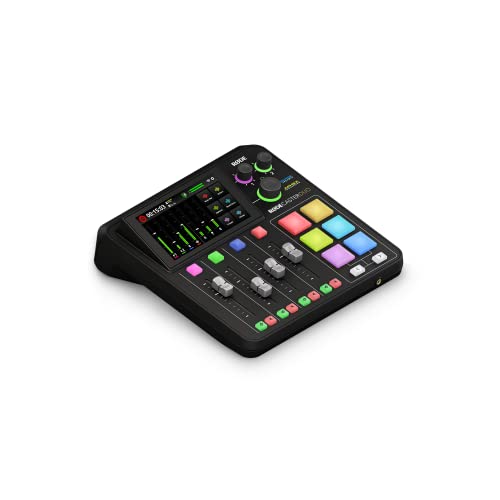
RØDE RØDECaster Duo — Best Overall
The RØDECaster Duo is the RØDECaster Pro II’s two-person distillation, and for a duo it loses almost nothing that matters. Two ultra-low-noise Revolution preamps feed APHEX processing — the broadcast polish of compression, EQ, gating and subtle excitement that makes voices sound like they belong on radio — and the unit records multitrack to microSD or over USB while hosting Bluetooth and USB guest channels for remote callers. Seven assignable SMART pads trigger intros, stingers and sound effects, and the whole thing is operated from a touchscreen and one big encoder rather than a forest of knobs.
Strengths
- Broadcast-grade preamps and APHEX processing that flatter untrained voices automatically.
- Multitrack recording built in — every voice on its own track for painless editing.
- Remote guest channels (Bluetooth/USB) solve the call-in problem inside the same box.
Trade-offs
- Premium tier pricing — it costs more than the mixers here by a wide margin.
- Two mic inputs is the ceiling; a third in-room guest needs a different plan.
- Its power depends on software-driven processing — purists who want raw analogue control should look at the Mackie.
| Spec | Detail |
|---|---|
| Mic inputs | 2 (Revolution preamps) |
| Recording | Multitrack — microSD and USB |
| Processing | APHEX per-channel |
| Extras | SMART pads, Bluetooth guest channel |
The Duo earns Best Overall because it removes the three failure modes of duo podcasting in one purchase: bad gain staging (its preamps are forgiving and quiet), uneven voices (its processing evens them), and lost recordings (it records locally even if the computer crashes). For a show that publishes weekly and cannot afford a lost session, that insurance is the product. Streamers get a broadcast-grade front end; video podcasters get clean multitrack audio to sync; interviewers get phone guests without a mixer-minus headache. It is the most expensive pick here and, for serious duos, the easiest to justify.
Best for: serious podcast duos, interview shows with remote guests, video podcasters. / Not suited for: tight budgets or shows that regularly seat three-plus in-room voices.
Check the current price on Amazon

Mackie ProFX6v3 — Best Analog Mixer
The ProFX6v3 is the pick for podcasters who come from live sound — or who simply trust knobs more than touchscreens. Two Onyx mic preamps with phantom power anchor a compact analogue mixer with three-band EQ, a GigFX effects engine (a touch of its reverb is a legitimate vocal sweetener), and USB connectivity that records the stereo mix to your computer while sending playback back for monitoring. It also moonlights: the same box runs a small live event, a presentation or a rehearsal, which no podcast console here can claim.
Strengths
- Onyx preamps with clean gain and analogue EQ you adjust by ear in real time.
- USB recording and playback in a mixer that also works standalone for live sound.
- GigFX effects and a familiar layout — zero learning curve for anyone who has run a board.
Trade-offs
- USB records the stereo mix, not separate tracks per mic — editing flexibility is limited.
- No built-in recorder; the computer must be present and behaving.
- No dedicated remote-guest channel; call-ins need software routing.
| Spec | Detail |
|---|---|
| Channels | 6 (2 mic preamps) |
| Mic preamps | 2 × Onyx |
| USB | Yes — stereo record/playback |
| Effects | GigFX engine |
Choose the ProFX6v3 if your podcast is two people in a room and your editing style is “get it right at the source.” Ride the faders, balance the voices live, add a breath of reverb, and the stereo file that lands in your editor needs little more than trimming. It is also the budget-sensible route into quality: the same money that buys a mediocre all-in-one buys a genuinely good small mixer from a company that has built them for decades. The multitrack limitation is real and stated plainly — if your show’s format needs per-voice editing rescue, step up to the RØDE — but thousands of excellent duo podcasts are recorded exactly this way.
Best for: in-room duos, live-sound-minded podcasters, hybrid podcast/event users. / Not suited for: editors who need multitrack, or shows built on remote guests.
Check the current price on Amazon

Zoom PodTrak P4 — Best Portable Recorder
The PodTrak P4 reframes the question: why should a two-mic podcast be tied to a desk at all? It offers four XLR mic inputs with phantom power (buy for two voices, keep the headroom for a guest), four independent headphone outputs so everyone monitors comfortably, and recording straight to SD card on battery or USB power. Sound pads trigger jingles and effects, a phone input brings in remote guests with automatic mix-minus, and the whole studio fits in a jacket pocket’s neighbourhood.
Strengths
- Records anywhere — batteries and SD card free you from laptops and studios.
- Four mic inputs and four headphone outputs: the most generous monitoring in this guide.
- Phone input with mix-minus makes remote guests simple without a computer.
Trade-offs
- Preamp gain is adequate rather than generous; very quiet dynamic mics may want a booster.
- No per-channel voice processing of the RØDE’s calibre — polish happens in editing.
- The small touchscreen-free interface is menu-driven; live adjustments are slower than knobs.
| Spec | Detail |
|---|---|
| Mic inputs | 4 × XLR with phantom power |
| Recording | SD card, battery or USB powered |
| Headphone outputs | 4 |
| Extras | Sound pads, phone input with mix-minus |
For journalists, field interviewers, conference podcasters and anyone whose show happens where the guests are, the P4 is not a compromise — it is the correct tool, and desktop consoles are the compromise. It also quietly serves as the best “third place” option for home duos who record at kitchen tables and pack the studio away afterwards. Pair it with two dynamic mics (which forgive untreated rooms) and you have a broadcast-capable rig in a small bag. Its successor model with noise-reduction features also exists in Zoom’s line; the original P4 remains the value pick while it is stocked.
Best for: field recording, travelling interviewers, pack-away home studios. / Not suited for: low-output mic owners without a booster, or processing-first studio duos.
Check the current price on Amazon

Behringer FLOW 8 — Best App-Controlled
The FLOW 8 is a digital mixer wearing an analogue mixer’s price tag: eight inputs (two mic preamps with phantom power among them), per-channel processing, effects, Bluetooth audio and full control from a phone or tablet app, with a simplified hardware surface for the adjustments you make constantly. For a two-mic podcast it is deliberately over-capable — and that headroom is the point for creators whose “podcast setup” also runs a small live stream, a worship team rehearsal or a band’s demo session.
Strengths
- Digital processing per channel — EQ, compression and effects — at an entry tier.
- App control lets a host adjust levels from the guest’s chair or the audience.
- Bluetooth playback and USB streaming cover music beds and computer audio cleanly.
Trade-offs
- Only two mic preamps despite the eight-input headline — the same two-voice ceiling.
- App dependence for deep settings; if you hate phones in your workflow, you will hate this.
- No built-in SD recording — the computer or phone is the recorder.
| Spec | Detail |
|---|---|
| Inputs | 8 (2 mic preamps) |
| Control | App control + hardware surface |
| Wireless | Bluetooth audio |
| USB | Yes — streaming/recording |
The FLOW 8’s podcast party trick is remote control of the mix: a producer in the next room, or a host reaching for a phone instead of leaning across a guest, can ride levels and mute coughs without touching the hardware. Its digital memory also means your show’s settings — gains, EQ, effects — return exactly, session after session, which analogue knobs cannot promise. For a two-mic show that is also a streaming or small-live rig, it is the most future-proof budget pick here; for a pure in-room duo who record and rarely stream, the simpler Mackie or CAD will feel more direct.
Best for: streamer-podcasters, small hybrid rigs, producers who mix remotely. / Not suited for: phone-free workflows or buyers needing a built-in recorder.
Check the current price on Amazon

MAONO MaonoCaster Dual-XLR Bundle — Best Budget
MAONO built its name on making podcasting affordable, and its dual-XLR MaonoCaster bundle is the budget door into genuine two-microphone recording: an interface-mixer with two XLR inputs — the feature that separates a real two-mic rig from a one-mic compromise — plus the accessories a beginner needs to start. It is aimed unapologetically at new shows: two voices, a computer, and as little money and setup friction as physics allows.
Strengths
- Two XLR mic inputs at the lowest tier in this guide — the essential feature, kept.
- Bundle format lowers the total cost of starting a two-person show.
- Podcast-first controls and sound effects suit beginners finding their format.
Trade-offs
- Preamp quality and build are budget-tier; demanding mics and daily professional use will outgrow it.
- Processing is basic compared with the RØDE’s broadcast chain.
- Bundle components vary — verify the exact contents of the listing before ordering.
| Spec | Detail |
|---|---|
| Mic inputs | 2 × XLR (dual-input model) |
| Format | Podcast interface bundle |
| USB | Yes |
| Extras | Bundle accessories (see listing) |
Every successful podcast started as an unproven idea, and the MAONO bundle respects that economics: prove the show exists before funding the flagship. Two voices recording cleanly is ninety percent of podcasting; the remaining ten percent — processing polish, pads, multitrack — is what the RØDE sells, and it will still be there when your audience justifies it. Buyers should set expectations honestly: this is the starter rig, chosen for its inputs and price, and it will teach you exactly which upgrade your show actually needs.
Best for: brand-new two-person shows, students, budget-first creators. / Not suited for: professional daily use or low-output microphone pairings.
Check the current price on Amazon

CAD Audio MXU2 — Best No-Frills Two-Mic Interface
The MXU2 is the minimalist’s answer: two XLR combo inputs, per-channel gain, USB audio, monitoring — and a deliberate absence of everything else. No pads, no effects menu, no app. For duos who record into proper software and do their processing in editing, the hardware’s job is to convert two voices cleanly and then be forgotten, and a microphone company’s compact interface does exactly that.
Strengths
- Two genuine combo channels — microphones or instruments, no adapters.
- Nothing to misconfigure: the fastest setup in this guide.
- CAD Audio heritage — a support organisation that lives and breathes microphones.
Trade-offs
- No processing, pads or recording built in — your software does all of it.
- No remote-guest channel; call-ins are a software problem to solve.
- Streamers who want live effects and sound boards should look at the RØDE or FLOW 8.
| Spec | Detail |
|---|---|
| Channels | 2 |
| Inputs | 2 × XLR combo |
| USB audio | Yes — interface |
| Effects | None |
There is a species of podcaster — often the most experienced — who wants the recording chain to be boring: two mics, two clean tracks’ worth of signal, an editor they already know. The MXU2 serves them, and it serves beginners who would rather learn one simple box than a production console’s operating system. It will never be the flashiest item on a desk, and that is its entire charm. If your show’s magic is in the conversation and your polish happens in post, this is the two-mic mixer that respects both.
Best for: software-first duos, minimalist setups, experienced editors. / Not suited for: live-processing streamers or remote-guest-heavy formats.
Check the current price on Amazon
Comparison Table
| Pick | Badge | Key spec | Best for |
|---|---|---|---|
| RØDE RØDECaster Duo | Best Overall | APHEX processing, multitrack SD/USB | Serious duos, remote guests |
| Mackie ProFX6v3 | Best Analog Mixer | 2 Onyx preamps, GigFX, USB | In-room duos, live crossover |
| Zoom PodTrak P4 | Best Portable Recorder | 4 XLR in, SD recording, battery | Field and travelling shows |
| Behringer FLOW 8 | Best App-Controlled | Digital processing, app control | Streamer-podcasters |
| MAONO Dual-XLR Bundle | Best Budget | 2 XLR inputs, bundle format | New shows on a budget |
| CAD Audio MXU2 | Best No-Frills Interface | 2 combo inputs, USB | Software-first minimalists |
How to Choose the Right 2 Mic Podcast Mixer
Decide where recording lives. In the box (RØDECaster Duo, PodTrak P4) means the show survives computer crashes and studio-less locations. In the computer (ProFX6v3, FLOW 8, MXU2, MAONO) means cheaper hardware and a workflow centred on your editor. Neither is wrong; a weekly show with deadlines should weight the in-box insurance heavily.
Match the mixer to your microphones. Low-output dynamic microphones — the forgiving, room-noise-rejecting favourites of podcasting — demand clean gain. The RØDE’s preamps handle anything; budget units may need an inline gain booster for the quietest dynamics, which is a legitimate and common addition, not a failure. Condenser owners need phantom power, which every pick here provides.
Count your guests, including the ones on screens. Two in-room mics plus a weekly remote guest is a three-source show. The Duo and P4 handle the remote guest natively; the mixers route it through software. Formats change, so buy for the format you have announced, not the one you daydream about.
Budget in tiers. Entry tier (MAONO, MXU2) proves the show. Mid tier (ProFX6v3, FLOW 8, P4) is where most long-running duos live happily for years. The premium tier (RØDECaster Duo) buys processing, multitrack and guest handling that professionals monetise. Microphones, arms and headphones will consume as much as the mixer — plan the whole rig’s budget before choosing the tier.
Dynamic vs Condenser Microphones for Two-Person Podcasts
The microphone decision shapes the mixer decision, so it deserves its own section. Dynamic microphones are the podcast default for good reasons: they pick up mostly what is directly in front of them, which means your co-host’s voice, the room’s echo and the street outside all stay relatively quiet in your channel. They need no phantom power, survive being knocked off a desk, and their only demand is gain — a demand the premium picks meet easily and the budget picks meet with typical models. Condenser microphones hear everything: more detail, more air, and more of your untreated room and your partner’s voice bleeding into your track. In a treated studio with careful placement they sound superb; at a kitchen table they can make editing miserable. The practical rule for duos: dynamics for real rooms, condensers for treated rooms, and never mix one of each on the same show unless you enjoy matching two very different voices in post. Whichever you choose, identical microphones for both hosts will make your show sound more professional than any processing in this guide.
One more pairing rule is worth stating before you buy microphones to match these mixers: buy the pair, not two singles over time. Manufacturers revise models quietly, and two “identical” microphones bought a year apart can differ enough to notice on a duo recording where the voices are compared constantly. A matched pair bought together, on identical settings, through identical channels, is the cheapest production value in all of podcasting — and it is why several makers sell two-packs aimed at exactly the buyers of this guide. If budget forces a staggered purchase, buy the two microphones first and the mixer second; the reverse order produces the mismatched-voice problem this section exists to prevent.
How to Set Up a Two-Mic Podcast Recording Session
1. Position before power. Seat the hosts facing each other or at a slight angle, each mic a fist’s width from its mouth and angled slightly off-axis. Identical distances make identical voices; mismatched placement is the flaw no mixer can fix.
2. Connect and check phantom power. XLR cables into channels 1 and 2. Condensers: phantom on. Dynamics: phantom off. Headphones on both hosts before anything is recorded.
3. Gain stage with real show energy. Have each host deliver their loudest genuine moment — the laugh, the emphatic point — and set gain so that moment stays clear of clipping. Quiet test voices produce loud surprises later.
4. Balance and process lightly. Match the two voices by ear. If your unit has compression or broadcast processing, apply the gentle preset; if you are recording raw to edit later, record raw and resist the urge to bake in effects.
5. Start the backup. On the Duo or P4, the SD card is recording before the computer is trusted. On computer-based rigs, record a second capture (a phone across the room is better than nothing) for the first month of any new workflow.
6. Clap, name and save. One clap on mic for sync if video is involved, a spoken slate of episode and date, and a photo of the settings. Future-you, editing at midnight, sends thanks.
Common Buying Mistakes
Buying a one-mic interface for a two-mic show. The most common budget error in podcasting: a single-XLR unit plus a USB mic “for the guest” creates mismatched sound and sync headaches. Two proper mic inputs — every pick here — is the actual requirement.
Ignoring the room. A flagship console in an echoing spare room sounds worse than a budget mixer in a room with a rug, curtains and a bookshelf. Treat the space before upgrading the electronics.
Forgetting the second pair of headphones. Both hosts must monitor. One shared earbud or speakers-as-monitors (which bleed into the mics) will sabotage an otherwise good rig. The P4’s four headphone outputs exist because this mistake is universal.
Paying for multitrack you will never use — or skipping it when you need it. If you edit in a DAW and rescue takes, multitrack (Duo) is essential. If you publish near-live with minimal editing, a stereo mixer is simpler and cheaper. Know your editing self.
Chasing features over gain. Pads and effects are fun; clean gain on your actual microphones is survival. Verify your mic pairing against the mixer’s reputation before falling for a feature list.
Matching the Mixer to Your Show Format
Podcast formats stress gear in different ways, and a two-mic show is not one thing. The conversation show — two hosts, one room, weekly rhythm — is the easiest brief: consistency matters more than features, and the Mackie ProFX6v3 or CAD MXU2 will serve it for years, because the format’s quality lives in the hosting, not the hardware. The interview show splits in two: in-person interviews reward the PodTrak P4’s portability and spare inputs (a guest mic is already there when the guest is), while remote-interview shows reward the RØDECaster Duo’s guest channels and mix-minus, which remove the echo and routing problems that eat beginners’ first seasons. The video podcast adds synchronisation and multitrack to the brief — separate tracks per voice let an editor fix one host without touching the other, which pushes the Duo to the front again — while the livestreamed show adds live processing and sound effects, the FLOW 8 and Duo’s home turf, because there is no editing pass to save a live mistake.
The panel and actual-play formats deserve a warning: they are two-mic shows only in the pilot episode. If your format’s gravity pulls toward three or four voices — and panel formats always do — buy the P4’s four inputs now or budget the upgrade honestly, because a two-input unit in a four-voice show produces the worst audio in podcasting: two people on mics and two people shouting into the room. Finally, the solo-plus-producer format, where one host performs and a second person engineers, inverts the usual advice: the second “mic” channel may never host a voice, and what matters is the engineer’s monitoring and control — the FLOW 8’s app control or the Duo’s producer-friendly cue options earn their keep here. Naming your format honestly before purchase is worth more than any single feature in this guide.
The Room and the Technique: Your Mixer’s Silent Partners
Ask any podcast editor what separates amateur audio from professional audio and they will not name a mixer. They will name the room and the distance. A voice recorded fifteen centimetres from a decent microphone in a furnished room beats a voice recorded a metre from a flagship microphone in a bare one, and no product in this guide can repeal that arithmetic. The cheapest upgrades in podcasting are a rug, curtains, a bookshelf full of uneven books, and recording in the room with the most soft surfaces you own — the wardrobe-adjacent bedroom beats the stylish kitchen every time. Two hosts add one specific trap: bleed, where each voice appears in the other’s microphone. Dynamics aimed correctly (speaking across the mic’s rejection zone, hosts seated at an angle rather than directly opposite through the mics’ sensitive sides) reduce bleed more than any gate setting.
Technique is the other silent partner. Consistent distance beats perfect distance: a host who sways between five and fifty centimetres forces the editor — or the Duo’s processing — to work constantly, while a host parked at a steady fist’s width sounds finished with no processing at all. Headphone monitoring is the technique enforcer, which is why this guide treats two headphone feeds as non-negotiable: hosts who hear themselves stay on mic, stay level and stay intelligible. Before upgrading any mixer in this guide, spend one episode enforcing distance and one afternoon softening the room. If the show still sounds wrong after that, the mixer’s upgrade will actually be audible — and you will know exactly which badge to buy.
Troubleshooting Two-Mic Recordings
Problem: one host is much louder in the recording than in the headphones. → The monitor mix and the recorded mix are set in different places. Check whether your unit records pre- or post-fader, and set gains (not faders) to match the voices at the recording stage first.
Problem: a guest on the phone echoes or hears themselves delayed. → Mix-minus is missing or misrouted. Use the dedicated guest channel on the Duo or P4, or build the mix-minus in your software; never send a caller the full mix including their own voice.
Problem: buzzing that appears when the laptop charger is plugged in. → A ground loop through USB. Power the laptop and mixer from the same strip, try a different USB port, and if the unit supports it, record to SD with the laptop disconnected — one more reason the in-box recorders in this guide are popular.
Problem: the recording sounds boxy and roomy despite good mics. → Distance and room, not electronics. Move each mic to a fist’s width, add soft furnishings, and re-record the test before touching a single EQ knob.
Multitrack vs Stereo: The Editing Decision Behind the Purchase
Underneath every pick in this guide sits one technical fork that determines your editing life: does the unit record each microphone separately (multitrack) or as a finished stereo blend? Multitrack — the RØDECaster Duo’s way, and available from the PodTrak P4’s SD recordings — means every mistake is negotiable. A host who coughs over a guest’s best sentence can be muted on their own track. A level imbalance discovered in editing can be rebalanced. Crosstalk can be gated per voice. The cost is file management and an editing workflow that touches every track, every episode. Stereo recording — the Mackie, CAD and MAONO way — means the mix you performed is the mix you publish: faster, simpler, and utterly unforgiving of a bad balance or an interruption, because the voices are married forever in one file.
Neither is the “professional” choice in the abstract; professionals exist in both camps, divided by format and temperament. News-style and interview shows with unpredictable guests benefit enormously from multitrack insurance. Tight, rehearsed co-host shows with experienced voices often publish faster and sound just as good from a well-ridden stereo mix. The honest test is your own editing history: if you have ever wished you could mute one voice for two seconds, buy multitrack. If your episodes go from record to publish in under an hour and sound fine, stereo is not a compromise — it is your workflow working as designed. The FLOW 8 sits interestingly between the camps, with per-channel processing that fixes balance at the source and USB options that suit both habits, which is part of why it earns its badge for hybrid creators.
Accessories That Complete a Two-Mic Rig
The mixer is roughly half the spend of a working two-mic rig, and the other half is unglamorous and decisive. Microphone arms or sturdy stands hold the mics at that fist’s-width distance without hands, which is what makes consistent distance physically possible across a two-hour record. Shock mounts and foam windscreens or pop filters tame plosives and desk thumps before they reach the preamp. Two closed-back headphones — one per host, non-negotiable — plus a small headphone splitter or amplifier if your unit has a single output (another point to the P4’s four). Cables: two balanced XLR leads of sensible length and one spare, because cables fail on recording days with a reliability that feels personal. Storage: a fast, generous SD card for the in-box recorders, formatted in the unit, with a second card in the bag. None of this is exciting, and all of it together costs less than the price step between the mid tier and the flagship in this guide — which is why experienced podcasters buy accessories first and flagships last.
Final Recommendation
For most two-person shows with any ambition, the RØDE RØDECaster Duo is the buy-once answer: processing, multitrack and guest handling in one box. Traditionalists and hybrid live users who value knobs over menus should take the Mackie ProFX6v3 without a second thought; travelling and field shows, the Zoom PodTrak P4; streaming hybrids of every kind, the Behringer FLOW 8 instead. New shows proving themselves should start with the MAONO dual-XLR bundle or the CAD MXU2 and upgrade later with real evidence from their own recordings, not with hope or guesswork. Comparing formats? See Best 2 Channel Mixers for the wider two-channel field, Best Affordable Mixers For Streaming for creator-focused alternatives, and Best 4 Channel Mixers when a third and fourth voice join the show.
Related guides
Frequently Asked Questions
Can I record two microphones with one USB interface?
Yes — if the interface has two microphone preamps, which is precisely the requirement behind this guide. Each voice gets its own channel and gain control. Depending on the unit, the computer receives separate tracks (multitrack, as on the RØDECaster Duo) or a combined stereo mix (as on the Mackie ProFX6v3). Both are legitimate; multitrack gives editors more rescue options.
Do podcast mixers work with streaming software?
Yes. Every pick here appears to a computer as a USB audio device (the PodTrak P4 included, when connected), so OBS, Zoom, Teams and recording software can all use it as the microphone source. App-controlled and processing-equipped models like the FLOW 8 and RØDECaster Duo are especially popular with streamers because voice polish happens in hardware, before the software ever hears it.
What is mix-minus, and do I need it?
Mix-minus is the feed sent to a remote guest: everything except their own voice, so they do not hear themselves echoing back with delay. If your format includes phone or online guests, you need it — the RØDECaster Duo and PodTrak P4 provide it for their guest channels automatically, while computer-based rigs create it in software. In-room-only shows never need it.
Are two dynamic mics better than two condensers for a home podcast?
For most homes, yes. Dynamics reject room echo and household noise, which are the top audio problems in untreated spaces, and they forgive imperfect mic technique. Condensers sound more detailed in a treated room but capture every flaw of an untreated one. Identical dynamics for both hosts is the reliable default this guide recommends.
Can a 2 mic mixer handle a third guest occasionally?
Occasionally, with workarounds: the PodTrak P4 actually has four mic inputs, so it simply handles it. On strict two-input units, a remote guest can join through software while the two in-room mics stay put, or a guest can share a host’s mic interview-style. If three in-room voices become regular, that is the show telling you to buy a four-input unit.
How much gain do podcast microphones need?
It depends on the microphone and the speaker. Condensers need modest gain; quiet dynamic broadcast mics need a lot, and soft-spoken hosts need more still. The RØDECaster Duo’s preamps are built for the demanding end. On budget units, an inline gain booster between a quiet dynamic mic and the input is a common, effective and inexpensive solution — plan for the possibility rather than discovering it mid-season. The practical test before any session: record thirty seconds at your normal speaking volume, listen for hiss at the level you actually publish at, and adjust gain once. A quiet, slightly lower recording that you raise in editing will sound better than a loud one captured on the edge of the preamp’s comfort, and your future episodes will thank you for building the habit early, before the audience grows and the archive of slightly hissy episodes grows with it.


