Disclosure: airfryerkitchensupply.com is reader-supported. When you buy through links on our site, we may earn an affiliate commission at no extra cost to you.
Where to buy
If you are shopping for the best audio mixers for streaming twitch broadcasts, start with the shortlist below and buy through Amazon, where the listing states the exact variant — full-size or Mini, black or white, bare unit or bundle — and returns are straightforward if a fader or preamp arrives faulty. For most Twitch streamers the honest starting point is the TC-Helicon GoXLR, because it was designed for exactly this job; work down the list from there according to how many microphones and sources you actually run.
- TC-Helicon GoXLR — check the current price on Amazon and confirm the exact configuration on the listing before you order.
- Rode Rodecaster Pro II — check the current price on Amazon and confirm the exact configuration on the listing before you order.
- Rode Rodecaster Duo — check the current price on Amazon and confirm the exact configuration on the listing before you order.
- Yamaha AG06MK2 — check the current price on Amazon and confirm the exact configuration on the listing before you order.
- Yamaha AG03MK2 — check the current price on Amazon and confirm the exact configuration on the listing before you order.
- MAONO Maonocaster AME2 — check the current price on Amazon and confirm the exact configuration on the listing before you order.
Twitch is an unforgiving place to have bad audio. Viewers will tolerate a soft webcam, a dropped frame, even a scuffed run — but they leave a stream with hissy, clipping, or echoing voice audio within a minute, and they rarely say why. A streaming mixer fixes the problem at the desk: it gives you a proper microphone preamp, separate physical control of game sound, chat, music and your own voice, a mute you can hit without alt-tabbing, and processing — compression, EQ, a gate — that happens in hardware before your voice ever reaches OBS or Streamlabs.
The category splits into two families. The first is the purpose-built broadcast deck: the GoXLR line and the Rodecaster family, with motorized or clearly labeled faders, sound pads, voice effects and software routing that treats “what I hear” and “what the stream hears” as two different mixes. The second is the compact streaming console from the music world — Yamaha’s AG series and the Maonocaster — which borrows the shape of a traditional mixer and adds loopback, DSP and USB connectivity aimed at creators. Both families appear in this guide, because the right choice depends on whether you stream alone, run a two-person show, or bring guests in over Discord.
One technical point decides more purchases than any other: submixes. On Twitch you constantly balance game audio against Discord against music against your microphone, and you want to change what you hear without changing what viewers hear — turning the game down in your headphones during a cutscene should not make it vanish from the broadcast. Decks with true submix or dual-USB routing handle this natively. Simpler mixers send one stereo mix everywhere, which is workable for a solo streamer with a fixed layout and frustrating for everyone else. Every pick below is labeled for which camp it falls into.
All six picks were verified as current Amazon listings on 2026-11-20. Prices move constantly in this category, so this guide deliberately prints none — each pick says to check the current price on Amazon under the full model name, because the GoXLR, the AG mixers and the Rodecasters all exist in multiple colors and bundle configurations that look identical in a search thumbnail.
In this guide
Quick Picks
- Best Overall — TC-Helicon GoXLR: the deck that defined Twitch audio: four motorized faders for mic, game, chat and music, a sound board, vocal effects and proper submix routing.
- Best for Multi-Mic Shows — Rode Rodecaster Pro II: a full broadcast studio with four studio preamps, APHEX processing, smart pads and multitrack recording — for streamers who also podcast or host guests in the room.
- Best Premium for Solo and Duo Streamers — Rode Rodecaster Duo: the Pro II’s broadcast preamps and processing in a compact two-microphone deck — the premium pick for solo streamers and two-person shows.
- Best for Two-Person Streams — Yamaha AG06MK2: Yamaha’s six-channel streaming mixer with two microphone inputs, loopback, DSP and a proper fader — the musician-streamer’s two-voice option.
- Best Compact for Solo Streamers — Yamaha AG03MK2: the solo streamer’s Yamaha: one good microphone channel, loopback, DSP and a real fader in a compact, bus-powered box.
- Best Budget — MAONO Maonocaster AME2: a budget streaming console with an XLR input, phantom power, Bluetooth and eleven sound pads — the affordable way off a headset microphone.
How These Picks Were Chosen
We screened streaming mixers on the five things that matter live on Twitch. First, microphone preamp quality and gain: the dynamic broadcast microphones streamers favor are quiet and hungry, and a preamp that hisses when pushed ruins an otherwise good deck. Second, routing: loopback, submixes or dual USB paths, so stream audio and headphone audio can differ. Third, physical control: real faders or knobs for the four sources a streamer touches constantly — mic, game, chat, music — plus a mute that works instantly. Fourth, onboard processing: compression and EQ in the box, because software plugin chains add latency and CPU load mid-stream. Fifth, reliability of the companion software, since a streaming deck is half hardware and half app.
Models that failed the screen included generic DJ mixers with no loopback, audio interfaces with no physical source mixing at all, and discontinued broadcast decks whose software is no longer maintained. What survived is a ladder: a budget Maonocaster that covers the basics, Yamaha’s two AG streaming mixers, the GoXLR that defined the category, and the two Rodecasters for streamers who also record podcasts or run multi-microphone shows.
The 6 Best Audio Mixers for Streaming on Twitch

TC-Helicon GoXLR — Best Overall
The GoXLR remains the reference point for Twitch audio because it solves the streamer’s actual problem, which is not recording quality — any decent interface records well — but live source management. Four motorized faders sit under your hand labeled for the four things you balance all night: your microphone, the game, voice chat and music. Push the game down during a story beat and the fader for your headphones moves without touching the broadcast level, because the GoXLR maintains separate mixes for you and for the stream. That single design decision is why this deck still anchors so many Twitch desks years after launch.
The microphone channel carries a Midas-designed preamp with enough clean gain for quiet dynamic broadcast microphones, plus a processing chain — EQ, compression, a noise gate and a de-esser — that you set once in the app and then forget. There is a sound board for samples and stingers, a bank of vocal effects including pitch and reverb for comedy bits, and a dedicated mute button with a cough-button mode. It connects over USB and presents itself to Windows as several separate audio devices, which is exactly how OBS and Discord want to be fed.
Strengths
- Motorized faders with separate stream and headphone mixes — the feature streamers actually use hourly
- Clean, high-gain Midas preamp that drives quiet dynamic microphones without hiss
- Sound pads, vocal effects and a hardware mute built for live performance, not studio recording
Trade-offs
- Windows-only official support; Mac users should look at the Rodecasters or Yamaha AG line instead
- A single XLR input — co-streamers on a second microphone need a different deck
- The app is powerful but dense; expect an evening of setup before your first stream
| Specification | Detail |
|---|---|
| Channels | 4 assignable faders (mic, game, chat, music/system) |
| Mic input | 1 × XLR with Midas preamp and phantom power |
| Connection | USB to Windows PC; optical input for console audio |
| Extras | Sound board, vocal FX, sampler, hardware mute |
Setup deserves respect. The GoXLR asks you to route Windows sound, your game, Discord and your music app to separate virtual devices, then assign each to a fader. Streamers who rush this end up with everything on one fader and conclude the deck is pointless; streamers who spend the hour get the desk they saw in the videos. TC-Helicon’s routing table is the heart of the product, and once it is saved as a profile it survives reboots and OBS updates without drama.
For console streamers, the optical input pulls game audio from a PlayStation or an HDMI extractor cleanly, and the line-in handles a Nintendo Switch or a second PC. What the GoXLR does not do is multitrack recording — it is a live broadcast mixer, and podcasters who need separate tracks per microphone should read the Rodecaster reviews below instead.
Best for: solo and duo Twitch streamers who want set-and-forget source control / Not suited for: Mac-only setups — the GoXLR app is officially supported on Windows
Check the current price on Amazon for the TC-Helicon GoXLR.

Rode Rodecaster Pro II — Best for Multi-Mic Shows
The Rodecaster Pro II is what happens when a broadcast company builds a streaming deck with no compromises. Four studio-grade preamps with very high, very clean gain drive any microphone a streamer would realistically own, including the quietest dynamic broadcast models, with no inline booster required. Each channel gets APHEX processing — the aural exciter and big-bottom warmth that radio voices are made of — alongside EQ, compression, a gate and a de-esser, all adjustable on a large touchscreen or in the companion app.
For Twitch specifically, the Pro II brings two USB connections, Bluetooth, and eight programmable SMART pads that trigger sounds, effects, MIDI commands and OBS-adjacent macros. It records multitrack — every microphone on its own track — to a computer, a microSD card or a USB drive, and it works standalone, so a streamer who also records podcasts or records on location carries one box instead of a rack. Dual headphone outputs with independent mixes suit a two-person streaming setup where each host wants a different balance.
Strengths
- Four genuinely quiet, high-gain preamps — no Cloudlifter-style booster needed for broadcast dynamics
- Multitrack recording to PC, microSD or USB makes the same desk serve streaming and podcasting
- SMART pads, dual USB and Bluetooth cover guests in the room and guests on a phone call
Trade-offs
- The largest and most involved deck here; overkill for a single microphone and a single game feed
- Premium tier pricing — check the current price on Amazon and weigh it against the Duo
- Touchscreen-first design means some deep settings live in menus rather than on knobs
| Specification | Detail |
|---|---|
| Mic inputs | 4 × XLR combo with studio preamps |
| Recording | Multitrack to computer, microSD or USB storage |
| Connection | 2 × USB-C, Bluetooth, 2 headphone outputs |
| Extras | 8 SMART pads, APHEX processing per channel |
The honest question for a Twitch buyer is whether the Pro II’s podcasting strengths earn their desk space. If your channel includes talk shows, guest interviews, tabletop sessions or any format with more than one voice in the room, the answer is yes — nothing else in this guide runs four processed microphones this gracefully. If you stream alone, the same money buys the Duo and leaves budget for the microphone itself, which matters more.
Rode’s firmware support has been a genuine strength of this line, with features added after launch rather than reserved for a successor model. Buy the exact configuration you need — the Pro II is sold bare and in creator bundles with microphones and arms — and confirm on the Amazon listing which one you are ordering.
Best for: streamers running two to four microphones, in-room guests or a stream-plus-podcast workflow / Not suited for: solo streamers who will never plug in a second microphone — the Duo below is the tighter buy
Check the current price on Amazon for the Rode Rodecaster Pro II.
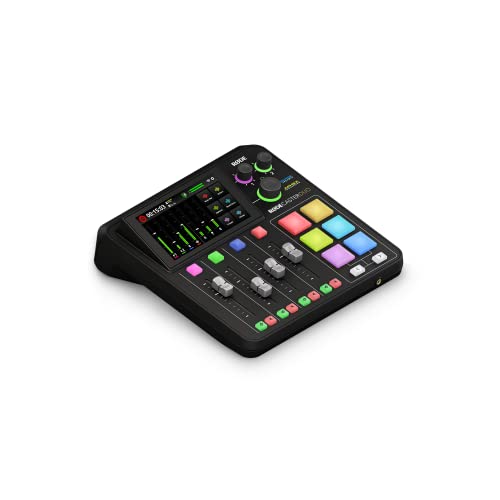
Rode Rodecaster Duo — Best Premium for Solo and Duo Streamers
The Rodecaster Duo takes everything that makes the Pro II desirable for a streamer — the quiet high-gain preamps, the APHEX voice processing, the smart pads, the multitrack recording — and trims it to the two-microphone format that most Twitch channels actually use. A solo streamer gets one superb microphone channel and a spare for a guest; a duo gets two matched channels with independent processing and headphone mixes. The footprint is meaningfully smaller, which matters on desks already carrying two monitors, a keyboard and a Stream Deck.
Like its bigger sibling, the Duo offers dual USB connections so a two-PC streaming setup — game PC and stream PC — can be wired without a tangle of analog cables, and Bluetooth for a phone guest or music feed. It records to microSD or USB storage as well as to the computer, works with Mac as happily as with Windows, and runs Rode’s wireless microphone receivers directly, which opens the door to clip-on wireless audio for IRL or cooking streams.
Strengths
- Same class of preamp and APHEX processing as the Pro II, sized for one or two voices
- Dual USB suits the classic two-PC Twitch setup; Bluetooth covers phone guests
- Records multitrack standalone, so VOD audio can be remixed after the stream
Trade-offs
- Two microphone inputs is a hard ceiling — growing to a four-person show means replacing it
- Premium tier; budget streamers get more audible improvement from a better microphone on a cheaper mixer
- Wireless receiver integration favors Rode’s own wireless microphones
| Specification | Detail |
|---|---|
| Mic inputs | 2 × XLR combo with studio preamps |
| Recording | Multitrack to computer, microSD or USB storage |
| Connection | 2 × USB-C, Bluetooth, 2 headphone outputs |
| Extras | SMART pads, APHEX processing, wireless mic receiver built in |
Voice quality is where the Duo justifies itself. The processing chain is set per microphone and stored, so your broadcast voice sounds the same on a Tuesday variety stream and a Saturday talk show, and the preamps stay silent at the gain levels quiet dynamic microphones demand. Streamers upgrading from a USB microphone usually describe the change as sounding like a different person — the same person, on the radio.
Choose the Duo over the GoXLR if you are on a Mac, if you record podcasts, or if a second microphone is in your near future. Choose the GoXLR if your stream is Windows-based, game-focused and built around fast fader moves between game, chat and music. Both are defensible; they optimize for different shows.
Best for: solo streamers who want broadcast voice quality, and duos with two microphones / Not suited for: shows with three or four in-room voices — step up to the Pro II
Check the current price on Amazon for the Rode Rodecaster Duo.

Yamaha AG06MK2 — Best for Two-Person Streams
The AG06MK2 is Yamaha’s answer to a specific streamer: one who has two voices, or a voice and an instrument, and who thinks in mixer channels rather than broadcast-deck pages. Six input channels include two microphone preamps — the second input doubles as a guitar input with amp simulation — plus line inputs for a game console, a phone or a second computer. Loopback folds the computer’s audio back into the stream mix, and onboard DSP provides compression, EQ and reverb that can be applied to the broadcast without burdening the PC.
A single confident fader controls the main level, mute buttons are placed where a live performer expects them, and the whole unit is bus-powered over USB-C, so it travels between a desk and a laptop setup without a power brick. Yamaha bundles Steinberg software, which suits streamers who also record music or edit audio seriously. The AG06MK2 works with Windows, Mac and iOS, a flexibility the Windows-only GoXLR cannot match.
Strengths
- Two microphone inputs plus a guitar-ready channel — the natural duo and music-streamer layout
- Loopback and onboard DSP cover streaming needs without plugin chains
- Bus-powered, cross-platform and built like Yamaha’s stage mixers, not like a gadget
Trade-offs
- One main fader rather than a fader per source; balancing game versus chat is a knob-and-software task
- DSP settings are edited in software and offer less depth than the Rodecaster processing chains
- No sound pads — stingers and samples need a separate app or controller
| Specification | Detail |
|---|---|
| Channels | 6 input channels, 2 mic preamps |
| Connection | USB-C, bus-powered; Windows, Mac, iOS |
| DSP | Compressor, EQ, reverb, amp simulation on input 2 |
| Extras | Loopback, Steinberg software bundle |
Music streamers should weight this pick heavily. A guitar or keyboard plugged straight in, with amp simulation and reverb in the box, monitored with zero latency while the backing track plays through loopback, is a workflow the broadcast decks imitate awkwardly. The AG06MK2 was designed by a company that has built live mixers for decades, and it shows in the gain staging and the feel of the controls.
For pure gaming streams with one microphone, the smaller AG03MK2 below does the same job in less space. The AG06MK2 earns its premium when the second input is genuinely used — a co-host, an instrument, or a dedicated console feed you do not want sharing a channel with anything else.
Best for: duos, music streamers and anyone who wants a traditional mixer layout with streaming features / Not suited for: streamers who need per-source submixes as deep as the GoXLR’s routing table
Check the current price on Amazon for the Yamaha AG06MK2.

Yamaha AG03MK2 — Best Compact for Solo Streamers
Most Twitch channels have exactly one voice, and the AG03MK2 is built honestly around that fact. One microphone preamp with phantom power for a condenser or gain for a dynamic, a stereo line input for a console or second device, loopback for folding game and chat audio into the stream, and Yamaha’s DSP — compression, EQ and a touch of reverb — to make a voice sound finished before it reaches OBS. A single fader and clearly placed mutes keep live control simple, which is what a solo streamer mid-game actually needs.
The AG03MK2 is compact and bus-powered, works across Windows, Mac and iOS, and doubles gracefully as a desk interface for calls and recording when you are not live. Its restraint is its virtue: there are no pads to configure, no routing table to master, and a new streamer can be live with good audio on the first evening. Streamers who later add a co-host will outgrow it, but streamers who stay solo may never need anything else.
Strengths
- Focused solo layout: one strong mic channel, loopback and DSP, nothing wasted
- Cross-platform and bus-powered — equally at home on a gaming PC, a Mac or an iPad setup
- Yamaha build and gain staging at a mid-range tier
Trade-offs
- One microphone input only, with no upgrade path inside the box
- No per-source faders or sound pads; complex shows will feel the ceiling
- DSP is capable but shallower than Rode’s APHEX chains
| Specification | Detail |
|---|---|
| Channels | 3-channel streaming layout, 1 mic preamp |
| Connection | USB-C, bus-powered; Windows, Mac, iOS |
| DSP | Compressor, EQ, reverb |
| Extras | Loopback, Steinberg software bundle |
Pairing advice matters here: the AG03MK2’s preamp handles popular dynamic streaming microphones well, and its phantom power covers condensers, so buy the microphone that suits your room — a dynamic for an untreated bedroom, a condenser for a quiet, treated space — rather than the microphone that suits the mixer. Set the DSP compressor gently; the goal is a consistent voice level, not a flattened one.
Against the GoXLR, the AG03MK2 loses on source-by-source fader control and wins on simplicity, size and platform support. Against the Maonocaster below, it wins on preamp refinement and build. It is the pick we hand to a solo streamer who says “just make my voice sound professional” and means it.
Best for: solo streamers, VTubers and remote workers who want one excellent voice channel / Not suited for: duos — there is only one microphone preamp; see the AG06MK2
Check the current price on Amazon for the Yamaha AG03MK2.

MAONO Maonocaster AME2 — Best Budget
The Maonocaster AME2 exists for the streamer whose budget has to cover a microphone, a boom arm and a mixer all at once. For a budget-tier price — check the current price on Amazon — it provides an XLR microphone input with phantom power, a set of voice effects and preset EQ modes, Bluetooth for a phone feed, and eleven customizable sound pads for stingers, applause and memes. It connects to a PC for Twitch and equally to phones for TikTok or YouTube Live, which suits streamers who broadcast from more than one platform.
Honesty about the tier is required. The preamp is serviceable rather than silent at extreme gain, so it pairs best with condensers and average-sensitivity dynamics rather than the quietest broadcast dynamics. The effects lean playful — voice changers and pitch presets — where the Yamaha and Rode units lean professional. But the workflow is genuinely streamer-shaped: pads under your fingers, a big volume knob, and monitoring without latency. As a first mixer that teaches you what you actually use, it is a rational purchase.
Strengths
- Full streamer feature set — XLR, phantom power, pads, Bluetooth, effects — at a budget tier
- Works with PC and phones, suiting multi-platform streamers
- Eleven customizable pads is generous at any price
Trade-offs
- Preamp noise floor is the compromise; very quiet microphones will expose it
- Build and knobs feel budget-grade next to Yamaha or Rode hardware
- Effects are entertainment-first; serious podcast processing is better elsewhere in this guide
| Specification | Detail |
|---|---|
| Mic input | 1 × XLR with 48V phantom power |
| Connection | USB to PC; phone connectivity; Bluetooth input |
| Extras | 11 customizable sound pads, voice effects, preset EQ modes |
| Monitoring | Headphone output with direct monitoring |
The smart way to buy the AME2 is as a bundle decision: Maonocaster kits pair it with a matching microphone that its preamp drives comfortably, removing the gain-matching guesswork entirely. If you already own a microphone, check its sensitivity first — a lively condenser or a standard dynamic will be happy; a famously quiet broadcast dynamic will not reach its best here.
Streamers who outgrow the AME2 almost always upgrade for preamp quietness, not features — which is a good sign. It teaches the streaming workflow cheaply, and everything learned on its pads and routing transfers directly to a GoXLR or Rodecaster later.
Best for: new streamers on a budget who want pads, effects and an XLR upgrade path / Not suited for: owners of very quiet dynamic microphones who need maximum clean gain
Check the current price on Amazon for the MAONO Maonocaster AME2.
Comparison Table
| Pick | Badge | Key spec | Best for |
|---|---|---|---|
| TC-Helicon GoXLR | Best Overall | 4 motorized faders, dual routing, Midas preamp | solo and duo Twitch streamers who want set-and-forget source control |
| Rode Rodecaster Pro II | Best for Multi-Mic Shows | 4 XLR preamps, APHEX processing, multitrack record | streamers running two to four microphones, in-room guests or a stream-plus-podcast workflow |
| Rode Rodecaster Duo | Best Premium for Solo and Duo Streamers | 2 XLR preamps, APHEX processing, compact footprint | solo streamers who want broadcast voice quality, and duos with two microphones |
| Yamaha AG06MK2 | Best for Two-Person Streams | 6 channels, 2 mic inputs, loopback, DSP | duos, music streamers and anyone who wants a traditional mixer layout with streaming features |
| Yamaha AG03MK2 | Best Compact for Solo Streamers | 3-channel layout, 1 mic input, loopback, DSP | solo streamers, VTubers and remote workers who want one excellent voice channel |
| MAONO Maonocaster AME2 | Best Budget | XLR input, 48V phantom, Bluetooth, 11 pads | new streamers on a budget who want pads, effects and an XLR upgrade path |
How to Choose the Best Audio Mixers for Streaming on Twitch
Start with your microphone count, because it eliminates half the market instantly. One voice means the AG03MK2, GoXLR or Maonocaster class; two voices in the room means the AG06MK2 or Rodecaster Duo; three or four voices means the Rodecaster Pro II or a small traditional mixer with a USB return. Buying for a format you might try someday is how desks fill with returned boxes — buy for the show you streamed last month.
Next, decide how you balance sources. If you constantly ride game, chat and music levels independently — and competitive and variety streamers do — prioritize decks with per-source faders and separate stream-versus-headphone mixes: the GoXLR is the benchmark, and the Rodecasters approach it with dual USB routing. If your layout is fixed — one game, one chat app, voice on top — a loopback mixer like Yamaha’s AG series handles it with far less setup.
- Microphone gain: quiet dynamic broadcast microphones need substantial clean gain; the Rodecasters and GoXLR provide it, budget decks may need a louder microphone instead.
- Platform: the GoXLR app is Windows-only; Mac streamers should shortlist Rode and Yamaha.
- Two-PC setups: dual USB (Rodecaster) or optical/analog routing (GoXLR) prevents ground-loop hum and cable clutter.
- Pads and effects: variety and comedy streamers use them hourly; focused gameplay streamers may never touch them — do not pay for a light show you will not use.
- Recording: if you edit VODs or cut highlights, multitrack recording (Rodecaster line) saves hours; if you never edit, it is dead weight.
Budget framing is simple in this category. The budget tier (Maonocaster class) gets you off a headset mic and teaches the workflow. The mid tier (Yamaha AG, GoXLR Mini class) buys quiet preamps and durable controls. The premium tier (GoXLR, Rodecasters) buys routing depth, processing quality and recording features. Money spent climbing tiers is audible mostly in preamp silence and processing polish — spend first on the microphone and the room, then on the deck.
Setting Levels So Your Twitch Audio Never Clips
Good streaming audio is mostly level discipline. Set the microphone gain so your loudest laugh peaks safely below clipping in the mixer’s meter, then let the compressor — not your hand on the fader — handle the difference between talking and shouting. Viewers forgive a quiet moment; they do not forgive distortion, because distortion cannot be fixed by turning a stream down.
Balance the other sources against the voice, never the reverse. Your voice is the product; game audio sits clearly underneath it, music sits further under the game, and alert sounds should startle you slightly and viewers not at all. Test with a recording in your streaming software, not by ear alone: what your headphones tell you and what the stream receives are different mixes on every deck in this guide, and only the recording proves the broadcast balance.
Microphone Pairing: The Other Half of Your Twitch Sound
Every mixer in this guide is only as good as the microphone feeding it, and Twitch rooms impose a specific logic. Most streamers play in untreated bedrooms and living rooms where a condenser microphone — however prestigious — faithfully broadcasts the radiator, the hallway and the mechanical keyboard along with the voice. A dynamic microphone, placed six inches from the mouth and slightly off-axis, rejects most of that room by design, which is why the broadcast world standardized on dynamics long before streaming existed. The mixers here divide by how well they feed that choice: the GoXLR and both Rodecasters supply abundant clean gain for the quietest broadcast dynamics, the Yamaha AG pair handle the popular mid-sensitivity streaming dynamics comfortably, and the Maonocaster is happiest with a condenser or a matched bundle microphone whose sensitivity suits its preamp.
Placement outranks purchase price in every comparison we know. A modest dynamic on a boom arm, close and consistent, will outperform an expensive condenser on a desk stand across the room on any mixer in this guide — the preamp can only amplify the ratio of voice to room it is given. Add a shock mount if your desk transmits bumps, keep the microphone out of the direct line between your mouth and a hard wall, and treat a few soft furnishings behind the camera as audio equipment, because acoustically that is what they are. Streamers routinely spend a mixer’s worth of money chasing a sound that thirty dollars of placement would have delivered.
Two-PC and Console Streaming: Routing the Rest of the Desk
The mixer is the center of a Twitch desk, but the edges decide whether the center holds. In a two-PC setup, the gaming PC should send its audio to the streaming PC by the cleanest available path — dual USB where the Rodecasters offer it, the GoXLR’s routing where TC-Helicon’s ecosystem is in charge — because every analog hop between two mains-powered machines is an invitation to ground-loop hum. Console feeds follow the same rule: optical where possible, capture-card HDMI where video demands it, and analog only with both devices on the same power strip.
Alerts, music and chat deserve the same deliberateness as the microphone. Give each its own fader or channel from day one, even if your current layout feels simple, because the night a charity stream doubles your alert rate is not the night to re-route Windows audio. Save the working configuration as a named profile in the mixer’s software and export your streaming software’s profile alongside it; the pair of files together are your desk’s disaster-recovery plan, and streamers who keep them measure reinstalls in minutes instead of lost weekends.
How to Set Up a Streaming Mixer for Your First Twitch Broadcast
A careful first setup takes about an hour and saves weeks of small frustrations. Work in this order: hardware first, then routing, then levels, then a recorded test you actually listen back to.
- Connect the microphone with an XLR cable and position it a hand’s width from your mouth, slightly off-axis; close placement is the cheapest noise reduction that exists.
- Connect the mixer by USB and install its companion app or drivers before opening any streaming software, so the audio devices exist when OBS or Streamlabs looks for them.
- Route each source deliberately: game audio, voice chat, music and alerts each to their intended fader, channel or virtual device, following the deck’s routing guide rather than Windows defaults.
- Set microphone gain with your real streaming voice — read chat aloud, laugh, call a play — aiming for strong peaks with clear headroom, then enable the gate so keyboard and room noise vanish between sentences.
- Add compression gently, then EQ last: a small low-cut to remove rumble and a modest presence lift is enough for most voices in most rooms.
- Record a five-minute test in your streaming software playing a game, talking, and triggering an alert; listen on earbuds and a phone speaker, fix the balance, and save the mixer profile and the OBS scene together.
After the first live stream, change one thing at a time. Streaming audio problems compound — if you adjust gain, EQ and game balance simultaneously, you will not know which change fixed or broke the sound. Keep a short note in the mixer app or a text file: microphone distance, gain setting, compressor setting. Your future self, setting up after a Windows reinstall, will be grateful.
Common Buying Mistakes
The mistakes below recur in almost every “my stream audio sounds bad” thread, and every deck in this guide can avoid all of them.
- Buying a mixer before a microphone: a premium deck fed by a headset mic still sounds like a headset; the microphone and its placement matter most.
- Running the microphone too far away: at arm’s length, any mixer faithfully amplifies your room; six inches from the mic is the fix, not more gain.
- Setting gain by the meter while whispering: set it with your real, excited streaming voice or your first big moment will clip.
- Letting alerts and music share the voice balance: viewers come for you; everything else is accompaniment and should be mixed like it.
- Ignoring the recorded test: headphone sound and broadcast sound differ; only a test recording tells the truth about what viewers hear.
- Chasing software plugins before hardware basics: a gate and compressor in the mixer, set gently, beat a fragile chain of five plugins.
Final Recommendation
For most Twitch streamers, the recommendation is the TC-Helicon GoXLR: its motorized faders, submix routing and sound board are built for the exact rhythm of a live gaming broadcast, and its preamp makes a good microphone sound broadcast-ready. Solo streamers who value simplicity or use a Mac should take the Yamaha AG03MK2; duos and music streamers, the AG06MK2. Streamers who also podcast, host in-room guests or edit VODs should step up to the Rodecaster Duo, or the Rodecaster Pro II for three and four voices. New streamers on a tight budget start with the Maonocaster AME2 and upgrade the microphone first when money allows.
Whichever deck you choose, check the current price on Amazon under the full model name and confirm the variant — color, size and bundle contents — on the listing before ordering. Audio gear is a long-term desk investment; the right mixer bought once is cheaper than the wrong one bought twice.
Start your shortlist with TC-Helicon GoXLR, Rode Rodecaster Pro II, Rode Rodecaster Duo — check the current price on Amazon for each and compare the exact configurations side by side before you decide.
Related guides in this series: Best Audio Mixers For Pc · Best Audio Mixers For Podcasting · Best Audio Mixers For Xbox And Pc · Best Audio Mixers For Xbox · Best Audio Mixers Live · Best Affordable Mixers For Streaming
Frequently Asked Questions
Do I really need a mixer for Twitch, or is a USB microphone enough?
A USB microphone is enough to start, and many successful streamers never upgrade. A mixer earns its place when you need to balance several sources live — game, chat, music and voice — use an XLR microphone, add hardware processing, or mute and trigger sounds without leaving the game. If none of those describe your stream yet, spend on the microphone and room first.
What is loopback and why do streaming mixers advertise it?
Loopback folds the computer’s own audio — game sound, alerts, music — back into the mixer so it can be blended with your microphone and sent to the stream as one feed. Without loopback or an equivalent routing scheme, your streaming software must assemble those sources itself, which works but removes the physical, hands-on control a mixer exists to provide.
Can one mixer handle a two-PC streaming setup?
Yes. The Rodecaster Duo and Pro II offer dual USB connections designed for exactly this, and the GoXLR handles it through USB plus its optical and line inputs. The goal is to move game audio to the streaming PC without analog ground-loop hum, and dual-USB decks achieve that most cleanly.
Which microphone pairs best with these mixers?
In an untreated room, a dynamic microphone placed close is the reliable choice; in a quiet, treated room, a condenser captures more detail. Match sensitivity to the mixer: quiet broadcast dynamics want the strong preamps of the GoXLR or Rodecasters, while budget mixers like the Maonocaster pair happiest with average-sensitivity microphones or a matched bundle.
GoXLR or Rodecaster for a Twitch-first channel?
Choose the GoXLR if you stream games on Windows and live on fader moves between game, chat and music. Choose a Rodecaster if you also record podcasts, host guests in the room, use a Mac, or want multitrack recordings for editing. Both make a voice sound professional; they optimize for different shows around that voice.
How loud should my voice be compared with the game on stream?
Your voice should sit clearly on top: game audio audible and exciting underneath, but never competing with speech. Set the balance, record a test with real gameplay and real talking, and judge the recording — not your headphones — because the stream mix and your monitor mix are deliberately different on these decks.
How much should a new streamer spend on a mixer?
Spend in sequence: microphone and placement first, then the mixer tier that matches your show. A solo gameplay streamer is fully served by the mid tier (Yamaha AG03MK2 class) for years. The premium tier buys routing depth, pads and recording features that only pay off when the show uses them — guest voices, sound boards, edited VODs. Buying the flagship first and the microphone later is the one sequence this guide advises against in every case.
Why does my voice sound different on stream than in my headphones?
Because the two mixes are deliberately different: your headphones carry your monitoring balance, while the stream receives the broadcast mix after processing and level decisions in the streaming software. Small differences are normal and healthy. Large ones mean a setting — a software gain stage, a limiter, a second compressor — is acting on the broadcast path that you cannot hear while performing, which is why the recorded test in this guide’s setup section is non-negotiable.


