Disclosure: airfryerkitchensupply.com is reader-supported. When you buy through links on our site, we may earn an affiliate commission at no extra cost to you.
Where to buy
If you are shopping for the best audio mixers for studios, buy through Amazon and confirm the exact variant on the listing — channel count, USB configuration and bundle contents differ between near-identical model names. For most project studios the practical center of this guide is the Tascam Model 12, a mixer, multitrack recorder and interface in one; start there and move up or down the list according to how you actually record.
- Tascam Model 12 — check the current price on Amazon and confirm the exact configuration on the listing before you order.
- Allen & Heath CQ-18T — check the current price on Amazon and confirm the exact configuration on the listing before you order.
- Allen & Heath ZEDi-10FX — check the current price on Amazon and confirm the exact configuration on the listing before you order.
- Soundcraft Signature Plus 12 — check the current price on Amazon and confirm the exact configuration on the listing before you order.
- Yamaha MG12XU — check the current price on Amazon and confirm the exact configuration on the listing before you order.
- Mackie ProFX12v3+ — check the current price on Amazon and confirm the exact configuration on the listing before you order.
A studio mixer is asked to do three jobs that pull in different directions: capture performances cleanly, let musicians hear themselves comfortably while they play, and hand the computer separate tracks that can be mixed later. Small project studios feel every compromise. A mixer that records only a stereo sum forces you to commit to balances while tracking; a mixer with multitrack USB lets you fix the balance at mixdown, when you can actually hear. That single specification — stereo versus multitrack over USB — matters more than channel count, effects count or brand.
This guide covers the realistic project-studio ladder. At the top sit hybrid recording consoles like the Tascam Model 12, which records to SD card with no computer at all and then works as an interface and DAW controller. In the middle are analog mixers with USB — Allen & Heath, Soundcraft, Yamaha and Mackie designs whose preamps and EQ are their reason to exist, with USB as a capture path. At the digital end, the Allen & Heath CQ-18T packs a full digital mixer, effects and multitrack recording into a stage-box footprint that suits studios short on space.
An honest framing first: a dedicated audio interface with two excellent preamps records a solo artist as well as any mixer here, and costs less desk. A studio mixer earns its premium when several sources live plugged in at once — microphones, synthesizers, drum machines, a guitar rig, a talkback mic — and when hands-on EQ and faders during tracking make musicians perform better. If your studio is one microphone and one laptop, buy the interface. If your studio is a room full of gear that should always be ready, read on.
All six picks were verified as current Amazon listings on 2026-11-20. This guide prints no prices — studio gear pricing swings with promotions — so check the current price on Amazon under the full model name before ordering.
In this guide
Quick Picks
- Best Overall — Tascam Model 12: a 12-track recording studio disguised as a mixer: records to SD without a computer, then serves as a multitrack USB interface and DAW controller.
- Best Digital Compact — Allen & Heath CQ-18T: a full digital mixer in a compact box: touchscreen control, deep processing per channel, multitrack recording and Wi-Fi — a modern studio brain.
- Best Analog Hybrid — Allen & Heath ZEDi-10FX: a compact analog mixer with a 4×4 USB interface and guitar-ready DI inputs — the songwriter studio’s hybrid.
- Best Analog Sound — Soundcraft Signature Plus 12: Ghost preamps, Sapphyre EQ and Lexicon effects with modern USB-C — the analog purist’s studio board.
- Best Value Workhorse — Yamaha MG12XU: D-PRE preamps, one-knob compressors and SPX effects in Yamaha’s famously durable 12-input frame — the dependable studio utility mixer.
- Best for Studio Streaming — Mackie ProFX12v3+: Onyx preamps, GigFX+ effects, Bluetooth and flexible USB modes — the studio board that also runs the livestream.
How These Picks Were Chosen
We screened studio mixers on capture quality first: preamp noise and headroom, because a studio mixer’s preamps end up on every recording it ever makes. Second, USB architecture — true multitrack versus stereo-only — stated plainly for every pick so no buyer discovers the limitation after the return window. Third, the analog path: EQ quality, aux sends for headphone mixes and effects, and inserts or subgroups where the format allows. Fourth, workflow: does the mixer speed up a session — direct recording, DAW control, clear metering — or merely occupy the desk?
Excluded were live-sound consoles with no recording path, DJ mixers, and stereo-only budget boards marketed to studios they cannot serve. The six survivors divide cleanly: two multitrack recording consoles (Tascam, Allen & Heath CQ), three analog mixers with respected preamps and EQ (ZEDi-10FX, Signature Plus 12, MG12XU, ProFX12v3+ — four, in fact, because the analog middle is where most studios live), each labeled for the studio it suits.
The 6 Best Audio Mixers for Studios

Tascam Model 12 — Best Overall
The Model 12 collapses the project-studio signal chain into one surface. Twelve tracks record to an SD card with the computer off — a band can rehearse, write and capture keeper takes with nothing but the mixer and a pair of monitors — and the same hardware then connects as a multitrack USB interface, sending channels separately to your DAW, and as a DAW controller with transport and fader control. Eight microphone preamps with compressors on the input channels handle a drum kit or a full small band.
The analog-style layout is the point: one knob per function for EQ, aux sends and pan, so tracking decisions are made by ear at the surface instead of by mouse in a menu. A built-in metronome, tuner-adjacent utilities and MIDI synchronization suit songwriter studios, and click-free punch recording to SD makes the Model 12 a genuine sketchpad. Studios that record everything into the DAW from the first note use it as an interface with unusually good manners; studios that hate computers use it as the whole studio.
Strengths
- Records 12 tracks to SD standalone — the studio works with the computer off
- Multitrack USB interface plus DAW control in the same surface
- One-knob-per-function layout keeps tracking fast and musical
Trade-offs
- Channel count caps at ten inputs; larger drum setups need submixing discipline
- SD workflow adds a media-management step DAW-only studios do not have
- Premium-mid tier pricing — verify the current price on Amazon against your interface alternative
| Specification | Detail |
|---|---|
| Recording | 12-track to SD card; multitrack USB interface |
| Mic inputs | 8 preamps with per-channel compression |
| Control | DAW controller mode with transport |
| Extras | MIDI sync, built-in metronome, Bluetooth input |
The Model 12’s real rival is not another mixer but the classic pairing of an 8-input interface and a control surface, which it undercuts in cables, latency management and sheer session speed. Where it concedes ground is deep DAW integration and plugin workflows — it is a recorder and mixer first. For project studios whose bottleneck is capturing performances rather than processing them, that priority is correct.
Best for: project studios that record bands, demos and podcasts without living inside a DAW / Not suited for: studios needing more than ten input channels at once — see the Model 16 class instead
Check the current price on Amazon for the Tascam Model 12.

Allen & Heath CQ-18T — Best Digital Compact
The CQ-18T represents the other direction in studio mixing: no long analog surface, but a complete digital mixer — parametric EQ, dynamics and effects on every channel, total recall of every setting, and multitrack recording — in a box smaller than most interfaces’ breakout cables. A bright touchscreen runs the surface, Wi-Fi and Bluetooth handle control and playback, and the whole studio’s settings save and recall per artist, per project or per song.
For studios that track different acts on different days, recall alone justifies digital: the session from three weeks ago returns exactly, instead of approximately, from a photograph of knob positions. The CQ-18T’s preamps and converters are clean and modern, its effects are genuinely usable rather than decorative, and its footprint frees desk space for the instruments themselves.
Strengths
- Total recall: every EQ, level and effect saved and restored per session
- Deep per-channel processing that analog boards at this size cannot match
- Multitrack recording in a remarkably small footprint
Trade-offs
- Touchscreen mixing divides engineers; fast multi-fader moves are less tactile
- Menus reward an evening of learning before the first paid session
- No traditional channel strips for engineers trained on analog desks
| Specification | Detail |
|---|---|
| Format | Digital mixer, 18 inputs |
| Control | 7-inch touchscreen, Wi-Fi app control |
| Recording | Multitrack via USB / SD |
| Extras | Bluetooth playback, per-channel EQ and dynamics |
Choose the CQ-18T when your studio’s work is repeatable and varied — podcasts on Monday, a singer-songwriter on Wednesday, a band on Saturday — and the cost of re-dialing a room each time is real. Choose an analog pick below when one setup serves one artist and the sound of a specific EQ is part of your signature. Neither instinct is wrong; they are different studio businesses.
Best for: space-limited studios wanting digital recall, deep FX and multitrack capture / Not suited for: engineers who want a physical fader per channel — this is a touchscreen surface
Check the current price on Amazon for the Allen & Heath CQ-18T.
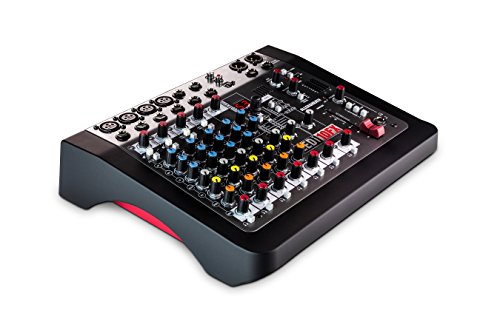
Allen & Heath ZEDi-10FX — Best Analog Hybrid
The ZEDi-10FX is Allen & Heath’s compact hybrid: an analog mixer whose USB interface carries four channels each way, so a vocal, a guitar DI and a stereo keyboard can reach the DAW as separate tracks instead of a stereo sum — the crucial upgrade over cheaper ZED models. Two inputs offer high-impedance DI modes voiced with guitar amp emulation heritage, letting electric guitars plug straight in and sound intentional rather than merely captured.
Onboard effects drawn from Allen & Heath’s larger consoles cover reverbs and delays for cue mixes and quick demos, the EQ is musical in the British tradition, and the build is the metal, nutted-pot quality the ZED line is known for. As a front end for a songwriter studio — voice, guitar, keys, a drum machine — it is a complete, honest tool that will not be the weak link in a recording.
Strengths
- 4×4 USB sends separate tracks to the DAW — rare at this size and tier
- Guitar DI inputs make direct recording a feature, not a compromise
- Allen & Heath EQ, effects and build quality in a compact footprint
Trade-offs
- Four microphone inputs is the hard limit for simultaneous tracking
- Effects are a single shared engine — one reverb flavor at a time
- No subgroups or inserts; larger-studio routing tricks are out of scope
| Specification | Detail |
|---|---|
| USB | 4-in / 4-out interface |
| Mic inputs | 4, two with guitar DI mode |
| Effects | Onboard FX engine with 61 presets |
| EQ | 3-band with swept mid on mic channels |
The ZEDi-10FX suits studios built around overdubs: track the band’s guide together, then replace parts one or two at a time with the 4×4 interface keeping everything separate. Studios that must capture eight simultaneous microphones — a full drum kit with options — should start at the Tascam or a larger interface instead, and treat this board as the excellent writing-room mixer it is.
Best for: songwriters and small studios recording guitars, keys and vocals with analog feel / Not suited for: full-band tracking — four USB channels and four mic inputs set the ceiling
Check the current price on Amazon for the Allen & Heath ZEDi-10FX.

Soundcraft Signature Plus 12 — Best Analog Sound
Soundcraft’s Signature line trades on two inherited assets: Ghost microphone preamps, named for the flagship console and known for quiet gain and headroom, and Sapphyre British EQ, the broad, forgiving equalization that makes sources sit together with small moves. The Plus 12 updates the format with USB-C connectivity and Lexicon effects — reverbs and delays with genuine studio pedigree — in a 12-channel frame that covers a small band or a well-equipped songwriter setup.
This is a mixer for engineers who mix at the board: riding faders into a stereo capture, printing EQ decisions while tracking, using the Lexicon reverb as the room the recording lives in. Studios working that way find the Signature’s sound immediately useful; studios that record everything flat and mix entirely in the DAW will use fewer of its strengths and should weight the multitrack picks more heavily.
Strengths
- Ghost preamps and Sapphyre EQ give recordings a finished, glued quality early
- Lexicon effects are mix-worthy, not just cue-mix decoration
- USB-C modernizes the connection for current computers
Trade-offs
- Analog-first design: capture flexibility depends on the USB mode — read the listing carefully
- Character is a commitment; ultra-transparent capture is better served by the digital picks
- No onboard multitrack recording to media
| Specification | Detail |
|---|---|
| Channels | 12 channels, Ghost preamps |
| EQ | Sapphyre British EQ |
| Effects | Lexicon FX engine |
| Connection | USB-C audio interface |
A practical note on workflow: printing the Signature’s EQ while tracking commits you, and that commitment is the point — sessions move faster and mixes start closer to finished. Keep a safety habit of capturing one unprocessed path when the DAW routing allows it, and the board’s character becomes an asset with an undo button.
Best for: studios that mix through the board and value preamp and EQ character / Not suited for: studios needing multitrack USB — confirm the USB configuration on the listing before ordering
Check the current price on Amazon for the Soundcraft Signature Plus 12.

Yamaha MG12XU — Best Value Workhorse
The MG12XU is the mixer other mixers get compared against for reliability. Yamaha’s D-PRE preamps are clean and quiet, the one-knob compressors on the microphone channels tame a dynamic singer without a lesson in dynamics processing, and the SPX effects engine provides serviceable reverbs and delays for cue mixes and live-to-tape recording. Twelve inputs with a 4-bus layout cover a small band’s tracking session or a podcast-plus-music studio.
Its USB connection serves the stereo workflow: record the board’s mix, stream a session, capture a rehearsal. Studios must be clear-eyed that this is not multitrack capture — the MG12XU records the performance as mixed, which disciplined engineers treat as a feature and beginners should understand before buying. What no one disputes is the hardware: metal chassis, smooth faders, and a decade-long reputation for surviving institutional use.
Strengths
- D-PRE preamps punch above the tier for cleanliness and gain
- One-knob compression makes good tracking levels easy for non-engineers
- Yamaha durability — the safe institutional and school purchase
Trade-offs
- Stereo USB capture only; no per-channel recording to the DAW
- Effects are functional rather than inspiring next to Lexicon or APHEX processing
- EQ is 3-band and workmanlike — precision surgery happens in the DAW
| Specification | Detail |
|---|---|
| Channels | 12 inputs, 4-bus |
| Preamps | D-PRE with one-knob compressors |
| Effects | SPX digital effects |
| Connection | USB stereo interface |
The MG12XU’s natural home is the studio that also rehearses, teaches or streams: one surface that records a lesson, captures a rehearsal in stereo, and runs a small live webcast without re-patching. Pure recording studios should compare it honestly against the Tascam’s multitrack capture and decide which workflow — mixed-now or mixed-later — matches how they actually finish music.
Best for: budget-conscious studios, rehearsal-room recording and schools / Not suited for: multitrack capture — the USB path is a stereo mix workflow
Check the current price on Amazon for the Yamaha MG12XU.

Mackie ProFX12v3+ — Best for Studio Streaming
The ProFX12v3+ is the hybrid-era Mackie: twelve channels of Onyx-preamp analog mixing, the GigFX+ effects engine, Bluetooth for a phone or backing-track feed, and USB recording modes that include a loopback-style option for streaming — the feature set of a studio that records, podcasts and broadcasts from the same desk. Mackie’s build-like-a-tank reputation applies; this is a board meant to be used daily and moved occasionally without anxiety.
For teaching studios and session-streaming creators, the blend is exactly right: a student’s instrument and voice tracked cleanly, a remote guest arriving by Bluetooth or USB, effects for the room mix, and a recording of the whole thing without a second system. Dedicated tracking studios will find the Tascam or CQ-18T deeper; working studios that earn from several formats will find this board easier to justify.
Strengths
- Streaming-aware USB modes plus Bluetooth — the most format-flexible board here
- Onyx preamps are clean, high-gain and proven
- GigFX+ effects and Mackie durability suit daily working studios
Trade-offs
- Breadth over depth: multitrack and processing depth trail the Tascam and CQ-18T
- Bluetooth convenience invites casual sources into serious sessions — manage it deliberately
- Fan-less but feature-dense layout rewards reading the manual once
| Specification | Detail |
|---|---|
| Channels | 12 channels, Onyx preamps |
| Effects | GigFX+ engine |
| Connection | USB recording with multiple modes; Bluetooth input |
| Build | Steel chassis, sealed rotary controls |
Buy the ProFX12v3+ when the studio’s calendar is mixed — lessons, podcasts, streams, demos — and one reliable surface must serve all of it. Its resale and rental familiarity is a quiet bonus: engineers walking into your room already know this board, which is worth real time on session day.
Best for: studios that livestream sessions, teach remotely or record podcasts with music / Not suited for: purist tracking studios — its talents are breadth, not ultimate preamp refinement
Check the current price on Amazon for the Mackie ProFX12v3+.
Comparison Table
| Pick | Badge | Key spec | Best for |
|---|---|---|---|
| Tascam Model 12 | Best Overall | 12-track SD recording, multitrack USB, DAW control | project studios that record bands, demos and podcasts without living inside a DAW |
| Allen & Heath CQ-18T | Best Digital Compact | 18 inputs digital, touchscreen, multitrack record | space-limited studios wanting digital recall, deep FX and multitrack capture |
| Allen & Heath ZEDi-10FX | Best Analog Hybrid | 4×4 USB interface, DI inputs, onboard FX | songwriters and small studios recording guitars, keys and vocals with analog feel |
| Soundcraft Signature Plus 12 | Best Analog Sound | Ghost preamps, Sapphyre EQ, Lexicon FX, USB-C | studios that mix through the board and value preamp and EQ character |
| Yamaha MG12XU | Best Value Workhorse | 12 inputs, D-PRE preamps, SPX FX, USB | budget-conscious studios, rehearsal-room recording and schools |
| Mackie ProFX12v3+ | Best for Studio Streaming | 12 channels, Onyx preamps, Bluetooth, USB modes | studios that livestream sessions, teach remotely or record podcasts with music |
How to Choose the Best Audio Mixers for Studios
Decide your capture philosophy first, because it outranks every other specification. Mix-later studios — most project studios — need multitrack: the Tascam Model 12 recording to SD or USB per channel, or the CQ-18T’s digital multitrack. Mix-now studios, printing balances and EQ while tracking in the classic manner, can thrive on an analog board with a stereo USB path like the Yamaha MG12XU or the Soundcraft, and will finish sessions faster for it. Confusing the two is the classic studio-mixer regret.
Count simultaneous microphones honestly. A singer-songwriter never exceeds four; a drum kit starts at four and wants eight. Then count always-plugged line sources — synthesizers, drum machines, a tape return — because a mixer’s real gift to a studio is everything ready at once, with no patching session before the session.
- Preamps: every channel you record passes through them; quiet gain (Tascam, Ghost, Onyx, D-PRE) is worth more than extra channels you will not use.
- Headphone mixes: at least one aux send for the artist’s cue mix; two is professional courtesy on band sessions.
- EQ character: British-style EQ (Soundcraft, Allen & Heath) flatters sources broadly; precision problems still get fixed in the DAW.
- Recall: digital (CQ-18T) restores sessions exactly; analog restores them approximately from notes and photos.
- Monitoring path: the mixer should feed your monitors without the computer running, or every quick playback becomes a boot sequence.
Budget tiers in plain terms: the value tier buys clean preamps and stereo capture (MG12XU class). The mid tier buys either multitrack capture (Model 12) or superior analog sound (Signature, ZEDi). The premium-digital tier buys recall and depth (CQ-18T). Spend on the tier that matches your session calendar, not your aspirations — a mixer’s unused features do not improve a single recording.
Gain Staging: The Studio Skill That Matters More Than Gear
Every mixer in this guide can make a clean recording, and every one can make a distorted or noisy one; the difference is gain staging. Set each preamp so the source’s loudest moment peaks with headroom to spare on the channel meter, keep channel faders near their unity region where their resolution is finest, and let the master section sum a healthy — not heroic — level into the recorder or interface. Noise usually enters from a preamp turned down and a later stage turned up to compensate; distortion enters from the reverse.
Make it a ritual: soundcheck loudest-first, drums before vocals, choruses before verses. Musicians perform quietly in soundcheck and loudly in takes, so leave more headroom than feels necessary. The mixers here all provide the metering to do this well — the discipline is the engineer’s contribution, and it is audible on every track that leaves the room.
Headphone Mixes: The Session Feature Nobody Puts in the Headline
Ask working engineers what separates a pleasant tracking session from a miserable one and most will name the cue mix before any microphone. The artist performs to what they hear: their own voice or instrument slightly forward, the band in balance, the click present but civilized, a touch of reverb so a dry headphone feed does not make a singer push. Delivering that mix is a routing problem before it is an art problem — the mixer needs aux sends that can be built pre-fader, so the cue stays put while the engineer rides the control-room balance, and enough of them that the drummer and the singer are not negotiating a shared compromise.
This is where the guide’s picks quietly differentiate. The Tascam Model 12 and the CQ-18T build multiple cue mixes as a matter of architecture; the analog boards offer the aux sends their frames allow, which is sufficient for the small sessions they target and insufficient for a full band wanting individual mixes. Count your performers’ cue demands as ruthlessly as you counted microphones. A studio that records one overdub at a time needs one good cue; a studio that tracks bands live needs a cue strategy, and the mixer is where that strategy either exists or does not.
Room, Monitors and the Budget Order That Actually Improves Recordings
A studio mixer is the glamorous purchase, and it is rarely the bottleneck. The honest order of improvement for most project studios runs: the room’s worst acoustic problem (usually uncontrolled low-frequency buildup and a flutter echo between bare walls), the monitoring chain’s placement and calibration, the microphones, and only then the mixer’s preamps — because every board in this guide is already clean enough to make records on. This is not an argument against buying a good mixer; it is an argument for buying it in sequence, so its quality is audible instead of theoretical.
Practical corollary: when the budget forces a choice between the premium-digital pick and the mid-tier pick plus acoustic treatment, the treated room with the mid-tier mixer wins on every recording both setups will ever make. The CQ-18T’s recall and the Model 12’s workflow are workflow purchases — they buy speed and repeatability — while treatment and monitoring are sound purchases. Studios earn from both, but they should know which they are buying and why, and this guide’s per-pick framing is written to keep that distinction visible.
Cables, Patchbays and the Studio That Is Always Ready
The mixer’s deepest gift to a studio is not sonic at all: it is the elimination of setup. Every source that lives plugged in — the vocal microphone on its stand, the synthesizers on their channels, the drum machine, the talkback — removes a patching session from between an idea and its recording. Studios that exploit this keep a written channel map taped inside a cabinet door, standardize cable lengths so the room re-dresses itself, and treat a small patchbay as the natural next purchase once the mixer’s rear panel becomes a destination visited daily.
There is a discipline cost, and it should be budgeted honestly: always-ready means always-maintained. Channels get labeled, dead cables get replaced the week they fail, and the mixer’s settings for the room’s standing setup get saved or photographed before any session that disturbs them. The studios that sound effortlessly professional are, without exception, the ones that did this paperwork. The mixer enables the system; the system is the achievement.
Used and Vintage Mixers: A Sober Word for Project Studios
Every studio-mixer guide eventually faces the used market, where famous analog consoles change hands at prices that make new mid-tier boards look timid. The attraction is real — classic British EQ and preamp character at project-studio money — and so are the costs that listings omit: scratchy pots and faders that print noise into quiet passages, capacitors aging out of specification, channels that work on demonstration day and retire during your first paid session, and the absence of any USB architecture a modern studio takes for granted. A used console is a maintenance commitment wearing a bargain’s clothes, and studios without a technician relationship should price a full service into any such purchase before comparing it with the new picks in this guide.
Where used buying does make sense is at the edges of the system: monitor controllers, outboard pieces and secondary mixers for rehearsal or live duty, where a fault costs an evening rather than a session. For the central console — the surface every recording passes through — the warranty, the recall and the known history of a new Tascam, Soundcraft, Allen & Heath, Yamaha or Mackie board is worth its premium to most working project studios. Buy vintage for character you can afford to lose a day to; buy new for the desk your calendar depends on. That rule, applied honestly, ends most used-market romances at the correct moment.
Longevity: Buying the Mixer Your Studio Keeps for a Decade
Studio mixers are among the longest-lived electronics a musician owns, and the picks in this guide were chosen partly on that horizon. The analog boards age gracefully — a scratchy pot in year eight is a service item, not a funeral — while the digital and hybrid designs trade that simplicity for firmware lifespans the makers here have historically honored with years of updates. Either way, the ownership habits are the same: clean power from a decent strip, dust discipline in a room that also hosts instruments and coffee, and a service relationship found before it is needed, because the week a session depends on the board is the wrong week to interview technicians.
Buy once, cry once is a cliché because studios keep proving it. The mixer a project studio replaces in year two is almost never the one that failed; it is the one whose USB architecture, channel count or cue capacity was a compromise accepted to save a tier. The screening in this guide front-loads exactly those structural questions — multitrack or stereo, preamps for your real drum kit, auxes for your real performers — because structure is what a decade tests. Cosmetics fade, features date, and structure is forever; choose the structure your busiest imaginable session needs, and the mixer will still be answering roll call when the studio around it has changed twice.
A Word on Latency, Drivers and the Session That Will Not Wait
Digital and hybrid studio mixers live or die by their software manners, and the session-day test is brutal in its simplicity: does the system open, recognize the mixer and pass audio within a minute of the artist arriving? The makers in this guide have earned their places partly here — mature drivers, sensible control software and hardware that also works standalone when the computer misbehaves, the Tascam’s SD recording being the ultimate expression of that insurance. Before any purchase, a studio should also decide its latency posture honestly: tracking through the mixer’s own monitoring (every pick here) makes interface latency nearly irrelevant, while tracking through DAW plugins makes it a specification worth chasing. Most project studios monitor through the mixer and should buy accordingly — for workflow and sound, not for a latency number they will never use.
The First Session Test: Auditioning Your Own Mixer
Before the first paying or precious session, give the new mixer a deliberate shakedown with material you know: record a familiar voice and instrument, build the cue mix you will actually offer artists, save and recall the setup, and export or photograph every setting. The hour exposes the board’s real workflow — where its menus hide, how its meters behave at your levels, whether its USB mode is the one your studio philosophy requires — while the stakes are zero. Studios that skip the shakedown meet these discoveries in front of a client; studios that schedule it meet them alone, with coffee, and convert them into the house notes that make the second session feel like the twentieth. Keep the shakedown’s recordings: they are also your baseline for judging every future change to the room, the microphones or the mixer itself.
How to Set Up a Studio Mixer for a Tracking Session
A repeatable setup routine is what separates studios that capture great takes from studios that capture almost-great takes and fix them for hours. Run it in order, every session.
- Patch deliberately: microphones to preamps in a fixed order you reuse (kick, snare, overheads, then instruments, then vocals), so the surface layout becomes muscle memory.
- Set preamp gains loudest-source-first with the performer playing at real take intensity, leaving clear headroom on every channel meter.
- Build the cue mix before your own: the artist’s headphone balance — their voice or instrument slightly forward, click at a civilized level — decides the performance quality more than your control-room mix does.
- Dial tracking EQ conservatively: high-pass filters to clear rumble, small corrections for obvious problems, and leave tonal adventures for mixdown where they can be undone.
- If the mixer records (Tascam, CQ-18T), arm tracks, name them, and record the soundcheck itself — count-ins and first takes are often the keeper performances.
- Print a settings note or save the digital scene before anyone touches a knob; tomorrow’s overdub session will thank today’s discipline.
After the session, back up recordings before listening back for pleasure. SD cards and session drives are cheapest insurance in the entire studio, and the only copy of a great performance should never spend a night as the only copy.
Common Buying Mistakes
Studio-mixer regrets are remarkably consistent; the list below is drawn from the pattern of returns and resale listings in this category.
- Buying stereo-USB when you needed multitrack: the single most expensive misunderstanding in this category — check the USB architecture in writing before ordering.
- Counting channels instead of simultaneous microphones: sixteen channels with four preamps records four microphones, not sixteen.
- Skimping the cue mix: artists give the performance the headphones ask for; a bad cue mix is audible on the master.
- Printing heavy EQ and compression while tracking with no safety path: commitment is a style, not an accident — choose it deliberately.
- Placing the mixer where the engineer cannot reach it while listening at the mix position: ergonomics is a sound-quality specification.
- Ignoring gain staging and blaming the preamps: every board here is quiet when staged correctly and noisy when it is not.
Final Recommendation
For most project studios, the recommendation is the Tascam Model 12: standalone multitrack recording, a proper multitrack interface and an analog-feeling surface remove more friction from making records than any other single purchase in this guide. Studios that live on recall and deep processing should take the Allen & Heath CQ-18T; analog devotees, the Soundcraft Signature Plus 12 for sound or the ZEDi-10FX for compact hybrid work. The Yamaha MG12XU remains the value workhorse for stereo workflows, and the Mackie ProFX12v3+ serves studios that stream and teach as much as they track.
Confirm the USB architecture and the exact variant on the Amazon listing, and check the current price on Amazon under the full model name — in studio gear, the difference between two similar model names is often the difference between the studio you planned and the one you have to work around.
Start your shortlist with Tascam Model 12, Allen & Heath CQ-18T, Allen & Heath ZEDi-10FX — check the current price on Amazon for each and compare the exact configurations side by side before you decide.
Related guides in this series: Best Audio Mixers For Pc · Best Audio Mixers For Podcasting · Best Audio Mixers For Streaming Twitch · Best Audio Mixers Live · Best Analog Mixers For Studios · Best 12 Channel Mixers
Frequently Asked Questions
Mixer or audio interface for a home studio?
Choose an interface if you record one or two sources at a time and mix entirely in the DAW. Choose a mixer if several sources stay plugged in, if you want hands-on EQ and faders while tracking, if musicians need cue mixes, or if you want to record without a computer — the Tascam Model 12’s specialty. Many studios eventually run both, mixer feeding interface.
What does multitrack USB actually mean?
It means the computer receives each mixer channel as its own track, so balances can be changed at mixdown. Stereo USB sends only the finished mix — what you hear while tracking is what you keep. For studio work the difference is fundamental, which is why this guide states the architecture for every pick.
How many channels does a project studio need?
Count simultaneous microphones first — four for singer-songwriter work, eight for a full drum kit — then add always-connected line sources. Most project studios land between ten and sixteen channels of mixer, of which eight are microphone preamps. Buying preamps you will use beats buying channels you will not.
Are analog mixers obsolete for recording?
No. Analog boards like the Soundcraft Signature and Allen & Heath ZEDi offer immediate, musical EQ and a mix-now workflow many engineers prefer, and their stereo or 4-channel capture suits demos and live-to-tape work. Digital and hybrid designs win on recall and multitrack depth. The obsolete choice is the one that mismatches your workflow, in either direction.
Can a studio mixer also run a livestream or podcast?
Yes — the Mackie ProFX12v3+ is built for it, the Tascam records podcasts standalone, and any mixer here can feed streaming software over USB. If streaming is a major part of the studio’s work, weight USB streaming modes and Bluetooth guest inputs in your decision, as this guide’s streaming pick reflects.
Do expensive preamps really sound different?
At sane gain levels, modern preamps from Yamaha, Mackie, Soundcraft, Allen & Heath and Tascam are all clean; differences appear at high gain with quiet sources, where better preamps stay quieter, and in subtle headroom behavior. Spend first on microphones, room treatment and monitoring — preamp differences are real but they are not the first bottleneck in a project studio.
Should I mix on the way in or keep everything flat?
A hybrid serves most project studios: commit the irreversible-friendly decisions (high-pass filtering, gentle compression on dynamic sources, the Soundcraft or Allen & Heath EQ’s broad shaping when it is clearly right) and keep a safety path where your routing allows it. The mix-now tradition exists because commitment speeds sessions and gives recordings a sound; the flat tradition exists because storage is cheap. Your mixer choice — analog character versus multitrack flexibility — is really this philosophy wearing hardware.
What sample rate and bit depth should the studio run?
Run the rate your delivery requires and no higher: 48 kHz covers video-adjacent and general work, 44.1 kHz covers music-only delivery, and 24-bit depth everywhere gives the headroom that makes gain staging forgiving. Higher rates multiply file sizes and plugin load without audible benefit in this class of studio. Consistency across the mixer, the interface mode and the DAW session matters more than the number itself.


