Disclosure: airfryerkitchensupply.com is reader-supported. When you buy through links on our site, we may earn an affiliate commission at no extra cost to you.
Where to buy
A standalone DJ mixer is the mixer itself — no laptop required at its heart, no controller jogwheels pretending to be decks. It sits between turntables, CDJs, or media players and does the mixing in hardware. Every pick below was confirmed as a real, orderable hardware mixer. Configurations vary (some bundles include cases or cables), so check the current price on Amazon for the exact listing before buying.
- Pioneer DJ DJM-A9 — check price on Amazon
- Allen & Heath Xone:96 — check price on Amazon
- RANE DJ Seventy — check price on Amazon
- Pioneer DJ DJM-450 — check price on Amazon
- Behringer PRO MIXER DJX750 — check price on Amazon
- Numark M6 USB — check price on Amazon
The phrase best standalone dj mixers means something specific, and it is worth pinning down before any money moves. A standalone mixer is a hardware mixing desk for DJs: channels, gain, EQ, crossfader, and effects living in the unit itself, fed by external sources — turntables, CDJs, media players, or a laptop running DVS if you choose. It is not a controller, whose jogwheels and pads need software to make sound, and it is not an all-in-one system with decks built in. DJs choose standalone mixers because the mixer is the instrument they actually play: the faders, the EQ curves, and the effects are under their hands every transition, and the unit keeps working with whatever sources the next decade brings.
That distinction shapes this whole list. We have excluded controllers, however popular, because a buyer searching for a standalone mixer who receives a controller has been mis-sold. What remains are six genuine hardware mixers spanning the real range of the category: a flagship four-channel club desk, an analogue audiophile favourite, a battle mixer’s weapon, a compact two-channel club workhorse, a five-channel effects mixer for open-format DJs, and a USB-equipped four-channel value pick that has launched a thousand bedroom setups.
Be honest about your sources before choosing. A mixer is only as standalone as the rig around it: pair any of these with two media players or turntables and you have a complete, laptop-free setup. Pair one with nothing but a laptop and you have bought a very good audio interface with faders — which some of these also are, deliberately, because modern DJs move between vinyl, DVS, and USB media in a single night. The reviews below flag exactly which workflow each machine serves best.
One more boundary worth drawing: several desks in this list include USB audio, and that does not make them controllers. The USB connection is a source and a recording path; the mixing itself — gains, EQ, faders, the master bus — happens in hardware whether or not a computer is attached. That is the standalone promise, and it is why these desks keep their value while software-dependent gear ages with its drivers.
In this guide
Quick Picks
Six real hardware mixers: club flagship, analogue purist, battle, compact club, effects-heavy open-format, and the USB value starter — no controllers anywhere on the list.
- Best Overall / Club Flagship: Pioneer DJ DJM-A9 — the current four-channel club standard — the mixer visiting DJs expect to find in the booth. — Check on Amazon
- Best for Analogue Sound Purists: Allen & Heath Xone:96 — a six-channel analogue desk with dual USB interfaces and the filters purists write essays about. — Check on Amazon
- Best for Battle and Scratch DJs: RANE DJ Seventy — contactless MAG FOUR faders, MPC pads, and Serato integration — a turntablist’s instrument. — Check on Amazon
- Best Compact Club Mixer: Pioneer DJ DJM-450 — the two-channel slice of the club standard — Beat FX, DVS-ready, rekordbox at its heart. — Check on Amazon
- Best Effects-Heavy Value: Behringer PRO MIXER DJX750 — five channels, digital effects, and BPM counters at a price that leaves budget for records. — Check on Amazon
- Best First Standalone Mixer: Numark M6 USB — four channels, USB audio, 3-band EQ, and a replaceable crossfader — the classic first real mixer. — Check on Amazon
How These Picks Were Chosen
Every model was cross-checked against Amazon listing data through this site’s provider account — brand-and-model search, title match, ASIN taken only from the listing response. Controllers returned by the same searches (and there were several famous ones) were deliberately excluded for failing the standalone brief, however good they are at their own job. That exclusion discipline is the backbone of this list.
Selection criteria were a working DJ’s: crossfader quality and replaceability, because it is the highest-wear, highest-expression part of the instrument; EQ character — full-kill versus isolator versus gentle shelving changes how a mixer feels to mix on; channel count matched to realistic rigs rather than spec-sheet maximalism; and build for transport, because standalone mixers travel to gigs in a way studio desks never do. Effects mattered where a genre demands them — battle and open-format — and mattered less where the analogue purist audience actively does not want them.
We also weighted the second life of each unit: DVS compatibility for laptop DJs, USB audio for recording sets straight from the booth, and the availability of replacement faders and parts. A standalone mixer is a five-to-ten-year purchase; the ecosystem around it decides whether year six feels like ownership or abandonment.
We also checked each desk’s source logic against the standalone brief in the most literal way: can it take two turntables or players and a microphone, and produce a mixed programme with no computer in the building? Every pick passed that test on its published input set. Desks that needed a laptop to complete their basic function were returned to the controller category where they belong, however impressive their other talents.
The 6 Best Standalone DJ Mixers

Pioneer DJ DJM-A9 — Best Overall / Club Flagship
The DJM-A9 is what ‘standalone’ means at the top of the market: a four-channel professional desk that anchors a rig of CDJs or turntables, with a high-grade audio interface built in for recording and DVS, colour effects that headline DJs build transitions around, and a layout so standardised that a guest DJ can walk up and play without a familiarisation set. If you run a venue, a serious home studio-booth, or headline slots where the rider simply says ‘DJM’, this is the machine the rider means.
Strengths
- Four full channels suit multi-deck, back-to-back, and guest-DJ rigs without repatching
- Built-in audio interface covers recording and performance duties straight from the booth
- The industry-default layout makes it the zero-learning-curve choice for visiting DJs
Trade-offs
- Flagship pricing puts it beyond bedroom budgets — it is a professional tool with a professional bill
- Large and heavy; it anchors a booth rather than travelling lightly to house parties
- Its depth is wasted on a strict two-turntable purist who will never touch half the panel
| Channels | 4 |
| Role | Professional club mixer with audio interface |
The A9’s real product is certainty. Venue owners buy it because every touring DJ knows it; touring DJs request it because every serious venue has it; and that loop is self-reinforcing in a way no spec sheet can argue with. Under the surface, the things that matter night after night are the fader feel, the headroom before the master bus complains, and effects that sound musical at the extremes DJs actually use — all of which this generation refined rather than reinvented. As a standalone centrepiece fed by media players, it is the complete article: no laptop required, none missed.
The buying question is purely economic. A home DJ mixing for pleasure will get ninety percent of this experience from the two-channel Pioneer further down the list at a fraction of the commitment; a working DJ or venue gets the difference back in bookings that specify this exact desk. Know which side of that line you are on. If you are equipping a room that other DJs will play, the A9 is not the expensive option — it is the only option that ends the conversation.
Best for: venues, headline DJs, and four-deck or back-to-back rigs / Not suited for: bedroom DJs or minimal two-channel purists
Check on Amazon — check the current price on Amazon before you buy, because configurations and included accessories vary by listing.
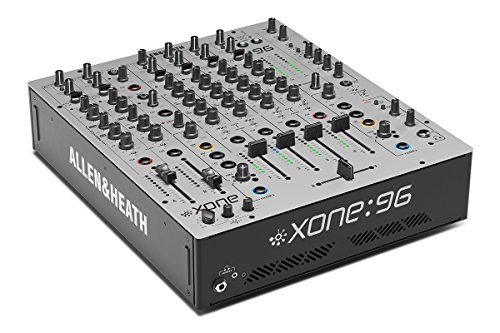
Allen & Heath Xone:96 — Best for Analogue Sound Purists
The Xone:96 serves the DJ who hears the difference: vinyl-first and sound-quality-obsessed players who want an analogue signal path, famously musical filters, and EQ that shapes rather than amputates. Its six channels (four main plus returns) suit DJs layering decks, samplers, and effects sends, and the dual USB interfaces make it a quiet hybrid — analogue at heart, but able to run two laptops for back-to-back DVS changeovers without a cable swap mid-set.
Strengths
- Analogue circuitry and filters deliver the warm, forgiving sound its audience buys it for
- Six channels plus dual USB interfaces handle layered rigs and seamless b2b laptop changeovers
- Four-band EQ on main channels gives finer tonal control than the usual three
Trade-offs
- No onboard effects unit — outboard pedals or software must supply them, by design
- Four-band EQ and analogue workflow are a learning curve for DJs raised on club-standard desks
- Premium pricing for a mixer whose party tricks are deliberately invisible
| Channels | 6 (analogue) |
| Interfaces | Dual USB audio |
Mixing on the 96 feels different in a way that is hard to market and easy to hear: the filters sweep smoothly enough to become a mixing technique in themselves, blends sit together instead of fighting, and long techno or house transitions — the genres this desk was born in — gain a patience and glue that digital desks pursue with processing. DJs who play those long-form sets often describe every other mixer as a compromise after owning one, which is either audiophile romance or the plain truth of a well-designed analogue path; the queue of devotees suggests the latter.
Its demands are equally clear. You supply your own effects. You learn a four-band EQ. You accept that the booth at most clubs will hold a Pioneer, not this, so your home standard and your away standard differ. For the purist building a personal rig — home booth, gallery sets, the venues that let you bring your own desk — none of that is a deterrent. The Xone:96 is the connoisseur’s standalone, bought for sound above spectacle.
Best for: vinyl and long-form house/techno DJs who prioritise sound quality / Not suited for: effects-driven performers or DJs who need the club-standard layout everywhere
Check on Amazon — check the current price on Amazon before you buy, because configurations and included accessories vary by listing.

RANE DJ Seventy — Best for Battle and Scratch DJs
Battle DJs judge a mixer by one component before all others: the crossfader, because their entire art lives in its cut. The Seventy answers with three contactless MAG FOUR faders — magnetic, adjustable, and built to survive the percussive abuse of scratch technique without the bleed and wear of conventional faders. Add Akai MPC performance pads, internal effects, and deep Serato DJ integration, and you have the two-channel weapon the competitive and hip-hop worlds reach for.
Strengths
- MAG FOUR contactless faders give the sharp, durable cut scratch technique demands
- MPC pads and internal FX put performance features under the hands without extra controllers
- Serato integration matches the software ecosystem battle DJs actually compete in
Trade-offs
- Two channels only — multi-deck and four-source rigs need a different desk
- Serato-centric design is a poorer fit for rekordbox or vinyl-only purists
- Battle focus means club-style polish (long smooth blends) is served, not celebrated
| Channels | 2 |
| Faders | 3x contactless MAG FOUR |
Spend an hour with a scratch DJ and you understand why fader feel is destiny: a cut that lands a millisecond late or bleeds at the edges is a flubbed routine, and faders are consumables on lesser mixers — replaced, modded, worried over. The Seventy’s contactless design removes the wear mechanism itself, and the adjustability lets each DJ set tension and curve to their own hands. That is not a feature list; that is the product, and everything else — the pads for cues and samples, the internal effects for transitions — is supporting cast done properly.
As a standalone purchase, note what it assumes: two sources, usually turntables with control vinyl or phase-style setups, and a laptop running Serato at the centre of the workflow for most owners. Vinyl-only purists can run it, but they are paying for integration they will not use. For its intended player — the battler, the hip-hop and open-format scratcher — there is no wasted money here at all: every pound of it is in the faders, the pads, and the build to take a beating.
Best for: battle, scratch, and hip-hop DJs in the Serato ecosystem / Not suited for: four-deck club DJs or rekordbox-only players
Check on Amazon — check the current price on Amazon before you buy, because configurations and included accessories vary by listing.

Pioneer DJ DJM-450 — Best Compact Club Mixer
The DJM-450 distils the club experience into two channels for the home booth and the small venue: the same effects philosophy as its flagship siblings (Beat FX and Sound Color FX), a built-in interface with DVS support, and a layout that teaches exactly the muscle memory a DJ will meet in a real booth. For the two-deck DJ — turntables or media players — who wants to practise on the genuine article rather than an approximation, this is the standard answer.
Strengths
- Club-standard layout and effects build transferable booth skills at home
- Built-in USB interface with DVS support covers laptop and media workflows
- Two-channel focus keeps the panel uncluttered and the price below flagship territory
Trade-offs
- Two channels cap back-to-back and multi-source ambitions
- Effects are a subset of the flagship’s — headline tricks have humbler tools here
- Pioneer polish commands a premium over feature-similar rivals
| Channels | 2 |
| Effects | Beat FX + Sound Color FX |
There is a training argument for the 450 that outweighs its spec sheet: DJs are made in bedrooms, and the bedroom mixer that matches the club desk makes the first real booth feel like home. Every knob position, every effect gesture transfers. DJs who learned on idiosyncratic budget desks often describe their first club set as playing a foreign instrument; 450 owners skip that tax entirely. As a standalone with two media players it is a complete, professional little rig — the same rig, in miniature, that fills dancefloors nightly.
Its ceiling is channel count and nothing else. The moment your ambitions include a third deck, a sampler as a live source, or regular back-to-back sets with a partner’s laptop, you are shopping again — likely for the A9 at the top of this list. Buy the 450 for the DJ you are for the next few years, not the festival headliner of your imagination, and it is one of the most satisfying purchases in DJing: a real club mixer, honestly sized.
Best for: two-deck DJs wanting true club layout at home or in small venues / Not suited for: multi-deck or back-to-back-heavy setups
Check on Amazon — check the current price on Amazon before you buy, because configurations and included accessories vary by listing.

Behringer PRO MIXER DJX750 — Best Effects-Heavy Value
The DJX750 is the open-format pragmatist’s pick: five channels for a rig that might include two decks, a microphone for the wedding-and-party work that pays, a laptop source, and a spare, plus a built-in digital effects section and BPM counters for DJs mixing across genres and tempos all night. It consciously echoes the classic club layout at a fraction of flagship cost, and for working mobile and bar DJs that equation — capability per pound — is the whole decision.
Strengths
- Five channels cover decks, mic, and auxiliary sources without repatching
- Built-in digital effects and BPM counters support open-format, multi-genre sets
- Value pricing suits working DJs who’d rather put money into music and speakers
Trade-offs
- Fit, finish, and fader feel sit below the Pioneer and Rane standard — this is the budget of the list
- Effects quality is serviceable rather than inspiring next to flagship units
- Long-term heavy touring would test its build harder than bar and mobile work does
| Channels | 5 |
| Effects | Built-in digital FX, BPM counter |
Judge the DJX750 by its natural habitat — the bar residency, the mobile rig, the home studio of a DJ who plays everything from disco edits to drum and bass in one night — and its priorities snap into focus. Channel flexibility and a microphone that behaves matter more there than a crossfader built for crab scratches, and an effects section that exists beats a purist’s empty panel. Behringer built exactly that brief, and the model’s longevity in the catalogue says the brief was real.
The compromises live where its price says they should: in the tactile details. Faders and knobs do their jobs without the machined confidence of the desks above, and a DJ who scratches seriously should look at the Rane instead without a second thought. But as a standalone centre for a varied, working, multi-source rig — especially a first ‘real’ mixer after a controller — the DJX750 delivers more usable desk per pound than anything else here.
Best for: mobile, bar, and open-format DJs needing channels and a mic on a budget / Not suited for: scratch specialists or tactile purists
Check on Amazon — check the current price on Amazon before you buy, because configurations and included accessories vary by listing.

Numark M6 USB — Best First Standalone Mixer
Almost every generation of DJs has a version of this machine in its past: the affordable four-channel desk that turned a pair of turntables or a laptop into a real setup. The M6 USB gives the beginner the full grammar of mixing — four channels, three-band EQ per channel, a microphone input, a slope-adjustable and replaceable crossfader — plus a USB audio interface so a laptop can be a source and a recorder from day one. It is the mixer you buy to learn whether DJing is your thing, and it is honest enough to remain useful if it is.
Strengths
- Four channels and full 3-band EQ teach real mixing technique, not a cut-down dialect
- USB interface makes laptop sources and set recording simple from the start
- Replaceable, slope-adjustable crossfader extends its life and suits early scratch practice
Trade-offs
- No onboard effects — transitions rely on EQ and fader craft (arguably good training)
- Build is entry-level; it is a first mixer, not a ten-year booth anchor
- Sound and headroom sit below the professional desks, as its price promises
| Channels | 4 |
| Interface | Built-in USB audio |
The M6’s deepest virtue is that it hides nothing. Without effects to lean on, a new DJ learns gain staging, EQ blending, and fader control — the fundamentals that transfer to every desk they will ever touch, including the flagships at the top of this list. Four channels at this price also future-proofs the early years: add a second source, a microphone for streams and parties, a sampler — the desk absorbs the growth that a two-channel starter would force you to re-buy your way out of.
Set expectations at the door: knobs and faders feel like the entry tier they are, and a DJ who falls hard for the craft will eventually want the Pioneer or Rane above. That is not a flaw in the M6; that is its job description fulfilled. Few first mixers in DJ history have started more careers per pound spent, and as a standalone — fed by turntables, players, or its own USB — it remains the easiest recommendation on this list to make to a beginner.
Best for: beginners building a first turntable, player, or hybrid rig / Not suited for: effects-dependent performers or working club professionals
Check on Amazon — check the current price on Amazon before you buy, because configurations and included accessories vary by listing.
Comparison Table
| Pick | Badge | Key spec | Best for |
|---|---|---|---|
| Pioneer DJ DJM-A9 | Best Overall / Club Flagship | 4-channel pro club mixer + interface | venues, headline DJs, and four-deck or back-to-back rigs |
| Allen & Heath Xone:96 | Best for Analogue Sound Purists | 6-channel analogue, dual USB | vinyl and long-form house/techno DJs who prioritise sound quality |
| RANE DJ Seventy | Best for Battle and Scratch DJs | 2-channel battle, MAG FOUR faders | battle, scratch, and hip-hop DJs in the Serato ecosystem |
| Pioneer DJ DJM-450 | Best Compact Club Mixer | 2-channel club, Beat FX, DVS | two-deck DJs wanting true club layout at home or in small venues |
| Behringer PRO MIXER DJX750 | Best Effects-Heavy Value | 5-channel, built-in FX | mobile, bar, and open-format DJs needing channels and a mic on a budget |
| Numark M6 USB | Best First Standalone Mixer | 4-channel USB starter desk | beginners building a first turntable, player, or hybrid rig |
Choose by workflow, not channel count: battle DJs live in the crossfader (Rane), purists in the signal path (Xone:96), club residents in the standard layout (Pioneer), and everyone else in the honest middle. Every desk here is a true standalone mixer; the differences are feel, effects philosophy, and how many sources your real rig actually has.
How to Choose a Standalone DJ Mixer
Standalone, controller, or all-in-one — buy the right species
A controller needs a laptop to make sound; its mixer section is a remote control for software. An all-in-one includes the decks. A standalone mixer is the desk alone, agnostic about sources: turntables today, media players tomorrow, DVS when you feel like it, a guest’s laptop at the weekend. That source-freedom is why professionals standardise on standalone desks, and why a standalone holds its value while controllers age with their software. If your sources are physical or mixed, standalone is not a preference — it is the architecture.
The practical test: unplug the laptop. A standalone rig keeps playing. If that sentence matters to your gigs — and for weddings, bars, and clubs it should — you are shopping in the right category.
Crossfader: the component that decides feel
No part of a DJ mixer wears faster or matters more to technique. Scratch and battle DJs need a sharp cut, adjustable curve, and ideally a contactless or easily replaceable fader, because they will wear one out. Mixing DJs need smoothness and a curve that makes long blends forgiving. Club-standard desks stake their reputations on faders that survive nightly abuse from strangers. Whatever your style, check two things before buying: is the crossfader replaceable, and can its curve be adjusted? A ‘no’ to both is a countdown timer on the mixer’s useful life.
Channel faders matter too, quietly: they are your volume rides in every blend. Stiff, scratchy channel faders make subtle mixing coarse. You cannot feel a mixer through a listing, which is why the established desks dominate — their fader feel is a known quantity across the whole DJ community.
EQ philosophy and effects: match the desk to your genre
Three-band full-kill EQ (the club standard) lets you remove a band entirely — the basis of modern blend technique. Four-band EQ (the Xone way) trades kill switches for finer shaping and suits long, patient mixing. Isolator-style desks are a third religion entirely. None is ‘best’; each encodes a genre’s mixing style, so buy the EQ your music uses. Effects divide the same way: battle and open-format DJs lean on them; purist house and techno players often prefer a clean desk plus outboard. Buying effects you will not use is paying for panel clutter; missing effects your genre needs is worse.
Channels, inputs, and the rig you actually own
Count your sources honestly, then add one. Two turntables is a two-channel life until the night a friend brings a third deck or you add a sampler — then the four-channel owners smile. Microphone inputs matter enormously to mobile and streaming DJs and not at all to booth purists. Phono preamps matter if any source is a turntable without its own; check per-channel, because some desks economise there. USB interfaces decide your recording and DVS life: a built-in interface (A9, 450, M6) removes a box and a cable from every gig.
Finally, think about the room the mixer lives in. A flagship desk in a bedroom is not wasted if you play it daily, but its size and cost compete with the records, speakers, and headphones that also make a DJ. Balance the rig as a whole.
二手 value and the used market — a note for standalone buyers
Standalone mixers hold value unusually well because the technology moves slowly and the standard layouts barely change — a decade-old flagship is still a flagship experience. That makes the used market tempting, and mostly safe, with three checks. First, the crossfader: play it hard, listen for bleed and crackle at the cut points, because it is the wear item and its replacement cost belongs in your price math. Second, every channel and every input: a desk with one dead phono stage is a discount only if your rig never needs it. Third, the USB interface, if fitted: connect it, record, and confirm the computer sees what the brochure promised.
Buy used from DJs rather than from venues where possible — a home desk has lived a gentler life than a booth desk — and remember that a new mid-tier mixer with a warranty can be the wiser purchase than a tired flagship at the same money. The badge is not the instrument; the condition is.
Recording and Streaming from a Standalone Desk
A standalone mixer’s second career is as the front end of your recordings and streams, and the desks here split into two camps. Those with built-in USB interfaces — the DJM-A9, DJM-450, Xone:96, and M6 USB — can send the master (or a record bus) straight to a laptop for recording sets, streaming, or DVS without extra hardware. Desks without USB need an external interface on the booth or record output, which is one more box but also one more choice: you pick the converter quality yourself.
Whichever route you take, record from a dedicated output rather than splitting the master, keep the recording level conservative — digital clipping on a two-hour set is forever — and test the full chain before a set you care about. The standalone desk’s gift to streaming is stability: the mix happens in hardware, the computer only carries the finished stereo picture, and a software crash mid-stream never silences the room.
Rotary Mixers: The Standalone Niche Worth Knowing
One standalone species deserves a footnote because buyers searching this category meet it and get confused: the rotary mixer. Desks like the Ecler WARM series and the Headliner R4 — both of which surfaced in our API verification for this category — replace channel faders with rotary knobs and strip the effects away, serving house and techno DJs who mix in long, slow blends and prize signal purity over tricks. They are genuinely standalone, genuinely excellent, and genuinely wrong for most buyers, because their entire design assumes you never cut, never scratch, and rarely touch an effect.
If your mixing style is the long blend, investigate the niche properly rather than stumbling into it; if it is not, let the rotary desks be a reminder of this list’s core lesson — a DJ mixer is a playing style made physical, and the correct purchase is the desk whose assumptions match your hands. The six picks in the main list cover the mainstream styles; the rotary niche is the connoisseur’s detour, signposted here so you take it deliberately or not at all.
Renting, Riders, and the Working DJ’s Second Desk
Working DJs rarely own one mixer; they own the desk they love and the desk the work demands. Venues and promoters specify club-standard equipment on riders, which is why the Pioneer layout dominates even among DJs who prefer another desk at home — fluency on the standard is a professional skill independent of taste. If you are building toward paid work, factor that into a standalone purchase: a home desk that teaches the standard layout is partly an investment in employability, while a beloved idiosyncratic desk is an investment in your own room and your own nights.
The second-desk logic also explains the value picks’ endurance in working DJs’ bags. A DJX750 or an M6 that travels to bars, house parties, and mobile rigs absorbs the risks — spills, drops, strangers — that nobody wants their flagship exposed to. Professionals call it a B-rig; beginners can steal the idea early and keep their best desk safe while their roughest gigs happen on the honest workhorse.
The Booth Is a Workplace: Ergonomics of a Long Set
Four hours into a set, a mixer’s ergonomics stop being comfort and start being accuracy. Knob spacing that lets fingers land without looking, faders whose travel matches the gestures your style uses most, meters you can read in peripheral vision while watching a floor — these decide whether the last hour sounds like the first. The flagship desks earn part of their price here, in panels designed with working DJs rather than for showroom photographs, and the value desks earn theirs by keeping the vital controls big and separated even when the finish is plain. When you audition any standalone mixer, mime your three commonest moves — a blend, a cut, an effect grab — and notice what your hands had to search for. In a dark booth, at hour four, that search is the product. Buy the desk your hands stopped searching on.
How to Set Up a Standalone DJ Mixer Rig
A standalone desk is simple to wire and easy to wire badly. This sequence — sources to mixer to speakers — produces a clean, quiet rig for any of the mixers above.
Step 1: Connect sources with gain discipline in mind
Turntables go to phono inputs (with ground wires attached — the hum you ignore at home is deafening on a club system), media players and laptops to line inputs. Connect everything with the mixer powered off and channel faders down, so the first power-up cannot send a thump through the speakers.
Step 2: Set channel gains before touching EQ
Play your loudest typical track per source and set each channel’s gain so peaks sit in the healthy upper range of the meter without hitting the top. Gain-matched channels make every later blend predictable; mismatched gains are why beginners’ transitions lurch in volume.
Step 3: Choose your crossfader curve for your style
Sharp curve for scratching and cuts, smooth/long curve for blending. Set it before the set, not during: curve is a playing-style decision, and mid-set experiments end in audible accidents.
Step 4: Route the master and booth separately
Master out feeds the room (or your recording speakers at home); booth out feeds your monitors. Keeping them independent lets you set your own listening level without touching what the room — or the recording — hears.
Step 5: Record a test and listen back
Before any set that matters, record five minutes and listen on headphones. Buzz means a ground or cable problem to fix now; distortion means your gains are lying to you. Five minutes of testing has saved more sets than any effect on any panel.
Re-run this sequence whenever the rig changes — new source, new room, borrowed speakers. Standalone hardware rewards methodical setup with the thing DJs value most: a night where the equipment never enters your thoughts. Treat the first month with a new desk as calibration, not performance: learn where its EQ bites, where its faders lie to you, and how its meters relate to what the recording actually captured, so that by the first night that matters, the desk has already told you all of its truths in private.
Common Buying Mistakes
Buying a controller when you wanted a mixer
The most common and most expensive confusion in this category. If the unit cannot mix external sources without a laptop, it is not the standalone desk you searched for — check for phono/line inputs and a hardware master section.
Counting channels instead of sources
Four channels feeding one laptop is not a four-source rig. Buy channels for the decks, players, mics, and samplers you genuinely connect, plus one spare — not for the brochure photograph.
Ignoring the crossfader’s replaceability
Faders are consumables under real use. A sealed, non-replaceable crossfader turns a wear item into a whole-mixer replacement, which is a false economy at any price.
Skipping the microphone test
Mobile and streaming DJs: test your actual microphone through the actual desk before a paid night. Mic sections vary wildly in gain and tone, and the wedding speech is not the moment to discover yours is inadequate.
Chasing effects over fundamentals
A desk with modest effects and excellent gain structure, EQ, and faders will make you a better DJ than a fireworks panel on a flimsy foundation. Effects are the last ten percent of a set, not the first ninety.
Judging a mixer by its effects count
Effects are the most marketed and least decisive part of a working desk. Gain structure, EQ character, and fader feel shape every transition; the effect you use twice a set should never outvote them.
Final Recommendation
The DJM-A9 is the standalone standard for venues and four-channel rigs; the Xone:96 is the purist’s analogue instrument; the RANE Seventy owns battle; the DJM-450 brings the club home in two channels; the DJX750 maximises channels and effects per pound; and the Numark M6 USB remains the first real mixer to beat. Match the desk to your sources and your genre, and any of them will serve for years.
Check the current price on Amazon for your shortlist — pro-audio pricing moves with bundles and seasons, and included cases or cables change the real comparison.
The shortlist in one line: Pioneer DJ DJM-A9, Allen & Heath Xone:96, RANE DJ Seventy, Pioneer DJ DJM-450, Behringer PRO MIXER DJX750, Numark M6 USB.
Keep exploring the cluster: Best Starter Mixers Best Starter Mixers For Streaming Best Stereo Mixers Usb Best Audio Mixers Best Stick Mixers
Frequently Asked Questions
What makes a DJ mixer ‘standalone’?
It mixes external sources in hardware — turntables, media players, laptops — without needing a computer to function. Unplug the laptop and a standalone rig keeps playing; a controller goes silent.
How many channels do I actually need?
One per source, plus a spare if you can. Two decks is the classic setup; four channels cover multi-deck, back-to-back, and sampler-augmented rigs. A microphone input is separate from deck channels on most desks here.
Can I use a standalone mixer with a laptop?
Yes — most picks here include USB audio interfaces for DVS control, recording, or laptop sources. The laptop becomes one source among several rather than the brain of the rig.
Is an analogue mixer like the Xone:96 really different?
In feel and workflow, yes: analogue EQ and filters behave and blend differently from digital processing, and its audience buys precisely that character. It also means no onboard effects — a deliberate trade.
What wears out first on a DJ mixer?
The crossfader, by a distance. Prefer replaceable or contactless designs if you play daily or scratch, and treat fader adjustability as a core feature, not a footnote.
Do I need phono inputs?
Only if a source is a turntable without a built-in preamp. Check per channel — some desks offer phono on selected channels only, which decides which deck connects where.
Can a standalone mixer work without any laptop at all?
Yes — that is its defining trait. Two turntables or media players plus a standalone mixer is a complete rig. A laptop only enters if you choose DVS, recording, or a digital source.
What is DVS and do I need it?
Digital Vinyl System: control files on vinyl or media that let a laptop’s library play through a traditional rig. You need a DVS-capable interface (built into several picks here) only if you want your digital library on turntable-style control.


