Disclosure: airfryerkitchensupply.com is reader-supported. When you buy through links on our site, we may earn an affiliate commission at no extra cost to you.
Where to buy
If you are shopping for the best bang for your buck audio mixers, the six boards below are where the value actually lives right now. Every one was confirmed as a current Amazon listing, and every one earns its place by giving you clean preamps, honest channel counts and the features home studios, podcasters and small bands actually use — without charging you for touring-rig extras you will never touch. Start with the Yamaha MG10XU if you want the safest all-round spend, and check the current price on Amazon for the exact model name, because mixer families reuse names across very different channel counts.
- Yamaha MG10XU — check the current price on Amazon and confirm the exact variant on the listing before you order.
- Behringer XENYX 302USB — check the current price on Amazon and confirm the exact variant on the listing before you order.
- Mackie Mix8 — check the current price on Amazon and confirm the exact variant on the listing before you order.
- Soundcraft Notepad-8FX — check the current price on Amazon and confirm the exact variant on the listing before you order.
- Pyle PMXU83BT.5 8-Channel Bluetooth Studio Mixer — check the current price on Amazon and confirm the exact variant on the listing before you order.
- Behringer XENYX X1204USB — check the current price on Amazon and confirm the exact variant on the listing before you order.
The best bang for your buck audio mixers are not the cheapest boards on the page, and they are not the flagship desks either. They sit in the productive middle: a small-format analogue mixer with clean microphone preamps, a USB connection that actually records properly, and enough channels for the job you really have. Spend less than this tier and you usually pay twice — once for the toy board, then again for the real one. Spend more and you are buying subgroups, extra aux sends and road-case hardware that a bedroom studio or a duo act will never use.
One honesty note before the list, because it decides whether any board is good value for you: manufacturers count channels generously. A mixer advertised with a big channel number often has far fewer true microphone inputs, with the rest made up of stereo line pairs. Value is not channels per dollar on the box — it is usable microphone preamps, clean gain and reliability per dollar. Every review below states the real layout in plain language so you can count your own microphones, instruments and playback sources against it before you spend anything.
All six picks were verified as current Amazon listings on 2026-11-20 and 2026-11-21, and they divide neatly: a five-dollar-menu USB starter board, two dependable mid-size all-rounders, a compact live board, a feature-stuffed Bluetooth option, and a step-up desk with compressors and proper effects. Between them they cover podcasting, streaming, home recording, rehearsal rooms and small gigs — which is where nearly all bang-for-buck money in this category is honestly spent.
Key Takeaways
- Count microphone preamps, not headline channels — that is where value hides.
- The Yamaha MG10XU is the no-weak-point default; the 302USB is the honest solo starter.
- Built-in effects and compressors belong in the price comparison, not after it.
- Spend what you save on the board on a better microphone — the audience hears that first.
In this guide
Quick Picks
Best Overall Value — Yamaha MG10XU. The benchmark value board in this class: clean D-PRE preamps, a genuinely usable SPX effects section, metal chassis and USB recording in one desk that suits podcasts, rehearsals and small gigs equally well.
Best Budget — Behringer XENYX 302USB. The smallest sensible spend in audio mixing: one XENYX microphone preamp, USB audio in and out, and a footprint that fits beside a laptop. The starter board for a single-microphone podcast or stream.
Best Compact Live Value — Mackie Mix8. A rugged little live board with two clean microphone preamps, a proper tape input and output, and Mackie’s proven small-format build — the rehearsal-room and small-gig value pick.
Best Sound Quality per Dollar — Soundcraft Notepad-8FX. Lexicon effects and Soundcraft preamps in a compact USB desk. The pick for singers and acoustic acts who care how the vocal sounds more than how many channels the box advertises.
Best Feature Count — Pyle PMXU83BT.5 8-Channel Bluetooth Studio Mixer. Bluetooth playback, a built-in MP3 player, DSP effects, phantom power and USB recording in one eight-channel board. The karaoke, house-party and community-hall value pick where features per dollar is the whole game.
Best Step-Up Value — Behringer XENYX X1204USB. Four XENYX preamps with one-knob compressors, British-style EQ, a 24-bit effects processor and USB — the step-up board for growing podcasts and small bands that need control, not just connections.
How These Picks Were Chosen
We chose these six by starting from the jobs budget audio mixers actually get hired for: solo podcasting and streaming, two-person interview shows, home-studio recording, band rehearsals, karaoke and small-venue live sound. For each job we asked what decides satisfaction a year later — preamp noise when you turn the gain up, whether the USB connection records the whole mix or individual channels, whether effects are built in or must be bought separately, and whether the board still works after being carried to fifty rehearsals in a backpack.
Value scoring was strict. A board only counted as bang for buck if it avoided the three classic cheap-mixer traps: hissy preamps that ruin quiet recordings, a USB output that only works at fixed low quality, and channel counts inflated by stereo pairs nobody can plug a microphone into. We also weighted included software and effects, because a board that forces you to buy a separate reverb or interface is not actually cheaper than the board that bundles them.
Finally, every pick had to be a current, verifiable Amazon listing. Discontinued bargains and grey-market oddities were excluded even when they looked tempting, because a mixer you cannot return or warranty is the opposite of value. Where a cheaper sibling model exists in the same family, the review says so and explains exactly what you give up by saving the difference.
The 6 Best Bang for Your Buck Audio Mixers

Yamaha MG10XU — Best Overall Value
The Yamaha MG10XU is the mixer we recommend when someone asks for the most capability per dollar without a lecture. Its four D-PRE microphone preamps are quiet enough for condenser microphones in a home studio, the built-in SPX effects cover the reverbs and delays a singer or podcaster actually reaches for, and the metal chassis survives the backpack-to-rehearsal-room commute that kills plastic boards. For a solo creator it is generous; for a duo or trio it is exactly right-sized.
Strengths
- D-PRE preamps stay quiet at the gain levels home recording demands
- SPX effects section removes the need for a separate reverb purchase
- Metal chassis and a layout that makes sense the first time you use it
Trade-offs
- USB records the stereo mix only, not individual channels
- Four microphone inputs is the real ceiling despite the bigger headline number
- No Bluetooth, so playback needs a cable or a spare channel pair
Key specs
- Microphone inputs: 4 x D-PRE preamps
- Total inputs: 10
- Effects: SPX processor
- USB: Stereo recording and playback
- Build: Metal chassis
What makes the MG10XU the value benchmark is the absence of a weak point. Cheap boards usually fail in one specific place — noisy preamps, a toy effects chip, faders that scratch within a year. The Yamaha is merely good everywhere, and good everywhere is what a working setup needs. Podcasters get clean gain for dynamic microphones with a compressor on the first channels; bands get effects for vocals without an extra rack unit; streamers get a USB feed that simply works. If your budget stretches to exactly one serious small mixer, the honest answer in this price class has been this board for years, and nothing in this roundup dethrones it.
Ownership of the MG10XU tends to be uneventful in the best way: it becomes the board that other gear is tested against. Owners typically discover its second life as a keyboard submixer, a rehearsal board or the house desk for a small venue when a bigger setup arrives, because nothing about it ever becomes embarrassing. Keep the faders dust-free, coil its power supply kindly, and it will outlast several generations of the laptops it records into — durability being the quietest form of bang for buck there is.
Best for: podcasters, duos and small bands wanting one dependable board / Not suited for: anyone needing more than four microphones at once
Check on Amazon — check the current price on Amazon for the exact configuration described above.
Behringer XENYX 302USB — Best Budget
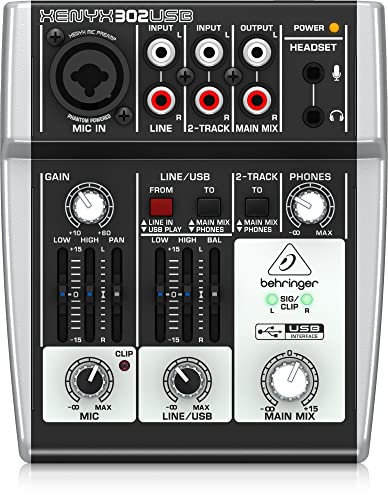
The Behringer XENYX 302USB exists for one job: getting a single decent microphone into a computer without buying a separate interface. It is tiny, bus-powered over USB, and honest about what it is — a one-microphone board with a line input for a phone or instrument, basic EQ and a headphone output. For a solo podcaster, a streamer with one dynamic microphone, or a student recording voiceovers in a dorm room, it removes every excuse to record through a laptop’s built-in microphone.
Strengths
- Lowest sensible entry price into real microphone recording
- USB powered, so it travels with just a laptop and a cable
- XENYX preamp is a clear step up from headset and laptop microphones
Trade-offs
- Only one microphone input — a second host means a different board
- No built-in effects of any kind
- Plastic build expects a desk life, not a gig bag life
Key specs
- Microphone inputs: 1 x XENYX preamp
- Total inputs: 5
- USB: Stereo interface, bus powered
- EQ: 2-band per channel
- Size: Ultra-compact desktop
Judged as a podcast starter rather than a miniature live desk, the 302USB makes complete sense. Most first podcasts are one person and one microphone; this board covers that with gain to spare, adds a stereo input for music beds, and hands the computer a clean stereo feed. Its limits are equally clear and we state them plainly: the moment a co-host joins, or you want effects, or a second instrument appears, you have outgrown it. Bought with open eyes as a first step — ideally knowing the MG10XU above is the natural upgrade — it is money well spent rather than money wasted.
Living with the 302USB is a study in smallness as a feature: it lives beside the laptop, draws power from it, and turns any table into a recording spot in under a minute. Its single microphone input disciplines a solo show in a healthy way — one voice, well recorded, beats three voices recorded badly. When the upgrade day comes, it demotes gracefully to travel duty, a backup for live-stream emergencies, or a permanent voiceover station in a second room.
Best for: solo podcasters and streamers with one microphone / Not suited for: co-hosted shows, bands or anyone needing effects
Check on Amazon — check the current price on Amazon for the exact configuration described above.

Mackie Mix8 — Best Compact Live Value
The Mackie Mix8 is the value pick for people whose mixer leaves the house. It is an analogue-only board — no USB, no effects — and that focus is exactly why it is good value for live use: the money went into the chassis, the preamps and the knobs instead of a recording feature a PA setup never uses. Two microphone inputs, stereo line channels for keyboards or playback, a three-band EQ and a solid metal feel make it a fit for rehearsals, fitness instructors, small worship corners and mobile presenters.
Strengths
- Rugged build that tolerates regular transport
- Clean, simple signal path that is hard to set up wrong
- Dedicated tape inputs and outputs suit playback-heavy gigs
Trade-offs
- No USB recording — this is a live-only board
- No built-in effects, so vocal reverb needs an external unit
- Two microphone inputs limits growing acts
Key specs
- Microphone inputs: 2
- Total channels: 8
- EQ: 3-band on main channels
- USB: None — analogue only
- Extras: Tape in/out, phantom power
There is a quiet category of buyer the USB boards serve badly: the instructor, celebrant or duo who needs microphones and music through speakers, reliably, in a different room every week. For them the Mix8’s simplicity is the feature. Nothing needs a driver, nothing needs a laptop, and the control set can be taught to a volunteer in two minutes. If you record at home as well, buy this for the road and treat recording separately; if you only play live, this may be the best-value board on this entire page for your actual life.
The Mix8 rewards owners who value rehearsal momentum: it sets up in minutes, its controls can be run by feel, and its lack of software anything means it never waits for a driver or an update. Bands often find it becomes the permanent rehearsal-room board while fancier desks stay home for recording — a division of labour that extends the life of both. Wipe it down, keep it in its bag, and it will start every rehearsal on time for years.
Best for: mobile live sound, instructors and rehearsal rooms / Not suited for: home recording or streaming setups
Check on Amazon — check the current price on Amazon for the exact configuration described above.
Soundcraft Notepad-8FX — Best Sound Quality per Dollar
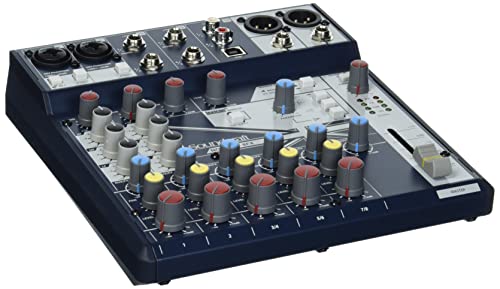
The Soundcraft Notepad-8FX spends its budget on the two things listeners actually hear: microphone preamp quality and effects quality. Its Lexicon effects — the name behind decades of studio reverb — give vocals a polish that generic budget effects chips cannot match, and the preamps handle both dynamic and condenser microphones gracefully. Four microphone inputs, USB audio for recording or streaming, and a footprint that suits a home studio desk or an acoustic duo’s gig bag complete a board aimed squarely at sound-first buyers.
Strengths
- Lexicon reverbs and delays genuinely flatter vocals
- Soundcraft preamps with a musical, unstrained character
- USB I/O covers recording and streaming without extra hardware
Trade-offs
- Compact layout means controls are closely spaced
- Fewer channels than similarly priced rivals
- No Bluetooth for wireless playback
Key specs
- Microphone inputs: 4
- Total channels: 8
- Effects: Lexicon processor
- USB: Audio interface I/O
- Character: Sound-quality focused compact desk
Acoustic performers are the natural owners here. A singer with a guitar needs two great channels, not ten mediocre ones, and the Notepad-8FX delivers exactly that ratio: the reverb tail on a vocal, the way a fingerpicked guitar sits under it, the lack of hiss when the room goes quiet between songs. It also records respectably over USB, so the same board covers the livestream and the demo. Buyers who count channels first should look at the Yamaha; buyers who listen first will understand this board in one song.
Notepad-8FX owners tend to talk about one song — the first one where the Lexicon reverb made their voice sound like the record they heard in their head. That moment is the board’s whole sales pitch, delivered after purchase. It also travels well between worlds: the same desk that flatters a Saturday gig records a Sunday demo over USB without a rewire, which is why acoustic performers, who are usually their own engineer, rate it so highly.
Best for: singers, acoustic acts and sound-first home studios / Not suited for: larger bands needing many inputs
Check on Amazon — check the current price on Amazon for the exact configuration described above.

Pyle PMXU83BT.5 8-Channel Bluetooth Studio Mixer — Best Feature Count
The Pyle PMXU83BT.5 is the maximalist answer to bang for buck: eight channels, Bluetooth for phone playback, a built-in MP3 player, sixteen DSP effects, three-band EQ per channel and USB computer recording, all in a board aimed at karaoke nights, community events, DJs and home entertainers. It does not pretend to be a studio desk. It pretends — successfully — to be the only box a party, a church social or a mobile karaoke rig needs to buy.
Strengths
- Bluetooth and MP3 playback remove cables and extra devices
- Effects, phantom power and USB recording all included
- Eight channels cover karaoke plus instruments plus playback easily
Trade-offs
- Preamp refinement trails the Yamaha and Soundcraft picks
- Feature density means a busier, less elegant control surface
- Best kept to entertainment duty rather than critical recording
Key specs
- Channels: 8 with XLR combo inputs
- Playback: Bluetooth and built-in MP3 player
- Effects: 16 DSP programs
- Phantom power: 48V
- USB: Computer recording
Value means different things to different buyers, and for the entertainment user this Pyle is legitimately the smartest spend on the page. The features it bundles — wireless playback above all — are the ones that otherwise require extra boxes, extra cables and extra setup time at every event. Sound purists recording an album should choose elsewhere; hosts who need two microphones, backing tracks from a phone, a little echo on the vocals and a recording of the night, all from one affordable board, should choose exactly this and spend the savings on better microphones, which will improve their sound more than any mixer upgrade would.
The Pyle’s ownership story is social: it becomes the board of family parties, karaoke nights and community events, where Bluetooth playback and forgiving controls matter more than studio refinement. Its many inputs mean the cousin with a guitar and the uncle with a keyboard can both plug in without an argument or an adapter hunt. For households whose music is an event rather than a production, that social reliability is the value — and it is real value, honestly delivered.
Best for: karaoke, parties, community events and mobile entertainers / Not suited for: critical studio recording
Check on Amazon — check the current price on Amazon for the exact configuration described above.

Behringer XENYX X1204USB — Best Step-Up Value
The Behringer XENYX X1204USB is where budget boards start borrowing professional ideas: one-knob compressors on the microphone channels that tame uneven speakers and singers, British-style EQ with a sweepable midrange that actually fixes problems instead of merely brightening them, and a 24-bit multi-effects processor. Four microphone preamps and twelve total inputs cover a four-person podcast panel or a small band, and the USB interface records the programme mix for editing and upload.
Strengths
- One-knob compressors are genuinely useful for voices
- Sweepable mid EQ solves problems fixed EQ cannot
- Effects processor and USB included at a step-up price that stays sane
Trade-offs
- Larger and heavier than the compact picks
- USB still records the stereo mix rather than separate channels
- Control density has a learning curve for true beginners
Key specs
- Microphone inputs: 4 x XENYX with compressors
- Total inputs: 12
- EQ: British style, sweepable mid
- Effects: 24-bit multi-FX processor
- USB: Stereo audio interface
The compressor is the headline your money buys here. Podcast guests lean in and out, worship singers move off the microphone, presenters get excited — and a gentle one-knob compressor keeps all of it listenable without an engineer riding faders. Add EQ that can notch out a boxy room resonance and effects for the musical parts of a show, and the X1204USB becomes the natural second mixer: the board people buy after the starter board, and often the last small mixer they need. If your show is growing, skipping straight here can be the real bang-for-buck move.
X1204USB owners usually grow into its features in sequence: first the extra channels, then the sweepable mids when a room fights back, then the compressors when a show’s voices vary wildly in level. That staged discovery is why it anchors so many small studios and podcast desks for years — there is always one more capability waiting when the production is ready for it. It is the rare budget board that teaches its owner engineering while serving them.
Best for: growing podcasts, panels and small bands / Not suited for: ultra-portable or single-microphone setups
Check on Amazon — check the current price on Amazon for the exact configuration described above.
Comparison Table
The table below compresses the shortlist to the four facts that decide most purchases: the badge each board earned, its defining specification, and the job it suits best. Read it alongside the full reviews — the numbers state the layout, but the reviews explain how each board behaves when a real show, rehearsal or recording session leans on it for two hours straight.
| Pick | Badge | Key spec | Best for |
|---|---|---|---|
| Yamaha MG10XU | Best Overall Value | 4 D-PRE preamps, SPX effects, USB | podcasters, duos and small bands wanting one dependable board |
| Behringer XENYX 302USB | Best Budget | 1 mic preamp, USB powered, ultra-compact | solo podcasters and streamers with one microphone |
| Mackie Mix8 | Best Compact Live Value | 2 mic inputs, rugged analogue build | mobile live sound, instructors and rehearsal rooms |
| Soundcraft Notepad-8FX | Best Sound Quality per Dollar | 4 preamps, Lexicon FX, USB | singers, acoustic acts and sound-first home studios |
| Pyle PMXU83BT.5 8-Channel Bluetooth Studio Mixer | Best Feature Count | 8 channels, Bluetooth, MP3, DSP FX | karaoke, parties, community events and mobile entertainers |
| Behringer XENYX X1204USB | Best Step-Up Value | 4 preamps with compressors, 12 inputs | growing podcasts, panels and small bands |
How to Choose the Best Bang for Your Buck Audio Mixers
Start by counting microphones, not channels. List every microphone you will plug in at once — hosts, guests, vocalists, instruments with microphones — and treat that number as your non-negotiable preamp count. Then add playback: a computer, phone or keyboard usually takes one stereo channel. The board whose real microphone count covers your list, with one spare for growth, is your shortlist; every board in this guide states its true preamp count in its specs box for exactly this exercise.
Next, decide your recording requirement honestly. If you record a podcast or stream as a finished stereo mix, every USB board here serves you. If you need to edit each speaker separately afterwards, you need multitrack recording, which is a different and pricier product class — no bang-for-buck stereo board will grow into it later. Buying the right recording model now is the single largest saving available in this category.
Then weigh effects and extras against your act. Singers need built-in reverb; speech-only shows need compressors more than effects; entertainers need Bluetooth and playback. Match the board’s bundle to your show rather than paying for the longest feature list, and put whatever budget remains into microphones — the first thing your audience hears and the last thing to economise on.
What Actually Makes an Audio Mixer Good Value?
Strip away the marketing and a mixer’s value comes down to four things you can hear. The first is preamp noise: turn the gain up for a quiet dynamic microphone and a cheap board adds a hiss bed under everything you record. Every board in this guide keeps that hiss low enough for real work, which is the single biggest dividing line between value and false economy in this category.
The second is EQ you can fix problems with. A sweepable midrange lets you find and reduce the exact frequency where a room booms or a voice turns nasal; fixed EQ mostly lets you make things brighter or duller. The third is routing honesty — aux sends for a monitor or an external effect, a control-room output, a tape path — small things that decide whether the board fits your setup or fights it. The fourth is build: faders and knobs are mechanical parts you will touch thousands of times, and their failure is how budget boards usually die.
Notice what is not on that list: the headline channel count and the number of effects programs. Both are cheap to inflate and neither improves a recording. Judge boards the way this guide did — by preamps, EQ, routing and build — and the bang-for-buck answer usually picks itself.
How to Set Up a Small Audio Mixer for Podcasting or Live Sound
A mixer only delivers its value when it is gain-staged properly. This ten-minute setup works for every board in this guide, for podcasts, streams and small gigs alike.
- Connect microphones with balanced XLR cables, instruments to line inputs, and your computer or speakers last, with all faders down and the master at zero.
- Set each channel fader to its unity mark, then speak or play at your loudest real level while raising the channel gain until the meter peaks just below the red — this is gain staging, and it is where clean sound is won or lost.
- Only now raise the master and channel faders to set the balance between sources. If something is too quiet, return to its gain control rather than pushing faders to their extremes.
- Add EQ sparingly: cut a little low end from voices to remove rumble and proximity boom before boosting anything, and make small moves — two or three decibels changes a sound more than you expect.
- Dial in effects on a send or the channel’s FX control until you can just hear the reverb in headphones, then back it off slightly. Effects you notice are usually effects that are too loud.
- If you record over USB, do a thirty-second test recording at performance level and listen back on headphones before the real session. Check for hum, hiss and clipping while fixing them is still free.
- Label channels with tape and a marker — microphone one, guitar, playback — so future-you, or a volunteer, can run the board without a diagram.
Finish by saving a photo of your knob positions once a setup sounds right. Small boards have no memory, and a phone photo is the poor man’s scene recall — it will save a full setup’s worth of time at the next session.
Podcasting, Streaming or Live: Matching the Board to the Job
Podcasters live and die by preamp gain and quiet. Dynamic microphones — the podcast standard — are quiet devices that demand a lot of clean amplification, and this is where toy boards expose themselves with hiss. If your show is voice-first, weight the preamp quality of the Yamaha and Soundcraft picks heavily, and consider the X1204USB’s compressors a genuine production tool: they keep a guest’s loud laugh and quiet aside in the same listenable range without post-production surgery.
Streamers add one requirement: monitoring without latency and playback without fuss. A board that returns the computer’s audio to your headphones alongside your microphone, with Bluetooth for music beds as on the Mackie ProFX family’s streaming-oriented models and the Pyle here, simplifies a stream desk enormously. The Mackie Mix8 is deliberately excluded from this use — it is a live board with no USB — which is a virtue in its own category and a disqualifier in this one.
Live users should invert the priorities: build, simplicity and effects for vocals outrank recording features entirely. A rehearsal or small-gig board gets carried, dropped, set up by volunteers and run in rooms with terrible acoustics; three-band EQ, a decent reverb and a chassis that shrugs are worth more than any interface specification. Read the picks through your own job’s lens and the value ranking reshuffles itself correctly — that reshuffle is the sign of an honest shortlist.
Ownership Costs Nobody Puts on the Box
A mixer’s sticker is the beginning of its cost, not the total. Cables are the first surprise: budget two quality XLR cables per microphone and a USB cable you trust, because the board is only ever as reliable as its cheapest connection. The boards in this guide keep that bill sane by including effects and interfaces that lesser setups buy separately — a standalone reverb or a separate recording interface can each cost as much as the value boards themselves.
The second hidden cost is replacement driven by growth. A one-microphone starter is a rational purchase for a solo show and a guaranteed second purchase for a duo. This guide handles that honestly by presenting the ladder as a ladder: start at the rung your show occupies, and know that the 302USB you outgrow becomes a travel or backup board rather than waste. Buying two rungs up ‘just in case’ is only wasteful if the show never grows; buying one rung up from a certain growth plan is the cheapest path in the whole category.
Finally, budget a little for the unglamorous: a small bag or case for a board that travels, gaffer tape and labels for channels, and headphones good enough to hear your own hiss before your audience does. None of it is exciting, and all of it separates setups that sound professional from setups that merely contain professional parts.
How Long Will a Budget Audio Mixer Last — and What Kills It?
A well-chosen value mixer should serve five to ten years of regular use, and the picks here were selected with that horizon in mind. The components that age are mechanical: faders accumulate dust and eventually scratch, knobs loosen, and jacks wear from thousands of insertions. Metal-chassis boards with honest layouts — the Yamaha and Mackie pattern — tolerate this decade best, which is part of their value case despite higher stickers than the plastic starter tier.
Heat and dust are the silent killers. A mixer run for hours in a closed cabinet or a smoky rehearsal room cooks its own capacitors and invites crackle. Give any board ventilation, blow its faders out with compressed air a few times a year, and work each knob through its full travel monthly — potentiometers that sit in one position develop dead spots exactly where you leave them, a failure entirely preventable by thirty seconds of attention.
Cables kill more mixers than mixers kill themselves. A tripped-over XLR cable tears a jack from its board; a laptop slid off a desk takes the USB port with it. Strain-relieve your connections — loop cables through a handle or tape a service loop to the desk — and the board’s sockets will outlive its faders. This is unglamorous advice that doubles working life, which makes it the highest-value paragraph in this section.
Software is the fourth lifespan factor for USB boards. Interfaces built on class-compliant USB audio — the standard these picks follow — keep working as operating systems change, because they need no proprietary driver to abandon. When a bargain board depends on a bespoke driver from a maker who may vanish, its recording life is borrowed. The boards here record through standards, which is a longevity feature disguised as a specification line.
Finally, know the graceful end: a value board rarely dies outright; it retires sideways — to the rehearsal room, the backup bag, the second desk — as a bigger board takes the main role. Budget for that cascade and the category’s economics become kind: one careful purchase serves three roles across a decade, and the cost per role is the real bang for your buck.
Common Buying Mistakes
The most expensive mistake is counting channels from the box instead of counting microphone preamps. Work out how many microphones you truly need, add one for growth, and only then look at headline numbers. A board that is full on day one is not a bargain at any price.
The second mistake is buying effects twice — purchasing a board with no effects for live vocals, then adding an external reverb unit that costs half the board again. If singers are involved, built-in effects belong in the value calculation from the start, which is why the Yamaha, Soundcraft, Pyle and Behringer X1204USB all include them.
The third is ignoring the recording path. A USB connection that records the stereo mix is perfect for podcasts and streams; a production that needs to edit each speaker separately needs a multitrack interface or a board with individual channel recording, and no amount of savings on the wrong board fixes that later.
Finally, do not spend the whole budget on the mixer. Microphones are the first thing the audience hears. A mid-priced board from this list with a decent dynamic microphone will outperform a flagship board fed by a poor microphone every single time.
Final Recommendation
For most buyers the Yamaha MG10XU is the answer: it is the board with no weak point, and it will still be the right board when your podcast gains a co-host or your duo becomes a trio. Solo creators on a tight budget should start with the Behringer 302USB and upgrade without regret when the show grows. Sound-first acoustic performers should listen to the Soundcraft Notepad-8FX, live-only users to the Mackie Mix8, entertainers to the feature-loaded Pyle, and growing shows to the compressor-equipped X1204USB.
Whichever you choose, buy the exact model name from the listing — mixer families reuse names across sizes — and check the current price on Amazon before ordering, since these value boards move in and out of promotion frequently.
Short on time? Go straight to the listings: Yamaha MG10XU, Behringer XENYX 302USB, Behringer XENYX X1204USB.
Related guides on this site: Best 10 Channel Mixers Best 12 Channel Mixers Best 12 Channel Audio Mixers Best 16 Channel Mixers Best 2 Mic Mixers For Podcasting Best Bargain Stand Mixers
Value in audio mixing is not a price; it is a ratio between what a board does and how long it keeps doing it. The six boards in this guide were chosen to maximise that ratio at six different budgets and for six different jobs, and the honest differences between them — preamps here, effects there, compressors elsewhere — are the map to your own best ratio.
Make the decision by your inputs, your recording model and your show’s shape, in that order, and any pick on this page will serve you well. Then go make the thing the mixer exists for — the episode, the gig, the demo — because the best-value board is always the one that disappears under the work.
Frequently Asked Questions
How many channels do I actually need for a podcast?
Count microphones first: one per host or guest. Add a stereo pair for music playback or a computer feed. A two-person show with playback is comfortable on a board with two to four microphone preamps and one stereo channel — which is why the four-preamp boards in this guide suit most growing podcasts.
What is the difference between a mixer and an audio interface?
An interface converts audio for a computer and usually offers one or two inputs with no hands-on mixing. A mixer gives you physical control of several sources at once and, in every pick here except the Mackie Mix8, also works as a USB interface for recording the mixed result.
Do I need built-in effects on a mixer?
For live vocals, yes — a touch of reverb is the difference between a dry, exposed voice and a finished sound. For speech-only podcasting, effects matter less, but compressors matter more, which is why the X1204USB earns its step-up place for voice work.
Why does my recording hiss, and will a better mixer fix it?
Hiss usually comes from turning a weak preamp up too far, or from recording too quietly and amplifying later. Gain-stage properly first — loud source, sensible gain, peaks near the top of the meter. If hiss persists at correct levels, a cleaner preamp such as the Yamaha or Soundcraft here is the real fix.
Can these mixers work for both live sound and recording?
Yes, with one honest limit: the USB boards here record the finished stereo mix, not each channel separately. That suits podcasts, streams and live recordings of gigs. Separate-channel editing needs a multitrack recorder or interface, which is a different product class.
Is a cheaper mixer with more channels better value?
Almost never. Extra stereo line channels cost manufacturers very little, while quiet preamps, good EQ and solid faders are where the money shows. Judge by microphone preamps and build, not by the biggest number on the box.


