Disclosure: airfryerkitchensupply.com is reader-supported. When you buy through links on our site, we may earn an affiliate commission at no extra cost to you.
Where to buy
Voice recording is a chain where one weak link is audible forever, so every linked unit below was confirmed against its Amazon listing as the actual mixer or production console. Match the unit to your format — solo podcast, panel show, streaming, or studio voice work — using the reviews, because these machines differ more in workflow than in sound.
- RODE RODECaster Pro II (Best Overall Voice Recording Console) — check price on Amazon
- RODE RODECaster Duo (Best Compact Voice Console) — check price on Amazon
- Tascam Model 12 (Best for Voice Studios That Grow Into Music) — check price on Amazon
- Zoom LiveTrak L-8 (Best Value Podcast Console) — check price on Amazon
- TC-Helicon GoXLR (Best for Streamers’ Voices) — check price on Amazon
- MAONO MaonoCaster AME2 (Best Budget Voice Console) — check price on Amazon
The best voice recording mixers solve a problem that did not exist twenty years ago: most recorded voices now are not sung or acted in studios, but spoken — podcasted, streamed, narrated, taught and sold — by people who are simultaneously the talent, the engineer and the producer. A voice recording mixer is therefore not a small mixing desk. It is a production console for speech: microphone preamps voiced for talking, processing that polishes a voice in real time, recording that happens whether or not a computer cooperates, and controls a host can run while thinking about the conversation instead of the equipment.
This roundup covers that whole spoken-word landscape. There are podcast production studios that record a panel to their own memory cards, compact consoles for the solo creator, broadcast-style mixers for streamers, and one multitrack studio machine for voice work that grows into music. Every pick is current and listing-verified, and each was chosen for a spoken-word virtue — preamp quality for speech, voice processing, headphone mixes for guests, or rescue-proof recording — rather than for a generic feature count.
If you record voices with other humans, read the guest-headphone section of the buying guide twice. It is the feature nobody shops for and everybody regrets skipping.
In this guide
Quick Picks
Six verified voice consoles, from the podcast flagship to the streamer’s sidearm — divided by format, not by hype.
- RODE RODECaster Pro II — Best Overall Voice Recording Console. The podcast flagship: four studio preamps, APHEX voice processing, smart pads and multitrack recording that works with or without a computer. — Check on Amazon
- RODE RODECaster Duo — Best Compact Voice Console. The flagship’s philosophy in a two-voice footprint: same preamp and processing bloodline, sized for the solo host and the two-chair show. — Check on Amazon
- Tascam Model 12 — Best for Voice Studios That Grow Into Music. A real mixer that records: twelve tracks, a standalone multitrack recorder and DAW control — for voice studios whose work keeps becoming production. — Check on Amazon
- Zoom LiveTrak L-8 — Best Value Podcast Console. The podcaster’s workhorse: mixer, recorder and interface in one, with four headphone outputs and battery power for recording anywhere. — Check on Amazon
- TC-Helicon GoXLR — Best for Streamers’ Voices. The streamer’s voice desk: motorised faders, a sound board and a vocal effects chain built for live broadcast performance. — Check on Amazon
- MAONO MaonoCaster AME2 — Best Budget Voice Console. The starter console that respects the starter: XLR input with phantom power, sound pads and streaming smarts at the friendliest tier here. — Check on Amazon
How These Picks Were Chosen
Verification, as ever, came first: each unit matches its Amazon listing. Selection then applied spoken-word criteria. Preamps were judged for speech specifically — enough clean gain for broadcast dynamic microphones, the spoken-word standard, without hiss intruding on quiet narration. Voice processing counted heavily: compression, de-essing, gating and the broadcast polish chains that let a host sound finished live, because most spoken content is published close to raw.
Recording resilience was the third test — units that record to their own media, independently of a laptop’s mood, protect the one thing that cannot be re-performed: a conversation. Guest handling was the fourth: independent headphone mixes, talkback logic and inputs that forgive a guest’s unknown microphone. The final six divide cleanly by format — flagship panel console, compact creator console, streamer mixer, podcast value console, gaming-voice hybrid and studio multitrack — because in spoken word, workflow fit beats raw specification every time.
The 6 Best Voice Recording Mixers

RODE RODECaster Pro II — Best Overall Voice Recording Console
The RODECaster Pro II is the machine the spoken-word industry reorganised itself around. Four studio-grade preamps with enough clean gain for broadcast dynamic microphones, APHEX processing that gives a voice broadcast finish — presence, controlled dynamics, de-essed polish — at the turn of a guided control, and multitrack recording to card, USB or computer, standalone. A panel of four can sit down, put on headphones, and produce a finished-sounding show without an engineer in the building.
Its design intelligence is in the details hosts feel weekly: smart pads for intros, stings and sound effects fired mid-conversation; per-guest headphone mixes; processing presets that make a new voice sound produced in minutes. The trade-offs are commitment-shaped — it is a flagship with a flagship’s tier and a learning curve measured in evenings, not minutes — and pure music studios will want a different centre. For spoken word, it is the reference product, and this guide does not pretend the contest is close.
Strengths
- Four studio preamps with gain for broadcast dynamic microphones
- APHEX voice processing delivers broadcast finish in real time
- Standalone multitrack recording protects irreplaceable conversations
Trade-offs
- Flagship tier and a learning curve for new hosts
- Speech-first design; music production is a secondary talent
- Desk footprint suits a dedicated recording space
| Detail | What to know |
|---|---|
| Format | All-in-one production studio, 4 preamps, APHEX processing, multitrack (per Amazon listing title) |
Check on Amazon — check the current price on Amazon before you decide, because bundle contents and included accessories change between listings.
Best for: podcast panels and professional spoken-word producers / Not suited for: casual solo recorders wanting the simplest possible tool
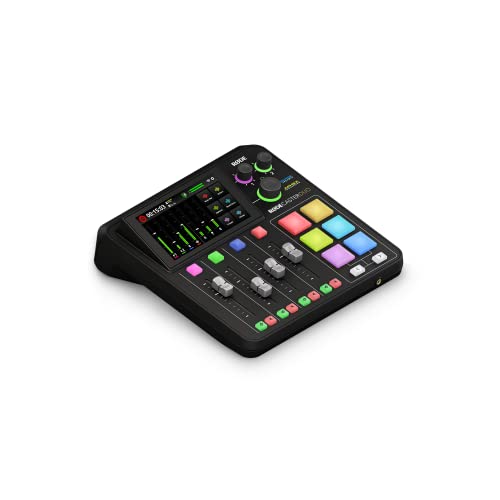
RODE RODECaster Duo — Best Compact Voice Console
The Duo answers the most common podcast shape there is: one host, one guest, no engineer. It carries the RODECaster bloodline — the same preamp quality and voice-processing approach as its big sibling — into a compact console that lives on a creator’s desk without annexing it. Two voices get the full production treatment: processing, pads, headphone mixes and multitrack capture, in a unit a solo producer can run while hosting, which is the entire point of the format.
Choosing between Duo and Pro II is a census question, not a quality question: count your chairs. Shows that will grow to three or four regular voices should buy the flagship once; the vast majority of podcasts, streams and narration setups will never outgrow the Duo and will enjoy its smaller footprint and simpler operation every session. It is the guide’s default recommendation for new serious podcasters, because it removes equipment from the list of reasons a show might fail.
Strengths
- Flagship preamp and processing lineage in a compact body
- Perfectly sized for solo hosts and two-voice formats
- Multitrack recording and production pads included
Trade-offs
- Two-voice ceiling — growing panels must upgrade
- Flagship-family pricing within the compact class
- Fewer physical controls than the Pro II for complex shows
| Detail | What to know |
|---|---|
| Format | Compact production studio for podcasting and streaming (per Amazon listing title) |
Check on Amazon — check the current price on Amazon before you decide, because bundle contents and included accessories change between listings.
Best for: solo podcasters, two-host shows and narration creators / Not suited for: panel shows with three or more regular voices

Tascam Model 12 — Best for Voice Studios That Grow Into Music
The Model 12 is the pick for voice work with ambitions. It is a genuine analog-feeling mixing desk that happens to contain a twelve-track standalone recorder and a USB interface with DAW control: a voice studio can track a panel, a narration session or a voice drama with full multitrack safety, then mix it with hands on faders rather than with a mouse. Tascam’s heritage in recorders shows in the workflow — recording is the centre of the design, not a feature bolted to a mixer.
For pure podcasting it is more machine than the RODECasters’ guided polish, and hosts wanting one-touch broadcast processing should look above. Its kingdom is the hybrid studio: audiobooks with music cues, voice drama, interview shows that become productions, creators whose ‘podcast’ keeps turning into records. If your voice work is growing in that direction, the Model 12 grows with it further than any console here.
Strengths
- Standalone 12-track recording plus mixer and DAW control in one unit
- Hands-on fader mixing for productions beyond raw talk
- Tascam recorder heritage: capture is the design’s centre
Trade-offs
- Less guided voice polish than the podcast flagships
- More desk than a simple two-voice show needs
- Learning real mixing craft is part of the deal
| Detail | What to know |
|---|---|
| Format | 12-track digital multitrack mixer/recorder and DAW controller (per Amazon listing title) |
Check on Amazon — check the current price on Amazon before you decide, because bundle contents and included accessories change between listings.
Best for: voice drama, audiobook and hybrid production studios / Not suited for: hosts wanting one-touch podcast polish only

Zoom LiveTrak L-8 — Best Value Podcast Console
The LiveTrak L-8 built its reputation on a simple, generous idea: everything a small podcast needs, in one box, at a working creator’s tier. It mixes, it records multitrack to its own card, it interfaces with a computer, and — the detail panel hosts bless — it provides four headphone outputs with mixes guests can actually use. Battery power means the show can record in a kitchen, a conference room or a field, which for interview podcasts is not a gimmick but a format.
Its voice processing is honest rather than luxurious, and its preamps serve speech well without matching the flagships’ polish. What it offers instead is completeness per unit of money that nothing else here touches. For a new panel show, a school or community podcast, or a mobile interview rig, the L-8 is the value recommendation this guide makes with both hands.
Strengths
- Mixer, multitrack recorder and interface in one unit
- Four headphone outputs — proper guest monitoring included
- Battery power enables location and field recording
Trade-offs
- Voice polish is functional rather than flagship-grade
- Smaller display and controls than the big consoles
- Music-grade demands will outgrow it sooner
| Detail | What to know |
|---|---|
| Format | Battery-powered mixer/recorder, 6 combo + 2 stereo inputs, 4 headphone outputs (per Amazon listing title) |
Check on Amazon — check the current price on Amazon before you decide, because bundle contents and included accessories change between listings.
Best for: new panel podcasts, mobile interviews and community shows / Not suited for: producers needing flagship voice processing

TC-Helicon GoXLR — Best for Streamers’ Voices
The GoXLR treats a streamer’s voice as a live broadcast performance, because it is one. Motorised faders give instant, physical control over voice, game, chat and music; the vocal effects chain — from pitch-flavoured fun to serious polish — is built for a host performing in real time; and the sound board puts stings and samples under the same fingers. For the streamer whose voice carries hours of live content daily, it remains the category’s defining desk.
Its world is the Windows streaming desk, and buyers should enter it knowingly: it is a broadcast performance tool, not a multitrack recording console, and podcast panels should look at the RODE and Zoom picks. Within its world it has no real rival in this guide. A streamer upgrading from a plain interface to a GoXLR is not buying a mixer; they are buying stagecraft for their voice, and their audience hears the difference in the first minute.
Strengths
- Motorised faders give live, physical mix control while streaming
- Vocal effects chain designed for real-time broadcast performance
- Sound board integrates stings and samples into the show
Trade-offs
- Windows-focused platform — check your setup honestly
- A performance desk, not a multitrack recording console
- Single-host focus; not a panel solution
| Detail | What to know |
|---|---|
| Format | 4-channel broadcaster platform with motorised faders and vocal effects (per Amazon listing title) |
Check on Amazon — check the current price on Amazon before you decide, because bundle contents and included accessories change between listings.
Best for: live streamers performing voice-first content on Windows / Not suited for: podcast panels or Mac-centred studios

MAONO MaonoCaster AME2 — Best Budget Voice Console
Every category needs a door that opens at a beginner’s push, and the MaonoCaster AME2 is this one’s. It gives a new voice creator the essentials in their correct form: a proper XLR microphone input with phantom power — so the microphone upgrade path stays open — sound pads for the production touches audiences love, Bluetooth for phone guests and music, and a layout aimed at podcast recording and live streaming from day one. It is designed for the YouTube-and-TikTok generation of voice creators and makes no apology for it.
Budget honesty, as always: its preamp and processing will not trouble the flagships, and a show that finds its audience will eventually graduate. But graduation is the point of a starter console. The AME2 teaches a new host the real workflow — gain, pads, monitoring, going live — on hardware that costs less than the mistake of buying the wrong flagship. For a first voice, it is the right first console.
Strengths
- Proper XLR input with phantom power keeps mic upgrades open
- Eleven custom sound pads for production personality
- Bluetooth and streaming-first layout for new creators
Trade-offs
- Preamp and processing are starter class, honestly
- Successful shows will outgrow it — by design
- Build suits a home desk, not a touring life
| Detail | What to know |
|---|---|
| Format | Podcast studio console with XLR input, phantom power, Bluetooth and 11 sound pads (per Amazon listing title) |
Check on Amazon — check the current price on Amazon before you decide, because bundle contents and included accessories change between listings.
Best for: first-time podcasters and streamers on a real budget / Not suited for: established shows needing flagship polish or panels
Comparison Table
| Pick | Badge | Key spec | Best for |
|---|---|---|---|
| RODE RODECaster Pro II | Best Overall Voice Recording Console | 4 preamps, APHEX, multitrack standalone | podcast panels and professional spoken-word producers |
| RODE RODECaster Duo | Best Compact Voice Console | Compact, 2-voice production studio | solo podcasters, two-host shows and narration creators |
| Tascam Model 12 | Best for Voice Studios That Grow Into Music | 12-track multitrack, DAW control | voice drama, audiobook and hybrid production studios |
| Zoom LiveTrak L-8 | Best Value Podcast Console | Mixer/recorder, 4 headphone outs, battery | new panel podcasts, mobile interviews and community shows |
| TC-Helicon GoXLR | Best for Streamers’ Voices | 4-channel, motorised faders, vocal FX | live streamers performing voice-first content on Windows |
| MAONO MaonoCaster AME2 | Best Budget Voice Console | XLR + phantom, 11 pads, budget tier | first-time podcasters and streamers on a real budget |
How to Choose a Voice Recording Mixer: Speech Is a Different Instrument
Speech runs a preamp differently from song. A broadcast dynamic microphone — the spoken-word standard — arrives quiet and asks for generous, clean gain, and any hiss in that gain prints onto every quiet sentence you will ever publish. When you compare consoles, the preamp question is therefore singular: can it drive a demanding dynamic microphone to a healthy level with the noise floor still inaudible in a pause? The flagship picks here answer with studio preamps; the budget picks answer adequately for close-miked, energetic delivery. Match the answer to your microphone and your material — narration is the least forgiving format ever recorded.
Processing is the second divider. A finished spoken voice is compressed gently, de-essed invisibly and gated or expanded so the room disappears between sentences. Consoles that build that chain in — with presets a non-engineer can trust — publish better-sounding shows from the same voices. If you record with a skilled producer and a DAW, raw capture plus later processing is a legitimate philosophy, and the Tascam’s multitrack honesty serves it. If you are the host, the engineer and the editor, buy the processing in the box and spend your evenings on content.
Guests decide the third divider. Every additional voice needs an input with real gain, a headphone feed with its own mix, and forgiveness for the microphone they brought. Four headphone outputs, as on the Zoom, or the RODECasters’ per-guest mixes, are not luxury specifications; they are the difference between guests who relax and perform and guests who endure your show. Count your chairs, then your headphone outputs, in that order.
Recording Resilience: The Episode You Cannot Re-Record
Conversations are unrepeatable. The laugh, the confession, the perfect answer — they happen once, in front of whatever recording chain you trusted. This is why the strongest voice consoles record to their own media, multitrack, independently of a computer: laptops update, crash, run out of storage and receive notifications, and a console that treats the computer as a guest rather than as the foundation survives all of it. When you evaluate any unit in this guide, ask the failure question out loud: if the computer dies at minute forty, what do I still own? The right answers are in this roundup; buy one of them.
Multitrack is the second half of resilience. A stereo mix bakes every mistake permanently — the guest who coughed over the host, the chair that squeaked through the best answer. Multitrack capture lets you repair in edit what the room did in life. For solo narration, a single clean track suffices and the compact consoles shine. For anything with two or more voices, multitrack is not a professional affectation. It is insurance, priced once, claimed on the worst day of your show’s year.
How to Set Up a Voice Recording Console for a Podcast or Narration Session
Set the chain in signal order and test it in that order. Microphone first: position it a hand’s breadth from the mouth, slightly off-axis to tame plosives, and set the console’s gain while speaking at true performance energy — interview voice, not soundcheck voice — aiming for healthy peaks with headroom to spare for laughter, which is louder than speech and always arrives unannounced. Engage the voice processing in stages: compression until the level feels settled, de-essing only if your sibilants demand it, gate or expansion last and gently, because an aggressive gate eating word-endings is worse than a quiet room.
Build headphone mixes as hospitality. Each guest hears themselves clearly, the host at conversational balance, and any playback — intros, clips, callers — at a level that does not make them shout over it. Record a two-minute test with everyone talking, laughing and interrupting, then listen to it on the worst speakers you own before the real session. Every problem your show has is audible in that test, at the only moment it is still free to fix.
Protect the take as procedure: fresh or verified media in the console, multitrack armed, a backup recorder running if the conversation truly matters, and a spoken slate at the top — show, date, guests — that future-you will bless during editing. Then put the equipment out of your mind entirely. The console’s whole purpose is to let the host be a host; a setup ritual done properly is what buys that freedom.
Common Buying Mistakes
Buying a music mixer for a speech job. Speech needs gain for dynamic microphones, voice processing and guest headphone mixes. A generic small mixer offers none of these on purpose, and your show will feel it weekly.
Trusting the computer as the only recorder. One crash, one full disk, one forced update — and an unrepeatable conversation is a memory. Standalone multitrack recording is insurance, not luxury.
Skipping per-guest headphone mixes. Guests who cannot hear themselves properly shout, mumble or endure. Their performance is your product; monitor it properly.
Over-processing the voice. Heavy gating eats word endings, heavy compression flattens personality. Set processing on a test recording and stop one notch before you think it is perfect.
Setting gain on a quiet soundcheck. Real conversation, laughter and emphasis are louder. Gain set politely is gain that clips at the best moment of the show.
Ignoring the microphone upgrade path. A console without a proper XLR input and adequate gain closes the door on the broadcast microphones your show will want next year. Buy the door open.
Final Recommendation
Panel podcasts and professional spoken-word shows belong on the RODECaster Pro II; solo hosts and two-chair formats on the Duo, which this guide names its default for new serious podcasters. Voice studios growing into production take the Tascam Model 12, mobile and community shows take the LiveTrak L-8, streamers take the GoXLR, and first voices on honest budgets take the MaonoCaster AME2 and learn the craft properly. Each was chosen for spoken word first — which is why each will still be right when the show finds its audience.
Set it up by the ritual, record the test, protect the take — and then forget the equipment and have the conversation. That forgetting is the product you actually bought.
Keep exploring the cluster: Best Vocal Mixers Best Analog Mixers Best Audio Mixers Under $500 Best Alternative Audio Mixers Best Voice Recording Mixers
Microphones for Voice Recording: The Other Half of the Console
A voice console’s preamps exist to serve microphones, and the pairing decides the sound more than either device alone. The broadcast dynamic microphone is the spoken-word reference for reasons of physics: it hears the voice at close range and largely ignores the room, it handles laughter and emphasis without distress, and its low output is precisely why this guide weighted clean preamp gain so heavily — a console that drives it quietly, like the RODECaster line, unlocks the microphone’s whole design. Large-diaphragm condensers occupy the other pole: in a treated room they capture narration with a detail and intimacy that dynamics cannot, and they punish every untreated wall with equal fidelity.
The practical wisdom is to match the microphone to the room you actually have, not the room in the brochure photograph. Most home studios are acoustically honest at best, and in those rooms the dynamic microphone through a strong console preamp produces the more professional result — a slightly less detailed voice that sounds like a studio, rather than a beautifully detailed voice that sounds like a kitchen. Creators graduate to condensers when their rooms earn it, and a console with proper phantom power and gain range, as every pick here has, keeps that graduation open.
Technique completes the chain: a consistent distance, a pop filter or off-axis angle for plosives, and a level set for the laugh rather than the sentence. Consoles with good metering and per-channel processing make that technique visible and repeatable. The host who masters distance and gain on a modest console will out-record the host who buys a flagship and shouts at it — a sentence this guide offers as encouragement to everyone starting at the budget picks.
Solo, Panel and Remote: Matching the Console to the Format
Spoken-word formats impose genuinely different demands, and the console that flatters one can frustrate another. The solo format — narration, commentary, the one-voice show — prizes a single immaculate channel, simple operation and editing-friendly capture; the compact consoles here serve it best, because every unused feature on a solo desk is a future misconfiguration. The solo host’s real risks are room sound and consistency, and money saved on console scale is better spent on the room and the microphone.
The panel format is a logistics discipline wearing an audio costume: multiple voices of different volumes and microphone techniques, guests who have never worn headphones professionally, and a host who must run the desk while holding a conversation. Here the flagship virtues — per-guest headphone mixes, processing presets that normalise a new voice in seconds, pads for the show’s furniture — stop being luxuries and become the difference between a produced programme and a recorded meeting. Panels should buy for the guest experience first, because guests are the product.
The remote format adds distance to the panel’s problems: callers and co-hosts arriving by phone, Bluetooth or computer, each with their own level and latency personality. Consoles that integrate those sources as first-class channels — with mix-minus handled so guests never hear their own echo — turn remote recording from a technical negotiation into a booking decision. Formats evolve, too: the solo show that adds a co-host has changed categories, and the guide’s census rule applies — count chairs honestly, including next year’s, before choosing the console that must seat them.
Editing Starts at the Console: Capture Decisions That Save Post-Production
Every hour of editing is purchased at the console, in advance, at a discount — or afterwards, at a premium. The first capture decision is multitrack discipline: one track per voice, always, even when the live mix sounds perfect, because perfection does not survive a guest’s cough, a chair’s opinion or a laugh that swallows the answer to the only question that mattered. The consoles in this guide that record multitrack standalone exist because their designers understood that post-production begins at capture.
The second decision is processing philosophy. Printing the console’s voice chain — compression, de-essing, gentle gating — produces episodes that need polish rather than rescue, and for most shows that trade is correct: the small loss of later flexibility is repaid weekly in editing hours. The exception is produced work — voice drama, audiobooks, anything with a sound designer’s name on it — where raw capture and full post control justify their cost, and where the Tascam’s honest multitrack approach in this guide is the right tool. Know which show you are making before you choose which philosophy to record with.
The third decision is metadata, the least glamorous and most repaid: slates spoken aloud, file naming that a stranger could decode, settings photographed, sessions backed up before the room is tidied. A voice archive is a creator’s capital, and it compounds only if it can be found, understood and trusted years later. The console is where that capital is minted. Run it like a mint — carefully, consistently, and with the humility to write everything down.
Room Treatment on a Budget: The Console’s Silent Partner
Every console in this guide will faithfully record the room it sits in, which makes the room the silent partner in every purchase. The good news is that voice recording is the most forgiving of all recording disciplines to treat: speech needs the reflections tamed, not the room rebuilt. Soft furnishings near the recording position, a bookcase’s cheerful disorder behind the host, heavy curtains on the nearest reflective wall — these unglamorous citizens absorb the flutter and slap that make home recordings sound like bathrooms, and they cost less than the cable drawer of most studios.
The test is the clap and the pause: record thirty seconds of your own voice with deliberate silences, and listen to what the silences contain. A treated-enough room gives the console a quiet canvas; the voice processing in these units — gating, expansion, polish — then works on a signal that deserves it. Creators routinely buy a flagship console to fix a room problem that a bookcase would have solved, and this guide, having sold you the console honestly, now tells you about the bookcase for free.
Two-Host Dynamics: Levels, Laughter and Talking Over Each Other
The two-host show is podcasting’s classic chemistry and its classic technical headache: two voices of different natural volumes, one shared sense of humour, and laughter that arrives like weather. The console’s contribution is preparation — each voice on its own channel with its own processing, gains set for the laugh rather than the sentence, compressors matched so neither host swells over the other, and headphone mixes that let each hear the balance the audience will hear. Shows that set up this way sound like conversations; shows that do not sound like negotiations.
Multitrack capture is the insurance policy for the format’s joy: the overlap, the interruption, the simultaneous laugh are the moments audiences love and editors fear, and separate tracks turn them from baked-in chaos into mixable energy. The host running the desk mid-conversation needs the controls to be few and physical — which is why the production consoles here put processing on guided controls and effects on pads, rather than in menus. Chemistry cannot be bought. The conditions for chemistry to be recorded properly can, and they are in this guide.
Video’s Audio Problem: Voice Consoles for Creators Who Film
Most spoken-word creators now publish to cameras as well as to feeds, and the camera’s audio — thin, roomy, an afterthought in a device built for pictures — is where professional impressions go to die. A voice console feeding the camera or the streaming software directly reverses the hierarchy: the voice arrives with broadcast processing, the levels are set by a person rather than an algorithm, and the recording exists independently of the video file, so an editing suite can marry the best picture to the best sound rather than accepting whichever the camera managed.
The workflow virtues compound on a filming schedule: the same console settings serve the podcast, the stream and the video, so a creator’s voice becomes recognisably theirs across every platform — an audio brand as consistent as a visual one. Guests on camera benefit doubly, because the headphone discipline and per-voice processing that make panels sound produced also make them look relaxed. Audiences forgive ordinary pictures with excellent sound far more readily than beautiful pictures with amateur audio. The console is the cheapest cinematography upgrade a voice creator can buy.
Longevity and Workflow: Choosing the Console You Will Still Love at Episode Two Hundred
Podcast equipment is usually reviewed at episode one and lived with at episode two hundred, and the virtues reorder themselves across that distance. Setup speed becomes sacred: the console that is ready in two minutes gets used for the extra episode, the interview, the quick response recording that keeps a feed alive. Reliability becomes identity: the show that has never lost a take trusts its process and books braver guests. And the small ergonomic truths — controls where the hand expects them, settings that recall themselves, media that manages itself — compound from conveniences into the show’s working culture.
Buy, therefore, for the producer you will be when the novelty has worn off: fewer features you must remember, more automation of the things you should not have to think about, and a recording path that protects the work when you are tired, rushed or hosting the most important guest of your year. The consoles in this guide were chosen with episode two hundred in mind. The show is a marathon disguised as a series of conversations, and the right desk is the one still quietly doing its job when the finish line is nowhere in sight.
Acoustic Confidence: Hearing Yourself the Way the Audience Will
Headphones are the voice recordist’s mirror, and most home setups look into a flattering one. The console’s headphone mix decides what the host believes they sound like, and a host who believes wrongly performs wrongly — pushing against a quiet mix, relaxing into a loud one, misjudging every pause. Set the headphone level so your own voice arrives at the intimacy you intend the audience to hear, with the guests balanced as they will be in the edit, and the performance calibrates itself without a single instruction from the engineer you also are.
The second mirror is playback honesty: check recordings on the devices your audience actually uses — a phone speaker, earbuds, a car — because a voice that only sounds produced on studio monitors is a voice produced for an audience of one. The consoles in this guide make that check easy with their multiple outputs and USB returns, and the habit costs three minutes a session. Shows that adopt it stop shipping episodes whose quiet guest vanishes on every phone in the world.
Confidence, in the end, is a technical achievement before it is a personal one. The host who trusts the chain — gain right, processing gentle, monitoring honest, recording protected — forgets the chain entirely, and the forgetting is audible in every relaxed sentence. That is what the equipment in this guide is actually for, and it is worth every penny of the flagship tier to the shows that live by it.
Sponsors, Segments and Structure: Production Touches the Console Enables
A mature show is built from segments — the cold open, the interview, the recurring feature, the close — and the production consoles here turn that structure into something performable live. Sound pads hold the stings and beds that mark the segments; a music channel rides under the host’s voice at a level set once and trusted; the whole architecture of the programme becomes a set of physical gestures rather than an editing project. Shows produced this way publish faster, sound more intentional, and give their hosts the pleasure of performing a programme instead of assembling one.
Sponsor reads and live announcements benefit disproportionately: delivered through the same voice chain, at the same polish, they inherit the show’s production values instead of sounding pasted on — which is precisely what sponsors are paying for. The console’s processing, set for the host’s voice, flatters the read automatically, and the pads make the transitions feel like radio, because structurally they are radio, rebuilt on modern hardware.
None of this requires the flagship by definition — the budget console’s pads produce a structured show too — but it requires the mindset the consoles were designed around: production as a live act, not a post-production apology. Creators who adopt it find their editing hours falling and their shows’ confidence rising, which is the closest thing to a free lunch this industry offers.
Your Voice, Your Archive: A Closing Word on Starting
Every long-running show began as a first episode recorded on whatever was at hand, and the archive of those episodes is the creator’s true body of work. The consoles in this guide span the whole journey — the first console that teaches the craft, the workhorse that carries the growth years, the flagship that a successful show grows into — and the workflow learned on the first transfers intact to the last, because the fundamentals never change: gain set honestly, guests heard properly, takes protected, voices treated as the product.
Start where your budget and your format honestly meet, record the test episode nobody will hear, and publish the second one. The equipment question, which feels enormous at the beginning, resolves into a habit within a month; the shows that matter are the ones still being made when it does. Choose from this guide with that perspective, and you will have chosen well — whichever badge is on the box, the voice that comes out of it will be yours, only clearer.
Frequently Asked Questions
What is the difference between a voice recording mixer and a podcast console?
The terms overlap: podcast consoles are voice recording mixers specialised for shows — standalone multitrack recording, guest headphone mixes, sound pads and guided voice processing. This guide uses voice recording mixer in that full, modern sense.
How much preamp gain do I need for a broadcast dynamic microphone?
Plenty, and clean. Dynamic broadcast microphones are quiet by design, so choose a console whose preamps are specified and reviewed for them — the RODECaster line’s studio preamps are the benchmark in this guide.
Do I need multitrack recording for a podcast?
For two or more voices, strongly yes: it lets you fix overlaps, coughs and level mismatches in editing instead of publishing them. Solo narration can live happily on a single clean track.
Can one console serve both podcasting and streaming?
Yes — the RODECaster Duo and Pro II work standalone for podcasts and as interfaces for streams, and the GoXLR serves streamers who also record. Match the primary job first; the secondary usually follows.
What are sound pads for?
Triggering intros, stings, effects and clips live during recording, so the show is produced in the moment rather than assembled later. Both RODECaster models and the MaonoCaster build them in.
Is a budget console good enough to start a show?
Yes — the AME2 and LiveTrak L-8 in this guide will record a real show properly. Content and consistency build audiences; consoles can graduate later, and the workflow you learn transfers.


