Disclosure: airfryerkitchensupply.com is reader-supported. When you buy through links on our site, we may earn an affiliate commission at no extra cost to you.
Where to Buy
Office chair prices vary enormously by tier and promotion, so picks say check price on Amazon rather than printing figures that age badly. Before ordering any chair, measure your desk height and doorway; the premium picks here are substantial pieces of furniture.
- Herman Miller Embody Ergonomic Office Chair (Charcoal Rhythm) — Check on Amazon
- Steelcase Leap Office Chair (Onyx) — Check on Amazon
- HON Ignition 2.0 Ergonomic Office Chair (Black) — Check on Amazon
- Marsail Ergonomic Office Chair — Check on Amazon
- SIHOO Doro C300 Pro V2 Ergonomic Office Chair with Footrest (Jet Black) — Check on Amazon
- Hbada E3 Air Ergonomic Office Chair (Grey) — Check on Amazon
Ask ten people to name the best top office chairs and you will hear the same two flagship names, a scrum of mid-range contenders, and very little agreement about what separates them. The honest answer is adjustment depth and build intent. A top chair is not the one with the longest feature list; it is the one whose seat height, lumbar support, armrests, and recline can be fitted to your body precisely — and whose mechanisms still feel tight after years of daily use. This guide compares six verified office chairs from the true flagships down to the strongest value designs, and explains what each tier actually buys you.
A note on claims, because this category attracts inflated ones: ergonomic is a design description, not a medical outcome. A well-fitted chair supports comfortable posture for long work sessions; no chair treats back conditions, and this guide makes no such claim for any pick. Spec boxes repeat only what each verified listing title states — adjustment systems by their makers’ names, capacities where listed, colors and configurations exactly as named. Where a listing is brief, the review says what is known and does not invent the rest.
Who should keep reading: full-time home workers, employers fitting out a small office, and anyone whose current chair has become the loudest complaint in their workday. The badges run from premium flagships to feature-rich mid-range chairs, so you can decide your tier first and your model second — the order that keeps this purchase sane.
In this guide
Quick Picks
Herman Miller Embody Ergonomic Office Chair (Charcoal Rhythm) — Best Overall. The flagship benchmark: fully adjustable arms and carpet casters in the Charcoal Rhythm configuration, from the maker whose name defines this tier. Buy once, work for a decade-plus. Check the current price on Amazon.
Steelcase Leap Office Chair (Onyx) — Best Ergonomic Back Support. LiveBack technology that changes shape as your back moves, plus the Natural Glide System that keeps you oriented as you recline — the listing names both systems outright. Check the current price on Amazon.
HON Ignition 2.0 Ergonomic Office Chair (Black) — Best Office Standard. The contract-office workhorse: lumbar support and adjustable arms from HON, a maker that furnishes actual offices. Less theatre, more Tuesday. Check the current price on Amazon.
Marsail Ergonomic Office Chair — Best Value Features. High-back mesh, adjustable lumbar, 3D armrests, and a headrest in one mid-range package. The feature checklist other brands charge flagship money to complete. Check the current price on Amazon.
SIHOO Doro C300 Pro V2 Ergonomic Office Chair with Footrest (Jet Black) — Best for Recline and Footrest. Full-body adaptive support, 8D armrests, breathable mesh, and a footrest, in Jet Black. Built for the worker whose day mixes deep focus with genuine lean-back breaks. Check the current price on Amazon.
Hbada E3 Air Ergonomic Office Chair (Grey) — Best Dynamic Lumbar Design. A 3-zone dynamic lumbar system, 3D adjustable headrest, and 4D armrests in Grey. The lumbar-curious pick: support designed to move in zones rather than push in one spot. Check the current price on Amazon.
Key Takeaways
- Fit adjustment — seat height, lumbar, armrests, tilt — matters more than any single premium material.
- Flagship chairs (Embody, Leap) sell long-term mechanism quality and refined ergonomics; mid-range chairs sell feature counts. Both are legitimate purchases for different budgets.
- Mesh backs breathe through long sessions; upholstered and foam seats cushion better in cold rooms and shorter sessions.
- Check listed weight capacities and seat dimensions against your own body before falling for a design.
- A chair supports comfortable posture; it does not treat medical conditions. Persistent pain needs a professional, not a purchase.
How These Picks Were Chosen
We started from office, desk, executive, and task chairs confirmed in the verified catalog data, and removed everything that was not a complete chair: no cushions, pads, mats, or replacement parts, and no dining or accent chairs wearing office keywords. Gaming chairs were set aside unless the listing itself positioned the model as an ergonomic office chair, because this guide’s keyword is about office seating first. Children’s desk chairs were excluded.
The six finalists were selected to represent the real tiers of the market honestly: two long-standing flagship ergonomic chairs whose names anchor the category, one established office-standard model from a contract furniture maker, and three modern mesh designs competing on adjustable features per dollar. Each appears in one named configuration — color and variant as listed — and duplicates of the same model in other colors were deduplicated away. Rankings follow fit quality and build intent, not feature-list length.
The 6 Best Office Chairs
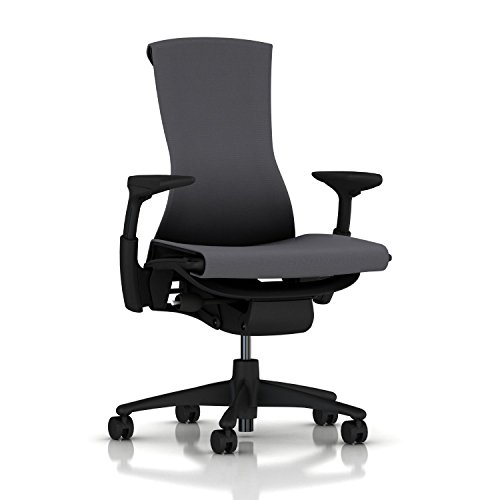
Herman Miller Embody Ergonomic Office Chair (Charcoal Rhythm) — Best Overall
The Herman Miller Embody is the chair this category is measured against, and the verified listing configuration here — Charcoal Rhythm fabric with fully adjustable arms and carpet casters — is the full-spec version, not a stripped variant. Embody’s design premise is a back and seat built from flexible structures that distribute pressure and move with the sitter rather than holding one rigid posture, which is why it remains the reference point for people who sit ten hours a day and have tried everything else.
Strengths
- Flagship ergonomic design built around movement and pressure distribution for very long sessions
- Fully adjustable arms, as listed, complete the fit picture for desk and keyboard work
- Build quality and mechanism refinement are the tier’s benchmark — this is a decade-scale purchase
Trade-offs
- Premium pricing that only makes sense amortized over years of full-time use
- Carpet casters, as listed, are specified for carpet; hard-floor users should confirm the right caster option
- The distinctive feel divides opinion — it is engineered support, not plush cushioning, and some sitters prefer foam
| Specification | As listed |
|---|---|
| Arms (as listed) | Fully adjustable |
| Casters (as listed) | Carpet casters |
| Configuration | Charcoal Rhythm |
| Category | Ergonomic office chair |
What the flagship tier actually sells is tolerance for your worst habits. Long meetings, deadline slouches, the slow migration from upright to reclined across an afternoon — a chair like the Embody is designed to keep supporting through all of it, with a back structure that flexes regionally instead of forcing a single curve. The fully adjustable arms matter more than they photograph: elbows supported at desk height remove the shoulder shrug that ends many workdays in tension, and they stay where you set them.
The buying logic is arithmetic, not luxury. A full-time worker spends more waking hours in this object than in their car; spread across a decade of daily use, the flagship premium becomes a modest daily figure, while a chair replaced every two years quietly costs the same and fits worse throughout. If your budget reaches this tier and you sit for a living, this is the chair the rest of the guide is implicitly compared to.
Check the current price on Amazon
Best for: Full-time professionals who sit 8+ hours daily and want a long-term flagship / Not suited for: Part-time or occasional desk users, or buyers wanting a soft, cushioned lounge feel

Steelcase Leap Office Chair (Onyx) — Best Ergonomic Back Support
The Steelcase Leap in Onyx is the other flagship name in this category, and its listing names the two systems that built its reputation: LiveBack technology, a backrest designed to change shape as your spine moves, and the Natural Glide System, which lets the seat move as you recline so your posture and reach stay natural. The listing also specifies wheels for carpet and frames the chair around supporting the sitter’s unique body shape — an unusually specific set of claims, all of which come from the verified title itself.
Strengths
- LiveBack backrest adapts its shape as you move, per the listing — support that follows posture changes
- Natural Glide System keeps work orientation natural through recline, reducing the reach penalty of leaning back
- Steelcase’s contract-grade build targets years of daily office use, in a neutral Onyx colorway
Trade-offs
- Flagship pricing, like its Herman Miller rival — justified by years of full-time use, not by occasional sitting
- Listed with wheels for carpet; hard-floor setups should confirm the appropriate wheel option
- Upholstered construction breathes less than the mesh chairs in this guide during warm-room marathons
| Specification | As listed |
|---|---|
| Back system (as listed) | LiveBack Technology |
| Recline system (as listed) | Natural Glide System |
| Wheels (as listed) | For carpet |
| Colorway | Onyx |
The Leap’s insight is that a back is not a static shape. Your spine’s curve differs upright, reclined, and perched forward, and a fixed backrest can only match one of them. LiveBack’s flexible back is engineered to track those changes, which is why Leap owners tend to describe the chair as disappearing — the support is simply always where the back currently is. The Natural Glide seat complements it: as you recline, the seat glides so your eyes and hands stay in a natural relationship to the screen and desk, instead of the recline pushing you away from your work.
Choose between the two flagships on feel and ecosystem: the Embody’s pixelated, movement-first support versus the Leap’s adaptive upholstered back. Both are legitimate endgame chairs, and both hold value unusually well because offices buy them by the hundred. For a buyer who knows their discomfort lives in their back’s changing posture across the day, the Leap’s named systems address exactly that pattern.

Best for: Workers whose posture shifts constantly through the day and who prioritize adaptive back support / Not suited for: Budget buyers, or hot-room sitters who strongly prefer a full mesh back

HON Ignition 2.0 Ergonomic Office Chair (Black) — Best Office Standard
The HON Ignition 2.0 in Black represents the tier where most real offices actually live: a proper ergonomic desk chair with lumbar support and adjustable arms, from a manufacturer whose core business is furnishing workplaces rather than selling to consumers one chair at a time. Its listing is refreshingly plain — ergonomic design, lumbar support, adjustable arms, workstation comfort — and that plainness is the point: everything a full workday needs, specified without flagship pricing or gaming theatre.
Strengths
- Lumbar support and adjustable arms — the two adjustments that matter most — from a contract furniture maker
- Black, neutral design that fits corporate and home offices without visual noise
- The Ignition line is built for fleet deployment, which implies parts, consistency, and durability thinking
Trade-offs
- Fewer exotic adjustments than the flagships — the fit envelope is good, not bespoke
- The listing does not name a headrest or footrest; buyers wanting those should look at the feature-rich picks below
- Aesthetically conservative: it looks like an office chair because it is one
| Specification | As listed |
|---|---|
| Support (as listed) | Lumbar support |
| Arms (as listed) | Adjustable |
| Colorway | Black |
| Intended setting (as listed) | Office / workstation |
There is a category of buyer — small businesses, pragmatic home workers, anyone furnishing two or three desks — for whom the correct question is not ‘what is the best chair money can buy’ but ‘what is the best chair that scales’. The Ignition 2.0 is built for that question. HON’s contract heritage means the chair is designed to be bought in multiples, sat in by different bodies, adjusted by each, and maintained over years — a different and in some ways harder brief than a single flagship sale.
For an individual buyer, that translates to honest ergonomics at a mid tier: real lumbar support, arms that move, and a mechanism that expects daily use. It will not flex like a Leap or distribute pressure like an Embody, and it does not pretend to. If your workday is six to eight hours and your budget has other claims on it, this is the chair that respects both facts.
Check the current price on Amazon
Best for: Small offices, pragmatic home workers, and multi-desk setups needing consistent, real ergonomics / Not suited for: Buyers seeking flagship refinement or headrest-and-footrest feature sets

Marsail Ergonomic Office Chair — Best Value Features
The Marsail Ergonomic Office Chair is the modern value formula executed completely: a high-back mesh chair with adjustable lumbar support, 3D armrests, and a headrest, on a rolling swivel base. Each of those features exists somewhere in the flagship tier, usually as an expensive inclusion; Marsail’s proposition is bundling all of them at a mid-range position. For buyers comparing spec sheets, this is the chair that makes the expensive ones explain themselves.
Strengths
- Complete adjustment bundle as listed: adjustable lumbar, 3D armrests, headrest, high-back mesh
- Mesh back breathes through long sessions and warm rooms better than upholstery
- Rolling swivel task format suits dynamic desk work across multiple screens and surfaces
Trade-offs
- Feature breadth is not the same as flagship mechanism refinement — adjustments may feel less precise over years of use
- Mesh seat-and-back feel is firmer and cooler than foam; cushion lovers should note the difference
- Brand support and parts ecosystems are younger than the contract makers in this guide
| Specification | As listed |
|---|---|
| Back | High back mesh |
| Lumbar (as listed) | Adjustable |
| Armrests (as listed) | 3D |
| Headrest | Included, as listed |
The honest way to evaluate a chair like this is adjustment by adjustment. Adjustable lumbar lets you place support at your belt line rather than accepting a fixed curve — the single most valuable ergonomic feature after seat height. 3D armrests move up-down, forward-back, and angle, which is what lets elbows rest naturally whether you type, mouse, or write. A headrest earns its place only for recliners and call-heavy workers who lean back to think or talk; if that is you, having it included beats retrofitting nothing.
Where the flagships pull away is in the tenth year and the tenth percentile: mechanism smoothness after a decade, and fit for bodies at the extremes of size. Within a normal budget and a normal frame, the Marsail bundle covers the ergonomic essentials completely, and its mesh construction adds the warm-room advantage. It is the pick for the buyer who reads spec sheets — and has noticed what the same boxes cost to tick elsewhere.
Check the current price on Amazon
Best for: Feature-focused buyers wanting lumbar, 3D arms, headrest, and mesh in one mid-range chair / Not suited for: Buyers prioritizing decade-scale mechanism refinement or plush foam seating

SIHOO Doro C300 Pro V2 Ergonomic Office Chair with Footrest (Jet Black) — Best for Recline and Footrest
The SIHOO Doro C300 Pro V2, in Jet Black, is specified around range: full-body adaptive support, 8D armrests — the most adjustment axes of any pick here — breathable mesh, a high back, and an integrated footrest, in a listing that frames it for long sessions at a computer desk. (The listing title available to us ends mid-phrase at ‘for Long’; we report the visible specification and do not complete the sentence.) This is the chair for workers whose posture range across a day is widest — upright typing, reclined reading, feet-up thinking.
Strengths
- 8D armrests, as listed, offer the finest arm positioning granularity in this guide
- Integrated footrest supports real recline breaks without a separate ottoman
- Breathable mesh and adaptive support suit long, posture-varied sessions
Trade-offs
- A footrest chair is a larger footprint — measure your under-desk and room space
- Maximum adjustability means maximum setup time; expect an evening of dialing-in
- The listing title in our data is truncated at the end, so confirm the full specification on the product page
| Specification | As listed |
|---|---|
| Armrests (as listed) | 8D |
| Support (as listed) | Full-body adaptive support |
| Back | High back, breathable mesh |
| Footrest | Included, as listed |
| Colorway | Jet Black |
The footrest changes a chair’s job description. Without one, recline is a posture you visit for thirty seconds; with one, it becomes a working position — reading, calls, review, thinking — that genuinely rests the legs and lower back between focused bouts. For home workers whose chair is also their reading chair and their call chair, that consolidation replaces a second piece of furniture. The 8D armrests serve the same range: they can be positioned to support elbows in upright typing and in reclined reading alike, which lesser arms cannot do across both extremes.
The costs are space and setup. A footrest mechanism needs room to deploy, and a chair with this many axes arrives as a project: budget real time to fit it, section by section, rather than judging it from the first sit. Buyers who want to unbox and work should take the HON; buyers who enjoy dialing a workstation to themselves, and who will use the recline daily, get a chair here that flagships without footrests simply do not offer.
Check the current price on Amazon
Best for: Home workers who mix upright work with reclined reading and calls, and who will invest setup time / Not suited for: Small desks, impatient unbox-and-go buyers, or anyone who never reclines

Hbada E3 Air Ergonomic Office Chair (Grey) — Best Dynamic Lumbar Design
The Hbada E3 Air, in Grey, leads with its lumbar concept: a 3-zone dynamic lumbar support, designed to address the lower back in sections rather than with a single pad. Around it, the listing specifies a 3D adjustable headrest and 4D adjustable armrests in a swivel chair — a coherent package aimed at workers who have found single-point lumbar supports either too much or in the wrong place, which is a common and legitimate complaint about simpler chairs.
Strengths
- 3-zone dynamic lumbar, as listed, targets support in sections for a more tailored back fit
- 4D armrests and a 3D adjustable headrest complete a full fit envelope
- Grey colorway and airy design language suit modern home offices that reject corporate black
Trade-offs
- Dynamic lumbar systems are a feel preference — some sitters still prefer a simple, firm single support
- Like all feature-rich chairs, it needs methodical setup to deliver what the spec promises
- A newer design lineage than the flagship and contract names; long-term parts support is less proven
| Specification | As listed |
|---|---|
| Lumbar (as listed) | 3-zone dynamic lumbar support |
| Headrest (as listed) | 3D adjustable |
| Armrests (as listed) | 4D adjustable |
| Colorway | Grey |
Single-pad lumbar supports fail in a predictable way: they push at one height with one force, and backs differ in both. A zoned dynamic system spreads that support across sections that can respond differently, which is mechanically closer to how a hand supports a back than how a pillow does. For the worker whose previous chairs were ‘almost right, but the lumbar digs in’ or ‘supportive, but too low’, a zoned approach is the specific engineering answer to that specific frustration — and the honest reason to choose this chair over a simpler one.
The rest of the package keeps pace: 4D arms add angle adjustment over the Marsail’s 3D, and a 3D headrest adjusts in enough axes to actually meet the back of your head rather than approximating it. Set aside real setup time, work through the lumbar zones first, and judge it across a full week of workdays. Within the feature-rich tier, this is the pick for the back-focused buyer.
Check the current price on Amazon
Best for: Workers dissatisfied with single-point lumbar supports who want zoned, adjustable back support / Not suited for: Buyers wanting the simplest possible chair, or flagship-brand long-term assurance
Comparison Table
| Pick | Badge | Key spec | Best for |
|---|---|---|---|
| Herman Miller Embody Ergonomic Office Chair (Charcoal Rhythm) Check on Amazon | Best Overall | Fully adjustable | Full-time professionals who sit 8+ hours daily and want a long-term flagship |
| Steelcase Leap Office Chair (Onyx) Check on Amazon | Best Ergonomic Back Support | LiveBack Technology | Workers whose posture shifts constantly through the day and who prioritize adaptive back support |
| HON Ignition 2.0 Ergonomic Office Chair (Black) Check on Amazon | Best Office Standard | Lumbar support | Small offices, pragmatic home workers, and multi-desk setups needing consistent, real ergonomics |
| Marsail Ergonomic Office Chair Check on Amazon | Best Value Features | High back mesh | Feature-focused buyers wanting lumbar, 3D arms, headrest, and mesh in one mid-range chair |
| SIHOO Doro C300 Pro V2 Ergonomic Office Chair with Footrest (Jet Black) Check on Amazon | Best for Recline and Footrest | 8D | Home workers who mix upright work with reclined reading and calls, and who will invest setup time |
| Hbada E3 Air Ergonomic Office Chair (Grey) Check on Amazon | Best Dynamic Lumbar Design | 3-zone dynamic lumbar support | Workers dissatisfied with single-point lumbar supports who want zoned, adjustable back support |
How to Choose the Best Top Office Chairs: Fit, Tier, and Honest Expectations
Begin with the fit envelope, in this order: seat height range that lets your feet rest flat with knees near ninety degrees; seat depth that leaves a small gap behind your knees; lumbar support you can position at your belt line; armrests that meet your elbows without shrugging your shoulders; and a recline you can tension to your weight. A chair that nails those five is ergonomic for you regardless of its tier or marketing. A chair missing two of them is a decoration with casters, regardless of its price.
Then choose your tier with clear eyes. Flagships — the Embody and Leap here — sell refined mechanisms, adaptive structures, and decade-scale durability, and they make financial sense for full-time, long-horizon sitters. The office-standard tier, represented by the HON Ignition 2.0, sells correct essentials and fleet practicality. The feature-rich tier — Marsail, SIHOO, Hbada — sells adjustment breadth per dollar, trading some long-term refinement for headrests, footrests, and multi-axis arms today. None of these is the ‘smart’ tier in the abstract; the smart tier is the one matching your hours, horizon, and budget.
Set expectations honestly at the end. A great chair supports comfortable, varied posture and removes the chair as a source of distraction. It does not fix a workstation with a wrong-height desk or a screen at the wrong distance, and it does not treat back pain or any medical condition. Fit the whole workstation — desk, screen, chair, feet — and let the chair be the strong link it is designed to be.
Mesh, Foam, and Upholstery: Choosing a Chair Body for Your Climate and Day
Mesh backs — and in some designs mesh seats — breathe. Air moves through them, heat does not pool, and a warm room or a naturally warm sitter stays comfortable through an afternoon. The trade is feel: mesh support is taut and distributed, without the cushion-sink some people equate with comfort, and mesh quality varies widely, from engineered flagship textiles to budget nets that sag within a year. In this guide, mesh appears in the Marsail and SIHOO picks, aimed squarely at long, warm sessions.
Upholstered foam — the flagships’ and the HON’s territory — cushions and insulates. It feels substantial in cold rooms and short sessions, molds a sense of being held, and in quality builds keeps its resilience for years. Its costs are heat retention and, in cheaper foams, permanent compression. The flagships justify themselves partly here: their seat structures, whether flexible pixels or engineered foam over glide systems, are designed to defeat the flattening that kills budget chairs.
Decide by your actual room and day, not by showroom impressions. A chair that feels like a cloud for four minutes can feel like a swamp at hour six in July; a taut mesh that feels austere at first touch can be the one you forget entirely by lunch — and a chair you forget is the highest praise this category offers.
Chair Setup: The Fifteen Minutes That Decide Whether a Good Chair Feels Good
Most ergonomic chairs are returned or resented because they were never actually fitted. Work through the setup in order: seat height until feet are flat and knees near a right angle; seat depth until two or three fingers fit between the seat edge and the back of your knees; lumbar positioned into the small of your back at belt height, at the gentlest effective pressure; armrests raised until elbows rest without shoulder lift, then angled to your keyboard work; recline tension set so you can lean back with gentle pressure and return without effort.
Then check the workstation around the chair: screen top near eye level, screen at arm’s length, feet fully supported — on the floor or a footrest if your desk is high. Change one variable per day across the first week and note what your body reports at 5 p.m., not at 9 a.m. Fresh adjustments feel strange before they feel right, and the honest judge is the end of a full workday. A chair fitted this way delivers what its listing promised; a chair left at factory settings delivers about half of it.
How Long Should You Sit? Posture Variety, Breaks, and What the Chair Cannot Do
Every chair in this guide, flagships included, shares one limit that no mechanism removes: the human body is not built for eight motionless hours in any posture, however well supported. Ergonomic design’s honest promise is narrower — to support you well in each position and to make changing positions easy. That is why recline systems that glide, backs that flex in zones or sections, and arms that reposition all matter: they are variety machines. A chair locked rigid at a textbook angle is ergonomically worse across a real day than a supportive chair its owner actually moves in.
Build the variety into the day deliberately. Shift between upright work, a slight recline for reading and calls, and standing or walking for the tasks that allow it — water, printers, the colleague conversation that did not need to be a meeting. Micro-movement counts too: the fidgeting a flexible back permits is circulation, not bad posture. If your work allows a sit-stand desk, the chair’s job becomes supporting the sitting intervals superbly rather than carrying the whole day, which is the healthiest brief any chair can be given.
And keep the boundary from this guide’s introduction in view: a chair supports comfortable posture; it does not diagnose, treat, or prevent medical conditions. Numbness, weakness, radiating pain, or pain that persists despite a properly fitted workstation are signals for a clinician or a qualified ergonomics assessment, not for a more expensive chair. Buy the best-fitted chair your tier allows, move in it often, and let professionals handle anything that behaves like a symptom rather than a preference.
Buying for a Team or a Household: Consistency, Spares, and Total Cost
Furnishing more than one desk changes the correct answer. A single buyer can indulge a flagship’s idiosyncrasies; a buyer equipping a small office, a couple’s two home workstations, or a family of students needs consistency — chairs that adjust across many bodies, survive shared use, and can be matched or replaced years later without a redesign of the room. That is the contract tier’s home ground, represented here by the HON Ignition 2.0: a chair designed to be bought in multiples, with the parts and support ecosystem that fleet ownership quietly depends on.
Total cost accounting also changes at scale. The honest ledger includes the chair, the correct casters for the floor, a spare set of arm pads or a gas lift held against the most common failures, and the replacement horizon — a mid-tier chair replaced twice in a flagship’s lifespan is not obviously the cheaper line item, and it is two rounds of disposal and re-setup besides. Households should run the same math in miniature: two well-matched mid-range chairs, bought once and fitted properly, usually serve a couple better than one flagship and one leftover kitchen chair, because the second workstation’s discomfort does not stay politely in the second room.
Whatever the count, standardize the fitting, not just the furniture. Run every chair through the fifteen-minute setup in this guide with its actual user, write the settings down, and re-check them seasonally — bodies, desks, and monitors all drift. A fleet of identical chairs at factory settings underperforms a mixed fleet that has been fitted chair by chair, which is the same lesson the whole category teaches at every scale: the chair is hardware, but the fit is the product.
Secondhand Flagships: A Legitimate Shortcut, With Checks
Flagship office chairs hold an unusual distinction in furniture: a deep, liquid secondhand market, fed by office closures and corporate refresh cycles, where Embody and Leap chairs change hands at fractions of their new price. For a buyer whose budget reaches the mid tier but whose body wants the flagship tier, a well-inspected used flagship is a rational route — these chairs were engineered for a decade-plus of daily service, and a three-year-old office example often has most of its designed life ahead of it. The keyword in that sentence is inspected, because a chair’s wear concentrates in specific, checkable places.
Run the checks in order. The gas lift: sit and confirm the chair holds height overnight, since a sinking lift is the most common flagship failure and a replacement part is a real cost. The tilt mechanism: recline through its range and listen for grinding or looseness. Arm pads and adjustments: every axis should move and then stay where it is set. Casters: roll across the floor type you own. Fabric and foam: press the seat’s front edge, where compression shows first. A chair that passes those five checks at a fair used price is not a compromise purchase; it is the flagship strategy executed patiently — and it is worth stating in a guide that also sells new chairs, because the reader’s decade of sitting matters more than any single transaction.
How to Set Up Your Office Chair and Workstation Together
Use this sequence on day one with any pick in this guide, then fine-tune across the first week.
- Assemble on a clear floor and check every fastener twice — a surprising share of ‘wobbly chair’ complaints are one under-tightened bolt.
- Set seat height first: sit, feet flat, knees at roughly ninety degrees. If your desk then feels too high for your elbows, the desk — not the chair — is the problem to solve next.
- Adjust seat depth if your chair offers it, leaving a two-to-three-finger gap behind your knees.
- Position lumbar support at your belt line, starting with light pressure and increasing only until your lower back feels met, not pushed.
- Set armrests to support your elbows with shoulders relaxed, then adjust their angle and depth to your keyboard and mouse positions.
- Set recline tension so leaning back takes gentle, deliberate pressure; lock nothing permanently — posture variety across the day is a feature, not a flaw.
- Align the workstation: screen top at or just below eye level, roughly an arm’s length away, feet fully supported.
- Work a full day before judging. Adjust one setting per day for the first week, and judge by how you feel at the end of the day.
A top chair is a fitted instrument. Fifteen minutes of methodical setup, plus a week of single-variable tweaks, is the difference between the chair in the listing and the chair in your life.
Common Buying Mistakes
Buying by feature count alone. A headrest you never recline into and arms with axes you never adjust add cost without comfort. List the adjustments your body and habits actually need, then buy the chair that does those well.
Ignoring casters and floor type. Two flagships here are listed with carpet wheels. Hard floors want soft casters and carpet wants hard ones; the wrong pairing scratches floors, resists rolling, and quietly annoys you for years.
Skipping the capacity and dimension check. Listed capacities and seat dimensions exist to be read. A chair sized below your body will feel wrong and wear fast, and no adjustment range rescues a structural mismatch.
Expecting a chair to treat pain. Chairs support posture; they are not medical devices. Persistent or worsening back, neck, or arm pain deserves assessment by a qualified professional — buy the chair for comfort and fit, and get pain addressed properly.
Judging the chair in the first hour. New support feels strange before it feels right. Give any serious chair a fitted week of full workdays before deciding, changing one setting at a time.
Final Recommendation
If the budget reaches the flagship tier, the decision is between two legitimate endgames: the Herman Miller Embody for movement-first, pressure-distributing support with fully adjustable arms, and the Steelcase Leap for an adaptive LiveBack backrest and Natural Glide recline — both listed here with carpet wheels, so hard-floor buyers should confirm their caster options. Below that tier, the HON Ignition 2.0 is the office-standard answer: real lumbar support and adjustable arms from a contract maker. The feature-rich tier splits by priority — Marsail for the complete mesh bundle, SIHOO Doro C300 Pro V2 for recline with a footrest and 8D arms, and the Hbada E3 Air for zoned dynamic lumbar support.
Whichever tier you choose, do the fifteen-minute fitting and the week of tweaks. The best office chair is not the one with the best listing; it is the one fitted to your body, at your desk, across your actual workday.
Related guides on this site:
- Best Ergonomic Office Chairs Back Pain
- Best Ergonomic Office Chairs Home
- Best Home Office Chairs For Comfort
- Best Customizable Office Chairs
- Best Heavy Duty Executive Office Chairs
- Best Easy Rolling Office Chairs
Frequently Asked Questions
Is a flagship chair like the Embody or Leap worth it?
For full-time sitters over a long horizon, the math usually works: refined adaptive support, mechanisms that stay tight for years, and strong resale demand. The value case collapses for part-time use — a few hours a week cannot amortize a flagship. Match the tier to your sitting hours, not to your aspirations.
What is the most important adjustment on an office chair?
Seat height is the foundation — feet flat, knees near ninety degrees — because every other fit depends on it. Lumbar positioning is second, since support at the wrong height is just pressure in the wrong place. Armrests third, then recline tension. A chair offering those four, well executed, covers the ergonomic essentials.
Are mesh chairs better than foam chairs?
Neither is universally better. Mesh breathes and suits warm rooms and long sessions; foam cushions and suits cold rooms and people who like a held, upholstered feel. Quality matters more than material: engineered mesh outlasts cheap foam, and flagship foam structures outlast cheap mesh. Choose by your room temperature and feel preference.
Do I need a headrest and footrest?
Only if your work includes real reclining — reading, calls, thinking breaks. Upright typists rarely touch a headrest, and a footrest needs room to deploy. The SIHOO pick bundles both for workers who genuinely mix postures; everyone else can skip the cost and footprint without losing upright ergonomics.
Can an ergonomic chair fix my back pain?
No chair can promise that, and you should distrust any listing that does. A well-fitted chair supports comfortable posture and removes poor seating as an aggravating factor, which is valuable and honest. Pain that persists, worsens, or includes numbness or weakness should be assessed by a qualified clinician — that is the correct purchase order: professional advice first, furniture second.
How long should a good office chair last?
Flagship and contract-grade chairs are built for many years of daily use, and their makers’ ecosystems assume it. Feature-rich mid-range chairs typically serve well for a solid span of years with more variance by model. Longevity habits help everywhere: correct casters for your floor, fasteners checked occasionally, and recline mechanisms used rather than locked rigid.


