Disclosure: airfryerkitchensupply.com is reader-supported. When you buy through links on our site, we may earn an affiliate commission at no extra cost to you.
Where to buy
Every chair in this guide was confirmed through Amazon’s own product data before it earned a place here, and every model sat inside the under-$300 tier at the time of checking. Prices move, so use the links below to check the current price on Amazon before you buy: Furmax Ergonomic Mesh Office Chair, BestOffice Ergonomic Office Chair, Sweetcrispy Computer Desk Chair, TRALT Ergonomic Office Chair with Headrest, GABRYLLY Ergonomic Office Chair with Footrest, and Hbada E2 Ergonomic Office Chair.
Introduction
Finding the best posture chairs under 300 dollars is really a search for adjustability, because posture at a desk is not a fixed pose you lock in once — it is a series of small positions you move through across a working day. A chair supports comfortable, upright sitting when its seat height, lumbar contact, arm position, and backrest angle can be tuned to your body and then re-tuned when you shift. Under $300, you will not get the motorized or fully modular systems of flagship ergonomic chairs, but you absolutely can get mesh backs that breathe, lumbar supports that move, headrests that adjust, and seats sized for smaller or larger bodies. This guide compares six verified chairs across that whole range, from a simple mid-back mesh chair for a first home office to a big-and-tall design with a six-way dynamic lumbar system. We frame everything in ergonomics and comfort terms only: a chair can support a neutral, relaxed sitting position, but no chair in this guide is presented as a treatment for back pain or any medical condition, and none should be bought as one.
One honesty note before the picks: the under-$300 boundary matters for this search, so every chair below was price-checked against that tier through Amazon’s product data before being linked. Models we liked but could not confirm inside the tier — including some well-known kneeling chairs and premium task chairs — were left out of the linked picks rather than waved through. If a chair’s price has moved since checking, the live listing is the final word.
In this guide
Quick Picks
- Best Overall: Furmax Ergonomic Mesh Office Chair — a mid-back mesh chair with lumbar support, adjustable height, and a breathable backrest that covers the posture basics at a budget-tier price. Check the current price on Amazon
- Best Budget: BestOffice Ergonomic Office Chair — a mid-back swivel desk chair with lumbar support, a sponge seat, and rolling wheels; the lowest-cost way into an adjustable desk chair in this group. Check the current price on Amazon
- Best for Small Spaces and Students: Sweetcrispy Computer Desk Chair — a mid-back mesh task chair with flip-up arms that tuck under a desk, made for bedrooms, dorms, and study corners. Check the current price on Amazon
- Best with Headrest: TRALT Ergonomic Office Chair with Headrest — an ergonomic desk chair with adjustable lumbar support, a headrest, flip-up armrests, and a 330 lb capacity rating in the listing. Check the current price on Amazon
- Best for Reclining Breaks: GABRYLLY Ergonomic Office Chair with Footrest — a mesh chair with a pull-out footrest, 135-degree recline, adjustable lumbar support, 3D armrests, and a steel base, rated in the listing to 300 lbs. Check the current price on Amazon
- Best Premium Under $300: Hbada E2 Ergonomic Office Chair — a big-and-tall mesh chair with 6-way dynamic lumbar support, 3D adjustable armrests, and a 3D adjustable headrest, in grey, without a footrest. Check the current price on Amazon
How These Picks Were Chosen
We started from the posture problem rather than the product catalog. A desk chair supports comfortable posture when four contact points can be adjusted to the sitter: seat height so feet rest flat, lumbar contact so the lower back is supported without being pushed, armrests so shoulders can relax, and a backrest that allows both upright work and a slight recline. Every candidate was checked against Amazon’s product data for its listing title, features, and — because this search carries a price tier — its price against the under-$300 boundary. Only models confirmed inside the tier received purchase links. We favored mesh backs for long sessions, treated weight-capacity figures printed in listings as sizing information rather than guarantees, and deliberately mixed chair types: compact task chairs, headrest models, a footrest recliner-style mesh chair, and a big-and-tall design, because “posture chair” means different geometry for different bodies. Claims in this article stay inside what the listings themselves confirm; where a listing is silent about a feature, we say so instead of filling the gap.
A word on method, because this search’s price tier makes method matter more than usual. Several strong ergonomic chairs appear in Amazon’s catalog without a price we could confirm against the tier at the time of writing — including respected mid-range models and both kneeling chairs discussed in the FAQ. Rather than assume they fall under $300, we excluded them from the linked picks entirely. That discipline shrinks the guide, and we accept the trade: a posture-chair guide organized around a budget owes its readers picks that were actually verified inside that budget, not picks that merely feel like they belong there. If your budget is flexible, those excluded models are worth a look on their own listings; if your budget is firm, everything linked below was checked against it.
The 6 Best Posture Chairs Under 300
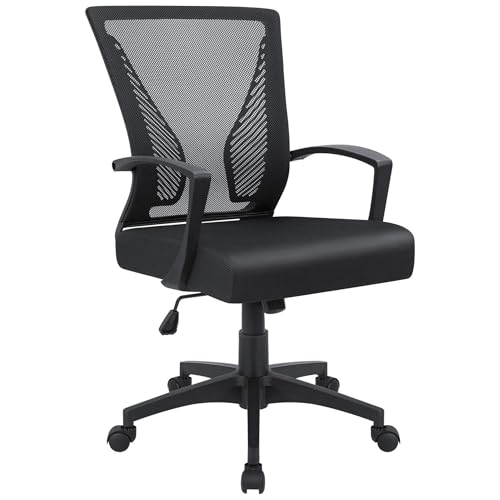
Furmax Ergonomic Mesh Office Chair — Best Overall
The Furmax is the chair that made budget mesh seating mainstream in home offices, and its formula still makes sense for posture basics: a mid-back mesh backrest with built-in lumbar support, adjustable seat height, a 360-degree swivel, and armrests, in black. It suits first-time home-office buyers, spare-room desks, and anyone replacing a dining chair with something designed for sitting at a screen. It is a mid-back design, so support stops below the shoulder blades — taller users who want head and upper-back contact should look at the TRALT or Hbada E2 instead.
Strengths
- Mesh backrest breathes through long sessions and flexes with the sitter
- Built-in lumbar support addresses the contact point budget chairs most often skip
- Adjustable height and full swivel cover the core ergonomic adjustments
Trade-offs
- Mid-back height gives no headrest or upper-back support
- Armrests are fixed rather than adjustable
- Seat cushion is a simpler pad than the contoured seats on pricier picks
Spec snapshot (from the listing): mid-back mesh backrest; lumbar support; adjustable height; 360-degree swivel; armrests; black.
What makes the Furmax work as a posture chair is that it gets the order of priorities right. Seat height adjustment lets you set your feet flat and your knees at a comfortable angle; the lumbar curve meets the lower back instead of leaving a gap you slump into; and the mesh keeps the backrest from becoming a heat trap that makes you perch on the seat edge. None of this is exotic, but at this tier many chairs still ship with a flat plywood-feel back and no lumbar shaping at all. Assembly is part of the value story too — the listing notes easy assembly, which matters when the alternative at this price is often a chair that takes an afternoon and a second pair of hands. For a single-desk household that needs one honest chair, this is the default recommendation.
Best for: budget home offices and first desk setups / Not suited for: tall users wanting headrest support or anyone needing a heavy-duty capacity rating
Check the current price on Amazon

BestOffice Ergonomic Office Chair — Best Budget
BestOffice’s mid-back chair is the floor of this guide: a swivel desk chair with lumbar support, adjustable height, a breathable backrest, a sponge seat, and rolling wheels, sold as a pack of one in dark black. It suits students, temporary work-from-home setups, and households furnishing two desks at once, where the per-chair cost decides everything. The listing even publishes the chair’s weight and dimensions — 19 pounds and 18 x 18 x 38 inches from the product data — which tells you honestly what class of chair this is: light, compact, and simple.
Strengths
- Lowest entry cost in this guide while keeping lumbar support and height adjustment
- Lightweight build is easy to move between rooms
- Breathable backrest suits warm rooms and long study sessions
Trade-offs
- Compact seat dimensions will feel small for larger adults
- Sponge seat padding is basic and compresses with heavy daily use
- No headrest, no adjustable arms, no recline lock range to speak of
Spec snapshot (from the listing): mid-back; lumbar support; adjustable height; sponge seat; rolling wheels; 19 lb chair weight; 18 x 18 x 38 in.
Budget chairs earn skepticism, so be clear about what this one is for. It gives a small or average-sized sitter the two adjustments that matter most — seat height and a lumbar-shaped back — at the lowest price in the group, and that is a genuine posture upgrade over a kitchen chair or a flat-back novelty seat. What it does not give you is durability headroom for a 250-pound user sitting ten hours a day, or the fine-tuning a taller person needs. Treat it as the right chair for a dorm, a teen’s study desk, a guest-room office, or a first apartment, and it performs its job well. Treat it as a decade-long daily driver for a large adult and you are asking the wrong chair the wrong question.
Best for: students, small sitters, second desks, tightest budgets / Not suited for: large adults or all-day heavy use
Check the current price on Amazon
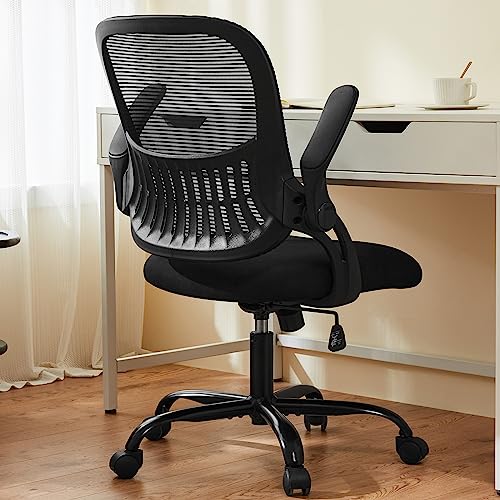
Sweetcrispy Computer Desk Chair — Best for Small Spaces and Students
The Sweetcrispy is a mid-back mesh task chair designed around tight rooms: lumbar support, a rolling swivel base, and flip-up arms that let the chair push fully under a desk when the day ends. The listing positions it for home, bedroom, study, and student use, and that positioning is honest — this is a chair for desks that share space with beds and wardrobes. It suits students, apartment dwellers, and anyone whose “office” is a corner of another room.
Strengths
- Flip-up arms let the chair tuck completely under the desk, saving floor space
- Mesh mid-back with lumbar support keeps the posture basics intact
- Compact footprint fits bedroom and dorm desks
Trade-offs
- Mid-back design with no headrest option
- Seat sizing is aimed at students and smaller adults
- Flip-up arms trade adjustability for space savings
Spec snapshot (from the listing): mid-back mesh; lumbar support; flip-up arms; rolling swivel; black.
Small-space sitting has a specific posture trap: when a chair cannot tuck away, it gets parked at an angle, and the sitter ends up twisted toward the desk. Flip-up arms solve the parking problem, and a chair that parks straight gets sat in straight. The Sweetcrispy also keeps the mesh back that this price band sometimes swaps for solid plastic, which matters in un-air-conditioned student housing. If your desk is full-size and your room is not, the TRALT below gives you a headrest and a higher capacity rating for more money; if every inch counts, this is the posture chair that respects the room it lives in.
Best for: dorms, bedroom desks, small apartments / Not suited for: large adults or users wanting a headrest
Check the current price on Amazon

TRALT Ergonomic Office Chair with Headrest — Best with Headrest
The TRALT adds the feature the first three picks lack: a headrest, paired with adjustable lumbar support and flip-up armrests on a mesh ergonomic frame. The listing rates the chair to 330 lbs and describes it as a home office desk and reading chair. It suits taller sitters who feel mid-back chairs end too soon, and anyone who leans back to read, take calls, or think between tasks. One transparency note: the Amazon title for this listing contains a garbled segment (it reads “Black, 1 |” mid-title, apparently a pack-count artifact); the product itself is a single black chair, and we name it here by its confirmed features rather than repeating the garbled text.
Strengths
- Headrest extends support for taller users and reclined reading
- Adjustable lumbar support, not just a fixed curve
- 330 lb capacity rating in the listing widens the fit range
- Flip-up arms keep the small-room parking trick
Trade-offs
- Pricier than the mid-back basics above
- Headrest geometry suits a range of heights, not every height
- Mesh seat-and-back feel is firmer than padded executive chairs
Spec snapshot (from the listing): ergonomic mesh; adjustable lumbar support; headrest; flip-up armrests; 330 lb capacity; black; single chair.
A headrest only helps posture if it meets your head when you lean back slightly — too low and it pushes your shoulders, too high and it never touches. The TRALT’s value is that it brings headrest support into a price band where most chairs stop at the shoulders, while keeping the flip-up arms that make a chair livable in a real room. Combined with adjustable (rather than fixed) lumbar support, it is the most complete ergonomic package in the middle of this guide’s budget, and the natural step up from the Furmax if you are taller or you read and take calls in your chair as much as you type.
Best for: taller sitters, readers, mixed work-and-call days / Not suited for: buyers who prefer deep padded executive-style seats
Check the current price on Amazon

GABRYLLY Ergonomic Office Chair with Footrest — Best for Reclining Breaks
The GABRYLLY is built around a rhythm more people are adopting: work upright, rest reclined. It combines a mesh ergonomic chair — adjustable lumbar support, 3D armrests, a headrest, and a large steel base — with a 135-degree recline and a footrest, and the listing rates it to 300 lbs. It suits people who take reading, video, or rest breaks in the same chair they work in, and home offices that double as relaxation space. The steel base is a meaningful detail at this tier, where bases are often the first structural compromise.
Strengths
- Footrest plus 135-degree recline supports genuine position changes through the day
- Adjustable lumbar support and 3D armrests cover work-mode tuning
- Large steel base and 300 lb listing rating suggest a sturdier frame class
Trade-offs
- Footrest chairs need floor space in front of the desk to extend
- Recline-focused design is more chair than a small room may want
- Near the top of the under-$300 tier
Spec snapshot (from the listing): mesh; adjustable lumbar support; 3D armrests; headrest; footrest; 135-degree recline; large steel base; 300 lb capacity.
Ergonomists repeat one idea more than any other: the best posture is the next posture. A chair that only supports one upright angle encourages the fidgeting, perching, and leg-crossing that make long days feel longer. The GABRYLLY’s footrest-and-recline combination gives you a second, genuinely different position without leaving the chair, and its work-mode adjustments are not an afterthought — adjustable lumbar, 3D arms, and a headrest are all present. If your day blends focused typing with reading, calls, and short rest breaks, this is the chair in the guide designed for that blend.
Best for: mixed work-and-rest days, readers, video-heavy work / Not suited for: very small rooms or buyers who never recline
Check the current price on Amazon

Hbada E2 Ergonomic Office Chair — Best Premium Under $300
The Hbada E2 is the most adjustable chair in this guide and the closest the under-$300 tier gets to flagship ergonomic design. Its headline feature is a 6-way dynamic lumbar support — a system intended to move with the sitter rather than press at one fixed point — joined by 3D adjustable armrests and a 3D adjustable headrest on a big-and-tall mesh frame, in grey. The listing specifies this configuration has no footrest. It suits larger users, long-hour workers, and anyone who has found fixed lumbar pads land in the wrong place on their back.
Strengths
- 6-way dynamic lumbar support is the most advanced back system in this guide
- 3D armrests and 3D headrest extend fine-tuning to shoulders and head
- Big-and-tall mesh frame suits larger bodies and warm rooms
Trade-offs
- Highest price in this guide, though confirmed inside the under-$300 tier when checked
- No footrest on this configuration
- Dynamic lumbar feel is different from a firm fixed pad — a preference, not a given
Spec snapshot (from the listing): big-and-tall mesh; 6-way dynamic lumbar support; 3D adjustable armrests; 3D adjustable headrest; grey; no footrest.
Fixed lumbar supports have a quiet flaw: backs are not fixed. When you shift, reach, or lean, a static pad can end up pressing where you no longer are. A dynamic system that tracks the sitter is the premium answer to that flaw, and the E2 brings it under $300 alongside genuinely adjustable arms and headrest — the full adjustment stack. For a larger user who works long hours and has already discovered that budget chairs run small and simple, this is the guide’s endgame pick: buy the adjustability once, inside the tier, instead of buying two lesser chairs in three years.
Best for: larger users, long hours, buyers prioritizing lumbar adjustability / Not suited for: small rooms or buyers wanting a footrest
Check the current price on Amazon
Comparison Table
| Pick | Badge | Key spec | Best for |
|---|---|---|---|
| Furmax Ergonomic Mesh Office Chair | Best Overall | Mid-back mesh, lumbar support, adjustable height | First home offices |
| BestOffice Ergonomic Office Chair | Best Budget | Mid-back, sponge seat, 19 lb build | Students and second desks |
| Sweetcrispy Computer Desk Chair | Best for Small Spaces | Mid-back mesh, flip-up arms | Dorms and bedroom desks |
| TRALT Ergonomic Office Chair | Best with Headrest | Headrest, adjustable lumbar, 330 lb rating | Taller sitters and readers |
| GABRYLLY Ergonomic Office Chair | Best for Reclining Breaks | Footrest, 135° recline, steel base | Mixed work-and-rest days |
| Hbada E2 Ergonomic Office Chair | Best Premium Under $300 | 6-way dynamic lumbar, 3D arms and headrest | Larger users, long hours |
Key Takeaways
- Posture support under $300 is about adjustability: seat height, lumbar contact, arms, and backrest angle.
- Every pick here was price-checked against the under-$300 tier through Amazon’s product data before being linked.
- Mesh backs suit long, warm sessions; headrests matter mainly for taller users and reclined reading.
- Flip-up arms are a real ergonomic feature in small rooms because a chair that parks straight gets sat in straight.
- Dynamic lumbar systems, like the Hbada E2’s, address the biggest flaw of fixed pads: backs move.
- These chairs support comfortable sitting positions; none is a medical treatment, and none is sold here as one.
- Measure your body and your desk before ordering — sizing errors are the most common reason a good chair feels wrong.
How to Choose a Posture Chair Under $300
Start with your body, not the chair. Measure your desk height and your own lower-leg length: you want a seat height range that lets your feet rest flat on the floor with your knees at roughly a right angle, and a seat depth that leaves a small gap behind your knees. Petite users are often best served by compact task chairs like the Sweetcrispy or BestOffice; taller users should look for headrest models like the TRALT; larger users should filter first by the capacity rating printed in the listing and by seat width, which is where the Hbada E2 and other big-and-tall designs earn their place.
Next, decide how you actually sit. If you type in one position for hours, prioritize lumbar quality and seat cushioning. If your day mixes typing, calls, reading, and short breaks, a recline with a footrest — the GABRYLLY pattern — supports the position changes that keep sitting comfortable. If you share the chair with a partner or teenager, favor models with the widest adjustment ranges, because a chair that fits two bodies needs more travel in every adjustment than a chair fitted to one.
Finally, spend the tier wisely. Under $300, the meaningful upgrades in order are: lumbar support that exists at all, then lumbar support that adjusts, then a headrest if you are tall, then arm adjustability, then dynamic lumbar systems. Cosmetic upgrades — racing stripes, leather-look upholstery, RGB anything — add nothing to sitting comfort. Every chair in this guide spends its budget on the adjustment stack instead, which is exactly what a posture purchase should do.
How to Set Up Your Chair for Comfortable Sitting
A posture chair only works if it is set up, and most people skip the setup. Work through this sequence once, in order, when your chair arrives. First, set seat height so your feet rest flat on the floor and your thighs are roughly parallel to it; use a footrest or a sturdy box if your desk forces the chair higher. Second, sit back fully so your lower back contacts the lumbar support, then adjust the lumbar height or depth until the contact feels even and supportive rather than pushy. Third, set armrests so your shoulders hang relaxed and your elbows bend at about a right angle when your hands are at the keyboard; if fixed arms hold your shoulders up, you are better off flipping them up or ignoring them. Fourth, raise or lower your monitor so the top of the screen sits near eye level — chair setup and screen setup are one system. Fifth, set the backrest tension so you can lean back with gentle pressure rather than fighting the chair or falling through it. Revisit the sequence after a week; new chairs settle, and so do habits.
When to Replace a Chair Instead of Adjusting It
Some readers arrive at this guide with a chair already under them, wondering whether setup changes can save it. Sometimes they can: a chair that feels wrong because its lumbar pad sits at the wrong height, its arms lift your shoulders, or its seat height forces your feet to dangle is a setup problem, and the setup sequence earlier in this guide fixes it for free. But four symptoms mean replacement is the honest answer. A gas lift that slowly sinks during the day will not recover, and sitting on a sinking chair means your desk height relationship changes by the hour. A backrest that has cracked, or mesh that has gone slack so the lumbar curve no longer meets your back, has lost the feature that made it a posture chair at all. A seat cushion compressed to a hard, flat board in the center — you can feel the seat pan through it — no longer distributes weight the way it did when new. And a chair that was simply bought for a different body — a compact student chair now serving a much larger adult, or a big executive chair dwarfing a petite user — cannot be adjusted across that gap, because adjustment ranges are measured in inches, not in categories. If your chair shows one of the first three symptoms or matches the fourth, the picks in this guide are organized so you can replace like for like by use case: small-space, headrest, recline, big-and-tall, or the all-round Furmax default.
Common Buying Mistakes
The first mistake is buying by silhouette — choosing the chair that looks like an executive suite or a race car instead of the chair whose adjustments fit your body. The second is ignoring capacity and seat dimensions printed in the listing; a chair that is too small is a posture problem wearing a product photo. The third is assuming a headrest helps everyone: on a short torso, a fixed headrest can push the head forward, which is why mid-back chairs remain the right answer for many petite users. The fourth is treating “ergonomic” in a product name as a certification — it is a description, not a standard, and the adjustments listed are the real specification. The fifth is forgetting the floor: hard casters on hardwood can damage flooring and roll too freely, so check what your floor needs. The sixth is expecting a chair to fix a workstation: if your screen is a laptop on a low table, no chair at any price completes that setup.
Lumbar Support, Explained: Fixed, Adjustable, and Dynamic
The lumbar system is the heart of a posture chair, and the under-$300 tier contains all three generations of the idea. A fixed lumbar design — the Furmax and BestOffice pattern — builds the curve into the backrest itself. It costs nothing extra, never needs setting, and works well when the curve happens to land where your lower back is, which it does for a broad middle range of torso lengths. Its weakness is the same as its strength: it cannot move, so a sitter whose lumbar curve sits unusually high or low may feel the support in the wrong place.
An adjustable lumbar system — found on the TRALT and GABRYLLY — lets you raise, lower, or deepen the contact point. This is the single most valuable upgrade in the tier, because it converts a chair that fits the average body into a chair that fits your body. If you have ever sat in a chair and felt the support pad pressing your mid-back or hovering below your belt line, adjustable lumbar is the feature written for you.
A dynamic lumbar system — the Hbada E2’s six-way design — goes one step further and moves with you, maintaining contact as you shift, lean, and reach. It is the closest analogue in this tier to how premium ergonomic chairs behave. Dynamic systems feel less like a pad and more like a presence; some users immediately prefer it, while others who like a firm, definite push in the lower back may find a well-placed adjustable pad more satisfying. None of the three approaches is a medical device, and none should be chosen on a promise of pain relief — choose by how the contact feels across a full day of your actual work.
Sizing a Posture Chair to Your Body
Chair sizing is where most posture purchases quietly fail, so take five measurements before ordering. Seat height range must cover the distance from the floor to the crease behind your knee while you wear your usual work shoes; if the chair’s lowest setting is above that, your feet will dangle and your thighs will carry pressure they should not. Seat depth should leave roughly two to three fingers of space between the seat edge and the back of your knee when you sit fully back. Seat width should exceed your hip width with room for winter clothing and natural shifting — this is the measurement that pushes larger users toward big-and-tall designs like the Hbada E2, and toward checking the capacity figures listings print, such as the TRALT’s 330 lb and the GABRYLLY’s 300 lb ratings.
Backrest height is the fourth measurement: a mid-back chair should reach at least your shoulder blades’ lower edge, while taller users — roughly over six feet, though torso length matters more than total height — usually need a high back and headrest. Armrest height is fifth: with your shoulders relaxed and elbows at a right angle, the rests should just meet your forearms without lifting your shoulders. When a listing publishes the chair’s own dimensions and weight, as the BestOffice listing does with its 18 x 18 x 38 inch, 19-pound figures, use them — a compact chair is a feature in a dorm and a flaw under a large adult, and the numbers tell you which before the box arrives.
Posture Habits That Matter More Than the Chair
Honesty requires this section: the chair is the smaller half of desk posture. The larger half is behavior. Change position regularly — a chair with recline, like the GABRYLLY, makes this easy, but standing, stretching, and walking to refill a water bottle all count. Keep your feet supported rather than hooked around the chair base or tucked under you, positions that feel restful for five minutes and expensive by hour three. Place frequently used items within easy reach so you are not repeatedly twisting to a printer or shelf. Take your calls standing or walking when the call allows it. And set a simple timer if you are prone to three-hour unmoving stretches; no lumbar system, however dynamic, is designed to make one frozen position healthy for an entire afternoon. Buy the chair for support, then supply the movement yourself — that combination, not any single product, is what “good posture” actually consists of at a desk.
How to Care for a Mesh Office Chair
Mesh chairs ask for little, but not nothing. Vacuum the backrest and seat weekly with an upholstery brush to pull dust out of the weave before it grinds in; wipe spills immediately with a damp cloth and mild soap, because mesh dries fast but stains set in the fibers if left. Check the gas-lift and base bolts after the first month — new chairs settle and fasteners loosen slightly — and again twice a year. Keep casters clean; hair and carpet fiber wound around the axles are the usual cause of a chair that stops rolling smoothly. If your chair has a foam seat pad under mesh, rotate your sitting position across the week rather than always perching on the front edge, which compresses one zone of foam months ahead of the rest. Finally, keep the chair out of prolonged direct sun when you can: UV ages mesh elasticity, and a backrest that has lost its tension has lost the lumbar support you paid for.
Understanding the Under-$300 Tier: What the Money Buys
It helps to know what this budget actually purchases, because the chair market’s biggest price jumps are not linear. At the bottom of the tier, money buys the fundamentals: a shaped backrest with lumbar support, a gas lift, a five-point base, and casters — the BestOffice and Furmax pattern. These chairs are honest tools, and for many home offices they are sufficient for years. In the middle of the tier, money buys adjustability range: headrests, lumbar systems you can position, armrests that move in more than one direction, higher capacity ratings, and sturdier bases — the TRALT and GABRYLLY territory. At the top of the tier, approaching $300, money buys sophistication in the lumbar system itself, like the Hbada E2’s dynamic design, plus the fit range of big-and-tall frames.
What the tier does not buy, at any point, is worth naming so expectations stay calibrated. You will not find genuine leather upholstery, all-metal construction throughout, or the decade-scale component warranties of flagship ergonomic brands. You will not find synchronized mechanisms tuned by research labs, or seat pans with waterfall edges sculpted from pressure-mapping data. None of that makes the tier a compromise to apologize for: the adjustments that determine daily comfort — height, lumbar, arms, recline — are all present in this guide’s picks, confirmed in their listings and checked against the tier. The flagship premium buys refinement and longevity at the margins. The under-$300 tier buys the substance, and for most desks the substance is what sitting actually feels like.
Desk, Floor, and Room Compatibility
Before ordering, run three compatibility checks that have nothing to do with your back. First, desk clearance: measure the height under your desk apron or drawer unit and compare it with the chair’s armrest height at your sitting setting — flip-up arm designs like the Sweetcrispy and TRALT exist precisely because fixed arms collide with drawers and thick desktops. Second, floor type: standard casters are made for carpet and hard floors alike at this tier, but deep-pile carpet will make any chair feel reluctant to roll, and delicate hardwood deserves either a chair mat or softer caster wheels; decide which before the first scratch rather than after. Third, room geometry: a reclining footrest chair like the GABRYLLY needs open floor in front of the desk equal to its extended length, and a big-and-tall frame needs a doorway and turning radius that fit it. Posture chairs are furniture as well as equipment — the best-fitting chair in this guide is the one that fits your body, your desk, and your room at the same time.
Final Recommendation
For most buyers, the Furmax Ergonomic Mesh Office Chair is the sensible default: the posture basics, a breathable back, and a budget-tier price. If money is the binding constraint, the BestOffice Ergonomic Office Chair keeps the essential adjustments for less. Taller users and readers should step up to the TRALT’s headrest design, break-takers to the GABRYLLY’s footrest recline, and larger or long-hour users to the Hbada E2, the most adjustable chair confirmed inside this tier. Small rooms point to the Sweetcrispy. Readers comparing adjacent budgets and use cases should also see Best Posture Chairs For Desk, Best Chairs For Good Posture Inexpensive, Best Desk Chairs Around 300, Best Desk Chairs Mesh, and Best Desk Chairs For Extended Use.
Frequently Asked Questions
What makes a chair a “posture chair”?
In practice, adjustability: seat height, lumbar contact that meets your lower back, armrests that let shoulders relax, and a backrest that supports upright work and a slight recline. The label itself is not a certification — judge any chair by the adjustments its listing actually specifies.
Is mesh or padding better for long sitting days?
Mesh breathes and flexes, which suits warm rooms and people who run hot; padded seats feel plusher at first contact and suit cooler rooms. For long days, the lumbar design and seat dimensions usually matter more than the backrest material.
Should I choose a mid-back or high-back chair?
Mid-back chairs support up to below the shoulder blades and suit most average-height users. High-back chairs with headrests suit taller users and anyone who leans back to read or take calls. A headrest that lands at the wrong height is worse than none, so match the chair to your torso length.
What about kneeling chairs under $300?
Kneeling chairs are a legitimate alternative sitting style, and verified listings exist — a DRAGONN by VIVO ergonomic kneeling chair and a Varier rocking knee stool both appear in Amazon’s product data. We could not confirm either inside the under-$300 tier with a recorded price at the time of writing, so neither is linked as a pick here; check their live listings if that style appeals to you, and note kneeling chairs shift load to the shins, which some users love and others cannot tolerate for long sessions.
How much capacity should I look for?
Choose a chair whose listing capacity rating comfortably exceeds your weight, and check seat width as well as the number. In this guide, ratings printed in listings include 300 lbs for the GABRYLLY and 330 lbs for the TRALT; the Hbada E2 is a big-and-tall design.
How long should a chair in this tier last?
With daily use, expect the gas lift and seat foam to be the wear items over a multi-year horizon, while mesh backrests and steel or reinforced bases typically outlast them. Chairs with published capacity ratings comfortably above your weight, and designs that keep you sitting back in the seat rather than perched on its edge, age the slowest. Care basics — vacuuming mesh, tightening bolts, cleaning casters — meaningfully extend service life.
Is a gaming-style chair a good posture chair?
Some are and some are furniture-shaped decoration. Judge by the same specification as any chair in this guide: does the listing confirm lumbar support (ideally adjustable), seat height adjustment, sensible dimensions, and a capacity rating? Bolstered racing seats can hold a sitter upright, but fixed side bolsters also restrict position changes, and position change is half of comfortable sitting. The six picks above were chosen because their ergonomic features are explicit in their listings.
Can a chair fix my back pain?
No chair should be bought as a treatment. A well-adjusted chair supports a comfortable, neutral sitting position, and varying your position through the day helps sitting feel sustainable. Persistent pain is a question for a medical professional, not a product page.


