Disclosure: airfryerkitchensupply.com is reader-supported. When you buy through links on our site, we may earn an affiliate commission at no extra cost to you.
Where to buy
This page covers the best office chairs to prevent back pain — with the honesty that phrase requires, stated up front. Read this first, because it governs every pick below: no chair can guarantee it will prevent back pain, and any listing that promises prevention is making a claim no furniture can keep. What a chair can do is support a comfortable, well-fitted working posture — adjustable lumbar support, a seat that fits you, a back that moves with you. Every pick here was verified, and only posture-support features stated in the titles are described. If you have persistent or worsening back pain, see a clinician; a chair is not a treatment.
- SIHOO M18 Ergonomic Office Chair — Check on Amazon
- Steelcase Leap Office Chair (Onyx) — Check on Amazon
- HON Ignition 2.0 Ergonomic Office Chair — Check on Amazon
- Herman Miller Embody Ergonomic Office Chair — Check on Amazon
- Marsail Ergonomic Office Chair — Check on Amazon
- Hbada E2 Ergonomic Office Chair — Check on Amazon
If you are searching for the best office chairs to prevent back pain, this guide begins with the sentence the keyword needs most: no office chair can guarantee to prevent back pain, and this one will not pretend otherwise. Back pain has many causes — workload, movement habits, health conditions, stress, sleep — and a chair touches only one of them: how your body is supported while you sit. Shoppers deserve that honesty before they deserve a product list, so here it is, first.
What a well-chosen chair genuinely offers is posture support you can adjust to your own body: lumbar support that meets your lower back where it actually is, a seat depth and height that fit your legs, armrests that let your shoulders rest, and a back that encourages small movements instead of one frozen position. The six chairs below were selected on exactly those checkable features, each one stated in its verified Amazon title — adjustable lumbar support appears again and again, because adjustability is what turns a generic chair into your chair.
Treat this guide as comfort-and-fit advice, not medical advice. It will help you choose a chair that supports comfortable working posture and avoids the common fit mistakes that make sitting miserable. It will not diagnose, treat or promise outcomes, and the FAQ returns to that line plainly. If your pain persists, radiates, or comes with numbness or weakness, a clinician — not a chair — is the right next step.
In this guide
Quick Picks
1. SIHOO M18 Ergonomic Office Chair — Best Overall. A mesh-back desk chair whose title confirms adjustable lumbar support, a headrest, 2D armrests, a wide cushion and a stated 330 lbs hold — the complete adjustable package at an accessible tier. Check on Amazon
2. Steelcase Leap Office Chair (Onyx) — Best Established Ergonomic Name. An established ergonomic work chair whose title describes back support that responds to your body’s shape, with a Natural Glide System and Liveback Technology named in the listing. Check on Amazon
3. HON Ignition 2.0 Ergonomic Office Chair — Best Office-Proven All-Rounder. A workplace-staple ergonomic chair whose title confirms lumbar support and adjustable arms, pitched in its own listing at workstation comfort for focused work. Check on Amazon
4. Herman Miller Embody Ergonomic Office Chair — Best Premium Statement. The premium name in ergonomic seating, verified here in a charcoal configuration whose title confirms fully adjustable arms and carpet casters. Check on Amazon
5. Marsail Ergonomic Office Chair — Best Value Adjustable. A high-back mesh chair whose title confirms adjustable lumbar support, 3D armrests and a headrest — the adjustment checklist at a value tier. Check on Amazon
6. Hbada E2 Ergonomic Office Chair — Best Big-and-Tall Support. A big-and-tall mesh chair whose title names a 6-way dynamic lumbar support, 3D adjustable armrests and a 3D adjustable headrest — and honestly notes it has no footrest. Check on Amazon
How These Picks Were Chosen
Selection began verification, as on every guide on this site: search, title match, and a link only where the title confirms the product. On top of that baseline, this search added a stricter filter. A pick had to name at least one concrete posture-support feature in its title — adjustable lumbar support, an ergonomic back design, adjustable arms or headrest — because vague ‘comfort’ language cannot be checked and medical-sounding language was treated as a warning sign, not a selling point.
The picks that made the final six earned their places on adjustable, mechanical features — the kind you can set, feel and re-set — across a spread of formats: mesh task chairs, a big-and-tall design, and established ergonomic names whose titles describe their support systems in plain terms.
One more criterion mattered: fit range. Backs differ, so the six include chairs with different adjustment philosophies — dialled lumbar systems, dynamic supports that respond as you move, and simpler adjustable designs — because the best posture support is the one that can be made to meet your body, and no single mechanism does that for everyone.
The 6 Best Office Chairs to Prevent Back Pain Worries at Your Desk — A Comfort-First Guide

1. SIHOO M18 Ergonomic Office Chair — Best Overall
The SIHOO M18 earns the top slot on the completeness of its checkable fit features: the verified title names adjustable lumbar support, a headrest, 2D armrests, a wide cushion, tilt lock and a 330 lbs capacity, in a mesh-back format. For a sitter whose discomfort comes from a chair that fits nobody in particular, that list is the point — each element can be moved until the chair meets your body, and the mesh back keeps long days cooler while you learn your settings.
Strengths
- Adjustable lumbar support stated in the title — the core fit feature
- Headrest and 2D armrests extend the adjustment to neck and shoulders
- 330 lbs capacity stated, so the fit claim has a checkable boundary
Trade-offs
- Adjustment rewards patience — expect a week of fine-tuning, not a first-sit miracle
- Mesh back feel is firmer than padded executive chairs
- No chair prevents pain; this one supports posture, and the distinction matters
| Lumbar | Adjustable lumbar support (per Amazon title) |
| Arms | 2D armrests (per Amazon title) |
| Capacity | 330 lbs (per Amazon title) |
| Extras | Headrest, tilt lock (per Amazon title) |
The M18’s case is breadth of fit at an honest tier. Most sitters’ desk misery traces to one or two mismatches — lumbar support landing too high, arms forcing a shrug — and a chair that adjusts in several places lets you hunt those mismatches down one at a time. The setup section of this guide gives you the order to work in, and this chair has the levers to follow it.
Hold the expectation correctly, though. Adjustability is a tool, not an outcome: the chair supports the posture you set, and it cannot set it for you or compensate for a day spent motionless. Pair this chair with the movement rhythm described later in the guide and it is the strongest all-round answer here; expect it to work alone and you have misunderstood what any chair can do.
Best for: Sitters ready to spend setup time dialling a chair to their own body / Not suited for: Anyone expecting a chair to fix pain by itself
Check on Amazon — check the current price on Amazon before you decide.

2. Steelcase Leap Office Chair (Onyx) — Best Established Ergonomic Name
The Leap’s verified title describes a different support philosophy from the M18: instead of asking you to dial everything, it names a back that supports your body’s unique shape, with the brand’s Natural Glide System and Liveback Technology stated in the listing, plus wheels specified for carpet. It suits the sitter who moves a lot in the chair — leaning, turning, perching — and wants the backrest to follow rather than hold a single sculpted position.
Strengths
- Title describes shape-responsive back support — a movement-friendly philosophy
- Established ergonomic name with named support systems in the listing
- Carpet wheels specified in the title
Trade-offs
- Premium tier — the support philosophy costs what it costs
- Responsive backs feel less ‘locked in’ to sitters who like a firm, fixed lumbar push
- Feature language is brand terminology; judge it by a week’s sitting, not by the names
| Support | Ergonomic back support (per Amazon title) |
| Named systems | Natural Glide System, Liveback Technology (per Amazon title) |
| Casters | Wheels for carpet (per Amazon title) |
| Colour | Onyx (per Amazon title) |
There are two honest schools of back support: hold the sitter in a well-set position, or follow the sitter through many positions. The Leap is this guide’s representative of the second school, and for restless sitters it is often the better match — a chair that resists your movement teaches you to fight it, while a chair that follows lets small posture changes happen all day, and movement variety is itself a comfort strategy.
The premium tier is the real decision here. You are paying for an established ergonomic platform and its support systems, and the rational way to judge the spend is over years of daily sitting rather than against a feature checklist. If the budget reaches, this is the connoisseur’s pick of the six; if it does not, the M18 above delivers the adjustable essentials without apology.
Best for: Restless sitters who shift position often and value responsive support / Not suited for: Budget-led buyers or fans of a firm, fixed lumbar feel
Check on Amazon — check the current price on Amazon before you decide.

3. HON Ignition 2.0 Ergonomic Office Chair — Best Office-Proven All-Rounder
The HON Ignition 2.0 is the office-proven entry in this six: its verified title confirms lumbar support and adjustable arms in a black ergonomic desk chair, and the listing frames it around workstation comfort. It suits buyers who want a known, no-drama answer — the kind of chair facilities managers buy by the dozen — for a home office that values reliability and a conventional look over novelty.
Strengths
- Lumbar support and adjustable arms both confirmed in the title
- Conventional office format suits any room and any employer stipend list
- A proven-range chair rather than a marketplace experiment
Trade-offs
- Conservative styling — it will never be the room’s feature
- Title states fewer exotic adjustments than the M18
- Support quality still depends on your setup, as with every pick here
| Lumbar | Lumbar support (per Amazon title) |
| Arms | Adjustable arms (per Amazon title) |
| Colour | Black (per Amazon title) |
| Capacity | Not stated in Amazon title |
There is a category of purchase where ‘boring’ is praise, and a chair you will sit in for years is one of them. The Ignition’s appeal is that its brief is narrow and kept: support the back, adjust the arms, disappear into the working day. For sitters whose discomfort comes from a truly bad chair — a dining chair, a broken task chair, a stool — this kind of competent normality is often the single biggest upgrade available.
It is also the pick least likely to be argued about in a shared household or a corporate purchase process, which has real value. If two people will alternate in the chair, its straightforward adjustments re-set quickly between sitters. Pair it with the fit routine in this guide each time the sitter changes, and it serves a shared desk better than a highly personalised chair that only fits one body.
Best for: Shared desks and buyers wanting a proven, conventional ergonomic chair / Not suited for: Style-led buyers wanting a statement piece
Check on Amazon — check the current price on Amazon before you decide.
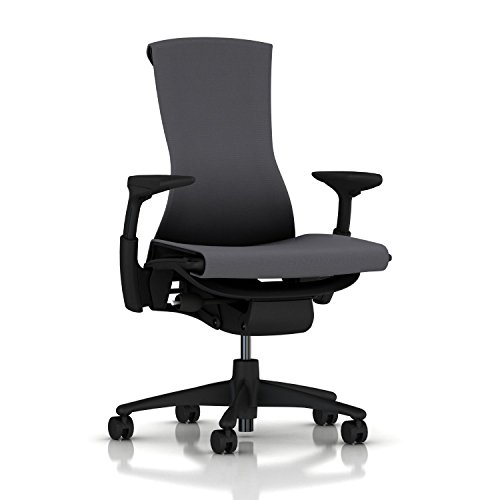
4. Herman Miller Embody Ergonomic Office Chair — Best Premium Statement
The Embody is the premium statement of this guide, and its verified title is comparatively restrained: an ergonomic office chair with fully adjustable arms and carpet casters, in Charcoal Rhythm. That restraint is itself informative — at this tier the chair’s reputation does the talking, and the listing’s checkable content is the configuration. It suits the buyer who has decided on this specific chair after research and wants the configuration facts stated plainly before ordering.
Strengths
- Fully adjustable arms confirmed in the title
- The most established premium name in this roundup
- Configuration (charcoal, carpet casters) stated for verification
Trade-offs
- Top tier pricing — this is a deliberate, researched purchase
- Carpet casters only in this listing; hard floors need a different configuration
- Reputation is not fit: your body, not the brand, decides comfort over a week of sitting
| Arms | Fully adjustable arms (per Amazon title) |
| Casters | Carpet casters (per Amazon title) |
| Colour / fabric | Charcoal Rhythm (per Amazon title) |
| Other features | Not stated in Amazon title |
Buying at this tier is a different activity from buying the M18. The decision is rarely about whether the chair is good — it is about whether this chair’s particular support character suits your body and habits, and that can only be settled by sitting in your own room across real workdays. Keep packaging, use the returns window honestly, and let a week of work outrank a first impression, in either direction.
One configuration warning carries the practical weight here: this listing’s carpet casters make it a carpet-room chair. Premium purchases attract premium regret when a detail like casters is wrong, because everything else about the chair can be right and the ownership experience still starts with a return. Verify floor, colour and arms against the title at checkout, as this guide repeats for every premium pick.
Best for: Researched premium buyers in carpeted rooms who have chosen this chair deliberately / Not suited for: Impulse buyers, hard-floor rooms, or anyone stretching a budget to reach it
Check on Amazon — check the current price on Amazon before you decide.

5. Marsail Ergonomic Office Chair — Best Value Adjustable
The Marsail covers the core fit checklist at a value tier: its verified title names a high-back mesh design with adjustable lumbar support, 3D armrests and a headrest, on rolling swivel casters. It suits the buyer upgrading from a basic chair who wants the adjustments that matter — lumbar position, arm position, head support — without entering premium territory, and who will spend the setup time to make those adjustments count.
Strengths
- Adjustable lumbar support, 3D arms and headrest all in the title
- High-back mesh format suits long, warm working days
- Value tier makes the full adjustment checklist accessible
Trade-offs
- Value tier means judging longevity by care, not by brand heritage
- Adjustment range on value chairs can be narrower — verify your fit in the first week
- As with every pick: posture support, not pain prevention
| Lumbar | Adjustable lumbar support (per Amazon title) |
| Arms | 3D armrests (per Amazon title) |
| Back | High-back mesh (per Amazon title) |
| Extras | Headrest (per Amazon title) |
The Marsail and the M18 compete on similar ground, and the honest comparison is philosophical: both offer the adjustable essentials, and the choice between them comes down to the details of their titles and your own fit checks during the first week. That is a healthy place for a buyer to be — choosing between two checkable chairs on fit, rather than between a checkable chair and a promise.
Value-tier discipline applies: assemble carefully, keep every tool and document, and test the full adjustment range while returns are simple. A value chair that fits you well and is set up properly will serve your working posture better than a premium chair left at factory settings — a sentence worth remembering across this entire guide.
Best for: Upgraders wanting the full adjustment checklist at a value tier / Not suited for: Buyers wanting premium-tier materials or heritage
Check on Amazon — check the current price on Amazon before you decide.

6. Hbada E2 Ergonomic Office Chair — Best Big-and-Tall Support
The Hbada E2 is the big-and-tall representative, and its title leads with the support system: a 6-way dynamic lumbar support, with 3D adjustable armrests and a 3D adjustable headrest, in a grey mesh build. ‘Dynamic’ is the operative word — the support is designed to respond as you shift, which suits larger sitters and restless sitters alike. The title also states, refreshingly, that this configuration has no footrest; this guide rewards that kind of candour.
Strengths
- 6-way dynamic lumbar support named in the title
- Big-and-tall format for larger sitters
- Title honestly excludes a footrest rather than implying one
Trade-offs
- No footrest in this configuration — lean-back break fans should note it
- Dynamic support feel differs from fixed lumbar; allow an adjustment week
- Grey mesh aesthetic is functional rather than decorative
| Lumbar | 6-way dynamic lumbar support (per Amazon title) |
| Arms | 3D adjustable armrests (per Amazon title) |
| Headrest | 3D adjustable headrest (per Amazon title) |
| Footrest | No footrest (per Amazon title) |
Larger sitters are the worst served by generic chairs: supports land in the wrong places, seats run narrow, and adjustment ranges run out. A chair that names its big-and-tall brief and pairs it with a multi-way dynamic lumbar is addressing that reality directly, and the headrest and arm adjustability extend the fit work to the whole back rather than one zone.
Judge the dynamic system over days. A support that moves with you can feel unfamiliar — even insufficiently firm — on a first sit if you are used to a fixed pad pushing back. Give it the week this guide prescribes for every pick, work through the setup order, and then decide. Fit verdicts delivered in the first ten minutes are how good chairs get returned and bad chairs get kept.
Best for: Larger sitters wanting dynamic, multi-way lumbar support / Not suited for: Footrest seekers or fans of a firm, fixed lumbar pad
Check on Amazon — check the current price on Amazon before you decide.
Comparison Table
| Pick | Badge | Key spec | Best for |
|---|---|---|---|
| SIHOO M18 Ergonomic Office Chair | Best Overall | Adjustable lumbar support, headrest, 330 lbs (per Amazon title) | Sitters ready to spend setup time dialling a chair to their own body |
| Steelcase Leap Office Chair (Onyx) | Best Established Ergonomic Name | Shape-responsive back support, carpet wheels (per Amazon title) | Restless sitters who shift position often and value responsive support |
| HON Ignition 2.0 Ergonomic Office Chair | Best Office-Proven All-Rounder | Lumbar support, adjustable arms (per Amazon title) | Shared desks and buyers wanting a proven, conventional ergonomic chair |
| Herman Miller Embody Ergonomic Office Chair | Best Premium Statement | Fully adjustable arms, carpet casters (per Amazon title) | Researched premium buyers in carpeted rooms who have chosen this chair deliberately |
| Marsail Ergonomic Office Chair | Best Value Adjustable | Adjustable lumbar, 3D arms, headrest, high-back mesh (per Amazon title) | Upgraders wanting the full adjustment checklist at a value tier |
| Hbada E2 Ergonomic Office Chair | Best Big-and-Tall Support | 6-way dynamic lumbar support, big-and-tall mesh (per Amazon title) | Larger sitters wanting dynamic, multi-way lumbar support |
How to Choose the Best Office Chairs to Prevent Back Pain Worries — Fit Before Features
Start from the truth this guide opened with and let it organise your shopping: you are not buying prevention, you are buying fit and support. That reframing immediately improves decisions, because fit can be checked and prevention cannot. A chair whose title lists adjustable lumbar support, seat and arm adjustments is making promises you can test in your first week. A chair whose title promises to fix your back is making one you cannot — and should not pay for.
Work the fit order that matters. Seat height first, so your feet rest flat and your legs are supported without pressure behind the knees. Lumbar position second: the support should meet the small of your back at your height, which is why adjustable beats fixed for most bodies. Arms third, set so shoulders rest down rather than shrug up. Headrest last, and only if your chair’s recline makes it useful. Each pick in this guide was chosen because its title confirms the adjustments this order needs.
Then be honest about the rest of the system. Screen height, desk height, keyboard position and — above all — how often you stand and move will each influence your comfort as much as the chair does. The most ergonomic chair in this guide, sat in motionlessly for nine hours at a badly set desk, loses to a mid-priced chair inside a well-arranged, movement-friendly day. Buy the chair as one component, and budget a little attention for the others.
Finally, know the boundary of furniture advice. Discomfort that persists despite a well-fitted chair and a sensible routine, pain that travels into a leg, numbness, weakness, or pain after an injury are clinical matters. This guide’s picks can support comfortable posture; they cannot and do not diagnose or treat, and no wording on any listing changes that.
Posture Support Features, Translated From Listing Language
‘Adjustable lumbar support’ is the phrase that matters most in these titles, because adjustability is what lets support meet your back rather than an average back. It appears in the M18, Marsail and — in dynamic form — the Hbada E2 titles, and it should be the first phrase you look for on any listing you consider beyond this guide. ‘Lumbar support’ without ‘adjustable’ may still suit you, but it is a gamble on the manufacturer’s chosen position matching your spine.
‘Dynamic’ or shape-responsive language — the Leap’s named systems, the Hbada’s dynamic lumbar — describes support that follows movement. That philosophy suits restless sitters and long, varied days. Fixed or dialled systems suit sitters who find one good position and keep it. Neither is superior; they are matched to different sitting personalities, and recognising your own is worth more than any single feature.
Arms and headrests are posture features, not luxuries, when they adjust. Arms set at the right height let shoulders drop, which changes how the whole back feels by mid-afternoon; a headrest earns its keep only in recline. When a title confirms adjustability in these places — as the Embody’s fully adjustable arms and the M18’s 2D arms do — it is telling you the chair can be fitted at the shoulders as well as the spine.
The Movement Half of the Equation
Every credible strand of sitting advice converges on the same point: the best posture is the next posture. Chairs support positions; only you supply variety. Build the rhythm deliberately — stand for calls where you can, walk for water rather than keeping a bottle army at the desk, and use your chair’s own range, sitting upright for typing and leaning for reading, so the day contains several postures instead of one long one.
This is also where a chair’s design quietly helps or hinders. A back that moves with you, a tilt you can unlock, a recline you can rest in — the features across these six picks — make variety easy, and easy variety happens. A rigid chair makes every change a small effort, and small efforts are what tired people skip at 4 p.m. When you compare picks, you are partly comparing how gracefully each one lets you move.
Set a timer if your work absorbs you; most people cannot feel three hours pass at a screen. The goal is not athletic — it is simply to interrupt stillness regularly, stand, shift, and sit again. No chair in this guide, at any price, substitutes for that habit, and the guide’s recommendations assume the habit exists.
What the Evidence-Shaped Middle Ground Actually Looks Like
Between the marketing promise (‘this chair fixes backs’) and the nihilist shrug (‘chairs do nothing’) sits the position this guide occupies, and it is worth stating fully. Prolonged sitting in a poorly fitted chair is a common contributor to everyday desk discomfort. A chair fitted to your body, at a well-arranged desk, inside a day with regular movement, removes several of the mechanical aggravations — unsupported lumbar curves, shrugged shoulders, pressure behind the knees — that make sitting miserable. That is a comfort claim, honestly bounded, and it is the most any furniture can truthfully offer.
Notice what the middle ground requires of you: fitting, arranging and moving. The chair is the only one of the three that arrives in a box, which is why marketing loads everything onto it. Resist that loading in your own expectations and the purchase becomes rational: you are buying the best available version of one component, chosen on adjustable features you can verify, and you are keeping the other two components — setup and habits — in your own hands, where they were always going to stay.
This is also why the guide’s picks favour adjustment over cushioning theatre. A thick seat feels like care; an adjustable lumbar support is care, because it can be moved to the one back it must serve. When in doubt between a softer chair and a more adjustable one, choose adjustment — softness is a first impression, and fit is a thousand afternoons.
Fitting the Chair to Different Bodies in One Household
Shared chairs are where fit goes to die, because a chair carefully set for one body is a badly set chair for another. If your household shares a desk, build the reset into the routine: the thirty-second version of this guide’s setup order — height, lumbar position, arms — performed by whoever sits down, every time the sitter changes. The HON Ignition’s straightforward adjustments suit this life particularly well, but the habit matters more than the model.
Where sharing is permanent and bodies differ greatly, consider the honest alternative: two mid-priced chairs, each fitted once and left alone, can serve a household better than one premium chair refitted daily. The premium picks in this guide earn their tier for a single dedicated sitter who will live in their settings. Fit is personal in a way that build quality is not, and households ignore that at the cost of the very comfort they bought the chair for.
Children and teenagers at the family desk are the extreme case: no adult chair fits them, and no adjustment range fully bridges the gap. A footrest for dangling feet and a cushion for seat depth are pragmatic bridges for homework hours — accessories in their proper, humble role, not substitutes for the day a young sitter gets a chair of their own size.
When the Chair Is Not the Problem: A Desk Audit
Before upgrading a chair, audit the desk it serves, because three desk faults masquerade as chair faults. First, screen height: a monitor or laptop sitting flat on the desk pulls the head and shoulders forward for hours, and no lumbar support downstream can compensate for a neck bent upstream. A stand, a stack of books, an arm — anything that raises the screen’s top to near eye level — is the cheapest posture intervention in this entire guide.
Second, desk height against elbow height. If the desk forces your shoulders up while typing, the chair will be blamed for tension it did not create; if it forces a slump to reach the keyboard, the same. The chair’s height adjustment exists partly to mediate this relationship, which is why the setup order sets feet and seat first and arms immediately after — the three points that negotiate between body and desk.
Third, the stillness audit: count, honestly, how many times you left the chair yesterday. If the answer is twice, the best purchase in this guide will disappoint you, and the free fix — a timer, a water glass that needs refilling, calls taken standing — will outperform it. Buy the chair as part of a system you are willing to run, and the system, chair included, will treat you well.
A Realistic First Month: From Setup to Habit
Week one is for fitting, and it should feel like a project: the setup order worked through deliberately, one adjustment changed at a time, notes kept if your memory is human. Expect the chair to feel unfamiliar even when it fits better — your body has adapted to the old chair’s faults, and it will initially report the corrections as strangeness. This is why the guide insists on a working week before verdicts: the verdict that matters is Friday’s, delivered by a body that has stopped comparing and started simply sitting.
Weeks two and three are for the system around the chair. The screen rises to its proper height if it has not already; the timer that guards movement becomes unremarkable; the shared-desk reset, if your household shares, becomes as automatic as adjusting a car mirror. Discomfort that belonged to the old arrangement fades in this period or reveals itself as something else — and that revelation, too, is valuable information, honestly obtained, to take to a professional if it persists.
By the end of the first month, the chair should have disappeared. That is the unglamorous success state of ergonomic furniture: not a daily delight, but an absence — of the shoulder ache that used to arrive at three, of the fidgeting that used to start at four. If the chair has disappeared into your day, it has done everything furniture can do. Keep the movement habit, keep the clinician’s number for anything that does not disappear, and let the chair be what it honestly is: a well-fitted tool inside a well-run day.
Keeping a Simple Comfort Log for the First Month
If you want your first month with a new chair to produce knowledge rather than impressions, keep a comfort log — three lines a day, no more. Note the hours sat, the one adjustment you changed, and where you felt best and worst at day’s end. Patterns that are invisible in memory become obvious on paper within two weeks: the ache that follows the long meeting days rather than the chair, the improvement that tracked the screen stand rather than the lumbar dial, the arm height that quietly ended the shoulder tension.
The log also disciplines the adjustment habit this guide teaches. One change at a time stops being advice and becomes method when yesterday’s change is written next to today’s result. And if discomfort persists, the log becomes the most useful thing you can hand a clinician: a dated record of what was tried, in what setup, with what effect — the difference between ‘my back hurts at my desk’ and a history a professional can actually reason from. Furniture, setup, habits, evidence: that is the complete method of this guide, and the log is where it all comes together.
How to Set Up Your Chair for Comfortable Working Posture
Work through these steps in order during your first session, then repeat the quick version whenever a different sitter uses the chair.
- Set seat height so your feet rest flat on the floor (or a footrest) and your thighs sit roughly level, without pressure behind the knees.
- Set seat depth, if your chair adjusts it, so two or three fingers fit between the seat edge and the back of your knees.
- Position the lumbar support to meet the small of your back; adjust height before firmness, because position matters more.
- Set armrests so your elbows rest with shoulders fully relaxed — if you feel any shrug, the arms are too high.
- Raise your screen so its top is near eye level and about an arm’s length away; chair fit cannot compensate for a screen on the desk.
- Sit a full work session, then adjust one thing at a time over the following days; changing everything at once teaches you nothing.
- Pair the setup with movement: stand or walk briefly at least once an hour, and vary your sitting posture through the day.
If discomfort persists after a week of honest setup and regular movement, treat that as information to take to a clinician — not as a reason to buy a more expensive chair on a promise.
Common Buying Mistakes
Believing a prevention promise. No chair can guarantee to prevent back pain. Buy checkable fit features; treat prevention language on any listing as marketing, recorded here as a warning sign.
Buying fixed lumbar support blind. If the support cannot move, it must happen to match your back exactly. Adjustable support removes that gamble, which is why it leads this guide’s picks.
Setting the chair once, at the door. Fit reveals itself over days. Use the returns window and the setup order, and judge at the end of a working week.
Ignoring the desk and screen. A perfect chair under a badly placed screen still produces a miserable posture. Set the whole workstation, not just the seat.
Sitting still to ‘test’ the chair. Motionless marathon sits are the worst test and the worst habit. Judge the chair inside a normal, moving day.
Final Recommendation
If you buy one chair here, buy the SIHOO M18 for its complete adjustable package, the Marsail if the same checklist must come at a value tier, or the Hbada E2 if you are a larger sitter who needs dynamic support. Choose the HON Ignition 2.0 for proven, shared-desk normality, and the Steelcase Leap or Herman Miller Embody if your researched decision and budget both point to the established premium names — with casters and configuration verified at checkout.
Whichever arrives, run the setup order, give it a working week, and build the movement rhythm alongside it. And keep the guide’s opening line in view: the chair supports your posture; your habits and, when needed, your clinician do the rest. That is not a lesser promise — it is the only honest one furniture can make.
Shortlist recap: SIHOO M18 Ergonomic Office Chair — Check on Amazon · Steelcase Leap Office Chair (Onyx) — Check on Amazon · HON Ignition 2.0 Ergonomic Office Chair — Check on Amazon · Herman Miller Embody Ergonomic Office Chair — Check on Amazon · Marsail Ergonomic Office Chair — Check on Amazon · Hbada E2 Ergonomic Office Chair — Check on Amazon
Keep researching with these related guides: Best Office Chairs To Prevent Back Pain Best Ergonomic Office Chairs Back Pain Best Office Chairs For Back And Posture Best Office Chairs For Hip And Back Pain Best Office Chairs Recommended By Physical Therapists
Frequently Asked Questions
Can an office chair prevent back pain?
No chair can guarantee that, and this guide does not claim otherwise for any pick. A well-fitted chair supports comfortable working posture, which is one factor among many — movement, workload, overall health and workstation setup all matter. Persistent pain deserves a clinician, not a product promise.
Which feature matters most for back comfort?
Adjustable lumbar support, because it lets support meet your own lower back rather than a manufacturer’s average. It is the feature this guide weighted most heavily, and it is confirmed in the titles of the leading picks here. Seat fit and arm height follow closely behind.
How long should I give a new chair before judging it?
A full working week of normal days, with deliberate setup on day one and small adjustments after. First sits mislead in both directions — novelty feels good, unfamiliar support feels strange — and the returns window exists precisely for this evaluation period.
Are expensive chairs better for backs?
Not automatically. The premium picks here buy established support systems and build quality, but a value chair that fits you and is set up properly will serve your posture better than a premium chair left at factory settings. Fit and setup outrank price in this guide’s logic.
When should I see a clinician instead of buying a chair?
If pain persists despite a sensible setup, travels into a leg, comes with numbness or weakness, follows an injury, or keeps worsening — see a clinician promptly. Those are medical questions, and no chair purchase should delay them.
Do I need a headrest for back comfort?
Only if your chair use includes reclining — calls, reading, breaks — where a headrest supports the neck in lean-back postures. For upright typing it contributes little. Several picks here include one; choose based on how you actually spend your day, not on the longest feature list.


