Disclosure: airfryerkitchensupply.com is reader-supported. When you buy through links on our site, we may earn an affiliate commission at no extra cost to you.
Where to buy
Every pick in this guide that carries a verified Amazon listing is linked below and again inside its review. Prices move constantly, so we never print a fixed price in the article — use the links to check the current price on Amazon before you buy. If a pick is marked as unlinked, it means we could not confirm a matching live listing at verification time, so we describe it honestly without a buy link rather than guess at one.
- Steelcase Leap Office Chair, Ergonomic Back Support, Onyx — check the current price on Amazon
- Herman Miller Embody Ergonomic Office Chair, Charcoal Rhythm — check the current price on Amazon
- HON Ignition 2.0 Ergonomic Office Chair, Lumbar Support, Black — check the current price on Amazon
- SIHOO M18 Ergonomic Office Chair, Mesh Back with Headrest — check the current price on Amazon
- Marsail Ergonomic Office Chair, High Back Mesh with Adjustable Lumbar Support — check the current price on Amazon
- Furmax Office Chair, Ergonomic Mesh Chair with Lumbar Support — check the current price on Amazon
Introduction: What “Recommended by Physical Therapists” Can Honestly Mean
Let us be precise about the keyword best office chairs recommended by physical therapists, because precision is the whole value of this guide. We are not aware of — and we will not invent — endorsements in which a named physical therapist recommends the specific chairs below, and any guide that attaches a clinician’s authority to a product without evidence should not be trusted with your back or your money. What physical therapists do publish, teach and repeat in clinic rooms every day is a set of ergonomic principles for choosing and setting up a chair. This guide applies those principles, openly and only those principles, to chairs whose listings we verified.
Those principles are consistent enough to summarise. Choose adjustability over fixed shapes, because bodies differ: seat height that lets your feet rest flat, lumbar support that can be positioned at your curve, armrests that let your shoulders hang rather than shrug. Prefer support that accommodates movement — recline you will actually use, a back that follows you — over any single “perfect” posture, because the profession’s most repeated sentence is that the best posture is the next one. And treat the chair as one part of a system that includes desk height, screen position and regular breaks, which no chair, at any price, can replace. The six chairs below were selected because their verified listings demonstrate those principles at six different tiers, from a budget mesh chair to two flagships. That — not a borrowed endorsement — is what recommends them. Read the reviews with a tape measure nearby: your leg length, your desk height and your shoulder breadth are the specifications that decide which of the six is yours, and no badge in this guide outranks your own measurements.
In this guide
Quick Picks
Six verified chairs chosen strictly by therapist-taught ergonomic principles — adjustable lumbar support, correct seat height, fitting armrests and usable recline — across every tier from budget to flagship.
Best Overall: Steelcase Leap Office Chair, Ergonomic Back Support, Onyx — a flagship ergonomic chair whose listing highlights LiveBack technology that follows the shape of your spine and a Natural Glide System that keeps you oriented as you recline. — Check on Amazon
Best Premium Design: Herman Miller Embody Ergonomic Office Chair, Charcoal Rhythm — Herman Miller’s flagship ergonomic chair, the verified listing confirming fully adjustable arms and carpet casters in the Charcoal Rhythm finish. — Check on Amazon
Best Mid-Range: HON Ignition 2.0 Ergonomic Office Chair, Lumbar Support, Black — a mid-range ergonomic chair from an office-furniture specialist, the listing confirming lumbar support and adjustable arms. — Check on Amazon
Best Value Ergonomic: SIHOO M18 Ergonomic Office Chair, Mesh Back with Headrest — a mesh ergonomic chair with adjustable lumbar support, a headrest, 2D armrests and a stated 330 lb capacity, at the value end of the ergonomic market. — Check on Amazon
Best Feature Set: Marsail Ergonomic Office Chair, High Back Mesh with Adjustable Lumbar Support — a high-back mesh chair with adjustable lumbar support, 3D armrests and a headrest, packing the longest feature list in this guide’s middle tier. — Check on Amazon
Best Budget: Furmax Office Chair, Ergonomic Mesh Chair with Lumbar Support — a budget mesh office chair with lumbar support, adjustable height and a breathable mid-back, the floor of sensible ergonomic buying. — Check on Amazon
Key Takeaways
- No specific chair here carries a named clinician’s endorsement, and this guide claims none — it applies the profession’s published ergonomic principles instead.
- Adjustability is the principle: seat height, positionable lumbar support and fitting armrests matter more than brand or padding.
- The best posture is the next posture — choose a chair whose recline and back movement you will actually use through the day.
- A chair is one third of the system: desk height, screen position and movement breaks do the rest.
- Set up any chair with a fitting routine; a premium chair adjusted badly underperforms a budget chair adjusted well.
- Health framing in this guide is comfort and ergonomics only — a chair is not a medical treatment, and persistent pain belongs in a clinic, not a checkout.
How These Picks Were Chosen
Method first, because this search invites abuse. We listed the ergonomic criteria that physical therapists and ergonomics bodies consistently describe for task seating — adjustable seat height; lumbar support, ideally adjustable in position; armrests that adjust enough to let shoulders relax; a backrest that supports reclining and movement; a seat that fits the sitter’s frame and weight — and then we searched Amazon listing data for office chairs whose own listings state those features. Each pick’s ASIN, title and stated features come from that API verification, and each review’s spec box contains only what the listing states. Where a listing is brief — the Herman Miller title is notably short — the review says so and claims less, not more.
Two exclusions are worth naming. Seat cushions and chair accessories were excluded even when their listings used clinical language, because this search asks for chairs. And chairs whose listings leaned on medical claims rather than ergonomic features were passed over: this guide’s health framing is comfort and ergonomics only, and a chair is furniture, not treatment. If you have persistent or diagnosed back problems, the correct purchase order is a clinician’s assessment first and a chair second — ideally chosen with that assessment in hand. Finally, we weighted the tiers deliberately: two flagships to show what the principles look like without a budget constraint, two mid-range chairs where most readers should land, and two accessible chairs to prove the principles survive at student money. A guide to this search that only listed flagships would be an advertisement; one that only listed budget chairs would be a false economy for people who sit for a living.
The 6 Best Office Chairs by Ergonomic Principle

Steelcase Leap Office Chair, Ergonomic Back Support, Onyx — Best Overall
Start with the honesty this search demands: no chair in this guide is presented as endorsed by any named physical therapist, because we have no such endorsement to report. What the Leap offers instead is the fullest expression of the ergonomic principles that physical therapists, as a profession, consistently describe when they talk about sitting — a backrest that supports the lumbar curve without freezing it, movement through the day rather than one locked posture, and adjustments that let the chair fit the body instead of the reverse. The verified listing names the two systems that deliver that: LiveBack technology, which flexes with the shape of your back, and the Natural Glide System, which reclines the seat in a way that keeps your work in front of you.
That second point is more important than it sounds. On a basic chair, reclining tips your eyes to the ceiling and your arms away from the keyboard, so people simply never recline — and then sit bolt upright and static for eight hours, which is precisely the pattern movement-based ergonomic advice warns against. A glide system that keeps you oriented makes reclining usable, and usable recline gets used. Add a back that follows rather than dictates, and you have the chair in this guide that comes closest to the profession’s ‘the best posture is the next posture’ principle.
The limitations are price and specification detail. This is a premium-tier chair, and the listing we verified specifies carpet casters and no headrest, so hard-floor homes should confirm the caster variant before ordering. Buy it if you sit for a living and your chair is a tool of your trade; the value picks below exist for everyone whose sitting is serious but whose budget is not flagship-shaped.
Strengths
- LiveBack is designed to change shape with your spine’s movement rather than holding one fixed curve against it
- The Natural Glide System reclines while keeping your eyes and arms oriented to the desk, which fixed-pivot chairs do not
- A long-running professional model line, the kind of chair facilities managers buy in fleets
Trade-offs
- Sits at the premium tier of this guide by a wide margin
- The verified listing specifies carpet casters; hard-floor users should confirm caster options before ordering
- No headrest is mentioned in the listing
| Back (per Amazon title) | LiveBack technology |
| Recline (per Amazon title) | Natural Glide System |
| Casters (per Amazon title) | For carpet |
| Colour (per Amazon title) | Onyx |
Best for: full-time desk workers who want the deepest, most proven ergonomic adjustment set in this guide / Not suited for: buyers on a budget tier, or anyone who wants a headrest included as standard

Herman Miller Embody Ergonomic Office Chair, Charcoal Rhythm — Best Premium Design
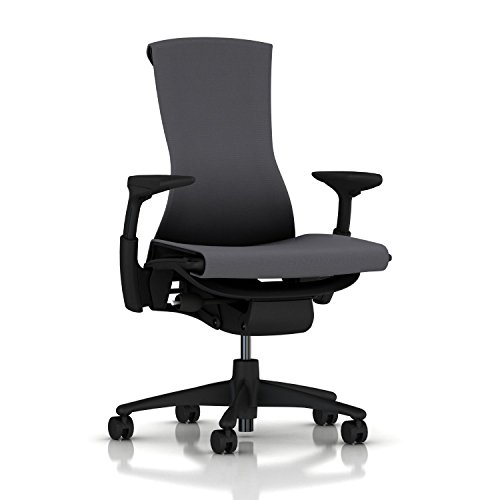
The Embody is the chair people picture when ergonomic seating is discussed as design, and we include it with a transparency note: its verified Amazon title is short — Herman Miller Embody Ergonomic Office Chair, fully adjustable arms, carpet casters, Charcoal Rhythm — so this review claims only what that listing and the model’s well-established design premise support, and directs you to the product page for the remainder rather than inventing specifications. What is confirmed matters: fully adjustable arms are not a luxury detail. Armrests set at the wrong height either shrug your shoulders all day or hang uselessly below your elbows, and adjustability in height, width and pivot is how a chair lets your shoulders stay down — one of the most repeated cues in professional posture advice.
The Embody’s founding idea is a back that distributes pressure and flexes with movement rather than presenting a single moulded curve. That aligns with the movement-first framing used throughout this guide: physical therapists generally do not prescribe one perfect chair posture, because no posture stays healthy for eight hours; they describe support that accommodates shifting, reclining and fidgeting without punishing any of it. A chair built around flex and distribution is a material answer to that advice.
Buy the Embody if you value the design, the maker’s service ecosystem and the arm adjustability, and if the flagship tier is a deliberate purchase rather than a stretch. Everyone else should know that the ergonomic principles it embodies — adjustability, lumbar support that follows you, freedom to move — are available further down this list at far lower tiers, which is rather the point of a guide.
Strengths
- Fully adjustable arms let you set height, width and angle so shoulders can stay down and relaxed
- A flagship line from the maker most associated with research-led ergonomic seating
- Distinctive flexible back construction is the model’s defining idea: support that moves with the sitter
Trade-offs
- The Amazon title is brief, so several specifications buyers may want are not confirmed by the listing text we verified — check the product page for the rest
- Highest tier in this guide
- Carpet casters specified; hard floors need the right caster choice
| Arms (per Amazon title) | Fully adjustable |
| Casters (per Amazon title) | Carpet casters |
| Finish (per Amazon title) | Charcoal Rhythm |
Best for: buyers who want a design-led flagship chair with highly adjustable arms and a long service life / Not suited for: shoppers who need the specification sheet to do the persuading — the listing is brief, and the price tier is the highest here
Check the current price on Amazon

HON Ignition 2.0 Ergonomic Office Chair, Lumbar Support, Black — Best Mid-Range
The Ignition 2.0 is the sensible centre of this guide. HON builds office furniture for a living, and the verified listing confirms the two features that dominate professional sitting advice: lumbar support, and adjustable arms. That pairing is not a coincidence. The lumbar curve is where an unsupported sitter collapses first, and armrests at the wrong height are how shoulders end up around ears by mid-afternoon. A chair that adjusts both, from a maker with a service network behind it, covers the ergonomic essentials without asking flagship money.
What the mid-range buys you, beyond the badge, is refinement in the adjustments themselves: lumbar support that can be positioned rather than merely present, arms that move in more than one direction, and a recline mechanism tuned for working angles rather than cinema angles. The listing we verified is concise — it does not enumerate every mechanism — so treat the product page as the specification of record and this review as the positioning: this is the chair for a person who sits six to ten hours a day, wants the principles honoured, and would rather spend the flagship difference on a desk, a monitor arm or nothing at all.
Its compromises are honest ones. No headrest is mentioned, the look is boardroom rather than studio, and buyers who want every surface in mesh should confirm the exact configuration. None of those touches the ergonomic core. If the Leap and Embody are the profession’s principles at full price, the Ignition 2.0 is the same principles at the price most offices actually pay — which is why so many offices pay it.
Strengths
- From HON, a maker whose business is office seating rather than a sideline
- Lumbar support and adjustable arms cover the two adjustments posture guidance mentions most
- Positioned in the middle tier, where ergonomic value per money is usually strongest
Trade-offs
- The listing title is concise; detailed specifications should be confirmed on the product page
- No headrest is mentioned
- Styling is corporate rather than domestic, which some home offices will mind and others will prefer
| Support (per Amazon title) | Lumbar support |
| Arms (per Amazon title) | Adjustable |
| Use (per Amazon title) | Desk / workstation chair |
Best for: home and small-office workers who want a reputable ergonomic chair without flagship pricing / Not suited for: buyers who want a headrest or mesh everything — confirm the exact configuration on the listing
Check the current price on Amazon

SIHOO M18 Ergonomic Office Chair, Mesh Back with Headrest — Best Value Ergonomic
The SIHOO M18 is where this guide’s principles meet a strict budget, and it is included because its verified listing states the single most important ergonomic feature by name: adjustable lumbar support. Not a fixed bump moulded into the back, but support you can position — because lumbar curves live at different heights on different spines, and a support that cannot move to yours is decoration. The listing adds a headrest, 2D armrests, a tilt lock, a wide cushion and a stated capacity of 330 lbs, a fuller specification than several pricier listings provide.
The mesh back suits warm rooms and warm sitters, and it keeps the chair visually light in a home office. The headrest — absent from the flagship listings above — genuinely helps in reclined reading or call-taking postures, though it should meet the back of your head only when you lean back, not push it forward while you type. Set up with the fitting routine in this guide’s how-to section, the M18 honours every principle in the introduction at a fraction of the flagship tiers.
The trade-offs are the usual value-tier ones: mechanisms that work without feeling machined, plastics that are functional rather than beautiful, and a brand experience that is transactional rather than white-glove. None of that changes how your back feels at 4 p.m. If your choice is between a basic chair now and an ergonomic chair someday, this is the argument for the ergonomic chair now.
Strengths
- Adjustable lumbar support at this tier is the feature that matters most, and it is present
- Headrest included, which the premium picks above do not state
- The listing states a 330 lb capacity and a wide cushion, useful information stated plainly
Trade-offs
- Value-tier mechanisms and plastics feel less refined than HON or Steelcase
- Mesh back comfort is personal; some sitters prefer padded backs
- Assembly and adjustment ranges should be checked against your height on the listing
| Lumbar (per Amazon title) | Adjustable |
| Arms (per Amazon title) | 2D armrests |
| Capacity (per Amazon title) | 330 lbs |
| Extras (per Amazon title) | Headrest, wide cushion, tilt lock |
Best for: budget-conscious buyers who still want adjustable lumbar support and a headrest / Not suited for: buyers expecting flagship build refinement or a premium service network
Check the current price on Amazon

Marsail Ergonomic Office Chair, High Back Mesh with Adjustable Lumbar Support — Best Feature Set
Marsail’s ergonomic chair competes on completeness. The verified listing confirms a high back in mesh, adjustable lumbar support, 3D armrests and a headrest — the full checklist that posture guidance points to, in the middle tier. The 3D armrests are the detail to dwell on: height alone does not fit arms, because elbows also sit at different widths and angles depending on shoulder breadth and task. Arms that adjust in three directions are how a chair lets a narrow-framed typist and a broad-shouldered drafter both keep their shoulders down, and in this guide that level of arm fitting otherwise appears only at the flagship end.
The high back suits taller sitters, whose shoulder blades often land above the support of mid-back chairs, and the headrest completes the recline picture. But a feature list is a promise that setup must keep: every added adjustment is a dimension along which the chair can be wrong, and a Marsail adjusted carelessly is worse than a simple chair adjusted well. Budget the twenty minutes the how-to section asks for; this chair rewards it more than any other here.
Judge it as the feature-maximal mid-tier option. Buyers who prize established service networks should take the HON; buyers who prize the longest adjustment list per tier should take this. Either way, the lumbar support adjusts, the arms adjust properly, and the principles in the introduction are honoured — which, for this search, is the entire test.
Strengths
- 3D armrests adjust in three directions, the most complete arm fitting in the mid tier
- High back plus headrest supports taller frames through the shoulders
- Adjustable lumbar support, again the key feature, is present and named
Trade-offs
- More mechanisms mean more to set up correctly — and more to leave wrong
- Mesh high backs feel less cushioned than padded designs
- Brand and long-term parts support are less established than HON or Steelcase
| Lumbar (per Amazon title) | Adjustable |
| Arms (per Amazon title) | 3D armrests |
| Back (per Amazon title) | High back mesh |
| Extras (per Amazon title) | Headrest |
Best for: taller sitters and feature hunters who want maximum adjustability per tier / Not suited for: minimalists who prefer fewer mechanisms and a padded back
Check the current price on Amazon
Furmax Office Chair, Ergonomic Mesh Chair with Lumbar Support — Best Budget
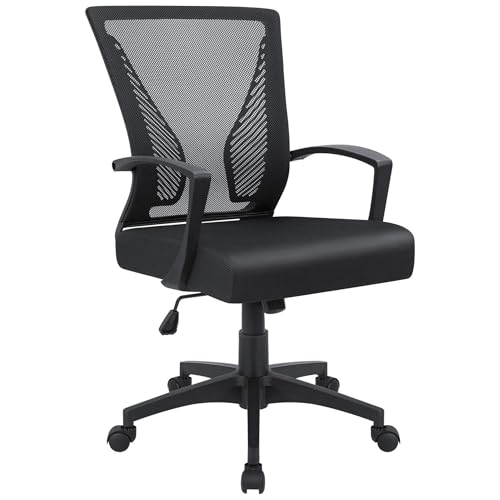
The Furmax is the floor of this guide, and it is a respectable floor. Its verified listing confirms the two adjustments that matter most — lumbar support and adjustable height — plus a breathable mesh mid-back, armrests and 360-degree swivel. Against the true competition at its tier, which is the dining chair, the kitchen stool and the inherited chair with a cushion on it, that specification is transformative: a supported lumbar curve, feet flat at the right height, and a back that breathes through a long study or work session.
Its limits define the tiers above it. The lumbar support is a fixed shape rather than an adjustable mechanism, so it will suit average curves better than pronounced ones. The armrests do not adjust, which taller and shorter sitters will notice at the shoulders by evening. And the build is budget grade in the honest sense: entirely serviceable, not heirloom. None of that is a reason to skip it; all of it is a reason to buy it knowingly, as the chair that carries a student through a degree or a spare room through occasional use.
If you sit eight hours a day for a living, treat the Furmax as the baseline from which to step up — the SIHOO adds adjustable lumbar and a headrest, the HON adds refinement and a maker’s network. But if the alternative today is a bad chair, this is the correct purchase today, because the principles in this guide do not require a flagship budget to start helping.
Strengths
- Lumbar support and height adjustment — the two non-negotiables — at the lowest tier in this guide
- Breathable mesh back suits warm rooms and long sessions better than vinyl at this price
- Mid-back format stores and fits in small rooms where high-back chairs dominate
Trade-offs
- Armrests are fixed in this class, so shoulder fitting is limited
- Build and cushion are budget grade; expect a service life measured in a few years of daily use
- No headrest and no lumbar adjustability beyond the built-in support shape
| Support (per Amazon title) | Lumbar support |
| Height (per Amazon title) | Adjustable |
| Back (per Amazon title) | Breathable mesh, mid-back |
| Movement (per Amazon title) | 360 swivel |
Best for: students, spare rooms, first home offices and anyone replacing a dining chair / Not suited for: full-time heavy use by larger sitters — step up to the SIHOO or HON for capacity and refinement
Check the current price on Amazon
Comparison Table
| Pick | Badge | Key ergonomic feature | Best for |
|---|---|---|---|
| Steelcase Leap Office Chair, Ergonomic Back Support, Onyx | Best Overall | LiveBack back support, Natural Glide System, carpet casters | full-time desk workers who want the deepest, most proven ergonomic adjustment set in this guide |
| Herman Miller Embody Ergonomic Office Chair, Charcoal Rhythm | Best Premium Design | Flagship ergonomic design, fully adjustable arms, carpet casters | buyers who want a design-led flagship chair with highly adjustable arms and a long service life |
| HON Ignition 2.0 Ergonomic Office Chair, Lumbar Support, Black | Best Mid-Range | Lumbar support, adjustable arms, mid-range tier | home and small-office workers who want a reputable ergonomic chair without flagship pricing |
| SIHOO M18 Ergonomic Office Chair, Mesh Back with Headrest | Best Value Ergonomic | Adjustable lumbar, headrest, 2D armrests, 330 lb capacity per listing | budget-conscious buyers who still want adjustable lumbar support and a headrest |
| Marsail Ergonomic Office Chair, High Back Mesh with Adjustable Lumbar Support | Best Feature Set | High back mesh, adjustable lumbar, 3D armrests, headrest | taller sitters and feature hunters who want maximum adjustability per tier |
| Furmax Office Chair, Ergonomic Mesh Chair with Lumbar Support | Best Budget | Mesh mid-back, lumbar support, adjustable height, 360 swivel | students, spare rooms, first home offices and anyone replacing a dining chair |
How to Choose an Office Chair by Ergonomic Principle
Seat height and feet. Your feet should rest flat on the floor (or a footrest) with knees at roughly hip height or a touch lower. That requires a height range that includes your leg length — the first specification to check against your own body, and the reason “one size” chairs fail tall and petite sitters in opposite directions.
Lumbar support that can find your curve. The lumbar spine’s inward curve sits at different heights on different people. Adjustable lumbar support — named in the SIHOO and Marsail listings — can be positioned at yours; a fixed support, like the budget Furmax’s, is a bet that your curve is average. LiveBack-style backs take the third route: flexing to follow the spine rather than prescribing its shape.
Armrests and shoulders. Shoulders should hang, elbows resting lightly at about a right angle. That takes height adjustment at minimum, and width and pivot adjustment — the Embody’s fully adjustable arms, the Marsail’s 3D arms — to fit different shoulder breadths. Fixed arms that sit too high are worse than no arms; if a chair’s arms shrug you, remove or lower them if the design allows.
Movement and recline. Choose a recline you will use daily, ideally one that keeps your screen and desk relationship stable as you lean back. Then use it: shift position every half hour or so, recline for calls, sit forward for focused typing. The chair enables the movement; only you perform it.
Fit and capacity, stated plainly. Match the chair’s stated capacity and cushion width to the sitter — the SIHOO listing’s stated 330 lb capacity is the kind of plain information to look for — and remember that seat depth matters: you should be able to sit back against the lumbar support with a small gap behind your knees.
How to Set Up Your Chair: A Fifteen-Minute Fitting
Step 1: set seat height so your feet rest flat and your knees sit at or just below hip level; use a footrest if the desk forces the chair higher. Step 2: sit fully back and position the lumbar support into the small of your back — it should feel like a hand supporting you, not a fist pushing you. Step 3: set armrest height so your shoulders drop and your elbows rest at roughly a right angle with your hands at keyboard height; add width and pivot adjustment if your chair has it. Step 4: set recline tension so leaning back is easy but not a collapse, and leave the recline unlocked for most of the day. Step 5: raise or lower your screen so its top is near eye level and about an arm’s length away; the chair cannot fix a laptop on a low table, so use a riser and a separate keyboard if you work from one. Step 6: set a break rhythm — stand, walk or stretch briefly every half hour. Step 7: after a week, revisit steps 2 and 3; small lumbar and arm corrections after real use are where most of the comfort is won.
The Rest of the System: Desk, Screen and Breaks
A chair fitted perfectly to a bad workstation still produces a bad day. Desk height should let your forearms rest roughly level while typing with shoulders down; if the desk is fixed and high, raise the chair and add a footrest rather than perching. The screen belongs at arm’s length with its top near eye level, because a low screen pulls the head forward and no lumbar support can compensate for a head that lives in front of the shoulders. Documents belong on a holder beside the screen, not flat on the desk under a twisted neck. And breaks are not a concession to weakness but the mechanism by which sitting stays tolerable: the human body tolerates almost any reasonable posture briefly and almost none indefinitely. Buy the chair for support, then build the system for movement.
Common Buying Mistakes
Believing endorsement language. If a listing or guide claims clinicians recommend a specific chair, ask for the evidence; principles are checkable, endorsements usually are not. Buying padding instead of adjustment. Thick foam feels wonderful in a showroom and compresses within a year; adjustments keep working. Ignoring armrests. Shoulder tension is the most common office complaint and arms are its most common chair-side cause. Locking the recline upright all day. A locked chair enforces the static posture every professional warns against. Skipping the fitting. Fifteen minutes with the routine above is worth more than the gap between adjacent price tiers. Expecting a chair to treat pain. Chairs support comfort; persistent pain deserves a clinician, and this guide will not pretend otherwise.
Sitting Profiles: Matching the Chair to the Worker
The all-day typist lives at the keyboard with forearms level and eyes forward; their chair lives or dies by armrest fitting and lumbar position, which is why the Leap and the HON anchor this profile. The recliner-thinker — calls, reading, reviewing — spends half the day leaned back, and needs a glide or recline that keeps the screen usable plus, ideally, a headrest that meets them there; the SIHOO and Marsail serve this worker at sane tiers. The fidgeter changes position every few minutes and should distrust any chair that only supports one posture; flexible backs and unlocked recline are their features. The small-room worker at a bedroom desk needs a mid-back footprint and casters matched to their floor — and should check the caster specification on the listing, as two of our flagship listings specify carpet casters. The shared-desk household, where two people alternate in one chair, should prize fast, memorable adjustments: numbered or simple controls, a lumbar support that repositions in seconds, and a height lever that will actually be used twice a day. Naming your profile before you shop converts a wall of similar chairs into a shortlist of two.
Chair Care: Keeping Adjustments Working for Years
An ergonomic chair is a machine, and its adjustments are the parts that fail first when neglected. Keep casters clean — hair and grit wound around caster axles are the leading cause of chairs that stop rolling and start scratching floors, and a monthly pick-out takes two minutes. Tighten the assembly bolts after the first month and then twice a year, because working chairs loosen in use and a wobble is usually a bolt, not a broken frame. Keep the gas lift’s piston rod clean and never sit on the chair’s front edge with your full weight as a habit, which stresses both lift and seat mechanism. Mesh cleans with a vacuum brush and a damp cloth; padded fabrics want prompt attention to spills before they set. And use the adjustments themselves: mechanisms that move weekly stay free, while a recline locked for three years often stays locked forever. Five minutes a month is the entire programme, and it is the difference between a chair that supports you in year five and one that merely seats you.
What to Do in the First Week With a New Chair
Day one belongs to the fitting routine in this guide — height, lumbar, arms, recline, screen — done slowly, in your working clothes and shoes. Days two and three are for resisting verdicts: a correctly fitted ergonomic chair often feels strange to a body adapted to a bad one, and “different” is not the same as “wrong”. Around day four, make one adjustment at a time — lumbar a notch higher, arms a notch lower — and live with each change for a full day so you know what caused what. By the end of the week, note what still bothers you and where: shoulder tension points back to arm height, thigh pressure to seat height or depth, a restless need to shift to recline tension. Most issues resolve inside the chair’s own adjustments; the ones that do not are fit issues, and they are exactly what return windows are for. Judge the chair at the end of that week, by your evenings rather than your first impression, and you will have bought once instead of twice.
Reading Chair Listings Without Being Played
Chair listings use a vocabulary that rewards slow reading. “Ergonomic” itself is unregulated — it means the maker thought about the body, at some level of seriousness, and it appears on chairs with one adjustment and chairs with twelve. Count the adjustments instead: height, lumbar position, arm directions, recline tension, seat depth. Each named, mechanical adjustment is a fact; each adjective is a hope. “Lumbar support” without “adjustable” usually means a fixed curve — acceptable at budget tiers, as our Furmax pick shows, but a different product from the positionable support in the SIHOO and Marsail listings. Capacity and dimensions, when stated, are the most honest lines in any listing, and their absence is information too. Finally, be wary of clinical costume: listings dressed in the language of medicine — designed with doctors, therapist approved, orthopaedic grade — are making an appeal this guide has deliberately refused to make on any product’s behalf. Buy the mechanisms you can count, fit them with the routine in this guide, and let your own evenings deliver the verdict that no endorsement, real or invented, can deliver for you.
Final Recommendation
If your budget reaches it, the Steelcase Leap is the most complete expression of the principles this guide is built on. The Embody serves buyers who want the flagship design route, the HON Ignition 2.0 is the mid-range answer most offices should buy, and the Marsail and SIHOO bring adjustable lumbar support — the key feature — down to feature-hunter and value tiers. On the tightest budget, the Furmax still honours the two non-negotiables: lumbar support and correct height.
Whichever tier you choose, spend the fifteen minutes on the fitting routine before you judge the chair, and build the desk, screen and break habits around it. For neighbouring questions — long-hour sitting, back-and-neck comfort setups and affordable chairs — our related guides continue from here:
Best Chairs For 8 Hours Best Chairs For Back And Neck Best Chairs Affordable Best Chairs Around 100 Best Chair Mat For Carpets Rolling Chairs Best Carpet For Under Desk Chairs
Frequently Asked Questions
Do physical therapists really recommend specific chair brands?
As a profession, physical therapists teach ergonomic principles — adjustability, lumbar support, movement — rather than endorsing retail products. This guide follows that practice: it names no clinician endorsements, because we have none to report, and selects chairs whose verified listings demonstrate the principles.
Mesh or padded back — which should I choose?
Choose by room and by body. Mesh breathes, suits warm rooms, and keeps a chair visually light at home; padded backs feel more cushioned and formal. Both appear in this guide because fit and adjustment outrank the material — a well-adjusted mesh chair will serve you better than a badly adjusted padded one, and vice versa.
How long should I sit before taking a break?
A widely used rhythm is to change position or stand briefly every 30 minutes or so, with longer movement breaks through the day. The exact interval matters less than the habit: no posture, however well supported, is meant to be held all day.
Can the right chair fix my back pain?
A well-fitted chair can remove chair-shaped causes of discomfort, and that is a real and worthwhile gain. But a chair is not a medical treatment, and persistent, radiating or worsening pain should be assessed by a clinician — ideally before you spend flagship money on furniture.
I work from a laptop at a dining table. Will one of these chairs solve my setup?
It will solve the chair third of it. A dining table is usually too high relative to a correctly set chair, and a laptop screen is always too low, so add a footrest if your feet dangle, raise the laptop on a stand or stack of books, and use a separate keyboard and mouse. The fitting routine in this guide walks through the order to do it in.
What if I am much taller or shorter than average?
Prioritise range: a seat-height range that reaches your leg length, a high back if you are tall (the Marsail’s listing is explicit), and armrests that adjust in width as well as height. Check stated capacities and dimensions on the listing against your own measurements before ordering.


