Disclosure: airfryerkitchensupply.com is reader-supported. When you buy through links on our site, we may earn an affiliate commission at no extra cost to you.
Where to buy
The best ergonomic chairs with headrests are bought on Amazon, where every pick below was verified against its own listing before a link was added — and for this search, verification has a specific meaning: the word headrest, or adjustable headrest, appears in the listing itself. Chairs with merely tall backs, chairs whose headrests are sold separately as accessories, and listings where a headrest could not be confirmed were all excluded, however good the chair. Use the links to check price on Amazon, and confirm the headrest description in the listing title matches the review — several chairs here sell in versions with and without one.
- SIHOO M18 Ergonomic Office Chair with Headrest (Black) — Best Overall: Check the current price on Amazon
- GABRYLLY Ergonomic Office Chair with Headrest (Black) — Best for Big and Tall: Check the current price on Amazon
- TRALT Office Chair with Headrest (Black) — Best Budget: Check the current price on Amazon
- Hbada P5 Ergonomic Office Chair with 2D Headrest (Black) — Best with Footrest: Check the current price on Amazon
- NEO CHAIR Office Desk Chair with Headrest (Grey) — Best Simple Mesh Design: Check the current price on Amazon
- SONGMICS Ergonomic Mesh Office Chair with Headrest (Ink Black) — Best Compact Tilt Range: Check the current price on Amazon
A headrest is the most misunderstood part of an office chair. It does nothing while you type — your head is forward, balanced over your spine, and a correctly placed headrest should not even touch you. Its moment comes when you lean back: to read, to think, to take a call, to watch the render finish. Then a good headrest catches the back of your head at the right height and angle, and a bad one — too low, too far forward, fixed at the wrong tilt — pushes your chin toward your chest and makes reclining worse than sitting upright. The best ergonomic chairs with headrests are the ones whose headrests adjust enough to meet your head where it actually is.
That is why this guide ranks adjustability, not presence. Every chair below has a headrest confirmed in its listing; the differences that matter are how the headrest moves — height, angle, the multi-direction designs two listings describe as 2D — and how the rest of the chair behaves when you recline into it. A headrest on a chair that barely tilts is furniture decoration. A headrest paired with a real recline and a lumbar support that stays with you is a second working posture.
One honest framing before the picks: a headrest is a comfort feature for reclined moments, not a posture cure, and this guide makes no health claims for it. If you never lean back at your desk, you do not need one, and the money is better spent on arms or lumbar. If your workday includes reading, calls and thinking time away from the keyboard, read on — that is exactly the reader these six chairs serve.
In this guide
Quick Picks
Six chairs, six real headrests — all confirmed in their listings, none inferred from a tall back alone or borrowed from an accessory listing. The badges separate the all-rounders from the specialists: footrest comfort, big-and-tall fit, genuine budget value and compact tilt. Read the badge that matches your own working day first, then check its full review for the two facts that decide this search — how the headrest adjusts in practice, and how far the chair reclines to meet it.
- SIHOO M18 Ergonomic Office Chair with Headrest (Black) — Best Overall: the listing combines the headrest with adjustable lumbar support, a wide cushion, 2D armrests and a stated 330lbs figure — the complete checklist at a mid tier. Check the current price on Amazon
- GABRYLLY Ergonomic Office Chair with Headrest (Black) — Best for Big and Tall: the listing states a high back with headrest, a wide cushion and big and tall positioning — head support scaled for larger frames. Check the current price on Amazon
- TRALT Office Chair with Headrest (Black) — Best Budget: the listing pairs the headrest with a stated 330 LBS figure and flip-up armrests at the guide’s budget tier. Check the current price on Amazon
- Hbada P5 Ergonomic Office Chair with 2D Headrest (Black) — Best with Footrest: the listing specifies a 2D headrest — movement in two directions — plus a footrest, the recline-and-rest combination in one chair. Check the current price on Amazon
- NEO CHAIR Office Desk Chair with Headrest (Grey) — Best Simple Mesh Design: the listing says adjustable headrest and adjustable lumbar support in plain words, on a high-back mesh chair in grey. Check the current price on Amazon
- SONGMICS Ergonomic Mesh Office Chair with Headrest (Ink Black) — Best Compact Tilt Range: the listing pairs its headrest with a defined 90-to-105-degree tilt and a wide seat — a headrest chair tuned for upright workers who lean back briefly, not loungers. Check the current price on Amazon
How These Picks Were Chosen
Eligibility for this guide was mechanical: the catalog listing held for this site had to state a headrest in its own title. That single rule removed several famous ergonomic chairs whose headrests are optional add-ons or absent, and it removed every chair where a tall back was doing an impression of head support. What remained was checked for the rest of the ergonomic brief — adjustable lumbar support, arm adjustability, tilt behaviour — because a headrest cannot rescue a chair that fails at the basics.
Ranking weighed headrest adjustability first: fixed headrests rank below height-adjustable ones, which rank below the multi-direction designs. It weighed recline second, since the headrest only works when the chair leans. Lumbar positioning, seat comfort for long sessions and stated capacity, where a listing gives one, completed the order. Prices and ratings were not consulted — both change too often to print — and each badge marks the tier or speciality so you can enter the list where your needs sit.
The 6 Best Ergonomic Chairs with Headrests

SIHOO M18 Ergonomic Office Chair with Headrest (Black) — Best Overall
The M18 is the chair this guide would hand to the widest range of readers: a mesh-back ergonomic chair whose listing confirms a headrest, adjustable lumbar support, a wide cushion, 2D armrests, a tilt lock and a stated capacity of 330lbs. Nothing on that list is exotic, and that is the point — every adjustment a headrest buyer actually needs is present, named, and priced in the middle tier rather than the flagship one.
Strengths
- Headrest, adjustable lumbar and tilt lock all confirmed in one listing
- Stated capacity of 330lbs gives a clear fit ceiling
- Wide cushion suits longer sitting sessions than standard pans
Trade-offs
- The listing does not detail the headrest’s own adjustment range — confirm on the listing page if angle adjustment matters to you
- Mesh back feel is firmer than padded executive chairs
- 2D armrests adjust less than the 3D and 4D designs elsewhere in this guide
| Listing name | SIHOO M18 Ergonomic Office Chair, Mesh Back Desk Chair with Headrest | Adjustable Lumbar Support, Hold 330lbs Computer Chair with 2D Armrests & Wide Cushion, Tilt Lock, for Home Office – Black |
| Headrest (listing) | Headrest included |
| Lumbar (listing) | Adjustable lumbar support |
| Capacity (listing, verbatim) | Hold 330lbs |
| Seat (listing) | Wide cushion; 2D armrests; tilt lock |
The M18’s virtue is balance. Recline is where its headrest earns its place: lock the tilt for upright work, release it for reading, and the back, lumbar and headrest travel together as one system. The adjustable lumbar matters more than shoppers expect in a headrest chair, because reclining shifts your back’s contact point — support you can position stays relevant in both postures. The wide cushion and stated capacity widen its audience to larger sitters without turning it into a big-and-tall specialist. If your needs are ordinary and your budget is mid-tier, this is the shortest path to a correct purchase in this guide.
Best for: most home-office buyers who want a headrest with the full basic adjustment set / Not suited for: sitters above the stated 330lbs, or buyers who need a footrest
Check the current price on Amazon

GABRYLLY Ergonomic Office Chair with Headrest (Black) — Best for Big and Tall
Headrests fail tall sitters more than anyone, because a headrest mounted on a standard back lands on their shoulder blades. The GABRYLLY answers with scale: its listing describes a high-back chair for big and tall users, with the headrest on that taller back, a wide cushion, flip-up arms and a tilt lock spanning 90 to 120 degrees. The headrest starts higher because the whole chair is built higher — the only honest way to aim it at a tall head.
Strengths
- High back places the headrest at a tall sitter’s altitude
- Wide cushion and big-and-tall design suit larger frames
- Flip-up arms clear the desk and widen the effective seat
Trade-offs
- The listing states no numeric weight capacity despite the big and tall positioning — verify on the listing page if that figure decides your purchase
- Tilt range is honest but shallower than deep-recline chairs
- Mesh construction, so no plush executive feel
| Listing name | GABRYLLY Ergonomic Office Chair, High Back Home Desk Chair with Headrest, Flip-Up Arms, 90-120° Tilt Lock and Wide Cushion, Big and Tall Mesh Chairs for Man Woman, Black Task Chair |
| Headrest (listing) | Headrest on a high back |
| Tilt (listing) | 90-120 degree tilt lock |
| Seat (listing) | Wide cushion; flip-up arms |
Buy this chair if you are tall enough that ordinary headrests have only ever annoyed you. The geometry is the feature: back height first, headrest placement second, and a seat wide enough that your posture is not dictated by the armrests. Flip-up arms deserve their mention — for larger sitters they remove the hip-pinch problem entirely when raised, and drop back for reading posture. The capacity silence is the one caution: the listing positions the chair for big and tall users without printing a number, and this guide does not invent one. If a stated rating is essential to you, the M18 above prints 330lbs, and the dedicated 400-pound guide linked below goes further.
Best for: tall and larger sitters who need the headrest mounted on a genuinely high back / Not suited for: buyers who require a printed weight capacity, or petite sitters
Check the current price on Amazon

TRALT Office Chair with Headrest (Black) — Best Budget
The TRALT proves the budget tier can satisfy this search properly: a headrest in the listing, adjustable lumbar support, flip-up armrests, and a stated capacity of 330 LBS — a figure many pricier listings decline to print. Its listing even positions it as a reading chair, which is precisely the posture a headrest serves. For a first home-office chair or a second seat, it covers the brief without ceremony.
Strengths
- Stated 330 LBS capacity at a budget tier
- Headrest and adjustable lumbar both confirmed in the listing
- Flip-up arms suit small desks and close work
Trade-offs
- Budget-tier mechanisms and mesh will not match the flagship longevity in this guide
- The listing does not specify headrest adjustment directions
- One chair per listing — the ‘(1, Black)’ in the title is the pack count, so pairs mean two orders
| Listing name | TRALT Office Chair Ergonomic Desk Chair with Lumbar Support Black | 330 LBS Home Office Desk Chairs with Headrest, Reading Chair with Flip-up Armrests, Comfortable Computer Chairs (1, Black) |
| Headrest (listing) | Headrest included |
| Capacity (listing, verbatim) | 330 LBS |
| Arms (listing) | Flip-up armrests |
The right way to judge the TRALT is against the keyword, not against chairs three tiers up. Headrest: present and confirmed. Lumbar: adjustable. Arms: flip-up, which at small desks is a feature, not a compromise. Capacity: stated. What the budget tier concedes is refinement — tilt damping, mesh tension, the feel of the adjustment levers — and longevity under a decade of daily use. For students, hybrid workers and anyone furnishing a first real desk, those concessions are rational. Set the lumbar for your upright posture, test the headrest in a reclined read, and it will tell you within one evening whether its geometry matches your frame.
Best for: budget buyers, students and hybrid workers who want a confirmed headrest and a stated capacity / Not suited for: full-time professionals buying a ten-year chair
Check the current price on Amazon

Hbada P5 Ergonomic Office Chair with 2D Headrest (Black) — Best with Footrest
The P5 is the comfort maximalist of the list: its listing specifies a 2D headrest, meaning the headrest adjusts in two directions rather than sitting fixed, and pairs it with a footrest and adjustable lumbar support in a mesh chair. That combination targets the reader whose desk chair doubles as their reading chair — recline, feet up, head supported at an angle you chose rather than one the factory chose for you.
Strengths
- 2D headrest adjustability is specified in the listing — a step above fixed designs
- Footrest completes the reclined posture the headrest serves
- Mesh build keeps long sessions cooler than padded chairs
Trade-offs
- Footrest chairs need floor space — check a small room
- The listing states no weight capacity
- More mechanisms mean a longer, more careful assembly
| Listing name | Hbada P5 Ergonomic Office Chair, Desk Chair with Adjustable Lumbar Support and Height, Comfortable Mesh Computer Chair with Footrest 2D Headrest, Swivel Tilt Function Black |
| Headrest (listing) | 2D headrest |
| Extras (listing) | Footrest included |
| Lumbar (listing) | Adjustable lumbar support |
Headrest adjustability is this search’s quality divide, and the P5 sits on the right side of it: a headrest that moves in two directions can be angled to meet the back of your head instead of presenting a flat board at neck height. Add the footrest and the recline becomes a system rather than a lean. The trade-offs are the honest ones of any feature-rich chair — footprint, assembly time, and more moving parts to keep tightened. If your workday includes long reading or call blocks away from the keyboard, this is the pick that treats those blocks as first-class postures.
Best for: readers and call-heavy workers who recline daily and want the headrest angle adjustable / Not suited for: small-space buyers, or anyone who never leans back at their desk
Check the current price on Amazon

NEO CHAIR Office Desk Chair with Headrest (Grey) — Best Simple Mesh Design
The NEO CHAIR is the straightforward pick: a high-back mesh chair whose listing states an adjustable headrest and adjustable lumbar support, with flip-up armrests, in a grey finish that disappears into a home office. No smart features, no gaming silhouette — just the two adjustments this search cares about, named plainly, in a chair designed, as its listing puts it, for extended sitting while working.
Strengths
- Headrest adjustability stated outright in the listing
- High-back mesh suits long, warm working sessions
- Neutral grey styling fits shared and visible home workspaces
Trade-offs
- The listing states no weight capacity
- No footrest or deep-recline speciality — it is a working chair, not a lounger
- Flip-up arms adjust by disappearing, not by fine positioning
| Listing name | NEO CHAIR Office Desk Chair with Ergonomic High Back Mesh Headrest, Grey | Adjustable Headrest and Lumbar Support with Flip-Up Armrests Designed for Extended Sitting Comfort While Working |
| Headrest (listing) | Adjustable headrest |
| Lumbar (listing) | Adjustable lumbar support |
| Arms (listing) | Flip-up armrests |
There is a buyer this chair serves perfectly: the person who wants the headrest and lumbar done correctly and everything else kept simple. The adjustable headrest means you can set its height against your own head rather than accepting a factory guess, and the mesh high back keeps the support breathable. It concedes the extras — no footrest for lounging, no multi-direction arms — and spends nothing on them. In a spare-room office or a corner of a living room, its restraint is the recommendation: a working chair that looks like furniture and adjusts like equipment.
Best for: home workers who want an adjustable headrest without gaming or gadget styling / Not suited for: buyers who want a footrest, or who need a stated capacity
Check the current price on Amazon
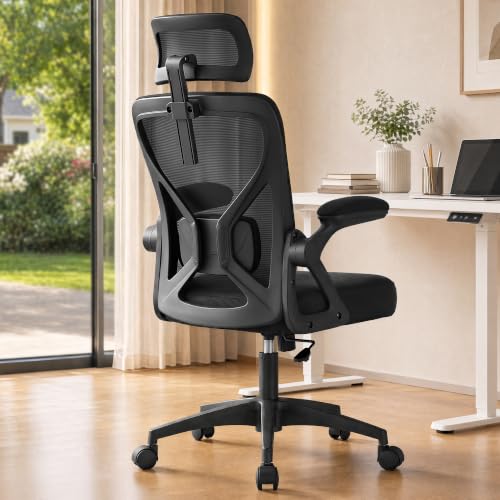
SONGMICS Ergonomic Mesh Office Chair with Headrest (Ink Black) — Best Compact Tilt Range
The SONGMICS closes the list with a different philosophy: its listing states a tilt function of 90 to 105 degrees — a modest, work-focused range — alongside its headrest, adjustable lumbar support, wide seat and flip-up arms. This is the headrest chair for the upright worker: the recline exists for micro-breaks and reading a page, not for an afternoon nap, and the headrest meets you in that shallow lean where most office leaning actually happens.
Strengths
- Defined tilt range in the listing suits upright work with brief lean-backs
- Wide seat and flip-up arms fit varied bodies and small desks
- Adjustable lumbar support confirmed in the listing
Trade-offs
- Shallow tilt means no lounging — recline romantics should choose the Hbada P5
- The listing states no weight capacity
- Headrest adjustment directions are not specified in the listing
| Listing name | SONGMICS Ergonomic Mesh Office Chair with Adjustable Lumbar Support | Computer Desk Chair, Headrest, 90-105° Tilt Function, Wide Seat, Flip-Up Armrests, Ink Black, KIME Collection UOBN044BH01S |
| Headrest (listing) | Headrest included |
| Tilt (listing) | 90-105 degrees |
| Seat (listing) | Wide seat; flip-up armrests |
Most office reclining is fifteen degrees and thirty seconds: lean, think, return. The SONGMICS is honest about serving exactly that, and its headrest is placed for the shallow lean rather than a deep one. The wide seat and flip-up arms make it friendly to shared workspaces and smaller rooms, and the mesh keeps it neutral in warm weather. Choose it when your work is upright by nature and your headrest is for thinking pauses; choose the P5 when your chair doubles as your reading chair. Neither is better — they are answers to different days.
Best for: upright workers who lean back briefly and often, in compact spaces / Not suited for: deep-recline loungers, or buyers needing a stated capacity
Check the current price on Amazon
Comparison Table
| Pick | Badge | Key spec | Best for |
|---|---|---|---|
| SIHOO M18 Ergonomic Office Chair with Headrest (Black) | Best Overall | Headrest, adjustable lumbar support, holds 330lbs, 2D armrests, per the listing | most home-office buyers who want a headrest with the full basic adjustment set |
| GABRYLLY Ergonomic Office Chair with Headrest (Black) | Best for Big and Tall | High back with headrest, wide cushion, 90-120 degree tilt lock, per the listing | tall and larger sitters who need the headrest mounted on a genuinely high back |
| TRALT Office Chair with Headrest (Black) | Best Budget | Headrest, adjustable lumbar support, 330 LBS stated, flip-up armrests, per the listing | budget buyers, students and hybrid workers who want a confirmed headrest and a stated capacity |
| Hbada P5 Ergonomic Office Chair with 2D Headrest (Black) | Best with Footrest | 2D headrest, footrest, adjustable lumbar support, mesh, per the listing | readers and call-heavy workers who recline daily and want the headrest angle adjustable |
| NEO CHAIR Office Desk Chair with Headrest (Grey) | Best Simple Mesh Design | Listing states adjustable headrest and lumbar support, high back mesh, flip-up arms | home workers who want an adjustable headrest without gaming or gadget styling |
| SONGMICS Ergonomic Mesh Office Chair with Headrest (Ink Black) | Best Compact Tilt Range | Headrest, adjustable lumbar, 90-105 degree tilt, wide seat, per the listing | upright workers who lean back briefly and often, in compact spaces |
Compare headrests by adjustability and tilt by range: the Hbada’s 2D headrest and the NEO’s stated adjustable headrest lead on placement; the GABRYLLY’s 90-120 degrees is the deepest stated work recline; the SONGMICS deliberately trades recline for upright focus. Capacities appear only where listings state them.
How to Choose the Best Ergonomic Chairs with Headrests
Start by being honest about whether you recline. A headrest only works in a lean; if your working day is entirely upright at the keyboard, a headrest is inert furniture and its budget belongs in the armrests or the seat. If you read, take calls, watch briefings or think at your desk, the headrest becomes a working part — proceed.
Then judge the headrest’s adjustability, because placement is everything. The order of merit runs: fixed headrest, height-adjustable headrest, then multi-direction designs like the 2D headrest in the Hbada listing. Your head meets the rest at one specific height and angle determined by your torso length and your recline; the more directions the rest moves, the more likely it can meet you there instead of approximating. When a listing confirms a headrest but not its adjustment — the M18 and TRALT here — check the listing page details before ordering if angle adjustment is decisive for you.
Match the headrest to the back it rides on. Tall sitters need the rest mounted on a high back, as with the GABRYLLY, or it lands between the shoulder blades. Shorter sitters face the opposite risk: a rest that cannot drop low enough pushes the head forward. Torso length, not total height, is the measurement that predicts fit, and the setup section below shows how to test placement in the first evening.
Check the tilt as a pair with the headrest. A defined tilt range in the listing — 90 to 120 degrees on the GABRYLLY, 90 to 105 on the SONGMICS — tells you the lean the headrest was designed around. Deep recliners should also look for a footrest, as on the Hbada P5, because reclining with feet dangling pulls you out of the headrest’s reach.
Consider the seat beneath it all, because recline comfort is a chain. A seat that is too deep pushes you forward, away from the backrest and its headrest; a seat that is too shallow leaves your thighs unsupported so you slide down as you lean. The wide cushions named in several listings here — the M18 and the GABRYLLY among them — are not vanity dimensions: they are what keep a reclined sitter’s body in the position where the headrest can be reached. If you are between sizes, sit in the chair’s returns window and test the full recline, not just the upright sit.
Finally, keep the basics non-negotiable: adjustable lumbar support and sensible arms matter more hours of the day than the headrest does. Every pick in this guide has the lumbar confirmed in its listing for exactly that reason. The headrest is the finishing feature of a correct chair, never a substitute for one.
What a Headrest Actually Does — and When It Does Nothing
Upright, a headrest should be invisible. Your head balances over your spine, your neck muscles do light work, and a correctly set headrest hovers just behind you, untouched. Shoppers who test chairs upright and complain the headrest ‘does nothing’ are describing correct behaviour; shoppers whose headrest pushes their head forward while typing have a badly placed one, which is worse than none.
The headrest’s working moment is the recline. Lean back fifteen or twenty degrees and your head’s weight needs somewhere to go; without support, your neck holds it, and the recline stops being restful within minutes. With a well-placed rest, the recline becomes a genuine second posture — the reading, thinking and call posture that breaks up a keyboard day.
This is why headrest value scales with how much of your day is spent away from the keys. Writers, reviewers, managers on calls and students reading PDFs use theirs hourly. Pure data-entry and fast-paced trading postures barely touch theirs. The keyword suits the first group; the second group should spend the same money on arms and seat.
Headrest Adjustability: Height, Angle and the 2D Designs
Height adjustment is the minimum viable feature: it lets the rest meet the back of your skull rather than your neck. The contact point matters — support belongs under the occiput, the bony shelf at the back of the head. A rest that meets your neck pushes your chin down; one that meets the crown tips you back. Height adjustment, honestly used, solves most fit problems for most bodies.
Angle adjustment solves the second problem: as chairs recline, the head’s natural line changes, and a rest that can tilt keeps its contact surface parallel to your head. Multi-direction designs — the 2D headrest named in the Hbada P5’s listing — combine movements so the rest can be positioned in space, not just raised. Each added direction is another chance to make contact exactly right, and another mechanism to set patiently once.
Fixed headrests are not automatically bad — on a chair designed around one torso size, they can be perfect for the bodies they fit. But they are a gamble bought blind, which is why this guide ranks stated adjustability above unstated, and tells you plainly which listings specify it and which merely confirm the headrest exists.
Pairing the Headrest with Tilt, Lumbar and Foot Support
A headrest never works alone. Recline into a chair whose lumbar support stays upright and your lower back loses contact at the exact moment your head gains it — you have traded one unsupported curve for another. The chairs in this guide were required to show adjustable lumbar support in their listings because reclining shifts where your back meets the chair, and positioned support can be set to serve both postures.
Tilt tension is the quiet partner: set too stiff, you fight the chair to recline and never rest; set too loose, you fall back past the headrest’s sweet spot. Spend the first evening with any chair in this guide adjusting tension until the recline feels like leaning into a hammock’s first inch — supported from the start of the movement.
Foot support completes the system at deeper angles. Past roughly 110 degrees, dangling feet drag your pelvis forward and your head off the rest. That is the mechanical reason the footrest-equipped Hbada P5 exists in this list: at its recline, the footrest is not a luxury but the piece that keeps the headrest in play.
Mesh Backs, Padded Backs and Headrest Comfort
The back material under the headrest changes how the whole recline feels. Mesh backs, fitted to every pick here, flex with your shoulders and breathe through long sessions; their headrests typically mount on a frame above the mesh, which keeps the rest’s position stable as the back flexes. Padded backs feel plusher in the first minute and warmer in the fourth hour, and their headrests often sit in the padding’s line, moving as it compresses.
For headrest use specifically, stability beats softness: you want the rest to be where you set it every time you lean back, not approximately there depending on how the foam feels today. That is a quiet argument for the mesh designs dominating this category, and for testing any padded alternative across a full reclined minute rather than a showroom lean.
Upholstery care is the last practical note: headrests collect hair products and skin oils more than any other chair part. A rest that detaches or wipes clean — check the listing’s care details — will still look presentable in year three, which matters in client-facing and shared spaces.
Testing a Headrest in the First Evening: A Placement Routine
Do not judge a headrest in the first five minutes; judge it after this routine, in your real workspace, with real work. First, set the chair upright for your desk: seat height, lumbar, arms — the headrest comes last, because its correct position depends on every other setting being right first.
Second, recline to your natural reading angle and let your head fall back honestly. Note where the rest meets you: skull, neck or nowhere. Adjust height until contact sits under the back of your skull; adjust angle, if your chair offers it, until the surface feels parallel, not edged. Third, take a real ten-minute call or read a full document in that posture. Comfort at minute ten is data; comfort at minute one is hope.
Finally, sit upright and type for five minutes and confirm the rest has disappeared — no contact, no forward push. A headrest that passes both tests, present in the lean and absent at the keys, is correctly placed. One that fails the second test needs lowering or angling back before it needs replacing.
Headrests for Shared Chairs, Calls and Video Meetings
Shared chairs complicate headrests, because the rest’s correct position is a body measurement. In a household or hot-desking office where two people alternate, prefer the designs with the widest, easiest adjustment — the stated adjustable headrest on the NEO CHAIR or the 2D design on the Hbada P5 — and agree a ritual: each sitter sets height first, before the first call, the way drivers adjust mirrors. A headrest left at a colleague’s height is a fixed headrest for you, with the fit gamble that implies.
Video meetings add a cosmetic dimension worth one honest paragraph. A headrest visible behind you reads as professional furniture on camera, and a rest placed too high can look like it is holding your head up. Set yours for the recline test in this guide and it will sit naturally on camera as a by-product. What you should not do is raise the rest purely for the camera’s sake — a headrest worn as a prop pushes your head forward for the entire call.
For call-heavy workers there is also a practical audio note: a headrest gives headphone wearers a backstop that changes how headsets sit, and over-ear users should test their own headset against the rest during the first-evening routine. Five minutes with your real equipment beats a month of small annoyances.
How to Adjust a Headrest Correctly, Step by Step
Five minutes, once, in this order — and repeat it whenever you change the chair’s other settings, because headrest placement is relative to all of them.
- Finish every other adjustment first: seat height with feet flat, lumbar support in the small of your back, armrests level with the desk.
- Recline to the angle you actually use for reading or calls — not the chair’s maximum — and settle your back fully into the backrest.
- Raise or lower the headrest until its centre meets the back of your skull, above your neck. If you feel it in your neck, it is too low; on your crown, too high.
- If your headrest adjusts in angle or depth, tilt it until its surface feels flat against your head — no top edge digging in, no chin pushed toward your chest.
- Sit fully upright and type for a minute. The headrest should not touch you. If it pushes your head forward, move it back or down until it disappears.
Live with the result for a week before micro-adjusting again. Bodies adapt to supported reclining over days, and the setting that felt strange on Monday is often the one your neck requests by Friday. Change one direction at a time, and note the positions — a phone photo of the headrest’s height marks saves the whole routine after cleaning day.
Common Buying Mistakes
Testing the headrest upright. Upright, a correct headrest does nothing. Judge it reclined, over a full ten-minute read, or you will reject good chairs and keep bad ones.
Buying a tall back and calling it a headrest. Height is not support. If the listing does not state a headrest, the chair does not have one — every pick here was required to say the word.
Ignoring adjustment directions. A fixed headrest fits one torso. Adjustable — and especially multi-direction — designs fit yours. The difference is the whole keyword.
Forgetting the torso measurement. Headrest fit follows torso length, not total height. Two people of the same height can need the rest in different places; adjustability is the insurance.
Pairing a headrest with a chair that barely tilts. No recline, no headrest moment. Check the stated tilt range in the listing before valuing the rest on top of it.
Final Recommendation
If you buy one chair from this guide, buy the one whose headrest you can place, on a chair whose basics are already right. Start with the SIHOO M18 Ergonomic Office Chair with Headrest (Black) (check price on Amazon); the strongest alternative is the Hbada P5 Ergonomic Office Chair with 2D Headrest (Black) (check price on Amazon); and the specialist choice is the TRALT Office Chair with Headrest (Black) (check price on Amazon).
The specialists divide by day: the Hbada P5 for the reader who reclines with feet up, the GABRYLLY for the tall frame that ordinary headrests miss, the TRALT for the budget that still deserves a stated capacity, the NEO CHAIR for the tidy home office, and the SONGMICS for the upright worker’s brief lean-backs. Set the headrest last, test it reclined, and confirm it vanishes when you type — that two-posture test is the whole purchase in miniature. Keep the packaging until the test has been run across several real working days, because headrest fit is one of the few furniture judgements that genuinely improves with a week’s evidence.
Reading further across this category? Compare Best Ergonomic Chairs For Super Tall People Best Ergonomic Office Chairs For 400 Lbs Best Ergonomic Chairs For Posture Best Office Chairs With Lumbar Best Office Chairs For 12 Hour Days.
Frequently Asked Questions
Should a headrest touch my head while I type?
No. Upright, your head balances over your spine and a correctly placed headrest hovers just behind it. Contact while typing means the rest is too far forward or too low, and it will push your chin down all day. Adjust it back or down until it disappears at the keys — it should only meet you when you recline.
What does a 2D headrest mean?
It describes a headrest that adjusts in two directions — typically height plus angle or depth — rather than sitting fixed. The Hbada P5 in this guide specifies a 2D headrest in its listing. More directions mean more chances to place the rest exactly under the back of your skull, which is where support belongs.
Is a headrest worth it for working from home?
It depends entirely on how much of your day is spent reclined — reading, calls, reviewing, thinking. If that is an hour or more daily, a well-placed headrest turns those blocks into genuine rest postures. If you type upright all day, the same money buys better armrests or a better seat, and you should spend it there instead. A useful self-test: count yesterday’s lean-backs. If you cannot remember one, you are an upright worker whatever your intentions — buy for the posture you have, not the one you imagine.
Can a headrest help my neck pain?
This guide makes no medical claims, and a headrest is a comfort feature, not a treatment. A correctly placed rest can support your head while you recline, which many people find more restful. Persistent neck pain is a question for a health professional — no chair listing, including the ones here, is evidence about your health.
Why do some famous ergonomic chairs have no headrest?
Because their designers consider it unnecessary for upright task work, and offer it, if at all, as a separate accessory. That is a legitimate design position — but it means those chairs fail this search’s basic requirement. Every pick here has the headrest confirmed in its own listing, included, not sold separately.
How do I know if a headrest will fit my height?
Torso length decides it. Tall-torso readers should prefer headrests mounted on high backs, like the GABRYLLY here, and everyone should prefer stated adjustability, which lets the rest travel to your head. In the first evening, run the placement routine in this guide: reclined contact under the skull, no contact at the keys. A chair that fails both ends of that test does not fit you, whatever its badge.


