Disclosure: airfryerkitchensupply.com is reader-supported. When you buy through links on our site, we may earn an affiliate commission at no extra cost to you.
Where to buy
The best ergonomic chairs for photo retouchers are bought on Amazon, where every pick below was verified against its own listing on this site’s catalog before a link was added — the model name, adjustment list and upholstery in the listing are exactly what the review describes. Retouchers sit differently from other desk workers: long, still, forward-leaning sessions over a pen display, punctuated by short bursts of keyboard shortcuts. Buy the chair the way you would buy a monitor — by the adjustments you will actually use daily, not by the longest feature list. Use the links to check price on Amazon, confirm the upholstery and caster type in the listing title, and keep the box until you have sat through one full editing session.
- Steelcase Leap Office Chair (Onyx) — Best Overall: Check the current price on Amazon
- Herman Miller Embody Ergonomic Office Chair (Charcoal Rhythm) — Best Premium: Check the current price on Amazon
- HON Ignition 2.0 Ergonomic Office Chair (Black) — Best Value Workhorse: Check the current price on Amazon
- SIHOO Doro C300 Pro V2 Ergonomic Office Chair (Jet Black) — Best for Long Sessions: Check the current price on Amazon
- Hbada X7 Smart Ergonomic Chair (Black) — Best High-Tech Adjustability: Check the current price on Amazon
- Marsail Ergonomic Office Chair with Headrest — Best Budget Mesh: Check the current price on Amazon
Photo retouching is some of the most static work done at a desk. A beauty retouch or a product composite can hold you in one posture for forty minutes at a stretch, leaning slightly forward, one hand on a pen tablet and your eyes locked on fine detail. A chair that feels fine for email will quietly punish that posture: the seat edge presses into your thighs, the lumbar support sits at the wrong height for a forward lean, and armrests that suit typing collide with the drawing arm you rest at tablet height. The best ergonomic chairs for photo retouchers are the ones whose adjustments map onto that specific working position.
This guide ranks six verified chairs for retouching work, from a flagship with a back that moves as you shift, to a mesh chair with a headrest at a fraction of the cost. Every product below was cross-checked against the retailer’s own catalog data for this site: the name, the ASIN and the features quoted are the ones in the listing itself, and where a listing does not state a feature, this guide says so rather than guessing. Nothing here carries a fixed price or a fixed rating — both change too often to print honestly — so each pick links out for the current figure.
One honest note before the picks: no chair fixes a badly set-up desk. If your pen display sits too low, you will lean forward in any chair on this page. Treat the chair as one part of a workstation — screen height, tablet angle and foot support matter as much — and use the setup section later in this guide to put the whole station in order.
In this guide
Quick Picks
Six chairs, six different answers to the retoucher’s posture problem. Start with the badge that matches how you edit, then read the full review of each chair before deciding.
- Steelcase Leap Office Chair (Onyx) — Best Overall: the listing credits its back with LiveBack technology that supports your body shape as it changes, which is exactly what a retoucher’s shifting lean needs. Check the current price on Amazon
- Herman Miller Embody Ergonomic Office Chair (Charcoal Rhythm) — Best Premium: the listing specifies fully adjustable arms, the single most useful feature when one arm works a pen tablet while the other rests. Check the current price on Amazon
- HON Ignition 2.0 Ergonomic Office Chair (Black) — Best Value Workhorse: the listing confirms the two adjustments a retoucher uses most — lumbar support and arms — from a mainstream office brand without flagship pricing. Check the current price on Amazon
- SIHOO Doro C300 Pro V2 Ergonomic Office Chair (Jet Black) — Best for Long Sessions: the listing adds a footrest and a 135-degree recline to breathable mesh and highly adjustable armrests — a chair built for marathon retouching days with real breaks in it. Check the current price on Amazon
- Hbada X7 Smart Ergonomic Chair (Black) — Best High-Tech Adjustability: the listing describes automated lumbar tracking, a 4D adjustable headrest and a ventilated seat cushion — the most technology-led answer to a static job. Check the current price on Amazon
- Marsail Ergonomic Office Chair with Headrest — Best Budget Mesh: the listing packs a high mesh back, adjustable lumbar support, 3D armrests and a headrest into the guide’s budget tier. Check the current price on Amazon
How These Picks Were Chosen
Each candidate chair was checked against the catalog listing held for this site, and only listings whose titles confirmed the ergonomic features being claimed — adjustable lumbar support, adjustable arms, mesh or contoured backs, headrests where named — were eligible for a link. Chairs whose listings were vague about their adjustments, duplicates of the same chair under different colour listings, and accessories such as seat cushions sold as chairs were excluded. Six distinct chairs remained, and they were ranked for retouching specifically, not for general office use.
A note on what verification means here: features are claimed only where the listing itself states them. When a listing is silent — the Leap’s arm specification, for example — the review says so and tells you to confirm on the listing page rather than filling the gap with the manufacturer’s general reputation. That discipline costs a few superlatives and buys accuracy, which is the trade this guide always makes.
The ranking criteria were, in order: how well the backrest supports a slight forward lean without pushing; whether the lumbar support can be positioned rather than merely present; armrest adjustability, because a retoucher’s drawing arm rests lower and wider than a typist’s; seat depth and edge shape for long still sits; and breathability across a long session. Price was deliberately not a criterion for ordering — the badges mark the budget and premium ends so you can enter the list at your own level.
The 6 Best Ergonomic Chairs for Photo Retouchers

Steelcase Leap Office Chair (Onyx) — Best Overall
The Leap earns the top spot for retouchers because its backrest is designed to move with you rather than hold you in one moulded position. The listing describes a back that supports your unique body shape via its Natural Glide System and LiveBack technology — in practice that means when you lean in toward a pen display for detail work and then sit back to judge the whole image, the support follows instead of fighting you. For an editor whose posture changes fifty times an hour, that matters more than any single adjustment dial.
Strengths
- Backrest technology named in the listing is built around following the sitter’s changing posture
- A proven task-chair platform with a long service life and widely available parts
- Carpet casters are specified in the listing, so it rolls predictably on studio carpet
Trade-offs
- Premium tier: this is the most expensive class of chair in the guide
- The listing does not mention a headrest, so do not expect one
- A fabric task chair look that some home studios find plain
| Listing name | Steelcase Leap Office Chair, Ergonomic Back Support, Onyx |
| Back technology (listing) | LiveBack Technology with Natural Glide System |
| Casters (listing) | Wheels for carpet |
| Colour (listing) | Onyx |
Retouching rewards a chair that disappears. The Leap’s strength is that its support is dynamic: the lower back stays filled in as you recline slightly to evaluate colour, and the upper back does not shove your shoulders forward when you lean in to clone-stamp. Armrests matter with a pen tablet, and while this listing does not enumerate arm adjustments, the Leap platform is sold as a fully featured task chair; confirm the exact arm specification on the listing page before ordering if four-way arms are a deal-breaker for you. The seat is a contoured foam cushion rather than mesh, which suits retouchers who find mesh seats feel unstable under a drawing posture. If you edit eight hours a day and buy one chair for the decade, this is the rational place to spend.
Best for: full-time retouchers who want a back that follows their lean and a chair that lasts for years / Not suited for: buyers who need a headrest or who are furnishing a studio on a tight budget
Check the current price on Amazon
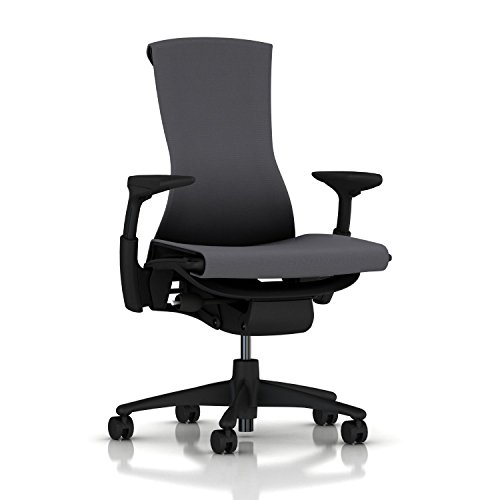
Herman Miller Embody Ergonomic Office Chair (Charcoal Rhythm) — Best Premium
The Embody is the premium answer for retouchers whose arms do two different jobs: the listing specifies fully adjustable arms, and that adjustability is what lets you drop the drawing-side armrest to tablet height while keeping the other side higher for keyboard work. Its pixelated back structure is famous in the design world, but for an editor the practical point is simpler — the chair encourages micro-movement during long, still sessions, and micro-movement is what keeps a four-hour retouch from ending in stiffness.
Strengths
- Fully adjustable arms are confirmed in the listing — rare and valuable for tablet work
- Back design encourages small posture changes during static editing
- Carpet casters specified, suiting carpeted home studios
Trade-offs
- The highest price tier in this guide by a wide margin
- No headrest is mentioned in the listing
- Its distinctive look divides opinion in a client-facing studio
| Listing name | Herman Miller Embody Ergonomic Office Chair |
| Arms (listing) | Fully adjustable arms |
| Casters (listing) | Carpet casters |
| Fabric/colour (listing) | Charcoal Rhythm |
Choose the Embody if your retouching is your income and your current chair is the bottleneck. The fully adjustable arms are the headline for this search: pen work wants a low, slightly outward arm position, and most chairs force a compromise height shared by both arms. The back’s flexible structure distributes pressure instead of concentrating it at two contact points, which editors tend to notice in the second hour of a session rather than the second minute. What the listing does not promise is a headrest or a footrest, and at this tier you should buy it for the arms and back alone. Studios on hard floors should also confirm caster suitability on the listing, since the specified casters are for carpet.
Best for: professional retouchers who will exploit fully adjustable arms every day / Not suited for: occasional editors, or anyone who wants a headrest included at this price
Check the current price on Amazon

HON Ignition 2.0 Ergonomic Office Chair (Black) — Best Value Workhorse
The Ignition 2.0 is the sensible middle of this guide: a mainstream office chair whose listing confirms adjustable lumbar support and adjustable arms, the two adjustments that decide whether a chair suits retouching. It does not chase novelty. It gives you a mesh-back task chair from a contract-furniture brand, tuned for workstations, at a mid-range tier — which is why it is the pick for studios equipping a second editing seat or a retoucher upgrading from a dining chair.
Strengths
- Adjustable lumbar support and adjustable arms both confirmed in the listing
- Mesh back keeps long sessions cooler than padded backs
- Contract-brand build aimed at daily workstation use
Trade-offs
- No headrest is mentioned in the listing
- Adjustment range is honest but not exotic — no four-way arm wizardry is claimed
- Black only in this listing, so colour choice means choosing a different listing
| Listing name | HON Ignition 2.0 Ergonomic Office Chair, Lumbar Support, Desk Chair, Black |
| Lumbar (listing) | Adjustable lumbar support |
| Arms (listing) | Adjustable arms |
| Colour (listing) | Black |
For retouching, the Ignition’s appeal is that its lumbar support can be positioned where your back actually curves, rather than sitting at a fixed height moulded for an average torso. Set it once for your editing posture — slightly upright, leaning a few degrees into the desk — and it stays relevant all day. The mesh back suits editors who work in warm rooms under studio lighting. Where it concedes ground to the flagship picks is refinement: the Leap’s back follows movement better, and the Embody’s arms adjust further. But measured by adjustments-per-tier, this is the guide’s value anchor, and for a retoucher whose alternative is a kitchen chair, it is a transformation.
Best for: retouchers upgrading from a basic chair who want the essential adjustments done properly / Not suited for: editors who specifically want a headrest or a reclining lounge posture
Check the current price on Amazon

SIHOO Doro C300 Pro V2 Ergonomic Office Chair (Jet Black) — Best for Long Sessions
Deadline weeks in retouching are marathons, and the Doro C300 Pro V2 is specced for them: the listing includes a footrest, breathable mesh, a high back, armrests described as 8D, and a recline to 135 degrees. The retouching logic is that your chair should serve both halves of the job — the forward, focused editing posture and the lean-back, whole-image judgement posture — and a footrest plus deep recline makes the second half genuinely restful instead of a slumped pause.
Strengths
- Footrest and 135-degree recline confirmed in the listing for proper review breaks
- Breathable mesh back and seat area suit long, warm sessions
- Highly adjustable armrests help set a low drawing-arm position
Trade-offs
- Footrest chairs take more floor space — measure a small studio
- The more mechanisms a chair has, the more setup time it needs out of the box
- Mesh seat feel is firmer than the foam seats some editors prefer
| Listing name | SIHOO Doro C300 Pro V2 Ergonomic Office Chair with Footrest, Jet Black |
| Armrests (listing) | 8D armrests |
| Recline (listing) | 135 degrees |
| Extras (listing) | Footrest; breathable mesh; high back |
The most underrated retouching skill is stepping back — literally leaning back to see the image whole. This chair builds that into the furniture: recline, extend the footrest, and evaluate colour and composition from a different posture, then return to the desk position. Its adaptive full-body support claim in the listing is marketing language, but the concrete, checkable features — mesh, footrest, recline range, armrest adjustability — are the ones that matter and they are all present. If your editing days regularly exceed six hours, the ability to change posture completely without leaving the chair is worth more than a marginal difference in cushion foam.
Best for: retouchers with long deadline sessions who review work reclined between editing passes / Not suited for: small studios short on floor space, or minimalists who dislike multi-mechanism chairs
Check the current price on Amazon

Hbada X7 Smart Ergonomic Chair (Black) — Best High-Tech Adjustability
The X7 is the technologist’s pick: its listing describes fully automated lumbar tracking, a 4D adjustable headrest, armrests with an unusually wide range of motion, and a ventilated seat cushion. For a retoucher, the pitch is that the chair handles the adjustments you forget to make. Static work makes people stop noticing their posture; a lumbar system that tracks your back as you shift removes one decision from a day already full of them.
Strengths
- Automated lumbar tracking is the listing’s headline and suits forgetful sitters
- 4D adjustable headrest included — rare in this guide
- Ventilated seat cushion addresses the warm-seat problem of long sessions
Trade-offs
- Smart features mean more to learn and more to go wrong than a manual chair
- Premium tier pricing for the technology
- The listing’s armrest range figure is generous marketing — judge by position, not numbers
| Listing name | Hbada X7 Smart Ergonomic Chair, Office Chair |
| Lumbar (listing) | Fully automated lumbar tracking |
| Headrest (listing) | 4D adjustable headrest |
| Seat (listing) | Ventilated seat cushion |
Treat the X7 as an experiment in removing friction. Manual lumbar supports only work when the sitter adjusts them, and most sitters adjust once and never again; a tracking system keeps support in contact as you lean in and out of a retouch. The 4D headrest is genuinely useful for the lean-back review posture, and the ventilated seat answers the specific discomfort of sitting still for hours, which is heat build-up rather than pressure. The risk is complexity: more powered or mechanical systems mean a longer setup and a steeper learning curve. Retouchers who enjoy dialling in their gear — the same people who calibrate monitors — will enjoy this chair. Those who want to sit and forget should look at the Leap or the Ignition.
Best for: tech-minded retouchers who want the chair to manage lumbar contact automatically / Not suited for: buyers who prefer simple, manual, set-and-forget furniture
Check the current price on Amazon

Marsail Ergonomic Office Chair with Headrest — Best Budget Mesh
The Marsail closes the list as the budget route into a proper retouching chair: a high back in mesh, adjustable lumbar support, 3D armrests and a headrest, all confirmed in its listing. That combination is precisely the starter kit for pen-tablet work — the arms adjust enough to find a drawing height, the lumbar support can be placed rather than endured, and the headrest serves the lean-back review posture that more expensive chairs in this guide charge extra for, or omit entirely.
Strengths
- Headrest included at a budget tier, confirmed in the listing
- 3D armrests give real scope to set a low drawing-arm position
- Mesh high back keeps the back cool during long sessions
Trade-offs
- Budget-tier materials will not match the flagship chairs’ longevity
- Adjustment mechanisms feel less refined than the premium picks
- No footrest, so review breaks happen at the desk, not reclined
| Listing name | Marsail Ergonomic Office Chair: Office Desk Chair with High Back Mesh and Adjustable Lumbar Support, 3D Armrests and Headrest |
| Back (listing) | High back mesh |
| Lumbar (listing) | Adjustable lumbar support |
| Arms/headrest (listing) | 3D armrests; headrest included |
If you are currently retouching from a fixed kitchen chair, the Marsail is the largest single upgrade per tier in this guide. Set the lumbar support for your editing lean, drop the drawing-side armrest until your pen arm rests level with the tablet, and use the headrest when you sit back to judge the image. Its limits are the honest limits of its tier: mechanisms with less damping, upholstery that will show years sooner than a Steelcase, and no recline-and-footrest combination. But the checklist of retouching-relevant adjustments is complete, and that completeness — not luxury — is what your back notices at hour three.
Best for: retouchers on a budget who still want a headrest and adjustable arms / Not suited for: buyers furnishing for a decade of daily professional use
Check the current price on Amazon
Comparison Table
| Pick | Badge | Key spec | Best for |
|---|---|---|---|
| Steelcase Leap Office Chair (Onyx) | Best Overall | LiveBack backrest and Natural Glide System, per the listing | full-time retouchers who want a back that follows their lean and a chair that lasts for years |
| Herman Miller Embody Ergonomic Office Chair (Charcoal Rhythm) | Best Premium | Fully adjustable arms and carpet casters, per the listing | professional retouchers who will exploit fully adjustable arms every day |
| HON Ignition 2.0 Ergonomic Office Chair (Black) | Best Value Workhorse | Adjustable lumbar support and adjustable arms, per the listing | retouchers upgrading from a basic chair who want the essential adjustments done properly |
| SIHOO Doro C300 Pro V2 Ergonomic Office Chair (Jet Black) | Best for Long Sessions | Footrest, 8D armrests, breathable mesh, 135-degree recline, per the listing | retouchers with long deadline sessions who review work reclined between editing passes |
| Hbada X7 Smart Ergonomic Chair (Black) | Best High-Tech Adjustability | Automated lumbar tracking, 4D headrest, 720-degree armrests, ventilated seat, per the listing | tech-minded retouchers who want the chair to manage lumbar contact automatically |
| Marsail Ergonomic Office Chair with Headrest | Best Budget Mesh | High back mesh, adjustable lumbar support, 3D armrests and headrest, per the listing | retouchers on a budget who still want a headrest and adjustable arms |
Read the table by adjustment, not by brand. A retoucher’s chair succeeds or fails on lumbar placement, arm height range and how the back behaves in a forward lean — the key-spec column quotes only what each listing itself states.
How to Choose the Best Ergonomic Chairs for Photo Retouchers
Start with your working posture, not the chair. Retouching posture is upright but not military: hips slightly above or level with knees, a lean of a few degrees toward the desk, forearms roughly level, and your drawing arm supported without your shoulder hiking. A chair suits retouching when it can hold that posture without forcing it — which means the deciding features are a lumbar support you can position, a seat that does not tip you forward or swallow you, and armrests that adjust down to tablet height.
Next, decide mesh versus cushion honestly. Mesh backs breathe, and under studio lighting a long session runs warm; mesh seats feel firmer and more stable, which many pen users prefer because the drawing arm braces against the body. Cushion seats feel softer for the first hour and warmer by the fourth. Neither is objectively better — but retouchers who work in cool rooms often prefer cushion, and those in warm rooms mesh, so let your room decide.
Then check the armrests against your desk, because this is where retouching chairs fail most often. Your pen arm should rest with the elbow supported and the wrist floating over the tablet. If the armrests cannot go low enough, they will lift your shoulders all day; if they cannot move inward, your drawing arm drifts unsupported. Fully adjustable or multi-direction arms — the Embody and the SIHOO in this guide — exist precisely for this. Fixed arms are the first thing to reject.
Seat dimensions deserve the same attention as the back. Seat depth decides whether the cushion supports your thighs without pressing behind your knees: you want a hand’s width of clearance between the seat edge and the back of your calf when your back is against the backrest. Editors with shorter legs should treat a deep, fixed seat as a rejection reason, because perching on the edge to reach the floor quietly cancels every ergonomic feature behind you. If your feet do not rest flat at working height, plan on a footrest from day one rather than enduring dangling feet.
Finally, budget in tiers and buy the tier you will keep. A budget mesh chair with the right adjustments beats an expensive chair with the wrong ones, but a flagship chair amortised over a decade of daily professional editing is not extravagance — it is the cheapest chair you will ever own per working hour. Choose by the hours you truly sit: under three hours a day, the budget and mid picks serve well; over six, the flagship backs earn their tier.
Setting Up Your Chair for a Pen Display or Graphics Tablet
A chair is only ergonomic in relation to the desk it serves, so set the station in order. First, seat height: sit with feet flat, and raise or lower the seat until your forearms rest level with the desk surface with shoulders relaxed. If your feet dangle at that height, the desk is too high for the chair — a footrest is the correct fix, not a lower seat that bends your arms upward.
Second, the pen display. Its top edge should sit at or slightly below eye level, close enough that you do not lean to reach detail. If you find yourself hunching, the display is too low or too far — raise it before blaming the chair. Third, lumbar: position the support in the small of your back while sitting in your actual editing lean, not while sitting bolt upright for the adjustment. Fourth, armrests: set the drawing side first, level with the tablet surface, then match or raise the other side for keyboard work.
Work through that sequence once, slowly, and then leave the chair alone for a week. Most discomfort in week one is your body adapting to supported posture, not the chair failing. Revisit only the one adjustment that maps to a specific, repeatable ache — and change one thing at a time, or you will never learn which change helped.
Backrests, Lumbar Support and the Retoucher’s Lean
Retouchers lean. Detail work pulls the head and shoulders forward, and a backrest designed for upright typing can make that lean worse by pushing the lumbar area while the upper back floats unsupported. The designs that handle the lean best share one trait: support that stays in contact as your back angle changes. That is the idea behind the Leap’s moving back technology and the X7’s tracking lumbar — different engineering, same goal.
A fixed lumbar pad is not useless, but its height must match your back. When you test a chair, sit in your editing posture and slide a hand behind your lower back: the support should fill that space gently. If it presses your belt line or sits against your shoulder blades, it is the wrong height, and if it cannot be moved, it is the wrong chair. Adjustable lumbar — named in the listings of the HON, the SIHOO, the Marsail and others here — is therefore not a luxury feature for this search; it is the feature.
Recline deserves a word too. Retouchers should recline — briefly, often — to view work whole. A chair that locks only upright trains you to perch; a chair with a free or lockable recline, like the SIHOO’s 135 degrees, lets evaluation become a posture instead of a break you have to leave the desk to take.
Mesh, Fabric and Foam: Upholstery for Long Editing Sessions
Upholstery decides how a chair feels in hour four, and retouching sessions are long. Mesh backs are the safe default for warm rooms: air moves, and the back stays neutral. Mesh seats add stability — you do not sink, so your drawing posture stays where you set it — but some editors find them firm on bony hips. If that is you, choose a mesh back with a foam seat, the classic hybrid.
Foam seats reward the first sit and punish inconsistency: cheap foam compresses into a bowl within a year, quality foam holds its shape for many years, and you cannot tell them apart in a showroom minute. This is one place brand track record genuinely informs the choice — the flagship picks in this guide built their reputations on foam that survives a decade of daily use.
Fabric versus leather-style coverings matter for a working studio too. Fabric breathes and grips, keeping you from sliding during a lean; smooth coverings wipe clean, which matters if your studio doubles as a client space or a home with children and coffee. The listings here state their materials plainly — check the exact upholstery in the listing title before ordering, because the same chair often sells in several finishes.
Casters, Floors and the Small Studio: The Overlooked Details
Retouching happens in small rooms more often than in grand studios, and small rooms punish careless chair choices. Start with casters: two picks in this guide specify wheels for carpet in their listings, which roll with a deliberate, damped feel on carpet and can feel skittish on hard floors. On wood or laminate, hard-floor casters or a chair mat keep the chair where your drawing posture puts it — a chair that drifts backwards half an inch an hour will have you re-leaning all day without knowing why.
Footprint is the second detail. Chairs with footrests and deep reclines, like the SIHOO here, need clear floor behind and below the desk; measure the reclined length against your wall before ordering, not after. Five-spoke bases also catch on rug edges and cable runs, so route your pen display and tablet cables where the base never travels.
Finally, noise. In a shared home, a squeaking mechanism or rattling armrest becomes a household issue by week two. Quality mechanisms are quiet mechanisms — one more reason the flagship tier exists — but any chair in this guide will stay quieter if you re-tighten its assembly bolts after the first fortnight, when parts have settled under real use. Put that ten-minute job in your calendar when the chair arrives.
Breaks, Movement and the Honest Limits of Any Chair
It would be convenient if the right chair made eight still hours healthy. It does not, and this guide will not pretend otherwise. What the right chair does is remove the avoidable insults — the unsupported lumbar curve, the raised drawing shoulder, the seat edge pressing into your thighs — so that the remaining load is simply sitting itself, which you manage with movement. Retouchers who build micro-breaks into their workflow, standing between files and looking across the room while a batch exports, get more from a mid-tier chair than sedentary sitters get from a flagship.
Practical rhythm matters more than heroic stretching routines. Change posture when you change task: edit upright, evaluate reclined if your chair allows it, stand for culling and keywording if your desk permits. The chairs in this guide were partly ranked on how gracefully they support those changes — recline ranges, footrests and moving backs are workflow features, not luxuries.
If discomfort persists after a correct setup and a fair adaptation week, treat it as information, not failure. A specific, repeatable pain that survives adjustment is a reason to consult a health professional, and no product page — this one included — is a substitute for that. Buy the chair to support good working posture; let medicine handle medical questions.
How to Set Up Your Retouching Workstation Around the Chair
Do this setup once, in this order, with a real retouching file open — posture set over email will not match posture over a pen display.
- Sit in the chair with feet flat on the floor. Adjust seat height until your forearms are level with the desk and your shoulders hang relaxed.
- Raise the pen display or monitor so its top edge is at or just below eye level, an arm’s length away. Use a stand or books if needed — do not lean down to the screen.
- Position the lumbar support into the small of your back while sitting in your normal editing lean, not bolt upright.
- Set the drawing-side armrest level with the tablet surface so your pen elbow is supported and your wrist floats. Set the other armrest for comfortable keyboard height.
- Angle the tablet so your pen hand works in the centre of your body, not off to one side; recentre the chair to the tablet, not the desk edge.
- Edit for twenty minutes. Note any specific, repeatable ache, adjust only the one control that maps to it, and repeat.
Finish by marking your settings — a phone photo of each lever position saves you after the chair gets moved for cleaning. And keep the daily habit that no setup can replace: stand up between files, look at something far away, and let your back reset. The best chair in this guide still works best for the sitter who moves.
Common Buying Mistakes
Buying for the showroom minute. A chair that feels plush for sixty seconds can be wrong for six hours. Judge by adjustments and support placement, which predict hour four, not by first-sit softness.
Ignoring armrest height. Retouchers reject chairs for many reasons, but the daily irritant is usually an armrest that lifts the drawing shoulder. If the arms cannot drop to tablet height, pass.
Setting the chair upright and the screen low. A low pen display manufactures a hunch in any chair. Raise the screen first; only then evaluate the backrest.
Copying a colleague’s settings. Lumbar height, seat depth and arm width are body measurements. A chair adjusted for a taller editor is a badly adjusted chair for you.
Chasing the longest feature list. Features you never touch — novelty arm motions, decorative functions — add cost and failure points. Buy the adjustments your posture actually uses.
Final Recommendation
If you buy one chair from this guide, make it the one whose adjustments match your editing posture. Start with the Steelcase Leap Office Chair (Onyx) (check price on Amazon); the strongest alternative is the Herman Miller Embody Ergonomic Office Chair (Charcoal Rhythm) (check price on Amazon); and the specialist choice is the Marsail Ergonomic Office Chair with Headrest (check price on Amazon).
The rest of the list divides cleanly. The HON Ignition 2.0 is the value workhorse for a second seat or a first real chair; the SIHOO Doro C300 Pro V2 serves marathon sessions with its footrest and recline; the Hbada X7 suits the editor who wants lumbar support managed automatically; and the Marsail proves the budget tier can still cover every adjustment a retoucher truly needs. Whichever you choose, set it up against your pen display using the sequence in this guide, and give your body a week before you judge it. A chair bought for retouching is a tool of the trade in the same sense as a calibrated monitor: invisible when it is right, and quietly costing you work when it is wrong.
Reading further across this category? Compare Best Ergonomic Chairs For Posture Best Ergonomic Chairs For Studying Best Office Chairs For 12 Hour Days Best Ergonomic Office Chairs Home Best Inexpensive Ergonomic Office Chairs.
Frequently Asked Questions
What makes a chair good for photo retouching specifically?
The posture. Retouchers sit still, leaning slightly forward over a pen display, with one arm working at tablet height. A retouching chair needs positionable lumbar support that stays in contact during that lean, armrests that drop low enough for the drawing arm, and a back that lets you recline briefly to judge the whole image. General office chairs often fail on the armrests first. Retouching also rewards a chair that stays quiet and stable — no rocking, drifting or creaking — because your pen hand braces against your seated body, and a moving base turns into a moving drawing arm.
Is mesh or a cushion seat better for long editing sessions?
Mesh breathes and feels stable, which suits warm studios and pen users who brace as they draw. Cushion seats feel softer early in a session and warmer later. Many retouchers land on the hybrid — mesh back, quality foam seat. Your room temperature and session length decide better than any rule does.
Do I need a headrest for retouching?
Not for the editing itself — your head is forward and working. A headrest earns its place in the lean-back moments when you evaluate the image whole, and in chairs like the Marsail and Hbada X7 in this guide it is included. If you never recline at your desk, you can skip it without losing anything.
How long should a retouching chair last?
A budget chair in daily professional use is typically a two-to-four-year purchase; flagship task chairs are built for a decade or more of daily use. Divide the tier by the years and the flagship often wins on cost per working hour — but only if you will actually keep it that long.
Can a chair fix my backache from editing?
A chair can remove causes — unsupported lumbar, raised shoulders, a seat that tips you forward — but it cannot undo a low screen, a badly angled tablet, or six hours without standing. Set up the whole station using the steps in this guide, move between files, and treat persistent pain as a health question for a professional, not a shopping question.
What should I check in the listing before ordering?
Confirm the exact features you are counting on appear in the listing itself: lumbar adjustability, arm type, headrest, caster type for your floor, and the upholstery. Listings for the same chair vary by finish and configuration, and the title is the contract — if a feature is not stated there, do not assume it is included.


