Disclosure: airfryerkitchensupply.com is reader-supported. When you buy through links on our site, we may earn an affiliate commission at no extra cost to you.
Where to buy
Every chair below was verified before earning a link. This guide never prints prices — they change too often — so use the links to check the current figure after you have matched a chair to your body and your room.
- Furmax Office Chair (Mesh, Black) — Check the current price on Amazon
- Sweetcrispy Ergonomic Desk Chair (Gray) — Check the current price on Amazon
- DUMOS Home Office Chair — Check the current price on Amazon
- SIHOO M18 Ergonomic Office Chair — Check the current price on Amazon
- TRALT Office Chair with Headrest — Check the current price on Amazon
- NEO CHAIR Office Desk Chair (High Back, Gray) — Check the current price on Amazon
The best inexpensive ergonomic office chairs prove a point the furniture industry would rather you missed: posture is cheap. The features that determine whether your back survives a workday — a seat that adjusts to your leg length, lumbar support that meets the small of your back, a breathable backrest shaped like a spine, and armrests that keep your shoulders down — are engineering basics, and every chair in this guide has them at the affordable end of the market. What money beyond this tier buys is refinement: thicker foam, smoother mechanisms, longer service life and executive looks. Those are real things, but they are not posture. This guide therefore ranks six verified budget chairs by the ergonomic substance they deliver — including, where listings state them, the capacity figures that larger users are usually forced to guess.
One discipline runs through every review: if a specification is not in the listing, we say so. Three of these chairs do not state a weight capacity in their listings, and their reviews flag that rather than inventing a number. Larger buyers should start with the two picks that print their capacity, and every buyer should start with the setup routine in this guide.
Key Takeaways
- Posture is cheap: lumbar support, height adjustment and a breathable shaped back exist at every tier in this guide.
- Capacity is a specification, not a guess — two picks state 330 lbs in their listings; the others do not state it, and their reviews say so.
- Flip-up arms are a space feature: the chair tucks fully under the desk, which matters in bedrooms and shared rooms.
- Rocking, tilt lock and headrests serve different work styles — match the movement to how you actually spend your day.
- Five minutes of setup on day one (height, lumbar position, arm height) is worth more than any single feature.
In this guide
Quick Picks
Six chairs, six budgets of attention: the all-round value pick, the space-saver, the mover, the stated-capacity step-up, the work-and-read all-rounder, and the high-back. Start from your body and your room, not from the pictures.
Furmax Office Chair (Mesh, Black) — Best Overall Value. The category’s benchmark budget chair: an ergonomic mesh desk chair with lumbar support, adjustable height, a breathable mid-back and 360-degree swivel — every core ergonomic feature, none of the expensive extras. Check price on Amazon.
Sweetcrispy Ergonomic Desk Chair (Gray) — Best with Flip-Up Arms. A mesh ergonomic chair with lumbar support and flip-up arms — the small-space pick, because arms that fold away let the chair tuck fully under the desk and suit tablet-arm and instrument-playing sitters. Check price on Amazon.
DUMOS Home Office Chair — Best Rocking Budget Chair. A mesh mid-back chair with lumbar support, height adjustment, fixed armrests and a rocking mode — for sitters who think better when the chair lets them move a little. Check price on Amazon.
SIHOO M18 Ergonomic Office Chair — Best Stated Capacity and Adjustment. The step-up pick whose listing states the numbers others omit: a mesh chair with headrest, adjustable lumbar support, 2D armrests, a wide cushion and a stated 330 lb capacity, plus tilt lock. Check price on Amazon.
TRALT Office Chair with Headrest — Best Reading-Chair Comfort. An ergonomic desk chair with adjustable lumbar support, a headrest and flip-up armrests, whose listing also states a 330 lb capacity and even positions it as a reading chair — the budget all-rounder for work-and-read days. Check price on Amazon.
NEO CHAIR Office Desk Chair (High Back, Gray) — Best High-Back on a Budget. A high-back mesh chair with an adjustable headrest and lumbar support plus flip-up armrests, listed for extended sitting comfort — the tall-back silhouette without the executive price class. Check price on Amazon.
How These Picks Were Chosen
We built this list from Amazon listing data cache, checking every candidate’s listing title for the features its review claims. The filter was strict: a chair needed genuine ergonomic substance — lumbar support and height adjustment at minimum — to be considered at all, which excluded the large population of pretty, padded, non-adjustable desk chairs that fill the budget shelves. Kids’ desk chairs, gaming chairs, ball chairs and drafting chairs were also excluded; each serves a different brief. What remained was organised by the decisions real buyers face: Do you need a stated capacity? Must the chair vanish under the desk? Do you sit still or move? Do you read as much as you type? Are you tall?
Prices were deliberately ignored during selection and are never printed: “inexpensive” in this guide means the affordable class of the ergonomic market, judged by feature substance, and the current figure on any listing will tell you the rest. Where a listing states a capacity, we quote it exactly; where it does not, the review says “not stated” — because a guessed capacity is worse than no number at all. The same rule was applied to every other figure in this guide: seat dimensions, tilt ranges and capacities appear only when the listing itself prints them, and the spec boxes below were checked line by line against the listing titles before publication.
The 6 Best Inexpensive Ergonomic Office Chairs
Each review covers who the chair suits, three strengths, three trade-offs, the specifications exactly as listed, and a verdict. Capacities appear only where the listing states them.
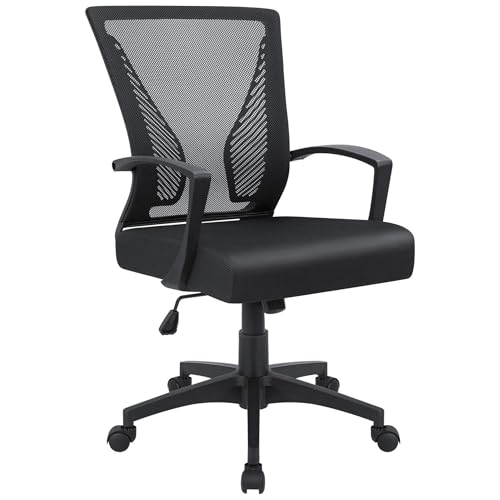
Furmax Office Chair (Mesh, Black) — Best Overall Value
The Furmax is where this category starts because it demonstrates the central truth of inexpensive ergonomic chairs: the features that protect your back during a workday — lumbar support, seat height adjustment, a breathable back that follows your spine’s curve, and armrests at a sane height — do not require a premium price. The listing describes an ergonomic computer desk mesh chair with lumbar support, adjustable height, a breathable backrest, mid-back design, 360-degree swivel and armrests, aimed at home, office and conference use, with easy assembly.
Who it suits: home workers, students and anyone furnishing a first proper desk setup who wants the ergonomic essentials done competently. Who it does not suit: very tall or heavy users who need a stated high capacity and a larger seat — look at the SIHOO or TRALT picks below, whose listings state their capacity figures — or anyone wanting a headrest, which this mid-back design does not have.
Strengths
- Lumbar support and an ergonomic mid-back shape are present at the lowest-commitment tier
- Breathable mesh back suits long sessions and warm rooms better than padded vinyl
- Adjustable height and 360-degree swivel cover the two movements a desk chair must get right
Trade-offs
- Mid-back design means no headrest or upper-shoulder support for reclining
- Capacity is not stated in the listing title — heavier users should choose a pick that states it
- Fixed-style armrests at this tier offer less adjustment than pricier chairs
Key specs (as listed)
- Format: mesh office/desk chair, mid-back
- Support: lumbar support as listed
- Adjustment: height adjustable; 360 swivel
- Colour: Black
Judge the Furmax by what a workday actually demands. For six to nine hours of sitting, the hierarchy of needs is: a seat height that lets your feet rest flat, lumbar contact that stops you slumping into a C-shape, and a back that does not cook you by midday. This chair addresses all three with mesh, shape and a lift cylinder, and spends nothing on leather-look padding or executive styling. The honest compromises are longevity and refinement: at this tier, foam and mechanisms are built to a price, and heavy daily use will show it sooner than on a premium chair. For a first ergonomic chair, a spare-room desk or a student setup, that is the right trade. Buy it for the posture it gives you now, not as a decade-long heirloom.
Best for: First ergonomic chair buyers, students and home workers on a budget / Not suited for: Users needing a stated high weight capacity, a headrest, or a large seat

Sweetcrispy Ergonomic Desk Chair (Gray) — Best with Flip-Up Arms
The Sweetcrispy earns its badge with one moving part the others lack: flip-up arms. That sounds minor until you live in a small room. Arms that fold vertical let the chair slide completely under the desk, freeing floor space every evening; they also get out of the way for guitar practice, tablet drawing, or simply sitting cross-legged. The listing describes an ergonomic computer desk chair in gray mesh with comfortable lumbar support, a mid-back, rolling swivel and flip-up arms, for home office, bedroom and study use.
Who it suits: small-space workers, students in bedroom-study setups, and anyone whose chair must disappear under the desk at night. Who it does not suit: users who lean heavily on armrests all day — flip-up arms at this tier are for occasional support, not for parking your full weight — or anyone wanting a headrest.
Strengths
- Flip-up arms let the chair tuck under the desk and free floor space
- Mesh back and lumbar support cover the ergonomic essentials
- Gray colourway suits bedrooms and shared spaces better than corporate black
Trade-offs
- Arms are less substantial than fixed or padded designs when used all day
- Mid-back format, no headrest
- Capacity not stated in the listing title
Key specs (as listed)
- Format: mesh desk chair, mid-back
- Arms: flip-up
- Support: lumbar support as listed
- Colour: Gray
Small rooms punish furniture that cannot get out of the way, and a desk chair is the worst offender — it is the one object that lives in the middle of the floor. The Sweetcrispy’s flip-up arms are therefore not a gimmick but a space strategy: work mode with arms down, room mode with the chair vanished under the desk. Ergonomically it plays the same hand as the Furmax — mesh, lumbar shape, height and swivel — so the choice between them is really about your room and your habits, not your spine. If your desk is in a bedroom, a studio flat or a shared family room, this is the budget chair that respects the rest of your life. If you have a dedicated office and never move the chair, the simpler fixed-arm picks are equally honest value.
Best for: Small spaces, bedroom desks and anyone who tucks the chair away daily / Not suited for: All-day armrest leaners or headrest seekers

DUMOS Home Office Chair — Best Rocking Budget Chair
Some people sit still to concentrate; others concentrate because they can move. The DUMOS is the budget pick for the second group: its listing describes an ergonomic mid-back mesh chair with lumbar support, height-adjustable seat, fixed armrests and a rocking mode on a 360-degree swivel, in black, for computer and conference use. Rocking — a gentle tilt under light pressure — lets you shift posture through the day instead of locking into one position, and posture variety is a genuine ergonomic strategy, not a fidget.
Who it suits: restless sitters, thinkers, call-heavy workers who lean back to listen, and anyone who finds a rigid chair fatiguing. Who it does not suit: users who want a lockable recline at a set angle for long reading sessions, or a headrest; this is a mid-back with a rock, not a lounger.
Strengths
- Rocking mode encourages the small posture changes that fight stiffness
- Mesh mid-back with lumbar support covers warm-room comfort and back contact
- Fixed armrests are sturdier for pushing up out of the chair than flip designs
Trade-offs
- Rocking is not a lockable recline — it will not hold a laid-back reading angle
- No headrest at this mid-back format
- Capacity not stated in the listing title
Key specs (as listed)
- Format: mesh office chair, mid-back
- Movement: rocking mode; 360 swivel
- Arms: fixed armrests as listed
- Colour: Black
The ergonomic literature’s most consistent advice is unglamorous: the best posture is the next posture. A chair that permits gentle movement serves that advice better than a rigidly “correct” chair that holds you in one position for four hours. The DUMOS builds that philosophy into a budget mesh chair, and pairs it with the standard kit — lumbar support, height adjustment, swivel — so you are not trading basics for the rock. Be clear about the boundary, though: rocking is a tilt that responds to your weight, not a recline you can set and forget. If your workday includes long leaned-back reading or calls where you want to stay tipped, look at the tilt-lock picks below. If your day is active desk work punctuated by thinking pauses, the DUMOS matches it well.
Best for: Restless sitters who concentrate better with gentle movement / Not suited for: Users wanting a lockable recline or headrest support

SIHOO M18 Ergonomic Office Chair — Best Stated Capacity and Adjustment
The SIHOO M18 is what the inexpensive category looks like when a maker decides to compete on specification. The listing describes a mesh-back desk chair with a headrest, adjustable lumbar support, 2D armrests and a wide cushion, with tilt lock — and it states a capacity: holds 330 lbs. That single stated figure does real work. Buyers above average size are routinely told to guess by budget listings; here the number is printed, and the wide cushion and adjustable lumbar match the brief. The headrest also moves this chair out of the mid-back class into genuine lean-back territory.
Who it suits: larger users, taller users who want headrest support, and home workers ready to spend a step above the floor of the market for stated specs and more adjustment. Who it does not suit: the strictest budgets — this is the least inexpensive direction on the list, though still firmly in the affordable class — or small rooms where a high-back chair dominates.
Strengths
- Capacity stated in the listing (330 lbs) — no guessing for larger users
- Adjustable lumbar support, 2D armrests and headrest give the most adjustment here
- Tilt lock allows a held recline angle for calls and reading
Trade-offs
- Sits at the top of this guide’s inexpensive band
- High-back format takes more room than the mid-back picks
- Assembly and setup of the adjustable parts takes longer than the basic chairs
Key specs (as listed)
- Capacity as listed: 330 lbs
- Back: mesh with headrest
- Arms: 2D adjustable
- Lumbar: adjustable; tilt lock; wide cushion
Adjustment is only valuable if you use it, so here is the M18 routine: set seat height for flat feet, slide the lumbar until it meets the small of your back without pushing you forward, set armrest height so your shoulders stay down while your forearms rest, and use tilt lock for calls, free rock for thinking. Five minutes of that on day one converts this chair’s specification list into actual comfort; skip it and you own an adjustable chair adjusted to nobody. That is the honest caveat for the whole step-up class. For buyers who will do the setup — and especially for larger buyers failed by unstated capacities elsewhere — the M18 is the most complete inexpensive ergonomic chair in this guide.
Best for: Larger users and anyone who wants stated capacity plus real adjustment / Not suited for: Strict minimum budgets or very small rooms

TRALT Office Chair with Headrest — Best Reading-Chair Comfort
The TRALT combines features that usually force a choice: a headrest for leaning back, flip-up arms for tucking away, adjustable lumbar support for the working hours, and a stated capacity of 330 lbs in the listing. It also describes itself, charmingly and usefully, as a reading chair — a hint that its comfort brief extends beyond the keyboard. For hybrid days that mix typing, calls and an hour with a document or a book, that breadth is the point.
Who it suits: hybrid workers and readers in spaces that must reset at night — headrest when you lean back, arms up and chair away when you finish. Who it does not suit: purists wanting a single-purpose chair optimised for one posture, or anyone needing a stated seat-size figure, which the listing does not provide.
Strengths
- Headrest plus flip-up arms is a rare combination at this tier
- Capacity stated in the listing (330 lbs)
- Adjustable lumbar support covers the core ergonomic requirement
Trade-offs
- Jack-of-all-trades design is out-specialised by focused picks on each single feature
- Seat dimensions not stated in the listing title
- Mesh-and-frame styling is functional rather than executive
Key specs (as listed)
- Capacity as listed: 330 lbs
- Back: with headrest
- Arms: flip-up
- Lumbar: adjustable support as listed
Most budget chairs ask you to declare your tribe — space-saver or leaner-back, worker or reader — and then serve only that tribe. The TRALT declines to ask. That makes it the natural recommendation for the large group of buyers whose days are genuinely mixed and whose rooms are genuinely shared: the spare room that is an office by day and a reading corner by night is exactly its habitat. The compromises are the honest kind — no single feature here is the best in this guide, and the listing leaves seat dimensions unstated, so petite users should double-check the listing details. But as a single purchase that covers the most real days for the most real rooms, it earns its badge.
Best for: Mixed work-and-read days in rooms that reset at night / Not suited for: Single-posture specialists or buyers needing stated seat dimensions

NEO CHAIR Office Desk Chair (High Back, Gray) — Best High-Back on a Budget
The NEO CHAIR closes the list with the silhouette many buyers picture when they say “ergonomic chair”: a high back in mesh, an adjustable headrest, adjustable lumbar support and flip-up armrests, in gray. The listing describes it as designed for extended sitting comfort while working, and the high-back format is its real distinction — your upper back and shoulders get contact and support that every mid-back pick here, however good, simply cannot offer.
Who it suits: taller users whose shoulders clear a mid-back uncomfortably, and anyone who leans back to think, read or take calls during the day. Who it does not suit: the smallest rooms — a high back is furniture, and it will own a small corner — or buyers wanting a stated capacity figure, which this listing does not give.
Strengths
- High-back mesh supports the full spine, not just the lumbar zone
- Adjustable headrest and lumbar let you tune both ends of the back
- Flip-up arms keep the tuck-under-desk trick despite the bigger format
Trade-offs
- Capacity not stated in the listing title
- High back dominates small rooms and small desks
- At this tier the headrest adjustment range is modest — set expectations accordingly
Key specs (as listed)
- Format: high-back mesh desk chair
- Headrest: adjustable as listed
- Arms: flip-up
- Colour: Gray
Choose between this and the SIHOO M18 by what you need stated. The M18 prints its capacity and cushion width; the NEO CHAIR prints its extended-sitting intent and gives you the high-back shape with adjustable headrest in a gray that suits home interiors. Both are legitimate step-up answers; they simply spend their specification budgets differently. In use, the NEO’s advantage shows up in the last hour of the day, when mid-back users start perching and shifting — a back that is still there when you lean is a back you lean on. Set the lumbar to meet your belt line, set the headrest to meet the curve of your neck rather than the top of your head, and the chair disappears under you, which is the highest compliment a desk chair can earn.
Best for: Taller users and lean-back thinkers wanting full-spine support / Not suited for: Small rooms or buyers who require a stated capacity
Comparison Table
| Pick | Badge | Key spec | Best for |
|---|---|---|---|
| Furmax Office Chair (Mesh, Black) | Best Overall Value | Mesh mid-back, lumbar support, height adjustable | First ergonomic chair buyers, students and home workers on a budget |
| Sweetcrispy Ergonomic Desk Chair (Gray) | Best with Flip-Up Arms | Mesh mid-back, flip-up arms, lumbar support | Small spaces, bedroom desks and anyone who tucks the chair away daily |
| DUMOS Home Office Chair | Best Rocking Budget Chair | Mesh mid-back, rocking mode, lumbar support | Restless sitters who concentrate better with gentle movement |
| SIHOO M18 Ergonomic Office Chair | Best Stated Capacity and Adjustment | 330 lb capacity as listed, headrest, 2D arms, adjustable lumbar | Larger users and anyone who wants stated capacity plus real adjustment |
| TRALT Office Chair with Headrest | Best Reading-Chair Comfort | 330 lb capacity as listed, headrest, flip-up arms | Mixed work-and-read days in rooms that reset at night |
| NEO CHAIR Office Desk Chair (High Back, Gray) | Best High-Back on a Budget | High-back mesh, adjustable headrest and lumbar | Taller users and lean-back thinkers wanting full-spine support |
The table’s most important column is arguably the one with gaps: where a key spec reads “not stated”, that absence is information. If you are a larger user, the honest shortlist is the two chairs that print 330 lbs. If you are a smaller user in a small room, the flip-up-arm mid-backs give you your floor back every night. Everyone else should choose by movement: rock, tilt lock, or lean-back high-back.
Notice, too, what does not vary: every chair here has lumbar support and height adjustment. That is deliberate. A budget guide that included a chair without them would be a furniture guide, not an ergonomic one — and your back would pay the difference long after the savings were forgotten.
How to Choose an Inexpensive Ergonomic Office Chair
Start with the non-negotiables. Lumbar support that actually contacts the small of your back. Seat height adjustment that lets your feet rest flat with knees at roughly ninety degrees. A backrest shaped to follow the spine, ideally in mesh if you run warm. Any chair missing one of these is not an ergonomic bargain at any price — it is a stool with ambitions.
Then match the extras to your day. Sit still and type? Prioritise lumbar quality and seat comfort. Think, call and read? A headrest and tilt lock or a gentle rock earn their keep. Work in a bedroom or shared room? Flip-up arms and a chair that tucks away are quality-of-life features, not luxuries. Tall or large? Start from stated capacity and seat size, and distrust any listing that will not print its numbers.
Be honest about the tier. Inexpensive ergonomic chairs use thinner foam, simpler mechanisms and lighter frames than premium chairs. Expect a good inexpensive chair to serve a home worker well for a few years, not a decade. That is not a failure of the category; it is the category. Buy the posture now, replace the chair later if your work becomes permanent — your spine will not wait for the perfect purchase.
Assembly is part of the product. Every chair here arrives in a box with an Allen key in your future. Budget an unhurried half hour, tighten in the sequence the instructions give, and re-check the main bolts after the first week — new chairs settle, and a two-minute re-tighten prevents the wobble that owners later blame on build quality.
The Five-Minute Setup That Makes a Budget Chair Ergonomic
An ergonomic chair adjusted wrongly is just a chair. This routine, done once on day one and checked monthly, is where the value in every pick above is actually realised. One: sit down and set the seat height so your feet rest flat on the floor and your knees sit at about a right angle; if your feet dangle, everything downstream fails. Two: adjust the lumbar — move it, or reposition yourself, until the support fills the curve above your belt without pushing you forward off the seat. Three: set armrest height so your forearms rest with your shoulders completely relaxed and dropped; shrug once, drop, and set the rests at the height your arms naturally land.
Four: check the desk relationship — your screen’s top should sit near eye level and your elbows should reach the keyboard without leaning; a chair cannot fix a desk that is the wrong height, but it can stop compensating for it. Five: set the tilt — free-rock for varied days, locked upright for intense typing, slight recline for calls — and then leave it alone for a week before judging. Bodies adapt to better posture over days, not minutes, and the chair you nearly returned on Tuesday is often the chair you praise by Friday. Write your settings down if the chair has several; memory is the first casualty of a busy month.
Mid-Back vs High-Back, Mesh vs Padding: The Budget Trade-Offs Explained
Mid-back chairs (the Furmax, Sweetcrispy and DUMOS here) support the lumbar and mid-spine, cost less, take less room and suit upright desk work. Their limit is absolute: lean back and your shoulders and head are on their own. High-back chairs (the SIHOO, TRALT and NEO CHAIR) add upper-back contact and headrests, serving lean-back work, calls and reading, at the price of size and a slightly higher tier. Neither is “more ergonomic” in the abstract — the question is whether your day includes leaning.
Mesh backs dominate this guide for a reason: they breathe through long sessions, they flex to follow your spine, and at budget tiers they hold their shape better than thin foam padding, which can compress into a hammock within a couple of years. Padded backs feel plusher on day one and suit cold rooms and shorter sessions. Seats are where budget chairs age fastest — sit on the edge of your decision here: if you work full days, the wider, better-specified cushions on the step-up picks are the upgrade most worth paying for, ahead of any styling.
How Long Should an Inexpensive Chair Last — and When to Replace It
Set the expectation honestly: an inexpensive ergonomic chair in daily full-time use typically gives its best service for a few years. The gas lift may start to sink a centimetre by morning, foam compresses, mesh relaxes, casters wear. None of this makes the purchase a mistake — it makes it a consumable with a long life, like a mattress on a shorter clock. The economics still favour the budget tier for most home workers: posture support now, at a price that permits replacement, beats years of saving in a dining chair.
Replace on symptoms, not birthdays. A lift that will not hold height, a back that has lost its lumbar shape, a seat that lets you feel the base through the foam, or a wobble that survives re-tightening are all end-of-service signals — and each of them quietly taxes your posture every day it is ignored. When replacement time comes, you will shop differently: you will know whether you used the rock, missed the headrest, or needed the stated capacity. That knowledge, bought cheaply by your first chair, is the real return on the inexpensive tier.
Before You Replace the Chair: Cheap Fixes for Expensive Complaints
A fair share of “my chair is uncomfortable” complaints are not the chair’s fault, and the fixes cost less than any pick in this guide. Feet that dangle usually mean the desk is high, not that the chair is wrong: a simple footrest — even a sturdy box at the right height as a test — restores flat-foot posture and takes pressure off the underside of your thighs. Try the box for a week before buying anything; if it fixes the day, buy the footrest. A screen that pulls you forward is a monitor-height problem: raise the screen on books or a stand until its top sits near eye level, and the mysterious mid-back ache that you blamed on the chair often leaves with it.
Cold, hard seats in winter are a materials issue a thin cushion solves — but choose thin deliberately, because a thick cushion raises your sitting height, changes every angle you just set, and can defeat the chair’s lumbar geometry. A chair that will not stay put on a hard floor needs its wheel-floor pairing looked at before its frame is blamed. And the 20-minute rule costs nothing at all: stand, walk, refill your water every half hour or so. No chair in this guide — or at ten times the price — is designed to make eight motionless hours healthy. The chair’s job is to make the sitting hours you cannot avoid as neutral as possible; the moving hours remain yours. Work through these fixes in order before concluding that a budget chair has failed you: in our experience of this category, the chair is innocent more often than the setup around it.
How to Assemble and Set Up Your Budget Office Chair (Without the Wobble)
Step 1 — Lay everything out and count it. Before touching a bolt, match every part against the instructions’ list. Discovering a missing caster after assembly is a special kind of misery; discovering it now is an email.
Step 2 — Build the base first. Press the casters firmly into the star base until each seats fully — a half-seated caster is the number one cause of mystery wobbles — then insert the gas lift with its cover.
Step 3 — Attach arms and back loosely, then tighten in sequence. Start every bolt by hand before tightening any of them. Frames align when bolts are loose; they fight when you fully tighten one corner first. Work diagonally, like a wheel change.
Step 4 — Mount the seat mechanism and join the halves. Fit the tilt mechanism to the seat, then lower the seat assembly onto the lift in one confident motion and sit down firmly to seat the taper.
Step 5 — Run the five-minute ergonomic setup. Seat height, lumbar contact, armrest height, tilt behaviour — the full routine from the guide section above, done now, not eventually.
Step 6 — Re-tighten after one week. New joints settle. A two-minute pass over the main bolts on day seven is the difference between a chair that feels solid for years and one that creaks by month two.
Problem: the chair sinks slowly → the gas lift is at end of life or was overloaded; check you are within any stated capacity and replace the lift cylinder — it is a standard, swappable part. Problem: a caster will not roll → check for carpet fibre and hair wound around the axle before blaming the wheel. Problem: creaking when you rock → re-tighten the mechanism bolts first; creaks are usually hardware asking for attention, not failing parts.
Common Buying Mistakes
Mistake 1: Buying the padded executive look instead of ergonomic substance. Deep-buttoned vinyl with no lumbar support is a photograph of comfort. Your back can tell the difference within a week.
Mistake 2: Guessing your capacity needs. If you are a larger user, buy a chair whose listing states a capacity that covers you. “Probably fine” is not a specification.
Mistake 3: Never adjusting anything. An adjustable chair left at factory settings is fitted to nobody. Five minutes on day one is the cheapest ergonomic upgrade in this entire guide.
Mistake 4: Judging the chair in the first hour. Bodies adapted to a bad chair need days to trust a better one. Give any new chair a full working week before deciding.
Mistake 5: Ignoring the one-week re-tighten. Most “cheap chair wobble” complaints are loose bolts that settled after assembly. The fix takes two minutes and an Allen key.
Mistake 6: Forgetting the floor. Hard casters on hard floors wander and annoy; if your chair will not stay where you leave it, the floor-wheel pairing — not the chair — is usually the culprit.
Final Recommendation
Start with the Furmax if you want the category’s proven value formula. Take the Sweetcrispy if your room must reclaim its floor every night, and the DUMOS if you think better in motion. Step up to the SIHOO M18 if you need a stated 330 lb capacity and real adjustment, or the TRALT if your days mix work and reading in a room that resets. Choose the NEO CHAIR if you are tall and want your whole back supported. Whichever box arrives, assemble it slowly, set it up properly, and re-tighten it in a week — that routine, more than any logo, is what makes an inexpensive chair an ergonomic one.
Related reading from the same programme:
Best Ergonomic Office Chairs Back Pain Best Ergonomic Office Chairs Home Best Chairs Affordable Best Chairs Around 100 Best Mid Back Armless Ergonomic Office Chairs
Frequently Asked Questions
Can an inexpensive chair really be ergonomic?
Yes — because the core of ergonomics is geometry, not luxury. Lumbar support, correct seat height and a shaped, breathable back are inexpensive to manufacture, and every chair in this guide has them. What extra money buys is refinement and longevity, not the posture itself.
What weight capacity do I need?
Choose a chair whose stated capacity comfortably exceeds your weight — and note the word stated. Two picks in this guide print 330 lbs in their listings; the others do not state a capacity, so larger users should stick to the picks that publish their numbers.
Is mesh or padding better for long workdays?
For most people, mesh: it breathes, flexes with your spine and keeps its shape longer at budget prices. Padding feels plusher initially and suits shorter sessions or cold rooms, but thin budget foam compresses with time. Full-day workers generally age better with mesh.
Do I need a headrest on an office chair?
Only if your day includes leaning back — calls, reading, thinking pauses. Pure upright typists rarely use one. If you do lean, a headrest plus a high back changes the last hour of the day; if you do not, a mid-back chair saves money and room.
How long will a budget ergonomic chair last?
Expect a few years of good full-time service rather than a decade. Gas lifts, foam and mesh age at this tier. Replace on symptoms — sinking lift, flattened seat, lost lumbar shape, persistent wobble — rather than on a schedule.
Why does my new chair feel worse than my old one?
Because your body adapted to the old chair’s compromises, and better posture asks different muscles to work. Give a new chair a full working week of properly adjusted use before judging it; most early discomfort is adaptation, not a defect.
Should I buy a used premium chair instead of a new inexpensive one?
It can be a smart route, with two cautions. A used premium chair’s gas lift and foam have already spent part of their service life, and you cannot know how much — test the lift by sitting for a full minute and checking for sink, and press the seat foam for dead spots. And hygiene and missing parts (headrests and arm pads walk away) deserve a honest look. If the used chair passes those checks, its mechanism quality may outclass a new budget chair; if it does not, the new inexpensive chair with fresh components and a return window is the safer purchase. Either way, run the same five-minute setup — a premium badge adjusted wrongly loses to a budget chair adjusted well, every working day of the week.


