Disclosure: airfryerkitchensupply.com is reader-supported. When you buy through links on our site, we may earn an affiliate commission at no extra cost to you.
Where to buy
For best digital rackmount mixers, start here: A rackmount digital mixer lives in a rack case at the side of the stage or in an install rack, so judge listings on input count, remote-control reliability and expansion — not on how the box photographs. Every linked pick below was matched by brand and model against Amazon’s catalog before this guide was written, so the product you land on is the product described. Linked picks say “check price on Amazon” because live pricing changes too often to print honestly. Any pick marked as unlinked is a real product without a stable listing-confirmed Amazon listing; it is described in full, with no purchase link, rather than swapped for a weaker substitute.
Behringer X32 Rack (Best Overall): Check on Amazon — check the current price on Amazon.
Soundcraft Ui24R (Best for Multitrack Recording): Check on Amazon — check the current price on Amazon.
Behringer X AIR XR18 (Best Value Stage Box): Check on Amazon — check the current price on Amazon.
Mackie DL16S (Best App Experience): Check on Amazon — check the current price on Amazon.
PreSonus StudioLive 24R (Best for StudioLive Users): Check on Amazon — check the current price on Amazon.
Midas M32C (Best Premium Rack Core): Check on Amazon — check the current price on Amazon.
Introduction: what actually matters here
If you are shopping for the best digital rackmount mixers, you are really shopping for a mixing system with no surface: the preamps, processing and outputs live in a rack, and the faders live on a tablet, phone or laptop. That trade — giving up physical faders for a compact, stage-side box — is why this category exists, and it shapes everything below. The six picks here span the realistic range, from a 12-input box for a duo to a 40-input rack that anchors a full production.
Two honest warnings before the shortlist. First, the mixer is only half the system: every rackmount digital mixer depends on a network link, and the built-in Wi-Fi in the smaller boxes is a rehearsal convenience, not a show plan — budget for a decent external router from day one. Second, input counts in product names count every input the box can address, including digital expansion; the number of physical mic preamps on the panel is the number that decides what you can plug in on the night. The reviews below separate the two wherever it matters.
What separates the picks is not sound quality in the abstract — modern digital preamps at every level here are clean enough for live work — but workflow: how the app feels at minute forty of a gig, how scenes and shows are stored, whether multitrack recording is built in, and how the box grows when the band adds in-ear monitors and suddenly needs six more aux mixes than it has. Read the badges as workflow labels, not league tables.
In this guide
Quick Picks
Behringer X32 Rack — Best Overall: The rackmount default for a reason: a full 40-input, 25-bus X32 engine in 3U, with sixteen Midas-designed preamps on the panel and the deepest scene, app and expansion ecosystem in this class. — Check on Amazon
Soundcraft Ui24R — Best for Multitrack Recording: The recorder’s rack mixer: twenty mic preamps, control from any device with a browser — no app to install — and multitrack recording to USB built into the box. — Check on Amazon
Behringer X AIR XR18 — Best Value Stage Box: The stage box that defined the format: sixteen Midas preamps, six aux buses for monitors, multitrack USB, and a price tier nothing with this architecture has matched. — Check on Amazon
Mackie DL16S — Best App Experience: The Master Fader ecosystem in a stage box: sixteen Onyx+ preamps, a 16×16 USB interface, and arguably the most approachable control app in the category. — Check on Amazon
PreSonus StudioLive 24R — Best for StudioLive Users: A Series III StudioLive engine in a rack: AVB networking, deep Studio One integration, and a natural upgrade path into PreSonus console surfaces. — Check on Amazon
Midas M32C — Best Premium Rack Core: The connoisseur’s rack core: a 1U M32 engine with forty inputs and twenty-five buses, designed to pair with Midas stage boxes and the M32 console family. — Check on Amazon
How These Picks Were Chosen
Picks were chosen from current-production rackmount and stage-box digital mixers, then matched one by one against Amazon’s catalog: the brand and model were searched, the returned listing title was checked against the product being reviewed, and only then was the ASIN linked. Specs quoted in the mini spec boxes come from those verified listing titles and the makers’ published formats for the same models — nothing is copied from roundup sites, and no price or rating is printed anywhere in this guide.
The ranking weighs, in order: the number and quality of physical mic preamps, the mix architecture behind them (buses and auxes for monitors), the maturity of the control app, recording options, and expansion paths such as AES50, Dante or stage-box networking. A mixer that wins on paper inputs but strands you without monitor mixes loses to a smaller box with a complete architecture, because monitor mixes are where live shows are actually won.
One category boundary was enforced strictly: desktop and console digital mixers with faders were excluded, however good they are, because they answer a different question. Everything below either rack-mounts or is designed to sit on stage as a rack-format stage box.
The 6 Best Options: Best digital rackmount mixers in detail

Behringer X32 Rack — Best Overall
The X32 Rack is what most people picture when they picture this category, and it earned that position by being complete: the same processing engine as the full X32 console, sixteen physical mic preamps, eight outputs on the panel, and expansion via AES50 stage boxes when sixteen preamps stop being enough. For working bands, churches and small production companies it is the safest pair of hands in the rack.
Strengths
- Full X32 processing and scene system — show files move freely between the Rack and any X32 console
- AES50 expansion accepts digital stage boxes, so the system grows instead of being replaced
- Mature apps on every platform, plus a huge base of shared presets and tutorials
Trade-offs
- Front-panel control is minimal by design — a dead tablet with no backup plan is a real risk to manage
- The platform is mature rather than new; buyers wanting the newest interface ideas should compare the WING-format and CQ-format rivals
- Sixteen physical preamps is the ceiling on the box itself — plan expansion for larger channel counts
Key specs (verified): 40-input / 25-bus digital rack mixer, 16 programmable Midas-designed mic preamps on the panel, AES50 networking, USB multitrack recording via expansion (per Amazon listing class)
The X32 Rack’s real product is its ecosystem. Any engineer you hire has mixed on an X32; any rental company can cross-hire a stage box for it; any problem you meet at a gig has been met, documented and solved by someone else at 1 a.m. before you. That support gravity matters more over five years of ownership than any single feature, and it is why the Rack keeps the Best Overall badge against newer rivals with prettier apps.
Set it up properly and it disappears: rack it with a quality external router, store a scene per venue type, and keep a laptop with the desktop editor as a second control surface. Bands running in-ears should note the personal-monitoring ecosystem that hangs off the same network — the rack becomes the hub of the whole stage, not just the mixer at the end of it.
Best for: Working bands, churches and production companies wanting the safest, best-supported rack system / Not suited for: Buyers who want a self-contained touchscreen on the box itself
Check on Amazon — check the current price on Amazon before you buy, and confirm the exact configuration in the listing title matches the model reviewed here.

Soundcraft Ui24R — Best for Multitrack Recording
The Ui24R takes a different control bet from everyone else: instead of an app, it serves its interface as a web page, so any laptop, tablet or phone with a browser can mix, including the borrowed device you grab when yours fails. Add twenty real mic preamps — the most in this list at its level — and dual-track plus multitrack USB recording, and it becomes the rack mixer that also archives every show.
Strengths
- Browser-based control means no app-store dependency and easy multi-device control at once
- Twenty physical mic preamps cover a full band without a stage box
- Built-in multitrack recording to USB media — record the gig without a laptop
Trade-offs
- The browser interface is powerful but utilitarian; some engineers find dedicated apps faster under pressure
- Expansion is limited compared with networked stage-box systems — twenty preamps is the ceiling
- As with all stage boxes, a proper external router is effectively mandatory for busy venues
Key specs (verified): 24-input rackmount digital mixer, 20 mic preamps, browser-based remote control, multitrack USB recording (per Amazon title)
For a band that records everything — for content, for virtual soundchecks, for honest post-gig review — the Ui24R removes a whole laptop-and-interface layer from the rig. Virtual soundcheck alone justifies it for serious working bands: play back last night’s multitrack, tune the room without the band on stage, and walk in with a mix that is eighty percent done. No other pick here makes that workflow this simple.
Its Lexicon-flavoured effects heritage shows in the reverbs, which sit naturally in a live mix, and the per-channel processing is complete rather than cut down. Treat the recording media seriously — fast, known-good USB storage, formatted and tested before the show — because a recorder is only a recorder when the media keeps up.
Best for: Bands and venues that want every show multitracked without a laptop in the rig / Not suited for: Systems that will outgrow twenty preamps and need networked expansion
Check on Amazon — check the current price on Amazon before you buy, and confirm the exact configuration in the listing title matches the model reviewed here.
Behringer X AIR XR18 — Best Value Stage Box
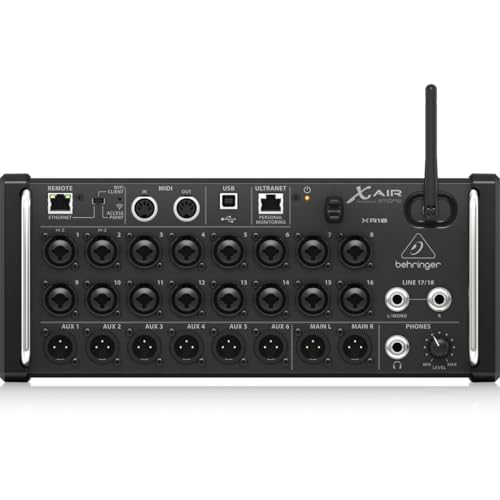
The XR18 is the small-format end of the same idea as the X32 Rack: sixteen programmable Midas preamps in a stage-box format that sits where the cables are, controlled from a tablet. Six aux outputs make it a genuine in-ear monitor engine for a full band, and the multi-channel USB interface records the show to a laptop. For most gigging bands, this is the rational amount of mixer.
Strengths
- Sixteen real mic preamps and six auxes — a complete band-plus-monitors system in one box
- Multi-channel USB audio interface for multitrack recording to a laptop
- Tri-mode Wi-Fi plus Ethernet gives flexible control options out of the box
Trade-offs
- Built-in Wi-Fi is fine for rehearsal and small rooms; a busy venue still demands an external router
- No expansion path — eighteen inputs is the whole story, forever
- The app experience varies by platform; the desktop editor is the most complete control surface
Key specs (verified): 18-channel / 12-bus digital stage-box mixer, 16 programmable Midas preamps, integrated Wi-Fi, multi-channel USB audio interface (per Amazon title)
The XR18’s dominance is a lesson in architecture over novelty: it was not the first tablet mixer, but it was the first affordable one with enough auxes to run a real monitor world, and that single decision made it the default band purchase for years. If your band fits in sixteen preamps — most do — the money it saves against the bigger racks buys the router, the tablet and the in-ear systems that complete the rig.
It also moonlights as a studio interface and a rehearsal recorder, which is how many owners justify it to themselves in January and thank themselves in June. Rack ears are available for it; many owners instead keep it in a shallow case on stage where the cable runs are shortest. Either way, label the auxes by musician name, not number — future you, mid-gig, will be grateful.
Best for: Gigging bands wanting a complete stage-box rig with in-ear monitors on a sane budget / Not suited for: Productions already counting past sixteen mic inputs
Check on Amazon — check the current price on Amazon before you buy, and confirm the exact configuration in the listing title matches the model reviewed here.

Mackie DL16S — Best App Experience
Mackie’s DL16S competes on feel. Its Master Fader app is the control surface many first-time digital engineers learn fastest, with a layout that behaves like a console rather than a spreadsheet, and the hardware behind it — sixteen recallable Onyx+ preamps and a full 16-in/16-out USB interface — is properly specified. It is the pick for owners who will mix their own band from the stage and want the app to help, not hinder.
Strengths
- Master Fader app is fast to learn and supports multiple control devices at once
- 16×16 USB audio interface records every input without extra hardware
- Recallable preamps and full processing per channel, in a compact stage-box format
Trade-offs
- Sixteen channels is a hard ceiling — no stage-box expansion path
- Fewer aux buses than the XR18 class, so very large monitor worlds outgrow it sooner
- The ecosystem is smaller than the X32 world; shared show files and hired-engineer familiarity are thinner
Key specs (verified): 16-channel digital rack/stage-box mixer, recallable Onyx+ preamps, 16×16 USB audio interface (per Amazon listing class)
Where the DL16S wins evenings is the first ten minutes: an owner-engineer who also plays in the band can soundcheck quickly because the app puts the likely thing one tap away. That usability is a real specification for the huge class of buyers who are their own sound engineer, and it is why this box, rather than a spec-sheet rival, takes the app badge. Judge it in a rehearsal, with your own hands, against the XR18 — the better app for you is the one you stop noticing.
Mackie’s snapshot and show handling suits bands with a fixed set and fixed personnel: build the show once, recall it nightly, and spend soundcheck on the room rather than the desk. Keep a wired Ethernet option in the case for the venues where every band in the building is fighting over the same airwaves.
Best for: Owner-operators and band-engineers who mix from stage and value the friendliest app / Not suited for: Bands planning to expand beyond sixteen inputs
Check on Amazon — check the current price on Amazon before you buy, and confirm the exact configuration in the listing title matches the model reviewed here.

PreSonus StudioLive 24R — Best for StudioLive Users
The StudioLive 24R is the rack entry into PreSonus’s Series III world: twenty-four inputs of Fat Channel processing, AVB networking for stage boxes and personal mixers, and recording that flows straight into Studio One and Capture. It makes the most sense — and it makes a lot of sense — for studios and live rigs already built around PreSonus software, where the rack mixer and the DAW behave like one product.
Strengths
- AVB networking integrates stage boxes, personal mixers and console surfaces in one ecosystem
- Capture and Studio One integration makes multitrack recording and virtual soundcheck unusually smooth
- Fat Channel processing includes modelled plug-in-style channel strips for a produced live sound
Trade-offs
- The ecosystem is the point — outside PreSonus software and AVB hardware, some advantages evaporate
- Control is app-and-software centred; engineers wanting a generic browser interface should compare the Ui24R
- AVB networking has its own switch requirements — budget and plan for compliant hardware
Key specs (verified): Series III digital rack mixer, 24 inputs, AVB networking, bundled Studio One Pro software (per Amazon title)
Treat the 24R as a platform decision. Bought alone, it is a capable rack mixer with strong recording. Bought as the core of an AVB system — stage box at the drums, personal mixers for the band, a console surface when a dedicated engineer joins — it becomes the most expandable small system here after the X32 family. Churches and studios already living in Studio One will find the recording workflow close to frictionless, which is a feature no spec sheet captures.
Its honest limitation is commitment: AVB is excellent and also a lane, and lanes ask you to stay in them. If your wider rig is PreSonus-flavoured or software-led, that is no limitation at all. If you hire freelance engineers weekly, weigh the X32 Rack’s universal familiarity against the 24R’s studio integration and choose by who actually touches the mixer.
Best for: Studios, churches and bands already using Studio One who want one recording-friendly ecosystem / Not suited for: Freelance-driven venues needing the most universally known platform
Check on Amazon — check the current price on Amazon before you buy, and confirm the exact configuration in the listing title matches the model reviewed here.

Midas M32C — Best Premium Rack Core
The M32C is a rack brain rather than a stage box: one rack unit carrying the M32 family’s processing — forty input channels, twenty-five buses — and expecting its preamps to arrive over AES50 from Midas or Behringer stage boxes. That sounds like a complication until you price the alternative: it lets an install or touring system put premium Midas preamps exactly where the microphones are, with a tiny, silent core at the mix position or in the rack room.
Strengths
- M32-family processing and bus architecture in a single rack unit
- Pairs with DL-series stage boxes for Midas PRO preamps at the stage
- Shares show files and workflow with M32 consoles — engineers move between them freely
Trade-offs
- No meaningful local preamp count — a stage box is a required purchase, not an option
- Total system cost lands well above self-contained stage boxes once the stage box is added
- Overkill for a single band that will never network beyond one box
Key specs (verified): Digital rack mixer core, 40 input channels, 25 mix buses, AES50 stage-box networking (per Amazon title)
Installs are this box’s home turf: a theatre, school or church that wants a locked-away core, stage boxes at performance positions, and control from wherever the operator sits. In that world the M32C’s lack of local inputs is a feature — nothing to tamper with, everything where it belongs. Touring engineers building an M32-family fly rig reach the same conclusion by a different road.
Be honest about the maths before choosing it: core plus stage box plus control device is a system price, and compared like-for-like the X32 Rack is cheaper and simpler. The M32C earns its premium in preamp pedigree and in systems designed to grow across a building or a tour — buy it as the start of that design, not as a shortcut around it.
Best for: Installs and touring systems built around Midas stage boxes and the M32 family / Not suited for: Single-box buyers wanting preamps included in the purchase
Check on Amazon — check the current price on Amazon before you buy, and confirm the exact configuration in the listing title matches the model reviewed here.
Comparison Table
| Pick | Badge | Key spec | Best for |
|---|---|---|---|
| Behringer X32 Rack — Check on Amazon | Best Overall | 40-in / 25-bus / 16 preamps / AES50 | Working bands, churches and production companies wanting the safest, best-supported rack system |
| Soundcraft Ui24R — Check on Amazon | Best for Multitrack Recording | 24-in / 20 preamps / browser control / multitrack USB | Bands and venues that want every show multitracked without a laptop in the rig |
| Behringer X AIR XR18 — Check on Amazon | Best Value Stage Box | 18-in / 16 preamps / 6 aux / USB multitrack | Gigging bands wanting a complete stage-box rig with in-ear monitors on a sane budget |
| Mackie DL16S — Check on Amazon | Best App Experience | 16-ch / Onyx+ preamps / 16×16 USB | Owner-operators and band-engineers who mix from stage and value the friendliest app |
| PreSonus StudioLive 24R — Check on Amazon | Best for StudioLive Users | 24-in / AVB network / Studio One included | Studios, churches and bands already using Studio One who want one recording-friendly ecosystem |
| Midas M32C — Check on Amazon | Best Premium Rack Core | 40-in / 25-bus / 1U core / AES50 | Installs and touring systems built around Midas stage boxes and the M32 family |
What Does a Scene Actually Buy You on a Rackmount Mixer?
Scenes are the quiet superpower of digital racks: the entire mixer — gains, EQ, monitor mixes, effects — recalled in a second. For a band, one scene per venue type turns soundcheck into verification. For a venue, one scene per act turns a four-band night from chaos into changeovers. The discipline is in the saving: update scenes after the gig, not during it, and lock the ones that work.
Protect the master scene. Every platform here lets you safeguard parameters — typically the main output EQ and the monitor mixes — so recalling a show does not bulldoze the room tuning. Learn your platform’s safe-recall system before the first multi-act night; it is the difference between scenes being a superpower and being a liability.
What Does a Rackmount System Cost Once It Is Actually Finished?
New rack owners consistently under-budget the finishing layer, so here is the honest anatomy of a complete system beyond the mixer itself. The rack case comes first — a shock-minded case for touring, a simple install rack for fixed work — followed by the external router, the control tablet and its rugged case, and a wired laptop option for the desktop editor. Add quality short patch cables for the stage box position, a small UPS if the venue’s power is theatrical in the wrong way, and labelling: printed input lists, aux names per musician, and a laminated network card taped inside the rack lid with the Wi-Fi name, password and mixer address. None of these items is glamorous; together they are the difference between a mixer and a system.
Then come the growth items the architecture invites. In-ear systems arrive aux by aux; a digital stage box arrives when the input count grows; personal monitor mixers arrive when the band tires of asking. The rack format’s financial virtue is that each of those is an addition rather than a replacement — the core you bought first remains the core. When comparing the picks’ prices, therefore, compare them as five-year systems: the cheapest box that forces a replacement in year two is the most expensive option on this page, and the expandable cores (X32 Rack, M32C, StudioLive 24R) earn their premiums precisely by refusing to be replaced.
How Do You Keep a Rack Rig Reliable Across a Whole Tour?
Reliability in rack systems is a set of habits, not a product feature. Firmware is updated at home, mid-season, never in show week — and the previous settings are exported before any update touches the box. Show files live in three places: on the mixer, on the control device, and in cloud storage the tech director controls. Cables into the rack are strain-relieved and labelled at both ends, because the fault you cannot find in the dark is the one that ends soundchecks. A spare Ethernet cable and a spare router power supply ride in the rack drawer; they weigh nothing and have saved more shows than any spare microphone.
The last habit is the post-show note: two lines in a shared document — what changed, what misbehaved, what to fix before the next load-in. Rack rigs that tour well are not luckier than others; they are documented. The mixer remembers the mix. The notes remember everything else, and between the two of them, a system can be run by whoever is available — which, on a long enough tour, is the entire point of putting the mixer in a rack in the first place.
What Separates a Good Rack App from a Great One?
Since the app is the mixer’s face, its quality deserves the same scrutiny as preamps. A good rack app answers four questions quickly at arm’s length in bad light: What is clipping? Whose monitor mix am I looking at? What did I just change? And how do I get back? The platforms in this guide differ in how they lay out channel processing, how they handle multiple simultaneous users (the monitor-mixing case), and how safely they treat the master section — the best implementations make the main output hard to ruin by accident, which on a shared system is a feature, not a limitation.
Test any candidate app the way you will use it: standing, one-handed, slightly stressed, with the band asking questions. If the gain for the vocal is two menus deep, that is two menus too deep at a gig. Engineers develop fierce loyalties here, and they are rational loyalties — the app is where your attention lives for three hours a night. When two racks tie on hardware, as several in this guide nearly do, the app is the honest tiebreaker, and trying the free apps before purchase costs nothing but an evening.
A Final Word on Buying for the Rig You Will Have
Every rack purchase is a bet on a future band: more singers, in-ears for everyone, a second room, a festival slot. The picks here were ordered so that the bet is survivable in both directions — the expandable cores forgive growth, the self-contained stage boxes forgive stability, and none of them punishes the present to pay for a hypothetical future. Make the bet with your eyes open: write down the input count, aux count and destinations of the biggest show you can plausibly play in three years, and buy the smallest system in this guide that covers it with two channels to spare.
Then stop shopping and start mixing. Rack systems reward familiarity more than any other format, because their power lives in scenes, templates and habits rather than in the box. A modest rack run by a team that knows it completely will out-mix a flagship run by strangers, every night of the week. Choose once, learn it fully, and let the rig become invisible — that invisibility, purchased and practised, is the true best digital rackmount mixer, whichever badge it wears.
Before You Order: The Rack Checklist
Run the final checklist before any rack leaves the basket. Inputs: panel preamps counted against your biggest show, plus two spare. Buses: stereo monitor mixes multiplied out honestly. Control: app tried on your own tablet, router in the same order. Recording: the route chosen (direct USB, interface or networked) and tested media waiting. Expansion: the stage-box or network path named, even if unpurchased, so the first growth step is a purchase rather than a redesign. Case, cables, labels and a backup control device complete the list. A rack bought against this checklist arrives as a system; a rack bought without it arrives as a project — and projects, unlike systems, are never finished by Friday.
How to Choose a Rackmount Digital Mixer: What Should You Count First?
Count physical mic preamps, not headline inputs. A ’32-input’ rack mixer may have sixteen preamps and expect a stage box for the rest; a ’24-input’ rival may put twenty preamps on the panel. For a band, the panel number is tonight’s reality and the headline number is the expansion story. List your actual inputs — every vocal, instrument DI, drum mic and playback channel — then add the two you will inevitably discover, and shop against that number.
Count aux buses second, because monitors decide gigs. Each stereo in-ear mix wants two auxes; each wedge mix wants one. A five-piece band on stereo ears needs ten auxes before effects sends enter the conversation. The picks above range from monitor-modest to monitor-rich, and the reviews flag the counts that matter — running out of auxes is the most common reason rack mixers get replaced within two years.
Third, decide how you will record. Built-in multitrack-to-USB (Ui24R), USB interface to a laptop (XR18, DL16S), or networked recording inside an ecosystem (StudioLive, X32 with expansion) are three different rigs wearing similar boxes. If virtual soundcheck matters to you — and for working bands it should — recording is not a bonus feature; it is the feature that improves every other gig.
What Network Setup Does a Rackmount Mixer Actually Need?
Every pick here is controlled over a network, which makes the network part of the instrument. The built-in Wi-Fi on stage boxes is designed for setup and rehearsal; in a venue full of phones it can drop at exactly the wrong moment. The professional pattern is boring and total: a dedicated dual-band external router, mounted high with line of sight to the mix position, on a network name the audience never sees, with a wired laptop as the backup surface.
Keep a second control device charged and connected — a phone running the same app has saved more gigs than any spare cable. And rehearse the failure: pull the tablet mid-rehearsal once, at home, and learn what the box does. Rack mixers keep passing audio when control drops, which is the saving grace of the format — the show continues while you reconnect, provided you set levels sanely in the first place.
Rackmount, Stage Box or Console: Which Format Fits Your Work?
Choose a rackmount core or stage box when inputs live on stage, space is tight, the same person mixes every show, and the rig travels in cases. Choose a console with faders when different engineers rotate through, when the mix is ridden actively all night — theatre, worship with a dedicated operator, broadcast-style work — or when a client is paying to see a desk at front of house. Many mature rigs end up hybrid: a rack core doing the show, a small surface or laptop where the engineer stands.
Budget the whole system, not the box: router, tablet, case, cables, stage box if the design needs one, and the in-ear systems your aux count suddenly makes possible. The cheapest mixer in this guide, fully rigged, outperforms the flagship mixer bought alone and starved of its supporting kit.
How to Set Up a Rackmount Digital Mixer for a Live Gig
The setup below assumes a stage-box or rack core, an external router and a tablet — the standard working rig for every pick in this guide. Do it in this order and the system comes up calm, every time.
- Rack the mixer with ventilation space, mount the router high in or on the rack, and connect the mixer’s network port to the router with a real Ethernet cable — never rely on the mixer’s built-in Wi-Fi as the primary link in a venue.
- Power the router first, then the mixer, then open the app on your tablet and confirm you can see and select the mixer before a single audio cable is plugged in.
- Connect inputs in a fixed, labelled order — drums, bass, guitars, keys, vocals is the common band layout — and set each input’s gain with the loudest expected signal, leaving headroom rather than chasing maximum level.
- Build monitor mixes before the main mix: send each musician their essentials first (their own voice or instrument loudest, then the rhythmic anchors), and ring out wedges or set in-ear limiters before the band plays a note together.
- Tune the mains to the room with familiar reference music at show level, then walk the room while it plays — the mix position lies, politely, and your feet tell the truth.
- Save the result as a named scene with the venue and date, photograph the stage cabling for the next visit, and only then declare soundcheck finished.
Two habits separate reliable rack rigs from lucky ones: a labelled, consistent input list that never changes between gigs, and a post-gig scene save while the night is fresh. The mixer remembers everything — your job is to make sure what it remembers is the good version.
Common Buying Mistakes
Trusting built-in Wi-Fi in a full venue. It works at soundcheck and fails at showtime, when five hundred phones wake up. External router, line of sight, every time.
Buying headline inputs instead of panel preamps. The gig plugs into preamps, not into a marketing number. Count the XLR sockets.
Running out of auxes. Stereo in-ears eat buses in pairs. If monitors are in your future, buy the bus count now.
No backup control device. A cracked tablet screen should be an inconvenience, not a cancelled show. A phone with the app is the cheapest insurance in live sound.
Never recording. The multitrack you skip is the virtual soundcheck, the content clip and the honest rehearsal review you also skip.
Final Recommendation
For most buyers the Behringer X32 Rack is the answer: complete, expandable and supported by the largest knowledge base in live sound. If recording every show without a laptop matters most, the Soundcraft Ui24R is the specialist to buy, and if the budget is the binding constraint, the Behringer X AIR XR18 delivers a complete band rig for stage-box money.
Choose the Mackie DL16S when your own hands are the ones mixing and the app’s friendliness will decide your evenings; choose the StudioLive 24R when your world already runs on PreSonus software; and choose the Midas M32C when the rack is the core of a designed, growing system rather than a single purchase. Every one of them is a current, verified listing — check price on Amazon, confirm the configuration in the title, and rig the network properly.
Shortlist again, for convenience: Behringer X32 Rack — Check on Amazon; Soundcraft Ui24R — Check on Amazon; Behringer X AIR XR18 — Check on Amazon.
Related reading on this site: Best Digital Mixers For Live Sound; Best Digital Tablet Mixers; Best Digital Sound Mixers For Churches; Best Digital Mixers For Recording; Best Digital Mixers Under $5000.
Frequently Asked Questions
Do rackmount digital mixers sound worse than consoles?
No — the picks here share their processing heritage with console families (the X32 Rack is an X32; the M32C is an M32). What you give up is the physical surface, not the sound. Preamps differ in flavour and headroom between brands, but every model listed is clean enough that mic choice and placement will dominate any difference you hear.
Can I mix a rackmount mixer without a tablet?
In an emergency, partially: most keep passing audio with the last settings, and some offer limited front-panel or laptop control. In practice the tablet or computer is the surface, which is why this guide insists on a backup device and a wired option. If the thought of a screen-only desk worries you, that is useful self-knowledge — buy a console instead.
How many inputs do I actually need for a band?
Count honestly: a typical five-piece with a fully mic’d kit lands between fourteen and twenty inputs once stereo keys, playback and talkback are included. That is why the sixteen-preamp boxes suit most bands and the twenty-plus preamp boxes suit ambitious ones. Add spare channels for guests and growth — inputs are cheapest at purchase time.
Is the built-in Wi-Fi enough for gigs?
For rehearsals and tiny rooms, usually. For paying shows, treat it as a setup tool and run a dedicated external router with line of sight to your mix position. This is the single most repeated piece of advice from working rack-mixer owners, and the cheapest reliability upgrade that exists.
Can a rackmount mixer record our shows?
Most of these can: the Ui24R records multitrack straight to USB media, the XR18 and DL16S act as multi-channel USB interfaces to a laptop, and the ecosystem racks (X32 family, StudioLive) record within their platforms. Check the review of your pick for its specific route, and test recording at rehearsal — never debut it at a show.
What else do I need to budget for besides the mixer?
A rack case, an external router, a tablet (plus a backup device), quality cables, and — if the design uses one — a stage box. Bands moving to in-ears should add transmitters or wired packs and earphones. Plan the system price, not the box price, and the purchase will feel complete rather than interrupted.
Can one rack mixer serve two rooms or two acts at once?
Within limits, yes: flexible routing and scene separation let some of these systems run a main room and a spill area, or hold two acts’ complete setups as separate scenes recalled between sets. What they cannot do is exceed their physical inputs, outputs and buses — count the second duty against the same architecture budget as the first. For permanent two-room duty, two right-sized systems are usually calmer than one stretched flagship.


