Disclosure: airfryerkitchensupply.com is reader-supported. When you buy through links on our site, we may earn an affiliate commission at no extra cost to you.
Where to buy
Every pick in this guide was verified against live Amazon listing data before inclusion. Use these links to check price on Amazon and confirm current availability for the best digital mixers for recording shortlist:
Tascam Model 12 — check price on Amazon · PreSonus StudioLive 16.0.2 USB — check price on Amazon · Behringer X Air XR18 — check price on Amazon · Soundcraft Ui24R — check price on Amazon · Allen & Heath CQ-18T — check price on Amazon · Zoom LiveTrak L-12 — check price on Amazon
The best digital mixers for recording share one defining trait: they capture every channel separately, not just a stereo mix, so the performance can be mixed properly afterwards. That single distinction — multitrack versus stereo — matters more than brand, channel count or screen size, and it is where buyers most often get caught out by a spec sheet that says ‘USB recording’ without saying what kind.
This guide gathers six mixers that record multitrack in genuinely useful ways: to a computer over USB, to SD or USB media without a computer, or across a network. Each was verified before inclusion. Whether you record a band live, a podcast ensemble or your own layered productions, the right choice below depends on where the recording happens and how much computer you want involved.
One clarification that saves returns: ‘digital mixer’ on a listing can describe anything from a stereo USB box to a 32-track recording system. This guide applied the strict definition — separate tracks for separate inputs, recoverable afterwards — and dropped models that could not confirm it. If you audition alternatives elsewhere, apply the same test: ask how many tracks arrive in the DAW or on the card, and let the number, not the adjective, decide.
In this guide
Quick Picks
- Tascam Model 12 — Best Overall: For recording it is the purest expression of the idea: a desk that is always ready to capture twelve tracks to SD, no laptop, no drivers, no excuses. Check price on Amazon.
- PreSonus StudioLive 16.0.2 USB — Best Simple Console: For small studios on the PreSonus path it pairs a simple console surface with USB multitrack into Studio One, suiting singer-songwriter and voice work. Check price on Amazon.
- Behringer X Air XR18 — Best Budget Multitrack: As the budget multitrack pick it records a whole band over USB from a stage box that also runs the live mix — the gig and the recording from one box. Check price on Amazon.
- Soundcraft Ui24R — Best for Live Recording: For live recording it captures multitrack to USB media while mixing the room from a browser, which suits venues that archive every show. Check price on Amazon.
- Allen & Heath CQ-18T — Best Premium Desktop: For project studios it blends touchscreen mixing with multitrack capture in a premium desktop unit that works in the studio and at small gigs. Check price on Amazon.
- Zoom LiveTrak L-12 — Best for Group Sessions: For ensembles recording together, its separate headphone mixes make it the session-friendly choice — performers who hear themselves well play better takes. Check price on Amazon.
How to use this shortlist: the badges are decisions, not decorations. If the Best Overall pick fits your input list and your way of working, the search for best digital mixers for recording can honestly end there — it earned the top badge by being the choice we would defend for the most buyers. Move to a specialist badge only when your situation names it: a tighter budget, a particular room, a recording habit, a network standard. Reading the guide that way — top pick first, specialists as exceptions — mirrors how engineers actually recommend gear to each other, and it will get you to the right mixer faster than comparing every specification against every other.
How These Picks Were Chosen
Two filters did most of the work. The first was honesty of specification: for best digital mixers for recording, marketing language hides the differences that matter — whether recording is multitrack or stereo, whether a network port carries audio or only control, whether the advertised channel count matches the microphone preamp count. We read past the headline numbers to the architecture underneath, and dropped models whose listings could not confirm the capability the search asks for. The second filter was ownership reality: control apps that are maintained, ecosystems with stage boxes and spares available, and manufacturers with a service network. A mixer is a five-to-ten-year relationship, and the guide weights it that way.
We started from the mixers buyers actually cross-shop for best digital mixers for recording, then verified each candidate against the manufacturer listing data returned by Amazon’s catalogue before writing a word. A pick only carries an Amazon link when that verification matched the exact model — its channel architecture, preamp count and recording path as listed. We weighted real-world workflow over spec-sheet theatre: how the mixer is controlled under pressure, what its recording path really captures, how its monitor buses serve real performers, and whether its ecosystem gives the purchase a future. Badges were assigned after those comparisons, and the same badge follows each pick from the Quick Picks into its full review below.
The 6 Best Options: Best Digital Mixers for Recording

Tascam Model 12 — Best Overall
The Model 12 is Tascam’s all-in-one: a mixer with real channel strips, a 12-track multitrack recorder and a USB audio interface, built for musicians who record as naturally as they rehearse.
For recording it is the purest expression of the idea: a desk that is always ready to capture twelve tracks to SD, no laptop, no drivers, no excuses.
Strengths
- Records multitrack to SD without a computer, mixes like a classic desk
- Physical controls keep the workflow tactile and fast
- USB interface mode integrates with a DAW when you want one
Trade-offs
- Twelve tracks is a ceiling for ambitious productions
- Channel count suits small line-ups, not full live bands
- Screen is functional rather than luxurious
| Recording | 12-track digital multitrack recorder |
| Functions | Mixer + recorder + USB audio interface in one unit |
| Control | Physical channel strips with faders and knobs |
| DAW | DAW control surface functions |
The Model 12 succeeds because it respects how musicians actually work: plug in, press record, play. No laptop latency, no driver roulette, no update dialogs — the desk captures twelve tracks to SD while feeling like the analogue mixers a generation learned on. Back at the computer it becomes the interface and control surface, so the same unit covers demo, rehearsal recording and finished production. For singer-songwriters, electronic duos and small bands, it is the centre of the room.
The Model 12 changes recording habits the way instant cameras changed photography: because capturing is effortless, it happens constantly. Song ideas, rehearsals, alternate arrangements — all preserved in multitrack, all mixable later. Its DAW-control and interface modes mean the computer joins when wanted rather than being required. Studios built around one describe it less as gear and more as furniture: the desk where music happens, always on, always ready.
Buy fast SD cards and a small stock of them; the Model 12’s appetite for captured ideas is its best feature. Studios that feed it media find their output of finished demos rises noticeably.
Best for: Musicians who want computer-free multitrack recording with a real mixer feel / Not suited for: Large live rigs or studios needing more than twelve tracks.
Check on Amazon — check price on Amazon for the Tascam Model 12.

PreSonus StudioLive 16.0.2 USB — Best Simple Console
The StudioLive 16.0.2 USB is the compact classic of the range: a small digital console with Fat Channel processing and USB multitrack recording for small venues and project studios.
For small studios on the PreSonus path it pairs a simple console surface with USB multitrack into Studio One, suiting singer-songwriter and voice work.
Strengths
- Simple, direct layout suits volunteer operators and small studios
- USB multitrack recording integrates with Studio One and other DAWs
- Compact footprint fits small control positions and desks
Trade-offs
- An older design — no touchscreen or motorized faders
- Channel count is the ceiling; no expansion path
- Check feature set against newer Series III models before buying
| Format | Compact digital console mixer |
| Connection | USB for multitrack recording to computer |
| Processing | Fat Channel dynamics and EQ on inputs |
The 16.0.2 earned its following by being the digital mixer a small church or studio could actually run: faders where you expect them, Fat Channel processing that makes vocals behave, and a USB connection that records the service or the session multitrack. It lacks modern theatre — no moving faders, no big screen — but everything it does, it does directly. As a first digital console or a small studio’s centre, its simplicity remains the point.
Time has been kind to the 16.0.2’s design brief: simple surface, honest processing, recording that works. In small studios it serves as the first ‘real console’ generations of engineers learned on, and in churches it survives because any volunteer can be taught it in an evening. Newer mixers out-feature it; few out-simplicity it. For buyers who value that directness — and whose channel count fits — it remains a rational, satisfying purchase.
Check the current listing’s included software and firmware state when buying the 16.0.2 — as a mature model, the details of the bundle matter. The core console proposition remains as sound as ever.
Best for: Small venues and project studios wanting a straightforward digital console / Not suited for: Users wanting touchscreens, moving faders or network expansion.
Check on Amazon — check price on Amazon for the PreSonus StudioLive 16.0.2 USB.
Behringer X Air XR18 — Best Budget Multitrack
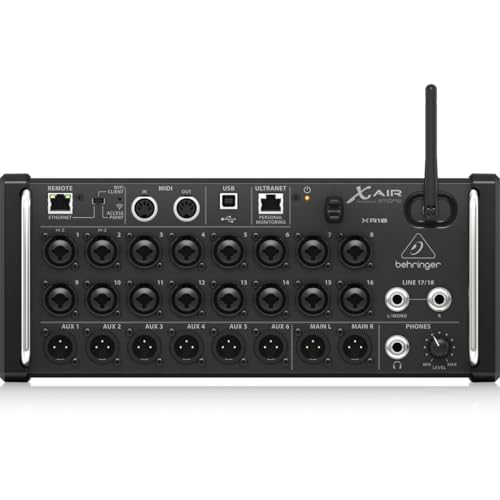
The XR18 is the stage-box mixer that defined the category: 18 channels, 16 Midas preamps, 12 buses and a multi-channel USB interface in a box that sits on stage and is mixed from a tablet.
As the budget multitrack pick it records a whole band over USB from a stage box that also runs the live mix — the gig and the recording from one box.
Strengths
- Sixteen real mic preamps cover a full band’s stage plot
- Multitrack USB recording turns every gig into a potential live album
- Enormous user community means answers and show files are easy to find
Trade-offs
- Built-in WiFi struggles in crowded venues — budget for an external router
- No physical controls if your tablet fails mid-show
- The app experience varies across the many supported platforms
| Inputs | 18 channels with 16 Midas preamps |
| Buses | 12-bus architecture |
| Recording | Multi-channel USB audio interface |
| Control | Integrated WiFi, tablet and computer control |
Few products in live sound offer this much capability per dollar or per kilo. The XR18’s preamps are the Midas-designed circuits from the X32 family, its bus count runs a full set of in-ear mixes, and its USB interface records the whole band multitrack to a laptop. The discipline it demands is networking: treat the built-in WiFi as a rehearsal-room convenience, wire a proper router for shows, and the platform is as reliable as the bands who have toured it for years will tell you.
Long-term XR18 owners develop rituals worth copying: a quality router mounted in the same rack, a hardwired laptop connection for recording nights, a laminated card with the network name inside the case lid. With those, the platform’s reliability record is excellent, and its resale market is liquid because every band knows what it is. It is also the best-documented mixer in its class — any problem you can name has a forum thread and a video waiting.
The XR18’s total system cost — mixer, router, tablet, small rack — still undercuts most rivals’ mixer alone. That arithmetic, plus the multitrack recording, is why it remains the default band purchase.
Best for: Working bands wanting full multitrack and monitor capability on a budget / Not suited for: Users who need physical faders or mix in RF-hostile rooms without a router.
Check on Amazon — check price on Amazon for the Behringer X Air XR18.

Soundcraft Ui24R — Best for Live Recording
The Ui24R is a rack-mount digital mixer controlled from any web browser — laptop, tablet or phone — with 24 inputs and multitrack recording, suiting bands and venues that want capacity without a console surface.
For live recording it captures multitrack to USB media while mixing the room from a browser, which suits venues that archive every show.
Strengths
- Browser control means any device with a screen becomes a control surface
- Multitrack recording to USB media captures shows without a laptop
- Generous input count covers full bands plus playback and spares
Trade-offs
- No physical faders, so mixing is entirely a touchscreen discipline
- Built-in wireless in busy venues benefits from an external router
- The rack needs a tablet or laptop budget added to the true cost
| Inputs | 24-input rack-mount digital mixer |
| Control | Browser-based control from any device, no app install |
| Recording | Multitrack USB recording to flash drive and computer |
| Processing | Onboard signal processing with Lexicon-style effects heritage |
The Ui24R’s browser interface is its party trick and its practical strength: no app store, no OS version roulette — open a browser and mix. Soundcraft’s channel processing is musical rather than surgical, the effects come from Lexicon lineage, and recording the gig multitrack to a USB stick means the live mixer doubles as the demo recorder. For a working band that soundchecks itself, or a venue whose operators rotate, the combination of capacity, recording and zero-install control is hard to beat at this tier.
The Ui24R’s browser control has a side benefit owners mention often: any device works, including the venue’s ancient laptop and the singer’s brand-new phone, on the same night, without installs or updates. Its multitrack-to-USB recording is similarly democratic — a flash drive in the rack captures the show whether or not anyone remembered a laptop. For schools and churches whose technical team is whoever shows up, that forgiveness is a feature no spec sheet captures.
Add a decent router and a labelled USB drive to the purchase and the Ui24R system is complete. Its owners rarely report mixer problems; they report the shows they recorded because recording was effortless.
Best for: Bands and venues wanting 24 inputs, browser control and easy multitrack capture / Not suited for: Engineers who mix with their eyes up and hands on faders.
Check on Amazon — check price on Amazon for the Soundcraft Ui24R.

Allen & Heath CQ-18T — Best Premium Desktop
The CQ-18T is the desktop CQ model with a 7-inch touchscreen and physical controls, suiting users who want Allen & Heath processing and assistive tools with hands-on control at the desk.
For project studios it blends touchscreen mixing with multitrack capture in a premium desktop unit that works in the studio and at small gigs.
Strengths
- Touchscreen plus real knobs and fader gives faster control than app-only mixers
- Assistive tools genuinely shorten setup for smaller teams
- Multitrack recording over USB or SD makes it a studio-live hybrid
Trade-offs
- Desktop format takes more space than a stage box
- Premium pricing against bigger-input rack rivals
- The screen is excellent but still small for dense channel views
| Display | 7-inch touchscreen |
| Connectivity | WiFi and Bluetooth built in |
| Format | Desktop digital mixer with physical controls |
| Recording | USB and SD multitrack recording options |
The CQ-18T is what happens when a serious mixer company designs for the home studio and small stage at the same time. The touchscreen workflow is fast, the quick channels and assistive setup suit musicians first and engineers second, and the recording options mean rehearsals and gigs are captured without extra hardware. In the studio it behaves like a well-mannered interface with recall; on stage it behaves like a mixer that wants you to finish soundcheck early. That dual personality is exactly what most project studios need.
What owners notice after a month is how often the CQ-18T gets used for small things: recording rehearsals to SD, mixing a video call properly, running the acoustic duo at the weekend. The touchscreen makes those small jobs fast, and the processing quality means the results sound like the main rig’s. It is an easy mixer to recommend because it fits real, mixed musical lives rather than a single defined job.
Accessories worth adding: a quality SD card for recording and a cover for the screen. The CQ-18T otherwise arrives complete — a premium desktop that earns its space from the first session.
Best for: Project studios and small live rigs wanting one premium mixer for both / Not suited for: Buyers counting maximum inputs per dollar above all else.
Check on Amazon — check price on Amazon for the Allen & Heath CQ-18T.

Zoom LiveTrak L-12 — Best for Group Sessions
The LiveTrak L-12 is a mixer and multitrack recorder designed for musicians and podcasters, notable for giving each performer their own headphone mix.
For ensembles recording together, its separate headphone mixes make it the session-friendly choice — performers who hear themselves well play better takes.
Strengths
- Separate headphone mixes make band recording sessions happier
- Records multitrack while mixing, no computer required
- Compact and light for a unit with this much function
Trade-offs
- Build is lighter than metal-chassis rivals
- Channel count caps ambitious live work
- Interface mode track count differs from SD recording — check your workflow
| Functions | Mixer and multitrack recorder |
| Monitoring | Individual headphone mixes for performers |
| Recording | Multitrack recording to SD, USB interface mode |
The L-12’s signature feature sounds small until you have run a session without it: five performers, five different headphone mixes, nobody asking for more of themselves. Around that, it is a complete small recording system — multitrack to SD, a straightforward mixer layout, and USB interface duty when the computer joins. Podcast ensembles, rehearsing bands and mobile recordists get a one-box answer that respects both budget and patience.
Session reports from L-12 owners return to the headphone mixes: a drummer who hears the click and bass properly plays tighter; a singer with their own reverb sings with more confidence. The L-12 makes those mixes trivially available, and its SD recording means the session exists even if the computer misbehaves. Podcast networks adopted it for the same reason bands did — it treats every participant’s ears as a first-class concern.
The L-12’s accessories are headphones — one good set per performer. Its per-person mixes only shine when everyone can actually hear them, so budget the session as a system, not a box.
Best for: Bands and podcast teams recording together in one room / Not suited for: Users needing a heavy-duty touring console.
Check on Amazon — check price on Amazon for the Zoom LiveTrak L-12.
Comparison Table
| Pick | Badge | Key spec | Best for |
|---|---|---|---|
| Tascam Model 12 — Check price on Amazon | Best Overall | 12-track multitrack recorder, mixer and USB interface in one | Musicians who want computer-free multitrack recording with a real mixer feel |
| PreSonus StudioLive 16.0.2 USB — Check price on Amazon | Best Simple Console | Compact digital console with USB multitrack recording | Small venues and project studios wanting a straightforward digital console |
| Behringer X Air XR18 — Check price on Amazon | Best Budget Multitrack | 18 channels, 16 Midas preamps, multitrack USB | Working bands wanting full multitrack and monitor capability on a budget |
| Soundcraft Ui24R — Check price on Amazon | Best for Live Recording | 24 inputs, browser control, multitrack USB recording | Bands and venues wanting 24 inputs, browser control and easy multitrack capture |
| Allen & Heath CQ-18T — Check price on Amazon | Best Premium Desktop | 7-inch touchscreen, WiFi/Bluetooth, desktop format | Project studios and small live rigs wanting one premium mixer for both |
| Zoom LiveTrak L-12 — Check price on Amazon | Best for Group Sessions | Mixer/recorder with per-performer headphone mixes | Bands and podcast teams recording together in one room |
Read the table by format first and specifications second. The format decides who can operate the mixer and where it lives; the key spec decides whether your input list and monitor world fit. Badges repeat the Quick Picks verdicts so the table can be used on its own — and every row links to the same verified listing used throughout the guide, so the price you check is the price for the exact model reviewed.
What does value look like in this category?
Recording value hides in the takes you keep. A mixer that records reliably, every time, without a negotiation, produces more finished music per year than a theoretically superior system used reluctantly — which is why the Model 12 and LiveTrak, neither the cheapest nor the most powerful here, are such strong value for the musicians they fit. The XR18’s value is arithmetic: sixteen preamps and multitrack for less than many eight-channel interfaces, with a live mixer thrown in.
Protect the value with media discipline: fast cards, same-day backups, and a scene file stored with every project. The most expensive recording is the one you have to make twice because the first copy vanished. When checking price on Amazon, add the storage and a spare card to the basket mentally — the complete recording system, not the box alone, is the purchase whose value you will actually experience.
How to Choose a Digital Mixer for Recording
Multitrack or stereo: what does the recording spec really mean?
Stereo recording captures the finished mix — useful for archiving a show, useless for fixing a buried vocal afterwards. Multitrack recording captures each input on its own track, so balance, EQ and effects decisions happen later in the DAW. When a listing says ‘USB recording’, check the channel count of the interface: 18-in/18-out means multitrack; 2-in/2-out means stereo. Every pick in this guide was chosen because its multitrack path is real, whether over USB, to SD card, or both.
Should you record to a computer, to media, or both?
Computer recording gives you the DAW’s full power and the largest track counts, at the price of drivers, latency settings and a laptop that must behave. Media recording — to SD or USB storage inside the mixer — is beautifully reliable and computer-free, which is why the Model 12 and LiveTrak exist. Many recordists run both: media in the mixer as the safety, computer as the main. Decide which failure you fear more — a crashed laptop or a forgotten SD card — and build accordingly.
How many tracks do you actually need to record?
A solo artist layering parts needs two good inputs at a time and twelve tracks of playback. A band recording live needs every drum mic separate: kick, snare, toms, overheads, plus bass, guitars, keys and vocals lands at 14–18 tracks. A podcast of four needs four. Match the mixer’s multitrack count to the biggest session you run monthly, and remember that stereo sources — keyboards, playback — consume two tracks each. The XR18 and Ui24R cover full bands; the Model 12 covers the way most home studios actually work.
What else makes a mixer good for recording beyond track count?
Preamps you cannot upgrade later, so their quality matters — the Midas-designed and PRO preamps in this class are audibly clean. Recall matters too: a digital mixer remembers the session’s gains and routing, so Tuesday’s mix resumes on Thursday. Monitoring decides session morale: performers need low-latency, preferably personal, headphone mixes. And file discipline — clear naming, reliable media, sample rates that match your DAW — separates studios that finish projects from those that collect hard drives.
How do you choose between recording in the mixer and recording in the DAW?
Treat them as safety and workshop. The mixer’s own media recording — where the model offers it — is the safety: always available, immune to computer moods. The DAW is the workshop: editing, comping and mixing live there. Many engineers run both simultaneously on important sessions. If forced to choose, choose by session type: irreplaceable live performances favour the mixer’s reliability; constructed studio productions favour the DAW’s immediacy. The picks here were selected to make that choice available rather than forced.
What storage and file habits keep multitrack sessions safe?
Record to fast, reputable media, formatted in the mixer itself. After each session, copy the files to the computer, verify the copy opens, and back up to a second location before the card is reused. Name folders with date, artist and venue while you still remember them. Studios rarely lose recordings to dramatic failures; they lose them to a card reused in a hurry and a laptop that was ‘going to be backed up’. The mixer gives you the tracks — your habits decide whether you keep them.
How do you decide between more preamps and better preamps?
By counting your simultaneous microphones on your biggest real session. If that number is six, a twelve-track desk with excellent channels serves you better than eighteen ordinary ones. If it is fourteen, the question answers itself the other way. Preamps are the one part of a recording chain whose quality is permanent in every file, so once the count is honestly covered, spend the rest of the budget on the front end and the monitoring — the two things every take passes through.
How does a recording mixer change the way sessions run?
The deepest change is that the mixer stops being furniture and becomes the session’s memory. Gains for each microphone, the drum routing, the talkback setup — all recalled in seconds. Bands notice it at rehearsal: last week’s recording settings load, the levels are already close, and the first take happens in five minutes instead of thirty. Studios notice it across clients: each project has a scene, and switching between them is a button, not a repatch.
The second change is confidence to record everything. When capturing multitrack costs nothing but storage, you record rehearsals, writing sessions and gigs as a matter of course. The take you did not plan to keep is often the one with the performance. Mixers that record to media without a computer push this furthest — the red light is always available, so it gets used.
What does a good recording workflow look like across a whole project?
It looks like continuity. The tracking scene becomes the overdub scene with two channels changed; the mix references the same channel names the DAW received; the artist hears the same headphone balance at every visit. A multitrack mixer enforces that continuity physically — the project lives in one box’s memory as well as in the DAW session — and projects finished on such systems tend to sound coherent because they were never re-patched into a different room halfway through.
It also looks like archived optionality. Because recording everything costs nothing, the project accumulates alternate takes, room microphones and rehearsal versions, and modern production mines exactly those seams. The mixer that records by default quietly changes the creative ceiling of the studio that owns it, which is a larger claim than any preamp comparison — and, session by session, the truest one in this guide.
How to Set Up a Digital Mixer to Record Multitrack
Decide the recording path first: mixer to computer over USB, mixer to its own SD or USB media, or both. Install any required driver or app before the session, connect, and confirm the DAW or the mixer’s record screen shows every input you intend to capture, with sensible levels on a loud rehearsal passage.
Build the input list in order, name every channel in the mixer and the DAW, and set gains for the loudest moment of the loudest song — multitrack recordings want headroom, because clipping on a track cannot be repaired. Arm a test recording, play the hardest thirty seconds, and check the files back before the real take: track count, naming and levels.
During the session, let the mixer feed performers their monitor mixes while the recording captures clean, pre-fader signals where the model allows, so mix decisions do not print into the tracks. Afterwards, copy the media before anything else, back it up in a second place, and save the mixer’s scene with the project name — future you, reopening this session in six months, will be grateful.
Build a session log habit alongside the recording habit: one short note per session — date, scene name, media used, anything unusual — saved with the project. Multitrack archives grow fast, and the log is what turns a folder of files into a catalogue you can actually return to. The mixers here remember the settings; the log remembers the story, and future sessions borrow from both.
Setup and Buying Checklist
Before and just after you buy, work through this checklist for best digital mixers for recording. It collects the small, unglamorous steps that separate systems which settle in quietly from systems that generate a month of small frustrations.
- Run a thirty-second test recording on every input before the session, and listen to it back.
- Set gains for the loudest passage of the loudest song, not for the soundcheck conversation.
- Record to media in the mixer as a safety even when the computer is the main recorder.
- Name channels identically in the mixer and the DAW so files and faders tell the same story.
- Copy and back up the session media the same day, before the card is needed again.
- Save the mixer’s scene with the project name and store a copy with the audio files.
Which pick fits which recording situation?
For the songwriter working alone, the Model 12 is the natural centre: the guitar, the vocal microphone and the keyboard stay plugged in, every idea is a button press from being a multitrack keeper, and the DAW joins for editing rather than gatekeeping. The CQ-18T suits the same writer who prefers a screen and also records other people — a step up in polish at a step up in price.
For the band recording itself — rehearsals that become demos, gigs that become live releases — the XR18 is the budget cornerstone and the Ui24R the capacity upgrade. Both capture the whole stage plot while running the live mix, which collapses two budgets into one and, just as importantly, means the recording setup is always already done. Bands that record everything improve faster; these boxes make ‘everything’ the default.
For the podcast and ensemble studio, the LiveTrak L-12’s headphone mixes are the feature that matters most after the record button: guests who hear themselves clearly perform better and need less editing. The 16.0.2 USB serves the same rooms when a traditional console posture is preferred — visiting engineers understand it instantly, and its USB multitrack feeds the DAW without ceremony.
For the venue or church archiving every event, the Ui24R’s media recording is the operational winner: a drive in the rack, a volunteer pressing record, and the archive builds itself. Pair it with a simple naming discipline and the building accumulates a searchable history of its own life — a resource whose value only becomes obvious the first time someone asks for last Easter’s recording.
Common Buying Mistakes
Most buying mistakes with best digital mixers for recording are not about choosing a bad mixer — every pick here is capable — but about mismatching the mixer to the room, the crew or the input list. These are the mismatches we see repeated most often, and each is cheaper to avoid on paper than to fix in hardware.
- Assuming ‘USB recording’ means multitrack and discovering a stereo file after the session.
- Setting gains for quiet conversation and clipping the first chorus on every track.
- Recording a whole session without a thirty-second test playback to confirm the files exist.
- Letting the only copy of a session live on the mixer’s SD card for a month.
- Printing heavy EQ and compression to the tracks instead of recording clean and deciding later.
Final Recommendation
If recording is the job, start with the Tascam Model 12 for computer-free multitrack with a real desk feel, or the XR18 when a full band and a live mix share one box. Venues archiving shows should look at the Ui24R, ensembles at the LiveTrak L-12, and PreSonus loyalists at the 16.0.2 USB. The CQ-18T is the premium desktop that does studio and stage in one. Whichever you choose, run the thirty-second test recording before every real session.
Whatever you record with, adopt the two habits that protect every session: the thirty-second test, and the same-day backup. The mixers here make recording easy; those habits make it safe, and the combination is what a recording practice is built on.
Shortlist links for the top three: Tascam Model 12 · PreSonus StudioLive 16.0.2 USB · Behringer X Air XR18 — check price on Amazon for each before deciding, and confirm the current listing matches the model described here.
Best Digital Mixers For Recording Studio Best Digital Mixers For Studio Best Digital Mixers Using Logice Pro X
A note on ownership and upkeep
A final note on longevity: recording mixers age through their media and their software, not their channels. Keep firmware current between projects rather than during them, keep a spare SD card of known-good speed in the case, and archive each finished project’s scene file beside its audio so the session can be reopened years later on the same unit. The recordings you make this year are the catalogue you will mine for a decade; the small disciplines that keep the files findable and the settings recoverable are, in the long run, worth more than any single specification compared in this guide.
Frequently Asked Questions
What is the difference between a mixer that records multitrack and one that records stereo?
Multitrack captures each input separately for later mixing; stereo captures only the finished blend. For any recording you plan to mix afterwards, multitrack is the requirement.
Can a digital mixer replace an audio interface?
Multitrack mixers like the Model 12, XR18 and CQ-18T function as USB interfaces with many inputs, and add live mixing and media recording an interface lacks. Dedicated interfaces still win on ultra-low latency and converter-focused designs.
How many tracks can the XR18 record?
Its USB interface is multi-channel, capturing its input set simultaneously to a computer — enough for a full band’s stage plot. Record a test to confirm your computer and DAW settings.
Do I need a computer to record with these mixers?
Not always. The Model 12 and LiveTrak L-12 record multitrack to SD with no computer; the Ui24R records to USB media. Others are happiest feeding a DAW.
What sample rate should I record at?
Match the mixer, the DAW session and any video you sync to — 48 kHz is the common live and video-friendly choice. Consistency matters more than chasing higher rates.
Can I record a live gig and mix the room at the same time?
Yes — that is the standard workflow for the XR18, Ui24R and CQ-18T. The recording takes the clean channel feeds while you mix the room independently.
Should I record with EQ and compression printed to the tracks?
Generally no — record clean and decide in the mix, where decisions can be revised. Gentle high-pass filtering to remove rumble is the common, safe exception.
What size SD or USB media should I use?
Larger than the session needs, from a reputable maker, formatted in the mixer. Multitrack hours accumulate quickly; running out mid-take is the failure to design against.
To close: the shortlist for best digital mixers for recording rewards buyers who decide by workflow first and specifications second. Start from the top pick — the Tascam Model 12 — and move down the list only when a specific requirement rules it out: a channel count, a format, a network standard, a control style. That order of decisions, applied honestly, is how the right mixer gets chosen, and it is the order this guide was written in. Keep the verified links above for current availability, save your first good scene the day the mixer arrives, and let the system settle into the background of the work it was bought to support.
Related reading on this site: Best Digital Mixers For Live Sound Best Digital Mixers Under $5000


