Disclosure: airfryerkitchensupply.com is reader-supported. When you buy through links on our site, we may earn an affiliate commission at no extra cost to you.
Where to buy
Every pick in this guide was verified against live Amazon listing data before inclusion. Use these links to check price on Amazon and confirm current availability for the best digital mixers for studio shortlist:
Allen & Heath CQ-18T — check price on Amazon · Tascam Model 12 — check price on Amazon · Behringer X Air XR18 — check price on Amazon · Soundcraft Ui24R — check price on Amazon · Behringer FLOW 8 — check price on Amazon · PreSonus StudioLive 16.0.2 USB — check price on Amazon
The best digital mixers for studio use earn that title by disappearing into the workflow: they route, record and monitor without demanding attention, and they remember every session’s setup. Unlike live desks, the best digital mixers for studio rooms are judged on preamp honesty, headphone mixes, DAW manners and how gracefully they handle the stop-start rhythm of recording — tracking in the morning, overdubs after lunch, a mix in the evening.
These six picks cover the realistic studio shapes: the premium desktop hybrid, the compact multitrack desk, the stage box that doubles as an interface, the live-recording rack, the fader-equipped mini mixer and the classic compact console. Each was verified before inclusion. None of them needs a flagship budget, and each can anchor a room that produces finished work rather than promising to one day.
Context matters here: ‘studio’ in this guide means the working project studio — a room, a computer, a musician or three, and a catalogue to finish. It does not mean the acoustic palace, and the picks are sized accordingly: deep enough to make real records, honest enough about the scale most records are actually made at. If your room regularly tracks orchestras, you already know you need a different page; for everyone else, this is the realistic shortlist.
In this guide
Quick Picks
- Allen & Heath CQ-18T — Best Overall: For studio use it is the balanced first choice: a premium desktop unit whose touchscreen, recording and assistive tools suit the way project studios actually run. Check price on Amazon.
- Tascam Model 12 — Best for Computer-Free Recording: For studios that think in takes, its computer-free multitrack and tactile strips make recording feel like playing rather than administering. Check price on Amazon.
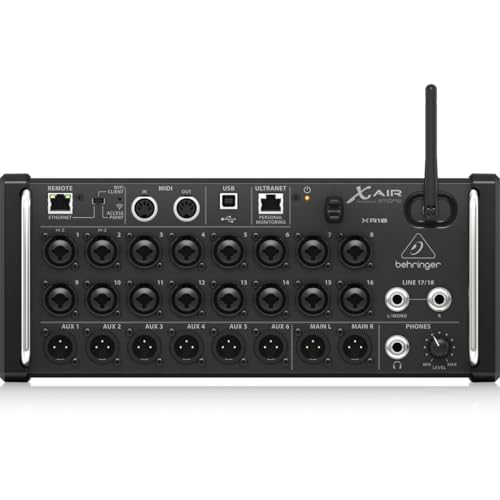
- Behringer X Air XR18 — Best Budget: As the studio budget pick it is really an 18-input interface with a mixer attached — tracking a band through it into the DAW is its party trick. Check price on Amazon.
- Soundcraft Ui24R — Best for Session Recording: For studios that record live rooms and sessions, it captures multitrack to media while the engineer mixes from anywhere in the building. Check price on Amazon.
- Behringer FLOW 8 — Best Small Studio Corner: For the single-room studio corner, it handles the talkback mic, the synth, the computer and the monitors with faders in reach. Check price on Amazon.
- PreSonus StudioLive 16.0.2 USB — Best Traditional Console Feel: For studios wanting a traditional console posture at a modest scale, it gives faders, Fat Channel processing and USB multitrack without ecosystem lock-in. Check price on Amazon.
How to use this shortlist: the badges are decisions, not decorations. If the Best Overall pick fits your input list and your way of working, the search for best digital mixers for studio can honestly end there — it earned the top badge by being the choice we would defend for the most buyers. Move to a specialist badge only when your situation names it: a tighter budget, a particular room, a recording habit, a network standard. Reading the guide that way — top pick first, specialists as exceptions — mirrors how engineers actually recommend gear to each other, and it will get you to the right mixer faster than comparing every specification against every other.
How These Picks Were Chosen
Two filters did most of the work. The first was honesty of specification: for best digital mixers for studio, marketing language hides the differences that matter — whether recording is multitrack or stereo, whether a network port carries audio or only control, whether the advertised channel count matches the microphone preamp count. We read past the headline numbers to the architecture underneath, and dropped models whose listings could not confirm the capability the search asks for. The second filter was ownership reality: control apps that are maintained, ecosystems with stage boxes and spares available, and manufacturers with a service network. A mixer is a five-to-ten-year relationship, and the guide weights it that way.
We started from the mixers buyers actually cross-shop for best digital mixers for studio, then verified each candidate against the manufacturer listing data returned by Amazon’s catalogue before writing a word. A pick only carries an Amazon link when that verification matched the exact model — its channel architecture, preamp count and recording path as listed. We weighted real-world workflow over spec-sheet theatre: how the mixer is controlled under pressure, what its recording path really captures, how its monitor buses serve real performers, and whether its ecosystem gives the purchase a future. Badges were assigned after those comparisons, and the same badge follows each pick from the Quick Picks into its full review below.
The 6 Best Options: Best Digital Mixers for Studio Use

Allen & Heath CQ-18T — Best Overall
The CQ-18T is the desktop CQ model with a 7-inch touchscreen and physical controls, suiting users who want Allen & Heath processing and assistive tools with hands-on control at the desk.
For studio use it is the balanced first choice: a premium desktop unit whose touchscreen, recording and assistive tools suit the way project studios actually run.
Strengths
- Touchscreen plus real knobs and fader gives faster control than app-only mixers
- Assistive tools genuinely shorten setup for smaller teams
- Multitrack recording over USB or SD makes it a studio-live hybrid
Trade-offs
- Desktop format takes more space than a stage box
- Premium pricing against bigger-input rack rivals
- The screen is excellent but still small for dense channel views
| Display | 7-inch touchscreen |
| Connectivity | WiFi and Bluetooth built in |
| Format | Desktop digital mixer with physical controls |
| Recording | USB and SD multitrack recording options |
The CQ-18T is what happens when a serious mixer company designs for the home studio and small stage at the same time. The touchscreen workflow is fast, the quick channels and assistive setup suit musicians first and engineers second, and the recording options mean rehearsals and gigs are captured without extra hardware. In the studio it behaves like a well-mannered interface with recall; on stage it behaves like a mixer that wants you to finish soundcheck early. That dual personality is exactly what most project studios need.
What owners notice after a month is how often the CQ-18T gets used for small things: recording rehearsals to SD, mixing a video call properly, running the acoustic duo at the weekend. The touchscreen makes those small jobs fast, and the processing quality means the results sound like the main rig’s. It is an easy mixer to recommend because it fits real, mixed musical lives rather than a single defined job.
Accessories worth adding: a quality SD card for recording and a cover for the screen. The CQ-18T otherwise arrives complete — a premium desktop that earns its space from the first session.
Best for: Project studios and small live rigs wanting one premium mixer for both / Not suited for: Buyers counting maximum inputs per dollar above all else.
Check on Amazon — check price on Amazon for the Allen & Heath CQ-18T.

Tascam Model 12 — Best for Computer-Free Recording
The Model 12 is Tascam’s all-in-one: a mixer with real channel strips, a 12-track multitrack recorder and a USB audio interface, built for musicians who record as naturally as they rehearse.
For studios that think in takes, its computer-free multitrack and tactile strips make recording feel like playing rather than administering.
Strengths
- Records multitrack to SD without a computer, mixes like a classic desk
- Physical controls keep the workflow tactile and fast
- USB interface mode integrates with a DAW when you want one
Trade-offs
- Twelve tracks is a ceiling for ambitious productions
- Channel count suits small line-ups, not full live bands
- Screen is functional rather than luxurious
| Recording | 12-track digital multitrack recorder |
| Functions | Mixer + recorder + USB audio interface in one unit |
| Control | Physical channel strips with faders and knobs |
| DAW | DAW control surface functions |
The Model 12 succeeds because it respects how musicians actually work: plug in, press record, play. No laptop latency, no driver roulette, no update dialogs — the desk captures twelve tracks to SD while feeling like the analogue mixers a generation learned on. Back at the computer it becomes the interface and control surface, so the same unit covers demo, rehearsal recording and finished production. For singer-songwriters, electronic duos and small bands, it is the centre of the room.
The Model 12 changes recording habits the way instant cameras changed photography: because capturing is effortless, it happens constantly. Song ideas, rehearsals, alternate arrangements — all preserved in multitrack, all mixable later. Its DAW-control and interface modes mean the computer joins when wanted rather than being required. Studios built around one describe it less as gear and more as furniture: the desk where music happens, always on, always ready.
Buy fast SD cards and a small stock of them; the Model 12’s appetite for captured ideas is its best feature. Studios that feed it media find their output of finished demos rises noticeably.
Best for: Musicians who want computer-free multitrack recording with a real mixer feel / Not suited for: Large live rigs or studios needing more than twelve tracks.
Check on Amazon — check price on Amazon for the Tascam Model 12.
Behringer X Air XR18 — Best Budget
The XR18 is the stage-box mixer that defined the category: 18 channels, 16 Midas preamps, 12 buses and a multi-channel USB interface in a box that sits on stage and is mixed from a tablet.
As the studio budget pick it is really an 18-input interface with a mixer attached — tracking a band through it into the DAW is its party trick.
Strengths
- Sixteen real mic preamps cover a full band’s stage plot
- Multitrack USB recording turns every gig into a potential live album
- Enormous user community means answers and show files are easy to find
Trade-offs
- Built-in WiFi struggles in crowded venues — budget for an external router
- No physical controls if your tablet fails mid-show
- The app experience varies across the many supported platforms
| Inputs | 18 channels with 16 Midas preamps |
| Buses | 12-bus architecture |
| Recording | Multi-channel USB audio interface |
| Control | Integrated WiFi, tablet and computer control |
Few products in live sound offer this much capability per dollar or per kilo. The XR18’s preamps are the Midas-designed circuits from the X32 family, its bus count runs a full set of in-ear mixes, and its USB interface records the whole band multitrack to a laptop. The discipline it demands is networking: treat the built-in WiFi as a rehearsal-room convenience, wire a proper router for shows, and the platform is as reliable as the bands who have toured it for years will tell you.
Long-term XR18 owners develop rituals worth copying: a quality router mounted in the same rack, a hardwired laptop connection for recording nights, a laminated card with the network name inside the case lid. With those, the platform’s reliability record is excellent, and its resale market is liquid because every band knows what it is. It is also the best-documented mixer in its class — any problem you can name has a forum thread and a video waiting.
The XR18’s total system cost — mixer, router, tablet, small rack — still undercuts most rivals’ mixer alone. That arithmetic, plus the multitrack recording, is why it remains the default band purchase.
Best for: Working bands wanting full multitrack and monitor capability on a budget / Not suited for: Users who need physical faders or mix in RF-hostile rooms without a router.
Check on Amazon — check price on Amazon for the Behringer X Air XR18.

Soundcraft Ui24R — Best for Session Recording
The Ui24R is a rack-mount digital mixer controlled from any web browser — laptop, tablet or phone — with 24 inputs and multitrack recording, suiting bands and venues that want capacity without a console surface.
For studios that record live rooms and sessions, it captures multitrack to media while the engineer mixes from anywhere in the building.
Strengths
- Browser control means any device with a screen becomes a control surface
- Multitrack recording to USB media captures shows without a laptop
- Generous input count covers full bands plus playback and spares
Trade-offs
- No physical faders, so mixing is entirely a touchscreen discipline
- Built-in wireless in busy venues benefits from an external router
- The rack needs a tablet or laptop budget added to the true cost
| Inputs | 24-input rack-mount digital mixer |
| Control | Browser-based control from any device, no app install |
| Recording | Multitrack USB recording to flash drive and computer |
| Processing | Onboard signal processing with Lexicon-style effects heritage |
The Ui24R’s browser interface is its party trick and its practical strength: no app store, no OS version roulette — open a browser and mix. Soundcraft’s channel processing is musical rather than surgical, the effects come from Lexicon lineage, and recording the gig multitrack to a USB stick means the live mixer doubles as the demo recorder. For a working band that soundchecks itself, or a venue whose operators rotate, the combination of capacity, recording and zero-install control is hard to beat at this tier.
The Ui24R’s browser control has a side benefit owners mention often: any device works, including the venue’s ancient laptop and the singer’s brand-new phone, on the same night, without installs or updates. Its multitrack-to-USB recording is similarly democratic — a flash drive in the rack captures the show whether or not anyone remembered a laptop. For schools and churches whose technical team is whoever shows up, that forgiveness is a feature no spec sheet captures.
Add a decent router and a labelled USB drive to the purchase and the Ui24R system is complete. Its owners rarely report mixer problems; they report the shows they recorded because recording was effortless.
Best for: Bands and venues wanting 24 inputs, browser control and easy multitrack capture / Not suited for: Engineers who mix with their eyes up and hands on faders.
Check on Amazon — check price on Amazon for the Soundcraft Ui24R.

Behringer FLOW 8 — Best Small Studio Corner
The FLOW 8 is a small digital mixer with real 60 mm faders, Bluetooth audio and app control, designed for solo performers, small streaming setups and desktop audio duties.
For the single-room studio corner, it handles the talkback mic, the synth, the computer and the monitors with faders in reach.
Strengths
- Physical faders at a size where most rivals are app-only
- Bluetooth playback and USB audio make it a tidy desktop hub
- Two effects processors cover vocal reverb and delay basics
Trade-offs
- Eight inputs is a hard ceiling — count microphones carefully
- Small faders demand a gentle touch for fine balance work
- Not a multitrack recorder; USB is stereo-oriented for this class
| Inputs | 8-input digital mixer |
| Faders | 60 mm channel faders |
| Effects | 2 FX processors |
| Connectivity | Bluetooth audio and app control, USB audio interface |
The FLOW 8 understands its job: sit within arm’s reach, mix a microphone, a guitar, a keyboard and the computer, and never require a manual. The app adds the deeper settings while the faders handle the moment-to-moment work, which is the right division of labour at this size. For a desktop that hosts calls, streams and practice, it replaces a pile of adapters with one calm surface — and when a small gig appears, it goes in the gig bag and runs that too.
The FLOW 8’s app control hides more depth than the surface suggests — full EQ and dynamics live there — but the design wisdom is that the surface handles the 90 percent: levels, mute, the blend. Streamers who came from software mixers describe the same relief: the mute button is a button, the fader is a fader, and nothing pops up, updates or crashes between you and the audience. Small, honest, and exactly as deep as its job requires.
A tablet or phone running its app completes the FLOW 8; with that pairing it covers an surprising amount of ground for its size. It is the easiest recommendation in this guide to a first-time digital buyer.
Best for: Solo performers, streamers and desktop setups wanting faders plus digital recall / Not suited for: Bands, or anyone needing multitrack recording.
Check on Amazon — check price on Amazon for the Behringer FLOW 8.

PreSonus StudioLive 16.0.2 USB — Best Traditional Console Feel
The StudioLive 16.0.2 USB is the compact classic of the range: a small digital console with Fat Channel processing and USB multitrack recording for small venues and project studios.
For studios wanting a traditional console posture at a modest scale, it gives faders, Fat Channel processing and USB multitrack without ecosystem lock-in.
Strengths
- Simple, direct layout suits volunteer operators and small studios
- USB multitrack recording integrates with Studio One and other DAWs
- Compact footprint fits small control positions and desks
Trade-offs
- An older design — no touchscreen or motorized faders
- Channel count is the ceiling; no expansion path
- Check feature set against newer Series III models before buying
| Format | Compact digital console mixer |
| Connection | USB for multitrack recording to computer |
| Processing | Fat Channel dynamics and EQ on inputs |
The 16.0.2 earned its following by being the digital mixer a small church or studio could actually run: faders where you expect them, Fat Channel processing that makes vocals behave, and a USB connection that records the service or the session multitrack. It lacks modern theatre — no moving faders, no big screen — but everything it does, it does directly. As a first digital console or a small studio’s centre, its simplicity remains the point.
Time has been kind to the 16.0.2’s design brief: simple surface, honest processing, recording that works. In small studios it serves as the first ‘real console’ generations of engineers learned on, and in churches it survives because any volunteer can be taught it in an evening. Newer mixers out-feature it; few out-simplicity it. For buyers who value that directness — and whose channel count fits — it remains a rational, satisfying purchase.
Check the current listing’s included software and firmware state when buying the 16.0.2 — as a mature model, the details of the bundle matter. The core console proposition remains as sound as ever.
Best for: Small venues and project studios wanting a straightforward digital console / Not suited for: Users wanting touchscreens, moving faders or network expansion.
Check on Amazon — check price on Amazon for the PreSonus StudioLive 16.0.2 USB.
Comparison Table
| Pick | Badge | Key spec | Best for |
|---|---|---|---|
| Allen & Heath CQ-18T — Check price on Amazon | Best Overall | 7-inch touchscreen, WiFi/Bluetooth, desktop format | Project studios and small live rigs wanting one premium mixer for both |
| Tascam Model 12 — Check price on Amazon | Best for Computer-Free Recording | 12-track multitrack recorder, mixer and USB interface in one | Musicians who want computer-free multitrack recording with a real mixer feel |
| Behringer X Air XR18 — Check price on Amazon | Best Budget | 18 channels, 16 Midas preamps, multitrack USB | Working bands wanting full multitrack and monitor capability on a budget |
| Soundcraft Ui24R — Check price on Amazon | Best for Session Recording | 24 inputs, browser control, multitrack USB recording | Bands and venues wanting 24 inputs, browser control and easy multitrack capture |
| Behringer FLOW 8 — Check price on Amazon | Best Small Studio Corner | 8 inputs, physical faders, Bluetooth, app control | Solo performers, streamers and desktop setups wanting faders plus digital recall |
| PreSonus StudioLive 16.0.2 USB — Check price on Amazon | Best Traditional Console Feel | Compact digital console with USB multitrack recording | Small venues and project studios wanting a straightforward digital console |
Read the table by format first and specifications second. The format decides who can operate the mixer and where it lives; the key spec decides whether your input list and monitor world fit. Badges repeat the Quick Picks verdicts so the table can be used on its own — and every row links to the same verified listing used throughout the guide, so the price you check is the price for the exact model reviewed.
What does value look like in this category?
Studio value is mostly time. The mixer that is always ready converts the twenty scattered minutes of inspiration into recorded tracks; the one that needs assembly converts them into a reason to make tea instead. By that measure the always-patched desktop units — CQ-18T, Model 12, FLOW 8 — are worth more to a working writer than their specifications suggest, and the stage boxes earn theirs by making the whole band recordable at rehearsal speed.
Resale deserves a line in the maths: the platforms here hold value because their ecosystems stay current and their names stay known. A mixer you can sell in a weekend when the studio’s shape changes is a cheaper thing to own than its price implies. Check price on Amazon, by all means — but also check what last year’s model sells for used, because that difference is the true cost of your ownership years.
How to Choose a Digital Mixer for Studio Use
What should a studio mixer do besides mix?
In a modern studio the mixer is also the interface, the monitor controller, the headphone system and often the recorder. Evaluate it as all four. As an interface: how many simultaneous inputs reach the DAW, and how stable are the drivers? As a monitor controller: can you switch speakers, dim and mute without a mouse? As a headphone system: can each performer get a personal mix? As a recorder: does it capture to media when the computer is off? The picks here score differently across those four jobs — your studio’s busiest job should decide.
How many inputs does a project studio really need?
Fewer than marketing suggests, more than optimism hopes. A one-person studio that overdubs needs four to eight quality inputs. A studio recording bands live needs sixteen plus. The trap is the middle: twelve inputs that almost cover a drum kit, forcing compromises on every session. Count the drum kit you record most — kick, snare, hi-hat, two toms, two overheads is seven before bass and guitars arrive — and let that arithmetic choose between the 12-track and 18-plus-input classes.
Why does recall matter so much in a studio?
Because studio time is fragmented. A mix gets revised after the client sleeps on it; a vocalist returns in three weeks for one chorus. Analogue recall means photographs and hope; digital recall means the session reopens exactly where it closed, gains and routing intact. Every pick here stores scenes, but the discipline is yours: save a scene per project, name it like you mean it, and back the files up with the audio. Studios that do this stop dreading revision requests.
Can a small digital mixer handle monitoring for performers?
Yes, within bus limits. Each independent headphone mix consumes buses, so a mixer with six buses might give the band two stereo or four mono mixes plus effects sends. Performers play better when they hear themselves properly, so treat monitor capacity as a recording-quality feature, not a live luxury. The LiveTrak concept of per-person mixes exists precisely because session morale is audible on the tape; within this list, the XR18 and Ui24R offer the deepest monitor worlds for the money.
How do you keep a small studio’s mixer setup from becoming spaghetti?
Permanence is the cure. Every cable that can stay plugged in, stays: microphones on stands in their channels, the keyboard rig wired, the computer connected, the monitors fed. Label both ends of everything that remains, and keep a one-page map in the mixer scene’s notes. The studio then has a default state that is also its best state, and sessions begin with music instead of archaeology. Digital recall handles the settings; physical permanence must handle the cables.
Should a studio mixer also be the live mixer for gigs?
For many small studios, yes — and it is an argument for the hybrid picks here. A mixer that records the band in the studio all week and runs their show on Saturday earns its cost twice. The discipline required is scene hygiene: studio scenes and live scenes clearly separated and backed up, so neither world overwrites the other. Studios that manage that separation get a second business out of the same box; studios that cannot should keep the roles apart.
How do you choose between the desktop and stage-box formats for a studio?
By where your hands live. If you mix, ride levels and tweak while performing or engineering from one chair, a desktop unit with a screen or faders — CQ-18T, Model 12, FLOW 8 — keeps the studio tactile. If the studio’s sources are spread across a room and you work from the DAW, a stage box like the XR18 puts the inputs at the sources and the control on screen. Studios frequently end with one of each: the box for the band wall, the desktop for the control position.
How does a studio mixer shape the sound of your recordings?
Mostly through decisions it encourages. A mixer with good preamps and honest monitoring makes you record drier and more confidently, because you trust what you hear. A mixer with recall makes you experiment — try the risky microphone position, because returning to the safe one costs a button press. And a mixer that records everything by default changes the archive: rehearsals, alternate takes and accidents survive, and modern production is substantially built from those survivals.
It also shapes sound through its monitoring honesty. Studios calibrate around their centre: if the mixer’s conversion and monitor path are trustworthy, mixes translate. This is why the premium desktops in this list justify themselves in small rooms — not through channel counts the room will never use, but through a control position the engineer can believe. Buy the centre you trust, then build outward.
What separates studio mixers that get used daily from those that gather dust?
Friction. The daily-use mixer is the one that is already on, already patched, already loaded with the right scene when an idea arrives. Dust gathers on the mixer that needs a laptop booted, a driver coaxed and a cable found. Every pick here can be arranged into a zero-friction default state — the discipline is arranging yours that way in the first week, before habits form around the workarounds.
The second separator is trust in the monitoring. Engineers return to the centre whose speakers tell them the truth at low volume, whose headphone feeds flatter the performer without lying to the engineer, and whose recall means yesterday’s balance is today’s starting point. Build that trust deliberately — calibrate levels, fix the monitor path, save the templates — and the mixer becomes the studio’s most-used instrument, which is what a centre is for.
How to Set Up a Digital Mixer in a Project Studio
Fix the layout first: microphones and instruments that never move — the vocal mic, the DI box, the keyboard rig — get permanent channels, labelled in the mixer, so the room’s default state is already a template. Connect the DAW over USB, confirm every input appears with the right name, and set the session sample rate once, consistently.
Build the performer’s world next: a headphone mix with their instrument and voice prominent, a talkback path from the control position, and speaker switching that lets you check a mix quietly without touching the headphone feed. Record a full test pass — every input, thirty seconds — and listen back on speakers and headphones before anyone performs for real.
Save scenes for your recurring jobs: solo tracking, band tracking, podcast, mixing. Store the scene files with the project backups, not just inside the mixer. When the room’s defaults live in named, backed-up scenes, any session can be resumed by anyone — including you, tired, at midnight, three weeks later.
After a month, review which scenes you actually loaded and which inputs never got used, and rebuild the default template around the truth. Studios evolve toward their real work, and the mixer should be re-centred on it periodically. This small audit — an hour, twice a year — keeps a digital studio feeling designed rather than accumulated, and it is the cheapest workflow upgrade available at any price.
Setup and Buying Checklist
Before and just after you buy, work through this checklist for best digital mixers for studio. It collects the small, unglamorous steps that separate systems which settle in quietly from systems that generate a month of small frustrations.
- Fix permanent sources to permanent channels and label them in the mixer.
- Save a named scene per project and back the files up with the audio.
- Set headphone mixes as part of the template, not as a session-day improvisation.
- Keep the mixer’s USB connection direct to the computer and the sample rate consistent everywhere.
- Calibrate your monitoring level and mark the fader position you trust.
- Review and prune unused scenes monthly so the right one is always findable in seconds.
Which pick fits which studio shape?
For the one-room, one-musician studio, the CQ-18T and FLOW 8 divide the territory by temperament: the CQ for the musician who thinks in screens and wants premium processing and recording in one desktop unit; the FLOW 8 for the one who thinks in faders and wants the desk to feel like an instrument. Both keep the operation within arm’s reach, which in a one-room studio is the whole design brief.
For the band’s own studio — the rehearsal room that records — the XR18 and Ui24R are the workhorses: inputs for the whole band, multitrack capture of every rehearsal, and monitor mixes that make practice sound like the record you are trying to become. The Ui24R adds media recording and browser control; the XR18 adds the larger community and the lower entry cost. Either turns rehearsal time into catalogue.
For the traditionalist’s project studio — faders, a console posture, a DAW that behaves like tape — the 16.0.2 USB and the Model 12 are the candidates, dividing on whether recording lives in the computer or in the desk. The Model 12’s standalone multitrack has converted many computer-sceptics; the PreSonus keeps the classic console-and-DAW arrangement reassuringly familiar.
For the studio that also streams and teaches, prioritise scenes and monitoring flexibility: the CQ-18T’s touchscreen speed, or the FLOW 8’s fader immediacy, with the computer treated as one source among several. The modern studio’s income is mixed — records, streams, lessons, podcasts — and the right centre is the one whose scenes make switching between those jobs a single gesture.
Common Buying Mistakes
Most buying mistakes with best digital mixers for studio are not about choosing a bad mixer — every pick here is capable — but about mismatching the mixer to the room, the crew or the input list. These are the mismatches we see repeated most often, and each is cheaper to avoid on paper than to fix in hardware.
- Judging a studio mixer by channel count while ignoring its headphone mix capacity.
- Re-patching the same five sources every session instead of fixing them to permanent channels.
- Saving scenes inside the mixer only, with no backup alongside the project files.
- Monitoring so loud that every EQ decision is a lie the room tells at high volume.
- Buying a live stage box for a studio that needed a control surface within arm’s reach.
Final Recommendation
Most project studios should start with the CQ-18T for its balance of control, recording and processing, or the Model 12 when computer-free tracking is the priority. The XR18 remains the budget multitrack answer, the Ui24R the session-recording specialist, the FLOW 8 the perfect small corner, and the 16.0.2 the traditionalist’s console. Whichever becomes your centre, fix the permanent channels, save scenes per project, and back them up with the audio.
Choose the centre that matches your hands and your session shapes, arrange it into a permanent, labelled, backed-up default state, and then make records. The mixer should be the most boring reliable thing in the room — so that everything else can be interesting.
Shortlist links for the top three: Allen & Heath CQ-18T · Tascam Model 12 · Behringer X Air XR18 — check price on Amazon for each before deciding, and confirm the current listing matches the model described here.
Best Digital Mixers For Recording Studio Best Digital Mixers For Recording Best Digital Mixers For Pc Speaker
A note on ownership and upkeep
A final note on growing into the purchase: most owners use perhaps half of a digital mixer’s depth in the first month — the scenes, the basic routing, the recording path — and discover the rest across the first year as sessions demand it. That is the correct order. Resist configuring every advanced feature on day one; instead, let each real session teach you one new capability and fold it into your templates. A studio centre mastered gradually becomes invisible infrastructure, while one configured exhaustively up front tends to be reconfigured exhaustively forever.
Frequently Asked Questions
Is a digital mixer good enough to be a studio’s main interface?
For most project and mid-size studios, yes. The multitrack mixers here record clean, recallable sessions and handle monitoring in one unit, which simplifies the room considerably.
What is the best size of mixer for a home studio?
Eight to eighteen inputs covers nearly all home studios. The FLOW 8 and CQ-18T anchor desks; the Model 12 and XR18 anchor band-capable rooms.
Do I need motorized faders in a studio mixer?
They help when the mixer itself is your mix surface and when recall must be visible. If you mix entirely in the DAW, they are a luxury; if you mix on the desk, they are close to essential.
Can these mixers record without a computer?
The Model 12 records multitrack to SD standalone, the CQ-18T offers media recording, and the Ui24R records to USB media. Others are primarily computer-fed.
How do I connect studio monitors to a digital mixer?
From the main or control-room outputs with balanced cables; set the monitors to a fixed level and control volume from the mixer for consistent, recallable monitoring.
Studio mixer or separate interface and controller?
A mixer-centred room is simpler and recalls as one system. Separate components can outperform it piece by piece at higher cost and complexity. Most small studios are happier with the coherent centre.
Can a studio mixer handle a whole band at once?
The 18- and 24-input picks here can; the desktop units suit smaller line-ups. Count the drum kit honestly — it decides the class you need.
Is it worth getting a mixer with built-in recording if I have a DAW?
Yes, as a safety and a convenience: rehearsals and ideas get captured when the computer is off, and live sessions gain a backup that has saved many projects.
To close: the shortlist for best digital mixers for studio rewards buyers who decide by workflow first and specifications second. Start from the top pick — the Allen & Heath CQ-18T — and move down the list only when a specific requirement rules it out: a channel count, a format, a network standard, a control style. That order of decisions, applied honestly, is how the right mixer gets chosen, and it is the order this guide was written in. Keep the verified links above for current availability, save your first good scene the day the mixer arrives, and let the system settle into the background of the work it was bought to support.
Related reading on this site: Best Digital Mixers Using Logice Pro X Best Digital Mixers For Live Sound


