Disclosure: airfryerkitchensupply.com is reader-supported. When you buy through links on our site, we may earn an affiliate commission at no extra cost to you.
Where to buy
The fastest way to compare the best computer audio mixers in this guide is on Amazon, where most of the models below are sold by the brands themselves or by authorized kitchen and audio retailers. Prices and stock move around, especially on seasonal colors and bundle configurations, so every pick here is listed with a live price check rather than a fixed number.
Confirm the exact variant on the listing before ordering: several models below are sold in black and white finishes and in bundles with microphones or stands, and the USB connection type (USB-C versus older USB-B) differs between hardware revisions.
- Yamaha AG03MK2 (Best Overall) — check price on Amazon
- RODE RODECaster Duo (Best for Podcasting and Streaming Production) — check price on Amazon
- TC-Helicon GoXLR (Best for Live Streamers) — check price on Amazon
- Yamaha AG06MK2 (Best for Two Voices on a Budget-Conscious Desk) — check price on Amazon
- FIFINE Ampligame SC3 Gaming Audio Mixer (Best Budget Streaming Mixer) — check price on Amazon
- Behringer XENYX 302USB (Best Ultra-Compact Analog Option) — check price on Amazon
The best computer audio mixers solve the problem every streamer, podcaster, and home recordist eventually hits: your computer has one mediocre microphone input, and your ambitions have outgrown it. A computer audio mixer puts real microphone preamps, physical faders or knobs, headphone monitoring with zero latency, and — in the streaming-focused models — mute buttons, voice effects, and submixes between you and your software, so the mix happens in hardware instead of in a tangle of virtual cables.
This category splits into two philosophies, and choosing between them matters more than choosing between brands. Traditional compact mixers with USB — the Yamaha AG series and the little Behringer at the end of this list — are audio mixers first: clean preamps, real EQ, and a USB connection that carries the finished stereo mix to your computer. Streaming consoles — the RODECaster Duo, the GoXLR, and the FIFINE — are broadcast desks shrunk for a desk at home: they add sound pads, voice processing, per-application volume control, and mute architecture designed for people live in front of an audience.
Neither philosophy is wrong. Podcasters recording two microphones into editing software are usually better served by the traditional side; live streamers juggling game, chat, music, and microphone are the people the streaming consoles were invented for. The six picks below cover both, with the split labeled honestly in every review.
One technical note that will save you money: a mixer sends your computer a finished mix, not separate tracks per microphone (with a few multitrack exceptions noted below). If your workflow needs each voice on its own track for editing, you may actually want an audio interface rather than a mixer — the buying guide further down explains how to tell the difference before you spend anything.
In this guide
Quick Picks
If you are short on time, these are the six best computer audio mixers worth your attention first. Each one carries a badge for the job it does best, and the same badge follows it into the detailed review further down the page.
- Yamaha AG03MK2 — Best Overall. One excellent microphone preamp, a loopback for streaming, one-knob compression and EQ, and Yamaha build quality — the default recommendation for solo creators. Check price on Amazon.
- RODE RODECaster Duo — Best for Podcasting and Streaming Production. Two broadcast-grade preamps, assignable sound pads, onboard recording, and wireless receiver support — a production studio in a desktop box. Check price on Amazon.
- TC-Helicon GoXLR — Best for Live Streamers. Motorized faders for game, chat, music, and mic, a proper broadcast preamp, voice effects, and a sampler — the streamer’s control surface, full stop. Check price on Amazon.
- Yamaha AG06MK2 — Best for Two Voices on a Budget-Conscious Desk. The AG03’s bigger sibling adds a second microphone channel and more inputs while keeping the loopback, processing, and driver-free simplicity. Check price on Amazon.
- FIFINE Ampligame SC3 Gaming Audio Mixer — Best Budget Streaming Mixer. XLR and headset inputs, voice effects, RGB-lit controls, and a streamer-friendly layout at a fraction of the big names’ tier. Check price on Amazon.
- Behringer XENYX 302USB — Best Ultra-Compact Analog Option. A five-input analog mixer the size of a paperback with a XENYX mic preamp and USB — the minimalist’s way to get one good mic and a line source into a computer. Check price on Amazon.
How These Picks Were Chosen
Every pick was verified against live Amazon catalog data, so model names, input counts, and connection types match current listings. We required a USB connection to a computer as a core feature — not an afterthought — plus at least one proper XLR microphone preamp, direct headphone monitoring, and controls that make sense at a desk.
We weighted preamp quality and noise floor first, because a hissy preamp cannot be fixed in software. After that: the monitoring experience (latency-free headphone feeds and how easy they are to adjust), the control surface (faders versus knobs versus touchscreen), the software story on both Windows and Mac, and whether the unit keeps working as a plain mixer when the companion app is closed — a real concern with app-dependent streaming gear.
We excluded pure DJ mixers (covered elsewhere in this cluster), large live-sound consoles that happen to have USB, and no-name streaming boxes whose preamps are audibly noisy and whose software support evaporates within a year. What remains is the short list worth your desk space.
The 6 Best Computer Audio Mixers

Yamaha AG03MK2 — Best Overall
The AG03MK2 is what happens when a serious audio company designs for streamers without condescension. Its single microphone channel carries a proper preamp with phantom power for condenser microphones, a high-impedance input for guitar, and Yamaha’s one-knob compressor and EQ that make a voice sound broadcast-finished without any engineering knowledge. A loopback switch folds computer audio back into the stream mix, which is the feature solo streamers actually use daily.
Strengths
- Clean, quiet microphone preamp with phantom power
- Loopback and one-knob voice processing built for streaming
- Driver-free USB operation on Windows and Mac
Trade-offs
- Only one microphone input
- No sound pads or app-level submix control
- Processing is simple rather than deeply adjustable
| Mic inputs | 1 XLR combo with phantom power |
| Connection | USB-C to computer |
| Extras | Loopback, one-knob comp/EQ, guitar Hi-Z input |
The layout is a lesson in desk ergonomics: big clear knobs, a dedicated mute, and headphone and monitor outputs that behave predictably. It works as a class-compliant USB audio device, so it functions on Windows and Mac without driver drama, and it keeps passing audio even when you never install Yamaha’s software. For podcasters it doubles as a clean little recording front-end; the stereo mix it sends is polished enough to publish with minimal editing.
The limits are count and depth: one microphone is all you get, the processing is deliberately simple rather than deep, and there are no sound pads or per-app faders. If you are a solo voice — streamer, podcaster, narrator, online teacher — those limits rarely bite. It sits in the mid tier; check the current price on Amazon.
Best for: Solo streamers, podcasters, and narrators who want one great mic channel / Not suited for: Two-host shows or gamers wanting per-app faders
Check the current price on Amazon
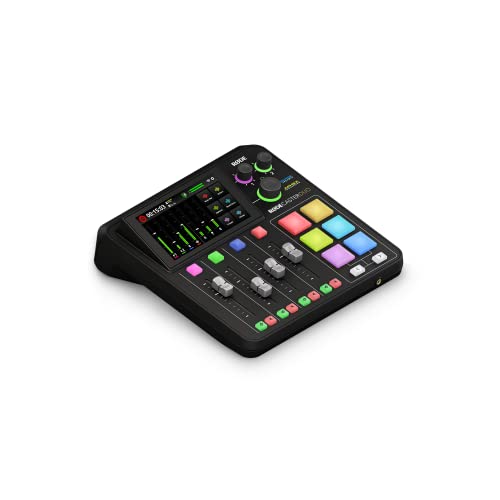
RODE RODECaster Duo — Best for Podcasting and Streaming Production
The RODECaster Duo is the smaller sibling of RODE’s flagship podcast console, and it keeps the parts that matter: two ultra-low-noise preamps with enough gain for demanding dynamic microphones without an inline booster, a row of programmable SMART pads for intros, effects, and sound drops, and the ability to record directly to microSD or a USB drive with the computer off entirely.
Strengths
- Two very quiet, high-gain preamps — no booster needed for most dynamic mics
- SMART pads, onboard recording, and wireless mic support
- Per-input studio processing with easy presets
Trade-offs
- Premium price tier
- Touchscreen workflow is not for everyone
- Overkill for a single gaming microphone
| Mic inputs | 2 XLR combo, high-gain low-noise |
| Connection | Dual USB-C, Bluetooth, microSD recording |
| Extras | SMART pads, wireless receiver built in |
For two-person podcasts and produced streams, the workflow is the product. Each input gets studio processing — compression, EQ, noise gating, and RODE’s vocal polish — that can be set with presets or tuned deeply. Built-in wireless receiver support pairs with RODE wireless microphones, Bluetooth connects a phone for call-ins, and dual USB ports let two computers or a computer and a phone share the desk. It feels less like a mixer and more like a radio station that happens to fit beside a keyboard.
The honest costs: it is a premium-tier purchase, the touchscreen-and-menus interface is slower for some tasks than physical faders, and its depth is wasted on a single-microphone gaming setup. Buy it when production value is the point of your content; check price on Amazon and budget for the microphones it deserves.
Best for: Two-host podcasts and produced live streams / Not suited for: Minimalist single-mic setups or tight budgets
Check the current price on Amazon

TC-Helicon GoXLR — Best for Live Streamers
The GoXLR was designed around one observation: streamers do not mix like recording engineers, they mix like pilots — glancing, grabbing a fader, muting fast. Its four motorized faders map to the sources a streamer actually juggles (microphone, chat, music, game/system), each with a dedicated mute, and the faders physically move when profiles change so what you see is always what is true. Underneath the theater is a genuinely good Midas-designed microphone preamp and a stack of voice effects, EQ, compression, and gating.
Strengths
- Motorized faders mapped to stream sources with per-channel mute
- Quality Midas-designed mic preamp with full voice processing
- Sampler, effects, cough and bleep buttons for live shows
Trade-offs
- Windows-centric; verify Mac support before buying
- Single microphone input
- App-dependent features — check current software support
| Mic inputs | 1 XLR with Midas preamp |
| Faders | 4 motorized, assignable |
| Extras | Sampler pads, voice FX, cough/bleep mute |
The supporting features are pure live-show tooling: a sampler and sound board on tactile pads, a voice-effects section with pitch and character effects, a cough button that mutes while you hold it, and bleep button for the moments every live streamer eventually has. In a live environment, those are not gimmicks; they are the show.
The caveats are real and should be weighed. The GoXLR is Windows-focused — Mac support has historically been limited — and its software has had an uneven support history, so check the current state of the app before buying and confirm it suits your operating system. It is also a single-microphone device. For a Windows gaming streamer, though, nothing else on this list feels as purpose-built. It sits in the upper-mid tier.
Best for: Windows gaming streamers mixing multiple sources live / Not suited for: Mac-first users or two-microphone shows
Check the current price on Amazon

Yamaha AG06MK2 — Best for Two Voices on a Budget-Conscious Desk
The AG06MK2 answers the most common AG03 question — “what if there are two of us?” — with a second microphone preamp and a more flexible input set, while keeping everything that makes the series easy to live with: loopback for streaming, one-knob compression and EQ on the voices, an amp simulator for the guitar input, and class-compliant USB that simply works.
Strengths
- Two microphone preamps with phantom power
- Loopback and per-voice one-knob processing
- Driver-free USB on Windows and Mac
Trade-offs
- Sends a finished stereo mix, not multitrack
- No sound pads or app submixes
- Processing depth is limited by design
| Mic inputs | 2 XLR combo |
| Connection | USB-C to computer |
| Extras | Loopback, amp simulator, one-knob comp/EQ |
Two-microphone podcasts, co-streamed games, interview recordings, and music practice with a mic’d instrument all fit comfortably here. The stereo mix it sends to the computer is clean and finished-sounding, and because it is a Yamaha, the knobs and jacks feel like they were specified by people who have used mixers in anger.
Its ceiling is the same philosophy as the AG03: the mix is committed as a stereo file, the processing favors easy over deep, and there are no pads or per-application faders. If your show grows into heavy production, the RODECaster Duo is the upgrade path. As a two-voice computer audio mixer at a mid tier, the AG06MK2 is hard to argue with — check the current price on Amazon.
Best for: Two-host podcasts, co-streams, and small music setups / Not suited for: Produced shows needing pads and multitrack editing
Check the current price on Amazon

FIFINE Ampligame SC3 Gaming Audio Mixer — Best Budget Streaming Mixer
The FIFINE SC3 is the budget entry that understands the assignment: give a new streamer a real XLR input (with the option of headset-mic input too), big friendly controls for mic, line, and output volumes, a handful of voice-changing effects, and customizable RGB buttons for sound triggers — all in a compact box that does not require an audio engineering vocabulary to operate.
Strengths
- Very affordable entry into XLR mixing
- Voice effects and customizable sound buttons
- Simple, game-streamer-friendly layout
Trade-offs
- Preamp is noisier than Yamaha/RODE rivals
- Build is light plastic
- Limited processing depth and inputs
| Mic inputs | 1 XLR plus headset input |
| Connection | USB to computer |
| Extras | Voice effects, RGB custom buttons |
Sound quality is the honest compromise. The preamp is serviceable for dynamic microphones in a typical room and noticeably a step below the Yamaha and RODE units on this list for gain-hungry mics and quiet sources. For game streaming, Discord calls, and casual content — its actual design brief — that difference rarely reaches the audience.
What the SC3 gets right is the upgrade path: it lets a creator move from a USB headset to an XLR microphone without replacing everything, and it teaches the physical-mixer habit — reach, mute, adjust — at a budget tier. Check price on Amazon; as a first computer audio mixer for gaming, it is easy to recommend with its limits stated plainly.
Best for: New streamers upgrading from a headset on a budget / Not suited for: Demanding dynamic mics or quiet-room recording
Check the current price on Amazon
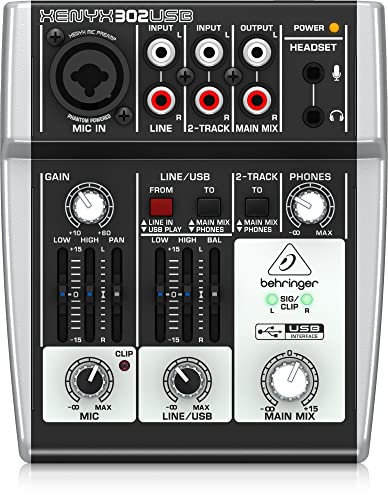
Behringer XENYX 302USB — Best Ultra-Compact Analog Option
The 302USB is the smallest serious answer to a simple problem: one microphone, maybe a phone or music player, and a computer that needs to hear them properly. Its single XENYX preamp (with phantom power) handles a proper XLR microphone, the stereo line inputs take a second source, and the USB connection carries the mix to and from the computer for recording, calls, and simple streaming.
Strengths
- Tiny, USB-powered, and genuinely portable
- Real XLR preamp with phantom power
- No software dependency — pure analog control
Trade-offs
- Single microphone input
- No streaming features or processing
- Modest headroom for loud sources
| Mic inputs | 1 XLR with phantom power |
| Inputs | 5 total including stereo line |
| Connection | USB audio interface built in |
Its virtues are size, simplicity, and price tier. It disappears on a desk, runs from USB power, and its analog knobs do exactly what they claim with zero software involvement — which also makes it the most future-proof device here, since there is no app to be abandoned. For voice-over work, online teaching, and single-mic recording on the move, it remains a quietly excellent tool.
The limits are equally clear: one microphone, modest headroom, no streaming features at all — no loopback tricks, no pads, no voice processing. It is a mixer, not a broadcast console. Buy it for what it is, at a budget tier, and it will out-serve devices three times its size for the single-voice jobs it was built for.
Best for: Single-voice recording, teaching, and travel desks / Not suited for: Multi-source streaming or two-host shows
Check the current price on Amazon
Comparison Table
| Pick | Badge | Key spec | Best for |
|---|---|---|---|
| Yamaha AG03MK2 | Best Overall | 1 mic preamp, USB-C, loopback | Solo streamers, podcasters, and narrators who want one great mic channel |
| RODE RODECaster Duo | Best for Podcasting and Streaming Production | 2 preamps, pads, onboard recording | Two-host podcasts and produced live streams |
| TC-Helicon GoXLR | Best for Live Streamers | 4 motorized faders, 1 mic, sampler | Windows gaming streamers mixing multiple sources live |
| Yamaha AG06MK2 | Best for Two Voices on a Budget-Conscious Desk | 2 mic preamps, USB-C, loopback | Two-host podcasts, co-streams, and small music setups |
| FIFINE Ampligame SC3 Gaming Audio Mixer | Best Budget Streaming Mixer | 1 XLR, USB, voice effects | New streamers upgrading from a headset on a budget |
| Behringer XENYX 302USB | Best Ultra-Compact Analog Option | 1 mic preamp, 5 inputs, USB-powered | Single-voice recording, teaching, and travel desks |
The table hides the category’s big fork: the Yamaha and Behringer models are mixers that connect to a computer, while the RODECaster, GoXLR, and FIFINE are streaming consoles that happen to mix. Decide which job you have before comparing specs.
How to Choose a Computer Audio Mixer: Mixer, Streaming Console, or Interface?
Start by identifying your actual bottleneck. If your problem is “my microphone sounds bad and my computer’s input is noisy,” any pick here fixes it — you need a real preamp and USB conversion. If your problem is “I juggle five sound sources while live and my software mixer is a mess,” you need a streaming console with per-source faders: the GoXLR or RODECaster Duo. If your problem is “I record two people and need to edit each voice separately afterward,” stop — you need multitrack, which most mixers do not send; look at multitrack interfaces or the RODECaster’s multitrack-over-USB mode instead.
Microphone count is the second decision, and it is unforgiving: you cannot add a preamp later. One voice points to the AG03MK2, GoXLR, SC3, or 302USB. Two voices point to the AG06MK2 or the Duo. Count headsets honestly too — a co-host on a headset mic still needs an input that accepts it, which the FIFINE handles natively and the Yamahas handle through their combo jacks and adapters.
Third, check your microphone before your mixer. Demanding dynamic broadcast microphones need substantial clean gain; the RODECaster Duo’s preamps are famous for driving them without a booster, the Yamahas cope well, and budget units may need an inline gain booster added to the budget. Condenser microphones need phantom power, which every pick here provides on its XLR input. Getting this pairing right matters more to your final sound than any other choice in this guide.
Finally, audition the software story on your operating system. Class-compliant traditional mixers (Yamaha, Behringer) work anywhere with no drivers and no app. Streaming consoles earn their features through companion software, which is a Windows-first world: the GoXLR in particular should be bought by Mac users only after verifying current support. A mixer that works without its app — even in a reduced mode — is insurance worth having.
What Is Loopback, and Do You Need It?
Loopback is the feature that separates streaming-ready gear from merely USB-equipped gear. It takes the audio your computer is playing — game sound, music, a guest on a call — and folds it back into the mix that goes out to your stream or recording, without echo and without software routing gymnastics. On the Yamaha AG series it is a switch. On the streaming consoles it is the entire architecture. On a traditional mixer without loopback, like the little Behringer, achieving the same result means workarounds in software.
You need loopback if your audience must hear what you hear: gameplay, reaction content, music, call-in guests. You do not need it if the computer is only a recorder — a podcast recorded locally, voice-over, or online lessons where the platform handles the other side’s audio. Many beginners overbuy here, paying for streaming architecture they never switch on; just as many underbuy and discover the gap mid-season. Your content format decides, and it decides completely.
A related trap is the echo of your own voice. Any setup that routes computer audio back toward a microphone must manage monitoring carefully: listen through the mixer’s headphone output (zero latency, no echo), not through your recording software’s playback, and keep speakers off while a microphone is live. Every pick in this guide offers direct hardware monitoring for exactly this reason.
How Many Inputs Do You Really Need at a Desk?
Desk setups grow by accretion: a microphone, then a second for a co-host, a phone for call-ins, a game console, a music source. It is tempting to buy for the setup you imagine in two years, but mixer inputs are the most commonly wasted money in home audio — a four-preamp desk mixer serving one microphone is not future-proofing, it is clutter with a power supply. The honest method is to count the sources you used in your last ten sessions and buy one input beyond that.
There is one exception: two-person content. If a co-host, guest chair, or interview format is even a near-term plan, the jump from one preamp to two is the jump that matters, because it cannot be faked — two voices into one preamp means one shared gain, one shared mute, and one shared everything. That is why this guide carries two genuine two-mic options (AG06MK2 and RODECaster Duo) rather than treating the second microphone as an afterthought.
Also count outputs, not just inputs. A headphone feed for each host is non-negotiable for two-voice work; a separate monitor output matters if speakers share the desk; and streamers should confirm the USB feed can be configured so the audience hears the mix while a co-host hears themselves without delay. The picks above were chosen partly on these unglamorous output details, which decide daily comfort more than headline input counts.
Setting Up Your Computer Mixer for Clean, Hiss-Free Audio
Most “my mixer sounds bad” problems are gain staging, and they are fixable in five minutes. Set the microphone preamp gain so your normal speaking voice peaks comfortably in the upper-middle of the meter in your software — strong but never clipping — then set your listening level with the headphone knob, not the gain. The classic beginner error is low gain at the mixer compensated by high volume in software, which amplifies the noise floor into audible hiss.
Keep the chain simple and physical: microphone close to your mouth (a hand’s width for most dynamic mics), pointed slightly off-axis to soften plosives, and away from fans and the computer case. Room noise enters through the microphone, not the mixer, and no preamp upgrade fixes a loud room — proximity does, because a close microphone needs less gain and therefore hears less of everything else.
Finally, record a test the way your audience will hear it: through the actual platform or file, on actual headphones, at the actual settings. Thirty seconds of honest playback catches wrong inputs, doubled audio from a software monitor left on, and the loopback echo that written guides cannot hear for you. Make the test a ritual whenever anything in the chain changes.
How to Set Up a Computer Audio Mixer for Streaming or Podcasting, Step by Step
This sequence works for every pick in this guide, with the streaming consoles adding their app configuration at the end.
- Connect the mixer to the computer by USB and select it as both the input and output device in your operating system and in your recording or streaming software. One device for both directions prevents most echo and clock problems.
- Plug your microphone into the XLR input. Enable phantom power only if your microphone is a condenser; dynamic microphones neither need it nor want it. Keep the gain knob low for now.
- Put your headphones on and plug them into the mixer, not the computer. This gives you zero-latency monitoring — your voice in your ears with no delay — which is essential for natural speaking.
- Set the gain while speaking at your real performance volume. Raise the preamp gain until your software meter peaks in the upper-middle range on your loudest phrases, then back off slightly. If you must shout to reach that level, the microphone is too far away — move it closer instead of adding gain.
- Add processing in order: high-pass filter if present, then gate, then EQ, then compression — each conservatively. On the Yamaha models this is the one-knob system doing the work; on the RODECaster, start from a voice preset and adjust one control at a time.
- Route your sources. Streaming consoles: assign game, chat, and music to their faders and set the balance so your voice always sits clearly on top. Traditional mixers: use loopback for computer audio and set its level against your voice.
- Record a one-minute test with every source playing, listen back on headphones, and fix levels now — not during a live show or a guest interview.
Save the working configuration — a photo of knob positions for analog mixers, a named profile in the app for streaming consoles. Desks get bumped, cables get swapped, and the profile is what turns a twenty-minute troubleshooting session back into twenty seconds.
Dynamic vs. Condenser Microphones: Pairing the Mic to the Mixer
The microphone you own — or plan to own — should steer this purchase as much as the mixer itself. Dynamic microphones are the forgiving workhorses of streaming and podcasting: they reject room noise, tolerate close talking, and need no phantom power, but the famous broadcast models output a quiet signal that demands real preamp gain. That single fact explains the RODECaster Duo’s popularity (its preamps were designed for exactly those microphones) and why budget mixers sometimes disappoint owners of high-end dynamic mics.
Condenser microphones trade that forgiveness for detail: they capture a brighter, more open sound and work at greater distances, but they need phantom power, hear the whole room — every fan, keyboard, and passing car — and punish untreated spaces. In a typical bedroom setup, a dynamic microphone on a modest mixer almost always produces the better finished result, a truth the industry is oddly reluctant to say out loud.
The practical rule: buy the mixer and microphone as a pair, on one budget. A mid-tier mixer with a well-matched microphone outperforms a premium console feeding a mismatched one, and the reviews above flag which preamps handle demanding dynamics natively so you can skip the booster purchase where possible.
Headphones, Monitoring, and the Mix-Minus Problem
Every conversation with a remote guest creates the mix-minus problem: the guest must hear you and the show, but must never hear their own voice coming back, or the call collapses into echo and confusion. Mixers solve this in hardware by letting you build the guest’s feed separately from the main mix. The streaming consoles automate it per source; traditional mixers achieve it with aux sends and careful routing; and the Yamaha AG loopback design handles the common solo case — computer audio in the stream, but your monitoring clean — with a single switch.
Your own monitoring deserves equal care. Listen from the mixer’s headphone output at a moderate level, with the direct-monitor path — not software playback — as your reference. If you wear open-back headphones, be aware that at high volumes their sound can leak into a sensitive microphone; closed-back models are the safer default at a live desk.
Two-host desks add one more requirement: independent headphone levels, or at minimum a headphone feed both hosts can live with. The RODECaster Duo provides separate control as a matter of course. On simpler two-mic mixers, a small headphone splitter-amp is an inexpensive and legitimate accessory — far better than one host monitoring too quietly and leaning off-microphone all show.
How a Computer Mixer Fits a Hybrid Work-and-Play Desk
Many buyers in this category run one desk for everything: work calls by day, games or a podcast by night. A computer audio mixer quietly becomes the desk’s audio hub in that life — microphone, headphones, and speakers routed once, properly, instead of being re-plumbed per activity. The traditional mixers shine here because they ask nothing of software: the Yamaha on your desk at 9 a.m. is a boardroom-grade voice for a client call and, at 9 p.m., the front end of a recording session, with the same knob positions.
Streaming consoles can play the same role but bring their profiles with them: a work profile with effects off and faders set for calls, a show profile with the full processing chain. If you go that route, name the profiles honestly and keep the work one boring — your employer’s all-hands is not the venue for the robot voice, however tempting.
Either way, the desk-hub pattern argues for buying one tier above your minimum. The mixer is touched every day, heard on every call, and expected to simply work; in this category more than most, reliability and clean gain are worth paying for once.
Cables, Stands, and the Small Purchases That Make the Setup Work
A computer mixer is the center of a small system, and the system fails at its cheapest joints. Budget for a balanced XLR cable of sensible length — long enough to position the microphone properly, short enough to avoid a cable nest — and a stand or boom arm that puts the microphone at mouth height without you leaning toward it. Posture is an audio feature: a microphone at the right place lets you speak at natural volume with consistent distance, which no processing fully imitates.
If your microphone is a demanding dynamic, price an inline gain booster into the setup unless your mixer is the RODECaster Duo or another high-gain design; it is a standard, legitimate part of this ecosystem, not an admission of failure. A pair of closed-back headphones you can wear for two hours matters more than any single processing feature. And a small powered USB hub with a real power supply prevents the mysterious disconnects that underpowered ports cause with bus-powered gear.
None of these accessories is glamorous, and together they typically cost less than the jump between mixer tiers. Buyers who fund the system rather than the centerpiece end up with the setup that simply works every day — which, for a device whose entire job is to be forgotten during a show, is the whole point.
Common Buying Mistakes
Buying a mixer when you need multitrack. Most mixers send one finished stereo mix to the computer. If your editing workflow needs each voice on its own track, buy for multitrack explicitly — or accept the stereo workflow with open eyes.
Ignoring preamp gain for demanding microphones. Famous broadcast dynamic mics are quiet by design. Pair them with a weak preamp and you get hiss; pair them with the RODECaster Duo or a booster and you get the sound you actually bought the microphone for.
Monitoring through software. Listening to yourself through a recording app adds delay that makes speaking feel like wading. Always monitor from the mixer’s headphone jack.
Buying streaming features for a recording-only workflow. Pads, effects, and per-app faders earn nothing in a podcast you edit afterward. The Yamaha AG line exists precisely for you, at a lower tier.
Skipping the operating-system check. Streaming consoles are software products as much as hardware. Verify current Windows or Mac support for the exact model before ordering, especially in the GoXLR’s case.
Setting gain by eye. Knob positions mean nothing across different microphones and voices. Set gain by meter and by test recording, at your real speaking volume, every time the setup changes.
Final Recommendation
For most people, the Yamaha AG03MK2 is the best computer audio mixer to buy: one superb microphone channel, honest streaming features, and zero software drama, in a box that will work on any computer you own next. Two voices on the same philosophy leads to the AG06MK2; two voices with full production ambitions leads to the RODECaster Duo, the finest desktop production console in this guide.
Windows gaming streamers who mix live should look hard at the GoXLR’s motorized faders — nothing else feels like it — while new creators on a budget get a real XLR start from the FIFINE SC3. And if your needs are one microphone and no fuss, the tiny Behringer 302USB remains the minimalist classic. Match the philosophy to your format first; the model choice follows almost automatically after that, and your audience will hear the difference in the very first episode or stream you publish with the new setup in place.
Ready to buy? Start with Yamaha AG03MK2, RODE RODECaster Duo, TC-Helicon GoXLR — check the current price on Amazon for each and confirm the exact color and configuration on the listing before you order.
Keep exploring the rest of this cluster: Best 12 Channel Audio Mixers Best 2 Mic Mixers For Podcasting Best Mixers For Podcasting Best Usb Mixers Best Streaming Mixers
Frequently Asked Questions
What is the difference between a computer audio mixer and an audio interface?
An interface converts each input into its own track in your recording software — ideal for music production and edited podcasts. A mixer blends inputs into a finished stereo mix with physical controls — ideal for live streaming and simple recording. Streaming consoles blur the line with processing and pads. Choose by workflow: edit later, interface; perform live, mixer.
Can I use a computer audio mixer for Zoom and Teams calls?
Yes, and it is one of their best uses. Select the mixer as the microphone and speaker in the app, monitor through its headphone jack, and your voice arrives with proper gain and processing while call audio stays out of your microphone feed. The Yamaha AG models are particularly popular for professional remote work.
Do I need phantom power?
Only for condenser microphones, which require it to operate. Dynamic microphones — including most broadcast and streaming mics — do not use it. Every mixer in this guide supplies phantom power on its XLR inputs, so either microphone type is covered; just switch it off for dynamics as a matter of habit.
Why does my microphone sound hissy through my new mixer?
Almost always gain staging or distance: the microphone is too far away, so the gain is high, so the room and the preamp noise come up with your voice. Move the microphone to a hand’s width from your mouth, lower the gain to match, and record a test. If hiss persists with a demanding dynamic mic on a budget mixer, an inline gain booster is the standard fix.
Can these mixers record two people at once?
The Yamaha AG06MK2 and RODECaster Duo have two microphone preamps and are built for it. The single-preamp models cannot mix two XLR microphones properly — a splitter cable shares one gain stage and produces poor results. If two voices are in your format, buy the second preamp now.
Will a computer audio mixer improve a USB microphone?
No — a USB microphone already contains its own preamp and converter and does not connect to a mixer’s XLR input. A mixer becomes relevant when you move to an XLR microphone. That is why the FIFINE SC3’s headset input exists as a bridge, but the real upgrade path is XLR microphone plus mixer, bought as a pair when budget allows.
Is the GoXLR worth it over the Yamaha AG03MK2?
For a Windows gaming streamer mixing game, chat, and music live, the GoXLR’s motorized per-source faders and live tools justify its higher tier. For podcasting, recording, calls, or any Mac involvement, the AG03MK2’s cleaner preamp focus, loopback, and driver-free operation make it the better buy. The formats are different; so are the answers — and choosing by format first is the single most reliable shortcut in this entire category, ahead of brand, ahead of price tier, and ahead of every individual feature on either spec sheet, every single time, for every kind of creator.


