Disclosure: airfryerkitchensupply.com is reader-supported. When you buy through links on our site, we may earn an affiliate commission at no extra cost to you.
Where to buy
Comparing the best chairs for bad lower back? Every pick below was verified against Amazon’s catalog data; links let you check the current price on Amazon.
- SIHOO M18 Ergonomic Office Chair — Check on Amazon
- HON Ignition 2.0 Ergonomic Office Chair — Check on Amazon
- Marsail Ergonomic Office Chair — Check on Amazon
- Furmax Office Chair — Check on Amazon
- BestOffice Ergonomic Office Chair — Check on Amazon
- TRALT Office Chair — Check on Amazon
Best chairs for bad lower back comfort are not medical devices, and this guide will not pretend otherwise. What a well-chosen chair can honestly do is support a neutral sitting posture, let you adjust the fit to your body, and make long desk sessions more comfortable day to day. If your back pain is persistent, worsening, or accompanied by numbness or weakness, stop shopping for chairs and talk to a clinician — a chair is a comfort tool, not a treatment, and nothing in this guide claims to treat, cure, or reduce any medical condition.
With that boundary set, the six chairs below were chosen on ergonomic fundamentals that any shopper can verify from the listing itself: a lumbar support element you can point to, adjustability where the listing states it, a backrest shape that encourages an upright posture, and a seat you can set at the right height for your desk. Every model here is a mainstream mesh or cushioned desk chair whose listing title confirms the features we describe — where a title does not state a capacity or a material, the spec box says ‘Not stated’ rather than guessing.
You will notice there are no exotic therapy chairs and no miracle claims. The honest differences between these six are adjustment range, backrest height, armrest design, and how much fitting work each chair asks of you on day one. Read the trade-offs as carefully as the strengths: the best chair for a bad lower back is the one whose adjustments match your body and your desk, set up correctly, and used with regular movement breaks.
In this guide
Quick Picks
- Best Overall: SIHOO M18 Ergonomic Office Chair — adjustable lumbar support, a headrest, 2D armrests and a stated 330 lb capacity — the most complete adjustment set in this guide.
- Best Proven Office Standard: HON Ignition 2.0 Ergonomic Office Chair — a contract-grade office chair from an established office furniture maker, with lumbar support and adjustable arms.
- Best High-Back Mesh: Marsail Ergonomic Office Chair — high-back mesh design with adjustable lumbar support, 3D armrests and a headrest for taller sitters.
- Best Budget: Furmax Office Chair — a long-running budget mesh chair with lumbar support, adjustable height and a breathable mid-back design.
- Best Simple Starter: BestOffice Ergonomic Office Chair — a straightforward mid-back swivel chair with lumbar support, a sponge seat and adjustable height.
- Best for Home Office Comfort: TRALT Office Chair — mesh executive-style chair with adjustable lumbar support aimed at home office comfort.
How These Picks Were Chosen
We started from office and desk chairs whose Amazon listing titles explicitly confirm a lumbar support feature, because a chair marketed for back comfort without any stated lumbar element is asking you to take its comfort on faith. From that pool we favoured chairs with at least one meaningful adjustment beyond seat height — adjustable lumbar support, adjustable armrests, a headrest, or a tilt lock — since adjustability is what lets a chair fit different bodies instead of one average body.
Each pick was cross-checked against the Amazon catalogue data for this site: the ASIN, the exact listing title, and every feature named in this article come from that returned title. Spec boxes only repeat what the title states. Where a title is silent — several of these listings never state a weight capacity, for example — the box records ‘Not stated’ and the review does not invent a number.
Finally, we deliberately excluded seat cushions, lumbar pillows sold separately, and chairs whose titles make medical claims. Accessories can be useful, but this search asks for chairs. We also excluded gaming chairs with fixed, non-adjustable lumbar pillows as the headline picks, because a pillow strapped to a backrest is a weaker fit tool than a lumbar mechanism built into the chair — the reviews explain that reasoning where it matters.
A final screening note: we read the listings the way a careful buyer should, treating every adjective as a claim that needs a noun behind it. ‘Ergonomic’ alone earned a chair nothing; a named, adjustable lumbar mechanism earned it a place. That is also the standard we would urge on any chair you consider beyond this list — the vocabulary of comfort is cheap, and the hardware vocabulary is what separates a supportive chair from a slogan with casters.
A note on process transparency: every chair in this guide was still listed with its lumbar feature in the verified title at the time of writing. Listings change — sellers revise titles, models get updated, capacities get added or removed. If a product page you open contradicts this guide, believe the page in front of you and treat our spec box as a dated record; that is exactly what the source file’s verification date is for.
The 6 Best Chairs for Bad Lower Back

SIHOO M18 Ergonomic Office Chair — Best Overall
The SIHOO M18 earns the top spot because it is the only chair in this roundup whose listing confirms the full comfort toolkit at once: adjustable lumbar support, a headrest, 2D armrests, a wide cushion, a tilt lock, and a stated capacity of 330 lbs. For a reader shopping specifically for lower back comfort, the adjustable lumbar element is the headline — it lets you move the support to where your own lower back actually curves, instead of accepting wherever a fixed pad happens to sit.
In daily use, the mesh back keeps air moving during long sessions, and the tilt lock lets you set a slight recline for reading or calls rather than sitting bolt upright all day. The honest work this chair asks of you is setup time: with this many adjustments, the first twenty minutes should be spent dialling in lumbar position, seat height, and armrest height in that order. Skip that step and you own an adjustable chair adjusted for nobody. The wide cushion suits broader frames, though smaller sitters should check the fit carefully — a seat that is too deep pushes you away from the backrest and quietly defeats the lumbar support you bought it for.
Day-to-day, the M18’s value shows up in small corrections: a firmer lumbar setting for morning focus work, a gentler one after lunch, tilt unlocked for calls. That rhythm of micro-adjustment is what separates an ergonomic chair from a merely comfortable one, and it is why this model suits people whose backs feel different at 9 a.m. and 4 p.m. If you share the chair with a partner or housemate, expect to re-dial it each swap — the adjustments that make it personal also make it personal to reset.
Strengths
- Adjustable lumbar support confirmed in the listing title
- Stated 330 lb capacity — no guessing about fit for larger sitters
- Headrest, 2D armrests and tilt lock round out a complete adjustment set
Trade-offs
- Many adjustments mean real setup time before it feels right
- Wide cushion may be too deep for petite sitters
- Mesh back feel is firmer than padded upholstery, which not everyone prefers
| Spec | Detail (from the listing title) |
|---|---|
| Lumbar support | Adjustable (per listing title) |
| Weight capacity | 330 lbs (per listing title) |
| Armrests | 2D adjustable |
| Headrest | Included |
| Backrest | Mesh |
| Tilt | Tilt lock |
Best for: desk workers who will spend time dialling in the fit and want adjustable lumbar support / Not suited for: anyone expecting a chair to treat a diagnosed back condition
Check the current price on Amazon

HON Ignition 2.0 Ergonomic Office Chair — Best Proven Office Standard
HON is a name that comes from the contract office world rather than the gaming-chair world, and the Ignition 2.0 is the chair in this guide most likely to be found in a real office building. Its listing confirms lumbar support and adjustable arms, and positions the chair squarely at workstation comfort for focused work. For buyers wary of no-name chairs, that provenance is the appeal: this is a chair designed for eight-hour institutional use, not for a product photo.
The trade-off for that pedigree is information. The listing title does not state a weight capacity, a backrest material, or a headrest, and this review will not fill those gaps with assumptions — check the full listing if those details decide your purchase. What can be said honestly is that the Ignition line is built around adjustability as a system, and the adjustable arms matter more than they sound: arms set at the right height keep shoulders down, and relaxed shoulders change how the whole back feels by the end of a day. Pair it with a desk at the right height and it is a quietly serious tool.
In a full office context the Ignition 2.0 also brings an ownership advantage: established makers tend to support parts and service over years, which matters for a chair you sit in daily. Budget chairs are often cheaper to replace than repair; a contract-grade chair is bought with a longer horizon. If your employer is furnishing a home office, this is the pick that reads as a sensible procurement decision as much as a comfort one — and its understated black styling disappears into any room rather than announcing itself as gaming furniture.
Strengths
- Established office-furniture maker with a contract-grade reputation
- Lumbar support and adjustable arms confirmed in the listing
- Designed for full workdays rather than occasional use
Trade-offs
- Listing title does not state weight capacity or backrest material
- Typically less plush than consumer mesh chairs
- Fewer headline extras than the SIHOO at this tier
| Spec | Detail (from the listing title) |
|---|---|
| Lumbar support | Yes (per listing title) |
| Armrests | Adjustable |
| Weight capacity | Not stated |
| Backrest material | Not stated |
| Headrest | Not stated |
Best for: buyers who trust established office brands and work long seated days / Not suited for: shoppers who need a stated weight capacity before buying
Check the current price on Amazon

Marsail Ergonomic Office Chair — Best High-Back Mesh
The Marsail stands out for the combination of a high backrest and 3D armrests. A high back matters for taller readers and for anyone who leans back to think: support that stops at the shoulder blades leaves the upper back to fend for itself, while this design carries the backrest up to a headrest. The listing confirms adjustable lumbar support as well, so the lower back — the subject of this guide — gets a movable support rather than a fixed bulge.
3D armrests adjust in more directions than basic up-down arms, which helps you bring support under your elbows without shrugging or reaching. The listing does not state a weight capacity, so larger sitters should verify that figure on the product page before ordering; the SIHOO above is the safer pick when a stated capacity is non-negotiable. Assembly and adjustment follow the usual pattern for this class of chair, and the mesh construction favours breathability over cushion softness — a genuine preference split, not a flaw.
Taller readers should also note what the high back changes about breaks: with a headrest present, leaning back for a two-minute reset actually rests your whole spine against support, instead of perching your head in space. That makes the Marsail the pick most likely to be used in more than one posture across a day — and posture variety, as the habits section argues, is worth as much as any single ‘correct’ position. Pair it with a monitor at eye level so the headrest meets your head rather than pushing against a hunched neck.
Strengths
- High-back mesh with headrest suits taller sitters
- Adjustable lumbar support confirmed in the listing
- 3D armrests offer the widest arm adjustment here
Trade-offs
- Weight capacity not stated in the listing title
- Mesh feel will not suit buyers who want deep padding
- High backrest takes more visual space in a small room
| Spec | Detail (from the listing title) |
|---|---|
| Backrest | High-back mesh (per listing title) |
| Lumbar support | Adjustable |
| Armrests | 3D |
| Headrest | Included |
| Weight capacity | Not stated |
Best for: taller desk workers who want headrest support and adjustable lumbar / Not suited for: buyers who require a confirmed weight capacity in writing
Check the current price on Amazon
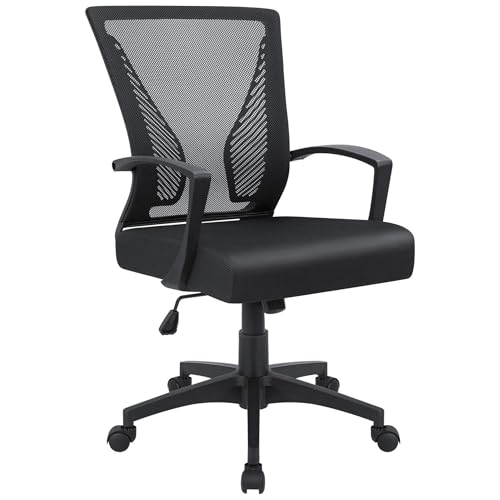
Furmax Office Chair — Best Budget
The Furmax is the budget reality check of this guide: a simple mid-back mesh chair whose listing confirms lumbar support, adjustable height, a breathable backrest, and 360-degree swivel with armrests. It does not offer adjustable lumbar positioning or multi-direction arms, and this review will not dress it up as an ergonomic flagship. What it offers is the cheapest honest route to the two things that matter most at this tier — a backrest shaped with lumbar support and a seat height you can set correctly.
For a first home-office chair, a spare-room desk, or a student setup, that may be exactly the right spend. The limits show up over long days: a mid-back design gives no headrest support, fixed armrests will not fit every desk height, and the listing does not state a weight capacity. If you sit six-plus hours daily, the SIHOO or Marsail will serve you better; if you sit two or three, the Furmax covers the fundamentals and leaves budget for a good desk setup, which matters just as much.
The Furmax also deserves a word about assembly and ownership: chairs at this tier typically go together in well under half an hour with the included tool, and their simplicity is a feature for renters and students who will move them repeatedly. Casters on hard floors can wander; a small rug or mat under the chair is a cheap fix that also protects flooring. Judge the Furmax as honest basic transportation for your workday — it will not pamper you, but set up correctly it will not punish you either, and at its tier that is a fair trade.
Strengths
- Lowest-cost route here to stated lumbar support
- Breathable mesh mid-back suits warm rooms
- Simple assembly and a compact footprint
Trade-offs
- Lumbar support is not adjustable
- No headrest and fixed armrests
- Weight capacity not stated in the listing title
| Spec | Detail (from the listing title) |
|---|---|
| Lumbar support | Yes (per listing title) |
| Backrest | Mid-back mesh, breathable |
| Height | Adjustable |
| Swivel | 360° |
| Weight capacity | Not stated |
Best for: budget buyers and shorter daily sitting time / Not suited for: full-time desk workers needing deep adjustability
Check the current price on Amazon
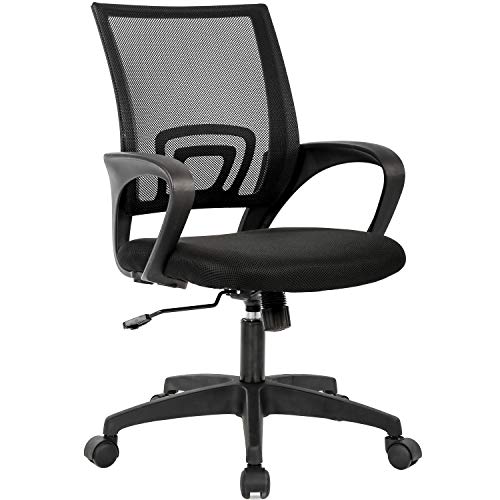
BestOffice Ergonomic Office Chair — Best Simple Starter
BestOffice’s chair is the other honest budget option, differing from the Furmax mainly in feel: its listing calls out a sponge seat, so the sitting surface is a cushioned pad rather than a tensioned mesh seat. Some backs genuinely prefer that — a padded seat spreads pressure differently and feels warmer and softer in a cool room. The listing confirms lumbar support, adjustable height, a breathable backrest, and rolling wheels, which covers the starter checklist without any inflated claims.
Keep expectations aligned with the tier. There is no adjustable lumbar mechanism, no headrest, and no stated weight capacity in the title. The value case is a simple one: for a home office that hosts a few hours of seated work a day, correct seat height plus a lumbar-shaped backrest plus a cushioned seat is a sensible, inexpensive combination. If your workday is long or your back is already temperamental, treat this as a stepping stone and budget for one of the adjustable-lumbar chairs above.
One more consideration separates the two budget picks: room temperature and clothing. A sponge seat feels warmer and can be the cosier choice in a cold spare room, while mesh seats and backs — the Furmax’s route — stay neutral in a hot one. Neither is a back-health factor, but comfort you notice is comfort that keeps you sitting properly instead of shifting and perching. If your home office doubles as a guest room, the BestOffice’s plain black mid-back profile is also the easiest to make disappear when visitors arrive.
Strengths
- Cushioned sponge seat for buyers who dislike mesh seats
- Lumbar support and adjustable height confirmed in the listing
- Uncomplicated, widely available design
Trade-offs
- Lumbar support position is fixed
- No headrest; mid-back height only
- Weight capacity not stated in the listing title
| Spec | Detail (from the listing title) |
|---|---|
| Lumbar support | Yes (per listing title) |
| Seat | Sponge seat (per listing title) |
| Backrest | Mid-back, breathable |
| Height | Adjustable |
| Weight capacity | Not stated |
Best for: starter home offices and buyers who prefer a padded seat / Not suited for: long daily sitting or anyone needing adjustable lumbar placement
Check the current price on Amazon

TRALT Office Chair — Best for Home Office Comfort
The TRALT splits the difference between the budget pair and the top picks: its listing confirms adjustable lumbar support and a mesh back in an executive-styled frame aimed at home offices. Adjustable lumbar at this tier is the meaningful upgrade — it is the feature that lets the chair adapt as your posture preferences change over a week, rather than locking you into one factory-set curve.
The listing is thinner on other specifics: no stated weight capacity and no headrest claim in the title, so this review describes only what is confirmed. In practice this is a chair for the reader who has outgrown a basic task chair, wants the lumbar adjustment that actually matters for lower back comfort, and does not need the SIHOO’s full armrest and headrest package. Set the lumbar pad so it meets the small of your back when you sit fully back in the seat — that single adjustment, done properly, is worth more than any marketing word on the box.
The TRALT’s executive styling cuts both ways, and it is worth naming: it looks more like furniture and less like equipment, which suits living-room offices, but the category’s buyers should confirm armrest and tilt specifics on the product page, since the verified title concentrates on the lumbar and mesh story. What is confirmed is the part that matters for this search. If your shortlist is ‘adjustable lumbar, mesh back, home-office looks’, the TRALT is the cleanest match; if you want every secondary spec in writing before purchase, the SIHOO’s fuller title wins.
Strengths
- Adjustable lumbar support confirmed in the listing
- Breathable mesh back for long sessions
- Executive styling suits visible home offices
Trade-offs
- Weight capacity not stated in the listing title
- Headrest not confirmed in the listing
- Fewer confirmed extras than the top two picks
| Spec | Detail (from the listing title) |
|---|---|
| Lumbar support | Adjustable (per listing title) |
| Backrest | Mesh |
| Style | Executive / home office |
| Weight capacity | Not stated |
| Headrest | Not stated |
Best for: home office users upgrading from a basic chair who want adjustable lumbar / Not suited for: shoppers who need every spec confirmed before purchase
Check the current price on Amazon
Comparison Table
| Pick | Badge | Key spec | Best for |
|---|---|---|---|
| SIHOO M18 Ergonomic Office Chair | Best Overall | Adjustable lumbar support; holds 330 lbs per listing title | desk workers who will spend time dialling in the fit and want adjustable lumbar support |
| HON Ignition 2.0 Ergonomic Office Chair | Best Proven Office Standard | Lumbar support with adjustable arms, per listing title | buyers who trust established office brands and work long seated days |
| Marsail Ergonomic Office Chair | Best High-Back Mesh | High-back mesh; adjustable lumbar; 3D armrests | taller desk workers who want headrest support and adjustable lumbar |
| Furmax Office Chair | Best Budget | Lumbar support; adjustable height; breathable mesh mid-back | budget buyers and shorter daily sitting time |
| BestOffice Ergonomic Office Chair | Best Simple Starter | Lumbar support; sponge seat; adjustable height | starter home offices and buyers who prefer a padded seat |
| TRALT Office Chair | Best for Home Office Comfort | Adjustable lumbar support; mesh back | home office users upgrading from a basic chair who want adjustable lumbar |
Key Takeaways
- A chair supports comfortable posture; it does not treat back pain — persistent pain needs a clinician, not a checkout.
- Adjustable lumbar support is the single most valuable feature for this search.
- Correct seat height and sitting fully back matter as much as the chair itself.
- Where a listing does not state a capacity, this guide says so instead of guessing.
- Movement breaks beat any chair: stand and walk briefly every half hour or so.
How to Choose a Chair for Lower Back Comfort
Start with the lumbar element, because it is the feature this purchase is actually about. Listings use similar words for very different hardware: a fixed lumbar bulge is moulded into the backrest and cannot move; an adjustable lumbar support can be repositioned or firmed up; and a separate lumbar pillow is an accessory strapped on afterwards. For lower back comfort, adjustable beats fixed, because backs differ. When you read any listing, look for the word ‘adjustable’ attached to the lumbar support itself — that is the wording used by the stronger picks in this guide.
Next, match the chair to your desk and your body. Your feet should rest flat on the floor with knees at roughly a right angle, which means seat height range matters more than seat styling. Sit depth matters too: you should be able to sit fully back against the backrest with a small gap behind your knees. A seat that is too deep pulls you forward into a slouch that no lumbar pad can rescue. Armrests should let your shoulders hang relaxed; arms that are too high shrug your shoulders all day, and the tension lands in your back.
- Prioritise adjustable lumbar support over styling or extra padding
- Check seat height range against your desk height before ordering
- Confirm weight capacity from the listing — if it is not stated, treat that as a question to answer, not a detail to assume
- Mesh backs breathe; padded seats feel softer — choose by your room and preference
- A headrest helps taller sitters and reclined breaks, but it is secondary to lumbar fit
Setting Up Your Chair: The Adjustments That Matter Most
Work in a fixed order. First, seat height: sit down, feet flat, and raise or lower the seat until your knees sit at about ninety degrees and your thighs are roughly level. Second, sit fully back so your lower back touches the backrest, then position the lumbar support into the natural curve above your beltline — it should feel like gentle support filling a gap, not a fist pushing you forward. Third, set armrests so your elbows rest lightly with shoulders down. Fourth, raise your screen so its top is near eye level; a perfect chair cannot compensate for a laptop on a low table pulling your whole torso forward.
Then live with the setup for two or three days before judging it. A correctly adjusted chair often feels strangely upright for the first day if you are used to slouching. Small daily tweaks — lumbar a notch firmer, seat one notch lower — are normal. What is not normal is new or worsening pain: if sitting in any chair aggravates symptoms, that is information for a clinician, not a cue to buy a more expensive chair.
Comfort Habits That Matter More Than Any Chair
No chair, at any price, makes eight motionless hours healthy. The strongest comfort habit is embarrassingly simple: change position often. Stand up, walk to get water, and reset your posture roughly every half hour. Alternate between sitting upright for focused work and a slight recline for reading or calls if your chair’s tilt allows it. A short walk at lunch does more for afternoon comfort than any single chair feature in this guide.
Treat the chair as one part of a workstation system. A footrest can help shorter sitters keep feet supported when the desk height forces a higher seat. A monitor riser or a stack of books under a laptop screen fixes the forward-head posture that loads the back. These are cheap, unglamorous fixes, and combined with a sensibly chosen chair they cover nearly everything a shopper can honestly control. The rest — diagnosis, treatment, exercise prescription — belongs to professionals, and this guide deliberately stays out of it.
Budget Tiers: What Each Level Honestly Buys
At the budget tier — the Furmax and BestOffice end of this guide — your money buys the fundamentals: a lumbar-shaped backrest, adjustable seat height, and a chair that assembles without drama. What it does not buy is adjustability of the lumbar support itself, armrest tuning, or a headrest. Those chairs are rational for shorter sitting days and first setups, and irrational for anyone already managing an unhappy back through long ones.
The mid tier — TRALT, Marsail, and the SIHOO M18 — is where the money turns into fit: adjustable lumbar support, better armrests, headrests, tilt control. For this search, that is the tier where spending stops being about comfort adjectives and starts being about whether the chair can be made to match your body. Above that sit the contract-grade names like HON, where the premium buys build horizon and serviceability more than extra features. None of these tiers buys treatment for a back condition, at any price — the tiers buy fit, durability, and adjustability, and the guide prices its recommendations accordingly.
Reading Chair Listings Like an Ergonomist
Three phrases in chair listings deserve a buyer’s scepticism. ‘Ergonomic design’ without named adjustments usually means a curved backrest and nothing you can change. ‘Lumbar support’ can mean anything from a moulded bump to a sprung, position-adjustable pad — the word ‘adjustable’ beside it is the dividing line, and it is the word this guide screened for. ‘Designed for back pain’ is marketing, not a specification, and any listing leaning on medical language should be read more suspiciously, not less.
The trustworthy signals are boring ones: a stated weight capacity, named adjustment types, a backrest height you can compare against your own torso, and a seat depth figure. When a listing gives you those, you can reason about fit before the box arrives. When it gives you lifestyle photos and adjectives, you are being asked to gamble — and with a temperamental back, gambling on the object you sit in for a third of your life is a poor bet.
- “Adjustable lumbar” is a mechanism; “lumbar support” alone may be a moulded shape
- Stated capacities and dimensions are the signs of a serious listing
- Medical-sounding claims in a title are a reason for caution, not confidence
- Fit can be reasoned about in advance: seat height, seat depth, backrest height
Who Each Chair in This Guide Is Really For
It helps to translate the six picks into people. The full-time remote worker with a temperamental back and a proper desk: the SIHOO M18, because its adjustments will be used daily and its stated capacity removes a worry. The professional furnishing a home office that clients see: the HON Ignition 2.0, whose contract pedigree reads as seriousness. The tall reader who thinks in a lean-back posture: the Marsail, the only pick whose backrest truly reaches the head. The renter, student, or spare-room furnisher: the Furmax or BestOffice, chosen by whether mesh or cushion feels better, with a clear-eyed plan to upgrade if sitting hours grow. The improver stepping up from a dining chair: the TRALT, which delivers the one upgrade that matters — adjustable lumbar — without flagship pricing or flagship complexity.
Notice what that mapping does not contain: a chair ‘for’ a diagnosis. Two people with the same back complaint can need different chairs, because bodies, desks, and habits differ; two people with no complaint at all can both benefit from the same adjustable chair. Shop for your body, your desk, and your hours — those are knowable — and let clinicians handle the unknowable medical layer. That division of labour is not a disclaimer pasted onto this guide; it is the guide’s method, and it is why the recommendations can be stated confidently inside it.
Finally, think in years. A chair used eight hours a day accumulates over two thousand sitting hours a year; small fit errors compound across that arithmetic, and small fit victories do too. The most expensive chair in this guide costs a fraction of what two thousand uncomfortable hours are worth to most people, and the cheapest costs less than a single month of most desk workers’ coffee. Buy the fit your hours justify, set it up like it matters, and revisit it as your body and your work change.
A Word on Chairs, Movement, and Realistic Expectations
It is worth ending the analysis where honest ergonomics always ends: the chair is the junior partner in your back’s daily life. Sleep quality, general activity, how often you move during the day, and how your workstation is arranged all sit above any single product in their effect on how your back feels at 6 p.m. That is not a reason to buy a careless chair — a bad chair can make a long day measurably worse — but it is a reason to hold this purchase in proportion. Buy a chair that fits, adjust it properly, and then spend your remaining attention on the habits that surround it.
Set a simple review rhythm for yourself: once a month, sit down at your desk and run the setup checklist again — feet flat, back fully supported, lumbar meeting your curve, shoulders down, screen at eye level. Bodies drift, chairs drift, and desks accumulate clutter that pushes equipment out of position. Two minutes of monthly maintenance protects the entire investment, including the hours you spent choosing. And if your back’s story changes — new symptoms, new persistence, new anything — let the next purchase be a consultation, not a chair. This guide will still be here when you get back.
Warranty, Returns, and the Thirty-Day Rule
Ergonomic chairs are unusually return-sensitive purchases, because fit cannot be fully judged from a listing — this guide’s insistence on stated specs narrows the risk but cannot eliminate it. Before ordering, read the seller’s return terms as carefully as the chair’s: who pays return shipping on a bulky item, and how long is the trial window in practice? A chair you can return in thirty days is a different purchase from one you cannot, even at the same price.
If a trial window exists, use it properly: assemble the chair fully, set it up with the fifteen-minute routine in this guide, and work in it for at least a week before deciding. Chairs returned after a day’s half-hearted setup teach you nothing except that unadjusted chairs are uncomfortable, which was never in doubt. Judge at day ten, adjust once more, and only then decide — that discipline converts a return policy from a marketing line into a genuine fit guarantee.
How to Set Up a New Desk Chair in Fifteen Minutes
A new chair delivers most of its value in the first setup session. Unbox it somewhere with floor space, keep the instructions, and resist the urge to sit down and start working immediately — fifteen deliberate minutes now will decide whether the chair helps or quietly annoys you for years.
- Assemble the chair fully and tighten every bolt; re-check the bolts after the first week of use.
- Set seat height so your feet rest flat on the floor and your knees sit at roughly a right angle.
- Sit fully back in the seat so your hips touch the backrest — do not perch on the front edge.
- Position the lumbar support into the curve of your lower back, just above belt height; adjust firmness until it feels like support, not pressure.
- Set armrest height so elbows rest lightly with shoulders relaxed and down.
- Set tilt tension so you can lean back with gentle resistance rather than flopping or fighting the chair.
- Raise your screen to near eye level and place keyboard and mouse so elbows stay close to your body.
- Work for a day, then fine-tune one adjustment at a time so you know what changed.
Keep the hex key that came in the box somewhere findable. Chairs loosen, preferences change with seasons and clothing, and the difference between a chair that supports you and one that merely holds you is usually two minutes of adjustment you will only make if the tool is at hand.
Revisit the setup after your first full week, not just the first day. By then the chair has settled, bolts may have relaxed a fraction, and your body has given you real feedback about which adjustment is still wrong. Change one thing, work a day, and repeat — that slow loop is how a good chair becomes your chair.
Common Buying Mistakes
Buying a chair to treat pain. A chair can support comfortable posture; it cannot diagnose or treat a back condition. Persistent, worsening, or radiating pain needs professional assessment, and delaying that to shop for furniture helps no one.
Choosing fixed lumbar support and calling it adjustable. The words matter. A moulded bulge cannot be repositioned; if your curve does not match it, the chair will never fit. Look for lumbar support the listing explicitly describes as adjustable.
Ignoring seat depth. A seat too deep for your legs keeps your back away from the backrest, so the lumbar support never touches you. Sit fully back and check the gap behind your knees.
Assuming an unstated capacity. Several listings in this very guide do not state a weight capacity. Guessing risks a broken chair; verify the figure on the product page or choose a pick whose capacity is stated, like the SIHOO M18.
Setting the chair once and never again. Bolts loosen and bodies change. Re-check fit monthly, and stand and move regularly — no adjustment replaces movement.
Judging in the first ten minutes. A correctly supportive chair can feel unfamiliar at first. Give a proper setup two or three working days before deciding, unless it causes genuine pain — in which case stop and reassess.
Final Recommendation
For most readers, the SIHOO M18 is the recommendation: it is the only pick here whose listing confirms adjustable lumbar support, a headrest, 2D armrests, and a stated 330 lb capacity in one package. Taller sitters and fans of high-back mesh should look at the Marsail, while the HON Ignition 2.0 suits buyers who prefer an established office brand. On a budget, the Furmax and BestOffice cover the fundamentals honestly, and the TRALT is the step-up for home offices that want adjustable lumbar without the full flagship package.
Whichever you choose, set it up properly, keep moving through the day, and keep the boundary clear in your mind: these chairs support comfortable sitting. They are not treatments, and a back that keeps hurting deserves a clinician’s attention, not another parcel.
One last piece of honest framing: if you read this whole guide and your main takeaway is that your current chair is fine but your habits are not, believe it. Breaks, screen height, and sitting fully back cost nothing, and they compound with whichever chair you choose — including the one already in your room.
Related guides on this site: Best Chairs For Back And Neck; Best Chairs For 8 Hours; Best Chairs Chronic Pain; Best Office Chairs For Sciatica And Lower Back Pains; Best Chairs For College Students; Best Chairs For Good Posture Inexpensive.
Frequently Asked Questions
Can a chair fix my lower back pain?
No. A well-fitted chair can support a more comfortable, neutral sitting posture, but it does not treat any medical condition. If your pain persists, worsens, or comes with numbness or weakness, see a clinician rather than shopping for another chair.
What is the most important feature for lower back comfort?
Adjustable lumbar support, because it can be positioned to meet your own back. After that, correct seat height and a seat depth that lets you sit fully back against the backrest matter most.
Is mesh or a padded seat better for my back?
Neither is automatically better. Mesh breathes and feels firmer; a padded sponge seat feels softer. The lumbar fit and your setup decide comfort far more than the seat material does.
How long should I sit before taking a break?
Change position regularly — standing and walking briefly about every half hour is a sensible rhythm for most desk workers. No chair makes unbroken sitting a good idea.
The listing does not state a weight capacity. What should I do?
Treat it as unconfirmed. Check the full product page or the manufacturer, or choose a chair whose capacity is stated in its listing, such as the SIHOO M18 at 330 lbs.
Do I need a headrest?
It is a secondary comfort feature. Taller sitters and people who recline to read or take calls tend to value it; for upright task work, lumbar fit and seat height matter far more.


