Disclosure: airfryerkitchensupply.com is reader-supported. When you buy through links on our site, we may earn an affiliate commission at no extra cost to you.
Where to buy
Every pick in this guide to the best orthopedic desk chairs was confirmed against Amazon listing data before it earned a link. Prices change constantly, so we never print a fixed price here — use the links below to check the current price on Amazon for the exact size and colour you want, and confirm the listing still matches the product described before you order.
- SIHOO M18 Ergonomic Office Chair — Best Overall. Check the current price on Amazon.
- HON Ignition 2.0 Ergonomic Office Chair — Best Mainstream Brand. Check the current price on Amazon.
- Mimoglad Ergonomic Office Chair with Footrest — Best for Posture Variety. Check the current price on Amazon.
- TRALT Office Chair with Adjustable Lumbar Support — Best Mid-Tier Home Office. Check the current price on Amazon.
- Furmax Office Chair (Mesh, Lumbar Support) — Best Budget. Check the current price on Amazon.
- Sweetcrispy Ergonomic Computer Desk Chair — Best Compact. Check the current price on Amazon.
People search for the best orthopedic desk chairs because they sit for a living and want a chair that supports them properly through the working day. This guide uses the word the way buyers mean it — a desk chair with serious ergonomic support: real lumbar adjustment, a seat shaped for long sessions, arms that adjust, and a build that holds its settings — and it is honest about the boundary: a chair is furniture, not a medical device. The six picks below were each confirmed against live Amazon listing data before earning a link, and none of them is presented as treating, fixing or preventing anything. What a good chair can do is make long sitting more comfortable and better supported; that is the standard this guide judges by.
That framing matters because this category’s marketing often implies more. Listings in the wider market attach clinical-sounding language to ordinary chairs, and buyers deserve a plainer account: the features that genuinely change a sitting day are adjustability (lumbar, seat height, arms, tilt), fit (the chair must match your body’s dimensions), and materials that stay comfortable at hour six, not just minute six. This guide evaluates those, in comfort and ergonomics terms, and leaves health questions where they belong — with health professionals.
The six picks span the real decision space: an established ergonomic mesh chair with adjustable lumbar support and a headrest, a mainstream corporate-grade ergonomic chair from a major office furniture maker, a feature-rich mesh chair with a footrest for people who vary their posture, a home-office ergonomic chair with a headrest at a mid tier, an enduring budget mesh chair that has sold for years, and a compact ergonomic mesh chair for smaller rooms and smaller budgets. We never print prices or ratings; check the current price on Amazon in the configuration you need.
Key Takeaways
- Adjustability is the product: lumbar support you can position, arms that move, and tilt you can tune matter more than any label on the box.
- Fit beats features — a chair must match your height and leg length, or its adjustments will never land where your body needs them.
- Mesh backs breathe through long days; padded leather-style seats feel plush at first and warmer by afternoon. Choose for your climate and hours.
- Weight capacity stated in a listing is a real specification — respect it, and leave margin rather than sitting at the limit.
- A chair supports comfortable sitting; it does not treat medical conditions. Persistent pain is a question for a professional, not a product page — and the most ergonomic purchase of all is the twenty minutes spent setting the chair up properly, at your real desk, in your working shoes, before the first full day in it.
In this guide
Quick Picks
Best Overall — SIHOO M18 Ergonomic Office Chair: a mesh-back ergonomic chair with adjustable lumbar support, a headrest, 2D armrests and a stated 330 lb capacity — the complete adjustment package at its tier.
Best Mainstream Brand — HON Ignition 2.0 Ergonomic Office Chair: an ergonomic desk chair with lumbar support and adjustable arms from one of the biggest names in office furniture — the corporate-grade safe buy.
Best for Posture Variety — Mimoglad Ergonomic Office Chair with Footrest: a mesh desk chair with 3-way adjustable lumbar support, a reclining high back, 3D headrest and armrests, and a footrest — built for people who change position all day.
Best Mid-Tier Home Office — TRALT Office Chair with Adjustable Lumbar Support: an ergonomic mesh desk chair with adjustable lumbar support, positioned for home office comfort at a mid tier.
Best Budget — Furmax Office Chair (Mesh, Lumbar Support): the long-running value mesh chair — ergonomic shaping, lumbar support, adjustable height and a breathable mid-back — the sensible first desk chair.
Best Compact — Sweetcrispy Ergonomic Computer Desk Chair: a mid-back mesh chair with lumbar support, rolling swivel and flip-up arms — the space-saving ergonomic pick for bedrooms and small home offices.
How These Picks Were Chosen
We filtered the verified chair listings to complete desk chairs — excluding chair mats, seat cushions, replacement parts and dining chairs that crowd this search space — and required an ergonomic specification stated in the listing: adjustable lumbar support or an explicitly ergonomic design, height adjustment, and a build intended for desk work over long sessions. Chairs whose listings leaned on clinical promises rather than construction were passed over in favour of chairs that state their mechanisms plainly.
The final six were spread deliberately across tiers and makers: two established ergonomic names (SIHOO and HON), one feature-led modern mesh chair, one mid-tier home-office design, and two of the category’s long-running value designs. Where a listing states a weight capacity — 330 pounds appears in two of these titles — we report it as a specification to respect, not a challenge. Badges describe the sitter each chair suits best. Every judgement about comfort in the reviews is framed as exactly that: comfort during long sitting, which is what a chair can honestly offer.
The 6 Best Orthopedic Desk Chairs

SIHOO M18 Ergonomic Office Chair — Best Overall
The verified listing describes an ergonomic office chair with a mesh back, a headrest, adjustable lumbar support, a stated 330 lb capacity, 2D armrests and a wide cushion (the title in our records is truncated at that point). That specification is the checklist most desk workers actually need: the lumbar support moves to meet your back rather than hoping your back meets it, the headrest supports reclined thinking and calls, and the arms adjust in two planes to sit under your elbows rather than in their way.
Strengths
- Adjustable lumbar support — the core ergonomic feature, done properly
- Headrest included for reclined work and breaks
- Stated 330 lb capacity gives most sitters real margin
Trade-offs
- Mesh back feel is firmer than padded upholstery — a preference, not a flaw
- Assembly and adjustment take an unhurried half hour to get right
- Wide cushion suits average and larger frames better than petite ones
| Detail (from the verified listing title) | Value |
|---|---|
| Back (per listing title) | Mesh |
| Lumbar (per listing title) | Adjustable lumbar support |
| Capacity (per listing title) | 330 lbs |
| Extras (per listing title) | Headrest, 2D armrests, wide cushion |
The M18’s case is completeness. Many chairs at its tier offer one headline adjustment and padding elsewhere; this one adjusts where long sitting is actually decided — the lumbar zone, the arms, the head — and states a capacity that tells you the frame is built with margin. The mesh back keeps air moving through summer afternoons and long calls, and it will not sag the way foam backs do in year three. Set it up patiently: seat height so feet rest flat, lumbar support positioned into the small of your back, arms at elbow height with shoulders relaxed. A chair with this many adjustments rewards the twenty minutes spent dialling them in, and quietly penalises the buyer who never bothers.
Best for: full-time desk workers wanting a complete adjustment set / Not suited for: sitters who prefer deep padded upholstery
Check on Amazon — check the current price on Amazon before you buy.

HON Ignition 2.0 Ergonomic Office Chair — Best Mainstream Brand
The verified listing describes an ergonomic office chair with lumbar support, in black, with adjustable arms, positioned as an ergonomic office desk chair (the title in our records is truncated). HON is a mainstream contract-furniture maker — the kind whose chairs fill actual offices — and the Ignition line is its mainstream ergonomic range, which makes this pick the conservative choice in the guide: a chair designed for procurement departments as much as for individuals.
Strengths
- Mainstream office-furniture maker with a service network behind it
- Lumbar support and adjustable arms cover the ergonomic essentials
- Understated black design suits any office or home
Trade-offs
- Specification is essentials-first — fewer extras than feature-led rivals
- Corporate styling will not excite design-led buyers
- Headrest is not part of this listing’s stated package
| Detail (from the verified listing title) | Value |
|---|---|
| Brand | HON |
| Lumbar (per listing title) | Lumbar support |
| Arms (per listing title) | Adjustable arms |
| Colour in listing | Black |
There is a particular comfort in buying the chair that facilities managers buy by the hundred: the design has been sat in, at scale, for years, and its failure modes are known and boring. The Ignition 2.0’s ergonomic brief is the honest core — lumbar support, adjustable arms, proper task-chair geometry — without the gaming-chair theatre or the feature-list inflation of lesser-known brands. For a home worker who wants to buy once, sit for years and never think about the chair again, that restraint is the feature. It is also the pick least likely to clash with a room, a desk or a video-call background, which in the home-office era is a genuine practical virtue.
Best for: buy-once home workers and anyone furnishing a serious home office / Not suited for: buyers wanting maximum extras per pound spent
Check on Amazon — check the current price on Amazon before you buy.

Mimoglad Ergonomic Office Chair with Footrest — Best for Posture Variety
The verified listing describes an ergonomic office chair with a footrest, a mesh desk chair build, 3-way adjustable lumbar support, a reclining high back, and 3D headrest and armrests, with a stated figure in the title that is truncated in our records — so we do not quote its capacity. The design philosophy is movement: deep recline, a footrest for legs-up thinking, and adjustments in more planes than most chairs offer, for sitters who work in several postures between nine and five.
Strengths
- 3-way adjustable lumbar support — finer positioning than most
- Footrest and deep recline support genuine posture variety
- 3D headrest and armrests complete the adjustment set
Trade-offs
- Feature-rich chairs have more to adjust — and more to set wrong
- Footrest format needs floor space when extended
- Recline-led design suits varied work better than fixed upright tasks
| Detail (from the verified listing title) | Value |
|---|---|
| Lumbar (per listing title) | 3-way adjustable lumbar support |
| Back (per listing title) | Reclining high back, mesh |
| Extras (per listing title) | Footrest, 3D headrest and armrests |
| Capacity | Not quoted — listing title truncated in our records |
Ergonomics guidance has quietly shifted from find one perfect posture to change posture often, and this chair is built for the second philosophy. The footrest is not a gimmick for napping — used for twenty minutes of reading or a call, it changes the load on your back and legs completely, and the 3-way lumbar adjustment lets the support follow you between upright typing and reclined thinking. The honest cost is complexity: with this many moving parts, the first week involves experimentation, and sitters who want to unbox, sit and forget should take the HON instead. For restless sitters — the ones who perch, lean, swivel and stretch — this is the guide’s most sympathetic design.
Best for: restless sitters and varied, creative working days / Not suited for: set-and-forget buyers or very small rooms
Check on Amazon — check the current price on Amazon before you buy.

TRALT Office Chair with Adjustable Lumbar Support — Best Mid-Tier Home Office
The verified listing describes an office chair as an ergonomic desk chair with adjustable lumbar support, a mesh computer chair build, and executive positioning for home office comfort (the title in our records is truncated). TRALT’s pitch is the mainstream home-office brief executed plainly: mesh breathability and a lumbar support that adjusts, without the premium brand tax or the gaming aesthetic.
Strengths
- Adjustable lumbar support — the core feature, present and stated
- Mesh build breathes through long home-working days
- Executive styling without gaming-chair looks
Trade-offs
- Lesser-known brand than the HON or SIHOO names here
- Mid-tier arms offer less adjustment than 2D/3D sets
- Title truncation means the remaining specs must be confirmed on the listing
| Detail (from the verified listing title) | Value |
|---|---|
| Lumbar (per listing title) | Adjustable lumbar support |
| Back (per listing title) | Mesh |
| Positioning (per listing title) | Home office comfort |
| Note | Full spec to confirm on listing — title truncated in our records |
Most home offices do not need the best chair in a guide; they need a good chair with the feature people most regret omitting — adjustable lumbar support — at a price that leaves budget for the desk and the monitor arm. That is this pick’s honest territory. The mesh construction suits the reality of home working, where the chair is used across seasons in rooms without office air conditioning, and the executive styling keeps it presentable on camera. Confirm the full specification on the listing before ordering, since our record of its title is truncated; what the title does confirm — ergonomic design, adjustable lumbar, mesh — is the core of the brief, and it is all there.
Best for: home workers wanting the key features without the brand premium / Not suited for: buyers who want a long-established brand name
Check on Amazon — check the current price on Amazon before you buy.
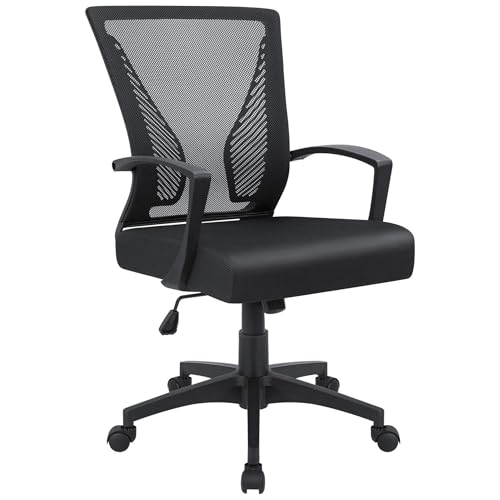
Furmax Office Chair (Mesh, Lumbar Support) — Best Budget
The verified listing describes an office chair as an ergonomic computer desk mesh chair with lumbar support, in black, with adjustable height, a breathable backrest, a mid-back design and 360-degree swivel with armrests (the title in our records is truncated). The Furmax chair has been the budget desk-chair answer for years, and its specification explains why: it covers the ergonomic essentials — lumbar shaping, breathable mesh, height adjustment — at the tier where most first home offices are actually furnished.
Strengths
- The value benchmark — ergonomic essentials at a budget tier
- Breathable mesh mid-back suits warm rooms
- Adjustable height and swivel cover the basics properly
Trade-offs
- Mid-back design — no headrest support
- Padding and mechanisms are built to a price
- Lumbar support is shaped rather than finely adjustable
| Detail (from the verified listing title) | Value |
|---|---|
| Back (per listing title) | Mesh, mid-back, breathable |
| Lumbar (per listing title) | Lumbar support |
| Adjustment (per listing title) | Adjustable height, 360 swivel |
| Colour in listing | Black |
Budget chairs should be judged against the alternative at their tier, which is usually a dining chair or a foam brick with casters. Against that field, the Furmax’s shaped lumbar support and breathable mesh are real ergonomic content, and its years on the market mean its assembly quirks and durability are thoroughly documented by owner experience. Its limits are equally real: the mid-back ends where a headrest would begin, the seat padding is honest rather than luxurious, and heavy daily use over many years is beyond its brief. As a first desk chair, a spare-room chair or a student chair, it remains the pick that respects a small budget without insulting the sitter.
Best for: first home offices, students and spare rooms / Not suited for: full-time heavy use over many years
Check on Amazon — check the current price on Amazon before you buy.

Sweetcrispy Ergonomic Computer Desk Chair — Best Compact
The verified listing describes an ergonomic computer desk chair as a mesh office chair with comfortable lumbar support, a mid-back design, rolling swivel, and flip-up arms, positioned for home office and bedroom use. The flip-up arms are the detail that earns this pick its place: in small rooms, arms that fold away let the chair tuck fully under the desk, which is the difference between a chair that lives in the room and a chair that owns it.
Strengths
- Flip-up arms let the chair tuck under the desk — a small-room superpower
- Mesh mid-back with lumbar support covers the ergonomic core
- Compact footprint suits bedroom offices
Trade-offs
- Mid-back, compact format suits smaller frames best
- Flip-up arms trade adjustment range for space-saving
- Lesser-known brand at a value tier
| Detail (from the verified listing title) | Value |
|---|---|
| Back (per listing title) | Mesh, mid-back |
| Lumbar (per listing title) | Lumbar support |
| Arms (per listing title) | Flip-up arms |
| Positioning (per listing title) | Home office and bedroom |
Small-room ergonomics is a real discipline and this chair respects it. The ergonomic core is present — lumbar support, breathable mesh, swivel and rolling base — but every dimension is chosen for rooms where the desk is in a bedroom corner and floor space is negotiated daily. The flip-up arms deserve emphasis because they solve two problems at once: support while working, clearance while stored, and they also help sitters who prefer to sit cross-legged or sideways for part of the day, a real habit that fixed arms punish. Larger-framed or very tall sitters should take the bigger chairs in this guide; for the compact brief, this is the honest answer.
Best for: small rooms, bedroom offices and tuck-away storage / Not suited for: tall or large-framed sitters needing a bigger chair
Check on Amazon — check the current price on Amazon before you buy.
Comparison Table
| Pick | Badge | Key spec | Best for |
|---|---|---|---|
| SIHOO M18 Ergonomic Office Chair | Best Overall | Mesh, adjustable lumbar, 330 lb capacity | full-time desk workers wanting a complete adjustment set |
| HON Ignition 2.0 Ergonomic Office Chair | Best Mainstream Brand | HON ergonomic, lumbar support, adjustable arms | buy-once home workers and anyone furnishing a serious home office |
| Mimoglad Ergonomic Office Chair with Footrest | Best for Posture Variety | Mesh, 3-way lumbar, footrest, reclining | restless sitters and varied, creative working days |
| TRALT Office Chair with Adjustable Lumbar Support | Best Mid-Tier Home Office | Mesh ergonomic, adjustable lumbar, headrest | home workers wanting the key features without the brand premium |
| Furmax Office Chair (Mesh, Lumbar Support) | Best Budget | Budget mesh, lumbar support, mid-back | first home offices, students and spare rooms |
| Sweetcrispy Ergonomic Computer Desk Chair | Best Compact | Compact mesh, flip-up arms, lumbar support | small rooms, bedroom offices and tuck-away storage |
How to Choose an Ergonomic Desk Chair
Start with fit, because no adjustment rescues a chair built for a different body. Three dimensions decide it. Seat height must let your feet rest flat with knees at roughly a right angle — check the chair’s height range against your leg length and desk height. Seat depth must support your thighs without the front edge pressing behind your knees; a hand’s width of clearance is the working rule. And the lumbar support must be able to reach the small of your back, which is why adjustable lumbar — present in most picks here — matters more than a fixed curve shaped for an average back that may not be yours.
Then audit the adjustments as a set, in the order you will actually use them: height daily, tilt tension as your weight and mood change, arm height and width to keep shoulders relaxed while typing, lumbar position once and then seasonally. A chair whose adjustments you cannot reach from the seat will not be adjusted; check that the controls are seated-reachable in the listing’s description. Head support is the optional layer — valuable for reclined reading and calls, irrelevant for upright-only workers — which is why this guide includes chairs with and without it rather than pretending it is mandatory.
Mesh, padded and leather-style seats
Mesh backs are the home-office default for a reason: they breathe, they hold their shape for years, and they suit rooms without climate control. Their feel is firmer and more hammock-like, which some sitters love and others never warm to. Padded upholstered chairs feel plush immediately and warmer by hour three; quality foam holds up, cheap foam packs into a board within a year. Leather-style executive chairs add presence on camera and easy cleaning, at the cost of heat and, usually, less precise ergonomics at the same tier. There is no hierarchy — there is your climate, your hours and your honest preference, in that order.
Capacity and build honesty
Where a listing states a weight capacity, treat it as engineering information: it reflects the tested design load of the base, cylinder and frame, and sitting permanently at the limit shortens a chair’s life even when it holds. Choose with margin. Where a listing does not state a capacity in the portion of its title we could verify — as with one pick here — check the full listing before ordering rather than assuming. The same honesty applies to your desk setup: a great chair under a wrong-height desk is a compromise no lumbar support can fix, so measure the desk as part of the same purchase decision.
Setting Up Your Chair: The Twenty Minutes That Decide the Year
An adjustable chair adjusted wrong is an ordinary chair with extra levers. Work through the setup in order, seated, in your working shoes. First, height: feet flat, knees level with or fractionally below hips. Second, seat depth if it adjusts: thighs supported, clearance behind the knees. Third, lumbar: raise or position the support until it fills the small of your back without pushing you forward — you should feel contact, not pressure. Fourth, arms: set them so elbows rest with shoulders completely relaxed; if your shoulders rise to meet the arms, the arms are too high, and if you lean to reach them, too low or too wide. Fifth, tilt: set the tension so you can recline with gentle pressure and return without effort, then lock or leave free according to your work.
Then live in it for a week before judging. Bodies adapt to a new sitting geometry over days, and the honest test of a chair is the end of a working Friday, not the first impressed minute. Keep the adjustment habit seasonal, too: heavier clothing, a new desk, a different monitor height all shift the geometry slightly, and the chairs in this guide were chosen partly because their adjustments are reachable enough to actually be revisited.
Budget Tiers for Desk Chairs
We do not print prices, but the tier logic in chairs is unusually honest. Budget buys shaped support and mesh breathability with simpler mechanisms — the Furmax end of this guide — and serves light-to-moderate daily use well. Mid-range buys true adjustment: moving lumbar supports, better arms, headrests, stronger cylinders. Premium and mainstream-brand tiers buy engineering depth, durability at scale and after-sales support. The calculation that matters is hours: a chair used eight hours a day is the most-used furniture you own, and its cost per hour of supported sitting falls below almost everything else in the room. Buy the tier your hours justify — and if your hours are long, they justify more than most people first assume.
Ergonomics Without the Hype: What a Chair Can and Cannot Do
This guide uses the word orthopedic because that is the word buyers search with, and it is worth being precise about what sits behind it. No desk chair is a medical device, and no chair in this guide is claimed to treat, cure or prevent any condition. What a well-designed ergonomic chair does is more modest and genuinely valuable: it supports a neutral, relaxed sitting posture, it distributes contact so long sessions stay comfortable, and it adjusts as your tasks and your body change through the day. Comfort across thousands of working hours is a real outcome; it is simply a furniture outcome, not a clinical one.
That honesty cuts both ways. A buyer with persistent back, neck or joint pain should take that pain to a qualified professional, whose advice may include workspace changes — but the chair is then one part of a professional’s plan, not a self-prescription. And a buyer without pain should still buy the adjustable chair, because the comfort case stands on its own: you will sit in this object for years of your life, and the difference between supported and unsupported sitting is felt every single day. Buy the chair for comfort and fit, with clear eyes, and it will not disappoint you with promises it never made.
A final note on language you will meet in listings: phrases like doctor recommended, therapeutic and medical grade appear in this category’s marketing, including in some verified listings we chose not to feature. Treat them as advertising, not credentials. The specifications that predict your experience are the ones this guide keeps returning to — adjustment ranges, dimensions, capacity, materials — because those are the facts a chair must actually live up to.
Desk Chairs for Different Workers: Writers, Coders, Callers and Gamers
The working day shapes the chair. Writers and coders sit in long, still, forward-leaning blocks; for them the priorities are lumbar precision, a seat that stays comfortable without fidgeting, and arms that support forearms without lifting shoulders — the SIHOO and HON end of this guide. Callers and managers recline, gesture and think aloud; they use the headrest and the tilt more than any other group, and the footrest-equipped Mimoglad speaks directly to their day. Hybrid workers in small homes need the chair to vanish at six — the Sweetcrispy’s flip-up arms and compact footprint are a work feature, not a compromise.
Gamers after hours share the desk but change the posture: more recline, longer single sessions, often a larger frame in the chair. The capacity-stated, wide-cushion designs here serve them better than racing-styled chairs whose ergonomics are mostly upholstery. And students — the most budget-bound sitters of all — should take the honest value pick and spend the savings on the desk lamp and the monitor riser, because a workspace is a system and the chair is one component. Match the chair to the day you actually live, and the category’s endless options narrow themselves.
The Workspace System: Desk, Monitor and Chair Together
A chair is judged at a desk, and two workspace facts decide more comfort than any single chair feature. The first is desk height relative to the chair: if the desk is too high, you will raise the chair until your feet dangle and then blame the seat; a footrest or a lower desk is the fix, not a different chair. The second is monitor height: a screen too low pulls your head forward all day, and no lumbar support at the other end of the spine compensates. The chair’s job is the base of the system — feet, seat, back, arms — and it does that job best when the desk surface lands at elbow height and the screen at eye level.
This is why the setup section of this guide matters as much as the picks. The most common ergonomic failure we see described is a good chair in a bad system, returned as uncomfortable when the desk was the problem all along. Before replacing a chair, run the twenty-minute setup, check the desk and screen heights, and give the geometry a week. If the chair still fails you after that, it has honestly failed — and the picks here are the considered replacements, each with the adjustments the system needs.
How to Assemble and Maintain a Desk Chair
Assembly and small maintenance habits decide whether an ergonomic chair serves for two years or seven. The pattern below applies to every pick in this guide.
Step 1 — Assemble on a soft surface, in order. Lay the parts out, follow the maker’s sequence, and leave bolts finger-tight until the chair is fully together, then tighten in a cross pattern. Forcing one corner first is how frames end up subtly twisted.
Step 2 — Set the gas lift and test the base. Sit, rise and roll across your floor type. If casters drag on carpet or skate on hard floors, the floor — not the chair — may need a mat or different casters; solve it now, not after a month of strain.
Step 3 — Run the full ergonomic setup. Work through height, depth, lumbar, arms and tilt exactly as the setup section of this guide describes, in your working shoes, at your real desk.
Step 4 — Re-tighten after two weeks. New chairs settle; bolts that were tight on day one relax slightly. One pass with the hex key at the fortnight mark prevents the creaks and wobbles people blame on build quality.
Step 5 — Clean for the material. Mesh wants a vacuum and a damp cloth; upholstery wants prompt attention to spills; leather-style surfaces want a wipe and no harsh solvents. Five minutes monthly keeps a chair looking like the investment it is.
Step 6 — Lubricate and inspect yearly. A drop of lubricant on the tilt mechanism, a check of caster wheels for wound-up hair and thread, and a bolt pass once a year will keep most chairs silent and smooth for their whole service life.
Treated this way, the better chairs in this guide should give years of daily service — and when one finally does wear out, you will know its replacement brief precisely, because you will know exactly which adjustments you actually used.
Common Buying Mistakes
Believing a chair can treat a medical problem
Chairs support comfortable sitting; they do not diagnose or treat. Marketing language aside, persistent pain deserves a professional, and a chair bought with clinical expectations will disappoint even if it is an excellent chair.
Buying by the label instead of the fit
Orthopedic, ergonomic and executive are words; seat height range, depth and lumbar position are facts. A chair whose dimensions do not match your body fails regardless of what its box promises.
Never adjusting the adjustments
The most common fate of a good ergonomic chair is to be sat in at factory settings for five years. Twenty minutes of setup, revisited seasonally, is the entire difference between owning adjustments and benefiting from them.
Ignoring stated weight capacity
Capacity is engineering, not insult. Sitting permanently at or beyond a chair’s stated limit shortens its life and voids the assumptions its mechanisms were built on. Choose with margin.
Blaming the chair for the desk
A wrong-height desk or a low monitor will defeat any chair. Check the whole workstation geometry before concluding that a chair is uncomfortable — the fix may cost nothing.
Buying the biggest chair for a small room
Oversized executive chairs in small home offices crowd the desk, block drawers and make the room feel like storage. Compact ergonomic designs exist precisely for this; measure the room and the under-desk clearance as carefully as you measure yourself.
Sitting still all day in a perfect chair
Even the best-adjusted chair is one posture, and the human day wants several. Stand, walk, stretch, take the call on your feet — the chair’s job is to make the sitting hours good ones, not to make sitting the whole day. Posture variety is the habit; the chair is the equipment.
Final Recommendation
Short on time? The three safest starting points are SIHOO M18 Ergonomic Office Chair, HON Ignition 2.0 Ergonomic Office Chair, Mimoglad Ergonomic Office Chair with Footrest — check the current price on Amazon for each in the size you need, and start with the one that matches your door clearance and traffic type.
For most full-time desk workers, the SIHOO M18 is the complete answer: adjustable lumbar, headrest, 2D arms and a stated capacity with margin. Buyers who want a mainstream name and buy-once calm should take the HON Ignition 2.0. Restless, posture-changing workers should take the Mimoglad and enjoy the footrest; home workers on a mid budget, the TRALT; first offices and students, the Furmax; and small rooms, the Sweetcrispy with its tuck-away arms.
Whichever you choose, do the twenty-minute setup, give it a working week, and judge it on a Friday afternoon. A chair chosen by fit and adjusted with care will support thousands of comfortable hours — which is the honest promise of this category, and the only one it needs to make.
And keep the perspective this guide opened with: the chair is one component of a working day that also includes a desk at the right height, a screen at eye level, and a body that stands up and moves between sittings. Get those four things right together and the question that brought you here — which chair supports me best — tends to answer itself in the working, week after comfortable week.
Related guides in this series: Best Desk Chairs Mesh; Best Desk Chairs For Extended Use; Best Chairs For Sitting At Desk; Best Desk Chairs For Tall Men; Best Customizable Office Chairs.
Related guides
Frequently Asked Questions
What makes a desk chair “orthopedic”?
It is a marketing term rather than a regulated one, and buyers generally use it to mean a chair with serious ergonomic support: adjustable lumbar support, proper seat geometry, adjustable arms and tilt. No desk chair is a medical device, and this guide uses the term only in that ergonomic sense — judge chairs by their stated adjustments and dimensions, not by the label.
Can a good chair fix my back pain?
A well-fitted chair can make long sitting more comfortable and better supported, and that is a genuine benefit. It cannot diagnose or treat pain, and this guide makes no such claim for any pick. Persistent or significant pain deserves assessment by a qualified professional, who can advise on your whole workspace as part of a proper plan.
Mesh or padded seat — which is better for long hours?
Mesh breathes and holds its shape for years, with a firmer, cooler sit. Padded seats feel plusher initially and warmer over long sessions; quality foam lasts, cheap foam flattens. For hot rooms and very long days, mesh is the safer default; for shorter days and a preference for cushion, padded suits many sitters well.
How important is adjustable lumbar support?
It is the single adjustment most worth having, because backs differ and a fixed curve is shaped for an average that may not be you. A support you can position into the small of your back stays useful as your posture and tasks change; several picks in this guide offer it, including at mid and budget tiers.
What weight capacity should I look for?
Choose a chair whose stated capacity exceeds your weight with comfortable margin — the margin protects the mechanisms and the chair’s service life. Two picks here state 330 lbs in their listings. Where a listing’s capacity is not stated in the portion we could verify, check the full listing before ordering — and remember that capacity interacts with use: a chair near its limit that is also sat in heavily for ten hours a day will age faster than the same chair in lighter service, which is another argument for margin.
How long should a desk chair last?
A budget mesh chair in daily use typically serves a few years; mainstream and premium ergonomic chairs, maintained with the routine in this guide, commonly serve much longer. The honest signals of the end are a sinking gas lift, a tilt that will not hold, and foam or mesh that no longer supports — replace on those, not on age alone.


