Disclosure: airfryerkitchensupply.com is reader-supported. When you buy through links on our site, we may earn an affiliate commission at no extra cost to you.
Where to buy
The fastest way to buy any of the best chairs for sitting at desk below is Amazon, where stock, colour and size options are widest and returns are straightforward if a pick does not suit your space. Linked picks go straight to the verified product page — check price on Amazon on the listing itself, because options and availability change often.
- SIHOO M18 Ergonomic Office Chair (Best Overall): check price on Amazon
- Steelcase Leap Office Chair, Onyx (Best Premium): check price on Amazon
- HON Ignition 2.0 Ergonomic Office Chair (Best Adjustable Fit): check price on Amazon
- Marsail Ergonomic Office Chair with Headrest (Best High-Back Mesh): check price on Amazon
- Furmax Office Chair, Mesh Mid-Back (Best Budget): check price on Amazon
- BestOffice Ergonomic Office Chair, Mid-Back (Best Value Spare Chair): check price on Amazon
The best chairs for sitting at desk are not found by sitting in them for ninety seconds — every chair in a showroom feels fine for ninety seconds. Desk sitting is an endurance event measured in hours and years, and the chairs that win it share a pattern: support that adjusts to your spine rather than a moulded guess at it, a seat that spreads pressure past hour four, and mechanisms that still work in year five. This guide ranks six verified chairs by exactly those criteria, from a budget mesh chair for part-time desks to the Steelcase Leap, the benchmark the rest are measured against.
Be honest about your hours before you spend. Two to four desk hours a day is a different purchase from nine, and this guide’s badges map to that honesty: budget picks for light duty, adjustable mid-tiers for full working days, and one premium chair whose cost-per-year beats the cheap-chair replacement cycle. Every pick was cross-checked against Amazon’s catalogue data for this site; prices move with configuration, so check price on Amazon and judge inside your tier.
One more framing note: no chair fixes a bad desk setup. Monitor height, foot support and movement breaks do half the work, which is why this guide includes a full setup walkthrough after the reviews — a mid-tier chair set up properly will serve you better than a flagship chair left at factory settings.
In this guide
Quick Picks
- SIHOO M18 Ergonomic Office Chair — Best Overall. Adjustable lumbar, headrest, 2D armrests and a wide cushion at a mid tier — the most complete desk chair here for the money-conscious. — Check on Amazon
- Steelcase Leap Office Chair, Onyx — Best Premium. The benchmark task chair: a back that flexes with your spine and a seat that glides as you recline — buy once, sit for a decade. — Check on Amazon
- HON Ignition 2.0 Ergonomic Office Chair — Best Adjustable Fit. A fit-focused task chair from a contract-furniture maker: lumbar support and adjustable arms in a chair built for shared and personal desks alike. — Check on Amazon
- Marsail Ergonomic Office Chair with Headrest — Best High-Back Mesh. High-back mesh, 3D armrests and a headrest — the tall-back option for taller users and lean-back readers. — Check on Amazon
- Furmax Office Chair, Mesh Mid-Back — Best Budget. The honest budget chair: mesh back, lumbar shaping, height adjustment and easy assembly for light-to-moderate desk hours. — Check on Amazon
- BestOffice Ergonomic Office Chair, Mid-Back — Best Value Spare Chair. A sponge-seat mid-back with lumbar support — the cushioned budget alternative for a second desk or a growing household. — Check on Amazon
How These Picks Were Chosen
Picks were chosen on adjustability that matters, in order: lumbar support you can position, seat height range that puts feet flat and knees near ninety degrees, armrests that fit your desk geometry, and a back that supports more than one posture. Features outside that list — racing stripes, pillow accessories, footrests on task chairs — earned nothing.
Build horizon was the second filter. Each pick is labelled with the duty it is actually built for, from part-time budget chairs to a commercial-grade flagship, because the dishonest version of this guide would sell the budget chairs as full-time workstations. Capacities and features quoted come from the verified listings, and where a listing states a weight capacity it is printed in the review.
Seat style was treated as preference, not hierarchy: mesh seats breathe and stay firm, sponge cushions feel softer for moderate sessions, and the guide includes both so you can match the chair to the sitter. What no pick was allowed to do is promise medical outcomes — a good chair supports comfortable sitting; persistent pain deserves a clinician, not a product page.
The 6 Best Chairs for Sitting at a Desk

SIHOO M18 Ergonomic Office Chair — Best Overall
Check the current price on Amazon
The M18 is the default recommendation for a home worker who sits six to ten hours a day and wants the adjustments that actually matter: lumbar support you can position, a headrest for lean-back moments, armrests that move out of the way of the desk, and a tilt lock for reading posture. The mesh back breathes through warm afternoons in a way padded chairs cannot. It suits the broad middle of desk workers — most heights, most desks, long days.
Strengths
- Adjustable lumbar support, headrest and 2D armrests at a mid tier
- Breathable mesh back for warm rooms
- Wide cushion and a stated 330 lb capacity per Amazon listing
Trade-offs
- Assembly takes a while and a second pair of hands helps
- Mesh feel is firmer than a padded executive chair
- Armrests are 2D, not the full 4D adjustment of premium chairs
| Detail | What to know |
|---|---|
| Capacity | Listed 330 lb per Amazon listing |
| Adjustments | Lumbar, headrest, 2D armrests, tilt lock per Amazon listing |
| Back | Mesh back per Amazon listing |
What earns the M18 its badge is the lumbar adjustment. Fixed lumbar bumps help the one back shape they were moulded for; an adjustable support can be moved to the curve of your spine, which is the difference between a chair that supports you and a chair you tolerate. Set it once, properly, using the setup section later in this guide, and the chair disappears under your workday.
The wide cushion matters more by hour six than hour one. Narrow seats concentrate pressure; a wider, flatter cushion spreads it, and the mesh back stops the slow build-up of heat that makes padded chairs uncomfortable in rooms without air conditioning. For most home offices, this combination is the sweet spot of the category.
Best for: most home workers sitting full days / Not suited for: buyers wanting a plush leather executive look

Steelcase Leap Office Chair, Onyx — Best Premium
Check the current price on Amazon
The Leap is for the desk worker who has already bought a cheap chair twice and done the maths. Its LiveBack backrest changes shape as you move, the seat glides forward as you recline so your eyes stay at screen distance, and the build quality is commercial grade — the kind installed by the thousand in offices and expected to survive them. It suits anyone whose back complains by Thursday and who would rather pay for one chair than rent comfort from a series of disposable ones.
Strengths
- Back technology flexes and supports as posture changes
- Seat glide keeps posture natural through recline
- Commercial-grade build intended for years of daily use
Trade-offs
- Premium tier — the largest budget commitment in this guide
- Heavier and more substantial than home-office chairs
- Looks like serious office equipment, not soft furniture
| Detail | What to know |
|---|---|
| Technology | LiveBack and Natural Glide systems per Amazon listing |
| Setting | Ergonomic work chair, wheels for carpet per Amazon listing |
| Colour verified | Onyx per Amazon listing |
Most chairs support one posture: upright, typing. Real desk work is a dozen postures — leaning in, sitting back to read, perching on a call — and the Leap’s moving back and gliding seat exist because Steelcase measured that. The support follows the spine instead of punishing movement, which is why this chair keeps appearing in ergonomics discussions decades after its design.
The value argument is cost per year. A premium chair used daily for ten years costs less per sitting hour than a budget chair replaced three times — and the difference in how your back feels at year five is not subtle. If the budget stretches once, it should stretch here.
Best for: full-time desk workers investing in a decade of sitting / Not suited for: occasional desk users or tight budgets

HON Ignition 2.0 Ergonomic Office Chair — Best Adjustable Fit
Check the current price on Amazon
The Ignition 2.0 suits households and offices where one chair serves several bodies, or one body that knows it is particular. HON builds for workplaces, so the adjustments are the practical set — lumbar support, adjustable arms, seat and tilt controls that survive being changed often — and the design is neutral enough for a spare-room desk or a corporate floor. It suits buyers who want fit quality without the flagship price of the Leap.
Strengths
- Workplace-grade adjustment set including lumbar and arms
- Neutral design suits home and office desks
- Built by a contract furniture maker for daily, shared use
Trade-offs
- Fewer signature technologies than the premium pick
- Styling is functional rather than a statement
- Check the exact configuration — options vary by listing
| Detail | What to know |
|---|---|
| Adjustments | Lumbar support and adjustable arms per Amazon listing |
| Maker | HON contract office furniture per Amazon listing |
| Colour verified | Black per Amazon listing |
Shared-desk households underestimate how much adjustment range matters. A chair that fits a 5’4″ homeworker and a 6’1″ partner has to move its lumbar, arms and seat through a wide envelope, and workplace chairs are engineered for exactly that envelope because facilities departments demand it. The Ignition line exists for that buyer.
In single-user service the same adjustability pays off across a long day: arms down for typing, up or away for a guitar break or a toddler on the lap, lumbar re-set when you swap between a desk and a drafting-height surface. It is the pragmatist’s chair in this guide.
Best for: shared desks and particular fitters / Not suited for: buyers chasing a designer look

Marsail Ergonomic Office Chair with Headrest — Best High-Back Mesh
Check the current price on Amazon
Taller desk workers and anyone who reads or takes calls leaning back should look at the Marsail first: the high back supports shoulders a mid-back chair leaves bare, the headrest is there when you recline, and the 3D armrests adjust in the extra direction that matters when you angle toward a second monitor. The full-mesh design suits warm rooms and users who dislike foam seats. It is the feature-rich alternative to the M18, trading a little simplicity for back height and arm adjustment.
Strengths
- High-back mesh supports shoulders and taller frames
- 3D armrests adjust for angled, multi-monitor setups
- Headrest included for reclined reading and calls
Trade-offs
- High back can overwhelm a small room visually
- Full mesh seat feel divides opinion — firmer than foam
- More adjustments mean more setup time to dial in
| Detail | What to know |
|---|---|
| Back | High-back mesh per Amazon listing |
| Armrests | 3D adjustable per Amazon listing |
| Extras | Headrest and adjustable lumbar per Amazon listing |
Back height is the specification taller users learn to check first, because a mid-back chair’s top edge lands exactly at the shoulder blades of a long torso and nags all day. The Marsail’s high back removes that edge from the equation, and the headrest gives reclined work — reviewing documents, watching training, calls — somewhere to actually rest.
The 3D armrests earn their keep in real desk geometry: angled toward a corner desk, dropped for a low drawer unit, raised for a standing-desk converter used seated. If your desk setup is anything but a straight line, that extra axis of adjustment is used weekly, not once.
Best for: taller users and multi-monitor desks / Not suited for: petite users in compact rooms
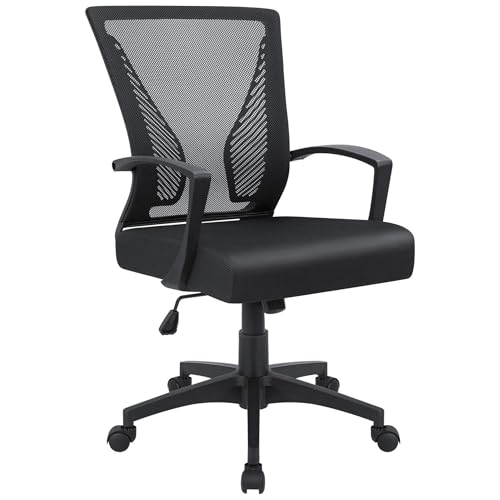
Furmax Office Chair, Mesh Mid-Back — Best Budget
Check the current price on Amazon
The Furmax is the right chair for the desk that sees two to four hours a day — homework, admin, gaming sessions, a spare room setup — and for buyers furnishing a first home office without pretending it is a ten-hour workstation. You get a breathable mesh mid-back with lumbar shaping, height adjustment, swivel and armrests, in a chair that assembles quickly and costs a fraction of the ergonomic picks. Judge it by that job and it is a good chair; judge it as a full-time workstation and the guide’s higher picks exist for a reason.
Strengths
- Lowest budget tier in this guide by a wide margin
- Breathable mesh back and lumbar shaping
- Easy assembly and a compact footprint
Trade-offs
- Fixed features — no adjustable lumbar, headrest or multi-axis arms
- Cushion comfort fades over very long daily sessions
- Built for light-to-moderate hours, not a decade of full-time use
| Detail | What to know |
|---|---|
| Back | Mesh mid-back with lumbar support per Amazon listing |
| Adjustment | Height adjustable, 360 swivel per Amazon listing |
| Assembly | Listed as easy assembly per Amazon listing |
Budget chairs fail in a predictable order: cushion first, then gas lift, then arm pads. The Furmax’s mesh back removes one failure mode — there is no foam back to flatten — and its simplicity means fewer mechanisms to loosen. For the hours it is built for, that honest simplicity outlasts a feature-stuffed chair at the same tier whose adjustments were cost-cut illusions.
The upgrade path is clear and this guide states it plainly: if your desk hours grow past half a working day, the M18’s adjustable lumbar is where the money starts buying comfort you can feel. Until then, the Furmax plus the setup advice in this guide beats an expensive chair set up badly.
Best for: part-time desks, homework and first setups / Not suited for: full-time workers with existing back complaints
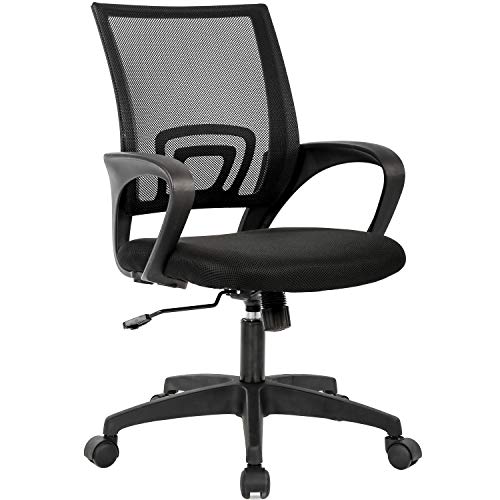
BestOffice Ergonomic Office Chair, Mid-Back — Best Value Spare Chair
Check the current price on Amazon
Where the Furmax is mesh-minimal, the BestOffice adds a sponge seat cushion, which some sitters simply prefer under them for shorter sessions. It suits the second desk, the teen’s room, the household that needs two decent chairs rather than one excellent one, and anyone furnishing a rental or temporary office. The feature set is the honest basics — lumbar support shaping, height adjustment, swivel, rolling wheels — in a chair priced for real life.
Strengths
- Sponge seat cushion for sitters who prefer padding to mesh seats
- Lumbar support and height adjustment included
- Priced for buying two — pairs and household desks
Trade-offs
- Sponge cushions compress over years of heavy use
- No headrest or adjustable arms
- Mid-back only — taller users should look at the Marsail
| Detail | What to know |
|---|---|
| Seat | Sponge seat cushion per Amazon listing |
| Back | Mid-back, breathable, lumbar support per Amazon listing |
| Base | Swivel with rolling wheels per Amazon listing |
The two-chair household is a real pattern the premium guides ignore: a couple both working from home twice a week does not need two flagship chairs, and two honest mid-tiers serve them better than one flagship and one kitchen chair. The BestOffice is built for that maths — adequate support, a cushion most people find comfortable for moderate hours, and a price that survives being doubled.
Its sponge seat is also the preference pick for sitters who find mesh seats chilly or hard-edged in winter. Comfort is partly personal physics, and this chair exists in the guide to say so: try to match the seat style to the sitter, not to a hierarchy.
Best for: second desks and households buying a pair / Not suited for: solo full-timers — the M18 or Leap serve better
Comparison Table
| Pick | Badge | Key spec | Best for |
|---|---|---|---|
| SIHOO M18 Ergonomic Office Chair | Best Overall | Adjustable lumbar + headrest, mesh back | most home workers sitting full days |
| Steelcase Leap Office Chair, Onyx | Best Premium | LiveBack flex back, gliding seat, commercial build | full-time desk workers investing in a decade of sitting |
| HON Ignition 2.0 Ergonomic Office Chair | Best Adjustable Fit | Contract-grade adjustments, lumbar + arms | shared desks and particular fitters |
| Marsail Ergonomic Office Chair with Headrest | Best High-Back Mesh | High-back mesh, 3D arms, headrest | taller users and multi-monitor desks |
| Furmax Office Chair, Mesh Mid-Back | Best Budget | Budget mesh mid-back, height adjust | part-time desks, homework and first setups |
| BestOffice Ergonomic Office Chair, Mid-Back | Best Value Spare Chair | Cushioned mid-back, value tier | second desks and households buying a pair |
Short on time? Start with the Best Overall pick, then use the table to check whether a specialist badge matches your actual room, routine or household better before you check price on Amazon.
How to Choose the Best Chairs for Sitting at a Desk
Start with your hours, honestly counted. Under four hours a day, a well-shaped budget chair set up properly is a rational purchase. Four to eight hours, adjustable lumbar support becomes the feature that matters most, because your spine’s curve is not the mould designer’s spine. Over eight hours, or with an existing grumbling back, the premium tier’s moving backs and decade builds stop being luxury and start being arithmetic.
Match the chair to your body next. Petite sitters need a seat that is not too deep — if the seat edge presses behind your knees, circulation suffers by afternoon. Tall sitters need back height and seat depth, which is why the high-back pick exists in this guide. Heavier sitters should buy by stated capacity with margin, not by hope.
Finally, match the chair to the desk. Armrests must clear the desk underside or adjust down; casters should suit your floor (soft-wheel or a chair mat on hard floors); and the chair’s footprint must leave room to actually roll back. A great chair that fights the desk loses to a good chair that fits it.
The Adjustments That Matter, and the Ones That Don’t
Lumbar position is adjustment number one: the support should sit in the curve of your lower back, which sits at a different height on every body. Height-adjustable lumbar (the M18, the HON, the Marsail) adapts; a fixed bump fits whoever it fits. Seat height is number two and non-negotiable — feet flat, thighs roughly level. Armrest height and width come third for anyone typing most of the day.
Further down the honest list: tilt tension and lock (genuinely useful for reading postures), headrests (pleasant for reclining, irrelevant upright), and seat-depth adjustment (valuable for very short or long legs, a premium feature). At the bottom, contributing nothing to sitting: recline angles past what you will use, massage functions, and styling borrowed from racing cars, whose seats are designed to hold a driver against g-forces, not to support a typist.
Mesh, Foam and Leather: Choosing a Seat You Can Live With
Mesh backs are the warm-room champions and hold their shape for years; mesh seats feel firmer and cooler, which divides sitters cleanly into lovers and haters. Foam or sponge cushions feel welcoming for the first hours and compress over years — density matters more than thickness, and a thin dense cushion outlasts a thick soft one. Padded executive chairs look like comfort and often insulate heat exactly where you sit longest.
The practical test is your own history: if you have ever found a mesh office chair chilly or hard, believe yourself and buy the cushioned pick; if you run warm and hate sticking to a seat in August, believe that instead. This guide deliberately includes both constructions at the value end so the choice is available where it is affordable.
Budget Honesty: Cost Per Year of Sitting
Run the arithmetic the category hopes you skip. A budget chair at light duty might serve three to four years; a mid-tier with adjustable lumbar, five to eight; a commercial flagship, a decade or more with parts support. Divided by years, the flagship and the budget chair can cost surprisingly similar money per year — the difference is that the flagship feels better in every one of those years and produces less landfill between them.
That arithmetic flips for light use: a decade chair for a two-hour desk is money sleeping. The badges in this guide encode exactly this — buy the duty class you will actually use, and spend the savings on the monitor arm or footrest your setup is missing.
How to Set Up Your Desk Chair Properly, Step by Step
Fifteen minutes of setup is worth more than the price gap between two chair tiers. Work through this in order, sitting in the chair at your actual desk.
- Set seat height so your feet rest flat on the floor (or a footrest) with thighs roughly level and a fist’s gap between the seat edge and the back of your knees.
- Position the lumbar support into the curve of your lower back — on adjustable chairs, move it until upright sitting feels supported rather than pushed; on fixed chairs, a small cushion can fine-tune the fit.
- Raise the desk or chair so elbows sit near ninety degrees with shoulders relaxed when your hands are on the keyboard; adjust armrests to meet your elbows without lifting your shoulders.
- Set the monitor so the top of the screen is at or just below eye level, about an arm’s length away — chair setup and screen setup are one job.
- Set tilt tension so you can lean back with gentle pressure and return upright without effort; lock the tilt only for tasks where one posture truly serves.
- Re-check everything after a week of real work and adjust again — bodies report fit over days, not minutes.
Then protect the setup with movement: stand, walk or stretch for a few minutes every half hour or so. The best chair in this guide supports sitting well; it does not make eight motionless hours healthy, and no honest guide should claim otherwise.
Chairs for Specific Bodies: Petite, Tall and Heavier Sitters
Petite sitters are the worst served by standard chairs: seat depths designed for average legs press behind shorter knees, lumbar bumps land in the middle of the back instead of its curve, and armrests sit too wide and too high. If you are petite, prioritise the adjustable-lumbar picks, test seat depth before anything else, and budget for a footrest — with feet properly supported, a slightly deep seat stops mattering because you are no longer sliding forward to reach the floor.
Tall sitters face the mirror problem: mid-back chairs end at the shoulder blades, seat depths end mid-thigh, and headrests — where fitted — hit the neck instead of the head. The high-back Marsail exists in this guide for you; also check that the gas lift’s top height lets your knees sit at or below hip level, because a tall sitter on a low-maximum chair is perched, not seated.
Heavier sitters should shop by stated capacity with real margin and by base construction: a chair rated well above the sitter’s weight, with a quality lift and a wide, dense cushion like the M18’s stated specification, will hold its comfort years longer than a chair at its limit, whose cushion and lift are working at maximum from day one. Capacity is a durability specification, not a judgement.
The Rest of the Desk: What to Fix Before Upgrading the Chair Again
If a good chair, properly set up, still leaves you uncomfortable, the fault is usually elsewhere in the workstation. A laptop screen at desk level bends the neck twenty degrees all day — raise it on a stand or a stack of books and add a separate keyboard before blaming any chair. A desk that is too high lifts shoulders toward ears regardless of armrests; a desk too low rounds the back over the keyboard.
Lighting is the hidden posture thief: glare or a dim screen pulls the head forward inch by inch, and by evening the ‘chair problem’ is actually a lamp problem. Position light to the side, match screen brightness to the room, and notice whether your afternoon slouch correlates with afternoon sun on the monitor — for many home workers it does, exactly.
Finally, the floor: feet that cannot rest flat because of a modesty panel, a PC tower or a sleeping dog will defeat the best chair setup in this guide. Clear the under-desk space, give feet a flat home or a footrest, and the chair you already own may suddenly become the chair this guide promised. Fix in that order — screen, desk height, light, floor — before spending on a second chair.
Buying Scenarios: First Job, Shared Flat, Home Business and the Bad Back
The first job from a bedroom desk is a budget scenario with a long fuse: the Furmax or BestOffice now, set up properly, with the savings held for the monitor stand the setup actually needs. The mistake is stretching to a mid-tier chair while working off a laptop at a kitchen table — the chair cannot fix the geometry, and the money was the geometry’s.
The shared flat’s desk chair serves three bodies and a gaming habit: adjustment range is the whole specification, which points to the HON or the M18, with settings marked or photographed per user so re-fitting takes a minute. A chair that only fits its owner is, in a shared flat, a chair that fits nobody by November.
The home business and the grumbling back are the investment scenarios, and they converge on the same answer: the Leap, or the M18 as the value alternative, bought once and written off over a decade of working days. When a chair is business equipment used two thousand hours a year, cost per hour reframes every price in this guide — the flagship becomes the cheapest seat in the building.
What to Check on the Listing Before You Buy a Desk Chair
Stated capacity, in numbers, with margin over the sitter’s weight — capacity is the durability specification. Second, the adjustment list itemised: lumbar (fixed or movable), arms (which axes), seat (height range, depth if any), tilt (lock and tension). A listing that says ‘ergonomic’ without itemising adjustments is marketing, and the chairs in this guide were chosen from listings that itemise.
Third, seat depth and back height against the sitter’s measurements, taken with a tape at home rather than estimated. Fourth, caster type against your floor — hard-floor wheels or a mat for wooden floors, standard casters for carpet — because the wrong wheels damage floors and annoy daily. Fifth, the returns reality for a product you cannot judge in a week: buy where a genuine trial period exists, and use the full first week of real work before deciding.
A chair passing those five checks, in the duty class matching your hours, is the closest thing this category has to a guaranteed good purchase. The guarantee is not the chair — it is the matching.
The First Month in a New Desk Chair: A Realistic Diary
Week one is adjustment theatre. Every new chair feels strange, because your body had adapted — badly, but completely — to the old one’s failures, and correct support initially registers as interference. The lumbar support feels pushy, the upright posture feels effortful, and by Wednesday most owners are tempted to conclude the chair is wrong. It usually is not; it is unfamiliar, and the correct response is small daily adjustments, not a return label. This is why the setup walkthrough in this guide ends with a re-check after a week rather than a verdict on day one.
Week two is when the settings converge. The lumbar finds its height, the armrests settle at the level where shoulders finally drop, and the sitter stops noticing the chair during work — the true success criterion, reached quietly. Owners of adjustable chairs report this convergence reliably; owners of fixed chairs report something else, a negotiation, in which their body does all the adapting the chair cannot. That difference, invisible in a showroom, is the entire mid-tier price premium explained.
By week four the comparisons arrive uninvited: a full day that ends without the familiar shoulder ache, a video call taken leaning back in genuine comfort, a Friday that feels like a Tuesday. None of it is dramatic, and that is the point — ergonomic equipment pays out in non-events, in the pains that do not happen, which is precisely why it is undervalued at purchase and overvalued by month six.
The diary’s last entry is about everything that is not the chair. By a month in, the owners still uncomfortable have almost always traced it to the screen, the desk height, the light or the motionless eight hours — the factors this guide’s companion section lists in repair order. A chair is the largest single piece of the sitting puzzle, and it is still only one piece. Buy it well, set it up patiently, fix the rest of the desk, and then forget the whole subject for a decade, which is the highest praise furniture can earn.
Value, Longevity and the Cost of a Working Decade
Restate the guide’s arithmetic one final time, because it decides real purchases. Divide any chair’s price by the years its duty class honestly serves, then divide again by your annual desk hours. The flagship and the budget chair converge surprisingly on cost per hour — while diverging completely on how those hours feel and on how many chairs reach landfill between you and the decade’s end. For a full-time worker, the premium chair is not the expensive option; it is the option whose expense is visible, once, instead of recurring quietly forever.
Longevity is protected by two unglamorous habits: keeping the chair’s mechanisms clean of the dust and hair that migrate into lifts and casters, and addressing small failures — a sinking lift, a worn arm pad — while they are small and, on quality chairs, replaceable. A chair maintained that way does not age on schedule; it ages on neglect, which is a choice the owner controls.
Buy the duty class your hours demand, set it up with the patience the first-month diary describes, fix the desk around it, and then remove chairs from your list of problems for years. That removal — thousands of working hours in which sitting simply does not feature as a complaint — is what the money buys, at every tier in this guide.
Common Buying Mistakes
Buying by the showroom sit
Ninety seconds judges upholstery, not ergonomics. Judge a chair by its adjustment list and its duty class, then give your own chair a full working week before deciding it is wrong — most ‘wrong chairs’ are right chairs at factory settings.
Ignoring seat depth
A seat too deep for your legs presses behind the knees and slides you into a slouch to escape it. Petite sitters especially should check depth, or choose chairs whose cushions and backs forgive it.
Setting armrests too high
Armrests that lift your shoulders create the neck and shoulder ache people blame on their monitor. Elbows should rest with shoulders down and relaxed; if the rests cannot go low enough, remove or drop them.
Sitting at a flagship chair with a terrible screen height
A laptop on a low desk bends the neck no matter what the chair cost. Raise the screen and use a separate keyboard before upgrading the chair a second time.
Never moving
Static posture is the enemy even in a perfect chair. The most expensive pick in this guide still assumes you stand up regularly — build the break into timers and calls rather than relying on willpower.
Final Recommendation
Most full-time desk workers should buy the SIHOO M18 and set it up properly with the walkthrough above — it is the completeness-per-budget champion here. If the chair is a decade decision, the Steelcase Leap is the one to stretch for; shared desks point to the HON Ignition 2.0, taller users to the Marsail, and part-time desks are honestly served by the Furmax or the cushioned BestOffice.
Whichever tier you choose, spend the fifteen minutes on setup and the discipline on movement breaks. A desk chair is the piece of furniture your working life happens in — choose it like it matters, because by Friday afternoon your back will confirm that it does.
Best Office Chairs Best Ergonomic Chairs Best Desk Chairs For Home Office Best Mesh Office Chairs Best Chairs For Long Hours Best Budget Office Chairs
Related guides
- Best Full Back Long Sitting Desk Chairs
- Best Desk Chairs For Producers
- Best Orthopedic Desk Chairs
- Best Xl Desk Chairs
Frequently Asked Questions
What is the most important feature in a desk chair?
Positionable lumbar support for full-time sitters, because it adapts the chair to your spine’s actual curve. After that: seat height range that lets your feet rest flat, and armrests that fit your desk. Everything else is refinement.
How many hours a day can a budget chair handle?
Budget chairs like the two value picks here are built for light-to-moderate use — roughly two to four hours a day. Beyond that, cushions compress and fixed supports start to cost you comfort; step up to an adjustable mid-tier.
Is mesh or a cushioned seat better?
Neither universally. Mesh breathes and holds its shape for years but feels firm; sponge cushions feel softer for moderate sessions and compress over time. Match to your own history with office chairs — you already know which camp you are in.
How long should a good desk chair last?
A mid-tier chair in daily service should give five to eight years; a commercial-grade flagship a decade or more. Budget chairs at light duty, three to four years. Cost per year is the fair way to compare tiers.
My back hurts at my desk — will a better chair fix it?
A well-fitted chair plus proper setup and regular movement breaks helps most desk sitters feel better, but a chair is furniture, not treatment. Persistent or worsening pain deserves a clinician’s assessment rather than a more expensive chair.
Do I need a headrest on a desk chair?
Only if you recline to read, review or take calls — upright typing never touches it. Two picks here include headrests for lean-back workers; if you never lean back, spend the money on lumbar adjustment instead.
How do I know if my chair is too big or small for me?
Sit fully back: you should fit a clenched fist between the seat edge and the back of your knees, rest your feet flat, and feel the lumbar support in your lower back’s curve — not your mid-back. Failing any of the three tells you which dimension is wrong.
Are gaming chairs good for desk work?
Most are styled on racing seats, which are designed to hold a driver against cornering forces — deep bolsters, fixed shapes, posture as containment. A task chair’s adjustable support serves desk work better for the same money, which is why every pick in this guide is a task chair.
How often should I replace a desk chair?
When its support no longer recovers: a cushion that stays compressed overnight, a lift that sinks during the day, a back that has lost its shape. Those are mechanical ends, not calendar dates — budget chairs reach them in a few years of daily use, quality chairs in a decade or more.
Is a footrest worth buying with a chair?
If your feet do not rest flat with the chair at the height your desk demands, yes — a footrest resolves the mismatch more cheaply than any chair upgrade. It is the standard companion purchase for petite sitters and high desks, and this guide’s setup walkthrough assumes one where the geometry requires it.
Can a desk chair help with posture outside work?
Indirectly: a chair that supports comfortable upright sitting trains the positions your body defaults to, and the movement-break habit matters everywhere. But posture is built by activity far more than furniture — the chair’s job is to stop punishing good posture for eight hours a day.


