Disclosure: airfryerkitchensupply.com is reader-supported. When you buy through links on our site, we may earn an affiliate commission at no extra cost to you.
Where to buy
Every chair in this guide to the best office chairs for mid back pain is sold on Amazon and was matched against Amazon’s catalog data before receiving a link. Check the current price on Amazon for each pick: SIHOO M18 Ergonomic Office Chair, Furmax Office Chair, BestOffice Ergonomic Office Chair, Sweetcrispy Ergonomic Desk Chair, DUMOS Home Office Chair, and TRALT Office Chair. We do not print fixed prices; check the live listing for the number that matters.
A note on honesty before anything else, because this search deserves it: no office chair treats, cures or medically relieves back pain, and this guide will not pretend otherwise. If your mid-back pain is persistent, severe, follows an injury, or comes with any worrying symptoms, the correct purchase is a medical appointment, not a chair. What a well-chosen chair genuinely can do — and what the best office chairs for mid back pain are actually about — is remove the everyday mechanical insults that make a long workday leave your mid-back tired, stiff and aching: a backrest that ignores the curve of your spine, lumbar support fixed at the wrong height, a seat that forces a slouch, and eight static hours with no movement. The six chairs below were chosen for comfort and ergonomic support features confirmed in their listings — adjustable lumbar support, mid-back designs, breathable mesh, sensible adjustability — framed strictly as comfort, never as therapy.
This guide covers six chairs across the realistic budget range for home offices, from entry-level mid-backs to a fully adjustable ergonomic model, because the right answer for an aching mid-back is fit and setup, not spending. A correctly placed fixed support on a budget chair will serve many backs better than an expensive chair left unadjusted — a theme the reviews return to, because it is the most money-saving truth in this category.
Why the mid-back specifically? The mid-back — roughly the thoracic region between your shoulder blades and your lower ribs — is where the classic desk slouch does its damage. When you round forward over a keyboard, the mid-back carries the strain of holding that curve for hours, and a chair whose support is designed only for the lower back leaves the mid-back to fend for itself. The chairs in this guide were selected with that anatomy in mind: mid-back models whose support zone sits where you sit, and adjustable-lumbar models whose support pad can be positioned upward into the mid-back region rather than locked at the belt line.
In this guide
Quick Picks
- Best Overall: SIHOO M18 — an ergonomic mesh chair with adjustable lumbar support that can be positioned toward the mid-back, a headrest, 2D armrests and a listed 330 lb capacity. Check the current price on Amazon
- Best Budget: Furmax Office Chair — a mid-back mesh desk chair with lumbar support, adjustable height and 360° swivel at an entry tier. Check the current price on Amazon
- Best Compact Mid-Back: BestOffice Ergonomic Office Chair — a mid-back swivel chair with lumbar support, sponge seat and breathable backrest for smaller workspaces. Check the current price on Amazon
- Best with Flip-Up Arms: Sweetcrispy Ergonomic Desk Chair — a mid-back mesh chair with lumbar comfort, rolling swivel and flip-up arms that tuck under desks. Check the current price on Amazon
- Best for Rocking Breaks: DUMOS Home Office Chair — an ergonomic mid-back mesh chair with lumbar support, height adjustment and a rocking mode for movement through the day. Check the current price on Amazon
- Best for Long Sessions: TRALT Office Chair — an ergonomic desk chair with adjustable lumbar support and a mesh build aimed at full-day home office comfort. Check the current price on Amazon
Key Takeaways
- No chair treats back pain. These picks are about comfort and ergonomic support; persistent pain belongs with a medical professional.
- Adjustable lumbar support (SIHOO M18, TRALT) is the key feature for mid-back comfort, because the pad can be raised into the mid-back zone instead of sitting only at the lower back.
- True mid-back chairs (Furmax, BestOffice, Sweetcrispy, DUMOS) concentrate their backrest where desk workers actually ache.
- Movement matters as much as support: rocking modes, swivel and regular standing breaks do what no static chair can.
- Mesh backrests breathe through long sessions; pair any chair with a desk-height and monitor check for the full ergonomic picture.
How These Picks Were Chosen
Every candidate was verified against Amazon’s catalog data by brand and model before receiving a link, and we limited the field to complete office chairs — a rule that excluded a large number of seat cushions and lumbar pillows that surface in searches for this search. Cushions can be useful accessories, but they are not chairs, and several of their listings carry medical claims (“doctor recommended,” condition names, relief promises) that this guide will not repeat or endorse. What remains are six complete chairs whose listings confirm the comfort features we cite.
Within the chairs, we prioritized two architectures. The first is the true mid-back design — Furmax, BestOffice, Sweetcrispy and DUMOS all describe mid-back models in their listings — where the backrest’s shaped support zone is built at mid-back height by definition. The second is adjustable lumbar support — the SIHOO M18 and TRALT — where the support pad moves, letting a mid-back-focused user position support higher than the default lower-back placement. We also valued breathable mesh for long sessions, listed weight capacities where the listing states them, and practical touches (flip-up arms, rocking mode, headrest) that change how a chair fits a real desk and a real day.
We also thought about who else this search serves. Many buyers arrive here not for themselves but for a partner, a parent working from home, or a teenager whose study hours have grown adult-sized. For gift and household purchases, the adjustable models earn an extra recommendation: a chair that can be re-tuned to a different person’s back is the only kind that can be bought responsibly for someone else. Fixed-geometry chairs bought as gifts are a gamble on a stranger’s torso; adjustable ones are a platform two different backs can each make their own.
Throughout the writing, we applied a strict language rule: comfort, support, posture and ergonomics are the vocabulary; treatment, relief and medical outcomes are not claimed anywhere, for any chair, at any price. Where a wider marketplace listing for some other product uses medical language, it was a reason to exclude that product, not to quote it.
The 6 Best Office Chairs for Mid Back Pain

SIHOO M18 Ergonomic Office Chair — Best Overall
The SIHOO M18 leads this guide because adjustability is the closest thing furniture has to personalization, and the M18’s verified listing confirms the adjustments that matter for mid-back comfort: adjustable lumbar support, a headrest, 2D armrests, a wide cushion, tilt lock, and a listed capacity of 330 lbs, all in a mesh-back ergonomic design. The adjustable lumbar pad is the headline — unlike fixed support molded at lower-back height, a movable pad can be raised so its pressure lands in the mid-back zone where desk workers actually feel the day’s work. That single feature makes the M18 the most adaptable chair here across different torsos and sitting styles.
Strengths
- Adjustable lumbar support can be positioned toward the mid-back, not just the lower back.
- Headrest, 2D armrests and tilt lock round out a full ergonomic adjustment set.
- Listed 330 lb capacity and a wide cushion suit a broad range of users.
Trade-offs
- More adjustments mean more setup time; expect to spend a real half hour dialing it in.
- Mesh-and-frame ergonomic styling will not match every home office’s look.
- It sits in a higher tier than the budget mid-backs here — you are paying for the adjustment range.
Mini spec box (from the verified listing): Type: ergonomic mesh office chair · Lumbar: adjustable support · Extras: headrest, 2D armrests, wide cushion, tilt lock · Capacity: 330 lbs (as listed) · Color verified: Black
SIHOO is an ergonomics-focused chair brand, and the M18 is its evergreen mid-range model for a reason: it concentrates spending on the mechanisms — lumbar, arms, tilt — rather than on leather or executive styling. For the mid-back-focused buyer, the setup ritual matters: set seat height first so your feet are flat, then raise the lumbar pad until you feel it meet the curve of your mid-back when you sit back, then set the armrests to keep shoulders relaxed. Done properly, the chair disappears under you, which is the entire goal.
Choose the M18 if you want one chair you can tune to your own back rather than a chair that guesses where your back is.
The headrest deserves its balanced sentence: it is not a mid-back feature, and we do not count it as one. Its value is for the lean-back moments — calls, reading, thinking — when a supported head lets the whole back, mid included, actually rest against the chair instead of holding itself up. Chairs earn their comfort across the whole day’s postures, not just the typing posture, and the M18 is the only pick here that covers the reclined end of that range with both a headrest and a tilt lock to hold the angle you choose.
Best for: users who will invest setup time for personalized mid-back support / Not suited for: buyers wanting a simple, cheap, no-adjustment chair
Check the current price on Amazon
Furmax Office Chair — Best Budget
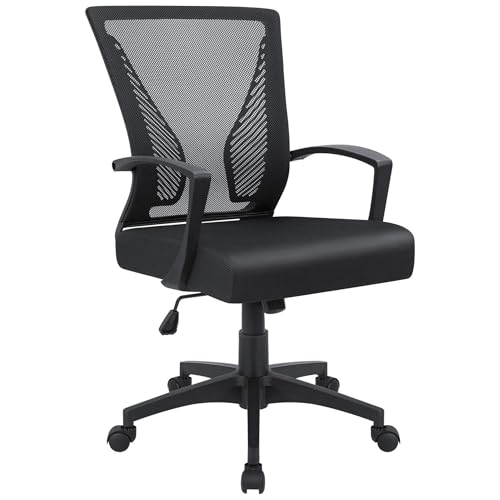
The Furmax is the entry point: a mesh office chair whose verified listing confirms an ergonomic computer desk chair design with lumbar support, adjustable height, a breathable mid-back backrest, 360° swivel and armrests, positioned for home, office and conference use with easy assembly. Mid-back is in its design brief, which is what earns it a place in this guide over the many budget chairs whose support is an afterthought. For a first home-office chair or a spare-room desk, it covers the comfort fundamentals at the tier where most people actually buy.
Strengths
- True mid-back design with lumbar support at a budget tier.
- Breathable mesh backrest suits long, warm sessions.
- Easy assembly and a compact footprint fit small home offices.
Trade-offs
- Lumbar support is built-in rather than adjustable; it will suit average torsos better than very tall or short ones.
- Budget chairs use simpler mechanisms; expect a firmer, less refined tilt feel than the SIHOO.
- Armrests are fixed in this class of chair — check the listing for the current configuration before ordering.
Mini spec box (from the verified listing): Type: mid-back mesh desk chair · Lumbar: built-in lumbar support · Adjustments: height, 360° swivel · Backrest: breathable mesh · Assembly: easy assembly (as listed)
The honest case for the Furmax is the upgrade delta: if you are currently working from a dining chair or a shapeless budget seat, a mid-back mesh chair with real lumbar shaping is a dramatic comfort improvement for very little money. Its limits are the class’s limits — fixed support geometry, modest padding — but within a workday punctuated by normal breaks, most users will find it entirely adequate, and its compact size suits the corner-desk reality of many homes better than executive-scale chairs.
It is also the sensible second chair: the one for the household’s other desk, the teen’s study corner, or the guest-room office.
One buying note specific to budget chairs: because their support geometry is fixed, fit-checking matters more, not less. If possible, confirm the backrest height against your own torso — sit against a wall, note where your mid-back sits, and compare with the chair’s listed dimensions. A budget chair whose shaped zone lands on your mid-back will outperform a premium chair whose pad lands in the wrong place, which is the most useful sentence in this entire guide for a careful shopper to remember.
Best for: first home-office chairs, small desks, tight budgets / Not suited for: users needing adjustable lumbar placement or premium mechanisms
Check the current price on Amazon
BestOffice Ergonomic Office Chair — Best Compact Mid-Back
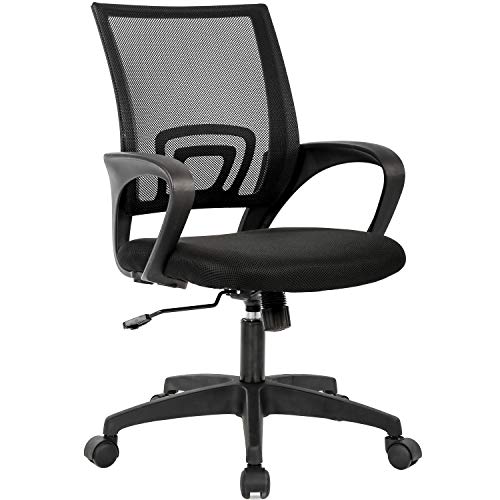
BestOffice’s ergonomic chair is the other budget mid-back worth your attention, with a verified listing confirming a mid-back swivel desk chair with lumbar support, adjustable height, a breathable backrest, a sponge seat and rolling wheels, sold as a single pack. The sponge seat is its differentiator against the Furmax: where mesh-and-thin-pad budget chairs can feel sparse by hour six, a sponge-cushioned seat keeps the sitting surface comfortable, and the mid-back backrest carries the support story for the torso.
Strengths
- Mid-back design with lumbar support and a breathable backrest.
- Sponge seat cushioning for long-session seat comfort.
- Compact, classic task-chair footprint for small workspaces.
Trade-offs
- Built-in rather than adjustable lumbar geometry, like most of its tier.
- The classic black task-chair look is functional, not decorative.
- One-chair pack; multi-desk households buy multiples.
Mini spec box (from the verified listing): Type: mid-back swivel desk chair · Lumbar: lumbar support · Seat: sponge seat · Adjustments: height · Backrest: breathable · Pack: 1 chair
BestOffice chairs are fixtures of small offices and dorm-adjacent workspaces because they solve the basic problem without drama: a shaped back at the right height, a seat that does not punish you, wheels and swivel that let you move. For the mid-back-focused buyer on a budget, the choice between this and the Furmax is mostly about seat preference — sponge cushion here, lighter build there — and about which listing’s current configuration matches your desk.
Set it up with the same care as a premium chair: feet flat, backrest meeting your mid-back when you sit back, screen raised separately. Ergonomic benefit comes from the whole workstation, and this chair does its part honestly.
The BestOffice also illustrates why this guide keeps two budget mid-backs rather than one: seat philosophy. Some sitters run warm and prefer the lightest, most ventilated seat they can get; others find thin seats uncomfortable within the hour and need the sponge cushion’s substance. Neither preference is wrong, and at this tier the honest advice is to choose by the seat you know you like, since both chairs deliver a comparable mid-back support story above it. Comfort you will actually sit in beats specifications you merely admire.
Best for: compact workspaces and budget buyers who prefer a cushioned seat / Not suited for: tall users wanting a high-back or adjustable-pad design
Check the current price on Amazon

Sweetcrispy Ergonomic Desk Chair — Best with Flip-Up Arms
The Sweetcrispy entry earns its slot on a practical feature the others lack: flip-up arms. Its verified listing confirms an ergonomic mesh office chair with comfortable lumbar support, a mid-back design, rolling swivel and flip-up arms, for home office, bedroom and study use. Flip-up arms solve the most common small-desk frustration — armrests that collide with the desk edge and force you to sit too far from your work, which is itself a slouch generator. Tuck the arms up, pull the chair in close, and your mid-back can actually reach the backrest it is supposed to rest against.
Strengths
- Flip-up arms let the chair slide fully under the desk and let you sit close to your work.
- Mid-back mesh design with lumbar comfort for the torso.
- Rolling swivel base suits multi-surface desks and shared spaces.
Trade-offs
- Flip-up arms sacrifice the fine height adjustment of premium armrests.
- Built-in lumbar shaping rather than a movable pad.
- The light, compact build is aimed at home desks, not heavy-duty commercial duty.
Mini spec box (from the verified listing): Type: mid-back mesh office chair · Lumbar: lumbar support · Arms: flip-up · Base: rolling swivel · Color verified: Gray · Settings named: home office, bedroom, study
There is an ergonomic chain here worth understanding: sitting too far from the desk — because armrests hit the desk edge — makes you reach, reaching rounds the mid-back, and the rounded mid-back is where the ache builds. The Sweetcrispy breaks the chain at its first link. It is the pick we would hand to anyone working at a shallow desk, a vanity-turned-workstation, or any setup where space is tight and the chair must store under the desk at day’s end.
The gray colorway in the verified listing is also a quiet plus for bedrooms and shared spaces where a black task chair looks too corporate.
Flip-up arms have a second, quieter benefit for shared and multi-use rooms: with the arms up, the chair pushes fully under the desk and the room returns to being a bedroom, a dining room, a guest room. For the large population now working from spaces that are not offices, that daily disappearance is a quality-of-life feature that never appears in ergonomic comparisons — and it also protects the backrest’s mid-back zone from being used as a push handle against the desk edge, a small durability bonus.
Best for: shallow desks, small rooms, anyone whose armrests fight their desk / Not suited for: users wanting adjustable armrest height or a movable lumbar pad
Check the current price on Amazon

DUMOS Home Office Chair — Best for Rocking Breaks
The DUMOS chair’s verified listing confirms an ergonomic mid-back mesh design with lumbar support, height adjustment, fixed armrests, a 360° swivel and — the feature that earns its badge — a rocking mode. Movement is the most underprescribed comfort feature in office seating: a chair that lets you rock gently through calls and reading changes the pressure map on your back continuously, instead of parking your mid-back in one loaded curve for hours. The DUMOS builds that movement into a budget-friendly mid-back package.
Strengths
- Rocking mode encourages the micro-movement that static sitting denies your back.
- Ergonomic mid-back mesh with lumbar support and height adjustment.
- 360° swivel and a home-office-friendly footprint.
Trade-offs
- Fixed armrests — no flip-up or height adjustment.
- Rocking is a preference; users who lock their chairs rigid will not use its best feature.
- Built-in lumbar geometry, as with the other budget mid-backs here.
Mini spec box (from the verified listing): Type: ergonomic mid-back mesh chair · Lumbar: lumbar support · Motion: rocking mode, 360° swivel · Arms: fixed armrests · Adjustments: height · Color verified: Black
Think of the DUMOS as the chair for people whose workday alternates between typing and thinking. Type upright with the backrest supporting you; think in a gentle rock with the load shifting. That rhythm — supported stillness, then movement — is closer to how backs actually stay comfortable than any single “perfect posture” a chair could impose. Pair it with the standing breaks in this guide’s how-to section and you have a realistic, sustainable comfort system at a modest tier.
DUMOS also appears in this program’s wider catalog with heavier-duty models, but this mid-back is the one whose listing matches this search’s brief: mid-back support, home-office scale, movement built in.
A word on rocking technique, since the feature only pays if used well: set the tilt tension so the rock is gentle and supported rather than loose, use it during low-focus tasks rather than precision typing, and let your feet stay planted so the movement comes from the hips and back rather than from pushing. Used that way, the DUMOS’s rock becomes a pressure-redistribution system you operate unconsciously — the closest a budget chair comes to the dynamic sitting that premium ergonomic designs pursue with far more expensive mechanisms.
Best for: thinkers, call-heavy workers, anyone who fidgets productively / Not suited for: rigid-posture users or those needing flip-up/adjustable arms
Check the current price on Amazon

TRALT Office Chair — Best for Long Sessions
The TRALT chair closes the list as the second adjustable-lumbar option. Its verified listing confirms an ergonomic desk chair with adjustable lumbar support, a mesh build, and executive-style positioning for home office comfort. Adjustable lumbar is the recurring theme of this guide’s top end for a reason: it is the one feature that lets a chair meet a specific person’s back rather than an average one, and for mid-back comfort the pad’s ability to sit higher than the factory default is precisely the point. TRALT offers that adjustability in a clean, conventional office-chair form.
Strengths
- Adjustable lumbar support — positionable toward the mid-back zone.
- Mesh construction breathes through full workdays.
- Conventional executive styling suits formal home offices.
Trade-offs
- Fewer listed extras than the SIHOO M18 (compare headrest and armrest specs on the listings before choosing).
- Adjustable pads reward setup attention; left at default, you own an ordinary chair.
- Home-office positioning means a larger footprint than the compact mid-backs.
Mini spec box (from the verified listing): Type: ergonomic desk chair · Lumbar: adjustable lumbar support · Build: mesh computer chair · Positioning: executive/home office comfort · Color verified: Black
Choose between the TRALT and the SIHOO M18 by the extras: the M18 lists a headrest, 2D armrests and a stated capacity, making it the more specified package; the TRALT counters with a simpler, more conventional executive silhouette that some offices will prefer visually. Both rest on the same sound foundation — movable lumbar support in a breathable mesh chair — and either is a defensible long-session choice.
For the user whose workday is genuinely eight-plus hours at one desk, that foundation is where the money belongs: not in leather, not in racing styling, but in a support pad you can place where your back actually is.
The TRALT also rewards a specific setup habit: because its lumbar pad adjusts, revisit its position seasonally and whenever your desk or seat height changes. Support placement is relative to your seated posture, and a change anywhere in the workstation — a new monitor riser, a different desk, thicker-soled shoes — quietly moves the target. Thirty seconds of re-checking keeps the pad where your mid-back actually rests, which is the entire premise of owning an adjustable chair rather than a fixed one.
Best for: long-session desk workers wanting adjustable support in a classic form / Not suited for: buyers wanting the longest feature list or the smallest footprint
Check the current price on Amazon
Comparison Table
| Pick | Badge | Key spec | Best for |
|---|---|---|---|
| SIHOO M18 | Best Overall | Adjustable lumbar, headrest, 330 lbs listed | Personalized support |
| Furmax Mid-Back | Best Budget | Mid-back mesh, lumbar support | First chairs, small budgets |
| BestOffice Ergonomic | Best Compact | Mid-back, sponge seat | Small workspaces |
| Sweetcrispy Desk Chair | Best Flip-Up Arms | Mid-back, flip-up arms | Shallow desks |
| DUMOS Mid-Back | Best Rocking | Rocking mode, mid-back mesh | Movement through the day |
| TRALT Ergonomic | Best Long Sessions | Adjustable lumbar, mesh | Full workdays |
How to Choose an Office Chair When Your Mid-Back Aches at Work
Start by locating your ache honestly. Mid-back discomfort from desk work is typically a posture-and-duration story: hours spent rounded forward, with support either missing or placed at the lower back only. That story points to two chair features above all others — a backrest whose support zone covers the mid-back, and lumbar support you can raise. The four true mid-back chairs here satisfy the first by design; the SIHOO and TRALT satisfy the second by adjustment. If you are tall, favor adjustability, because a fixed mid-back shape is designed around an average torso that may not be yours.
Next, audit your desk before your chair. A chair cannot rescue a workstation that forces a slouch: monitor too low, desk too high, or armrests that keep you seated at arm’s length from your keyboard. The Sweetcrispy’s flip-up arms exist for the third problem; a monitor riser solves the first for a few dollars; the second may need a keyboard tray or a different desk. Buy the chair as part of a system, and spend the small money on the rest of the system too.
Seat comfort is the third factor, and it is personal: the BestOffice’s sponge seat, the SIHOO’s wide cushion, and the firmer budget pads will suit different bodies. What matters is that the seat lets you sit back — actually back, against the backrest — with feet flat. A seat that is too deep pushes you into a perch-and-slouch; too shallow leaves you unsupported. Check listed dimensions against your own leg length where the listing provides them.
Breathability and movement complete the picture. Mesh backrests — every pick here uses one — prevent the warm, stuck feeling of vinyl through long sessions. Movement features, from the DUMOS’s rocking mode to simple tilt locks, let you vary your posture; the healthiest sitting position is honestly the next one, changed regularly. Build standing and walking breaks into your day regardless of chair: no furniture purchase substitutes for them.
Consider your day’s actual shape before finalizing. A chair for six hours of continuous typing wants maximum support tuning — the adjustable end of this list. A chair for a mixed day of calls, reading and tasks away from the desk wants movement and easy in-and-out — the DUMOS or the compact mid-backs. A chair that must serve two different people in a shared home office wants adjustability above all, because fixed geometry fits one torso at most. Naming your day honestly is worth more than any single feature comparison, and it is the step most buyers skip.
Finally, hold the line on expectations, because it protects both your wallet and your health. A chair in this guide can make a workday markedly more comfortable and remove the mechanical aggravations that leave a mid-back tired. It cannot diagnose or treat pain. If discomfort persists despite a sensible workstation and regular movement, that is information — take it to a professional rather than to a more expensive chair.
How to Set Up Your Chair and Desk for Mid-Back Comfort
- Set seat height so your feet rest flat on the floor (or a footrest) with knees at roughly a right angle. Everything else builds on this foundation.
- Sit fully back and position the support: on adjustable models (SIHOO M18, TRALT), raise the lumbar pad until it meets the curve of your mid-back; on mid-back models, confirm the backrest’s shaped zone contacts your mid-back when you sit back, not just your lower back.
- Bring the desk to you, not yourself to the desk: pull the chair in (flip up the Sweetcrispy’s arms if they collide) until your elbows rest near your sides with shoulders relaxed.
- Raise the monitor so the top of the screen is near eye level and about an arm’s length away. A low screen is a slouch machine that no chair can out-argue.
- Set armrests, where adjustable, to support your forearms without lifting your shoulders; where fixed, check they do not force a shrug — if they do, sitting closer and resting forearms on the desk is the lesser evil.
- Program movement: a gentle rock during calls if your chair allows it (DUMOS), a stand-and-walk break every half hour or so, and a brief shoulder-blade squeeze and chest stretch at each break. Comfort is a routine, not a setting.
- Do a two-minute posture audit at the same time each day for the first week — feet, seat, support contact, screen, shoulders — because new-chair comfort fades into habit quickly, and habits are what your mid-back actually lives with. The audit is how the setup survives contact with real work.
- Re-check after a week. Foam settles, pads drift, and your sense of the chair sharpens; a five-minute re-adjustment at day seven is where most users find their real setup.
Why the Mid-Back Aches at a Desk: The Mechanics in Plain Language
Understanding the basic mechanics helps you buy the right chair and ignore the wrong marketing. When you sit in a neutral, supported position, your spine keeps its natural S-curve and the muscles along your back share the work of holding you upright with the chair’s backrest. When you slouch — pelvis rolled back, shoulders rounded, head forward over the keyboard — the mid-back’s curve deepens and stays deepened for hours. The muscles and soft tissues along that curve are then holding a static load they were not designed to hold all day, and the familiar end-of-day ache between the shoulder blades is the receipt.
Three common desk habits feed the slouch. The first is distance: sitting too far from the keyboard, because the chair cannot get close to the desk, turns every keystroke into a small reach and every reach into more rounding. The second is screen height: a laptop or low monitor pulls your gaze — and therefore your head and shoulders — downward for the entire day. The third is the perch: sitting on the front edge of the seat, away from the backrest, often because the seat is too deep or the armrests block the chair from the desk. Notice that all three are workstation problems before they are chair problems, which is why this guide spends so much of its length on setup. A supportive chair used at a slouch-forcing desk will lose; a modest chair at a well-arranged desk will serve you surprisingly well.
The comfort strategy follows directly: support the curve instead of flattening it, close the distances that cause reaching, raise the screen, and interrupt the static load with movement. Every pick and every setup step in this guide maps to one of those four levers. None of them is a treatment for anything — they are ergonomics, the ordinary craft of fitting work to the worker — and if your discomfort does not respond to a sensible workstation and regular movement, that is exactly the point at which a professional should look at it.
Reading Chair Listings Critically: Support Claims Decoded
Chair listings use a small vocabulary that rewards precise reading. “Lumbar support” without the word “adjustable” almost always means a shaped backrest or a fixed pad positioned for the lower back — fine for many users, but for mid-back comfort you must ask where the shaping actually peaks, which is why the true mid-back models in this guide are valuable: their support zone is the mid-back by construction. “Adjustable lumbar support” means the pad moves, usually vertically and sometimes in depth; that movement is what lets a support designed for the lumbar region serve the mid-back too. “Ergonomic” alone means almost nothing — it is the specific, checkable features (pad movement, armrest adjustment, tilt lock, seat dimensions) that carry the meaning.
Capacity and dimension claims deserve the same care. A listed weight capacity, like the SIHOO M18’s 330 lbs, tells you about the mechanism’s rating and the chair’s intended user range; it is a fit specification, not a comfort promise. Seat width and depth, where listed, predict whether you can sit back properly. And beware the accessory trap this guide deliberately avoided: cushions and add-on pillows marketed with medical vocabulary. Their listings often promise outcomes no cushion can deliver. A complete chair with honest comfort features, set up well, is the defensible purchase — and the one whose claims you can verify from the listing itself, as we have done for all six picks here.
The Rest of the Workstation: Desk, Screen and Feet
Because the chair is one component, here is the short version of the rest. Your screen should sit about an arm’s length away with its top near eye level; laptop users should raise the laptop and use a separate keyboard, because a laptop’s built-in geometry forces a choice between a good screen position and a good keyboard position, and your mid-back pays for either compromise. Your keyboard and mouse should sit close enough that your elbows stay near your body and your shoulders stay down and relaxed. Your feet need the floor or a footrest; dangling feet drag the pelvis into the slouch this whole guide is fighting.
Lighting is the overlooked factor: glare or a dim screen makes you lean in, and leaning in is slouching by another name. Position the screen to avoid window glare, match its brightness roughly to the room, and increase font size rather than moving closer. Finally, the desk surface itself: keep the items you use hourly within the close arc of your chair’s swivel, because the repeated long reach across a deep desk is a mid-back insult disguised as tidiness. None of these adjustments costs much; together with the right chair, they are the difference between a workstation that fights you and one that disappears.
Common Buying Mistakes
- Believing a chair can treat pain. Chairs provide comfort and support. Persistent pain needs a professional evaluation, not a product upgrade.
- Buying lower-back support for a mid-back problem. Fixed pads sit at the belt line; mid-back comfort needs a mid-back design or a pad that raises.
- Ignoring the desk. Monitor height, desk depth and armrest collisions decide your posture as much as the chair does.
- Choosing by executive looks. Leather and bulk photograph well; mesh, adjustability and fit are what you feel at hour seven.
- Never adjusting the chair. An adjustable chair left at factory settings is an ordinary chair with extra cost. Spend the setup half hour.
- Sitting still all day in a “good” chair. Movement and breaks are part of the prescription no product can fill.
Final Recommendation
For most mid-back-focused buyers, the SIHOO M18 is the strongest choice: its adjustable lumbar pad, headrest and listed capacity make it the most tunable comfort platform here, with the TRALT as its classic-styled alternative. On a budget, the Furmax and BestOffice mid-backs cover the fundamentals honestly; tight desks point to the Sweetcrispy, and restless sitters to the DUMOS. Whichever you choose, set it up carefully, keep moving, and treat ongoing pain as a medical question, not a shopping one.
Related guides in this series: Best Ergonomic Office Chairs Home, Best Home Office Chairs For Comfort, Best Inexpensive Comfortable Office Chairs, Best Customizable Office Chairs, Best Easy Rolling Office Chairs, Best Ergo Office Chairs Available.
Frequently Asked Questions
Can an office chair cure mid back pain?
No. A chair can improve comfort and remove posture aggravations during desk work, but it does not diagnose or treat pain. Persistent, severe or worsening pain — especially after an injury or with other symptoms — should be evaluated by a medical professional.
What chair feature matters most for mid-back comfort?
Support placement. Either a true mid-back backrest whose shaped zone sits at the mid-back, or an adjustable lumbar pad you can raise into that region, as on the SIHOO M18 and TRALT. Support fixed at the lower back alone misses the area this search is about.
Is a mid-back or high-back chair better for desk work?
It depends on your torso and habits. Mid-back chairs concentrate support in the mid and lower back and suit users who sit actively; high-back chairs with headrests suit users who lean back often. What matters is that the support zone matches where you need it — not the chair’s total height.
How long should I sit before taking a break?
A practical rhythm is to change position or stand briefly every 30 minutes or so, with a short walk when you can. Features like rocking modes help you vary posture between breaks, but they complement — never replace — actually getting up.
How do I know if a chair’s support is in the right place for me?
Sit fully back in your normal working posture and pay attention to contact: the backrest should meet your back continuously, with its firmest, most shaped zone pressing gently at the area that aches — for mid-back-focused buyers, between the shoulder blades and the lower ribs. If the pressure sits only at your belt line while your mid-back floats free of the chair, the support is in the wrong place for you, whatever the listing calls it. On adjustable models, move the pad until that contact is right; on fixed models, that test is your buy-or-return decision.
Should I buy a seat cushion instead of a new chair?
A cushion can improve a decent chair’s seat, but it cannot fix a backrest whose support is in the wrong place, and it raises your sitting height, which can disturb desk ergonomics. If the chair itself is wrong — shapeless, broken, or the wrong size — a new chair is the honest fix; this guide covers complete chairs only.


