Disclosure: airfryerkitchensupply.com is reader-supported. When you buy through links on our site, we may earn an affiliate commission at no extra cost to you.
Where to buy
Every robot below was verified against Amazon’s catalog data for this site, and every specification we print — suction figures, navigation type, runtime, self-emptying details — comes from the manufacturer’s own listing. Robot vacuum listings mix vacuum-only and vacuum-and-mop models freely, so use the links to check the current price on Amazon and confirm the exact configuration before ordering:
- Roborock Q7 L5 Robot Vacuum and Mop Combo — Check the current price on Amazon
- iRobot Roomba 105 Vac Robot Vacuum — Check the current price on Amazon
- ILIFE A30 Pro Robot Vacuum and Mop — Check the current price on Amazon
- ILIFE V5s Max Robot Vacuum — Check the current price on Amazon
- ILIFE V10 Robot Vacuum Cleaner — Check the current price on Amazon
- ILIFE V2 Robot Vacuum Cleaner — Check the current price on Amazon
Introduction
The best robot vacuums for tile floors exploit a happy fact: tile is the surface robots were born for. It is flat, hard, and predictable, with no pile to agitate and no deep carpet resistance to drain a battery — which means a robot’s real talents decide everything. Suction goes straight to work on the grit that tile shows so mercilessly. Navigation shows its quality in the grout-line grid of a kitchen, where a methodical robot runs in clean rows and a random one leaves a polka-dot pattern of missed lanes. And mopping — an afterthought on carpet — becomes a headline feature, because tile is the floor that actually gets mopped, in the rooms that actually get dirty: kitchens, bathrooms, entries, and mudrooms.
Tile also has its own traps, and this guide is honest about them. Grout lines sit below the tile face, so crumbs and grit settle into channels a robot’s brush sweeps over unless its suction and brush design pull them out. Dark grout and dark tile can confuse the cliff sensors on some robots into seeing a drop that is not there. Wet tile is where mopping robots earn their keep and where cheap ones smear a dirty-water film from one end of the kitchen to the other. And large-format tile with wide grout joints gives small drive wheels a rhythmic bump that better navigation handles and bump-and-go robots turn into chaos.
The six robots below were chosen for tile-first homes: two LiDAR-guided methodical cleaners (one of them a vacuum-and-mop with a self-emptying station), a simple LiDAR Roomba for buyers who want the original brand without the complexity, and three ILIFE models spanning app-controlled vacuuming and mopping down to a remote-control budget classic. Every suction figure, runtime, and feature printed here comes from the verified listings — and where a listing is silent, the review says so.
In this guide
Quick Picks
- Best Overall: Roborock Q7 L5 — 8,000Pa suction, LiDAR navigation, multi-level mapping, a dual anti-tangle system, and vacuuming plus mopping in one robot. Check on Amazon
- Best Self-Emptying: ILIFE A30 Pro — 10,000Pa suction, LiDAR navigation, 150-minute runtime, and a self-emptying station rated by the listing for up to 280 days with 5 dust bags. Check on Amazon
- Best Simple Brand-Name Pick: iRobot Roomba 105 Vac — 7,000Pa suction with LiDAR navigation that cleans in neat rows, from the brand that invented the category. Check on Amazon
- Best App-Controlled Value: ILIFE V5s Max — 4,000Pa suction, gyro navigation, and WiFi, app, Alexa, and remote control in a hard-floor-focused format. Check on Amazon
- Best Slim Anti-Tangle: ILIFE V10 — 5,000Pa suction, a dual anti-tangle design, 120-minute runtime, and a slim body for low furniture. Check on Amazon
- Best Budget: ILIFE V2 — tangle-free suction, 120-minute runtime, scheduling, and a remote control, in the simplest format here. Check on Amazon
How These Picks Were Chosen
Three gates, all tile-specific. First, hard-floor competence had to be the product’s home turf: every listing here positions its robot for hard floors explicitly or by design, because a robot tuned for carpet pile wastes its battery and its brush geometry on tile. Second, navigation had to be a system, not a hope — LiDAR mapping on the top picks, gyro navigation on the mid picks — because tile’s open, gridded rooms are where methodical coverage pays off most visibly, and where random navigation’s missed lanes show up as clean-and-dirty checkerboards. Third, verification: every robot was confirmed in Amazon’s catalog data through this site’s product verification, and every figure printed — suction in pascals, runtime in minutes, self-emptying capacity — is the listing’s own figure, printed as the listing states it.
Within those gates, we spread the picks across the decisions tile owners actually face. Mopping: two picks vacuum and mop, for kitchens and entries where tile cleaning means wet cleaning. Self-emptying: one pick removes the dustbin chore for months at a time, which matters in tile homes because tile shows dust daily and these robots run daily. Control style: app-and-map control for the planners, remote-control simplicity for the set-it-loose households. And budget honesty: the list runs from a flagship-grade Roborock to a basic ILIFE that costs a fraction as much and asks only that you not expect maps from it. Suction figures, a word of caution, are manufacturer figures measured under each brand’s own conditions — useful for ranking within this guide’s listings, not a laboratory comparison across brands, and on tile, navigation and consistency matter more than the last thousand pascals anyway.
The 6 Best Robot Vacuums for Tile Floors

Roborock Q7 L5 Robot Vacuum and Mop Combo — Best Overall
The Q7 L5 is the complete tile-floor argument in one machine: 8,000Pa of suction per its listing, LiDAR navigation with multi-level mapping, a dual anti-tangle system for the brush, and a mop on the same chassis. On tile, that combination means methodical row-by-row vacuuming that pulls grit out of grout lines, followed by a mopping pass over the same mapped floor — the two-step clean tile actually wants, executed by one robot that knows where it has been.
Strengths
- LiDAR navigation with multi-level mapping: efficient, repeatable coverage of kitchens and open tile areas, floor after floor.
- 8,000Pa suction with a dual anti-tangle brush design — strong grout-line pickup with less hair-wrap maintenance.
- Vacuum and mop in one mapped run, which is the correct cleaning sequence for tile.
Trade-offs
- No self-emptying station in this configuration per the listing — the dustbin is yours to empty, and tile homes generate daily dust.
- Mapping robots reward setup time: boundaries, no-go zones, and floor plans are an evening’s work before the effortless era begins.
- Mopping on any robot is maintenance mopping, not scrubbing; dried-on kitchen spills still want a human and a real mop occasionally.
Key specs (from the manufacturer’s listing): Suction: 8,000Pa · Navigation: LiDAR, multi-level mapping · Functions: vacuum and mop · Brush: dual anti-tangle system · Charging: self-charging
What separates the Q7 L5 on tile is the map. Grout grids punish random navigation visibly, and a LiDAR robot’s rows leave no testimony behind — the floor is uniformly clean, including the traffic lane in front of the stove where tile homes actually live. The anti-tangle design matters more than it sounds in homes with long hair or pets, because a brush wrapped in hair stops sweeping grout lines effectively long before it stops moving. If your tile is extensive, your floors are multiple, and you want one robot to run the whole routine while you think about something else, this is the pick the rest of the guide is measured against.
Best for: large tile areas, multi-room and multi-floor homes, and buyers who want vacuum-plus-mop automation. / Not suited for: buyers who refuse dustbin duty (see the A30 Pro) or who want zero setup.

ILIFE A30 Pro Robot Vacuum and Mop — Best Self-Emptying
The A30 Pro attacks the robot vacuum’s dirtiest secret — that somebody still empties it — with a self-emptying station the listing rates at up to 280 days using 5 dust bags. Around that station sits a serious robot: 10,000Pa suction (the highest figure in this guide), LiDAR navigation, a 150-minute runtime, and vacuum-and-mop function positioned for pet hair, hard floors, and carpet. In a tile home, where visible dust justifies daily runs, a robot that also empties itself is the closest thing here to a floor that cleans itself.
Strengths
- Self-emptying station rated up to 280 days with 5 dust bags per the listing — months between chores.
- 10,000Pa suction and LiDAR navigation: the strongest stated suction here, on a methodical platform.
- 150-minute runtime covers large tile floors in one session; vacuum-and-mop covers the kitchen properly.
Trade-offs
- Dust bags are a consumable subscription — the 280-day figure assumes the included bags and typical debris loads.
- The station needs floor space and a permanent home; small apartments must plan for the tower.
- Highest capability here comes with the most setup: station placement, mapping, and app configuration.
Key specs (from the manufacturer’s listing): Suction: 10,000Pa · Navigation: LiDAR · Runtime: 150 minutes · Self-emptying: up to 280 days, 5 dust bags · Functions: vacuum and mop
The A30 Pro’s buyer is the daily-run household. Tile’s curse is that it displays dust — every day, in the sunlight, along the baseboards — so tile robots earn their keep running daily, and daily runs fill bins weekly. Removing the bin from the routine is what turns a gadget into infrastructure. The 150-minute runtime and LiDAR platform mean the daily run is also a competent one, covering real square footage in rows rather than wandering, and the mop function keeps the kitchen’s film from building between human moppings. If you want to think about your tile floors least, this is the robot that asks least of you.
Best for: daily-run households, pet owners, and large tile floors. / Not suited for: buyers avoiding consumable bags or tight on floor space for the station.

iRobot Roomba 105 Vac Robot Vacuum — Best Simple Brand-Name Pick
The Roomba 105 Vac is iRobot’s straightforward modern formula: 7,000Pa of power-lifting suction per the listing, LiDAR navigation, multi-surface cleaning, and cleaning in neat rows — with a charging base and no mop, no station, no sprawling feature list. For buyers who want the category’s founding brand, a robot that maps and rows properly, and a machine their less technical household members can live with, the 105 Vac is the calm choice.
Strengths
- LiDAR navigation with neat-row cleaning: methodical tile coverage without flagship complexity.
- 7,000Pa stated suction is strong for the class and more than tile requires.
- Vacuum-only focus: no mop pads to wash, no water tanks to manage — the simplest ownership here.
Trade-offs
- No mopping: tile homes wanting wet cleaning must look at the Roborock or the ILIFE Pro and Max picks.
- No self-emptying in this configuration; the bin is a manual, regular chore.
- The listing does not state a runtime figure, so large-floor session planning should be confirmed on the listing before purchase.
Key specs (from the manufacturer’s listing): Suction: 7,000Pa · Navigation: LiDAR · Pattern: cleans in neat rows · Surfaces: multi-surface · Includes: charging base · Runtime: not stated in the listing
There is a real virtue in a vacuum-only robot for tile: the daily dry pass is 90 percent of tile maintenance, and a machine that does only that, in mapped rows, with strong suction, does it without the pad-washing and tank-rinsing rituals that cause mop-combo robots to be run less often than their owners planned. The Roomba name also carries the category’s most familiar app and support ecosystem. Buy the 105 Vac if your tile routine is “vacuum daily, mop by hand on weekends” — it is honest equipment for exactly that life.
Best for: brand-loyal buyers, vacuum-only routines, and households wanting mapped cleaning without features they will not use. / Not suited for: buyers wanting mopping or self-emptying.
ILIFE V5s Max Robot Vacuum — Best App-Controlled Value
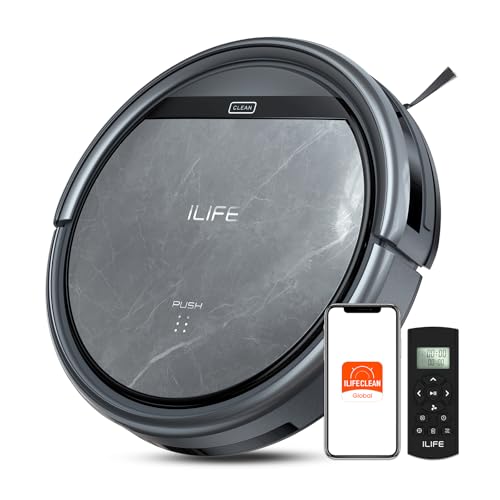
The V5s Max is ILIFE’s connected all-rounder at a value position: 4,000Pa suction, gyro navigation, control by 2.4G WiFi app, Alexa, or remote, self-charging, and a format the listing positions for hard floors, carpets, and pet hair. (The verified listing for this model describes vacuuming only, so we review it as a vacuum; buyers who need a confirmed mop function should take the Q7 L5 or A30 Pro, whose listings state it.) Gyro navigation is the honest middle technology: not a mapping LiDAR, but a systematic guidance that covers rooms in organized patterns rather than pure randomness, at a fraction of the flagship cost.
Strengths
- Four control routes — app, Alexa voice, remote, and onboard — the most flexible control set in this guide.
- Gyro navigation gives organized coverage at a value price, a real step above bump-and-go.
- Hard-floor positioning with pet-hair competence suits the tile-and-dog household exactly.
Trade-offs
- Gyro navigation builds no persistent map: no room selection, no no-go zones, no multi-floor memory.
- 4,000Pa is the mid figure here — plenty for tile’s surface grit, less margin for deep grout or carpet duty.
- App control requires 2.4 GHz WiFi per the listing; 5 GHz-only setups should take note.
Key specs (from the manufacturer’s listing): Suction: 4,000Pa · Navigation: gyro · Control: WiFi app (2.4G), Alexa, remote · Charging: self-charging · Surfaces: hard floors, carpets, pet hair
The V5s Max is for the buyer who wants to start the robot from the couch, the office, or the car — and who understands the trade they are making. What you give up versus LiDAR is memory: the V5s Max cleans today’s room well and remembers nothing tomorrow. What you keep is organized, app-scheduled, voice-startable cleaning at a price that lets a second robot for the other floor make sense. On tile, where the floor itself is forgiving and the rooms are usually the kitchen-bath-entry triangle, that trade lands well.
Best for: app and voice-control fans, single-floor tile homes, and value buyers wanting organized navigation. / Not suited for: buyers wanting maps, room targeting, or multi-floor memory.

ILIFE V10 Robot Vacuum Cleaner — Best Slim Anti-Tangle
The V10 pairs 5,000Pa suction and gyro navigation with the two features low-clearance homes care about: a slim body and a dual anti-tangle design, across a 120-minute runtime with remote control and scheduling. Tile floors live under low furniture — kitchen islands with toe-kick shadows, bathroom vanities, low-profile sofas in tiled living rooms — and the dust under them is the dust a tall robot never meets. The V10 is built to be the one that goes there.
Strengths
- Slim profile for under-furniture territory that taller LiDAR towers cannot enter.
- Dual anti-tangle design plus 5,000Pa suction: hair-managed pickup for pet and long-hair homes.
- 120-minute runtime with remote and schedule control — set it loose daily without an app account.
Trade-offs
- Gyro navigation, like the V5s Max, means no persistent maps or room targeting.
- Vacuum-focused model: buyers wanting a mop pass should choose the Q7 L5 or A30 Pro.
- Slim bodies carry smaller bins; daily-run homes will empty more often than station owners.
Key specs (from the manufacturer’s listing): Suction: 5,000Pa · Navigation: gyro · Runtime: 120 minutes · Design: slim, dual anti-tangle · Control: remote, scheduling, self-charging
Measure your furniture before you buy any robot: the gap under most sofas and vanities is a fixed number, and a robot either fits it or spends its life cleaning around the dustiest square footage in the house. The V10’s slimness, paired with anti-tangle brushing that keeps it effective in hair-heavy homes, makes it the under-furniture specialist of this guide. Its gyro coverage will not draw you a map, but on tile — flat, open, forgiving — systematic wandering with strong suction and a low body cleans remarkably completely, especially on a daily schedule where yesterday’s pass covers today’s gaps.
Best for: low-furniture homes, pet and long-hair households, and remote-control simplicity fans. / Not suited for: buyers wanting mapping or mopping.
ILIFE V2 Robot Vacuum Cleaner — Best Budget
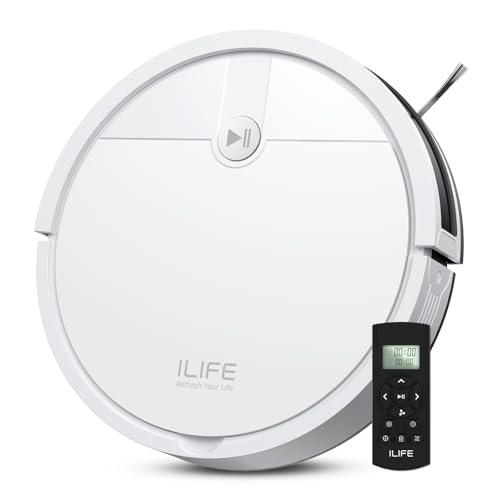
The V2 is the honest floor of this category: tangle-free suction, a 120-minute runtime, remote control with scheduling, a slim self-charging body, positioned for pet hair and hard floors. No app, no map, no mop claims — a robot you point at a tile floor and loose, the way the category began, at a price that makes a kitchen-and-bath robot a casual purchase rather than a project.
Strengths
- Tangle-free suction design: no brushroll to wrap with hair — the lowest-maintenance pickup style here.
- 120-minute runtime and scheduling at the budget end of the guide.
- Slim, self-charging, remote-controlled: zero apps, zero accounts, zero setup beyond the dock.
Trade-offs
- Basic navigation: coverage is opportunistic rather than systematic, so single passes can miss lanes that a second pass catches.
- Suction figure is not stated in the listing — expect class-typical budget performance, strong on tile’s surface dirt, modest elsewhere.
- No mopping, no app, no mapping: the simplicity is the product, and its limits are the price.
Key specs (from the manufacturer’s listing): Suction: tangle-free design (figure not stated) · Runtime: 120 minutes · Control: remote, scheduling · Charging: self-charging · Design: slim
The V2’s tangle-free design deserves a word, because it inverts the usual trade: without a brushroll, there is nothing for hair to wrap, which makes this the lowest-maintenance robot in the guide — and on smooth tile, where debris sits on the surface waiting to be inhaled rather than buried in pile, suction-port pickup works better than it has any right to. Run it daily on a schedule and its opportunistic coverage compounds into a consistently clean floor, the way daily light rain keeps a garden watered. For a first robot, a second-floor robot, or a gift for a tile-floored parent who will never open an app, the V2 is the right size of idea.
Best for: first-time robot owners, small tile areas, and app-free households. / Not suited for: buyers wanting maps, mops, or maximum single-pass coverage.
Comparison Table
| Pick | Badge | Key spec | Best for |
|---|---|---|---|
| Roborock Q7 L5 | Best Overall | 8,000Pa, LiDAR mapping, vacuum + mop | Large tile homes |
| ILIFE A30 Pro | Best Self-Emptying | 10,000Pa, LiDAR, 280-day self-empty, 150 min | Daily-run households |
| Roomba 105 Vac | Best Simple Brand-Name Pick | 7,000Pa, LiDAR, neat rows, vacuum only | Simple mapped cleaning |
| ILIFE V5s Max | Best App-Controlled Value | 4,000Pa, gyro nav, app/Alexa/remote | Connected value buyers |
| ILIFE V10 | Best Slim Anti-Tangle | 5,000Pa, slim, dual anti-tangle, 120 min | Low furniture, pet hair |
| ILIFE V2 | Best Budget | Tangle-free suction, 120 min, remote | First robot, small areas |
How to Choose a Robot Vacuum for Tile Floors
Choose navigation first, because on tile it is destiny. LiDAR robots — the top three picks — build a map, clean in rows, remember rooms, and let you send the robot to the kitchen alone after a flour incident. Gyro robots clean systematically but remember nothing, suiting single open areas run whole. Basic-navigation robots clean opportunistically and rely on frequency: run daily, they keep tile genuinely clean; run weekly, their misses show. Match the navigation to your floor plan’s complexity — many doors and rooms argue for LiDAR; one open kitchen-family space argues that gyro money is well saved.
Decide the mopping question honestly. If your tile life includes sticky kitchen film, bathroom splashes, and entry grime, a vacuum-and-mop model (the Q7 L5 or A30 Pro, whose listings state the mop function) folds the weekly damp pass into the daily routine — as maintenance mopping that prevents buildup, not as a substitute for ever scrubbing. If your tile is mostly dry dust and crumbs, a vacuum-only robot like the Roomba 105 or the ILIFEs V10 and V2 removes the pad-washing chores that quietly kill mopping robots’ usage. Then decide the emptying question: tile shows dust daily, so tile robots run daily, so bins fill fast — the A30 Pro’s self-emptying station is a lifestyle feature in this category, not a luxury.
Check the physical fit before the features. Measure the clearance under your lowest furniture and compare it with the robot’s height — LiDAR towers are the tallest bodies here, the slim ILIFEs the lowest. Look at your thresholds: tile-to-wood transitions, bathroom saddle strips, and rug edges on tile are small climbs most robots handle and a few stub on. Consider your grout: wide, deep grout lines reward stronger suction and effective brushwork, while polished large-format tile rewards gentle wheels and consistent rows. And if your tile is very dark, ask the listing’s Q&A about cliff-sensor behavior — dark surfaces occasionally read as drop-offs to infrared cliff sensors, the one tile-specific quirk worth confirming before purchase.
How to Run a Robot on Tile: A Routine That Keeps Grout Clean
Set the schedule before you judge the robot. Tile rewards frequency over intensity: a daily or every-other-day run at a consistent hour — while the house is empty or asleep — keeps grit from ever accumulating in grout lines, where it compacts and darkens. Before the first run, do the robot-proofing pass: lift cables, move the pet bowls to a mat, pick up bath mats you do not want climbed, and clear the small objects — socks, chargers, toy bricks — that tile’s openness invites and robots ingest. On mapping models, spend the setup evening on boundaries: keep the robot off the shag bath rug, out of the pet’s water corner, and focused on the tile zones that soil fastest.
Maintain the machine on tile’s schedule, which is a dust schedule. Empty the bin before it packs — suction falls as bins fill, and grout-line pickup is the first casualty. Pop the brush or suction port clear weekly in hair-bearing homes (daily runners in pet homes should check twice as often), wipe the cliff sensors and the front wheel monthly, and wash or replace mop pads per the maker’s guidance rather than letting a gray pad redistribute yesterday’s kitchen across today’s. Every few months, do the human pass the robot cannot: a stiff brush along the grout lines in the cooking zone and a real mop with fresh water. The robot’s job is to make that pass rare and easy, and a robot kept on this routine does exactly that.
Tile Is Not One Floor Either: Ceramic, Porcelain, Stone, and Vinyl
The word “tile” covers floors with different tempers, and a robot that suits one deserves a sentence about the others. Glazed ceramic and porcelain — the great majority of home tile — are the robot’s paradise: hard, smooth, sealed, and indifferent to wheels, brushes, and damp mopping. Porcelain’s density makes it the most forgiving surface in this entire guide. Natural stone asks for a little more respect: marble, travertine, and slate are softer or more textured, their grout sits deeper, and slate’s uneven face gives small wheels a busier ride — robots still work well on stone, but the daily-frequency strategy matters more, because grit ground into stone by foot traffic is the enemy and frequent light passes are the prevention. Textured and matte-finish tiles hold onto dirt more than glossy ones and reward the stronger suction picks, while luxury vinyl tile — not ceramic at all, but living in the same rooms and the same keyword searches — is softer underfoot, warmer, and fully robot-compatible, with the single caution that its surface prefers the gentler side of brush stiffness.
Grout deserves its own paragraph in any tile guide, because it is where tile floors age. Ungrouted lines do not exist, but unsealed grout might as well not: porous grout drinks spills and darkens in traffic lanes no matter what cleans the tile face. A robot’s contribution is prevention — removing the loose grit daily so it is never ground in — and that contribution is real but bounded. Sealed grout plus a daily robot is the combination that keeps a ten-year-old kitchen floor looking two; either one alone is half a strategy. If your grout is already darkened, no robot in this guide will restore it, and any product that promises otherwise is selling you the scrubbing it cannot do. Restore once, by hand or by professional, then let the robot keep the result.
Robots in a Mixed House: When Tile Meets Rugs, Thresholds, and Pets
Pure-tile homes are rarer than tile-floor shoppers: most have tile where the water is and rugs or wood where the living is, and the robot’s transitions become part of its job description. The mapping picks — the Roborock Q7 L5 above all — handle the mixed house best, because a map lets the machine treat surfaces as zones: full routine on the tile, appropriate behavior on the rugs, no-go lines at the shag bath mat. Gyro and basic robots handle transitions by simply crossing them, which works until it meets the three classic obstacles: the thick rug edge that a tired robot mounts halfway and begs rescue from, the bathroom threshold strip that becomes a nightly cliff-edge drama, and the pet’s water bowl, whose splash zone no robot should mop. A week’s observation cures most of this — watch the first runs, learn where your robot struggles, and adjust the furniture, the boundaries, or the schedule accordingly. Robot ownership is a collaboration, and the households that thrive with it are the ones that spend the first week teaching.
Pets deserve the final word in this section because tile-and-pet is the most common version of this search’s household. Pet hair on tile behaves differently than on carpet: it does not embed, it migrates — into corners, along baseboards, and into tumbleweed drifts under furniture that appear hours after a cleaning. Frequency is again the answer, and the anti-tangle designs in this guide (the Q7 L5’s dual system, the V10’s, and the V2’s tangle-free suction port) exist because pet homes wrap brushes faster than any other. Pair a daily schedule with an anti-tangle pick and the drifts never form; pair a weekly schedule with any robot and you will meet them at the baseboards, wondering why the expensive machine is losing to a broom. It is not losing. It is waiting to be run as often as tile and pets require.
The True Cost of a Clean Tile Floor: Consumables and Care Across the Six Picks
Every robot in this guide is the visible part of a small subscription, and tile households — who run their robots most — feel the subscription most. The honest ledger has four lines. Dust bags belong only to the self-emptying A30 Pro, whose listing’s 280-day figure with 5 included bags tells you the replacement rhythm to expect; the other five picks trade that cost for your minutes at the bin. Filters and brushes are universal: every robot here has a filter to replace on the maker’s schedule and a brush or suction path to clear weekly, and the anti-tangle designs reduce the second chore without abolishing it. Mop pads, on the Q7 L5 and A30 Pro, are washable consumables whose condition decides whether the mop pass cleans or merely wets — budget a spare set so one can dry while the other works. Batteries are the long line: a robot run daily cycles its battery hard, and over a multi-year horizon a mainstream brand’s battery availability is a genuine, if unglamorous, reason the Roomba and Roborock names carry weight in this guide.
None of this argues against buying; it argues for buying with the ledger open. The total cost of a tile robot is the machine plus a modest annual consumables allowance plus ten minutes of weekly care — and against that ledger stands the alternative: a human with a broom and a mop, daily, forever, at whatever your time is worth. For most tile households the robot wins that comparison in its first season. Choose the pick whose subscription shape fits your temperament — bags for the chore-averse, bins for the consumable-averse, pads for the mop-believers — and the machine you buy will be the machine still running, daily, when the grout thanks you for it.
Reading a Robot Vacuum Listing Like an Inspector
Robot listings reward a skeptical reader, and tile buyers should know the four places the truth hides. Suction figures, as this guide has noted, are each brand’s own measurement — compare them within a brand’s line with confidence and across brands with a shrug, and let navigation and design carry the cross-brand verdict. Runtime figures are best-case minutes on hard floors at standard power — genuinely achievable on tile, which is the kind surface, but worth discounting on any model you will run at maximum suction. Self-emptying durations, like the A30 Pro’s stated 280 days, assume the included bags and an average debris load; a shedding dog in shedding season writes its own schedule, and the honest reading is “months, plural” rather than a date circled in ink. And “mop” spans a spectrum from a dragged damp pad to a pressurized scrubbing system — the listings in this guide state the function, and this guide reviews it as maintenance mopping, because that is what the robots in this class, honestly described, provide.
The listings that deserve your trust are the ones that state their numbers the way the picks here do — a suction figure, a runtime, a navigation type, a capacity — and accept the questions those numbers invite. When a listing substitutes adjectives for figures at exactly the point a figure should be, believe the silence. It is the same standard this guide applied when the Roomba’s runtime and the V2’s suction went unstated: we printed the gap rather than filling it, because a buyer who knows what is unknown can ask, compare, and decide — and a buyer misled by a confident invention cannot.
Common Buying Mistakes
Chasing suction numbers. Pascal figures are measured under each brand’s own conditions and are not cross-brand laboratory data. On tile — where debris sits on the surface — navigation, brush design, and run frequency clean more floors than the largest Pa figure on a wandering robot.
Expecting mopping robots to scrub. Robot mops maintain; they do not restore. A neglected, sticky kitchen floor needs a human deep clean first, after which a mopping robot genuinely keeps it there. Buying one to avoid the initial scrub buys disappointment.
Ignoring the furniture gap. The dustiest tile in your home is under the sofa and the vanity. If the robot cannot fit there, that floor is yours forever. Measure first; the slim picks exist for this reason.
Skipping the dark-tile sensor check. Very dark tile and dark grout can trigger cliff sensors on some models, making the robot avoid whole areas. Confirm behavior for your exact floor before ordering — it is a two-minute question that saves a return.
Running weekly and judging harshly. Robots are frequency machines. A mid-range robot run daily will keep tile cleaner than a flagship run on Saturdays, because tile soils daily and visibly. Buy the robot your routine will actually run.
Final Recommendation
For most tile homes, the Roborock Q7 L5 is the complete answer: mapped rows, strong suction, anti-tangle brushing, and a mop pass in the same routine. If emptying the bin is the chore that would kill your routine, step to the ILIFE A30 Pro and its months-long self-emptying. Brand-loyal minimalists get the Roomba 105 Vac; app lovers on a budget get the ILIFE V5s Max; low-furniture homes get the slim V10; and first-timers get the V2’s honest simplicity. Tile is the kindest surface a robot can meet — choose by navigation, mopping, and emptying, and any of the six will keep it visibly, daily clean. Then do the one thing no specification can do for you: actually run it, every day, on a schedule set once and forgotten. The cleanest tile floor in any neighborhood belongs not to the most expensive robot, but to the one that was loose on the floor this morning while its owner drank coffee and read the news, in a kitchen that stays clean by routine rather than by effort, week after week, season after season.
Related robot guides in this series: Best Robot Vacuums For Bare Floors, Best Robot Vacuum For Hardwood Floors And Area Rugs, Best Robot Vacuums For Wood Floors, Best Robot Vacuums Mops, and Best Robot Vacuums Under $300.
Frequently Asked Questions
Will a robot vacuum scratch my tile floors?
Tile and its glaze are harder than the wheels and brushes of the robots in this guide, and routine robot use is a standard, safe practice on ceramic and porcelain tile. The realistic risks are indirect: grit trapped in a dirty front wheel can mark softer surfaces the robot also crosses, and dragging a robot by hand with debris under it can scuff. Keep wheels and brushes clean — the maintenance routine in this guide — and tile is the safest floor a robot can work on.
Can robot vacuums clean grout lines?
They clean grout the way they clean everything: by passing suction and brush over it, repeatedly. Loose grit in grout lines is picked up well by strong-suction models with effective brushes, especially on a daily schedule before debris compacts. What robots do not do is scrub stained or sealed-in grout discoloration — that is a brush-and-cleaner job for a human, needed occasionally, and needed far less often when a robot keeps loose grit from ever settling in.
Is a vacuum-and-mop robot worth it for tile?
For kitchens, entries, and bathrooms — the tile rooms that get wet-dirty — yes, as maintenance. A mopping pass after vacuuming lifts the film that dry cleaning leaves, and doing it daily prevents the buildup that eventually demands scrubbing. It is not worth it if your tile is in low-soil rooms, or if you know your household will not wash pads and refill tanks; a vacuum-only robot that actually runs beats a combo that gets retired to a closet.
Why does my robot avoid my dark tile?
Most likely its cliff sensors. Those infrared sensors detect drop-offs by reflected light, and very dark surfaces absorb the signal and can read as a void. It is model- and floor-specific, which is why this guide tells you to confirm behavior for dark tile before purchase. Where it occurs, manufacturer guidance and sensor-cleaning are the first steps; persistent cases are a reason to choose a model whose owners report dark-floor competence.
How often should a robot run on tile?
Daily or every other day is the rhythm tile rewards. Tile shows dust immediately and its grout collects grit continuously, so frequency is what converts a robot from a gadget into clean floors. All six picks here support scheduling or daily manual starts, and the self-emptying A30 Pro exists precisely because daily running fills bins at a pace that makes manual emptying the weak link.
Will a robot vacuum fall down my stairs?
The robots in this guide carry cliff sensors — infrared sensors at the front underside that detect drop-offs and stop the machine at edges, which is why they can work upstairs landings and lofts safely. The honest caveats are the ones this guide has raised elsewhere: keep the sensors wiped clean, because a dust-filmed sensor is a blind one, and remember that very dark flooring can occasionally confuse this sensor type. On a normal tiled upper floor with clean sensors, stair falls are a solved problem; the robot will approach the edge, read it, and turn away, every run.
LiDAR or gyro navigation — does it matter on tile?
It matters in proportion to your floor plan’s complexity. LiDAR’s maps, rows, and room targeting shine in multi-room tile layouts and let you clean one room on demand. Gyro navigation covers a single open area systematically and costs much less. On one open kitchen-family space, gyro owners lose little; across a whole tiled ground floor with many rooms, LiDAR’s memory is worth its premium every single run.