Disclosure: airfryerkitchensupply.com is reader-supported. When you buy through links on our site, we may earn an affiliate commission at no extra cost to you.
Where to buy
Studio mixers are sold through Amazon both as standalone consoles and in dealer bundles that add cables, headphones, or covers. The bundles are worth comparing, but price the bare console first so you know what the extras actually cost you. All six picks below were confirmed as live Amazon listings when this guide was prepared.
- Solid State Logic BiG SiX — check price on Amazon
- Tascam Model 12 — check price on Amazon
- Soundcraft Signature 22MTK — check price on Amazon
- Mackie Onyx16 — check price on Amazon
- PreSonus StudioLive AR8c — check price on Amazon
- Allen & Heath ZEDi-10FX — check price on Amazon
The best studio mixers are not the mixers with the most channels — they are the ones whose way of working matches how you actually make records. The modern studio mixer has split into three species. There are hybrid consoles like the SSL BiG SiX that exist to give a DAW-based studio an analog front end, analog summing, and hands-on control in one rack-width box. There are recorder-mixers like the Tascam Model 12 that put a multitrack recorder inside the console so a band can capture a rehearsal or a demo without a computer ever waking up. And there are the multitrack-USB analog boards from Soundcraft, Mackie, PreSonus, and Allen & Heath, which look like traditional live mixers but quietly send every channel to your DAW separately. All three species are in this guide, because “studio” now means everything from a spare-bedroom production desk to a working commercial room, and each species wins somewhere.
What has not changed is the hierarchy of what matters. Preamps and conversion get your sound into the system; routing decides what you can do with it; and the surface — faders, knobs, and how much of the mixer works without a mouse — decides whether you enjoy using it for the next decade. Channel count comes fourth, and effects come last, because plug-ins have made onboard effects the least important part of a studio board. Buy in that order and you will not be disappointed.
In this guide
Quick Picks
- Best Overall — Solid State Logic BiG SiX: A SuperAnalogue hybrid console and USB interface that gives a DAW studio real analog summing, the famous SSL bus compressor lineage, and monitor control in one unit. Check the current price on Amazon
- Best for DAW-less Multitrack Recording — Tascam Model 12: A 12-track mixer, recorder, USB interface, and DAW controller in one — record the band to SD card with no computer in the room. Check the current price on Amazon
- Best Multitrack Value for Larger Setups — Soundcraft Signature 22MTK: Twenty-two channels of analog mixing with multitrack USB recording and Lexicon effects — the big-board experience at a project-studio tier. Check the current price on Amazon
- Best for Project Studios — Mackie Onyx16: Sixteen channels, Onyx preamps, and multitrack USB in a board that also handles small live jobs without complaint. Check the current price on Amazon
- Best Compact Hybrid — PreSonus StudioLive AR8c: A small analog mixer with a USB-C multitrack interface and Studio One integration, sized for a songwriter’s desk or a compact production rig. Check the current price on Amazon
- Best Small-Format for Songwriters — Allen & Heath ZEDi-10FX: A compact hybrid mixer and 4×4 USB interface with studio-quality effects, from a company whose small mixers are a byword for build quality. Check the current price on Amazon
How These Picks Were Chosen
A studio mixer in 2026 must earn its desk space against a strong default: a good audio interface plus a DAW. So every pick here had to do something an interface alone does badly — sum signals in analog, record without a computer, give a band hands-on control of a cue mix, or put real faders and EQ under fingers during tracking. Pure live-sound boards with only a stereo USB output were excluded unless their multitrack capability was genuine, because a stereo-only board adds a large surface to a studio while sending the DAW the same two channels an interface would.
Each product and ASIN was verified against Amazon’s catalog before linking, and the spec boxes quote only what the verified listings and manufacturers state about these exact models. We do not print prices or review counts, which drift too fast to be honest in print. We also weighted long-term support: studio mixers are decade purchases, so driver maintenance and the manufacturer’s track record with firmware mattered as much as launch specifications. Where a famous name’s current model could not be confirmed on Amazon, it was left out rather than linked on faith.
The 6 Best Studio Mixers

Solid State Logic BiG SiX — Best Overall
The BiG SiX exists for one specific, very common studio: a producer working in a DAW who wants the sound and the physical control of an analog console without buying a full-size desk. It suits hybrid studios — part computer, part hardware — that track through quality preamps, mix with plug-ins, and then want their mix bus to pass through genuine analog summing and an SSL-style bus compressor on the way out. It does not suit a band that needs to record sixteen microphones at once; that is a different product category entirely, and pretending otherwise wastes everyone’s money.
Strengths
- SuperAnalogue signal path with SSL’s console heritage: the summing bus and bus compressor give DAW mixes the cohesion engineers buy large consoles for, in a desktop footprint.
- A proper USB interface built in, so the console is simultaneously the studio’s front end, summing mixer, and monitor controller — three boxes replaced by one.
- Monitor section and talkback facilities that small interfaces chronically skimp on, which matters every single session.
Trade-offs
- Premium tier, unambiguously — this is a considered purchase, not an impulse upgrade.
- Channel count is modest by design; it is a mix-and-track hub for produced music, not a live-band capture desk.
- Its value only materializes in a hybrid workflow; a purely in-the-box producer gains little over a good interface.
Key specs (from the verified listing): SuperAnalogue mixing console · USB audio interface · hybrid desktop format.
The deeper case for the BiG SiX is ergonomic as much as sonic. Mixing with a mouse one parameter at a time teaches you to mix with your eyes; a console puts the balance, the bus compressor, and the monitor level under your hands at once, and engineers consistently report finishing mixes faster and second-guessing less. The smaller SSL SiX (also verified on Amazon) distills the same idea into a compact desktop mixer for studios that need the flavor in fewer channels. If your studio’s bottleneck is that everything sounds fine but nothing sounds finished, this is the pick in this guide aimed precisely at you. Check the current price on Amazon
Best for: hybrid DAW studios, producers mixing their own records, rooms adding analog summing / Not suited for: high-channel-count band recording, tight budgets

Tascam Model 12 — Best for DAW-less Multitrack Recording
The Model 12 revives an idea Tascam pioneered with the Portastudio and updates it properly: a mixer that is also a 12-track recorder and a USB interface and a DAW controller, selectable by the job in front of you. It suits bands and songwriters who want to press record in a rehearsal room with no laptop, no updates, and no driver dialogs — and engineers who want a tactile surface when they do return to the DAW. It does not suit studios that need more simultaneous inputs for full drum kits with elaborate mic arrays.
Strengths
- True multitrack recording to SD card inside the mixer, so sessions happen anywhere the band can plug in.
- One-knob-per-function analog layout — the learning curve is measured in minutes, which is why these boards get used instead of admired.
- Triples as a USB multitrack interface and DAW control surface, so it stays useful as a studio grows around it.
Trade-offs
- Twelve tracks is a real ceiling for ambitious productions; plan your drum miking accordingly.
- Editing on the unit is basic by design — serious editing still happens in a DAW.
- Its channel EQ and effects are workmanlike rather than the BiG SiX’s raison d’être.
Key specs (from the verified listing): 12-track digital multitrack mixer/recorder · USB audio interface · DAW controller.
What the Model 12 understands is that the best recording is the one that happens. Bands lose songs to friction — the laptop that needed an update, the interface driver that vanished — and a console that records by pressing one button removes that friction entirely. Rehearsals become demos, demos become references, and the keeper performances stop evaporating. For a project studio whose computer is aging or shared, it also decouples recording from the machine entirely. It is the most musician-shaped product in this guide. Check the current price on Amazon
Best for: bands, rehearsal-room recording, songwriters who hate computers at capture time / Not suited for: large drum productions, studios needing deep onboard editing
Soundcraft Signature 22MTK — Best Multitrack Value for Larger Setups
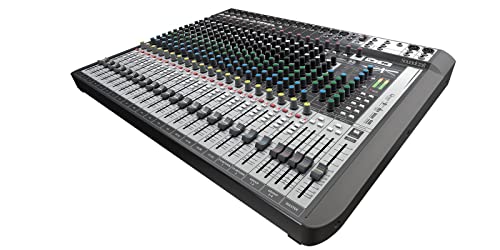
The Signature 22MTK is the traditional choice scaled up honestly: twenty-two channels of Soundcraft analog mixing, multitrack USB so every channel lands in the DAW separately, and Lexicon effects onboard. It suits project studios that record full bands, podcast networks with big panels, and houses of worship that record services — anyone whose input list genuinely runs long. It does not suit a desktop producer, for the simple reason that it will not fit on the desktop; this is a console that wants a stand, a rack case, or a dedicated table.
Strengths
- Real channel count with multitrack USB — track a full band live, then mix the separate channels later in the DAW.
- Soundcraft’s Ghost preamps and Sapphyre EQ carry a genuine studio lineage at this tier.
- Onboard Lexicon effects mean a vocal reverb for the cue mix without spending DAW resources or latency.
Trade-offs
- Physically large; measure your room before falling for the channel count.
- Analog workflow means mixes are performed, not recalled — total recall belongs to digital consoles and DAWs.
- More channels than most home studios will ever patch; unused inputs are not a bargain.
Key specs (from the verified listing): 22-channel analog mixer · multitrack USB recording · onboard Lexicon effects.
The 22MTK’s quiet superpower is that it removes the input-count anxiety from session planning. A band arrives with two guitars, keys in stereo, five drum mics, bass DI, and three vocals, and the answer is simply “yes” — with channels left over. That headroom is what separates a studio board from a compromise. The newer Signature Plus 22 (verified on Amazon with USB-C and Lexicon FX) updates the same formula; the MTK remains the multitrack value benchmark of the line. Buy it when your sessions, not your aspirations, fill twenty channels. Check the current price on Amazon
Best for: full-band tracking, larger project studios, recorded live services / Not suited for: desktop producers, small rooms

Mackie Onyx16 — Best for Project Studios
The Onyx16 sits in the productive middle: sixteen channels, Mackie’s respected Onyx preamps, multitrack USB recording, and a build meant to travel between studio and small-stage duty. It suits the project studio that records drums and bands on weekends and perhaps runs a small live rig occasionally — a dual life the BiG SiX and Model 12 are not shaped for. It does not suit buyers chasing analog summing character; its personality is clean, capable neutrality, which many engineers honestly prefer.
Strengths
- Multitrack USB at a tier where many rivals still offer stereo only — every channel reaches the DAW separately.
- Onyx preamps with a long, trusted record across Mackie’s line, plus Perkins-style EQ with a musical reputation.
- Bluetooth streaming input and SD recording options on the Onyx line make quick references and playback painless.
Trade-offs
- Neutral rather than characterful — engineers wanting console color should look at the SSL picks.
- Sixteen channels is generous for a home studio and insufficient for a big live rig; it is a deliberate middle.
- Like all analog boards here, no mix recall — document your settings with photos if a mix must be revisited.
Key specs (from the verified listing): 16-channel premium analog mixer · multitrack USB.
Mackie’s pitch with the Onyx series is professional competence without drama, and for a working project studio that is frequently the correct pitch. Sessions run, files land in the DAW in separate tracks, the board shrugs off being moved, and nothing about the workflow demands the manual weekly. It is also the natural upgrade path for owners of smaller Mackie boards who need multitrack capture without changing their mental model of the mixer. Competence, here, is the feature. Check the current price on Amazon
Best for: project studios tracking bands, studio/live dual duty, Mackie owners stepping up / Not suited for: analog-color seekers, very large sessions

PreSonus StudioLive AR8c — Best Compact Hybrid
The AR8c is the smallest expression of the hybrid idea: an analog mixer with a USB-C multitrack interface inside, bundled into the PreSonus ecosystem with Studio One software. It suits singer-songwriters, small podcast-and-music hybrids, and compact production desks where two to four real inputs cover every session. It does not suit band tracking — eight channels with fewer mic preamps fills up the moment a drum kit appears, and buyers should count preamps, not just channels, on every board in this guide.
Strengths
- USB-C multitrack recording in a genuinely compact body — the full hybrid workflow on a small desk.
- Studio One integration shortens the path from plugging in to recording for new engineers.
- Analog immediacy: gains, EQ, and levels are physical, with no menu between you and a fix mid-take.
Trade-offs
- Input count is the ceiling of your ambitions; growing studios will replace rather than expand it.
- Its ecosystem pull toward PreSonus software is a plus inside that world and a shrug outside it.
- Onboard effects are utility-grade next to the Lexicon and SSL offerings here.
Key specs (from the verified listing): analog mixer with USB-C multitrack interface · bundled Studio One Pro software (per listing).
Small hybrid mixers live or die on whether they disappear into the writing process, and the AR8c’s virtue is speed: guitar, vocal, a stereo synth, a drum machine — patched once, leveled once, and every idea gets captured multitrack without a routing seminar. For a songwriter’s room, that frictionless capture is worth more than another eight channels gathering dust. Buy it for the sessions you actually have weekly. Check the current price on Amazon
Best for: singer-songwriters, compact production desks, Studio One users / Not suited for: full-band tracking, large podcast panels
Allen & Heath ZEDi-10FX — Best Small-Format for Songwriters
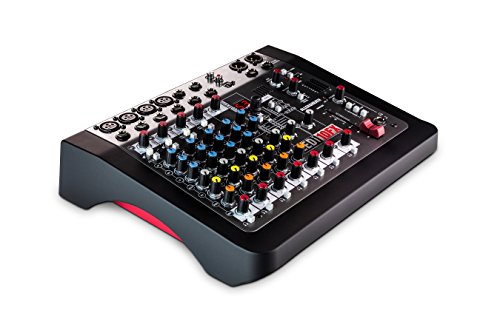
The ZEDi-10FX is the connoisseur’s small mixer: a compact hybrid board and 4×4 USB interface with Allen & Heath’s effects and a build quality that makes rival small mixers feel like toys. It suits a solo artist or duo who records guitar and voice, wants a genuinely good reverb in the headphones while tracking, and values an instrument that will still feel tight in ten years. It does not suit anyone whose input list is growing — four-by-four USB and a handful of channels is a deliberate, finished size.
Strengths
- Allen & Heath build and feel — the faders, pots, and chassis are the class standard at this size.
- Sixty-one studio-quality effects per the verified listing, including the reverbs and delays a tracking vocalist actually wants in the cue mix.
- Guitar DI inputs designed for direct recording, acknowledging how singer-songwriters actually work.
Trade-offs
- The 4×4 USB ceiling means grouped or many-source recording is off the menu.
- Per-channel cost is high — you are paying for quality and effects, not quantity.
- No onboard multitrack recording; the computer is always part of the session.
Key specs (from the verified listing): compact hybrid mixer · 4×4 USB interface · 61 studio-quality FX.
There is a type of buyer the ZEDi-10FX serves perfectly: the one who has stopped expanding. A finished, small, excellent rig — voice, guitar, a stereo source, great effects, flawless feel — beats a sprawling mediocre one for the artist who records the same intimate format every week. Allen & Heath’s small mixers also hold value and stay repairable, which matters at decade horizons. Buy small and excellent when small is truly your format. Check the current price on Amazon
Best for: solo artists and duos, guitar-vocal recording, quality-first small rigs / Not suited for: bands, expanding studios, DAW-less recording
Comparison Table
| Pick | Badge | Key spec | Best for |
|---|---|---|---|
| Solid State Logic BiG SiX | Best Overall | SuperAnalogue console + USB interface, analog summing | Hybrid DAW studios |
| Tascam Model 12 | Best for DAW-less Multitrack Recording | 12-track recorder, mixer, interface, DAW controller | Bands and rehearsal recording |
| Soundcraft Signature 22MTK | Best Multitrack Value for Larger Setups | 22 channels, multitrack USB, Lexicon effects | Full-band project studios |
| Mackie Onyx16 | Best for Project Studios | 16 channels, Onyx preamps, multitrack USB | Studio/live dual duty |
| PreSonus StudioLive AR8c | Best Compact Hybrid | Compact analog mixer, USB-C multitrack | Songwriters, small desks |
| Allen & Heath ZEDi-10FX | Best Small-Format for Songwriters | 4×4 USB interface, 61 studio FX | Solo artists and duos |
How to Choose a Studio Mixer That Fits Your Way of Recording
Start with your capture method, because it eliminates most of the shelf. If you record to a computer, the mixer must send multitrack audio over USB — verify “multitrack” explicitly, since many analog boards send only the stereo mix, which turns an expensive console into a very large two-channel interface. If you want to record without a computer, your choice narrows to recorder-mixers like the Model 12. If you mostly mix in the DAW and want analog character on the way out, you are shopping for a summing-capable hybrid like the BiG SiX, and channel count barely matters. Naming your capture method honestly is worth more than any spec comparison that follows.
Count microphone preamps, not channels. A “22-channel” mixer may offer ten or twelve microphone inputs, the rest being stereo line channels for keyboards and returns. A drum kit alone can consume eight preamps. List every microphone you will ever use simultaneously — kit, amps, vocals, room mics — and require the board to cover that list with one or two spare. Line channels are cheap to add later with a small submixer; preamps are not.
Decide how you will monitor. Tracking lives or dies on the cue mix: what the singer hears while recording. Boards with flexible aux sends let you build a headphone mix with reverb on the voice and the click exactly where the drummer wants it, independent of the control-room balance. Hybrid consoles with a dedicated monitor section, like the SSL, treat this as a first-class job. If you record other people — not just yourself — monitoring flexibility outranks almost everything else on the spec sheet.
Think about recall before you need it. Analog mixers sound wonderful and remember nothing. If your work involves returning to mixes days later — client revisions, episodic content, film cues — you will either document settings obsessively or mix in the DAW and use the console for tracking and summing. Many hybrid studios do exactly that: the board shapes sound on the way in and glues it on the way out, while automation and recall live in the computer. Choose the division of labor deliberately instead of discovering it mid-project.
Budget by tiers and buy the workflow, not the badge. Entry tier buys compact hybrids (AR8c, ZEDi-10FX) that make small rooms fast and musical. Mid tier buys multitrack band boards (Onyx16, Signature 22MTK, Model 12) that differ mainly in whether the recorder or the computer leads. Premium tier buys console character and monitor control (BiG SiX). Across all tiers, leave budget for the unglamorous essentials: a proper stand or desk space, balanced cables for every channel you own, and a headphone amplifier if your cue mixes multiply. A mid-tier board fully cabled beats a premium board half-patched, every session.
How to Set Up a Studio Mixer for Your First Tracking Session
Patch the studio once, properly, and leave it patched. Connect your microphones to the lowest-numbered preamps in the order you think about them — kick, snare, overheads, then instruments, then vocal — and label every channel with tape and a marker; future-you, mid-session, will be grateful. Set the mixer’s USB mode to multitrack and confirm in your DAW that each channel arrives on its own track, named to match the tape labels. Build the headphone cue from an aux send, not from the main mix: the performer needs their own balance, usually with more of themselves and a touch of reverb, and it must not change when you adjust the control-room faders to listen critically. Set input gains with the loudest passage the musician will play, watching the DAW meters peak safely below zero, then resist touching gains mid-take — ride the cue and monitor levels instead, so takes stay consistent for editing. Record thirty seconds, play it back on both your monitors and a phone or car speaker, and fix placement and gain before the real takes. Finally, save the session as a template — DAW file, a photo of the console, and a note of microphone positions — because the second session should start where the first one ended, not from a blank desk.
Analog Summing: What It Can and Cannot Do for Your Mixes
Summing mixers and hybrid consoles like the BiG SiX attract equal parts devotion and skepticism, so here is the honest version. Sending DAW subgroups — drums, instruments, vocals, effects — through separate analog channels and combining them in the analog domain does change the sound: transformers and discrete circuitry add subtle harmonic weight, stereo imaging often feels more stable, and a good bus compressor glues subgroups in a way engineers describe as the mix “sitting down.” What summing cannot do is fix a bad balance, rescue a muddy arrangement, or substitute for monitoring you trust. The engineers who swear by summing are typically excellent mixers whose in-the-box mixes were already strong; the console is their final few percent, not their foundation. If your mixes are still developing, spend on monitoring, room treatment, and a multitrack board that lets you record more and better — then let a summing-capable console be the reward a mature studio buys itself. That sequencing is why the BiG SiX tops this guide for hybrid studios while the multitrack boards top it for everyone still building theirs.
Cue Mixes, Talkback, and the Session Skills a Mixer Should Make Easy
Amateur studios obsess over capture specs; working engineers obsess over communication. A session flows when the engineer can speak to the performer through the headphones without stopping the take, when the singer can ask for more of themselves without describing faders, and when a second pair of headphones for a producer or a second performer takes thirty seconds to arrange. This is why the monitor and aux architecture of a studio mixer deserves as much scrutiny as its preamps. Before buying any board here, trace one scenario on paper: a vocalist tracking to a stereo backing track while you listen on monitors. Where does the backing track enter? Which knob builds the singer’s headphone mix? How do you add reverb to the headphones only, so the singer performs confidently while the recorded track stays dry and flexible? Where is the talkback, and if there is none, what is your workaround — a spare channel with a cheap mic and a mute you ride by hand is the classic one. Every pick in this guide can solve that scenario, but they solve it with different amounts of grace: the BiG SiX was designed around it, the multitrack boards solve it with aux sends, and the compact hybrids solve it simply because the scenario is small. Studios that record other people should rehearse this scenario before the first client arrives; studios that record only themselves can weigh it lightly and buy for sound and speed instead.
Talkback has a second, quieter benefit: it keeps performances relaxed. Singers sing better when the voice from the control room sounds close and kind rather than shouted through a door between takes. Engineers who build that communication path into the desk — and use it to encourage rather than only to correct — get better takes from the same performers and the same microphones. It is the least spec-sheet-friendly feature in this entire guide and one of the most valuable.
When to Step Beyond a Console: Rack Systems and Digital Desks
Some studios outgrow every product in this guide, and it is worth knowing what the next step looks like so you can recognize it honestly. When sessions regularly exceed twenty-four inputs, when multiple rooms need networked audio, or when recall of complete mixes becomes a daily client requirement, the answer is a digital console or a rack-based system with remote-controlled preamps — the world our companion guide to PreSonus rack systems explores from one manufacturer’s angle. Those systems trade the analog board’s immediacy for total recall, remote control from a tablet at the drum kit, and expansion over a network cable. They also trade away the simple pleasure of a surface that works with the computer off. Most project studios never truly need that step; the multitrack boards here will record a band superbly for a decade. Take the step when a specific, recurring session problem demands it — inputs you cannot cover, mixes you cannot reconstruct — rather than when a product launch makes the current desk feel old. Desks do not become obsolete the way phones do; they become insufficient only against real requirements.
Keeping a Studio Mixer Alive for a Decade
Analog consoles rarely die dramatically; they fade — a scratchy fader here, an intermittent channel there, a pot that crackles when the room is cold. Most of that decline is preventable with unglamorous habits. Keep the board covered when the studio is idle, because dust is the primary enemy of faders and rotary pots, and a simple fabric cover costs less than one hour of bench time. Exercise the controls monthly: sweep every fader and pot through its full travel a few times, which wipes the contact surfaces clean in the way they were designed to be maintained. Work connectors gently and support heavy cables so their weight does not hang from the jacks for years; strain at the socket is the second great killer of channels. If a control does become scratchy, the correct response is a proper contact cleaner applied by someone who knows the board, or a technician — not a random lubricant sprayed hopefully into the surface, which fixes a surprising number of nothing and ruins a predictable number of faders. Keep the firmware and drivers of the digital side current, but update between projects, never the night before a session, and keep the previous installer somewhere safe. Finally, photograph your patchbay and channel layout once a year. Studios evolve by accretion, and the engineer who can reconstruct last year’s routing from a photo is the one whose ten-year-old console still earns money. Treated this way, every board in this guide is a decade purchase, which is precisely how its price should be judged — per year of service, not per feature at launch.
Outboard Gear, Inserts, and Growing Around the Console
A studio mixer earns its keep for a decade partly by how gracefully it accepts company. The growth path usually looks like this: first one good outboard compressor or preamp for the lead vocal, then a favorite reverb or a pair of channels of EQ, and suddenly the question is where those boxes connect. Channel inserts are the classic answer — they let an external compressor process one channel before it reaches the fader, which is exactly where tracking compression belongs. Subgroup and main inserts serve mix-bus processing. Boards differ in how many of these access points they provide, and hybrid consoles like the BiG SiX assume outboard integration from the start, with inserts on the channels and the mix bus where engineers actually use them. When you shop, trace your likely first outboard purchase into the board: if the vocal chain you dream about cannot be inserted where it belongs, the console will fight your growth instead of hosting it.
A patchbay is the second growth step, and the one that separates studios that experiment from studios that settle. With the mixer’s key ins and outs and your outboard normalized through a bay, trying the expensive compressor on the bass instead of the vocal becomes a ten-second patch rather than a crawl behind the desk — and experiments that are easy are the ones that happen. You do not need the bay on day one. You need a console with enough access points that the bay, when it arrives, has something to organize. Buy the board for the studio you are becoming, within the budget of the studio you have: that balance is the whole art of this purchase.
Common Buying Mistakes
- Buying a stereo-USB board for multitrack work. The listing says “USB interface” and the buyer assumes per-channel recording. Confirm multitrack explicitly — every pick in this guide was chosen with that test applied.
- Counting channels instead of preamps. Stereo line inputs do not hold microphones. Your simultaneous-mic list is the number that matters.
- Letting the mixer outgrow the room. A 22-channel console in a bedroom eats the desk, the budget, and the patience. Buy for the room you have this year.
- Expecting onboard effects to replace plug-ins. Board effects are for cue mixes and convenience. Your mix effects will live in the DAW, and that is fine.
- Ignoring driver support history. A studio mixer is a ten-year purchase whose USB half ages in dog years. Manufacturers with a record of updating drivers earn the premium, and their support pages are worth ten minutes of reading before the order, not after the first incompatibility.
- Skipping the stand, cables, and cue system in the budget. The console is the middle of the purchase, not the whole of it.
- Judging a mixer in a noisy showroom or a thirty-second demo. Bring your own session files, your own headphones, and your most familiar recording; a board reveals itself against material you know by heart, not against a demo loop designed to flatter it.
Final Recommendation
For the hybrid studio that defines modern production — DAW at the center, hardware around it — the SSL BiG SiX is the best studio mixer in this guide: it is the front end, the summing bus, and the monitor controller in one serious unit. Bands and writers who want recording without a computer should buy the Tascam Model 12 and enjoy how often it gets used. Project studios tracking full bands on a sensible budget split by size: the Soundcraft Signature 22MTK when sessions run long, the Mackie Onyx16 when the board must also travel. Small rooms should choose between the PreSonus StudioLive AR8c for ecosystem speed and the Allen & Heath ZEDi-10FX for build and effects — both are finished, honest tools for the format they serve.
Related reading for the rest of the room: Best Streaming Mixers, Best Summing Mixers, Best Thunderbolt Mixers, Best Analog Mixers, and Best Studio Rack To Go With Presonus Mixers.
Frequently Asked Questions
Do I still need an audio interface if my mixer has USB?
Not for the mixer’s own channels — a multitrack-USB mixer is an interface. You might still keep a small interface for mobile work or for inputs beyond the board’s count, but the studio’s core capture runs through the console. The exception is stereo-only USB boards, which is why this guide insists on confirming multitrack before buying.
How many channels does a home studio really need?
Most home studios record one to four sources at a time and would be honest with eight to twelve channels. Full drum kits change the math: a kit plus bass, guitar, and a scratch vocal can reach twelve preamps quickly. Count your largest realistic session, add two, and buy that — not the largest session you can imagine. Also remember that a mixer lives at the center of a web of cables, stands, and cases; the true cost of stepping up a size class includes all of that web growing with it, which is one more reason the right-sized board is the professional choice rather than the timid one.
Analog or digital studio mixer?
Analog boards offer immediacy, character, and no menus, at the cost of recall. Digital consoles offer total recall, deep processing, and scene memory, at the cost of a learning curve and dependence on software support. Hybrid studios increasingly split the difference: analog or hybrid boards for tracking and summing, DAW for recall. This guide covers the analog and hybrid side, which suits project and production studios best. One more consideration: digital consoles age on software timelines, while analog boards age on mechanical ones — and mechanical aging is slower, more predictable, and repairable by any competent technician long after a manufacturer has moved on.
What is the difference between a studio mixer and a live mixer?
Live mixers prioritize many inputs, ruggedness, and outputs for PA systems and monitors; recording is secondary. Studio mixers prioritize preamp and conversion quality, multitrack recording, cue flexibility, and monitor control. Some boards, like the Onyx16 and Signature 22MTK, genuinely serve both — but a live-only board with stereo USB is a poor studio centerpiece.
Can a studio mixer improve the sound of my DAW mixes?
Yes, in a specific way: routing subgroups out through a quality analog summing path and bus compressor, as the BiG SiX is built to do, adds cohesion and subtle harmonic character. It will not fix balance or arrangement problems. Treat summing as the last few percent of a mix that is already working, and it earns its keep. Our dedicated guide to summing mixers goes deeper on the standalone options if you want that character without replacing your console.
What should I plug in first when the mixer arrives?
Resist the urge to patch everything at once. Start with one microphone and your monitors, confirm clean capture and playback, then add sources one at a time — each new connection verified before the next is added. Studios are debugged the way they are built: incrementally. An hour of this discipline on day one prevents the intermittent fault that otherwise haunts the room for months, because every cable and channel in the finished rig was proven individually on the way in. Keep a notebook — physical, in the room — of what is patched where; the studio’s memory should not depend on any one person’s.
How long should a studio mixer last?
A well-built analog or hybrid console should serve a decade or more; faders and pots may eventually want servicing, which established brands support. The digital half — USB drivers and companion software — is the aging risk, so favor manufacturers with a visible record of updates for older products.
Should I buy a used large-format console instead?
Sometimes — a used professional console can offer channel count and sound that no new board at the same money matches. But go in clear-eyed: shipping a large desk is expensive, recap and service histories vary wildly, power supplies are the usual failure point, and you will likely need a separate multitrack interface anyway since most older consoles predate USB multitrack entirely. For a studio with a technician’s mindset and a strong back, used is a legitimate path. For a studio that needs to make a record this month, the new boards in this guide — warrantied, USB-native, and sized for real rooms — are the safer professional choice.


