Disclosure: airfryerkitchensupply.com is reader-supported. When you buy through links on our site, we may earn an affiliate commission at no extra cost to you.
Where to buy
For best digital tablet mixers, start here: A tablet mixer is a stage box plus your screen, so judge listings on preamp count, aux buses for monitors and control reliability — the tablet you already own is the surface. Every linked pick below was matched by brand and model against Amazon’s catalog before this guide was written, so the product you land on is the product described. Linked picks say “check price on Amazon” because live pricing changes too often to print honestly. Any pick marked as unlinked is a real product without a stable listing-confirmed Amazon listing; it is described in full, with no purchase link, rather than swapped for a weaker substitute.
Behringer X AIR XR18 (Best Overall): Check on Amazon — check the current price on Amazon.
Soundcraft Ui24R (Best for Recording and Browser Control): Check on Amazon — check the current price on Amazon.
Midas MR18 (Best Preamps): Check on Amazon — check the current price on Amazon.
Mackie DL16S (Best App Experience): Check on Amazon — check the current price on Amazon.
Behringer X AIR XR16 (Best for Small Bands): Check on Amazon — check the current price on Amazon.
Behringer X AIR XR12 (Best Budget): Check on Amazon — check the current price on Amazon.
Introduction: what actually matters here
The best digital tablet mixers all make the same promise — a complete mixing system in a box that sits on stage, controlled from the tablet in your hands — and differ in the details that decide real gigs: how many microphones they can actually take, how many monitor mixes they can feed, whether they record, and how gracefully their control apps behave when the venue fills with phones. This guide compares the six that matter, all verified against Amazon’s catalog.
Understand the format’s bargain before you buy. You gain a rig that fits in a small case, sets up in minutes, stores every setting and costs a fraction of an equivalent console. You give up physical faders and accept a screen as your surface — which is why the network advice in this guide is not decoration. Every owner who loves this format runs a proper external router; every owner who hates it tried to gig on built-in Wi-Fi in a crowded room.
The picks span the format’s real range: a twelve-input box for duos and rehearsals, the sixteen-to-eighteen-input stage boxes most bands actually buy, a premium-preamp alternative, and a twenty-four-input flagship that records multitrack to USB with no laptop involved. One of them is the right size for your act; the reviews are organised to help you find which.
In this guide
Quick Picks
Behringer X AIR XR18 — Best Overall: The tablet mixer most bands end up with: sixteen Midas preamps, six auxes for a full in-ear world, multitrack USB recording, and apps on every platform. — Check on Amazon
Soundcraft Ui24R — Best for Recording and Browser Control: No app, no problem: control from any browser, twenty mic preamps, and multitrack recording to USB built in — the tablet mixer for bands that archive everything. — Check on Amazon
Midas MR18 — Best Preamps: The XR18’s refined sibling: genuine Midas PRO preamps in the same stage-box format — the tablet mixer for buyers who hear preamp quality and will pay for it. — Check on Amazon
Mackie DL16S — Best App Experience: Sixteen Onyx+ preamps and the Master Fader app — the tablet mixer that feels most like a friendly console, and the easiest first digital rig to learn. — Check on Amazon
Behringer X AIR XR16 — Best for Small Bands: The middle X Air: eight Midas preamps plus eight line inputs — exactly right for bands whose keyboards, playback and electronics outnumber their microphones. — Check on Amazon
Behringer X AIR XR12 — Best Budget: The honest minimum: four Midas preamps and eight line inputs in the smallest X Air — a duo, rehearsal and small-venue box that still records and recalls like its big brothers. — Check on Amazon
How These Picks Were Chosen
Selection started from current-production tablet-controlled mixers — stage boxes with no fader surface, designed around app or browser control — and each candidate was matched by brand and model against its Amazon listing title before linking. Specs in the mini boxes come from those verified titles. Desktop digital mixers with touchscreens and small consoles were excluded: they are good products answering a different question, covered by sibling guides on this site.
Ranking weighed physical mic preamps first, aux buses second (monitors decide band gigs), recording third, and the control experience throughout. On control, the guide distinguishes honestly between app-based systems (XR and MR families, Mackie) and the browser-based approach (Soundcraft Ui), because that choice affects which devices can rescue you when a tablet fails mid-show.
A note on naming honesty: several of these boxes carry their total input count in the model name while offering fewer mic preamps, with line inputs making up the difference. For a band, preamps are the currency; the reviews state the preamp count for every pick so the comparison is made in the currency that matters.
The 6 Best Options: Best digital tablet mixers in detail
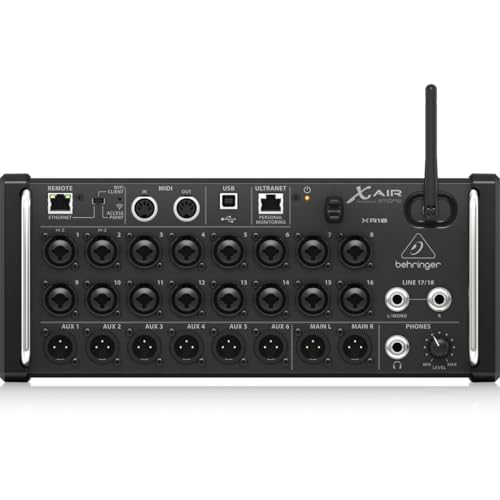
Behringer X AIR XR18 — Best Overall
The XR18 is the reference tablet mixer — the one rivals are compared against — because its architecture is complete at a price that reset the market. Sixteen programmable Midas preamps take a full band; six aux buses plus the main mix run stereo in-ears for three musicians or wedges for six; and the multi-channel USB interface turns any laptop into a multitrack recorder. It is the default recommendation because for most acts there is no remaining problem it does not solve.
Strengths
- Sixteen real mic preamps — a full band, mic’d kit included, with no stage box needed
- Six aux buses run a serious monitor world, the feature rivals most often skimp on
- Multi-channel USB recording plus mature apps for iPad, Android, Windows and Mac
Trade-offs
- Built-in Wi-Fi suits rehearsal; venues demand an external router — budget for one
- Eighteen inputs total is a hard ceiling with no expansion path
- Control is app-only, so a dead tablet needs a backup device ready, not a hope
Key specs (verified): 18-channel / 12-bus digital mixer for iPad/Android tablets, 16 programmable Midas preamps, integrated Wi-Fi, multi-channel USB audio interface (per Amazon title)
Spend time with owners and a pattern emerges: the XR18 disappears. It lives in a shallow rack or a case corner, the band’s mixes recall from the app, soundcheck is a gain check and a walk around the room. That invisibility is the highest praise for infrastructure, and it comes from the unglamorous completeness of the design — enough preamps, enough buses, recording included, apps everywhere. Newer rivals beat it in single categories; none beat it everywhere at once for the money.
Its second life as a studio and rehearsal interface extends the value: the same box that mixes Saturday’s gig records Tuesday’s rehearsal and demos. If you buy one thing from this guide’s advice beyond the mixer itself, make it the router — mounted high, on a hidden network, with the mixer’s Ethernet port connected by cable. That single habit converts this box from very good to utterly dependable.
Best for: Most bands and venues wanting one complete tablet rig with in-ear monitors / Not suited for: Acts already needing more than sixteen mic preamps
Check on Amazon — check the current price on Amazon before you buy, and confirm the exact configuration in the listing title matches the model reviewed here.

Soundcraft Ui24R — Best for Recording and Browser Control
The Ui24R’s control idea is quietly radical: the mixer hosts its own interface as a web page, so any device with a browser — your tablet, a borrowed laptop, the venue’s ancient desktop — becomes a full control surface with nothing to install. Around that idea sits the most preamps in this guide (twenty) and dual-purpose recording: a stereo mix or a full multitrack to USB media, no computer required.
Strengths
- Browser control means any device can mix — the ultimate backup plan is built in
- Twenty mic preamps cover large bands without expansion hardware
- Multitrack recording to USB media with no laptop in the rig
Trade-offs
- The browser interface is functional rather than beautiful, and very large shows can feel dense on a small tablet
- No stage-box expansion — twenty preamps is the format’s ceiling here
- Like every pick, its Wi-Fi is for setup; a router is the show configuration
Key specs (verified): 24-input tablet/laptop-controlled digital mixer, 20 mic preamps, onboard signal processing, multitrack USB recording (per Amazon title)
Two audiences should move the Ui24R to the top of their list. Bands that record everything get virtual soundcheck and an archive without a laptop, interface drivers or a spare pair of hands. And engineers who freelance across other people’s tablets get a surface that is identical on every device they touch. Its effects carry a Lexicon heritage that flatters vocals in particular — a small thing nightly, a large thing across a year of recordings.
Because control is a web page, multiple musicians can adjust their own monitor mixes from their phones simultaneously without app installs or pairing rituals — hand out the address and the monitor world manages itself. That practical openness, more than any single specification, is why so many function bands and churches standardise on the Ui format.
Best for: Bands that record every show and anyone who values device-proof browser control / Not suited for: Acts needing networked stage-box expansion beyond twenty preamps
Check on Amazon — check the current price on Amazon before you buy, and confirm the exact configuration in the listing title matches the model reviewed here.

Midas MR18 — Best Preamps
The MR18 answers a specific question: what if the tablet-mixer format kept everything practical about the XR18 and upgraded the front end to Midas PRO preamps — the same preamp family as flagship consoles? The result is a stage box for engineers and bands whose sources and rooms justify premium conversion: acoustic acts, jazz and classical crossover work, recording-first live rigs, and anyone whose live multitracks get mixed seriously afterwards.
Strengths
- 16 Midas PRO preamps — the finest front end in the tablet format
- Same practical architecture as the class leader: six auxes and multitrack USB
- Shares workflow DNA with the Midas/Behringer ecosystem, so knowledge transfers
Trade-offs
- Costs meaningfully more than the XR18 for quality that poor rooms and loud stages can mask
- Same eighteen-input ceiling and the same external-router requirement
- If your multitracks are only for reference, the premium buys little — judge by your actual use
Key specs (verified): 18-input digital mixer for iPad/Android tablets, 16 Midas PRO preamps, integrated Wi-Fi, multi-channel USB (per Amazon title)
Preamp differences are real and contextual in equal measure. On a quiet stage with good microphones, the MR18’s headroom and low-noise performance give recordings and in-ear mixes a composure the standard box approaches but does not match. On a loud rock stage in a reflective bar, the room is the sound and the premium is harder to hear. This guide’s advice is symmetrical: if your work is the first kind, the MR18 is the connoisseur’s correct choice; if it is the second, save the difference toward microphones.
It also future-proofs the archive: live recordings made through PRO preamps mix down better years later, which matters to bands building a catalogue from the road. Pair it with the same router discipline as every pick here, and it is as dependable as it is refined.
Best for: Acoustic, jazz and recording-focused acts wanting the best preamps in the format / Not suited for: Loud-stage bands in difficult rooms, where the premium is inaudible
Check on Amazon — check the current price on Amazon before you buy, and confirm the exact configuration in the listing title matches the model reviewed here.

Mackie DL16S — Best App Experience
Mackie designed the DL16S around a person, not a spec sheet: the performer-engineer who sings, plays and mixes, and needs the control app to be an ally at arm’s length. Master Fader is that ally — clear, fast and consistent across devices — and the hardware keeps the promise with sixteen recallable Onyx+ preamps and a 16×16 USB interface for recording.
Strengths
- Master Fader app is the most approachable control experience in the category
- 16×16 USB interface records every channel to a laptop without extra gear
- Snapshots and shows make a fixed band’s nightly setup nearly instant
Trade-offs
- Sixteen channels total, with no expansion — plan the ceiling honestly
- Fewer aux buses than the XR18 class for very large monitor worlds
- Smaller user community than the Behringer ecosystem when you need shared files or hired help
Key specs (verified): 16-channel digital rack/stage-box mixer, Onyx+ recallable preamps, 16×16 USB audio interface (per Amazon listing class)
The right way to choose between the DL16S and the XR18 is with your own hands at a rehearsal: load both apps, run a soundcheck in each, and notice which one you stop thinking about. Specs favour the Behringer slightly; evenings often favour the Mackie. For solo performers, duos and compact bands who will never pass sixteen channels, that evening-level difference is the whole decision, and this guide refuses to pretend otherwise.
Its snapshot workflow particularly suits acts with a fixed show — theatre companies, tribute acts, school productions — where the same cues recur nightly and consistency is the product. Build the show once, recall it forever, and spend your attention on the performance.
Best for: Performer-engineers and compact acts who value the friendliest app / Not suited for: Bands likely to grow past sixteen channels
Check on Amazon — check the current price on Amazon before you buy, and confirm the exact configuration in the listing title matches the model reviewed here.

Behringer X AIR XR16 — Best for Small Bands
The XR16 is the most misunderstood box in its family: its name promises sixteen inputs and delivers eight mic preamps plus eight line inputs. For the right band that is not a shortfall but a perfect fit — a worship team or function band with two keyboards, playback tracks, electronic drums and four vocal mics needs line inputs in bulk and preamps in moderation. Bought with open eyes, it is the value sweet spot of the range.
Strengths
- Eight preamps plus eight line inputs matches keys-and-playback-heavy bands precisely
- Same X Air apps, effects and workflow as the XR18 — knowledge and presets transfer
- Four auxes cover typical small-band monitor needs, with the same recording interface idea
Trade-offs
- Eight mic preamps is a hard limit — a mic’d acoustic kit alone can consume most of it
- Buyers who later add musicians will wish they had bought the XR18; the price gap is the insurance
- Built-in Wi-Fi needs the same external-router upgrade for real venues
Key specs (verified): 16-input digital mixer for iPad/Android tablets, 8 programmable Midas preamps, 8 line inputs, integrated Wi-Fi (per Amazon title)
This guide lists the XR16 above its smaller sibling deliberately: it is the smallest tablet mixer that still behaves like a band mixer rather than a duo box. The decision rule is a single rehearsal inventory — count your microphone channels on your biggest current gig. Six or fewer, with line-level sources filling the rest? The XR16 fits like it was designed for you, because it was. Eight or more? Skip it and buy the XR18 once.
Its line inputs also make it a quiet favourite for hybrid rigs: modelers, synth rigs and playback systems that arrive at line level stop consuming precious preamps. In that company the XR16 is not the budget compromise; it is the correctly specified tool.
Best for: Keys, playback and electronic-drum bands with modest microphone counts / Not suited for: Bands mic’ing a full acoustic kit plus multiple vocalists
Check on Amazon — check the current price on Amazon before you buy, and confirm the exact configuration in the listing title matches the model reviewed here.

Behringer X AIR XR12 — Best Budget
The XR12 serves the acts the bigger boxes over-serve: duos, solo performers with playback, rehearsal rooms, cafés and small venues with a handful of sources. Four programmable Midas preamps take the microphones; eight line inputs take everything else; and the same app, effects and USB recording as the flagship stage boxes mean the workflow you learn here transfers upward when the act grows.
Strengths
- The lowest-cost way into a recallable, recordable digital rig
- Four real preamps plus generous line inputs suit duo and playback formats exactly
- Same apps and effects family as the XR18 — no dead-end skills
Trade-offs
- Four preamps excludes almost any full band — this is a small-format box and knows it
- Two auxes limit monitor mixes to the simplest setups
- No expansion; when you outgrow it, you replace it (though it retires gracefully to rehearsal duty)
Key specs (verified): 12-input digital mixer for iPad/Android tablets, 4 programmable Midas preamps, 8 line inputs, integrated Wi-Fi (per Amazon title)
Judge the XR12 as a system purchase for small work and it is superb: a café residency, a duo’s entire PA brain, a rehearsal room that records itself. Its limits are printed on the front of the concept — four preamps — and the only buyers who regret it are those who ignored that number while dreaming of a band they had not yet formed. Buy for the act you have; if the act triples, this box becomes the rehearsal mixer and nothing was wasted.
It is also a sensible first step for venues testing the tablet format: run the acoustic night on it for a month and the staff will tell you, with evidence, whether the main room should follow. Few technology trials in live sound are this cheap or this conclusive.
Best for: Duos, solo acts, cafés and rehearsal rooms / Not suited for: Any full band — count preamps and buy the XR16 or XR18 instead
Check on Amazon — check the current price on Amazon before you buy, and confirm the exact configuration in the listing title matches the model reviewed here.
Comparison Table
| Pick | Badge | Key spec | Best for |
|---|---|---|---|
| Behringer X AIR XR18 — Check on Amazon | Best Overall | 18-in / 16 preamps / 6 aux / USB multitrack | Most bands and venues wanting one complete tablet rig with in-ear monitors |
| Soundcraft Ui24R — Check on Amazon | Best for Recording and Browser Control | 24-in / 20 preamps / browser control | Bands that record every show and anyone who values device-proof browser control |
| Midas MR18 — Check on Amazon | Best Preamps | 18-in / 16 Midas PRO preamps / 6 aux | Acoustic, jazz and recording-focused acts wanting the best preamps in the format |
| Mackie DL16S — Check on Amazon | Best App Experience | 16-ch / Onyx+ preamps / Master Fader app | Performer-engineers and compact acts who value the friendliest app |
| Behringer X AIR XR16 — Check on Amazon | Best for Small Bands | 16-in / 8 preamps + 8 line / 4 aux | Keys, playback and electronic-drum bands with modest microphone counts |
| Behringer X AIR XR12 — Check on Amazon | Best Budget | 12-in / 4 preamps + 8 line / 2 aux | Duos, solo acts, cafés and rehearsal rooms |
What Is Virtual Soundcheck and Why Do Tablet-Mixer Owners Swear by It?
Record the multitrack of a show, then play it back through the mixer at the next venue with the band off stage. You tune the room, set gains and polish the mix alone, walking the room freely; the band arrives to a system that is most of the way there. It is the single workflow that most improves a self-mixed band’s sound, and every pick in this guide can feed it in some form.
It also changes rehearsals: record everything, and arguments about balance become listening sessions. Bands that adopt recording as a habit — trivially easy when the mixer is the recorder — improve at a rate their non-recording peers notice within a season.
How Do Tablet Mixers Handle a Festival Changeover?
The festival slot is the tablet format’s sternest examination: fifteen minutes to change over, another band’s engineer watching, a stage manager counting aloud. Tablet rigs pass it in a specific way — the band’s own stage box stays wired to its own instruments, the festival engineer takes a pair of main outputs (and monitor feeds where agreed), and the band’s internal world never gets rep patched. Because every mix recalls from the app, the band’s sound arrives with the band, which is precisely what a changeover is supposed to protect.
The etiquette matters as much as the engineering: advance the arrangement with the festival team, label your tails clearly, and be the act whose outputs are exactly where the plot says they will be. Tablet systems make that professionalism cheap — the same recall that serves your club dates serves the festival — and engineers who once viewed stage boxes with suspicion now routinely spec them, because a band that brings its own mix, in ears, with two tails for the house, is a band that makes the whole day run on time.
What Should You Practise Before the First Tablet-Mixer Gig?
Three rehearsals convert tablet scepticism into tablet confidence. In the first, set the rig up completely and time it — then do it again against the clock, because setup speed is a feature you build, not one you buy. In the second, mix the rehearsal from the back of the room, on the tablet, walking while you work: this is the format’s superpower and it feels unnatural until it suddenly feels indispensable. In the third, rehearse the failures — tablet off, router unplugged and restored, app restarted mid-song — until each recovery is a thirty-second shrug rather than a five-minute panic.
Also practise the social choreography: who holds the tablet during the show, who owns monitor adjustments (each musician, on their own phone, is the grown-up answer), and where the backup device lives. Bands that run these three rehearsals describe their first tablet gig as anticlimactic, which is the highest praise live sound offers. The technology in this guide is ready; readiness, as ever, is a property of the team.
Tablet Mixers in the Studio and Rehearsal Room
The stage box’s second career is quieter but just as valuable: as the rehearsal room’s permanent brain and the demo studio’s interface. Left installed where the band practises, a tablet mixer removes the setup friction that kills rehearsal recording — plug in, recall, play, and the session exists as a multitrack. Bands underestimate how much this changes their development until the first time an argument about an arrangement is settled by pressing play. The mixer stops being gig equipment and becomes the band’s memory.
In project studios the same boxes serve as honest front ends: a rack of clean preamps, hardware-feel routing and headphone mixes for a small ensemble, at a cost dedicated studio hardware struggles to match per channel. The MR18’s PRO preamps and the Ui24R’s standalone recording make them the natural studio picks here, but every model in this guide can anchor a demo workflow. Buyers torn between a live rig and a studio interface should know the modern answer is frequently: the same box, twice a week, in two rooms.
How Loud Is the Room, Really? Mixing from the Audience’s Seat
The tablet format’s founding pleasure — mixing from inside the audience — deserves one caution and one technique. The caution: your ears adapt to the room’s loud zones, so the seat you mix from should be the room’s centre of gravity, not its sweetest spot, and periodic walks to the edges keep you honest about what the corners are enduring. The technique: set the show’s overall level by reference track at the start, mark it, and mix within a hand’s breadth of that mark all night; tablet mixing makes level creep effortless because the fader is always under your thumb, and level creep is how good mixes become tiring ones.
Used with that discipline, mixing from the room is the format’s genuine revolution: for the first time in live-sound history, the person mixing hears exactly what the audience hears, at the moment they hear it, without an intercom, a snake or a prayer. Consoles at a fixed mix position approximate that with experience and guesswork. A tablet in the crowd simply has it — one more reason this format, chosen at the right size, has permanently changed what small-venue sound can be.
The Ten-Minute Rule: Setup Speed as a Feature
Time your current rig’s setup honestly — from cases open to first sound — and then imagine the tablet rig’s: box placed, router on, tablet connected, scene recalled, line check done. For most bands the difference is not minutes but a category: the tablet system is ready before the drummer has assembled the kit. That speed is not a convenience; it is rehearsal time recovered, soundcheck stress deleted, and the reason so many small acts arrive at gigs calmer than their console-carrying peers. When comparing the picks, weigh it — a mixer that sets up in ten minutes gets set up properly every time, while a forty-minute rig gets set up approximately on the rushed nights, which are the nights that matter.
The same logic runs in reverse at load-out, at midnight, in the rain. Small, recallable and complete is a quality of life argument that spec sheets cannot make and owners never stop making. If the rest of this guide has narrowed you to two boxes, choose the one whose total life — carry, setup, mix, record, pack — fits the life you actually lead. The best tablet mixer is the one that is never the reason a gig felt hard.
Before You Order: The Tablet Checklist
Finish with the five checks that decide satisfaction in this format. Preamps: counted from your biggest current set, not the average rehearsal. Auxes: multiplied against the band’s real monitor plan, stereo pairs included. App: downloaded and driven for an evening on your own tablet before money moves — it is free, and it is the surface you will live on. Router: in the same basket, without exception, with an Ethernet cable to match. Recording: the route chosen and a practice session scheduled to prove it. Pass those five and any pick in this guide will serve you; skip the app trial or the router and even the best box on this page will feel like a compromise you chose yourself.
How to Choose a Tablet Mixer: Preamps, Auxes or App?
In that order. Preamps decide what you can plug in: count your microphones on your biggest gig, including the talkback and the ambient mic you keep meaning to add. Auxes decide what the band hears: each wedge mix takes one, each stereo in-ear mix takes two, and running out of auxes is the most common reason tablet mixers get replaced early. The app decides how your evenings feel — and it is a legitimate deciding factor between the two or three boxes that pass the first two tests, which is why the Mackie takes an app badge in this guide without apology.
Recording deserves a deliberate decision too. If you will multitrack — for content, for virtual soundcheck, for honest rehearsal review — choose a box whose recording route fits your rig: direct-to-USB (Ui24R) for laptop-free simplicity, USB interface (XR family, DL16S) if a laptop already travels with you. A rig that records by default improves faster than a rig that records by special effort.
What Network Setup Does a Tablet Mixer Need at a Real Gig?
A dedicated external router, connected to the mixer by Ethernet cable, mounted where it can see the room, broadcasting a network only the band uses. That sentence is the whole secret of this format’s reliability, and it costs less than a single microphone. The built-in Wi-Fi in these boxes is genuinely useful — for setup at home, for rehearsal, for the tiny café — and genuinely not the plan for a Saturday night in a full venue.
Complete the discipline: a second device (a phone is fine) running the control app or browser, the mixer’s settings backed up after every good soundcheck, and one rehearsal where you deliberately practise mixing for thirty seconds with the tablet ‘dead’. Audio keeps passing; your job is only to stay calm and reconnect. Teams that rehearse that moment stop fearing the format entirely.
Tablet Mixer or Small Console: Which Should You Buy?
Buy the tablet format when the rig travels, the same people run it every show, inputs live on stage, and space or budget rules out a surface. Buy a small console when guest engineers rotate through, when the show is actively performed on faders all night, or when the buyer’s honest preference is physical control — a preference this guide respects, because the best mixer is the one its operator trusts at midnight.
Many working rigs end up owning both across time: the stage box for the band’s own dates, hired consoles for festival slots. The tablet box’s low cost makes that sequence painless, and its resale and second-life value (rehearsal room, B-rig, install) is why it so rarely becomes a regretted purchase.
How to Set Up a Tablet Mixer for a Gig, Step by Step
This is the standard working sequence for every pick in the guide. It takes minutes once the input list is fixed, and it is deliberately ordered so that control is proven before audio is connected.
- Place the stage box where the cables are — beside the drums or at the edge of the stage — connect it to your external router by Ethernet, and power router first, mixer second.
- Open the app or browser on your tablet, connect to the band network, and confirm control of the mixer before plugging in a single microphone.
- Connect inputs in your fixed, labelled order and set gains on the loudest material the act produces, leaving headroom for the excitement of an actual audience.
- Build the monitor mixes before the front-of-house mix: each musician’s own source first, then the anchors they follow. Protect in-ear users with limiters where the platform offers them.
- Recall or build the main mix, play reference music, and walk the whole room while it plays — including the corners the audience actually stands in.
- Save the show with the venue name and date, start the recording if you use one, and put the backup control device somewhere reachable. Then enjoy the strange luxury of mixing from the bar during the first song to hear what the audience hears.
After the gig, save the improved settings over the scene while the night is fresh, and glance at the recording’s first song before the next rehearsal. The format’s whole advantage compounds through these small habits: nothing is ever set up from zero twice.
Common Buying Mistakes
Counting the model name instead of the preamps. A ’16-input’ box may have eight preamps. Bands plug into preamps; count those.
Gigging on built-in Wi-Fi. The most repeated regret in this category. Router, Ethernet, line of sight — then relax.
Too few auxes for the monitor plan. Stereo in-ears consume buses in pairs. Buy the bus count your band’s ears require.
No backup screen. A phone running the same app turns a cracked tablet from a cancelled show into a story.
Never saving scenes. Rebuilding a mix from zero every gig throws away the format’s main advantage. Save, name, back up.
Final Recommendation
For most buyers the Behringer X AIR XR18 remains the tablet mixer to beat: complete architecture, multitrack recording and an app on every platform. The Soundcraft Ui24R is the better buy when recording without a laptop and browser-based control matter most, and the Midas MR18 is the premium answer when preamp quality is the point of the purchase.
Choose the Mackie DL16S if the friendliness of the app will decide your evenings, the XR16 if your band is line-input heavy with few microphones, and the XR12 if your act is genuinely small and you want the format’s benefits at its lowest cost. All six are verified current listings — check price on Amazon, confirm the model in the title, and order the router in the same basket.
Shortlist again, for convenience: Behringer X AIR XR18 — Check on Amazon; Soundcraft Ui24R — Check on Amazon; Midas MR18 — Check on Amazon.
Related reading on this site: Best Digital Rackmount Mixers; Best Digital Mixers For Live Sound; Best Digital Sound Mixers For Churches; Best Digital Mixers For Recording; Best Digital Mixers With Ethernet.
Frequently Asked Questions
Do tablet mixers need an internet connection?
No. The mixer and your tablet form their own local network through the router; no internet is involved in mixing. Internet only matters for downloading apps or firmware at home. This is also why a dedicated router works anywhere, including fields and marquees with no connectivity at all.
What happens if the tablet dies or disconnects mid-show?
The audio keeps passing with the last settings — the show does not stop. You reconnect, or pick up the backup device, and continue. Levels set sanely in advance make the gap a non-event. This behaviour is common to all six picks and is the fact that converts most sceptics.
Can each musician control their own monitor mix?
Yes, on all the platforms here: each musician’s phone or tablet can be restricted to their own aux mix. It is one of the format’s best features — the engineer stops fielding monitor requests, and musicians fine-tune their ears during the show without bothering anyone.
Are tablet mixers good enough for professional work?
They mix professional shows nightly across the world, in theatres, churches, clubs and festival side stages. Their limits are scale and surface, not sound: when a production needs thirty-two preamps at the stage or a dedicated engineer riding faders, a console system takes over. Within their channel counts, these are professional tools.
Which tablet should I buy to control one?
Any reasonably current iPad or Android tablet works; the apps are not demanding. Prioritise screen size you can read at arm’s length, battery health, and a rugged case over processing power. Many bands dedicate an older tablet to the rig permanently and keep a phone as backup — total extra cost, often zero.
Can a tablet mixer replace our recording setup too?
For live multitrack purposes, largely yes: the Ui24R records to USB media directly, and the XR, MR and DL boxes act as multi-channel interfaces to a laptop. It will not replace a studio’s interface for overdub workflows, but as a show recorder and virtual-soundcheck source it removes a whole layer of gear from the van.
Can I use a tablet mixer for a wedding or corporate event?
Yes — it is one of the format’s best uses. Speeches, background music, a small band and a DJ feed all fit the mid-size picks, scenes separate the day’s chapters (ceremony, drinks, dinner, party), and the engineer can mix from a seat among the guests rather than from a visible desk. Keep the router discipline and a printed running order, and the format’s discretion becomes its selling point.
Do tablet mixers work outdoors and on generator or battery power?
Yes, and they are favourites for outdoor work precisely because the system is small, sealed and quick to shelter. The stage box itself draws modest power; run it and the router from the same clean supply as the PA, keep the tablet charged (a power bank in the case covers a long day), and give the router’s antennas height and line of sight across the field. Musicians’ monitor mixes travel with them as they move, which outdoor stages appreciate. As with any electronics outdoors, shade for the screens and a rain plan for the box are the whole secret.


