Disclosure: airfryerkitchensupply.com is reader-supported. When you buy through links on our site, we may earn an affiliate commission at no extra cost to you.
Where to buy
For best digital sound mixers for churches, start here: A church mixer serves volunteers, spoken word and a full band — often in the same service — so judge listings on scene recall, remote control for the tech team, and how forgiving the workflow is for non-engineers. Every linked pick below was matched by brand and model against Amazon’s catalog before this guide was written, so the product you land on is the product described. Linked picks say “check price on Amazon” because live pricing changes too often to print honestly. Any pick marked as unlinked is a real product without a stable listing-confirmed Amazon listing; it is described in full, with no purchase link, rather than swapped for a weaker substitute.
Behringer X32 (Best Overall for Churches): Check on Amazon — check the current price on Amazon.
Allen & Heath SQ-5 (Best for Growing Churches): Check on Amazon — check the current price on Amazon.
Midas M32 LIVE (Best Sound Quality): Check on Amazon — check the current price on Amazon.
Behringer WING (Best for Large and Modern Worship): Check on Amazon — check the current price on Amazon.
PreSonus StudioLive 32S (Best for Recording and Streaming Production): Check on Amazon — check the current price on Amazon.
Allen & Heath CQ-18T (Best for Small Churches): Check on Amazon — check the current price on Amazon.
Introduction: what actually matters here
Choosing the best digital sound mixers for churches is not the same exercise as choosing for a club. The operator is often a volunteer who mixes twice a month; the programme swings from a single spoken voice — where intelligibility is everything — to a full worship band; and the system must come up identical every week at the press of a scene recall. The six mixers below were picked against those realities, not against concert spec sheets.
One truth first: in most sanctuaries the mixer is not the weakest link. Room acoustics, loudspeaker placement and the pastor’s microphone decide clarity long before console brand does. A digital mixer earns its place in a church by making the good outcome repeatable — stored scenes for each service type, app control so the media team can adjust from the congregation, and enough buses to give the band proper monitor mixes without a second desk. Buy for repeatability and your volunteers will thank you every Sunday.
The list spans the realistic church range: a compact touchscreen desk for a small congregation, the ubiquitous mid-size consoles most churches actually run, and larger platforms for multi-service campuses. Every pick is a current production model, verified against Amazon’s catalog, with its genuine strengths — and its demands on your team — stated plainly.
In this guide
Quick Picks
Behringer X32 — Best Overall for Churches: The church default worldwide: forty inputs, deep scene automation, apps for the whole tech team, and a volunteer-training ecosystem no rival matches. — Check on Amazon
Allen & Heath SQ-5 — Best for Growing Churches: The step up in sound and speed: 96kHz processing, a fast modern surface, and expansion that lets a growing church add stage boxes instead of replacing the desk. — Check on Amazon
Midas M32 LIVE — Best Sound Quality: The X32’s distinguished sibling: thirty-two genuine Midas PRO preamps and premium faders on the same beloved workflow — the choice when audio quality is the stated priority. — Check on Amazon
Behringer WING — Best for Large and Modern Worship: The new-generation flagship: forty-eight full-stereo channels, deep source customisation, dual SD multitrack recording, and a touchscreen workflow built for complex modern services. — Check on Amazon
PreSonus StudioLive 32S — Best for Recording and Streaming Production: The producer’s church desk: motorised faders, AVB networking, and recording that flows into Studio One — ideal when the service is also a production. — Check on Amazon
Allen & Heath CQ-18T — Best for Small Churches: The small-church answer: a compact touchscreen desk with guided setup, automatic feedback-fighting tools and app control — designed for teams with no engineer at all. — Check on Amazon
How These Picks Were Chosen
Picks were matched by brand and model against Amazon listing title before any link was added, and specs in the mini boxes come from those verified titles. Beyond verification, selection weighed church-specific criteria: scene and show management for rotating volunteers, the quality of the remote apps (because much church mixing now happens from a tablet in the seats), monitor bus count for worship bands moving to in-ears, and recording — most churches now capture the service for streaming or archive.
Two deliberate exclusions shape the list. Analogue desks, however beloved, were left out because scene recall is the feature volunteer teams need most. And pure stage-box racks with no surface option were left to the companion rackmount guide, because most churches benefit from physical faders at the mix position — the surface is where a nervous volunteer feels in control.
Prices are never printed here, deliberately: church budgets are approved against live quotes, and a printed number would be stale before the committee meets. Each linked pick says check price on Amazon; treat that as the start of a proper quote comparison, including the router, tablet and installation items the final section lists.
The 6 Best Options: Best digital sound mixers for churches in detail

Behringer X32 — Best Overall for Churches
Walk into a hundred churches and the X32 is the desk you will meet most often, for reasons that compound: it is powerful enough for a full worship band and choir, its scene system lets the tech director store an entire service and hand a volunteer a console that recalls it perfectly, and its training resources — videos, preset libraries, other churches’ show files — are unmatched. For a typical congregation it is the safest recommendation in digital audio.
Strengths
- Scene and snippet automation stores whole services — recall Sunday in one press
- Apps let musicians mix their own in-ears and the engineer roam the room with a tablet
- The largest church user community in the world: presets, tutorials and help are everywhere
Trade-offs
- Forty inputs is generous but the surface workflow rewards some training — budget volunteer training time
- The platform is mature; churches wanting the newest interface generation should also audition the WING below
- Personal monitoring and stage boxes expand the system at extra cost — plan the full rig, not just the desk
Key specs (verified): 40-input / 25-bus digital mixing console, 32 mic preamps, motorised faders, AES50 networking (per Amazon listing class)
The X32’s church genius is delegation. A skilled tech director builds the service once — gains, the pastor’s EQ, the band’s monitor world — and stores it. Volunteers then operate a known-good system instead of inventing one weekly, and quality stops depending on who is rostered. Add per-musician monitor apps and the band stops asking the engineer for changes mid-service. That operational calm, more than any specification, is why this desk leads the list.
Churches streaming their services should note how naturally the X32 feeds a broadcast mix: a spare bus pair, processed separately for the stream, is a standard technique its routing handles easily. Pair it with a digital stage box at the platform and the long analogue snake — and its hum, weight and trip hazards — leaves the building for good.
Best for: Most churches: full band, rotating volunteers, services that must repeat exactly / Not suited for: Tiny congregations whose whole system is two microphones and a piano
Check on Amazon — check the current price on Amazon before you buy, and confirm the exact configuration in the listing title matches the model reviewed here.

Allen & Heath SQ-5 — Best for Growing Churches
The SQ-5 is the desk a church buys when the X32 class starts to feel like a ceiling: forty-eight channels of 96kHz processing, seventeen faders on a compact surface, and a workflow fast enough that experienced engineers mix on it with real pleasure. For growing churches adding services, musicians and eventually a second campus feed, it offers headroom in every direction that matters.
Strengths
- 96kHz processing with a noticeably open, detailed sound and very low latency
- Deep expansion: stage boxes, Dante options and personal monitoring grow with the church
- A modern, fast surface with per-channel displays that volunteers learn quickly
Trade-offs
- Costs more than the X32 class, and its expansion hardware is priced to match
- Its power rewards a tech director who will actually configure scenes and user layers for the team
- Smaller churches may never use its channel count — buy for your five-year plan, not your brochure
Key specs (verified): 48-channel / 36-bus digital mixer, 17 faders, 96kHz processing (per Amazon title)
What churches report after moving to the SQ platform is confidence at the extremes: the quiet spoken prayer stays intelligible, the loudest chorus stays composed, and the desk never feels like it is negotiating. The layered user permissions deserve special mention for volunteer teams — lock the deep menus, present each operator a surface matched to their skill, and the desk becomes safer as it becomes more powerful, which is the correct direction.
Its recording options suit churches capturing services for later mixing, and the same show file discipline applies: build service templates, protect the room tuning with recall safeguards, and let each Sunday start from a known place. If your church is choosing one desk for a decade of growth, this is the strongest candidate here.
Best for: Growing churches wanting a decade-long desk with real headroom / Not suited for: Small churches that need simplicity more than capacity
Check on Amazon — check the current price on Amazon before you buy, and confirm the exact configuration in the listing title matches the model reviewed here.
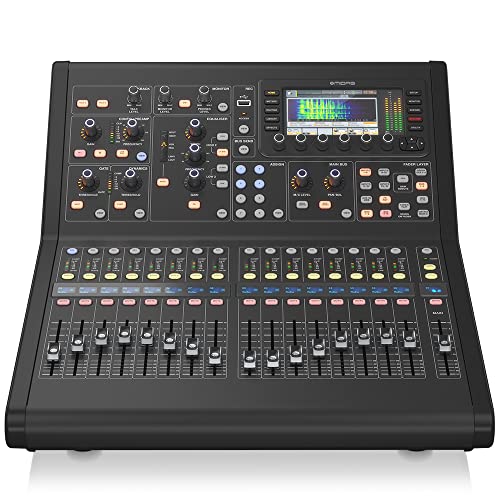
Midas M32 LIVE — Best Sound Quality
The M32 LIVE shares its architecture and workflow with the X32, then upgrades the parts an audiophile church cares about: thirty-two Midas PRO microphone preamplifiers, higher-grade faders and converters, and a build that feels like installed equipment rather than portable gear. Churches whose brief is explicitly ‘the best sound we can reasonably get’ — and whose music ministry justifies it — land here.
Strengths
- 32 Midas PRO preamps deliver the most refined front end in this list
- Identical workflow to the X32 family — training, show files and knowledge transfer directly
- Premium faders and construction suit a fixed install that will be touched daily for years
Trade-offs
- You pay a real premium over the X32 for quality differences a difficult room may mask
- Same 40-input ceiling as the X32 — it is an upgrade in quality, not in scale
- In a reverberant sanctuary, spend on acoustics and the pastor’s microphone first; this desk rewards a good room
Key specs (verified): 40 input channels, 32 Midas PRO mic preamps, 25 mix buses, live and studio console (per Amazon title)
The honest framing: the M32 is the X32 workflow wearing its best clothes, and whether the premium is rational depends on your room and your sources. In a treated sanctuary with good microphones and a serious music programme, the preamp quality and conversion are audible as ease — mixes settle faster and stay settled. In a gym with a ten-second echo, they are not where the money should go first, and this guide would rather tell you that than sell you the badge.
Because the workflow matches the X32, a church can even run both — M32 at the main campus, X32 at the plant — with one training programme. That family logic, plus stage-box compatibility across the range, makes the M32 a system decision as much as a desk decision.
Best for: Churches with good rooms and serious music ministries prioritising sound quality / Not suited for: Churches in difficult untreated rooms, where acoustics need the budget first
Check on Amazon — check the current price on Amazon before you buy, and confirm the exact configuration in the listing title matches the model reviewed here.

Behringer WING — Best for Large and Modern Worship
The WING is what the X32’s maker built when it started again: every channel fully stereo-capable, sources that can be labelled, coloured and customised in depth, a large touchscreen at the centre of the workflow, and multitrack recording to dual SD cards built in. For large churches running complex modern worship — tracks, multiple campuses feeds, broadcast mixes — it is the most capable desk in this guide.
Strengths
- 48 fully stereo-capable channels handle tracks, stems and stereo sources without eating channel pairs awkwardly
- Built-in dual SD multitrack recording captures every service for archive, streaming mixes and virtual soundcheck
- Deep customisation lets the tech director build exactly the surface each operator needs
Trade-offs
- Its depth is a commitment: a church must invest real configuration time to get the best from it
- Volunteer-simple it is not, until a tech director has built those simplified surfaces
- Newer platform than the X32 — the shared-knowledge pool, while growing fast, is smaller
Key specs (verified): 48-channel / 28-bus full-stereo digital console, Midas mic preamps, AES50 networking, SD card recording (per Amazon title)
Modern worship is a stereo, tracks-heavy, multi-destination production — house, stream, lobby, recording — and the WING is the first desk in its price class designed for that reality rather than adapted to it. Churches whose services already strain a conventional desk will feel the difference immediately; churches running a simple band and spoken word will feel mostly its configuration overhead. Match the desk to the production you actually run.
Its source-customisation model rewards churches with consistent teams: name everything once, properly, and every service inherits the clarity. Budget the tech director’s hours as part of the purchase — a WING configured over a thoughtful month will serve a decade; a WING left at defaults is an expensive way to be confused.
Best for: Large churches and modern worship productions with tracks, streaming and multiple mixes / Not suited for: Small volunteer teams wanting a desk that is simple out of the box
Check on Amazon — check the current price on Amazon before you buy, and confirm the exact configuration in the listing title matches the model reviewed here.
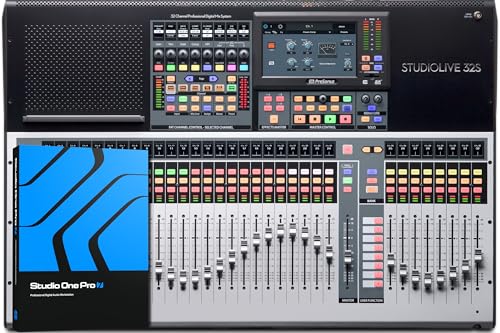
PreSonus StudioLive 32S — Best for Recording and Streaming Production
The StudioLive 32S suits churches that treat the service as a recording: thirty-two channels with motorised faders, Fat Channel processing with a produced, studio flavour, and capture that lands directly in Studio One for the midweek mix, the podcast edit and the stream archive. If your media team already lives in PreSonus software, this desk removes friction everywhere.
Strengths
- Bundled Studio One Pro and Capture make record-edit-publish a single workflow
- Motorised faders and scene recall give volunteers a surface that resets itself
- AVB networking supports stage boxes and personal mixers across a campus
Trade-offs
- Its strengths concentrate inside the PreSonus ecosystem — mixed-brand rigs gain less
- AVB networking needs compliant switches; it is a planned system, not a casual add-on
- Churches wanting the largest volunteer knowledge base should weigh the X32’s ubiquity
Key specs (verified): Series III digital console mixer, 32 channels, motorised faders, AVB networking, Studio One Pro included (per Amazon title)
The streaming era changed what a church desk must do, and the 32S answers with production thinking: the same desk mixes the room, feeds the stream and records everything in a form the media team can polish on Tuesday. For churches publishing sermons and worship content weekly, that pipeline is worth more than raw channel count. Its Fat Channel processing also gives volunteer mixes a helpful, finished character with modest effort.
Plan the network as part of the install — AVB done properly is robust and elegant; AVB improvised is neither. With that done, the 32S becomes the centre of a tidy campus system: stage box at the platform, personal mixers for the band, and a recording archive that builds itself every Sunday.
Best for: Churches with active streaming, podcast and media ministries / Not suited for: Churches wanting the most common volunteer-training platform
Check on Amazon — check the current price on Amazon before you buy, and confirm the exact configuration in the listing title matches the model reviewed here.

Allen & Heath CQ-18T — Best for Small Churches
Not every church has a tech team, and the CQ-18T is designed for the ones that do not: a compact mixer with a clear touchscreen, setup assistants that configure channels in plain language, and processing that helps a single microphone behave in a reflective hall. Eighteen inputs cover a small worship band, and the whole system can live in a cupboard between Sundays.
Strengths
- Guided, plain-language setup suits churches with no trained engineer
- Touchscreen on the box plus app control — no separate computer required
- Compact enough for church plants, halls and multi-use rooms that pack away weekly
Trade-offs
- Eighteen inputs is the ceiling — a growing band will outgrow it
- No motorised faders or large-format surface; it is a compact desk by design
- Churches planning streaming production at scale should step up to the larger platforms
Key specs (verified): Digital mixer with 7-inch touchscreen, Wi-Fi and Bluetooth connectivity, 18 inputs (per Amazon title)
The CQ-18T understands its buyer: the person setting up is also leading worship, greeting at the door and locking up afterwards. Its assistants and automatic tools compress the engineer’s checklist into minutes, and its scenes still give repeatability — the service template recalls, the room behaves, and the one volunteer on duty supervises rather than engineers. For a plant or a small congregation, that is not a compromise desk; it is the correctly sized one.
Pair it with sensible loudspeakers and a good headset or earset microphone for the speaker, and a small church can achieve clarity that surprises visitors. When the congregation outgrows it, the CQ graduates gracefully to the youth room or the second venue — compact desks rarely become waste.
Best for: Small churches, plants and halls with no dedicated engineer / Not suited for: Growing full-band churches that will pass eighteen inputs within a few years
Check on Amazon — check the current price on Amazon before you buy, and confirm the exact configuration in the listing title matches the model reviewed here.
Comparison Table
| Pick | Badge | Key spec | Best for |
|---|---|---|---|
| Behringer X32 — Check on Amazon | Best Overall for Churches | 40-in / 25-bus / scenes + apps | Most churches: full band, rotating volunteers, services that must repeat exactly |
| Allen & Heath SQ-5 — Check on Amazon | Best for Growing Churches | 48-ch / 36-bus / 17 faders / 96kHz | Growing churches wanting a decade-long desk with real headroom |
| Midas M32 LIVE — Check on Amazon | Best Sound Quality | 40-in / 32 Midas PRO preamps / 25 buses | Churches with good rooms and serious music ministries prioritising sound quality |
| Behringer WING — Check on Amazon | Best for Large and Modern Worship | 48-ch stereo / 28-bus / dual SD record | Large churches and modern worship productions with tracks, streaming and multiple mixes |
| PreSonus StudioLive 32S — Check on Amazon | Best for Recording and Streaming Production | 32-ch / motorised faders / Studio One | Churches with active streaming, podcast and media ministries |
| Allen & Heath CQ-18T — Check on Amazon | Best for Small Churches | 18-in / 7in touchscreen / Wi-Fi | Small churches, plants and halls with no dedicated engineer |
Why Do Churches Move Their Musicians to In-Ear Monitors?
In-ears solve the two loudest church problems at once: stage volume bleeding into the room (and the recording) and monitor wedges fighting a reflective sanctuary. Every larger pick here can feed personal mixing systems that let each musician adjust their own mix from a phone or a small mixer, which also removes the mid-service hand signals and the engineer’s divided attention.
The transition needs pastoral care as much as technology: some musicians, especially vocalists, initially feel isolated. One-ear-out habits, ambient microphones mixed into the ears, and a patient first month solve most of it. Churches that manage the human side rarely go back — the room mix becomes controllable in a way wedges never allowed.
How Should a Church Train Volunteers on a Digital Desk?
Training is the hidden half of every church mixer purchase, and the churches that thrive digitally treat it as a programme, not an afternoon. The working model has three layers. First, one or two people — the tech director and a deputy — learn the desk deeply: configuration, scenes, routing, recovery. Second, every operator learns a defined Sunday role: recall the scene, run the checklist in this guide’s how-to, ride the spoken voice, and know the three recoveries (desk reboot, wireless failure, stream failure) by heart. Third, nobody learns alone: new volunteers shadow two services, run two services supervised, and only then join the rota solo.
The desk itself should be configured to teach: user layers that hide what a role does not need, scenes named by service rather than by date, and a printed desk guide — written by your tech director, in your church’s language, with your pastor’s microphone channel circled. Generic video training builds the deep layer; only local documentation builds the Sunday layer. Budget the hours as part of the mixer project and the platform debates in this guide resolve themselves: the best church desk is the one your training programme can carry, and every pick here can be carried by a programme that actually exists.
What About Hearing Assistance, Overflow Rooms and the Cry Room?
Church audio extends beyond the sanctuary mix, and digital desks earn their keep in the destinations visitors never see. Hearing assistance — whether a loop system, infrared or a streamed feed to phones — should be fed from its own mix that favours the spoken voice heavily, because its listeners need intelligibility, not atmosphere. The same logic serves the cry room and overflow spaces: a speech-forward auxiliary mix, taken from the desk as its own bus, transforms those rooms from apologetic to genuinely served.
This is where bus architecture stops being a specification and becomes ministry. Each of those destinations consumes outputs and routing thought, which is why the guide’s larger picks emphasise buses alongside channels. When your church compares desks, list the destinations on paper — room, stream, recording, hearing assistance, cry room, lobby, the pastor’s monitor in the vestry if such things matter to you — and count them against the architecture. A desk that feeds every destination cleanly is not over-specified; it is correctly specified for the building you actually serve.
How Do You Specify a Church System Without Overbuying?
Start from a written Sunday, not from a catalogue. List every input on your fullest service — including the Christmas and Easter reinforcements you hire in — every output destination (room, stream, recording, hearing assistance, overflow), and every operator who will touch the system, with their honest skill level. That single page specifies the desk class more accurately than any demonstration: most churches discover they need routing flexibility and volunteer-proofing far more than raw channels, and a few discover the opposite, which is equally valuable to learn before the purchase order.
Then audition with your own material: record one rehearsal multitrack (most churches can borrow the means) and mix it on the candidate platforms’ offline editors or demo systems. The desk whose workflow your tech director stops fighting first is the desk your church will still love in year five. Finally, phase the project if the budget demands it — desk and stage box first, personal monitoring next, the pastor’s microphone upgraded immediately regardless — because a phased system that exists beats a perfect system deferred, every Sunday of the year.
What Does a Good First Month on a New Church Desk Look Like?
Week one belongs to the tech team alone: installation, firmware, the input list built and labelled, the room tuned, and the first service scene constructed at a full rehearsal — not a soundcheck snatched before doors. Week two is the first live service, deliberately programmed simply, with the old system’s essential settings documented as a fallback reference and the tech director mixing personally. Weeks three and four hand over gradually: volunteers run services with supervision, every hiccup is written into the desk guide the same day, and the scene library grows a template per service type — morning, evening, wedding, funeral — because a church’s real repertoire is its calendar.
By the end of the month the measure of success is boredom: services that start identically, problems that have printed answers, and a rota that no longer depends on one person’s presence. That boredom is what the digital purchase was actually for. Churches that skip the structured month often blame the desk for chaos that was really an unbuilt system; churches that invest it describe the same desks as the best decision they ever made. The desk is constant — the month is the variable.
The Quiet Test: What Success Sounds Like on Sunday
A church sound system has succeeded when nobody mentions it. The sermon was simply clear; the music simply supported the singing; the stream’s viewers simply stayed. Every decision in this guide — scenes over improvisation, the pastor’s microphone over the flashy upgrade, training over raw channels — points at that invisibility, because a congregation’s attention is a sacred budget and technology should spend none of it on itself. Judge your shortlist by that standard and the right desk usually identifies itself: it is the one whose strengths are all in service of the room forgetting it exists.
Buy that desk, build its scenes with love, train its people with patience, and back up its show file like the institutional memory it is. Do those things and the mixer question — which consumes so much committee energy — will not need asking again for a decade. That is the real deliverable behind every pick on this page: not a console, but ten years of Sundays that simply work.
Before You Order: The Church Checklist
Close the decision with the written Sunday in hand. Inputs counted from the fullest service of the year, not the average one. Destinations listed — room, stream, recording, hearing assistance, overflow — and matched against the desk’s buses. The operator rota named, with the training month scheduled and a deputy appointed. The pastor’s microphone confirmed as part of the project, the stage box and network cabling in the same budget, and a UPS on the order. Finally, the show-file discipline agreed in writing: who builds scenes, who may change them, where backups live. A church that orders against this checklist is not buying a mixer; it is commissioning ten quiet years of Sundays, which was the point all along.
How to Choose a Church Mixer: What Matters More Than Channel Count?
Volunteer-proofing matters most. Ask of any desk: can a trained-once volunteer recall the service, run it, and recover from the likely mistakes without the manual? Scenes, user layers, lockable menus and clear labelling are church features in a way they never are in a club. The picks above all offer them in different depths — the X32 family’s scene automation, the SQ’s user permissions, the CQ’s guided setup — and your team’s real skill level should choose between them.
Spoken-word clarity is the second test. The sermon is the product: the desk must give the pastor’s channel clean gain, precise EQ and gentle compression, and the system must protect that channel’s priority in every scene. Spend on the microphone itself — a quality earset or headset transforms intelligibility more than any console upgrade — and treat feedback control as a system property of mic, speakers and room, not a desk button.
Third, count destinations, not just inputs. A modern church feeds the room, the stream, a lobby or overflow, hearing assistance and a recording — each a mix. Bus architecture and routing flexibility decide whether those feeds are easy or agonising, which is why the larger picks here emphasise buses and networking as much as channels.
What Should a Church Budget Beyond the Mixer Itself?
The desk is typically half to two-thirds of the true project. Budget for a digital stage box and the network cabling that replaces the old snake, a tablet for roaming control, a router dedicated to the audio network, and installation time — ideally including a trainer who builds your first service scenes with your team rather than for them. Add the pastor’s microphone upgrade if it has been deferred; it belongs in this project.
Also budget the unglamorous: a UPS so a power blink does not reboot the desk mid-service, labelled cables, a printed one-page ‘Sunday start’ checklist stored at the desk, and a backup of the show file kept off-site. Churches that do these things describe their digital move as painless; churches that skip them describe the same desks as unreliable. The difference is rarely the desk.
How Should a Church Handle the Move From Analogue to Digital?
Run both worlds briefly if you can: install the digital desk, build scenes at rehearsals, and let volunteers shadow-mix before the first live Sunday. Keep the first digital service simple — the full band can wait a week — and debrief honestly afterwards. Store every improvement back into the scene the same week, while the lesson is fresh.
Resist rebuilding the show file from scratch each month. A church mix is an institution’s memory: the pastor’s EQ, the room’s corrections, the band’s monitor world. Digital desks preserve that memory perfectly when the team treats scenes as assets — backed up, versioned and guarded — rather than as one operator’s private settings.
How to Set Up a Church Digital Mixer for a Sunday Service
This routine assumes your scenes were built at rehearsal — Sunday morning is for recall and verification, not construction. It is written for the volunteer actually on duty.
- Power the system in order — desk and stage box first, amplifiers and powered speakers last — then recall the service scene and confirm the desk shows the correct date and service name.
- Walk the platform: check every microphone is the one the scene expects, in the position rehearsal left it, with fresh batteries in every wireless pack. The pastor’s microphone gets checked twice.
- Line-check quietly, channel by channel, at speaking and singing level, and confirm each musician’s in-ear or wedge mix is alive before anyone asks for changes.
- Play the walk-in music and walk the room: centre, sides, back and under any balcony. Note dead or harsh zones now, while adjustment is calm and free.
- Set the stream or recording feed and start the recording before the service begins — the sermon you forget to record is always the one someone requests.
- During the service, ride the spoken voice first and the music second; after the service, save any improvement into the scene, note it on the checklist, and back the show file up monthly.
Keep a printed recovery card at the desk: what to do if the desk reboots, if a wireless mic drops, if the stream feed fails. Volunteers do not need to be engineers; they need the three recoveries rehearsed and written down. That card, more than any feature, is what makes a digital system feel safe to a small team.
Common Buying Mistakes
Buying channels instead of volunteer-proofing. The best church desk is the one your actual team can run confidently at 9 a.m. on a wet Sunday.
Neglecting the pastor’s microphone. No console fixes a poor mic in a poor position. The earset upgrade outperforms any desk upgrade for clarity.
No scene discipline. If every operator rebuilds the mix weekly, you bought digital and kept analogue chaos. Build, store, protect, recall.
Forgetting the stream is a separate mix. The room mix rarely translates online. Give the stream its own bus and its own listener on headphones.
Skipping the UPS and the backup. A power blink and a lost show file are the two classic digital disasters in churches. Both are cheap to prevent and miserable to meet unprepared.
Final Recommendation
Most churches should buy the Behringer X32: it is the platform your volunteers can learn from the largest community in church audio, with scenes that make Sundays repeatable. Churches planning a decade of growth should step to the Allen & Heath SQ-5; churches whose rooms and music justify a quality-first spend should hear the Midas M32 LIVE; and large, production-heavy worship belongs on the Behringer WING.
If your church produces content all week, the PreSonus StudioLive 32S folds the service into your studio workflow, and if your church is small, new or engineer-less, the Allen & Heath CQ-18T is the honest right size. Whichever you choose, spend the remainder of the budget on the microphone, the network and the training — the desk will repay it every single week.
Shortlist again, for convenience: Behringer X32 — Check on Amazon; Allen & Heath SQ-5 — Check on Amazon; Midas M32 LIVE — Check on Amazon.
Related reading on this site: Best Digital Rackmount Mixers; Best Digital Mixers For Live Sound; Best Digital Tablet Mixers; Best Digital Mixers For Recording; Best Digital Mixers Under $5000.
Frequently Asked Questions
What size mixer does a church actually need?
Count every input on your busiest Sunday — band, choir mics, playback, spoken mics, plus spares — then add growth. Most mid-size churches land between 24 and 40 inputs, which is why the X32 and SQ-5 class dominates. Small congregations are genuinely well served by 18-input desks like the CQ-18T; buying forty channels for eight inputs wastes money better spent on speakers and microphones.
Can volunteers really run a digital mixer?
Yes — that is the format’s great church advantage. The tech director builds scenes once; volunteers recall them and operate a surface configured for their skill. Every pick here supports that model in some form. The churches that struggle are the ones that never build the scenes and ask volunteers to engineer from scratch, which would defeat any desk, analogue or digital.
Should our church mix the livestream from the same desk?
Usually yes, but as its own mix. Take a dedicated bus pair, process it for small speakers and earbuds — more compression, less room — and have someone monitor it on headphones. The larger picks here route this easily. What does not work is sending the raw room mix to the stream and wondering why online viewers report muddy audio.
Do we need a digital stage box as well?
It is strongly recommended with the console picks: it moves the preamps to the platform, replaces the heavy analogue snake with a network cable, and keeps mic cables short. The X32, SQ, M32, WING and StudioLive families all have matching stage boxes. Budget it in the project rather than discovering the need at installation.
How long will a digital church mixer last?
A current-production desk from this list, installed with clean power and updated firmware, should serve eight to twelve years comfortably. The practical limits are usually ecosystem changes — apps and operating systems — rather than hardware failure, which is another argument for the large, actively supported platforms chosen here.
Is 96kHz processing worth it for a church?
It is a genuine quality and latency benefit on platforms like the SQ-5, audible as clarity in a good room. It is not, however, the first place a limited budget should go: room treatment, loudspeaker placement and the pastor’s microphone all outrank sample rate for intelligibility. Buy 96kHz when the fundamentals are already funded — then it is worth it.
Should our church hire an installer or set the desk up ourselves?
For a simple like-for-like swap in a small room, a competent tech team can self-install using this guide’s routines. For stage boxes, network cabling through a building, hearing-assistance integration or a difficult room, a professional installer who also trains your team is money well spent — you are buying their pattern library of what goes wrong in churches, which is precisely the knowledge a first-time team lacks.


