Disclosure: airfryerkitchensupply.com is reader-supported. When you buy through links on our site, we may earn an affiliate commission at no extra cost to you.
Where to buy
Every pick in this guide was verified against live Amazon listing data before inclusion. Use these links to check price on Amazon and confirm current availability for the best digital mixers using logice pro x shortlist:
Tascam Model 12 — check price on Amazon · Behringer X Air XR18 — check price on Amazon · Soundcraft Ui24R — check price on Amazon · Allen & Heath CQ-18T — check price on Amazon · PreSonus StudioLive 16.0.2 USB — check price on Amazon · Zoom LiveTrak L-12 — check price on Amazon
Finding the best digital mixers using logice pro x — Logic Pro X, in Apple’s current naming simply Logic Pro — comes down to one specification buyers overlook: the mixer’s USB interface must send each channel to the DAW separately, and return playback cleanly, at a sample rate your whole session agrees on. The best digital mixers using Logic Pro X behave as class-compliant or well-supported multi-channel interfaces, so Logic sees every input as its own track.
Good news first: macOS treats most modern digital mixers kindly, and every pick below presents multitrack audio to a Mac over USB or network. They differ in track counts, in whether they also record without the computer as a safety, and in how much live mixing they add around the DAW. Each was verified before inclusion; none requires exotic drivers to get audio into Logic, though companion apps handle the mixer’s own settings.
A small terminology note with practical consequences: Apple renamed Logic Pro X to Logic Pro, but the pairing question is unchanged — the mixer must present multitrack audio to macOS cleanly. Everything in this guide was checked for exactly that behaviour. If you are comparing models elsewhere, the test is identical: connect, open Audio MIDI Setup, and count the inputs the Mac can see. That number is the product; the rest is furniture.
In this guide
Quick Picks
- Tascam Model 12 — Best Overall: With Logic it is the tactile partner: record to SD as a safety, run USB into Logic for the session, and use its DAW control to keep hands off the mouse. Check price on Amazon.
- Behringer X Air XR18 — Best Budget Multitrack: For Logic users recording bands, it is the budget multitrack front end — sixteen preamps arriving in Logic as sixteen tracks from a stage box. Check price on Amazon.
- Soundcraft Ui24R — Best for Live-to-Logic Capture: For live-to-Logic workflows it captures to USB media as backup while feeding the computer, which suits engineers who cannot afford a crashed take. Check price on Amazon.
- Allen & Heath CQ-18T — Best Premium Desktop: For the Logic project studio it is the premium desktop: clean USB multitrack, touchscreen mixing for the room, and media recording when the Mac stays home. Check price on Amazon.
- PreSonus StudioLive 16.0.2 USB — Best Simple Console: For Studio One migrants and Logic users alike, its straightforward USB multitrack and console layout make the DAW feel like a tape machine. Check price on Amazon.
- Zoom LiveTrak L-12 — Best for Ensembles: For Logic podcast and ensemble work, it records everyone separately — in the mixer or into Logic — with headphone mixes that keep sessions moving. Check price on Amazon.
How to use this shortlist: the badges are decisions, not decorations. If the Best Overall pick fits your input list and your way of working, the search for best digital mixers using logice pro x can honestly end there — it earned the top badge by being the choice we would defend for the most buyers. Move to a specialist badge only when your situation names it: a tighter budget, a particular room, a recording habit, a network standard. Reading the guide that way — top pick first, specialists as exceptions — mirrors how engineers actually recommend gear to each other, and it will get you to the right mixer faster than comparing every specification against every other.
How These Picks Were Chosen
Two filters did most of the work. The first was honesty of specification: for best digital mixers using logice pro x, marketing language hides the differences that matter — whether recording is multitrack or stereo, whether a network port carries audio or only control, whether the advertised channel count matches the microphone preamp count. We read past the headline numbers to the architecture underneath, and dropped models whose listings could not confirm the capability the search asks for. The second filter was ownership reality: control apps that are maintained, ecosystems with stage boxes and spares available, and manufacturers with a service network. A mixer is a five-to-ten-year relationship, and the guide weights it that way.
We started from the mixers buyers actually cross-shop for best digital mixers using logice pro x, then verified each candidate against the manufacturer listing data returned by Amazon’s catalogue before writing a word. A pick only carries an Amazon link when that verification matched the exact model — its channel architecture, preamp count and recording path as listed. We weighted real-world workflow over spec-sheet theatre: how the mixer is controlled under pressure, what its recording path really captures, how its monitor buses serve real performers, and whether its ecosystem gives the purchase a future. Badges were assigned after those comparisons, and the same badge follows each pick from the Quick Picks into its full review below.
The 6 Best Options: Best Digital Mixers for Use with Logic Pro X

Tascam Model 12 — Best Overall
The Model 12 is Tascam’s all-in-one: a mixer with real channel strips, a 12-track multitrack recorder and a USB audio interface, built for musicians who record as naturally as they rehearse.
With Logic it is the tactile partner: record to SD as a safety, run USB into Logic for the session, and use its DAW control to keep hands off the mouse.
Strengths
- Records multitrack to SD without a computer, mixes like a classic desk
- Physical controls keep the workflow tactile and fast
- USB interface mode integrates with a DAW when you want one
Trade-offs
- Twelve tracks is a ceiling for ambitious productions
- Channel count suits small line-ups, not full live bands
- Screen is functional rather than luxurious
| Recording | 12-track digital multitrack recorder |
| Functions | Mixer + recorder + USB audio interface in one unit |
| Control | Physical channel strips with faders and knobs |
| DAW | DAW control surface functions |
The Model 12 succeeds because it respects how musicians actually work: plug in, press record, play. No laptop latency, no driver roulette, no update dialogs — the desk captures twelve tracks to SD while feeling like the analogue mixers a generation learned on. Back at the computer it becomes the interface and control surface, so the same unit covers demo, rehearsal recording and finished production. For singer-songwriters, electronic duos and small bands, it is the centre of the room.
The Model 12 changes recording habits the way instant cameras changed photography: because capturing is effortless, it happens constantly. Song ideas, rehearsals, alternate arrangements — all preserved in multitrack, all mixable later. Its DAW-control and interface modes mean the computer joins when wanted rather than being required. Studios built around one describe it less as gear and more as furniture: the desk where music happens, always on, always ready.
Buy fast SD cards and a small stock of them; the Model 12’s appetite for captured ideas is its best feature. Studios that feed it media find their output of finished demos rises noticeably.
Best for: Musicians who want computer-free multitrack recording with a real mixer feel / Not suited for: Large live rigs or studios needing more than twelve tracks.
Check on Amazon — check price on Amazon for the Tascam Model 12.
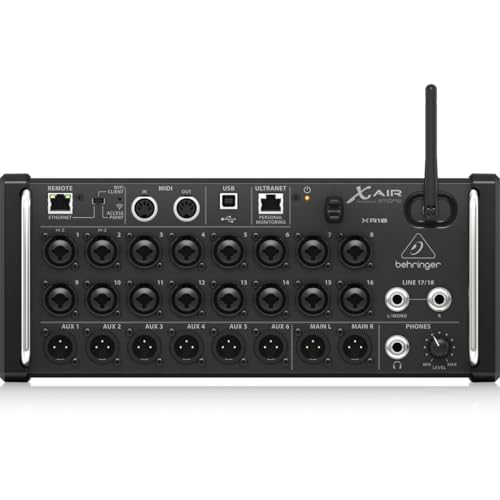
Behringer X Air XR18 — Best Budget Multitrack
The XR18 is the stage-box mixer that defined the category: 18 channels, 16 Midas preamps, 12 buses and a multi-channel USB interface in a box that sits on stage and is mixed from a tablet.
For Logic users recording bands, it is the budget multitrack front end — sixteen preamps arriving in Logic as sixteen tracks from a stage box.
Strengths
- Sixteen real mic preamps cover a full band’s stage plot
- Multitrack USB recording turns every gig into a potential live album
- Enormous user community means answers and show files are easy to find
Trade-offs
- Built-in WiFi struggles in crowded venues — budget for an external router
- No physical controls if your tablet fails mid-show
- The app experience varies across the many supported platforms
| Inputs | 18 channels with 16 Midas preamps |
| Buses | 12-bus architecture |
| Recording | Multi-channel USB audio interface |
| Control | Integrated WiFi, tablet and computer control |
Few products in live sound offer this much capability per dollar or per kilo. The XR18’s preamps are the Midas-designed circuits from the X32 family, its bus count runs a full set of in-ear mixes, and its USB interface records the whole band multitrack to a laptop. The discipline it demands is networking: treat the built-in WiFi as a rehearsal-room convenience, wire a proper router for shows, and the platform is as reliable as the bands who have toured it for years will tell you.
Long-term XR18 owners develop rituals worth copying: a quality router mounted in the same rack, a hardwired laptop connection for recording nights, a laminated card with the network name inside the case lid. With those, the platform’s reliability record is excellent, and its resale market is liquid because every band knows what it is. It is also the best-documented mixer in its class — any problem you can name has a forum thread and a video waiting.
The XR18’s total system cost — mixer, router, tablet, small rack — still undercuts most rivals’ mixer alone. That arithmetic, plus the multitrack recording, is why it remains the default band purchase.
Best for: Working bands wanting full multitrack and monitor capability on a budget / Not suited for: Users who need physical faders or mix in RF-hostile rooms without a router.
Check on Amazon — check price on Amazon for the Behringer X Air XR18.

Soundcraft Ui24R — Best for Live-to-Logic Capture
The Ui24R is a rack-mount digital mixer controlled from any web browser — laptop, tablet or phone — with 24 inputs and multitrack recording, suiting bands and venues that want capacity without a console surface.
For live-to-Logic workflows it captures to USB media as backup while feeding the computer, which suits engineers who cannot afford a crashed take.
Strengths
- Browser control means any device with a screen becomes a control surface
- Multitrack recording to USB media captures shows without a laptop
- Generous input count covers full bands plus playback and spares
Trade-offs
- No physical faders, so mixing is entirely a touchscreen discipline
- Built-in wireless in busy venues benefits from an external router
- The rack needs a tablet or laptop budget added to the true cost
| Inputs | 24-input rack-mount digital mixer |
| Control | Browser-based control from any device, no app install |
| Recording | Multitrack USB recording to flash drive and computer |
| Processing | Onboard signal processing with Lexicon-style effects heritage |
The Ui24R’s browser interface is its party trick and its practical strength: no app store, no OS version roulette — open a browser and mix. Soundcraft’s channel processing is musical rather than surgical, the effects come from Lexicon lineage, and recording the gig multitrack to a USB stick means the live mixer doubles as the demo recorder. For a working band that soundchecks itself, or a venue whose operators rotate, the combination of capacity, recording and zero-install control is hard to beat at this tier.
The Ui24R’s browser control has a side benefit owners mention often: any device works, including the venue’s ancient laptop and the singer’s brand-new phone, on the same night, without installs or updates. Its multitrack-to-USB recording is similarly democratic — a flash drive in the rack captures the show whether or not anyone remembered a laptop. For schools and churches whose technical team is whoever shows up, that forgiveness is a feature no spec sheet captures.
Add a decent router and a labelled USB drive to the purchase and the Ui24R system is complete. Its owners rarely report mixer problems; they report the shows they recorded because recording was effortless.
Best for: Bands and venues wanting 24 inputs, browser control and easy multitrack capture / Not suited for: Engineers who mix with their eyes up and hands on faders.
Check on Amazon — check price on Amazon for the Soundcraft Ui24R.

Allen & Heath CQ-18T — Best Premium Desktop
The CQ-18T is the desktop CQ model with a 7-inch touchscreen and physical controls, suiting users who want Allen & Heath processing and assistive tools with hands-on control at the desk.
For the Logic project studio it is the premium desktop: clean USB multitrack, touchscreen mixing for the room, and media recording when the Mac stays home.
Strengths
- Touchscreen plus real knobs and fader gives faster control than app-only mixers
- Assistive tools genuinely shorten setup for smaller teams
- Multitrack recording over USB or SD makes it a studio-live hybrid
Trade-offs
- Desktop format takes more space than a stage box
- Premium pricing against bigger-input rack rivals
- The screen is excellent but still small for dense channel views
| Display | 7-inch touchscreen |
| Connectivity | WiFi and Bluetooth built in |
| Format | Desktop digital mixer with physical controls |
| Recording | USB and SD multitrack recording options |
The CQ-18T is what happens when a serious mixer company designs for the home studio and small stage at the same time. The touchscreen workflow is fast, the quick channels and assistive setup suit musicians first and engineers second, and the recording options mean rehearsals and gigs are captured without extra hardware. In the studio it behaves like a well-mannered interface with recall; on stage it behaves like a mixer that wants you to finish soundcheck early. That dual personality is exactly what most project studios need.
What owners notice after a month is how often the CQ-18T gets used for small things: recording rehearsals to SD, mixing a video call properly, running the acoustic duo at the weekend. The touchscreen makes those small jobs fast, and the processing quality means the results sound like the main rig’s. It is an easy mixer to recommend because it fits real, mixed musical lives rather than a single defined job.
Accessories worth adding: a quality SD card for recording and a cover for the screen. The CQ-18T otherwise arrives complete — a premium desktop that earns its space from the first session.
Best for: Project studios and small live rigs wanting one premium mixer for both / Not suited for: Buyers counting maximum inputs per dollar above all else.
Check on Amazon — check price on Amazon for the Allen & Heath CQ-18T.

PreSonus StudioLive 16.0.2 USB — Best Simple Console
The StudioLive 16.0.2 USB is the compact classic of the range: a small digital console with Fat Channel processing and USB multitrack recording for small venues and project studios.
For Studio One migrants and Logic users alike, its straightforward USB multitrack and console layout make the DAW feel like a tape machine.
Strengths
- Simple, direct layout suits volunteer operators and small studios
- USB multitrack recording integrates with Studio One and other DAWs
- Compact footprint fits small control positions and desks
Trade-offs
- An older design — no touchscreen or motorized faders
- Channel count is the ceiling; no expansion path
- Check feature set against newer Series III models before buying
| Format | Compact digital console mixer |
| Connection | USB for multitrack recording to computer |
| Processing | Fat Channel dynamics and EQ on inputs |
The 16.0.2 earned its following by being the digital mixer a small church or studio could actually run: faders where you expect them, Fat Channel processing that makes vocals behave, and a USB connection that records the service or the session multitrack. It lacks modern theatre — no moving faders, no big screen — but everything it does, it does directly. As a first digital console or a small studio’s centre, its simplicity remains the point.
Time has been kind to the 16.0.2’s design brief: simple surface, honest processing, recording that works. In small studios it serves as the first ‘real console’ generations of engineers learned on, and in churches it survives because any volunteer can be taught it in an evening. Newer mixers out-feature it; few out-simplicity it. For buyers who value that directness — and whose channel count fits — it remains a rational, satisfying purchase.
Check the current listing’s included software and firmware state when buying the 16.0.2 — as a mature model, the details of the bundle matter. The core console proposition remains as sound as ever.
Best for: Small venues and project studios wanting a straightforward digital console / Not suited for: Users wanting touchscreens, moving faders or network expansion.
Check on Amazon — check price on Amazon for the PreSonus StudioLive 16.0.2 USB.

Zoom LiveTrak L-12 — Best for Ensembles
The LiveTrak L-12 is a mixer and multitrack recorder designed for musicians and podcasters, notable for giving each performer their own headphone mix.
For Logic podcast and ensemble work, it records everyone separately — in the mixer or into Logic — with headphone mixes that keep sessions moving.
Strengths
- Separate headphone mixes make band recording sessions happier
- Records multitrack while mixing, no computer required
- Compact and light for a unit with this much function
Trade-offs
- Build is lighter than metal-chassis rivals
- Channel count caps ambitious live work
- Interface mode track count differs from SD recording — check your workflow
| Functions | Mixer and multitrack recorder |
| Monitoring | Individual headphone mixes for performers |
| Recording | Multitrack recording to SD, USB interface mode |
The L-12’s signature feature sounds small until you have run a session without it: five performers, five different headphone mixes, nobody asking for more of themselves. Around that, it is a complete small recording system — multitrack to SD, a straightforward mixer layout, and USB interface duty when the computer joins. Podcast ensembles, rehearsing bands and mobile recordists get a one-box answer that respects both budget and patience.
Session reports from L-12 owners return to the headphone mixes: a drummer who hears the click and bass properly plays tighter; a singer with their own reverb sings with more confidence. The L-12 makes those mixes trivially available, and its SD recording means the session exists even if the computer misbehaves. Podcast networks adopted it for the same reason bands did — it treats every participant’s ears as a first-class concern.
The L-12’s accessories are headphones — one good set per performer. Its per-person mixes only shine when everyone can actually hear them, so budget the session as a system, not a box.
Best for: Bands and podcast teams recording together in one room / Not suited for: Users needing a heavy-duty touring console.
Check on Amazon — check price on Amazon for the Zoom LiveTrak L-12.
Comparison Table
| Pick | Badge | Key spec | Best for |
|---|---|---|---|
| Tascam Model 12 — Check price on Amazon | Best Overall | 12-track multitrack recorder, mixer and USB interface in one | Musicians who want computer-free multitrack recording with a real mixer feel |
| Behringer X Air XR18 — Check price on Amazon | Best Budget Multitrack | 18 channels, 16 Midas preamps, multitrack USB | Working bands wanting full multitrack and monitor capability on a budget |
| Soundcraft Ui24R — Check price on Amazon | Best for Live-to-Logic Capture | 24 inputs, browser control, multitrack USB recording | Bands and venues wanting 24 inputs, browser control and easy multitrack capture |
| Allen & Heath CQ-18T — Check price on Amazon | Best Premium Desktop | 7-inch touchscreen, WiFi/Bluetooth, desktop format | Project studios and small live rigs wanting one premium mixer for both |
| PreSonus StudioLive 16.0.2 USB — Check price on Amazon | Best Simple Console | Compact digital console with USB multitrack recording | Small venues and project studios wanting a straightforward digital console |
| Zoom LiveTrak L-12 — Check price on Amazon | Best for Ensembles | Mixer/recorder with per-performer headphone mixes | Bands and podcast teams recording together in one room |
Read the table by format first and specifications second. The format decides who can operate the mixer and where it lives; the key spec decides whether your input list and monitor world fit. Badges repeat the Quick Picks verdicts so the table can be used on its own — and every row links to the same verified listing used throughout the guide, so the price you check is the price for the exact model reviewed.
What does value look like in this category?
Value in a Logic pairing is measured in sessions that start on time. The Model 12’s premium over a plain interface buys the elimination of setup as a category: the front end is always ready, so Logic time is spent recording and editing. The XR18’s value is the opposite shape — maximum tracks per pound for band work — and the Ui24R charges for insurance, the media recording that means a crashed laptop costs you a restart, not the performance.
Count the software you are not buying, too: monitor control, headphone mixing, live effects for tracking and a recorder are separate purchases in an interface-only setup. The mixers here bundle them into hardware that also survives your next computer. When you check price on Amazon, compare the complete chain you would otherwise assemble — the bundle arithmetic is kinder to these mixers than the sticker comparison suggests.
How to Choose a Digital Mixer for Logic Pro X
What makes a mixer work well with Logic Pro specifically?
Logic records whatever the system audio device presents, so the mixer’s interface design is everything. You want a multi-channel USB path — the mixer appears in Logic’s audio preferences with all its inputs available per track — and a return path that lets Logic’s playback come back through the mixer to your monitors. Class-compliant operation is the smoothest path on macOS; where a maker offers a Mac app or driver, it usually manages the mixer’s settings rather than the audio itself. Every pick here follows that pattern.
How many simultaneous inputs can Logic record from a mixer?
As many as the mixer sends. Stage boxes like the XR18 present their full input set over USB; the Model 12 presents its twelve tracks; consoles present their configured USB channel count. Logic itself handles far more tracks than any mixer here provides, so the ceiling is always the hardware. The practical checks are your Mac’s USB bandwidth — connect the mixer directly, not through a bargain hub — and your disk speed when recording many tracks for hours.
Should the mixer or Logic handle monitoring while tracking?
Let the mixer do it. Monitoring through the mixer is latency-free and can carry reverb for the singer, while Logic records the clean tracks. Monitoring through Logic adds plug-in possibilities but also latency that performers hear as a slap echo, unless buffers are set low and the session is light. The standard professional pattern with these mixers: hardware monitoring for the performers, Logic as the recorder, and the mixer’s USB returns for playback between takes.
What about sample rates and session settings with a mixer and Logic?
Pick one rate — 48 kHz suits most music-plus-video work, 44.1 kHz suits music-only releases — and set it in the mixer, in Logic’s project settings and in macOS Audio MIDI Setup so nothing resamples or drifts. Mismatched rates are the number one cause of ‘my recording plays back at the wrong speed’ panic. Set it once, save a Logic template with the mixer’s input names, and every session starts correctly.
How do you handle latency with a mixer and Logic?
Latency lives in two places: the mixer’s hardware monitoring, which is effectively instant, and Logic’s software path, which depends on buffer size. The professional arrangement keeps performers on the mixer’s path and lets Logic record at a comfortable buffer, so the DAW never has to sprint. Reserve low-buffer software monitoring for the moments you truly need a Logic plug-in on the input — an amp simulation, for instance — and accept the smaller buffer only for those tracks.
Can you mix in Logic and monitor through the mixer at the same time?
Yes — route Logic’s main output back into the mixer as a stereo return, and your monitors and headphones hear the DAW through the same path as everything else. This gives you the mixer’s speaker switching, dim and talkback around Logic’s playback, which turns a laptop session into a control-room session. It is the setup most mixer-plus-Logic studios settle into permanently, because it makes the computer feel like one source among many rather than the centre of the universe.
How do mixer scenes and Logic templates work together?
They are the two halves of session recall. The Logic template restores tracks, names, routing and plug-in starting points; the mixer scene restores gains, monitor mixes and the live routing. Saved under the same project name and stored in the same folder, together they reopen a session completely — the closest thing digital recording has to walking back into a room exactly as you left it. Studios that pair them stop fearing revision requests, because returning to a project costs minutes instead of reconstruction.
How does a mixer-centred Logic workflow feel day to day?
It feels like the computer got out of the way. The mixer holds the microphones, the headphone mixes and the monitors; Logic holds the timeline. You stop managing aggregate devices and input monitoring toggles, because the physical desk does the live work it is good at. Tracking a vocal becomes: load the scene, arm the track, sing. The mixer even forgives the Mac’s moods — a reboot mid-session costs you the DAW, not the performer’s headphone mix or the room’s sound.
The workflow also future-proofs the studio. When the session outgrows the room — a live gig to record, a bigger band — the same mixer travels, captures the show, and returns to the desk where Logic imports the tracks. Studios built around a multitrack mixer tend to say yes to more kinds of work, because the recording chain is always already assembled.
What does a mature Logic-plus-mixer studio gain over a laptop-only setup?
Resilience and speed. The session survives the laptop’s worst day because the mixer holds the room together; tracking starts in seconds because the front end never sleeps; performers hear themselves properly because monitoring is hardware, not a plug-in chain balanced on a buffer setting. Laptop-only setups are miraculous for their cost, but they concentrate every function into the component most likely to demand an update at the wrong moment.
There is also a musical gain: the mixer invites other people in. A second musician can plug into channel seven without a settings expedition; a singer can hear reverb while Logic records dry; a band can rehearse through the same system that records them. Studios are social places, and the mixer is the piece of furniture that makes the computer social too. That, more than any specification, is why these pairings endure.
How to Set Up a Digital Mixer with Logic Pro X
Connect the mixer to the Mac by USB, then open Audio MIDI Setup and confirm the mixer appears with its full input and output count. In Logic’s audio preferences, select the mixer as both input and output device, set the buffer to a comfortable tracking value, and set the project sample rate to match the mixer’s rate.
Create a track per input and name them to match the mixer’s channels — kick, snare, vocal, and so on — then save the session as a template so the mapping is never rebuilt. Set the mixer to send clean, pre-fader channel feeds to USB where the model allows, and route Logic’s stereo output back to a mixer channel or return feeding your monitors.
Record a thirty-second test of every source, play it back through the mixer, and confirm the performers’ headphone mix comes from the mixer rather than through Logic. Once that loop is proven, disable input monitoring in Logic for the tracks the mixer is monitoring, and you have the low-latency, no-echo setup that makes tracking pleasant.
Revisit your template after your first real project and correct it with experience: the input you always move, the track you always add, the send you always build. Templates earn their keep in their second version. Thereafter, treat the mixer scene and Logic template as project documents — versioned, backed up, and named like you will search for them in a year, because you will.
Setup and Buying Checklist
Before and just after you buy, work through this checklist for best digital mixers using logice pro x. It collects the small, unglamorous steps that separate systems which settle in quietly from systems that generate a month of small frustrations.
- Set one sample rate in the mixer, Logic and Audio MIDI Setup — and verify it after any update.
- Save a Logic template whose track names match the mixer’s channel names exactly.
- Monitor performers through the mixer and disable Logic’s input monitoring on those tracks.
- Connect the mixer directly to the Mac by USB; avoid shared hubs for session work.
- Route Logic’s output back into the mixer so playback shares the monitor path.
- Store the mixer scene and the Logic project in the same backed-up folder.
Which pick fits which Logic workflow?
For the Logic-based songwriter, the Model 12 is the kindred tool: ideas captured to SD at the speed of thought, USB multitrack when the session formalises, and DAW control that keeps the arrangement moving without mouse fatigue. Its twelve tracks mirror how Logic projects by solo writers actually grow — a keeper vocal, layers of guitars and keys, and room to spare.
For the band that demos in Logic, the XR18 front end is the unlock: the whole band, sixteen preamps, one USB cable into the Mac, and a Logic template that turns rehearsal night into demo night. The Ui24R adds the safety of simultaneous media recording for the gigs and sessions that cannot be repeated — the take-protection professionals build into every important recording.
For the podcast and voice studio running Logic, the LiveTrak L-12 and 16.0.2 divide by posture: the Zoom for ensembles who need headphone mixes and standalone capture, the PreSonus for a console-feel room where Logic is the editor and the desk is the front end. Both keep editing in Logic — where it belongs — and tracking in hardware, where it is calm.
For the project studio that also does live work, the CQ-18T is the Logic partner that travels: multitrack into Logic in the studio all week, touchscreen mixing at the weekend’s small gig, media recording when the laptop stays behind. Studios with mixed income streams value that flexibility out of proportion to its spec-sheet size, because it collapses two purchases into one well-chosen box.
Common Buying Mistakes
Most buying mistakes with best digital mixers using logice pro x are not about choosing a bad mixer — every pick here is capable — but about mismatching the mixer to the room, the crew or the input list. These are the mismatches we see repeated most often, and each is cheaper to avoid on paper than to fix in hardware.
- Leaving Logic’s input monitoring on while also monitoring through the mixer, producing a doubled, echoing voice.
- Mismatching sample rates between the mixer and the Logic project and discovering pitch-shifted recordings.
- Plugging the mixer into an overloaded USB hub shared with drives and dongles, then blaming the mixer for dropouts.
- Recording the stereo main mix into Logic instead of the multitrack channel feeds.
- Never saving a Logic template, so every session starts with twenty minutes of track creation.
Final Recommendation
For Logic users, the Model 12 is the most natural partner — tactile, multitrack, and happy with or without the Mac — while the XR18 is the budget way to get a whole band into Logic. The Ui24R adds media backup for live capture, the CQ-18T brings premium desktop polish, the 16.0.2 keeps things console-simple, and the LiveTrak L-12 looks after ensembles. Set one sample rate, monitor through the mixer, save a template, and Logic sessions start the moment the musicians are ready.
Pair the mixer and Logic deliberately — one sample rate, matched names, a saved template, hardware monitoring — and the combination stops feeling like two systems negotiating and starts feeling like one instrument. That feeling is the actual product this guide is recommending.
Shortlist links for the top three: Tascam Model 12 · Behringer X Air XR18 · Soundcraft Ui24R — check price on Amazon for each before deciding, and confirm the current listing matches the model described here.
Best Digital Mixers For Recording Best Digital Mixers For Studio Best Digital Mixers For Recording Studio
A note on ownership and upkeep
A final note on updates: macOS and Logic updates occasionally change how audio devices are enumerated, so after any major system update, re-run the thirty-second test — open Audio MIDI Setup, confirm the mixer’s inputs, record a pass, and check the template still maps correctly — before the next real session rather than during it. Five quiet minutes after an update protects the first hour of the next session, which is where update surprises otherwise choose to live. Keep a note of the working configuration, and the pairing will stay as boring as it should be.
Frequently Asked Questions
Does Logic Pro work with any USB digital mixer?
Logic records from any audio device macOS recognises. The mixers here are chosen because they present true multitrack inputs over USB, not just a stereo feed.
Is ‘Logic Pro X’ different from Logic Pro?
Apple dropped the X in later versions; the workflow described here is identical. Any current Logic version pairs with these mixers the same way.
How do I stop hearing an echo when recording in Logic?
Monitor through the mixer and turn off Logic’s input monitoring for those tracks, or use Logic’s low-latency monitoring mode. Hearing both paths at once causes the echo.
Can I record a full band into Logic with a stage box like the XR18?
Yes — its USB interface sends its input set simultaneously, which is exactly how bands use it: stage box at the drums, laptop running Logic at the side.
Which sample rate should I use with Logic and a mixer?
44.1 kHz for music-only, 48 kHz if video is involved — but above all, one rate everywhere: mixer, Logic project and macOS settings in agreement.
Can the mixer control Logic’s faders?
Some models offer DAW control features — the Model 12 is the clearest example here. For others, the mixer controls the live sound while Logic’s own surface or mouse controls the DAW.
Do I need to install drivers for these mixers on a Mac?
Most operate class-compliantly for audio; companion apps may manage mixer settings. Install the maker’s current Mac software before the first session and test the full loop.
Can I use the mixer for Logic playback only, without recording?
Yes — select it as Logic’s output device and it becomes your monitor path, with the mixer’s speaker control and headphone feeds available around the DAW.
To close: the shortlist for best digital mixers using logice pro x rewards buyers who decide by workflow first and specifications second. Start from the top pick — the Tascam Model 12 — and move down the list only when a specific requirement rules it out: a channel count, a format, a network standard, a control style. That order of decisions, applied honestly, is how the right mixer gets chosen, and it is the order this guide was written in. Keep the verified links above for current availability, save your first good scene the day the mixer arrives, and let the system settle into the background of the work it was bought to support.
Related reading on this site: Best Digital Mixers For Pc Speaker Best Digital Mixers Under $5000


