Disclosure: airfryerkitchensupply.com is reader-supported. When you buy through links on our site, we may earn an affiliate commission at no extra cost to you.
Where to buy
Every pick in this guide was verified against live Amazon listing data before inclusion. Use these links to check price on Amazon and confirm current availability for the best digital mixers under 5000 shortlist:
Midas M32 Live — check price on Amazon · Behringer X32 — check price on Amazon · PreSonus StudioLive 32SX — check price on Amazon · Allen & Heath QU-24C — check price on Amazon · Yamaha TF1 — check price on Amazon · QSC TouchMix-30 Pro — check price on Amazon
The best digital mixers under 5000 dollars occupy the most competitive ground in pro audio: this is the tier where genuine touring consoles, networked systems and flagship touchscreen desks all compete, and where the best digital mixers under 5000 stop being compromises and start being long-term infrastructure. Under the $5000 frame you are choosing an ecosystem and a working philosophy as much as a mixer.
Every pick below sits within that budget frame as a product class — check price on Amazon for the current figure, because pro audio pricing moves with promotions and bundles. What the frame buys you: motorized faders, serious preamps, networked stage-box expansion, multitrack recording and surfaces built for nightly work. The six here represent the strongest philosophies in the tier, each verified before inclusion.
A framing note: prices in pro audio move with bundles, promotions and currency, so this guide treats the $5000 figure as the console-class frame the search names, and every pick as a member of that class — use the links to check price on Amazon for today’s number on your shortlist. What does not move is the tier’s character: these are the consoles that working professionals buy with their own money and keep for a decade.
In this guide
Quick Picks
- Midas M32 Live — Best Overall: Under the $5000 frame it is the premium anchor: the console professionals would choose with their own money when the room and the road both matter. Check price on Amazon.
- Behringer X32 — Best Value: As the value pick of the tier it leaves budget for the stage box, cases and personal mixers that turn a console into a system. Check price on Amazon.
- PreSonus StudioLive 32SX — Best Networked System: For buyers building a networked system, it is the centre that makes AVB stage boxes and recording computers feel like one instrument. Check price on Amazon.
- Allen & Heath QU-24C — Best for Venues: For venues wanting Allen & Heath quality with generous I/O while keeping change from the budget for installation and training. Check price on Amazon.
- Yamaha TF1 — Best for Institutions: For institutions, it trades raw channel count for Yamaha calm — the mixer a school or church can hand to a new operator without fear. Check price on Amazon.
- QSC TouchMix-30 Pro — Best Touchscreen Workflow: For corporate and theatre work under the frame, its big-screen guided workflow is the differentiator money cannot buy from rivals. Check price on Amazon.
How to use this shortlist: the badges are decisions, not decorations. If the Best Overall pick fits your input list and your way of working, the search for best digital mixers under 5000 can honestly end there — it earned the top badge by being the choice we would defend for the most buyers. Move to a specialist badge only when your situation names it: a tighter budget, a particular room, a recording habit, a network standard. Reading the guide that way — top pick first, specialists as exceptions — mirrors how engineers actually recommend gear to each other, and it will get you to the right mixer faster than comparing every specification against every other.
How These Picks Were Chosen
Two filters did most of the work. The first was honesty of specification: for best digital mixers under 5000, marketing language hides the differences that matter — whether recording is multitrack or stereo, whether a network port carries audio or only control, whether the advertised channel count matches the microphone preamp count. We read past the headline numbers to the architecture underneath, and dropped models whose listings could not confirm the capability the search asks for. The second filter was ownership reality: control apps that are maintained, ecosystems with stage boxes and spares available, and manufacturers with a service network. A mixer is a five-to-ten-year relationship, and the guide weights it that way.
We started from the mixers buyers actually cross-shop for best digital mixers under 5000, then verified each candidate against the manufacturer listing data returned by Amazon’s catalogue before writing a word. A pick only carries an Amazon link when that verification matched the exact model — its channel architecture, preamp count and recording path as listed. We weighted real-world workflow over spec-sheet theatre: how the mixer is controlled under pressure, what its recording path really captures, how its monitor buses serve real performers, and whether its ecosystem gives the purchase a future. Badges were assigned after those comparisons, and the same badge follows each pick from the Quick Picks into its full review below.
The 6 Best Options: Best Digital Mixers Under $5000
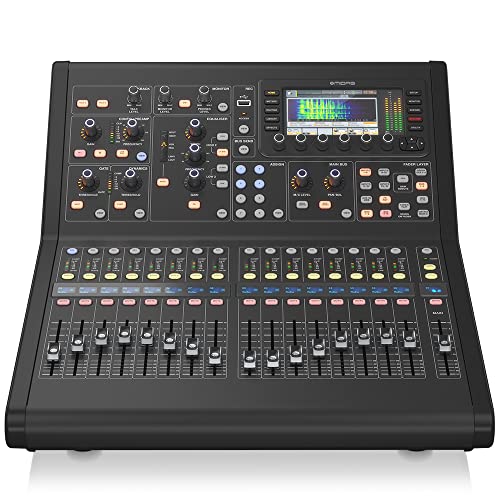
Midas M32 Live — Best Overall
The M32 Live is Midas’s flagship compact console: 32 Midas PRO preamps, 40 input channels, 25 buses and live multitrack recording, built for professional live and studio work.
Under the $5000 frame it is the premium anchor: the console professionals would choose with their own money when the room and the road both matter.
Strengths
- The preamps and build quality are a clear class above mid-tier consoles
- Fader feel and surface layout reward professional operators
- Multitrack recording is integrated for live album workflows
Trade-offs
- Price reflects the badge and the build — it is the premium option
- Weight and size suit proper cases and crews
- Its depth is wasted on genuinely small shows
| Inputs | 40 input channels, 32 Midas PRO preamps |
| Buses | 25 mix buses |
| Recording | Live multitrack recording |
| Design | Console design with premium faders and carbon-fibre styling |
The M32 Live is what the X32 wants to be when it grows up: the same conceptual layout, executed with Midas PRO preamps, better faders, a faster surface and materials that survive touring. Engineers who learned on the X32 step onto it without a manual and immediately hear where the money went — the top end opens up, the low mids stay clear at high channel counts, and the desk feels like it will outlast the band. For professional rooms and touring acts, it is the benchmark of this class.
Time on an M32 Live teaches respect for its details: faders that feel like instruments, a surface layout that keeps the important things under the hands, and processing that stays composed when the channel count climbs. It is the console engineers request by name on riders in this class, which matters for venues selling their room to touring acts. Expensive, yes — and priced like the professional tool it demonstrably is.
Insure it, case it, and put a trained engineer behind it: the M32 Live’s cost is justified nightly by rooms and tours that treat it as the professional instrument it is.
Best for: Professional venues and touring acts wanting the premium console of this class / Not suited for: Small shows where a stage box does the same work for a fraction.
Check on Amazon — check price on Amazon for the Midas M32 Live.

Behringer X32 — Best Value
The X32 is the console that moved a generation of small venues, churches and touring bands from analogue desks to digital, and it suits buyers who want a full physical surface with deep routing at a mid-tier price point.
As the value pick of the tier it leaves budget for the stage box, cases and personal mixers that turn a console into a system.
Strengths
- Huge input and bus count for the tier, so full bands with in-ear mixes fit comfortably
- Motorized faders and scene recall make multi-band bills and volunteer crews manageable
- AES50 stage boxes let you put inputs on stage and run one network cable to front of house
Trade-offs
- The learning curve is real — routing and the effects rack take study before the first show
- The full-size frame needs a proper flight case and two people to move comfortably
- The onboard screen is small by modern touchscreen standards
| Input channels | 40-input, 25-bus architecture |
| Control surface | Full-size console with motorized faders |
| Expansion | AES50 networking for digital stage boxes |
| Recording | USB audio interface expansion options |
What keeps the X32 relevant is ecosystem depth. Thousands of engineers know its layout, so hiring help, borrowing a show file or finding a tutorial is easy in a way newer rivals cannot match. The preamps are clean at sensible gain, the parametric EQ and dynamics on every channel cover club work without outboard, and the bus count means monitor mixes stop being the compromise they are on smaller desks. Treat it as a system — console, stage box, personal monitoring — and it scales from a bar rig to a festival side-stage without changing the workflow your crew already knows.
In daily operation the X32 rewards a methodical engineer: build a sensible input list, keep a house scene with the room tuned, and save per-act scenes on top of it. The effects rack covers the usual live needs — reverbs that do not cloud vocals, a delay that taps to tempo, and dynamics for the money channels. Where it ages most visibly is the small screen and the menu depth for rarely used settings, but muscle memory solves both, and the depth is precisely why it keeps headlining this class.
Budget-wise, remember the X32 is the centre of a system: case, stage box and cables belong in the same spreadsheet. Bought as a system and run by a trained operator, it remains the reference point every rival in this class is measured against.
Best for: Venues, churches and bands that need a full console surface and room to grow / Not suited for: Solo acts and tiny rooms where a rack mixer does the same job in a third of the space.
Check on Amazon — check price on Amazon for the Behringer X32.

PreSonus StudioLive 32SX — Best Networked System
The StudioLive 32SX is PreSonus’s compact Series III console: 25 motorized faders, the FLEX DSP engine and AVB networking, aimed at venues and studios that move between live and recording work.
For buyers building a networked system, it is the centre that makes AVB stage boxes and recording computers feel like one instrument.
Strengths
- AVB networking integrates stage boxes, personal mixers and recording computers elegantly
- Fat Channel processing gives every channel a choice of modelled EQ and dynamics
- Tight Studio One and Capture integration makes recording the show nearly automatic
Trade-offs
- Best experienced inside the PreSonus ecosystem — plan the whole system
- Compact frame packs controls densely for larger hands
- Learning the FLEX routing takes a dedicated session
| Faders | 25 motorized faders |
| DSP | Dual-core FLEX DSP engine |
| Networking | AVB networking for recording, mixing and monitoring |
| Recording | Multitrack recording and DAW integration |
PreSonus thinks in systems, and the 32SX is the centre of one: AVB stage boxes where the band is, personal mixers where the musicians are, and a recording computer quietly capturing everything over the same network. The Fat Channel’s modelled processors give engineers flavours rather than just tools, and the console’s recall makes a venue’s week — services, rehearsals, gigs — a set of scenes instead of a set of repatches. Buy it as a platform and it rewards you; buy it as a lone mixer and you still get a fine desk.
The 32SX rewards studios and venues that commit to its platform: Capture records the show almost without being asked, Studio One integration makes editing the recording a continuation of the same session, and AVB personal mixers give musicians control without console real estate. Its Fat Channel plug-in models let engineers choose processing flavours per channel — a tracking decision that gives mixes a head start. It is a platform purchase, and judged as one, a strong one.
The 32SX makes most sense bought with its first stage box, so the AVB system is real from day one. Purchased as a platform and grown deliberately, it anchors a room for years.
Best for: Venues and studios building an AVB-networked system / Not suited for: Buyers who want a standalone mixer with no ecosystem ambitions.
Check on Amazon — check price on Amazon for the PreSonus StudioLive 32SX.

Allen & Heath QU-24C — Best for Venues
The QU-24C is a compact digital console with 30 inputs and 24 outputs, motorized faders and the Qu workflow, suiting venues and bands that have outgrown 16 channels but not their budget.
For venues wanting Allen & Heath quality with generous I/O while keeping change from the budget for installation and training.
Strengths
- Input and output counts cover full bands plus several monitor mixes
- Physical faders and a clear, learnable layout suit volunteer teams
- Strong recording options for services and shows
Trade-offs
- Larger and heavier than rack mixers with similar channel counts
- Interface design is older than the CQ generation
- Stage-box expansion is a further purchase for remote inputs
| Inputs / outputs | 30 in / 24 out |
| Format | Compact digital console, Chrome Edition |
| Control | Motorized faders, touchscreen, remote apps |
The QU-24C occupies the sensible middle: enough channels for a full band with a horn section, enough outputs for wedges and in-ears, and a surface a competent volunteer can learn in an afternoon. Its processing is a known quantity — clean preamps, effective EQ, reverbs that sit in a mix — and its scene system handles the Sunday-morning, Saturday-wedding double life of real venues. If a rack mixer feels too invisible and a flagship console too much, this is the desk that fits.
The QU-24C’s party piece is balance: enough of everything, nothing eccentric. Twenty-four faders cover the band; the output count covers monitors and a recording feed; the processing covers the show without menu-diving. Theatres and schools that run it praise the training curve most — a new operator can be useful in one session and confident in three. In a market of extremes, that moderation is a deliberate and valuable position.
Plan the QU-24C’s home — a proper stand or case, and a stage position with sightlines. It is a console that rewards being treated as the room’s centre rather than as portable gear.
Best for: Venues and larger bands needing 24 faders of hands-on control / Not suited for: Rigs that must travel in a car boot rather than a van.
Check on Amazon — check price on Amazon for the Allen & Heath QU-24C.

Yamaha TF1 — Best for Institutions
The Yamaha TF1 is a compact 16-channel digital console built around a touchscreen TouchFlow interface, aimed at users who want Yamaha reliability with a gentle learning curve.
For institutions, it trades raw channel count for Yamaha calm — the mixer a school or church can hand to a new operator without fear.
Strengths
- TouchFlow workflow and presets make it approachable for new operators
- Yamaha build quality and support network
- Compact console footprint for small venues and schools
Trade-offs
- Channel count is fixed at this size — plan the input list
- Touchscreen-first design will not suit every engineer
- Expansion path is narrower than the X32 ecosystem
| Channels | 16-channel digital mixing console |
| Control | TouchFlow interface with touchscreen |
| Design | Compact console with motorized fader |
Yamaha built the TF range for the operator who mixes twice a month, not twice a day: presets for common microphones and instruments, one-knob compression and EQ that behave sensibly, and a screen that shows the whole story. The TF1’s 16 channels cover school productions, small churches and corporate work, and Yamaha’s reliability record means it will still be doing so in a decade. It trades the deep customisation of rivals for calm, predictable operation — a trade many venues gladly make.
The TF1’s presets deserve their reputation: choose the microphone, choose the instrument, and the channel starts from a place that sounds like a competent engineer set it. For schools this is transformative — productions stop depending on the one teacher who ‘does sound’. Yamaha’s stage-box expansion and recording options exist when needed, but the TF1’s core gift is confidence for occasional operators, and that gift compounds across every event the venue runs.
Institutions should budget a training hour alongside the TF1 — not because it is hard, but because one hour converts nervous volunteers into confident operators, which is the entire point of the design.
Best for: Schools, churches and venues with occasional operators / Not suited for: Power users who live in deep routing menus.
Check on Amazon — check price on Amazon for the Yamaha TF1.

QSC TouchMix-30 Pro — Best Touchscreen Workflow
The TouchMix-30 Pro is the flagship of QSC’s range: a professional digital mixer with a large touchscreen and expanded inputs for serious small-to-mid-size production.
For corporate and theatre work under the frame, its big-screen guided workflow is the differentiator money cannot buy from rivals.
Strengths
- Large screen makes complex shows legible at a glance
- Professional input count and processing for mid-size work
- QSC training and support ecosystem behind it
Trade-offs
- Costs flagship money against strong console rivals
- Touch-centric workflow is a commitment, not a dip-in
- Size and weight end the one-hand carry of the smaller models
| Format | Professional digital mixer with large touchscreen |
| Class | 30-series flagship of the TouchMix range |
| Control | Touchscreen with physical faders and remote apps |
The 30 Pro is QSC’s argument that a touchscreen desk can run a professional show: a big, bright display, enough inputs for a full production, and the guided TouchMix philosophy scaled up rather than abandoned. Engineers who give it a weekend usually come back converted on the workflow for corporate and theatre work, where cue stacks and scenes dominate. It competes with respected consoles on merit, and wins where its interface philosophy matches the operator.
The TouchMix-30 Pro’s large screen changes the ergonomics of touchscreen mixing: channel views are legible from a step back, and the desk can be run by an operator who is also watching a stage. Corporate and theatre users — its natural constituency — value the cue-friendly workflow and QSC’s training library. It asks you to commit to its philosophy; those who do tend to specify it again for the next room.
The TouchMix-30 Pro deserves a proper case and a trained operator; with both, it runs corporate and theatre work with a calm that fader desks envy. It is a philosophy purchase — commit and it delivers.
Best for: Corporate, theatre and mid-size production wanting a guided pro desk / Not suited for: Traditionalists who want a fader-per-channel surface.
Check on Amazon — check price on Amazon for the QSC TouchMix-30 Pro.
Comparison Table
| Pick | Badge | Key spec | Best for |
|---|---|---|---|
| Midas M32 Live — Check price on Amazon | Best Overall | 32 Midas PRO preamps, 40 channels, live multitrack | Professional venues and touring acts wanting the premium console of this class |
| Behringer X32 — Check price on Amazon | Best Value | 40 inputs, 25 buses, AES50 stage-box networking | Venues, churches and bands that need a full console surface and room to grow |
| PreSonus StudioLive 32SX — Check price on Amazon | Best Networked System | 25 motorized faders, FLEX DSP, AVB networking | Venues and studios building an AVB-networked system |
| Allen & Heath QU-24C — Check price on Amazon | Best for Venues | 30 in / 24 out compact digital console | Venues and larger bands needing 24 faders of hands-on control |
| Yamaha TF1 — Check price on Amazon | Best for Institutions | 16-channel console with TouchFlow touchscreen workflow | Schools, churches and venues with occasional operators |
| QSC TouchMix-30 Pro — Check price on Amazon | Best Touchscreen Workflow | Flagship TouchMix with large touchscreen | Corporate, theatre and mid-size production wanting a guided pro desk |
Read the table by format first and specifications second. The format decides who can operate the mixer and where it lives; the key spec decides whether your input list and monitor world fit. Badges repeat the Quick Picks verdicts so the table can be used on its own — and every row links to the same verified listing used throughout the guide, so the price you check is the price for the exact model reviewed.
What does value look like in this category?
Value at this level is a decade-long calculation. The console’s invoice is the entry fee; the real ledger includes stage boxes, cases, training, one mid-life service, and the resale or trade-in at the end. Platforms with deep ecosystems win that ledger repeatedly: parts exist, engineers exist, buyers for your used unit exist. The X32 family’s liquidity and the Midas badge’s professional demand are not marketing points — they are line items in the total cost of ownership.
The other ledger entry is work won. A console that visiting engineers accept, that a venue can advertise, that a band’s rider already names, generates bookings a technically equal unknown cannot. When you check price on Amazon for the shortlist, weigh that earning power alongside the specification. In professional audio the most expensive purchase is the one that has to be explained; the platforms here largely explain themselves.
How to Choose a Digital Mixer Under $5000
What does the under-$5000 tier actually add over mid-priced mixers?
Three things: surfaces, systems and stamina. Surfaces — motorized faders, better screens, controls that survive nightly use. Systems — networked stage boxes, personal monitoring and recording integration that let one console anchor a whole building. Stamina — build quality, support networks and resale value that make the purchase a decade-long decision. If your work uses none of those, the tier below serves you honestly; if your calendar is full of paying shows, this is where the tools stop arguing back.
Should the budget include the stage box and accessories?
Plan the system price, not the console price. A digital snake or stage box, a flight case, a router or network switch, personal mixers and cables routinely add a third to the console’s figure — and the under-$5000 frame in the search is best read as the console-class budget, with the system built around it. The X32’s value case rests partly here: the money it saves funds the S32-class stage box and cases that complete the rig. Buy the console that leaves the system affordable.
Console ecosystems compared: X/M32, StudioLive, Qu and TouchMix
Behringer and Midas share a platform language — AES50 stage boxes, personal mixers, a vast tutorial world — with Midas adding preamp and build pedigree. PreSonus StudioLive centres on AVB networking and the tightest DAW integration of the group. Allen & Heath’s Qu line is the conservative engineer’s choice: musical processing, sane layout, strong install record. QSC’s TouchMix bets on guided touchscreen workflow. None is objectively best; the right one matches your operators, your other gear and the engineers you hire.
How do you protect an investment at this level?
Buy the case the same week as the console, register the warranty, and keep firmware updates deliberate — update between tours, never before a show, and keep the previous version’s notes. Insure the rig if it travels, and photograph serial numbers. Finally, invest in one trained operator: a $5000-class console mixed by guesswork sounds worse than a stage box mixed with knowledge. Training is the cheapest upgrade in this entire guide.
How do you compare total cost of ownership across these platforms?
Add the ecosystem, not just the console: stage boxes, personal mixers, cases, network hardware, training days and the resale market at the end. The X32 family’s vast used market makes both buying and selling easy; the Midas badge holds value with professionals; PreSonus bundles software value; QSC and Yamaha bring institutional support networks. Across a decade, the cheapest console to own is usually the one your engineers already know and your local dealer supports — price the whole decade, not the invoice.
When should a buyer in this tier choose the rack path instead?
When the mix position is imaginary — self-mixed bands, installs without a booth, corporate work in borrowed rooms — a networked rack core like the stage-box systems in this guide’s wider family delivers the same processing without the furniture. The under-$5000 frame buys a serious rack system with stage boxes and personal monitoring included. Choose it when your shows travel light and your operators mix from the stage; choose the console when a dedicated engineer and a fixed mix position are part of the product you sell.
What training should accompany a console at this level?
At minimum, one full day for the lead operator on the actual platform — routing, scene management, network setup and the failure drills — plus a half-day for the deputies. Manufacturers and dealers run platform courses, and the platforms here all have deep tutorial libraries. The return on that day is measurable: faster soundchecks, calmer failures, and a console that sounds like its price. No accessory in this tier outperforms a trained operator, and none is cheaper.
Why do professionals standardise on one console family?
Because shows are rehearsed in the file, not just the room. When a production company or venue standardises, show files travel between consoles, engineers share a language, spare parts and stage boxes interchange, and a failure on the night becomes a swap rather than a crisis. The under-$5000 tier is where that standardisation becomes affordable for regional companies, churches with multiple rooms, and schools with several spaces.
It is also where a mixer becomes a hiring asset. Engineers advertise fluency in the major platforms; owning the platform your local engineers know means your events staff themselves. When you choose between the excellent options in this tier, ask who near you already speaks each language — that answer is worth real money across a season of shows.
What do experienced buyers in this tier check that beginners miss?
They check the boring infrastructure: whether the stage box they want is actually in stock, whether the platform’s app runs on the tablets they own, whether the local dealer has a loaner when a console needs service during show season. They check the used market to learn what the platform is worth in three years. And they check the rider problem — whether the acts they host will accept the desk — because a technically superior console that every guest engineer refuses is an expensive ornament.
They also check their own calendar. A console bought for a hypothetical tour is a liability; a console bought against a season of confirmed work is an investment with a payback date. The under-$5000 tier is full of excellent machines, and the discipline is matching the machine to the work that demonstrably exists. Do that, and any of the six here will look, in hindsight, like the obvious choice.
How to Deploy a Pro Digital Mixer System for the First Time
Unbox into a plan, not a pile: console, stage box, network cables and router laid out as the system diagram you drew before ordering. Connect the stage box over its network cable, power in sequence, and update nothing yet — first confirm the system works as shipped, every input audible, every output where the diagram says it should be.
Build the default show file slowly: input list in your standard order, gains set with your usual microphones, monitor mixes roughed in, effects chosen and scenes saved for soundcheck, show and interval playback. Record a multitrack pass of a rehearsal and play it back as a virtual soundcheck to tune the room without the band.
Only then update firmware — between engagements, with the current show file backed up twice — and write the one-page venue sheet: how to load the default show, who to call, where the spare cables live. A pro system is a console plus its documentation; the second half is what makes the first half reliable.
Six months in, hold a system review with the operators: which scenes earned their keep, which routing choices caused friction, which accessories are missing from the case. Consoles at this level are platforms for a decade of small corrections, and the review is where those corrections get scheduled. The venues and companies that do this are the ones whose systems feel, years later, uncannily well sorted — it is process, not luck.
Setup and Buying Checklist
Before and just after you buy, work through this checklist for best digital mixers under 5000. It collects the small, unglamorous steps that separate systems which settle in quietly from systems that generate a month of small frustrations.
- Budget the case, stage box, network hardware and training alongside the console, not after it.
- Confirm local dealer support and loaner policy before choosing between platforms.
- Standardise the input list and default show file across your venues or crews.
- Keep firmware updates scheduled between engagements, with show files backed up twice.
- Insure travelling rigs and record serial numbers in the production office.
- Assign one named operator as the platform’s owner inside your organisation.
Which pick fits which buyer at this level?
For the regional production company, the X32 family is the fleet logic: consoles, racks and stage boxes that interchange, engineers available in every town, and a used market that makes scaling up or down painless. The M32 Live enters the same fleet as the flagship for the rooms and clients where the badge and the preamps close the deal — many companies run exactly that two-tier structure.
For the performance venue — theatre, arts centre, large church — the choice is between the QU-24C’s volunteer-friendly manners, the StudioLive 32SX’s system integration, and the M32 Live’s rider appeal. Walk your actual operators through each interface if you can; the console your team runs confidently at a matinee with a sick head engineer is the right console, whatever the spec comparison says.
For the institution — school, university, corporate campus — the TF1 and TouchMix-30 Pro make the shortlist for opposite reasons: Yamaha’s calm presets for rotating student crews, QSC’s guided big-screen workflow for events teams. Both assume the operator is not a career engineer, and in institutional life that assumption is simply accurate. Budget the training session anyway; it multiplies either choice.
For the touring band graduating to its own rig, the question is truck space versus capability: the X32 with its stage box is the proven package, the M32 Live its premium form, and both leave the under-$5000 frame room for the cases and personal mixers that complete the touring system. Buy the system, rehearse the load-in, and the rig starts paying for itself in consistency from the first weekend.
Common Buying Mistakes
Most buying mistakes with best digital mixers under 5000 are not about choosing a bad mixer — every pick here is capable — but about mismatching the mixer to the room, the crew or the input list. These are the mismatches we see repeated most often, and each is cheaper to avoid on paper than to fix in hardware.
- Spending the entire budget on the console and running it without a case, stage box or trained operator.
- Updating firmware the night before an important show because a notification appeared.
- Choosing a platform nobody local knows, then discovering every visiting engineer needs a tutorial.
- Comparing consoles by channel count while ignoring bus counts and monitor capacity.
- Skipping the virtual-soundcheck workflow that the multitrack recording was bought for.
Final Recommendation
Within the $5000 frame, the M32 Live is the premium default and the X32 the value system-starter; StudioLive 32SX suits network builders, the QU-24C serves venues wanting Allen & Heath manners, the TF1 calms institutions, and the TouchMix-30 Pro wins touchscreen hearts. Check price on Amazon for the current figure on your shortlist, budget the stage box and case alongside, and put one operator through real training — that combination is what this tier is actually for.
At this level there are no bad picks on this page — only mismatched ones. Match the platform to your operators, your ecosystem and your calendar, complete the system around it, and the console will repay the frame price in reliability across a decade of shows.
Shortlist links for the top three: Midas M32 Live · Behringer X32 · PreSonus StudioLive 32SX — check price on Amazon for each before deciding, and confirm the current listing matches the model described here.
Best Digital Mixers For Live Sound Best Digital Mixers For Recording Studio Best Digital Mixers With Ethernet
A note on ownership and upkeep
A final note on buying process at this level: audition with your own material and your own operator if the dealer allows it, confirm the stage box and case availability before paying, and read the warranty terms for touring use specifically — some policies distinguish installed from portable service. None of this is suspicion; it is the ordinary diligence of a five-figure-adjacent system purchase, and reputable dealers expect it. The buyers who do this diligence are, not coincidentally, the ones still praising their consoles at year seven, and still running the same default show file they built carefully during the very first month of ownership.
Frequently Asked Questions
Is a mixer under $5000 enough for professional touring?
Yes — consoles in this tier, particularly the M32 Live and X32 families, tour professionally worldwide. The limits are channel count and rider prestige, not sound quality.
What is the difference between the M32 Live and the X32?
Preamps, faders, build and surface speed, on a shared conceptual platform. The X32 is the value benchmark; the M32 Live is the premium execution of the same idea.
Should I buy the stage box at the same time?
If your inputs live on stage and the console at front of house, yes — the system is incomplete without it. Budget them together.
Do these consoles record multitrack?
Yes, by USB, network or expansion depending on model — the M32 Live and StudioLive lines make it central. Confirm the exact path for your chosen configuration.
Which platform is easiest for volunteers?
The TF1 and TouchMix lines are designed for guided operation; the Qu series is the easiest of the traditional consoles. All benefit from saved scenes that give volunteers a correct starting point.
How long should a console at this price last?
A decade of service is a reasonable expectation with cases, sensible firmware discipline and one mid-life service. The platforms here all have long production runs behind them.
Is it better to buy one flagship console or a console plus stage box for the same money?
For most working rigs, the system wins: the stage box completes the architecture the console was designed for. A lone flagship with analogue snakes is a half-realised design.
How much should I expect to spend on accessories?
As a planning figure, a third again on top of the console for case, stage box, cabling and network hardware is realistic for a complete working system.
To close: the shortlist for best digital mixers under 5000 rewards buyers who decide by workflow first and specifications second. Start from the top pick — the Midas M32 Live — and move down the list only when a specific requirement rules it out: a channel count, a format, a network standard, a control style. That order of decisions, applied honestly, is how the right mixer gets chosen, and it is the order this guide was written in. Keep the verified links above for current availability, save your first good scene the day the mixer arrives, and let the system settle into the background of the work it was bought to support.
Related reading on this site: Best Digital Mixers For Studio Best Digital Mixers For Recording


