Disclosure: airfryerkitchensupply.com is reader-supported. When you buy through links on our site, we may earn an affiliate commission at no extra cost to you.
Where to buy
Every pick in this guide was verified against live Amazon listing data before inclusion. Use these links to check price on Amazon and confirm current availability for the best digital mixers for pc speaker shortlist:
Behringer FLOW 8 — check price on Amazon · Behringer X Air XR12 — check price on Amazon · Allen & Heath CQ-12T — check price on Amazon · Tascam Model 12 — check price on Amazon · Soundcraft Ui12 — check price on Amazon · Zoom LiveTrak L-12 — check price on Amazon
Searching for the best digital mixers for pc speaker setups usually means one practical problem: your computer, a microphone or instrument, and a pair of powered speakers all need one calm box in the middle. A small digital mixer does that job better than a plain audio interface when you also want hands-on control, effects for a microphone, and routing for calls, streams and music without re-patching cables.
Be honest about scale: you do not need a 32-channel console to run desktop speakers. The right picks are compact digital mixers with USB audio, a few quality preamps, and either faders or a good app. Every pick below was verified before inclusion, and each one can sit between a PC and powered speakers while also handling a microphone, an instrument and playback at the same time.
A note on expectations: a desktop mixer will not make poor speakers sound expensive, and it will not rescue a microphone placed carelessly. What it does is organise the desk’s audio into one predictable system — the voice treated properly, the computer at a known level, the speakers fed cleanly — and that organisation is what makes calls clearer, streams calmer and practice sessions more musical. The picks below are ordered for that organising job, not for studio grandeur.
In this guide
Quick Picks
- Behringer FLOW 8 — Best Overall: For a PC desk it is the natural first choice: real faders for the mic and the music, Bluetooth for the phone, and USB audio tying the computer in without drama. Check price on Amazon.
- Behringer X Air XR12 — Best Budget: As the budget desktop hub it hides in a rack tray or under the desk, mixes four microphones and the PC feed, and recalls scenes for call, stream and music modes. Check price on Amazon.
- Allen & Heath CQ-12T — Best Touchscreen: For users who want a screen on the desk, the touchscreen makes routing and EQ visible, which suits streamers who adjust while presenting. Check price on Amazon.
- Tascam Model 12 — Best for Recording Creators: For creators who record as well as monitor, it adds multitrack recording to the desktop role — the PC speakers become the mix position. Check price on Amazon.
- Soundcraft Ui12 — Best Minimal Desk Footprint: For a tidy desk, browser control means no extra app, and the box itself can live out of sight while the PC speakers do the listening. Check price on Amazon.
- Zoom LiveTrak L-12 — Best for Podcast Desks: For podcast desks and small ensemble recording through PC speakers, its per-person headphone mixes solve the monitoring problem interfaces ignore. Check price on Amazon.
How to use this shortlist: the badges are decisions, not decorations. If the Best Overall pick fits your input list and your way of working, the search for best digital mixers for pc speaker can honestly end there — it earned the top badge by being the choice we would defend for the most buyers. Move to a specialist badge only when your situation names it: a tighter budget, a particular room, a recording habit, a network standard. Reading the guide that way — top pick first, specialists as exceptions — mirrors how engineers actually recommend gear to each other, and it will get you to the right mixer faster than comparing every specification against every other.
How These Picks Were Chosen
Two filters did most of the work. The first was honesty of specification: for best digital mixers for pc speaker, marketing language hides the differences that matter — whether recording is multitrack or stereo, whether a network port carries audio or only control, whether the advertised channel count matches the microphone preamp count. We read past the headline numbers to the architecture underneath, and dropped models whose listings could not confirm the capability the search asks for. The second filter was ownership reality: control apps that are maintained, ecosystems with stage boxes and spares available, and manufacturers with a service network. A mixer is a five-to-ten-year relationship, and the guide weights it that way.
We started from the mixers buyers actually cross-shop for best digital mixers for pc speaker, then verified each candidate against the manufacturer listing data returned by Amazon’s catalogue before writing a word. A pick only carries an Amazon link when that verification matched the exact model — its channel architecture, preamp count and recording path as listed. We weighted real-world workflow over spec-sheet theatre: how the mixer is controlled under pressure, what its recording path really captures, how its monitor buses serve real performers, and whether its ecosystem gives the purchase a future. Badges were assigned after those comparisons, and the same badge follows each pick from the Quick Picks into its full review below.
The 6 Best Options: Best Digital Mixers for PC Speaker Setups

Behringer FLOW 8 — Best Overall
The FLOW 8 is a small digital mixer with real 60 mm faders, Bluetooth audio and app control, designed for solo performers, small streaming setups and desktop audio duties.
For a PC desk it is the natural first choice: real faders for the mic and the music, Bluetooth for the phone, and USB audio tying the computer in without drama.
Strengths
- Physical faders at a size where most rivals are app-only
- Bluetooth playback and USB audio make it a tidy desktop hub
- Two effects processors cover vocal reverb and delay basics
Trade-offs
- Eight inputs is a hard ceiling — count microphones carefully
- Small faders demand a gentle touch for fine balance work
- Not a multitrack recorder; USB is stereo-oriented for this class
| Inputs | 8-input digital mixer |
| Faders | 60 mm channel faders |
| Effects | 2 FX processors |
| Connectivity | Bluetooth audio and app control, USB audio interface |
The FLOW 8 understands its job: sit within arm’s reach, mix a microphone, a guitar, a keyboard and the computer, and never require a manual. The app adds the deeper settings while the faders handle the moment-to-moment work, which is the right division of labour at this size. For a desktop that hosts calls, streams and practice, it replaces a pile of adapters with one calm surface — and when a small gig appears, it goes in the gig bag and runs that too.
The FLOW 8’s app control hides more depth than the surface suggests — full EQ and dynamics live there — but the design wisdom is that the surface handles the 90 percent: levels, mute, the blend. Streamers who came from software mixers describe the same relief: the mute button is a button, the fader is a fader, and nothing pops up, updates or crashes between you and the audience. Small, honest, and exactly as deep as its job requires.
A tablet or phone running its app completes the FLOW 8; with that pairing it covers an surprising amount of ground for its size. It is the easiest recommendation in this guide to a first-time digital buyer.
Best for: Solo performers, streamers and desktop setups wanting faders plus digital recall / Not suited for: Bands, or anyone needing multitrack recording.
Check on Amazon — check price on Amazon for the Behringer FLOW 8.

Behringer X Air XR12 — Best Budget
The XR12 is the smallest X Air stage box: four mic preamps, eight line inputs and full X Air processing for solo acts, duos, presenters and install corners.
As the budget desktop hub it hides in a rack tray or under the desk, mixes four microphones and the PC feed, and recalls scenes for call, stream and music modes.
Strengths
- Full digital processing and scenes at the lowest X Air tier
- Compact enough for a cable bag, quick to deploy
- Stereo USB recording for simple show capture
Trade-offs
- Four mic preamps limits it to genuinely small acts
- Stereo recording only
- WiFi control means a tablet is part of the system cost
| Inputs | 12 inputs: 4 Midas preamps + 8 line inputs |
| Recording | USB stereo recorder |
| Control | Integrated WiFi, tablet control |
For a solo singer with tracks, a duo, or a presenter with playback and a couple of microphones, the XR12 delivers the grown-up features — saved scenes per venue, proper EQ on every channel, feedback-fighting graphic EQ on the mains — in a box the size of a paperback. It is also a favourite install trick: hide it above a ceiling or in a cupboard, and the room’s mixer becomes a wall tablet. Just be honest about the preamp count before you buy.
As an install mixer the XR12 has a quiet career in cafés, small gyms and meeting rooms, hidden away with scenes for each use and a tablet on the wall. As a gigging mixer it serves the acts honest enough to count four microphones. Either way, its X Air processing — proper EQ, gates, and a graphic on the mains — puts it a class above the analogue mini-mixers it replaces at similar money.
For presenters and small acts the XR12 often replaces a mixer, a recorder and a feedback suppressor in one purchase. Its limits are countable in advance — count them, and buy with confidence.
Best for: Solo acts, duos, presenters and discreet installs / Not suited for: Any act with more than four microphones.
Check on Amazon — check price on Amazon for the Behringer X Air XR12.
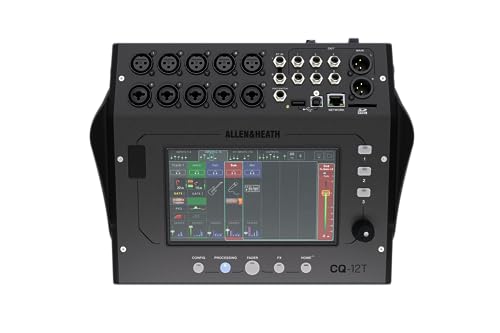
Allen & Heath CQ-12T — Best Touchscreen
The CQ-12T is the smallest CQ desktop mixer, built for solo performers, streamers and desktop rigs that want touchscreen digital mixing in a compact footprint.
For users who want a screen on the desk, the touchscreen makes routing and EQ visible, which suits streamers who adjust while presenting.
Strengths
- Same CQ touchscreen workflow in the smallest desktop body
- Bluetooth handles music playback and phone audio neatly
- Premium preamps and effects for a compact desktop unit
Trade-offs
- Input count suits solo and duo work, not full bands
- Costs more than larger analogue desktop mixers
- App ecosystem still growing compared with older platforms
| Display | 7-inch touchscreen |
| Connectivity | Bluetooth audio built in |
| Format | Compact desktop digital mixer |
On a desk, the CQ-12T feels like a piece of studio equipment rather than a small PA mixer: the screen is responsive, the layout is uncluttered, and the assistive features quietly handle gain structure while you concentrate on performing. For a streamer or a solo act running backing tracks, it replaces a small mixer, an interface and a Bluetooth receiver in one unit. The honest limit is channels — plan your inputs, and if the list fits, the 12T is a polished way to run them.
The CQ-12T makes the most sense treated as a personal instrument: the solo performer’s entire sound, tuned and saved, in one compact unit. Its touchscreen keeps the few channels it has instantly manageable, and Bluetooth removes the phone-cable ritual from every break. If your act grows beyond it, it retires gracefully to desk and streaming duty — few small mixers have so comfortable a second career.
The 12T’s value case rests on time saved and polish delivered at small scale. If your channel list fits with two to spare, it fits; count carefully, because the ceiling is the only real compromise.
Best for: Solo performers, streamers and desktop rigs with modest input lists / Not suited for: Anyone whose input list is still growing.
Check on Amazon — check price on Amazon for the Allen & Heath CQ-12T.

Tascam Model 12 — Best for Recording Creators
The Model 12 is Tascam’s all-in-one: a mixer with real channel strips, a 12-track multitrack recorder and a USB audio interface, built for musicians who record as naturally as they rehearse.
For creators who record as well as monitor, it adds multitrack recording to the desktop role — the PC speakers become the mix position.
Strengths
- Records multitrack to SD without a computer, mixes like a classic desk
- Physical controls keep the workflow tactile and fast
- USB interface mode integrates with a DAW when you want one
Trade-offs
- Twelve tracks is a ceiling for ambitious productions
- Channel count suits small line-ups, not full live bands
- Screen is functional rather than luxurious
| Recording | 12-track digital multitrack recorder |
| Functions | Mixer + recorder + USB audio interface in one unit |
| Control | Physical channel strips with faders and knobs |
| DAW | DAW control surface functions |
The Model 12 succeeds because it respects how musicians actually work: plug in, press record, play. No laptop latency, no driver roulette, no update dialogs — the desk captures twelve tracks to SD while feeling like the analogue mixers a generation learned on. Back at the computer it becomes the interface and control surface, so the same unit covers demo, rehearsal recording and finished production. For singer-songwriters, electronic duos and small bands, it is the centre of the room.
The Model 12 changes recording habits the way instant cameras changed photography: because capturing is effortless, it happens constantly. Song ideas, rehearsals, alternate arrangements — all preserved in multitrack, all mixable later. Its DAW-control and interface modes mean the computer joins when wanted rather than being required. Studios built around one describe it less as gear and more as furniture: the desk where music happens, always on, always ready.
Buy fast SD cards and a small stock of them; the Model 12’s appetite for captured ideas is its best feature. Studios that feed it media find their output of finished demos rises noticeably.
Best for: Musicians who want computer-free multitrack recording with a real mixer feel / Not suited for: Large live rigs or studios needing more than twelve tracks.
Check on Amazon — check price on Amazon for the Tascam Model 12.

Soundcraft Ui12 — Best Minimal Desk Footprint
The Ui12 is the smallest of Soundcraft’s Ui stage-box mixers: 12 inputs, full digital processing and browser control, aimed at solo performers, duos and small presentation rigs.
For a tidy desk, browser control means no extra app, and the box itself can live out of sight while the PC speakers do the listening.
Strengths
- Tiny footprint fits in a gig bag or small rack tray
- Browser control avoids app compatibility problems entirely
- Full channel processing rather than the cut-down EQ of analogue small mixers
Trade-offs
- Only a handful of mic preamps, so it is not a full-band mixer
- No multitrack recording at this level of the range
- Built-in Wi-Fi range is modest in difficult rooms
| Inputs | 12-input remote-controlled digital mixer |
| Control | Browser-based control from phone, tablet or computer |
| Format | Compact stage-box mixer |
The Ui12 earns its place where an analogue 12-channel mixer used to live — and then does the things analogue never could: saved scenes for each venue, a graphic EQ on the mains to notch out the room’s worst resonance, and a singer who can adjust their own monitor from a phone. Its limits are honest ones: count your microphones before buying, because the preamp count, not the channel count, is the real ceiling. Within that ceiling it is a complete, professional little system.
Owners use the Ui12 in ways its designers probably imagined and a few they did not: hidden in wedding rigs, built into lecture desks, carried as the presenter’s personal mixer. The browser interface means the handover to a colleague is a URL and a password, not an app install. Its channel processing is the full Ui standard, so the little box never sounds like the compromise in the chain — the PA and the room remain the limits, as they should be.
Treat the Ui12 as infrastructure: mount it, scene it, and let it vanish into the room or the rig. Small mixers that disappear into the job are the ones still in service a decade later.
Best for: Solo acts, duos and presenters who mix themselves / Not suited for: Bands with more than a few microphones or anyone needing multitrack capture.
Check on Amazon — check price on Amazon for the Soundcraft Ui12.

Zoom LiveTrak L-12 — Best for Podcast Desks
The LiveTrak L-12 is a mixer and multitrack recorder designed for musicians and podcasters, notable for giving each performer their own headphone mix.
For podcast desks and small ensemble recording through PC speakers, its per-person headphone mixes solve the monitoring problem interfaces ignore.
Strengths
- Separate headphone mixes make band recording sessions happier
- Records multitrack while mixing, no computer required
- Compact and light for a unit with this much function
Trade-offs
- Build is lighter than metal-chassis rivals
- Channel count caps ambitious live work
- Interface mode track count differs from SD recording — check your workflow
| Functions | Mixer and multitrack recorder |
| Monitoring | Individual headphone mixes for performers |
| Recording | Multitrack recording to SD, USB interface mode |
The L-12’s signature feature sounds small until you have run a session without it: five performers, five different headphone mixes, nobody asking for more of themselves. Around that, it is a complete small recording system — multitrack to SD, a straightforward mixer layout, and USB interface duty when the computer joins. Podcast ensembles, rehearsing bands and mobile recordists get a one-box answer that respects both budget and patience.
Session reports from L-12 owners return to the headphone mixes: a drummer who hears the click and bass properly plays tighter; a singer with their own reverb sings with more confidence. The L-12 makes those mixes trivially available, and its SD recording means the session exists even if the computer misbehaves. Podcast networks adopted it for the same reason bands did — it treats every participant’s ears as a first-class concern.
The L-12’s accessories are headphones — one good set per performer. Its per-person mixes only shine when everyone can actually hear them, so budget the session as a system, not a box.
Best for: Bands and podcast teams recording together in one room / Not suited for: Users needing a heavy-duty touring console.
Check on Amazon — check price on Amazon for the Zoom LiveTrak L-12.
Comparison Table
| Pick | Badge | Key spec | Best for |
|---|---|---|---|
| Behringer FLOW 8 — Check price on Amazon | Best Overall | 8 inputs, physical faders, Bluetooth, app control | Solo performers, streamers and desktop setups wanting faders plus digital recall |
| Behringer X Air XR12 — Check price on Amazon | Best Budget | 12 inputs, 4 mic preamps, compact stage box | Solo acts, duos, presenters and discreet installs |
| Allen & Heath CQ-12T — Check price on Amazon | Best Touchscreen | Compact desktop mixer, 7-inch touchscreen, Bluetooth | Solo performers, streamers and desktop rigs with modest input lists |
| Tascam Model 12 — Check price on Amazon | Best for Recording Creators | 12-track multitrack recorder, mixer and USB interface in one | Musicians who want computer-free multitrack recording with a real mixer feel |
| Soundcraft Ui12 — Check price on Amazon | Best Minimal Desk Footprint | 12 inputs, browser control from any device | Solo acts, duos and presenters who mix themselves |
| Zoom LiveTrak L-12 — Check price on Amazon | Best for Podcast Desks | Mixer/recorder with per-performer headphone mixes | Bands and podcast teams recording together in one room |
Read the table by format first and specifications second. The format decides who can operate the mixer and where it lives; the key spec decides whether your input list and monitor world fit. Badges repeat the Quick Picks verdicts so the table can be used on its own — and every row links to the same verified listing used throughout the guide, so the price you check is the price for the exact model reviewed.
What does value look like in this category?
Value on a desk is measured in problems that stop occurring. The XR12 and Ui12 deliver the core miracle — recall, routing, clean speaker feeds — at the lowest cost, provided your input list fits. The FLOW 8 charges more for the faders that make daily use pleasant; the CQ-12T more again for the screen and the processing polish. None of these is overpriced for what it removes from your day; the only bad value is the mixer whose format fights your habits, because you will replace it within the year.
Count the replaced devices in the value maths, too: a small mixer, a Bluetooth receiver, a headphone amplifier, a USB interface and a feedback suppressor is a real pile of boxes and cables that a single digital mixer retires. Desks that consolidate tend to stay bought. When you check price on Amazon, compare against that pile — not against the cheapest interface on the page — and the pricing of this category makes considerably more sense.
How to Choose a Digital Mixer for a PC Speaker Setup
Why use a digital mixer instead of an audio interface with PC speakers?
An interface is the right tool for recording one or two sources into a DAW. A digital mixer earns its desk space when you need to blend sources live — microphone, PC audio, a phone, an instrument — with EQ and effects, send the result to powered speakers, and change the blend with a fader instead of a mouse. Streamers, teachers, podcasters and musicians who practise through their PC speakers live in that second world. If your only task is recording guitar into a DAW, buy the interface; if your desk is a small broadcast studio, buy the mixer.
What connections does a PC speaker mixer actually need?
USB audio to the computer is non-negotiable, and it should carry at least a stereo return from the PC so music, calls and system sounds come back through the mixer to the speakers. You want main outputs on balanced connectors for powered speakers, a headphone output with its own level, and enough inputs for your real list: microphone, instrument, phone or tablet, and a spare. Bluetooth is a genuine convenience for phone playback. Count honestly — most desktop rigs need six to eight inputs, not sixteen.
How do you avoid feedback and noise between a PC, mixer and powered speakers?
Keep the microphone behind the speakers’ line and as far from them as the desk allows, use modest speaker volume with the mixer providing the level, and engage a high-pass filter on the microphone channel to remove desk rumble. Balanced cables between mixer and powered speakers reject the hum that unbalanced leads collect from computer power supplies. If a whine follows the mouse or screen, it is usually a ground or USB noise issue — powering the speakers and PC from the same strip and keeping audio cables away from power bricks fixes most cases.
Should a desktop mixer have faders, a touchscreen or an app?
Faders win for live adjustment while speaking — the FLOW 8’s appeal. A touchscreen like the CQ-12T’s makes routing visible and suits users who think in diagrams. App-only boxes keep the desk clearest and cost least, at the price of unlocking a device for every change. There is no wrong answer, only a wrong match: presenters should touch hardware, tinkerers enjoy screens, and minimalists hide the box.
How do you set levels between the PC, the mixer and powered speakers?
Fix two of the three and drive the third. Set the powered speakers’ volume to a fixed, generous position and leave it there; set the PC’s output to full or near-full so its digital volume never starves the mixer of signal; then let the mixer’s main fader be the one volume control you touch. This gain staging keeps noise low, makes levels repeatable, and means your saved scenes recall the same loudness every day — the quiet foundation of a desk setup that feels professional.
Can one mixer serve work calls, streaming and music on the same desk?
Yes, and scenes are how. Build a call scene with the microphone dry and forward, a stream scene with gentle compression and music tucked under the voice, and a music scene with the instrument and playback balanced for playing rather than talking. The discipline is naming them plainly and switching deliberately. Desks that try to make one setting serve every purpose end up serving none of them well; the digital mixer’s whole advantage is that it remembers the differences for you.
What about webinars, lessons and hybrid meetings from the same desk?
They are the PC speaker mixer’s growth job: the same microphone, camera-adjacent routing and speaker setup serves a lesson or a meeting with one scene change. The routing that matters is mix-minus — the remote participants must hear you and your shared media, but never their own voices returning. Every pick here can build that routing; build it once, save it as the meeting scene, and hybrid work stops being a weekly technical negotiation.
What does a mixer add to a computer audio setup day to day?
Scenes are the quiet superpower. One scene for video calls — microphone EQ’d for speech, PC return low, speakers modest. One for streaming — effects on the voice, music ducked, a limiter protecting the send. One for music practice — instrument up, backing track balanced, speakers honest. Recalling the right scene replaces the daily ritual of checking five settings across three apps, and it is the main reason a digital mixer feels calmer than the interface-plus-software stack it replaces.
The second daily win is monitoring without latency games. The mixer blends your microphone into the speakers and headphones in hardware, so you hear yourself with reverb while the computer records the dry signal or the mix, as you choose. For teachers and streamers who talk for hours, that immediate, effected monitor is the difference between a tiring setup and a sustainable one.
What does a well-run PC speaker desk feel like after a month?
It feels boring, in the best way. The microphone is always live at the right level, the speakers always play the computer, the call always hears you and never hears itself. That boredom is engineered: fixed speaker volume, saved scenes, balanced cables, and one volume control that matters. Desks that feel exciting after a month are usually desks with an unresolved problem being re-solved daily.
The month also reveals which control style you actually use. Fader people touch the FLOW 8 constantly and open its app rarely. Screen people live on the CQ-12T’s display. Minimalists forget the Ui12 exists until they need it. None of these is the correct temperament — but yours is knowable within a month, which is why buying the control style that matches your habits matters more than any single feature in this guide.
How to Connect a Digital Mixer Between a PC and Powered Speakers
Connect the mixer to the PC by USB and select it as the computer’s output and input device. Connect the mixer’s main outputs to the powered speakers with balanced cables, left and right matched, and set the speakers’ own volume controls to a fixed mid-high position so the mixer becomes the master volume.
Plug in the microphone and any instruments, set input gains so peaks stay comfortably below clipping, and add a high-pass filter to the microphone. Route the PC’s USB return to a channel or dedicated return so computer audio has its own fader. Balance the blend — voice over music for calls and streams, music forward for listening — then save it as a scene named for the task.
Finally, test the failure cases before they matter: join a call and confirm the other side hears the microphone and not an echo of themselves, play music and speak over it, and record a short test in your app of choice. Adjust the USB send routing if the recording captures the wrong blend — most small mixers let you choose whether the computer receives the main mix or individual channels.
Revisit the setup after a week of real use: the microphone will have drifted, the chair will have moved, and your scenes will need small corrections for the room as it actually is rather than as it was on setup day. Save the corrections over the originals. A desk audio system is finished not when it is installed but when its scenes match your habits — expect two or three iterations to get there, and treat each as the system learning your voice.
Setup and Buying Checklist
Before and just after you buy, work through this checklist for best digital mixers for pc speaker. It collects the small, unglamorous steps that separate systems which settle in quietly from systems that generate a month of small frustrations.
- Set the powered speakers to a fixed volume and tape the knob position if others share the desk.
- Create and name three scenes — call, stream or record, and music — before you need any of them under time pressure.
- Run balanced cables to the speakers and route them away from power bricks and monitor stands.
- Position the microphone behind the speakers’ radiation line and add a high-pass filter on its channel.
- Test a real call with a friend and ask specifically about echo and level, not just whether they can hear you.
- Keep the USB cable direct to the computer, not through a hub shared with drives and dongles.
Which pick fits which desk?
For the streamer and online teacher, the FLOW 8 is the desk’s centre of gravity: the microphone on a fader, the game or lesson audio on another, the phone on Bluetooth for the clip someone sends mid-stream. Its scenes separate broadcast voice from casual call voice, and the physical mute ends the era of hoping the software heard the keyboard shortcut.
For the tidy-desk minimalist — the consultant, the remote worker who records occasionally — the hidden stage boxes earn their place: the XR12 or Ui12 lives in a drawer or under the desk, the speakers sit clean, and control happens in an app opened twice a day. The desk looks like furniture and behaves like a broadcast chain, which is the entire aesthetic of modern remote work done well.
For the creator who records — podcaster, musician, voice artist — the Model 12 and LiveTrak L-12 turn the PC speaker desk into a small studio: multitrack capture without the computer’s cooperation, headphone mixes for guests, and monitoring through the same speakers used for everything else. The CQ-12T serves the creator who wants the screen — visible routing while presenting, premium processing under the fingers.
For shared and family desks, prioritise scenes and simplicity over depth: one scene per person or purpose, named plainly, with the mixer’s defaults forgiving of whoever sat down last. The FLOW 8 and CQ-12T, with their visible controls, cause the fewest household support incidents; app-only boxes belong to single-user desks where the operator and the owner are the same person.
Common Buying Mistakes
Most buying mistakes with best digital mixers for pc speaker are not about choosing a bad mixer — every pick here is capable — but about mismatching the mixer to the room, the crew or the input list. These are the mismatches we see repeated most often, and each is cheaper to avoid on paper than to fix in hardware.
- Buying a 24-channel console for a desk that needs six inputs, then fighting its size forever.
- Running powered speakers from unbalanced cables draped over power supplies and blaming the mixer for the hum.
- Placing the microphone in front of the speakers and expecting EQ to defeat physics.
- Forgetting the USB return path, so PC audio bypasses the mixer and the faders control nothing that matters.
- Never saving scenes, so every call starts with five minutes of settings archaeology.
Final Recommendation
For most PC speaker desks the FLOW 8 is the sweet spot: faders under your fingers, Bluetooth for the phone, USB for the computer. Tight budgets and hidden installs point to the XR12 or Ui12, screen lovers to the CQ-12T, and creators who record to the Model 12 or LiveTrak L-12. Match the input count to your real list, wire the speakers with balanced cables, save scenes for your recurring tasks, and the desk audio problem stays solved.
Set the desk up once, properly — balanced cables, fixed speaker volume, named scenes — and then stop thinking about it. The best PC speaker system is the one that disappears into the working day, and every pick here can be arranged to do exactly that.
Shortlist links for the top three: Behringer FLOW 8 · Behringer X Air XR12 · Allen & Heath CQ-12T — check price on Amazon for each before deciding, and confirm the current listing matches the model described here.
Best Digital Mixers For Recording Best Digital Mixers For Studio Best Digital Mixers Using Logice Pro X
A note on ownership and upkeep
A final practical note on keeping a desktop system healthy: update the mixer’s firmware and its app together, on a quiet afternoon, and re-test the call routing afterwards — updates occasionally reset a preference, and discovering that live in front of an audience is nobody’s plan. Keep the previous scene file exported before updating so any surprise is a restore rather than a rebuild. Desktop systems earn their keep through reliability across hundreds of small, unglamorous uses; a little update discipline is what protects that record, and it costs perhaps twenty minutes twice a year.
Frequently Asked Questions
Can a digital mixer replace an audio interface for PC speakers?
For live blending, streaming, calls and monitoring, yes — most small digital mixers include USB audio and act as the interface. Pure DAW recording with many simultaneous tracks still favours a dedicated interface or a multitrack mixer like the Model 12.
How do I connect powered speakers to a digital mixer?
Use the mixer’s main left and right outputs with balanced cables into each speaker, set the speakers’ volume to a fixed position, and control listening level from the mixer.
Why do I hear myself echo on calls through my mixer?
The other party’s audio is returning to them via your microphone or a mix-minus error. Route the call audio so it does not go back down the send channel; most digital mixers let you build that routing explicitly.
Is Bluetooth useful on a desktop mixer?
Yes, for phone playback, quick music references and a guest’s device without cable hunting. Keep USB as the main PC path for reliability.
How many inputs does a streaming desk need?
Typically four to eight: microphone, PC return, phone or console, an instrument, and spares. The picks here cover that range without console bulk.
Can I use a stage-box mixer I cannot see from my desk?
Yes — app and browser control make hidden mixers practical, and the Ui12 and XR12 are designed for exactly that. Keep a wired or reliable wireless path to them.
Can I use my PC speakers for monitoring recordings made with the mixer?
Yes — that is the standard arrangement. The mixer feeds the speakers its main or control-room output, and you hear the DAW or the live blend through the same path.
Why is my microphone quiet in recordings but loud in my speakers?
The monitor path and the USB send path have separate levels on most mixers. Raise the channel’s USB send or record level independently of what you hear in the room.
To close: the shortlist for best digital mixers for pc speaker rewards buyers who decide by workflow first and specifications second. Start from the top pick — the Behringer FLOW 8 — and move down the list only when a specific requirement rules it out: a channel count, a format, a network standard, a control style. That order of decisions, applied honestly, is how the right mixer gets chosen, and it is the order this guide was written in. Keep the verified links above for current availability, save your first good scene the day the mixer arrives, and let the system settle into the background of the work it was bought to support.
Related reading on this site: Best Digital Mixers For Live Sound Best Digital Mixers Under $5000


