Disclosure: airfryerkitchensupply.com is reader-supported. When you buy through links on our site, we may earn an affiliate commission at no extra cost to you.
Where to buy
Every pick in this guide was verified against live Amazon listing data before inclusion. Use these links to check price on Amazon and confirm current availability for the best digital mixers for live sound shortlist:
Behringer X32 — check price on Amazon · Behringer X Air XR18 — check price on Amazon · Soundcraft Ui24R — check price on Amazon · Allen & Heath CQ-20B — check price on Amazon · Mackie DL16S — check price on Amazon · Midas M32 Live — check price on Amazon
Choosing the best digital mixers for live sound is really choosing how your whole show will run: who mixes, from where, with what backup plan when the room fills with phones and the first song starts in four minutes. A digital mixer gives you recall, processing on every channel and monitor mixes that analogue desks at these prices never offered — but only if the format fits your crew. This guide separates the consoles, rack boxes and stage-box systems that genuinely work at real gigs.
The honest market picture: below the flagship tier, the fight is between full consoles with faders, rack mixers you control from a tablet, and stage boxes that live with the band. All three can sound excellent. They differ in who can operate them, how fast a problem gets fixed mid-show, and how the system grows. We picked six that cover those philosophies, every one verified against the manufacturer’s Amazon listing data before inclusion.
One more piece of honesty before the picks: no mixer on this page fixes a bad room, weak PA or an under-rehearsed band. What the right digital mixer does is remove the technical excuses — the mix starts from a saved, sensible place, the monitors behave, and the show gets recorded. Judge every pick below against your actual calendar of gigs, and let the busiest month of your year, not the quietest, cast the deciding vote.
In this guide
Quick Picks
- Behringer X32 — Best Overall: For live sound this remains the default recommendation: a surface your guest engineers already know, enough buses for a full monitor world, and stage-box expansion when the input list grows. Check price on Amazon.
- Behringer X Air XR18 — Best Budget: As the budget live pick it covers a full band, records the show multitrack, and lives in the on-stage rack — the mixer the band owns, not the one the venue lends. Check price on Amazon.
- Soundcraft Ui24R — Best for Venues with Rotating Operators: For venues whose operators rotate, the browser interface removes the app-training problem entirely, and multitrack capture of every service or gig comes free. Check price on Amazon.
- Allen & Heath CQ-20B — Best for Self-Mixing Bands: For self-mixing bands it is the premium stage box: fast assistive setup, tidy stage, and processing that flatters vocals without an engineer riding faders. Check price on Amazon.
- Mackie DL16S — Best App Experience: For app-first bands the Master Fader experience is the slickest here, which matters when three musicians are mixing their own ears from their phones. Check price on Amazon.
- Midas M32 Live — Best Premium: As the premium live pick it is the desk for rooms and tours where the operator is a professional and the console is a long-term investment. Check price on Amazon.
How to use this shortlist: the badges are decisions, not decorations. If the Best Overall pick fits your input list and your way of working, the search for best digital mixers for live sound can honestly end there — it earned the top badge by being the choice we would defend for the most buyers. Move to a specialist badge only when your situation names it: a tighter budget, a particular room, a recording habit, a network standard. Reading the guide that way — top pick first, specialists as exceptions — mirrors how engineers actually recommend gear to each other, and it will get you to the right mixer faster than comparing every specification against every other.
How These Picks Were Chosen
Two filters did most of the work. The first was honesty of specification: for best digital mixers for live sound, marketing language hides the differences that matter — whether recording is multitrack or stereo, whether a network port carries audio or only control, whether the advertised channel count matches the microphone preamp count. We read past the headline numbers to the architecture underneath, and dropped models whose listings could not confirm the capability the search asks for. The second filter was ownership reality: control apps that are maintained, ecosystems with stage boxes and spares available, and manufacturers with a service network. A mixer is a five-to-ten-year relationship, and the guide weights it that way.
We started from the mixers buyers actually cross-shop for best digital mixers for live sound, then verified each candidate against the manufacturer listing data returned by Amazon’s catalogue before writing a word. A pick only carries an Amazon link when that verification matched the exact model — its channel architecture, preamp count and recording path as listed. We weighted real-world workflow over spec-sheet theatre: how the mixer is controlled under pressure, what its recording path really captures, how its monitor buses serve real performers, and whether its ecosystem gives the purchase a future. Badges were assigned after those comparisons, and the same badge follows each pick from the Quick Picks into its full review below.
The 6 Best Options: Best Digital Mixers for Live Sound

Behringer X32 — Best Overall
The X32 is the console that moved a generation of small venues, churches and touring bands from analogue desks to digital, and it suits buyers who want a full physical surface with deep routing at a mid-tier price point.
For live sound this remains the default recommendation: a surface your guest engineers already know, enough buses for a full monitor world, and stage-box expansion when the input list grows.
Strengths
- Huge input and bus count for the tier, so full bands with in-ear mixes fit comfortably
- Motorized faders and scene recall make multi-band bills and volunteer crews manageable
- AES50 stage boxes let you put inputs on stage and run one network cable to front of house
Trade-offs
- The learning curve is real — routing and the effects rack take study before the first show
- The full-size frame needs a proper flight case and two people to move comfortably
- The onboard screen is small by modern touchscreen standards
| Input channels | 40-input, 25-bus architecture |
| Control surface | Full-size console with motorized faders |
| Expansion | AES50 networking for digital stage boxes |
| Recording | USB audio interface expansion options |
What keeps the X32 relevant is ecosystem depth. Thousands of engineers know its layout, so hiring help, borrowing a show file or finding a tutorial is easy in a way newer rivals cannot match. The preamps are clean at sensible gain, the parametric EQ and dynamics on every channel cover club work without outboard, and the bus count means monitor mixes stop being the compromise they are on smaller desks. Treat it as a system — console, stage box, personal monitoring — and it scales from a bar rig to a festival side-stage without changing the workflow your crew already knows.
In daily operation the X32 rewards a methodical engineer: build a sensible input list, keep a house scene with the room tuned, and save per-act scenes on top of it. The effects rack covers the usual live needs — reverbs that do not cloud vocals, a delay that taps to tempo, and dynamics for the money channels. Where it ages most visibly is the small screen and the menu depth for rarely used settings, but muscle memory solves both, and the depth is precisely why it keeps headlining this class.
Budget-wise, remember the X32 is the centre of a system: case, stage box and cables belong in the same spreadsheet. Bought as a system and run by a trained operator, it remains the reference point every rival in this class is measured against.
Best for: Venues, churches and bands that need a full console surface and room to grow / Not suited for: Solo acts and tiny rooms where a rack mixer does the same job in a third of the space.
Check on Amazon — check price on Amazon for the Behringer X32.
Behringer X Air XR18 — Best Budget
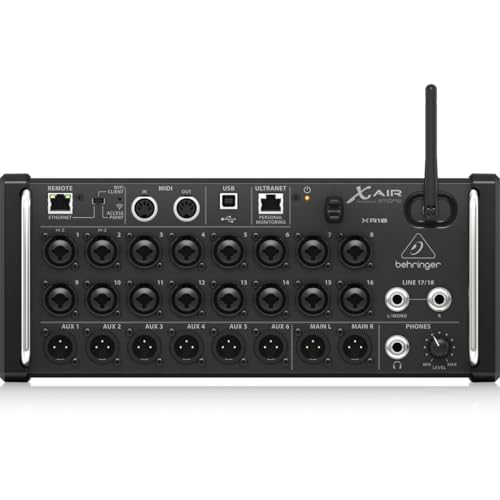
The XR18 is the stage-box mixer that defined the category: 18 channels, 16 Midas preamps, 12 buses and a multi-channel USB interface in a box that sits on stage and is mixed from a tablet.
As the budget live pick it covers a full band, records the show multitrack, and lives in the on-stage rack — the mixer the band owns, not the one the venue lends.
Strengths
- Sixteen real mic preamps cover a full band’s stage plot
- Multitrack USB recording turns every gig into a potential live album
- Enormous user community means answers and show files are easy to find
Trade-offs
- Built-in WiFi struggles in crowded venues — budget for an external router
- No physical controls if your tablet fails mid-show
- The app experience varies across the many supported platforms
| Inputs | 18 channels with 16 Midas preamps |
| Buses | 12-bus architecture |
| Recording | Multi-channel USB audio interface |
| Control | Integrated WiFi, tablet and computer control |
Few products in live sound offer this much capability per dollar or per kilo. The XR18’s preamps are the Midas-designed circuits from the X32 family, its bus count runs a full set of in-ear mixes, and its USB interface records the whole band multitrack to a laptop. The discipline it demands is networking: treat the built-in WiFi as a rehearsal-room convenience, wire a proper router for shows, and the platform is as reliable as the bands who have toured it for years will tell you.
Long-term XR18 owners develop rituals worth copying: a quality router mounted in the same rack, a hardwired laptop connection for recording nights, a laminated card with the network name inside the case lid. With those, the platform’s reliability record is excellent, and its resale market is liquid because every band knows what it is. It is also the best-documented mixer in its class — any problem you can name has a forum thread and a video waiting.
The XR18’s total system cost — mixer, router, tablet, small rack — still undercuts most rivals’ mixer alone. That arithmetic, plus the multitrack recording, is why it remains the default band purchase.
Best for: Working bands wanting full multitrack and monitor capability on a budget / Not suited for: Users who need physical faders or mix in RF-hostile rooms without a router.
Check on Amazon — check price on Amazon for the Behringer X Air XR18.

Soundcraft Ui24R — Best for Venues with Rotating Operators
The Ui24R is a rack-mount digital mixer controlled from any web browser — laptop, tablet or phone — with 24 inputs and multitrack recording, suiting bands and venues that want capacity without a console surface.
For venues whose operators rotate, the browser interface removes the app-training problem entirely, and multitrack capture of every service or gig comes free.
Strengths
- Browser control means any device with a screen becomes a control surface
- Multitrack recording to USB media captures shows without a laptop
- Generous input count covers full bands plus playback and spares
Trade-offs
- No physical faders, so mixing is entirely a touchscreen discipline
- Built-in wireless in busy venues benefits from an external router
- The rack needs a tablet or laptop budget added to the true cost
| Inputs | 24-input rack-mount digital mixer |
| Control | Browser-based control from any device, no app install |
| Recording | Multitrack USB recording to flash drive and computer |
| Processing | Onboard signal processing with Lexicon-style effects heritage |
The Ui24R’s browser interface is its party trick and its practical strength: no app store, no OS version roulette — open a browser and mix. Soundcraft’s channel processing is musical rather than surgical, the effects come from Lexicon lineage, and recording the gig multitrack to a USB stick means the live mixer doubles as the demo recorder. For a working band that soundchecks itself, or a venue whose operators rotate, the combination of capacity, recording and zero-install control is hard to beat at this tier.
The Ui24R’s browser control has a side benefit owners mention often: any device works, including the venue’s ancient laptop and the singer’s brand-new phone, on the same night, without installs or updates. Its multitrack-to-USB recording is similarly democratic — a flash drive in the rack captures the show whether or not anyone remembered a laptop. For schools and churches whose technical team is whoever shows up, that forgiveness is a feature no spec sheet captures.
Add a decent router and a labelled USB drive to the purchase and the Ui24R system is complete. Its owners rarely report mixer problems; they report the shows they recorded because recording was effortless.
Best for: Bands and venues wanting 24 inputs, browser control and easy multitrack capture / Not suited for: Engineers who mix with their eyes up and hands on faders.
Check on Amazon — check price on Amazon for the Soundcraft Ui24R.

Allen & Heath CQ-20B — Best for Self-Mixing Bands
The CQ-20B is Allen & Heath’s stage-box entry in the CQ range: a compact unit that sits on stage, connects over WiFi, and gives bands the brand’s processing and assistive mixing tools without a control surface.
For self-mixing bands it is the premium stage box: fast assistive setup, tidy stage, and processing that flatters vocals without an engineer riding faders.
Strengths
- Assistive gain and feedback tools speed up soundchecks for non-engineers
- Stage-box format keeps the stage tidy and the cable runs short
- Bluetooth audio covers walk-in music and backing tracks simply
Trade-offs
- No physical controls at all — the app is the mixer
- Depends on a solid WiFi connection in RF-hostile venues
- Smaller ecosystem of third-party tutorials than the X32 family
| Format | Stage-box digital mixer, no surface controls |
| Connectivity | Built-in WiFi and Bluetooth |
| Control | App control from tablet or phone |
| Processing | Allen & Heath CQ-series digital processing with assistive tools |
Allen & Heath designed the CQ range for the reality that most small shows are mixed by the performers. The 20B leans into that: automatic gain setup, feedback suppression that finds the ringing frequency before the audience does, and an interface a drummer can learn during one rehearsal. The processing quality is unmistakably a step above budget stage boxes — the EQ and reverbs sound expensive — and the box itself is small enough to live in the cable trunk permanently.
The CQ-20B’s assistive features change who can run sound. Gain assistant sets sensible levels across the band in moments; feedback suppression patrols the wedges while the performers concentrate on performing. Experienced engineers sometimes find the help unnecessary, but the CQ was not designed for them — it was designed for the band that is its own crew, and for that band it shortens the worst part of the gig, the soundcheck, dramatically.
The CQ-20B asks for a good tablet and a tidy stage box position; give it those and its assistive workflow pays you back at every soundcheck. It is the thinking band’s stage box.
Best for: Self-mixing bands that want premium processing and fast setup / Not suited for: Engineers who want a surface, or venues with rotating guest operators.
Check on Amazon — check price on Amazon for the Allen & Heath CQ-20B.

Mackie DL16S — Best App Experience
The DL16S is Mackie’s 16-channel stage-box mixer: rack-mount, app-controlled, with the Master Fader control app and USB recording for working bands.
For app-first bands the Master Fader experience is the slickest here, which matters when three musicians are mixing their own ears from their phones.
Strengths
- Master Fader app is among the most polished control experiences
- Built-in Wi-Fi plus the option of wired control for reliability
- Compact rack format with a full band’s worth of inputs
Trade-offs
- App-only control, with the usual tablet dependency
- Stereo USB recording rather than full multitrack on this model
- Access control and show management need learning before the first gig
| Channels | 16-channel digital rack mixer |
| Control | Master Fader app control over Wi-Fi |
| Recording | USB audio interface for recording and playback |
Mackie’s Master Fader app is the reason to choose the DL16S: it is fast, legible in stage lighting, and consistent across phones and tablets, which matters when three band members run their own monitor mixes. The hardware is a tidy rack unit with recallable preamps and solid processing per channel. Bands that have standardised on it praise the same thing — soundcheck is quick, the show file loads, and the mixer disappears into the background of the gig.
Master Fader, Mackie’s control app, is regularly cited as the reason bands stay with the DL platform through upgrades: it is quick to learn, hard to get lost in, and consistent across devices. The DL16S hardware matches that polish with tidy ergonomics and recallable preamps. For bands whose members each run their own monitor mix from phones on stage, the combination of app quality and access control is the deciding factor, and it is a legitimate one.
A current tablet matters to the DL16S experience more than to app-free rivals; pair it with decent hardware and Master Fader flies. Bands standardising on it rarely look back.
Best for: Bands that value the best app experience in a stage box / Not suited for: Anyone needing multitrack recording from the mixer itself.
Check on Amazon — check price on Amazon for the Mackie DL16S.
Midas M32 Live — Best Premium
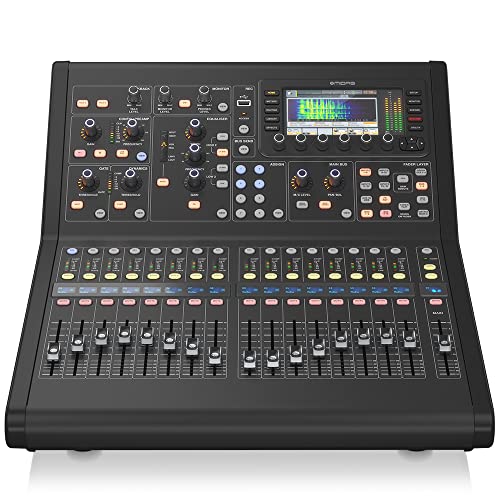
The M32 Live is Midas’s flagship compact console: 32 Midas PRO preamps, 40 input channels, 25 buses and live multitrack recording, built for professional live and studio work.
As the premium live pick it is the desk for rooms and tours where the operator is a professional and the console is a long-term investment.
Strengths
- The preamps and build quality are a clear class above mid-tier consoles
- Fader feel and surface layout reward professional operators
- Multitrack recording is integrated for live album workflows
Trade-offs
- Price reflects the badge and the build — it is the premium option
- Weight and size suit proper cases and crews
- Its depth is wasted on genuinely small shows
| Inputs | 40 input channels, 32 Midas PRO preamps |
| Buses | 25 mix buses |
| Recording | Live multitrack recording |
| Design | Console design with premium faders and carbon-fibre styling |
The M32 Live is what the X32 wants to be when it grows up: the same conceptual layout, executed with Midas PRO preamps, better faders, a faster surface and materials that survive touring. Engineers who learned on the X32 step onto it without a manual and immediately hear where the money went — the top end opens up, the low mids stay clear at high channel counts, and the desk feels like it will outlast the band. For professional rooms and touring acts, it is the benchmark of this class.
Time on an M32 Live teaches respect for its details: faders that feel like instruments, a surface layout that keeps the important things under the hands, and processing that stays composed when the channel count climbs. It is the console engineers request by name on riders in this class, which matters for venues selling their room to touring acts. Expensive, yes — and priced like the professional tool it demonstrably is.
Insure it, case it, and put a trained engineer behind it: the M32 Live’s cost is justified nightly by rooms and tours that treat it as the professional instrument it is.
Best for: Professional venues and touring acts wanting the premium console of this class / Not suited for: Small shows where a stage box does the same work for a fraction.
Check on Amazon — check price on Amazon for the Midas M32 Live.
Comparison Table
| Pick | Badge | Key spec | Best for |
|---|---|---|---|
| Behringer X32 — Check price on Amazon | Best Overall | 40 inputs, 25 buses, AES50 stage-box networking | Venues, churches and bands that need a full console surface and room to grow |
| Behringer X Air XR18 — Check price on Amazon | Best Budget | 18 channels, 16 Midas preamps, multitrack USB | Working bands wanting full multitrack and monitor capability on a budget |
| Soundcraft Ui24R — Check price on Amazon | Best for Venues with Rotating Operators | 24 inputs, browser control, multitrack USB recording | Bands and venues wanting 24 inputs, browser control and easy multitrack capture |
| Allen & Heath CQ-20B — Check price on Amazon | Best for Self-Mixing Bands | Stage-box format, WiFi and Bluetooth, app control | Self-mixing bands that want premium processing and fast setup |
| Mackie DL16S — Check price on Amazon | Best App Experience | 16-channel rack mixer with app control | Bands that value the best app experience in a stage box |
| Midas M32 Live — Check price on Amazon | Best Premium | 32 Midas PRO preamps, 40 channels, live multitrack | Professional venues and touring acts wanting the premium console of this class |
Read the table by format first and specifications second. The format decides who can operate the mixer and where it lives; the key spec decides whether your input list and monitor world fit. Badges repeat the Quick Picks verdicts so the table can be used on its own — and every row links to the same verified listing used throughout the guide, so the price you check is the price for the exact model reviewed.
What does value look like in this category?
Value in live mixers is measured in shows survived, not features listed. The XR18’s value is legendary because it collapses a mixer, a monitor system and a multitrack recorder into one band-owned box; the X32’s value is the decade of engineers, files and stage boxes standing behind it. When you compare prices — check price on Amazon for the current figures — compare systems: mixer plus router plus case plus the stage box your input list demands, because that total is what a working rig actually costs.
Also price the failure you are insuring against. A spare tablet and a backup router cost little; a failed show costs a client. The platforms here differ less in sound than in the depth of their ecosystems when something goes wrong at 7 p.m. — a hire shop with a compatible stage box, a forum with your exact error message, a dealer with a loaner. That depth is a real component of value, and it is why the established platforms dominate this guide.
How to Choose a Digital Mixer for Live Sound
Should you choose a console, a rack mixer or a stage box for live work?
Start with the operator, not the channel count. A console with faders suits a dedicated engineer and guest acts; a rack or stage box suits a band mixing itself, where the mixer lives on stage and control happens on tablets. Consoles cost more and travel bigger, but when feedback starts at a wedding, grabbing a physical fader beats unlocking a tablet. Stage boxes win on setup speed and stage tidiness, and modern apps are genuinely good — but your network becomes part of the instrument, so budget for a proper router and learn it before the first paying gig.
How many inputs and monitor mixes does your show really need?
Count the stage plot honestly: every drum mic, every DI, every playback channel, plus a spare vocal and a talkback. Then count monitor mixes — each in-ear user wants a stereo mix ideally, each wedge a bus. Mixers advertise input channels, but buses are what bands run out of first. A 16-input mixer with 6 buses serves a four-piece with two monitor mixes; a band with four in-ear users needs the bus count of the larger desks here. Buy for the show you play monthly, not the festival you hope for yearly.
What processing actually matters at a live gig?
Every pick here includes parametric EQ, gates and compressors per channel and graphic EQ for the mains — the live toolkit. Beyond that, look for feedback suppression help if volunteers operate the desk, scene recall if your venue hosts different acts weekly, and effects you will actually use: a good plate or hall reverb, a simple delay, and chorus for acoustic guitars cover most shows. De-essers and multiband tools are studio luxuries; at a gig, reliability and speed beat depth.
How does recording fit into a live mixer purchase?
Multitrack recording has become the live mixer’s second job: it captures the gig for content, enables virtual soundchecks, and gives the band a rehearsal tool. Rack mixers like the XR18 and Ui24R record everything with little fuss; consoles add USB or network recording options. If recording matters, confirm the format — multitrack to a laptop, multitrack to USB media, or stereo only — because the difference decides whether you can remix the show afterwards or just archive it.
How do you run monitors: wedges, in-ears or both?
The monitor decision shapes the mixer you need more than the front-of-house decision does. Wedges want power and patience; in-ears want buses and per-musician control. A band moving to in-ears should count stereo mixes — four musicians ideally take four stereo mixes, which is eight buses before effects sends. The consoles and larger stage boxes here handle that world; the smaller units serve a wedge or two plus a couple of ear mixes. Decide the monitor future first, because it is the hardest part of the system to upgrade later.
What should you carry as backup on show day?
A second control device, charged, logged in and tested. A spare network cable and, for stage-box systems, the router you configured at home rather than the venue’s mystery network. A printed input list and a saved copy of the show file on a USB stick. None of this is glamorous, and all of it has saved more shows than any processor. Digital mixing concentrates the show into one system; professional practice wraps that system in cheap, boring redundancy.
How should you plan power and placement for the mixer at a venue?
Treat the mixer position as infrastructure: clean power on the same circuit family as the PA to avoid ground loops, a sightline to the stage, and a cable path for the network or snake run that feet cannot find. Stage boxes want the opposite care — close to the inputs, off the floor’s wettest path, with the router mounted high. A half hour spent on placement at the first install pays out at every single show afterwards, because live problems are disproportionately physical ones.
What does a digital mixer change about show day?
Soundcheck changes first. With scenes, the desk remembers last week’s room: gains, EQ starting points, monitor mixes. A returning band loads a scene and starts from 80 percent right, which turns a forty-minute soundcheck into a line check and tweaks. For venues, scenes per act mean the open mic, the wedding band and the Sunday service each get their own starting point instead of a strip of tape and hope.
The second change is who can mix. A singer with a tablet can run their own in-ear mix; the guitarist’s partner in the audience can nudge the vocal. That freedom needs ground rules — one person owns the main mix — but it ends the era of monitor requests shouted across a stage. The third change is failure modes: digital systems fail differently, so professionals carry a spare tablet, a charged power bank and a router they trust. Build those habits and the format’s advantages are all upside.
What separates a good live mixer purchase from a great one after a year of gigs?
Support and familiarity, mostly. After a year, the spec sheet is forgotten; what remains is whether parts and stage boxes were easy to add, whether the app updates behaved, whether the show file from the first gig still loads, and whether the local engineers you hire can walk up and work. The platforms in this guide have all survived that year many times over in other people’s rigs, which is precisely why they are here — live sound is a conservative discipline, and it rewards proven tools.
The other separator is how the mixer handled your worst night: the outdoor show with RF chaos, the wedding where the band doubled in size, the service where the volunteer crew was entirely new. Consoles gave you faders to grab; stage boxes gave you a scene and a tablet; both philosophies have their war stories. Choose the philosophy whose worst night you would rather live through, because you will live through it eventually, and the mixer that fits your crew’s instincts will be the one that saves the show.
How to Set Up a Digital Mixer for a Live Show
Start with the network if your mixer is app-controlled: place the router high and central, connect the mixer by cable to it, and join the control devices to that network before any audio is patched. Soundchecking over a failing network wastes the whole slot.
Patch inputs in a consistent order — drums, bass, guitars, keys, vocals — and label channels in the app or scribble strip immediately. Set gains with the loudest expected signal, aiming for healthy levels with headroom, then build the main mix at performance volume, not conversation volume.
Ring out the monitors before the band plays a note: raise each vocal mic in its wedge or ears until feedback threatens, notch the offending frequencies with the graphic or parametric EQ, and leave a safety margin. Save the scene under the venue and date. During the show, mix the mains; let musicians adjust their own monitor mixes where the system allows it, and keep one charged spare device logged in and ready.
After the first show, do the unglamorous debrief while it is fresh: note which gains ran hot, which monitor mix caused requests, and which cable was too short, then fix all three in the scene and the case before the next load-in. Live systems improve by this ratchet — every show leaves the rig slightly more correct than it found it — and digital mixers make the ratchet easy because the fixes save into the show file itself.
Setup and Buying Checklist
Before and just after you buy, work through this checklist for best digital mixers for live sound. It collects the small, unglamorous steps that separate systems which settle in quietly from systems that generate a month of small frustrations.
- Confirm the input list against the stage plot one final time, including spares and talkback, so the mixer’s channel count is a plan rather than a hope.
- Test the control network at show volume in the actual room, with the audience’s phones imagined — then wire the router properly anyway.
- Save three scenes before doors: soundcheck, show, and a stripped emergency scene with just vocals and playback that anyone can run.
- Ring out monitors at performance level and write down the notched frequencies; rooms repeat their feedback frequencies faithfully.
- Record the show if your mixer allows it — even a stereo capture is tomorrow’s promo and next week’s rehearsal reference.
- Pack the spare tablet, spare network cable and printed input list in the same case every time, so backup is a habit rather than a decision.
Which pick fits which live situation?
For the working covers band playing pubs and weddings, the XR18 in the on-stage rack is the pragmatic heart of the rig: the band owns its sound, the in-ear mixes travel with them, and the venue’s unknowns shrink to two cables and a power socket. Add the CQ-20B instead if the budget allows and the band mixes itself — the assistive tools and processing polish are worth real money across a season of Saturdays.
For the venue — pub, church hall, school theatre — the calculus changes: operators rotate, acts vary, and the desk must forgive. The Ui24R’s browser control and scene library suit that forgiveness, while the X32 suits venues whose acts bring expectations, because its layout is the one visiting engineers already speak. Either way, the venue should own the default scene and guard it; guest acts load their own on top.
For the small production company, the decision is about the fleet: consoles that share a platform with your stage boxes and personal mixers, and that local engineers can be hired for. That logic points to the X32 family for value or the M32 Live for premium rooms, with the DL32S as the tablet-native alternative for companies whose crews already think in apps. Standardise, document, and the system becomes a business asset rather than a pile of gear.
For the solo performer and duo, resist the big desk entirely: a stage box from the CQ or X Air families, or the Ui16, covers the show with room to spare and loads in one trip from the car. The money not spent on unused channels buys the better microphone and the in-ear system that the audience will actually hear the benefit of. Right-sizing is the most underrated skill in live sound buying.
Common Buying Mistakes
Most buying mistakes with best digital mixers for live sound are not about choosing a bad mixer — every pick here is capable — but about mismatching the mixer to the room, the crew or the input list. These are the mismatches we see repeated most often, and each is cheaper to avoid on paper than to fix in hardware.
- Buying channels and forgetting buses, then discovering four singers cannot each have a monitor mix.
- Trusting a stage box’s built-in Wi-Fi in a sold-out room full of phones instead of wiring an external router.
- Never saving scenes, so every show starts from a blank desk and a long soundcheck.
- Letting every band member adjust the main mix from their own tablet during the show.
- Skipping the recording of a show that went well — the one artefact that would have helped promote the next one.
Final Recommendation
For most buyers the Behringer X32 remains the live-sound default: known everywhere, deep enough for real production, and expandable. Bands mixing themselves should take the XR18 for value or the CQ-20B for premium processing and faster setup, while app lovers will enjoy the DL16S. Venues with rotating operators get the gentlest learning curve from the Ui24R, and professionals investing for a decade should stretch to the M32 Live. Whichever format you choose, learn its scene system and your network before the first paying audience arrives.
Whichever you choose, spend the first week on the unglamorous foundations: the default scene, the network, the labelled case. Live sound rewards preparation disproportionately, and a digital mixer is preparation made tangible — the show you saved is the show you get.
Shortlist links for the top three: Behringer X32 · Behringer X Air XR18 · Soundcraft Ui24R — check price on Amazon for each before deciding, and confirm the current listing matches the model described here.
Best Digital Mixers For Recording Best Digital Mixers Under $5000 Best Digital Mixers With Ethernet
A note on ownership and upkeep
A final note on upkeep: wipe the faders’ travel paths, keep the case’s foam honest, and re-save your default scene after every firmware change so the file the desk loads is always the file you meant. Live rigs age through handling more than hours; the systems that look and behave new at year five are the ones whose owners treated the boring maintenance as part of the show.
Frequently Asked Questions
Is a digital mixer better than an analogue mixer for live sound?
For most working acts, yes: recall, per-channel processing, remote control and recording outweigh analogue’s simplicity once the show has more than a handful of inputs. Analogue still wins for tiny, fixed setups that never change.
Can I mix live sound from a tablet reliably?
Yes, thousands of bands do nightly. Reliability comes from your network: use a decent external router, connect the mixer by cable, keep a spare device charged, and the tablet becomes as trustworthy as a fader.
How many channels do I need for a five-piece band?
A typical five-piece with a fully mic’d kit lands between 14 and 20 inputs. A 16-channel mixer is the floor; 18–24 channels buys spares, talkback and growth.
Do digital mixers record the show?
Many do. Rack models like the XR18 and Ui24R record multitrack; consoles offer USB or network recording. Check whether your chosen model records multitrack or stereo only.
What is a stage box and do I need one?
A stage box puts the inputs on stage and connects to the mixer or console over one network cable. You need one when cable runs are long or when the mixer’s local inputs are not where the band is.
Can volunteers run a digital mixer at a church or school?
Yes — scenes and presets make digital desks easier for volunteers than analogue, because the show starts from a saved, correct state instead of last week’s knob positions.
Do I need a separate monitor mixer for in-ear monitors?
Not at this scale. The bus counts on the larger picks here run full in-ear worlds, and personal monitor mixers on the network can hand control to each musician. A separate monitor console belongs to arena-scale productions.
How loud should I soundcheck?
At performance level, with the room as full as you can simulate. Mixes built quietly collapse when the band plays at full energy and the room fills with bodies that absorb high frequencies.
To close: the shortlist for best digital mixers for live sound rewards buyers who decide by workflow first and specifications second. Start from the top pick — the Behringer X32 — and move down the list only when a specific requirement rules it out: a channel count, a format, a network standard, a control style. That order of decisions, applied honestly, is how the right mixer gets chosen, and it is the order this guide was written in. Keep the verified links above for current availability, save your first good scene the day the mixer arrives, and let the system settle into the background of the work it was bought to support.
Related reading on this site: Best Digital Mixers For Studio Best Digital Mixers For Recording Studio


