Disclosure: airfryerkitchensupply.com is reader-supported. When you buy through links on our site, we may earn an affiliate commission at no extra cost to you.
Where to buy
In the Batteries and Voltage category, a 12 volt monitor means a battery monitor: the gauge that tells you how much charge your 12-volt battery actually has left, rather than a video screen. Every pick below is a verified Amazon listing for a shunt-based or voltage-based battery monitor for RV, marine, solar, golf cart, and off-grid systems. Each carries a check-price link because prices in this category move too often to print honestly.
- Victron Energy SmartShunt 500A — Check the current price on Amazon
- Renogy 500A Battery Monitor — Check the current price on Amazon
- LNEX 500A Battery Monitor — Check the current price on Amazon
- WonVon 400A Battery Monitor — Check the current price on Amazon
- bayite 100A Battery Monitor — Check the current price on Amazon
- SUPNOVA Waterproof Battery Monitor — Check the current price on Amazon
If you are looking for the best 12 volt monitor for an RV, boat, solar setup, or golf cart, you are really shopping for the truth about your battery. A plain voltmeter lies to you politely: it shows voltage, which bounces with load and charging, and leaves you guessing how much usable energy remains. A proper battery monitor measures current flowing in and out through a shunt, counts amp-hours, and turns that into a percentage you can plan around. That difference, between guessing and knowing, is the entire subject of this guide.
The market splits into three honest tiers. At the top are smart shunt monitors with Bluetooth apps, deep history, and programmable relays. In the middle are display-based shunt monitors that put percentage, amps, watts, and time remaining on a screen you mount in the cabin. At the budget end are simple shunt meters and round voltage gauges that do one job cheaply. All six picks here were verified against Amazon’s catalog data for this store before writing, and each fills a distinct one of those roles, from the Victron SmartShunt that serious off-gridders standardize on to a waterproof round gauge you can hose down on a boat.
One clarification before the picks: this guide covers battery monitors for 12-volt systems, and most of these units also serve 24-volt and higher systems, which the specs note where the listing states it. If you arrived here looking for a small 12-volt video display for a backup camera, that is a different product category entirely, and none of these picks will show you a camera feed. For battery truth, though, read on: the guide covers choosing a shunt size, installing it correctly, and the wiring mistakes that make expensive monitors read nonsense.
In this guide
Quick Picks
Six monitors, three philosophies. The SmartShunt hides in the battery bay and reports to your phone. The display models put the numbers on the wall. The budget models trade polish for price. Badges here match the badges in the full reviews.
Victron Energy SmartShunt 500A — Best Overall. The monitor serious RV and marine electrical systems are built around. There is no screen at all: the shunt lives at the battery, and your phone becomes the display, with state of charge, history, and alarms handled in the app. Check price on Amazon.
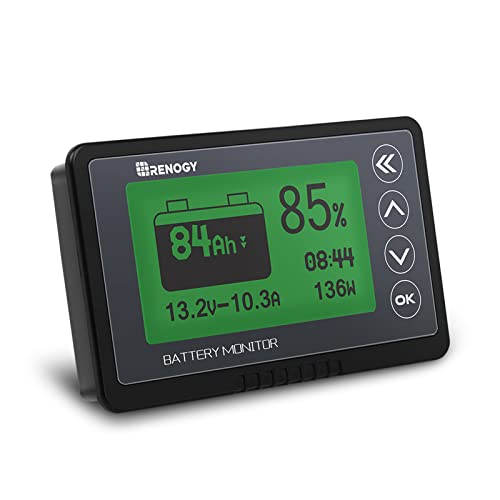
Renogy 500A Battery Monitor — Best Display Monitor. The wall-display counterpart to the SmartShunt: a 500-amp shunt, a backlit screen for the cabin, a generous stated 20-foot shielded cable to connect them, and programmable high and low voltage alarms. Check price on Amazon.
LNEX 500A Battery Monitor — Best Color Screen. A 500-amp shunt monitor built around a bright 2.4-inch color screen, with stated support for LiFePO4, sealed, gel, and flooded banks across 8 to 100 volts, plus programmable alarms. Check price on Amazon.
WonVon 400A Battery Monitor — Best Mid-Range. The sensible middle: a 400-amp shunt, a screen showing capacity percentage, remaining time, power, and voltage, and stated applications from RVs to golf carts and solar, at a mid-tier position in the range. Check price on Amazon.
bayite 100A Battery Monitor — Best Budget Shunt Meter. The long-running DIY favorite: a simple LCD meter and 100-amp shunt that shows voltage, current, power, and energy for small solar, RV, and project systems where loads stay modest. Check price on Amazon.
SUPNOVA Waterproof Battery Monitor — Best Waterproof Gauge. A waterproof, bracket-mounted gauge with a buzzer alarm and temperature display, made for the places screens fear: open boats, golf carts, and equipment that lives outdoors in the weather. Check price on Amazon.
How These Picks Were Chosen
Every pick was cross-checked against Amazon’s own catalog data for the airfryerkitchensupply.com store, confirming the model, its stated shunt rating and voltage range, and that the listing is live. Only verified products carry purchase links here. That verification step matters in this category more than most, because look-alike shunt monitors with wildly different current ratings share near-identical product photos, and buying the wrong shunt size is the most common mistake in the whole niche.
The shortlist was scored on measurement method first: true shunt-based coulomb counting outranks voltage-only estimation everywhere except the deliberately simple budget gauge, which is labeled as such. After that came shunt capacity matched to real system loads, display or app quality, alarm and relay features, cable length included for the display, and suitability for the stated environment, including waterproofing for marine and golf cart use. Popularity scores were deliberately not used; they fluctuate daily and say nothing about whether a monitor suits your bank.
A word on honesty about accuracy: no consumer monitor makes a lead-acid battery’s capacity perfectly knowable, because usable capacity changes with discharge rate, temperature, and age. A good monitor, correctly configured with your bank’s true capacity and kept synchronized by regular full charges, is dramatically better than voltage guessing, and the reviews describe each pick in those practical terms rather than promising laboratory precision.
The 6 Best 12 Volt Battery Monitors
Each review states who the monitor suits, three strengths, three trade-offs, the verified key specifications from its listing, and a plain verdict. Shunt ratings are the headline spec: every load and charge source in your system must pass through that shunt for the numbers to mean anything.

Victron Energy SmartShunt 500A — Best Overall
The SmartShunt makes a deliberate trade that turns out to be right for most modern systems: it deletes the dedicated display and puts everything into a Bluetooth app. In return you get Victron’s mature battery algorithms, a 500-amp shunt that covers serious inverter loads, a stated 6.5 to 70-volt range that spans 12, 24, and 48-volt banks, and detailed history that helps you spot a weakening battery or a parasitic drain before either strands you. Installers love it because there is no display hole to cut and no long display cable to route.
Strengths
- Benchmark battery-tracking algorithms and genuinely useful app history
- 500A shunt and wide voltage range cover most RV, marine, and off-grid banks
- No display to mount; one less cable run and one less hole in the panel
Trade-offs
- No screen means your phone is the gauge, which not everyone wants
- Premium pricing for a small black box with no visible display
- Full value depends on configuring capacity and charge settings carefully in the app
Key specs
- Shunt rating: 500 amps (stated)
- Voltage range: 6.5V-70V (stated)
- Display: None on unit; Bluetooth app provides detailed in-app insights (stated)
- Type: Smart shunt battery monitor
Ownership is where the SmartShunt pulls away. Firmware and app updates keep improving it, it integrates with the wider Victron ecosystem if you later add their chargers or solar controllers, and the consumption history becomes the record you consult when deciding whether a battery bank is aging out. If you want a glanceable wall display and no phone involved, buy one of the display picks below instead and accept their simpler software. If your phone is already the remote control for your whole rig, this is the best 12 volt monitor in this guide and the one the other five are measured against.
Best for: RV, marine, and off-grid owners who want the most accurate tracking and app-based history / Not suited for: Buyers who want a permanent wall display and no phone in the loop
Renogy 500A Battery Monitor — Best Display Monitor
Renogy’s 500A monitor is for the owner who wants the numbers on the wall, permanently, without opening an app. The stated package is well judged: a 500-amp shunt matches serious inverter systems, the voltage range runs from 10 to 120 volts so the same unit follows you from a 12-volt van to a 48-volt cabin bank, and the included shielded cable is long enough for real installations rather than the short leads that force budget monitors to live beside the battery. The programmable high and low voltage alarm is the feature owners end up valuing most, because it warns before a bank is drained into damage territory.
Strengths
- Permanent cabin display with percentage, current, and power at a glance
- 500A shunt and very wide voltage range grow with your system
- Long shielded cable and programmable alarms included in the box
Trade-offs
- Display and cable installation is a bigger job than a headless shunt
- Software and history are simpler than Victron’s app ecosystem
- Screen brightness and menu logic are functional rather than elegant
Key specs
- Shunt rating: 500 amps (stated)
- Voltage range: 10V-120V (stated)
- Included cable: 20 ft shielded cable (stated)
- Alarms: High and low voltage programmable alarm (stated)
In a family RV or a shared boat, the Renogy’s always-on display quietly changes behavior: everyone can see the percentage, everyone learns what the microwave costs, and the low-voltage alarm settles arguments about whether the bank can take one more load. That social visibility is a genuine feature no app matches. Choose it over the SmartShunt when the monitor serves a household rather than one technical owner, or when you simply refuse to make your phone part of the electrical system. It is the best display-first 12 volt monitor in this guide.
Best for: Families and shared rigs that want a permanent, glanceable battery display / Not suited for: Minimalists who prefer no display and app-only monitoring

LNEX 500A Battery Monitor — Best Color Screen
The LNEX competes on readability. Its color screen presents state of charge and power flow in a format that is genuinely easier to parse at arm’s length than the monochrome displays in this class, which matters in a bouncing RV or a dim cabin. Under the screen, the fundamentals are right: a 500-amp shunt for real inverter loads, a stated 8 to 100-volt range, a 16-foot shielded cable, and high and low voltage alarms. Stated compatibility spans the chemistries people actually run, including LiFePO4, which is now the default upgrade bank in this world.
Strengths
- Color screen is the most readable display in this guide
- 500A shunt and broad chemistry support, including LiFePO4
- Programmable high/low voltage alarms protect the bank
Trade-offs
- Brand ecosystem and long-term support are thinner than Victron or Renogy
- Cable is a little shorter than the Renogy’s stated run
- Color screen draws slightly more standby attention than monochrome rivals
Key specs
- Shunt rating: 500 amps (stated)
- Display: 2.4-inch color screen (stated)
- Voltage range: 8-100V (stated)
- Cable: 16 ft shielded wire (stated); high/low voltage programmable alarm supported
Pick the LNEX if the display is the product for you: mounted where you cook, dress, or helm, checked constantly, and understood instantly by everyone aboard. Its numbers come from the same shunt-based counting as the leaders, so you are not trading accuracy for prettiness, only trading some software depth and brand infrastructure. For a lithium bank in an RV that sees daily use, that is a trade many owners will happily make, and it earns the LNEX the best color screen badge without apology.
Best for: Lithium-bank RV and cabin owners who check the display constantly / Not suited for: Buyers who want the deepest app history and ecosystem support
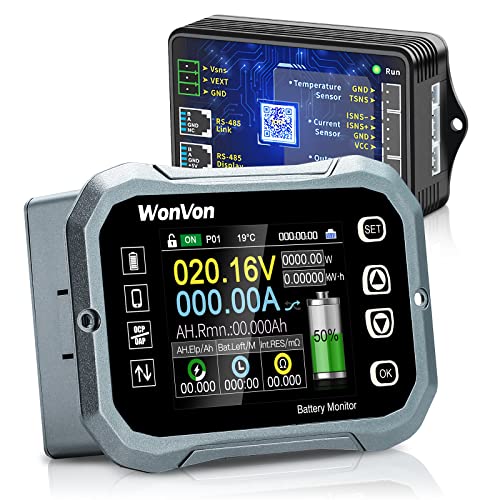
WonVon 400A Battery Monitor — Best Mid-Range
Not every system needs a 500-amp shunt, and the WonVon is built for the large middle that does not. A 400-amp rating still covers most single-inverter RV and cabin setups, and the display leads with the two numbers owners actually act on: capacity percentage and estimated time remaining at the current load. Time remaining is the most intuitive figure a monitor can show a non-technical user, because ‘about six hours at this rate’ needs no translation. Stated applications are broad, spanning RV, motorcycle, golf cart, and solar systems.
Strengths
- Time-remaining display is immediately useful to every user
- 400A shunt covers most single-inverter systems honestly
- Wide stated voltage range suits mixed 12/24/48-volt fleets
Trade-offs
- 400A ceiling excludes the largest inverter installations
- Display and software are plainer than the class leaders
- Alarm and relay features are more basic than the Renogy’s
Key specs
- Shunt rating: 400 amps (stated)
- Voltage range: 0V-120V (stated)
- Display data: Capacity percentage, time, power, and voltage (stated)
- Stated uses: RV, motorcycle, golf cart, solar panel systems
The WonVon is the monitor to recommend when the Renogy and Victron feel like more money than the system justifies, but a budget 100-amp meter is too small for the inverter. That is a very common place to land, especially in golf carts, smaller RVs, and workshop solar setups. Configure the capacity honestly, keep the bank fully charged regularly so the percentage stays synchronized, and it will tell you the truth you need at a price tier that respects the rest of the build.
Best for: Mid-size RV, golf cart, and solar systems that want percentage and time remaining / Not suited for: Large inverter systems that can exceed a 400A shunt
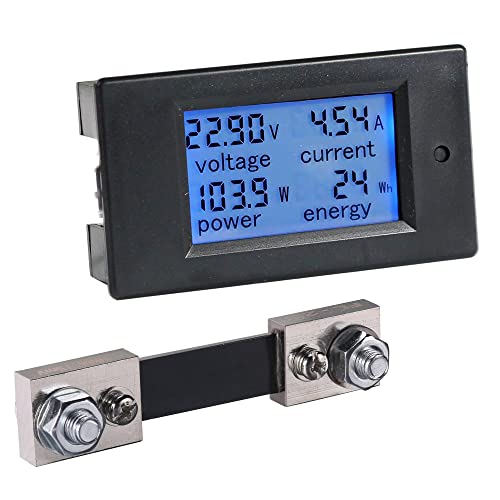
bayite 100A Battery Monitor — Best Budget Shunt Meter
The bayite meter has survived in this category for years because it does the basic job honestly for very little money. Paired with its 100-amp shunt, it reports voltage, current, power, and accumulated energy, which for a small solar setup, a fish finder battery, a trolling motor, or a DIY power box is most of what an owner needs. The stated 8 to 100-volt range makes it flexible across small systems. What it does not do is hold your hand: there is no polished percentage algorithm or app, so you read the numbers and interpret them, which the buying guide below teaches you to do well.
Strengths
- Proven, inexpensive way to get real current and energy numbers
- 100A shunt suits small solar, marine accessory, and DIY systems
- Wide voltage range makes it a handy bench and project meter too
Trade-offs
- 100A ceiling is far too small for inverter-driven RV systems
- No smart percentage tracking, alarms, or app
- Basic display and documentation assume a DIY-minded owner
Key specs
- Shunt rating: 100 amps (stated)
- Voltage range: DC 8-100V (stated)
- Display: LCD energy monitor with real-time power monitoring (stated)
- Stated uses: Solar, RV, and DIY projects
Buy the bayite for the systems it fits and it is one of the best values in this guide. Buy it for a big inverter rig and it becomes the most expensive cheap meter you ever owned, because an undersized shunt is not a limitation you can work around. For a solar shed, a kayak battery, a ham radio box, or a first learning system where watching amps and watt-hours teaches you how your loads behave, it is exactly right, and many owners keep one as a portable diagnostic long after upgrading the main system.
Best for: Small solar, DIY power boxes, and accessory batteries with loads under 100 amps / Not suited for: Inverter-based RV or cabin systems with large current draws

SUPNOVA Waterproof Battery Monitor — Best Waterproof Gauge
The SUPNOVA is the honest simple end of this guide, and it knows it. This is a voltage-and-percentage gauge rather than a full shunt-based coulomb counter, so its percentage is an estimate derived from voltage and battery type, and the reviews of the shunt models above explain why that is less precise under load. What it offers instead is survival: a waterproof housing, a bracket mount, a buzzer alarm you can hear over wind and engine noise, and a temperature readout, across a stated 7 to 100-volt span covering everything from a 12-volt boat to a 72-volt cart.
Strengths
- Waterproof build suits open boats, carts, and outdoor equipment
- Audible buzzer alarm works where a screen warning would be missed
- Huge voltage range covers 12V to 72V fleets with one gauge
Trade-offs
- Voltage-based percentage is an estimate, not shunt-counted truth
- No current, power, or history data
- Percentage accuracy depends on correct battery-type setup and resting voltage
Key specs
- Voltage range: 7-100V (stated); 12V through 72V systems listed
- Housing: Waterproof with mounting bracket (stated)
- Alarms: Temperature display and buzzer alarm (stated)
- Display: Voltage and remaining capacity percentage for lead-acid and lithium-ion (stated)
Judge this gauge by its job: a weatherproof, glanceable, audible warning that a battery is getting low, on equipment that would destroy a delicate display monitor in a season. For a golf cart fleet, a fishing boat’s house battery, or a gate and pump system outdoors, that job matters more than laboratory state-of-charge. Pair it with periodic resting-voltage checks and it will keep you out of trouble. If you need precise energy accounting for an expensive lithium bank, step up to a shunt pick; if you need a gauge that shrugs off spray and sun, this is the one.
Best for: Boats, golf carts, and outdoor equipment needing a waterproof low-battery warning / Not suited for: Owners who need precise amp-hour accounting for a large lithium bank
Comparison Table
Compare the six on measurement style and shunt size first, environment second. If your inverter can draw more than a monitor’s shunt rating, that monitor is disqualified for your system no matter how nice its screen is.
| Pick | Badge | Key spec | Best for |
|---|---|---|---|
| Victron Energy SmartShunt 500A | Best Overall | 500A smart shunt; 6.5V-70V; Bluetooth app | RV, marine, and off-grid owners who want the most accurate tracking and app-based history |
| Renogy 500A Battery Monitor | Best Display Monitor | 500A shunt; 10V-120V; 20 ft shielded cable; programmable alarm | Families and shared rigs that want a permanent, glanceable battery display |
| LNEX 500A Battery Monitor | Best Color Screen | 500A shunt; 2.4-inch color screen; 8-100V | Lithium-bank RV and cabin owners who check the display constantly |
| WonVon 400A Battery Monitor | Best Mid-Range | 400A shunt; 0V-120V; capacity, time, and power display | Mid-size RV, golf cart, and solar systems that want percentage and time remaining |
| bayite 100A Battery Monitor | Best Budget Shunt Meter | 100A shunt; DC 8-100V; LCD energy monitor | Small solar, DIY power boxes, and accessory batteries with loads under 100 amps |
| SUPNOVA Waterproof Battery Monitor | Best Waterproof Gauge | Waterproof; 7-100V; temperature and buzzer alarm | Boats, golf carts, and outdoor equipment needing a waterproof low-battery warning |
How to Choose the Best 12 Volt Monitor for Your System
Choose by measurement method before anything else. A shunt-based monitor counts every amp-hour in and out and computes state of charge from your bank’s programmed capacity; it is the only method that stays truthful while loads are running. A voltage-based gauge estimates charge from voltage, which is acceptable for a simple warning light role on a cart or boat, and misleading as the main gauge for an expensive bank. Four of the six picks here are shunt monitors, one is a smart shunt, and the waterproof pick is openly a voltage gauge; match the method to the job and the budget follows naturally.
Size the shunt to your biggest simultaneous load
Every watt your system uses or charges must pass through the shunt, so the shunt rating must exceed your largest combined current. Add up the realistic worst case: inverter draw at full load is the usual giant, since a mid-size inverter on a 12-volt bank can pull well over 150 amps, and large ones far more. Add charging current if it flows while loads run. If the total can pass 400 amps, you need a 500-amp model; if your world is lights, pumps, and electronics under 100 amps, the budget shunt meter is honestly sized. An undersized shunt is not a soft limit; it is the wrong part.
Display, app, or both is a lifestyle decision
A wall display serves everyone in the vehicle and works with gloves, glare, and dead phones; an app offers history, configuration depth, and alerts without cutting holes. Households sharing an RV usually thrive with a display. Solo technical owners usually prefer the app and its graphs. There is no wrong answer, only a wrong match: the owner who hates phones will ignore an app monitor, and the data lover will find a simple display starves them. Pick the interface you will actually look at weekly, because a monitor nobody checks is furniture.
Configure capacity honestly or the percentage is fiction
Every shunt monitor computes percentage against the capacity you type in. Use the bank’s realistic usable capacity, and for lead-acid remember that regular use should only draw on roughly the top half of the nameplate rating if you want the bank to live. Set the charged voltage and tail-current parameters the manual describes so the monitor can recognize a true full charge and resynchronize itself. Then actually charge fully on a regular rhythm. A monitor that never sees a verified full charge drifts, and the drift is the owner’s fault, not the instrument’s.
Budget tiers, in framing terms only
No prices are printed here because they move too often to print honestly, but the tiers are stable. The budget tier buys basic shunt metering or a waterproof voltage gauge. The mid tier buys a proper display shunt monitor with alarms. The premium tier buys the smart shunt’s algorithms, app history, and ecosystem. Spend in proportion to the bank being protected: the monitor guarding an expensive lithium bank should not be the cheapest line in the build, while a project box for a shed light does not need premium tracking.
Why Voltage Lies and Coulomb Counting Tells the Truth
A rested lead-acid battery’s voltage does track its charge, roughly, if you let it sit for hours with no load and no charging, at a moderate temperature, and consult the right chart for its chemistry. Real life in an RV or boat offers none of those conditions. The moment a load runs, voltage sags by an amount that depends on the load’s size and the battery’s health; the moment charging starts, voltage climbs toward the charger’s setting regardless of how full the bank really is. A voltage gauge in a working system therefore spends most of its life showing you the present electrical weather, not the fuel level, and owners who trust it run ’empty’ tanks that read fine and ‘full’ tanks that die by dinner.
Coulomb counting fixes this by bookkeeping instead of fortune-telling. The shunt measures current precisely, the monitor integrates it over time, and charge becomes an account balance: known starting point, every deposit and withdrawal recorded. Its weakness is drift, because tiny measurement errors and the battery’s own charging inefficiency accumulate, which is why good monitors resynchronize at each verified full charge and why the setup section of this guide matters. Configured well and resynced regularly, a shunt monitor’s percentage is the most trustworthy number in your electrical system.
The practical payoff is planning. With a truthful percentage and a live power readout, you learn your system’s real economy: what the fridge costs overnight, what the solar actually harvested on a cloudy day, how long the bank lasts at anchor. Owners consistently report that the monitor, not the extra panel or the bigger battery, is what ended their electrical anxiety, because uncertainty, not capacity, was the problem all along.
Setting Up the Monitor So Its Percentage Means Something
Setup begins with the capacity figure, and the honest number is rarely the one in big print on the battery. For lithium iron phosphate banks, usable capacity is close to the rating, and the monitor can be programmed near it. For lead-acid, program the rating the monitor asks for, then discipline yourself to treat the lower half of the gauge as reserve you do not spend except in emergencies; your bank will repay the restraint with years of life. If your bank is old, its true capacity has already shrunk, and no setting can restore it; a monitor that shows a bank reaching ‘full’ suspiciously fast and emptying just as fast is reporting age, not malfunctioning.
Next, teach the monitor what full looks like. The charged-voltage and tail-current settings tell it when a charge source has genuinely finished rather than merely paused, and hitting that state regularly is what keeps the percentage calibrated. This is why a weekly full charge from shore power, a generator run, or a good solar day is a maintenance ritual for the monitor as much as for the battery. Systems that live forever at partial charge, common in winter storage and shaded anchorages, are exactly the systems whose gauges drift into fiction.
Finally, use the history. A slow rise in overnight consumption is a parasitic drain introducing itself. A bank that accepts less charge each month is aging. A solar day that suddenly harvests half its usual total is a dirty panel, a failing connection, or a controller problem. The monitor records all of it quietly; the owners who review it monthly catch problems while they are still cheap. That habit, more than any single feature, is what separates a monitor that decorates a wall from one that runs an electrical system.
Lead-Acid versus Lithium: What Changes in Monitoring
The chemistry under the floorboards changes what your monitor must do. A lead-acid bank announces its state through voltage with at least some honesty, forgives sloppy monitoring, and tolerates the float chargers of the last century. A lithium iron phosphate bank does none of that: its voltage sits nearly flat through the middle of its range, so a voltage gauge is decorative, and its value is high enough that guessing wrong about its charge is an expensive habit. This is the deepest reason shunt monitors have become standard equipment in the lithium era. The monitor is not an accessory to a lithium bank; it is the bank’s only truthful fuel gauge, and the picks in this guide that state LiFePO4 support earned their places partly on that sentence.
Configuration follows chemistry. Lead-acid setups ask the monitor for the bank’s rated capacity and a charge-efficiency figure that reflects how much of what goes in ever comes back out, because lead-acid wastes a real share of charging energy as heat, especially near full. Lithium setups use a much higher efficiency figure and depend even more heavily on the synchronization event, the verified full charge, because a lithium bank may cruise for weeks in its flat middle where neither voltage nor vibes can recalibrate anything. Owners switching chemistries on the same monitor must revisit every setting, not just the capacity, or the gauge will lie in the new chemistry’s accent while wearing the old one’s settings.
The monitoring habit also changes the purchase conversation around the bank itself. Once a shunt monitor is installed, battery shopping stops being folklore: you know your true daily consumption, your deepest typical discharge, and your bank’s honest remaining capacity as it ages, because the history is on your phone or your wall. Replacement becomes a planned event with a date you choose, sized by data you trust. Owners consistently say the monitor paid for itself at that single moment, the first battery purchase made from evidence, even before counting the strandings it quietly prevented in the years between.
One last discipline separates monitors that stay truthful from monitors that become wall art: revisit the settings whenever the system changes. A new battery bank, a chemistry switch, an added inverter, or a replaced charge controller all rewrite the assumptions the monitor was configured under, and a gauge still running last year’s numbers will mislead with total confidence. Treat every electrical upgrade as a prompt to re-open the monitor’s setup, confirm capacity and charge parameters against the new reality, and perform a fresh full-charge synchronization. Five minutes of configuration after each change keeps the instrument honest for the life of the system, and an honest instrument, as this guide has argued from its first page, is the entire point of the purchase.
If you take only one habit from this guide, take the monthly glance at your monitor’s history with a coffee in hand. It takes two minutes, it has caught more failing batteries, creeping parasitic draws, and underperforming chargers than any other ritual in off-grid ownership, and it converts the monitor from a gauge you bought into the manager of the electrical system it was always capable of being.
How to Install a Shunt Battery Monitor Correctly
A shunt monitor is not hard to install, but it is unforgiving of one specific error: anything that bypasses the shunt makes the readings wrong forever. Work with the system powered down, follow your model’s manual for its terminals, and respect the single rule that every negative path goes through the shunt.
- Power everything down: disconnect shore power and solar input, switch the inverter off, and plan the work so the battery bank is idle while you rewire its negative side.
- Mount the shunt in the main negative line, close to the battery, in the order the manual specifies, so that the battery sits on one side of the shunt and every load and charger negative sits on the other side, with no exceptions.
- Move every negative cable that used to land on the battery, including inverter, charger, solar controller, and chassis grounds that carry system current, to the load side of the shunt. The only cable on the battery’s negative terminal afterward should be the shunt connection itself.
- Run the monitor’s sense and power leads as the manual directs, and route the display cable or confirm Bluetooth range from the shunt’s home to where you will actually stand to read it.
- Reconnect power, then program the monitor before trusting it: battery capacity, chemistry or charge parameters, alarm thresholds, and the charged-voltage settings that let it recognize a full bank.
- Charge the bank completely so the monitor can synchronize at a known 100 percent, then run a known load and confirm the display shows current flowing out and the percentage falling at a sane rate.
- Label the shunt and photograph the wiring. The next person to work on the system, often you in two years, will be grateful, and the photo settles any later argument about what was moved.
If the percentage behaves strangely in the first week, suspect a bypassed cable before suspecting the monitor: a forgotten ground or an accessory wired straight to the battery is the classic cause, and it makes the monitor under-report consumption in a way that looks like a magically efficient system. Find it, move it to the load side of the shunt, resynchronize with a full charge, and the numbers will settle into the boring truth you bought the monitor for.
Common Buying Mistakes
Leaving one negative cable on the battery. A single bypassed load or charger makes every reading wrong by exactly that device’s consumption. After installation, the battery negative terminal should carry only the shunt connection.
Buying a shunt smaller than the inverter. Shunt ratings are hard ceilings. Add up worst-case simultaneous current, including the inverter at full song, and buy the monitor whose shunt clears it with margin.
Programming the fantasy capacity. Typing the marketing capacity of an old or lead-acid bank guarantees a lying percentage. Program realistic capacity and resynchronize with genuine full charges.
Trusting voltage at a glance. Voltage under load or charge is weather, not fuel. If your gauge is voltage-based, read it rested, or step up to a shunt monitor for working truth.
Never charging to full. Monitors calibrate at full. A system that lives at partial charge drifts, and the owner blames the gauge for the owner’s charging habits.
Mounting the display where nobody looks. A monitor in a locker monitors nothing. Put the display, or keep the app, where daily life passes it, or choose the audible-alarm model for outdoor equipment.
Final Recommendation
For most 12-volt systems, the Victron SmartShunt is the best 12 volt monitor to buy: the most trustworthy tracking, a 500-amp shunt, and history that turns your electrical system from a mystery into a managed account. If your rig serves a family or you simply want the numbers on the wall, the Renogy 500A is the display pick, with the LNEX close behind for anyone who values its color screen. The WonVon covers the honest middle, the bayite remains the budget teacher for small systems, and the SUPNOVA guards outdoor equipment that would kill a delicate screen.
Whichever you choose, the installation and setup decide its worth: every negative through the shunt, capacity programmed honestly, and a full charge to synchronize. Do those three things and you will never again guess whether the battery makes it through the night. You will know, and knowing was the point of the purchase.
- Victron Energy SmartShunt 500A — Check price on Amazon
- Renogy 500A Battery Monitor — Check price on Amazon
- LNEX 500A Battery Monitor — Check price on Amazon
Keep researching the rest of this 12-volt cluster here: Best 12 Volt Mini Jump Starter Best 12 Volt Monocrystalline Solar Panel Best 12 Volt Motorcycle Battery Best 12 Volt Power Inverter Best 12 Volt Marine Battery Charger
Frequently Asked Questions
What is the difference between a battery monitor and a voltmeter?
A voltmeter shows instantaneous voltage, which swings with load and charging and only hints at charge when the battery has rested for hours. A shunt battery monitor measures all current entering and leaving the bank and computes state of charge by counting amp-hours against your programmed capacity. That is why a monitor can truthfully say 62 percent while the fridge is running, and a voltmeter in the same moment cannot.
Do I need a monitor if my battery is lithium?
Arguably more than with lead-acid. Lithium iron phosphate batteries hold a very flat voltage through most of their charge range, so voltage tells you almost nothing until the bank is nearly empty. A shunt monitor is effectively the only fuel gauge a lithium bank has, which is why most of the picks here explicitly support LiFePO4 systems.
What shunt size do I need for an inverter system?
Work out the inverter’s maximum DC draw by dividing its wattage by your system voltage and adding margin, then add any simultaneous charging or load currents that share the shunt. Many mid-size 12-volt inverter systems land in the 200 to 400-amp zone at full load, which is why 400 and 500-amp monitors dominate this guide. When the math lands near a boundary, buy the larger shunt.
Why does my monitor’s percentage drift over time?
Small measurement errors and charging inefficiency accumulate in any counting system, so monitors resynchronize when the bank reaches a verified full charge as defined by your settings. If your system rarely charges completely, the percentage slowly wanders. The cure is procedural, not technical: charge fully on a regular rhythm and make sure the charged-voltage settings match your charger’s actual behavior.
Can one monitor watch two battery banks?
Most single-shunt monitors track one bank precisely. Some systems add a second input for a starter battery’s voltage only, which is a useful compromise: full accounting for the house bank, a simple voltage watch on the starter. Two working banks that both cycle deeply really want either a monitor designed for it or two monitors, and pretending one shunt sees both banks produces confident nonsense.
Where should the shunt be installed?
In the main negative conductor, as close to the monitored bank as practical, with every load and charge source on the far side of it from the battery. It must sit where it stays dry and where its small sense wiring can reach the monitor or transmit reliably. The non-negotiable part is the topology, not the exact spot: nothing bypasses the shunt, ever.