Disclosure: airfryerkitchensupply.com is reader-supported. When you buy through links on our site, we may earn an affiliate commission at no extra cost to you.
Where to buy
Desktop and personal mixers span two families — personal monitor mixers for the stage and compact desktop mixers for streaming, podcasting and home studios — and both are sold in exact model configurations on Amazon. Every pick below links to its verified listing; use the links to check price on Amazon, because bundles (mounts, headphones, multi-packs) change pricing and we do not print static prices. Confirm whether a listing is a single unit or a bundle before ordering.
- Behringer POWERPLAY P16-M 16 Channel Digital Personal Mixer — Best Overall Personal Monitor Mixer: check price on Amazon
- Behringer Powerplay P16-HQ 16-Channel Digital Personal Monitoring Mixer — Best Upgraded Personal Mixer: check price on Amazon
- Behringer POWERPLAY P1 Personal In-Ear Monitor Amplifier — Best Simple In-Ear Solution: check price on Amazon
- Soundcraft Notepad-8FX Small-format Analog Mixing Console with USB I/O and Lexicon Effects — Best Desktop Mixer for Podcasting: check price on Amazon
- Mackie ProFX10v3+ 10-Channel Mixer with Bluetooth and USB Recording — Best Desktop Mixer for Streaming: check price on Amazon
- Behringer XENYX X1204USB Premium 12-Input 2/2-Bus Mixer — Best Desktop Mixer for a Small Band: check price on Amazon
The best desktop personal mixers solve a specific modern problem: one person, one desk or one stage position, needing control of their own sound without a sound engineer. The category has two branches, and this guide covers both honestly. Personal monitor mixers — the Behringer P16 family and its companions — sit at a musician’s position and let each performer build their own in-ear or headphone mix. Compact desktop mixers — small-format consoles from Soundcraft, Mackie and Behringer — sit beside a computer and run a stream, a podcast or a home studio.
What unites them is scale and autonomy: these are mixers for individuals, not front-of-house systems. Channels are counted in handfuls, the operator is also the performer or creator, and the features that matter are headphone monitoring, simple EQ, USB audio and controls that can be run by feel mid-performance or mid-stream.
Every pick was verified against its live listing, so channel counts, feature sets and model names below match what the links lead to. Where a branch’s products need a host system to work — personal monitor mixers need a distribution hub or a compatible digital console — the reviews state it plainly, because buying a P16 without its ecosystem is the category’s classic mistake.
In this guide
Quick Picks
Six personal-scale mixers: the P16-M and P16-HQ personal monitor mixers, the P1 in-ear amplifier, and three desktop consoles for podcasting, streaming and small-studio duty.
- Behringer POWERPLAY P16-M 16 Channel Digital Personal Mixer — Best Overall Personal Monitor Mixer. The personal mixing standard: 16 channels of your own monitor mix at your mic stand or desk, with EQ, panning and level control per channel. Check price on Amazon.
- Behringer Powerplay P16-HQ 16-Channel Digital Personal Monitoring Mixer — Best Upgraded Personal Mixer. The newer generation of Behringer personal mixing: a 16-channel digital personal monitoring mixer for rigs being built today rather than inherited. Check price on Amazon.
- Behringer POWERPLAY P1 Personal In-Ear Monitor Amplifier — Best Simple In-Ear Solution. Not a mixer but the personal monitoring essential: a belt-pack in-ear amplifier that takes a monitor feed and gives you volume control and clean headphone drive at your position. Check price on Amazon.
- Soundcraft Notepad-8FX Small-format Analog Mixing Console with USB I/O and Lexicon Effects — Best Desktop Mixer for Podcasting. A compact desktop console with Soundcraft mic preamps, USB audio for recording, and Lexicon effects — the podcaster’s and small studio’s tidy centerpiece. Check price on Amazon.
- Mackie ProFX10v3+ 10-Channel Mixer with Bluetooth and USB Recording — Best Desktop Mixer for Streaming. A 10-channel desktop mixer built for the streaming era: Onyx preamps, GigFX+ effects, Bluetooth input and USB recording in a creator-sized footprint. Check price on Amazon.
- Behringer XENYX X1204USB Premium 12-Input 2/2-Bus Mixer — Best Desktop Mixer for a Small Band. The rehearsal-room desktop staple: 12 inputs, XENYX preamps with compressors, British EQ and USB — small-band mixing at a working musician’s price. Check price on Amazon.
How These Picks Were Chosen
This search covers two product families, so the shortlist was built as three personal-monitoring picks and three desktop-console picks, each verified against its Amazon listing. Channel counts, preamp and effects claims, and interface features were confirmed from the listings before inclusion.
Within personal monitoring, the picks span the real ladder: full personal mixing (P16-M), the current-generation unit (P16-HQ), and the simple amplifier most performers actually need (P1). Within desktop consoles, the picks divide by creator type — podcasting, streaming, and small-band rehearsal — because those desks have genuinely different requirements.
We excluded full-size live consoles and DJ mixers: they are neither desktop nor personal, and padding the guide with them would betray the keyword. DJ and live-sound shoppers will find their guides linked at the end.
The 6 Best Desktop Personal Mixers

Behringer POWERPLAY P16-M 16 Channel Digital Personal Mixer — Best Overall Personal Monitor Mixer
Badge: Best Overall Personal Monitor Mixer. The P16-M is the product that defined personal mixing for working musicians. Fed by a digital distribution system, it hands each performer 16 channels with individual level, pan and EQ control — your vocal up, the click where you want it, the guitars where they belong — built by you, at your position, without flagging down the sound engineer. Check the current price on Amazon.
Strengths
- Full 16-channel personal mix control at each position
- Per-channel EQ, pan and level — a real mixer, not a volume knob
- The established standard: found in churches, theatres and touring rigs
Trade-offs
- Requires a compatible distribution hub or digital console ecosystem
- Wired workflow — cables to each position
- Learning curve for musicians new to mixing their own monitors
| Spec | Detail |
|---|---|
| Channels | 16 |
| Type | Digital personal monitor mixer |
| Control | Per-channel level, pan and EQ |
The P16-M’s value compounds in ensembles. A worship band, a theatre pit or a rehearsal room where every musician owns their mix stops negotiating wedge levels and starts performing. Singers hear themselves clearly at lower overall volumes, which protects hearing and cleans up the stage sound simultaneously.
Budget honestly for the system, not the unit: the P16-M is one seat in a distribution setup. If your band or venue already runs a compatible digital desk, adding personal mixers is the highest-value upgrade available. If you are starting from zero, cost the hub before falling in love with the per-seat price.
A field note on the P16-M’s interface: its controls are arranged for operation by touch in low light — a performer mid-set adjusts by feel, not by screen. That physicality is why the design has endured across a decade of touch-screen alternatives; on a dark stage, knobs you can find blind beat menus you cannot.
Best for: bands, worship teams and ensembles moving to in-ear monitoring / Not suited for: solo desktop creators or anyone without a distribution system
Check on Amazon if this pick matches your kitchen and the way you actually cook.

Behringer Powerplay P16-HQ 16-Channel Digital Personal Monitoring Mixer — Best Upgraded Personal Mixer
Badge: Best Upgraded Personal Mixer. The P16-HQ is Behringer’s current-generation personal monitoring mixer: 16 channels of individual mix control in the P16 tradition, positioned for new system builds. If you are speccing a personal monitoring rig now — a church install, a theatre refit, a rehearsal facility — the HQ is the unit to start from. Check the current price on Amazon.
Strengths
- Current-generation hardware for new installs
- 16 channels of personal mix control
- Same personal-mixing workflow the category standardized on
Trade-offs
- Same ecosystem requirement as all personal monitor mixers
- Bundle listings vary (mounts, multi-packs) — verify what is in the box
- Newer model: smaller pool of long-term field reports
| Spec | Detail |
|---|---|
| Channels | 16 |
| Type | Digital personal monitoring mixer |
Choose between the HQ and the M by context. Existing P16 systems adding seats often match the installed generation; new builds should default to the current model for support life and availability. Either way, the musician-facing promise is identical: your mix, your controls, no wedge wars.
Mounting matters more than newcomers expect — a personal mixer lives on a mic stand or a music stand at elbow height, worked by feel. Budget the bracket and a quality headphone or in-ear set into the same purchase, because the mixer is only the middle of the monitoring chain.
When comparing P16-HQ listings, pay attention to configuration: single units, multi-packs for whole bands, and bundles with mounting brackets and headphones all circulate. A four-pack with brackets can be the smartest way to equip a worship team; a solo buyer should ensure they are not paying for three spare mixers.
Best for: new personal-monitoring installs in churches, theatres and studios / Not suited for: expanding an older rig without checking compatibility, or solo desktop use
Check on Amazon if this pick matches your kitchen and the way you actually cook.

Behringer POWERPLAY P1 Personal In-Ear Monitor Amplifier — Best Simple In-Ear Solution
Badge: Best Simple In-Ear Solution. The P1 earns its place in a personal mixers guide by honesty about what most performers actually need: not 16 channels, but a reliable, loud-enough, personally controlled headphone feed. This belt-pack amplifier takes a monitor signal — from a mixer aux or a personal system — and drives your in-ears with your own volume control, in mono or stereo. Check the current price on Amazon.
Strengths
- Dead-simple: one volume control, done
- Belt-pack format moves with the performer
- The affordable on-ramp to in-ear monitoring
Trade-offs
- No mixing — it amplifies a feed built elsewhere
- Wired tether to the source
- Battery or power supply management on stage
| Spec | Detail |
|---|---|
| Type | Personal in-ear monitor amplifier |
| Format | Belt-pack |
| Modes | Mono / stereo operation |
Drummers, keyboard players and stationary performers are the P1’s natural owners: positions where a wired feed is no hardship and the alternative — a floor wedge — costs more, weighs more and sounds worse. Paired with a decent set of in-ears, it is the cheapest genuine upgrade in live sound.
It also serves as the spare every rig should own: when a wireless pack fails or a guest musician arrives, a P1 and a cable restore personal monitoring in a minute. Buy it as a tool, not a system, and it will never disappoint.
The P1 also moonlights offstage: podcasters and streamers use belt-pack amplifiers as personal headphone stations, and rehearsal rooms keep them as the universal spare. Few products at its position serve three different rooms in a building — stage, studio and practice space — without modification.
Best for: stationary performers and as a rig spare / Not suited for: anyone needing to build their own mix — that is the P16’s job
Check on Amazon if this pick matches your kitchen and the way you actually cook.
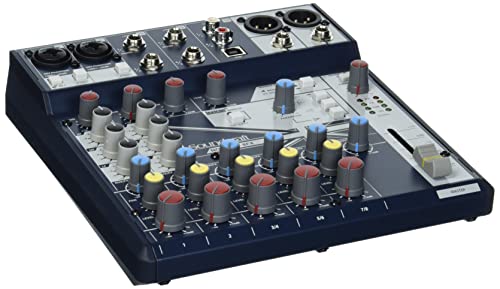
Soundcraft Notepad-8FX Small-format Analog Mixing Console with USB I/O and Lexicon Effects — Best Desktop Mixer for Podcasting
Badge: Best Desktop Mixer for Podcasting. The Notepad-8FX is the desktop branch of this guide at its most refined: a small-format analog console with Soundcraft’s microphone preamps, USB I/O that turns it into a computer recording interface, and built-in Lexicon effects for a touch of polish on a voice. For a podcast desk or a small home studio, it is the complete front end in one compact box. Check the current price on Amazon.
Strengths
- Quality mic preamps — the spec that decides vocal recordings
- USB I/O doubles as a computer audio interface
- Lexicon effects built in for voice polish
Trade-offs
- Analog workflow — no scene recall or digital routing
- Channel count suits solo and duo work, not bands
- Effects are seasoning, not a substitute for room treatment
| Spec | Detail |
|---|---|
| Format | Small-format analog console |
| Interface | USB I/O |
| Effects | Lexicon effects |
Podcasting is a preamp-and-quiet game, and the Notepad-8FX plays it properly: clean gain for dynamic microphones, a straightforward signal path, and USB straight into your recording software. The Lexicon reverb, used sparingly, gives a voice presence that raw recordings lack — the difference listeners describe as ‘professional’ without knowing why.
As a desktop citizen it behaves: compact footprint, top-panel controls you can run by feel, and a layout a guest can be taught in a minute. For the one-or-two-microphone creator, this is the desktop mixer to beat.
Soundcraft’s live-sound heritage shows in the Notepad’s details: the EQ is voiced musically rather than surgically, and the faders and knobs feel like a small console rather than a computer peripheral. Creators migrating from an interface often remark that mixing becomes physical and faster — decisions happen by hand, in real time.
Best for: podcasters, voice artists and small home studios / Not suited for: bands or anyone needing digital recall
Check on Amazon if this pick matches your kitchen and the way you actually cook.

Mackie ProFX10v3+ 10-Channel Mixer with Bluetooth and USB Recording — Best Desktop Mixer for Streaming
Badge: Best Desktop Mixer for Streaming. Mackie’s ProFX10v3+ is the desktop mixer that assumes a computer and an audience. Ten channels with Onyx mic preamps, the GigFX+ effects engine, Bluetooth for bringing in a phone’s audio, and USB recording — the full streaming signal chain on one desk panel, from a brand whose mixers have anchored small rigs for decades. Check the current price on Amazon.
Strengths
- Bluetooth input simplifies phone and backing-track feeds
- Onyx preamps handle demanding dynamic mics
- GigFX+ effects for voice and instruments
Trade-offs
- More mixer than a single-mic streamer needs
- Analog core — no digital scene memory
- Desk footprint is compact-plus
| Spec | Detail |
|---|---|
| Channels | 10 |
| Preamps | Onyx mic preamps |
| Features | Bluetooth, USB recording, GigFX+ effects engine |
Streamers outgrow interface-only setups when the second source arrives — a co-host, a guitar, a phone for call-ins. The ProFX10v3+ is sized exactly for that growth: enough channels to stop repatching, Bluetooth to end cable hunts, and effects that let a voice sit properly over game or music audio.
It also moonlights: the same desk mixer runs a small live gig or a rehearsal PA head-end competently. For creators whose work straddles online and in-room audio, that double life is the value.
The ProFX10v3+ also handles the hybrid session streamers increasingly run: a live in-room audience plus a stream, or a podcast recorded with a guest on a phone via Bluetooth while music beds play from USB. Each added source is where lesser desks force workarounds; this one just opens another channel.
Best for: streamers, creator studios and small hybrid live setups / Not suited for: minimal single-mic desks
Check on Amazon if this pick matches your kitchen and the way you actually cook.

Behringer XENYX X1204USB Premium 12-Input 2/2-Bus Mixer — Best Desktop Mixer for a Small Band
Badge: Best Desktop Mixer for a Small Band. The X1204USB is the desktop mixer small bands actually own: 12 inputs, XENYX mic preamps with per-channel compressors, musical British-style EQ, a 24-bit effects processor and USB for recording the rehearsal. It sits on a desk or a keyboard stand and runs the whole practice-room ecosystem. Check the current price on Amazon.
Strengths
- One-knob compressors tame vocal dynamics simply
- 12 inputs cover a small band’s rehearsal needs
- USB recording captures rehearsals and demos
Trade-offs
- Analog workflow with no recall
- Feature depth exceeds solo creators’ needs
- Built to a working price — treat the faders kindly
| Spec | Detail |
|---|---|
| Inputs | 12 (2/2-bus) |
| Preamps | XENYX with compressors |
| EQ | British EQ |
| Interface | USB |
The compressors are the headline for band use: a singer who moves around the microphone stays level without an engineer riding the fader, which makes rehearsal recordings listenable and small gigs manageable. British EQ is the forgiving, musical kind — hard to make sound bad, easy to make sound warm.
For a band’s home base or a music teacher’s studio, the X1204USB is the pragmatic desktop: everything the job needs, nothing priced for prestige. It has been the default answer in this niche for years because the niche keeps agreeing.
Teachers and rehearsal leaders get one more X1204USB dividend: recording the session to USB-connected software takes one cable and no interface, so every rehearsal can be reviewed. Bands that record rehearsals improve measurably faster — the mixer quietly functions as a practice tool, not just a sound tool.
Best for: small bands, rehearsal rooms and music teachers / Not suited for: solo streamers or digital-recall workflows
Check on Amazon if this pick matches your kitchen and the way you actually cook.
Comparison Table
First decide which branch you are in — personal monitoring or desktop mixing — because the two do not substitute for each other. The table states each pick’s role plainly.
| Pick | Badge | Key spec | Best for |
|---|---|---|---|
| Behringer POWERPLAY P16-M 16 Channel Digital Personal Mixer | Best Overall Personal Monitor Mixer | 16-channel personal monitor mixer | bands, worship teams and ensembles moving to in-ear monitoring |
| Behringer Powerplay P16-HQ 16-Channel Digital Personal Monitoring Mixer | Best Upgraded Personal Mixer | 16-channel digital personal mixer | new personal-monitoring installs in churches, theatres and studios |
| Behringer POWERPLAY P1 Personal In-Ear Monitor Amplifier | Best Simple In-Ear Solution | Belt-pack in-ear amplifier | stationary performers and as a rig spare |
| Soundcraft Notepad-8FX Small-format Analog Mixing Console with USB I/O and Lexicon Effects | Best Desktop Mixer for Podcasting | Analog console, USB, Lexicon FX | podcasters, voice artists and small home studios |
| Mackie ProFX10v3+ 10-Channel Mixer with Bluetooth and USB Recording | Best Desktop Mixer for Streaming | 10-channel, Bluetooth + USB, GigFX+ | streamers, creator studios and small hybrid live setups |
| Behringer XENYX X1204USB Premium 12-Input 2/2-Bus Mixer | Best Desktop Mixer for a Small Band | 12-input, compressors, USB | small bands, rehearsal rooms and music teachers |
How to Choose the Best Desktop Personal Mixers: Which Branch Are You In?
The first decision is existential: are you mixing your own monitor feed as a performer, or mixing sources at a desk as a creator? Personal monitor mixers (the P16 family) do the first job and require a host distribution system; desktop consoles (Soundcraft, Mackie, Behringer XENYX) do the second and connect to your computer by USB. Buying across the branches is the category’s one unforgivable error — a P16 cannot record your podcast, and a Notepad cannot build your in-ear mix.
Within your branch, count real inputs. A podcaster needs two good mic preamps, not twelve channels. A streamer needs a spare channel for every source that will ever join — co-host, instrument, phone. A band needs a channel per member plus returns. Buy for the session you actually run, plus one spare input, and the mixer will fit your desk and your workflow.
- Decide monitor mixing versus desktop mixing first
- Personal monitor mixers need a host hub or digital console — budget the system
- Count mic preamps, not just channels, for voice work
- USB audio is essential for creators; Bluetooth is a genuine convenience for streamers
- Plan mounting and headphones for personal mixers — they are part of the purchase
Personal Monitoring Explained: Wedges, In-Ears and Your Own Mix
Traditional stage monitoring gives every performer the same compromise through floor wedges. Personal mixing inverts it: a distribution system sends the individual channels to each position, and each musician builds the mix they perform best to — vocal-forward for singers, click-and-rhythm for drummers. The results are lower stage volume, cleaner house sound and protected hearing.
The on-ramp is gradual. A stationary player can start with a P1 amplifier taking an aux feed; a band ready to commit builds the P16 system seat by seat. Either way, the direction of travel in live sound is personal — this guide’s monitor picks are the established route into it.
Desktop Mixing for Creators: Preamps, USB and Effects That Matter
For desk work, the hierarchy is preamps, interface, then everything else. A clean preamp with enough gain for a dynamic microphone decides whether your voice sounds broadcast or basement. USB audio that records the mix (and, ideally, lets you monitor without latency) decides whether the workflow is sustainable. Effects — a touch of reverb or compression — are polish, valuable last.
Do not buy channels you will never patch. A compact console that fits your desk and your session beats a larger one that crowds out the keyboard and tempts you with inputs that stay empty for years. The Notepad-8FX and ProFX10v3+ bracket the sensible range for one-to-three-source creators.
Cables, Mounts and Headphones: The Hidden Half of a Personal Setup
Personal mixing systems are ecosystems, and the accessories decide whether the system delights or tangles. For P16 seats: a mounting bracket per position, network cables of sane lengths, and headphones or in-ears per musician. For desktop consoles: balanced XLR microphone cables, a USB cable you trust, and closed-back headphones for monitoring while recording. Budget these alongside the mixer, not after it.
Cable discipline is the unglamorous differentiator. Labeled, right-length cables make a rehearsal room setup take ten minutes; a bag of random lengths makes it take forty and a temper. The professionals this equipment is modeled on treat cabling as part of the instrument — personal-scale buyers who copy that habit get professional-feeling results from personal-scale gear.
Latency, Monitoring and Other Digital Desk Realities
Creators recording through a desktop mixer should understand the monitoring path: direct monitoring — hearing yourself from the mixer before the computer — is effectively latency-free, while monitoring through software adds a delay that distracts most speakers and singers. The consoles in this guide are built around direct monitoring for exactly that reason; set your software to let the mixer do the listening.
For personal monitor systems, latency is engineered into the distribution design and is not a practical concern at this scale. What matters instead is gain structure: a clean, consistent feed from the host console makes every personal mix downstream easier to build. Personal mixing rewards a tidy house system — one more reason the setup section of this guide insists on gain-staging first.
Scaling Up: From One Desk to a Small System
Personal setups grow in predictable steps. The podcaster adds a second microphone and a guest headphone feed. The streamer adds a co-host and a phone source. The band adds two more personal seats and a distribution hub with more ports. Choosing gear with headroom — a mixer one size above today’s session, a hub with spare outputs — makes each step a purchase of one item rather than a replacement of the system.
The picks in this guide were chosen with those growth paths in mind: the Notepad’s bigger sibling exists within the same family, the Mackie’s channel count anticipates the co-host era, and the P16 system scales seat by seat to full bands. Buy the step you are on, from a family that contains the step you are heading to.
Personal Mixers for Houses of Worship: A Special Case Done Well
Churches are personal mixing’s heartland because their constraints are the category’s constraints: volunteer operators, musicians of mixed experience, a room that punishes stage volume, and a budget that must be spent once and correctly. A P16 system answers all four — musicians own their mixes, the house engineer focuses on the congregation, stage volume falls, and the system scales seat by seat as the team grows.
The implementation advice from countless installs: start with the singers and the drummer, whose monitor needs are most acute, prove the workflow for a month, then extend. Label every seat’s mixer with its position, keep one P1 as the universal spare, and train two people on the host system. That sequence succeeds; the big-bang full install, attempted in one weekend, is where frustration stories come from.
Desktop Mixers and Room Acoustics: The Upgrade Nobody Sells
Every desktop mixer in this guide will faithfully record a bad room. Before upgrading a mixer, treat the space: soft furnishings near the microphone, a closet of clothes as a vocal booth, recording at the room’s quietest hour. The Notepad’s preamps and the Mackie’s Onyx gain deserve a room that lets them shine, and the improvement from basic treatment exceeds the difference between any two mixers in this category.
Monitoring is the other half: mix and judge on the closed-back headphones you record with, at consistent volumes, so your ears calibrate to one reference. Personal-scale audio is a chain of small fidelities — room, preamp, conversion, monitoring — and the mixer, chosen well from this guide, stops being the weak link the day the room gets its hour of attention.
Ergonomics at the Desk and the Stand: Using a Personal Mixer for Hours
Personal mixers are operated for hours at a stretch, and their ergonomics compound. A desktop console’s knobs should be distinguishable by touch and size — the channel you grab mid-sentence must be findable without looking down. Faders beat rotary controls for live adjustments because position is visible at a glance. The Notepad and Mackie layouts in this guide descend from live consoles, where these lessons were learned under stage pressure, and desk creators inherit the benefit.
At a musician’s position, the personal mixer’s placement is its ergonomics: elbow height, on the dominant-hand side, close enough to adjust between phrases. The P16’s stand mounting exists because a mixer on the floor or a distant table is a mixer that does not get adjusted — and a personal mix that does not get adjusted is just a monitor feed with extra steps. Budget the mount, place the unit, and the system fulfills its promise.
Headphone ergonomics close the loop: the best mix in the world fails through fatiguing headphones. Isolation, weight and cable routing decide whether a three-hour session ends in clarity or in a headache, which is why this guide treats headphones as part of the personal mixing purchase rather than an accessory afterthought.
Troubleshooting Personal and Desktop Mixers: The Five-Minute Diagnostic
Nearly every ‘broken mixer’ story resolves into one of five causes, and a five-minute pass finds it. One: the source is silent — check the instrument, the phone, the playback. Two: the cable has failed — swap it before suspecting anything expensive. Three: the channel is muted, unassigned or its gain is at zero — the classic. Four: the destination is wrong — headphones in the wrong output, speakers muted, the computer listening to a different device. Five: power — a supply unplugged, a battery spent, a hub port dark.
Work the chain in that order, changing one thing at a time, and personal-scale audio’s mysteries mostly evaporate. The habit scales from a podcast desk to a full P16 rig, where the same discipline — source, cable, channel, destination, power — isolates a silent seat while the band is still counting in. Keep a spare cable and a P1 in the kit and most failures become anecdotes instead of cancellations.
Personal Mixers for Education: Schools, Choirs and Teaching Studios
Schools and teaching studios are personal audio’s second heartland. A school hall’s assembly, a choir’s rehearsal, a music department’s ensemble — all share the volunteer-operator, mixed-experience, tight-budget profile that personal mixing serves. Desktop consoles anchor the teaching studio, where a Notepad-class desk teaches signal flow on real hardware: gain, EQ, aux sends and monitoring learned by hand, not by tutorial.
The educational dividend compounds: students who learn on a small console’s honest layout can walk up to any mixer in any venue and orient themselves in minutes, because the fundamentals are physical and universal. Institutions choosing between a touchscreen-only system and a hands-on desk for teaching should weigh that transfer — the picks in this guide were chosen partly for the clarity of their layouts, which is a pedagogical feature disguised as a design one.
For school stages, the P1-and-aux on-ramp deserves emphasis: a drama department can give its leads controlled in-ear feeds from an existing console’s aux outputs for the price of a few belt-packs, transforming audibility for young performers without a system rebuild. Personal audio’s ladder has a rung at nearly every budget, and education is where that ladder does some of its best work.
The Home Studio Desk: Arranging Mixer, Monitor and Machine
A desktop mixer’s performance is partly furniture. Place it within arm’s reach of your seated position, angled if the surface allows, with the computer’s keyboard and the mixer’s faders in the same glance — you will operate both in the same seconds during a stream or a session. Keep the microphone’s cable run short and uncrossed by power cables, and give the headphones a home — a hook beside the desk — because a personal setup’s tidiness is its reliability.
Monitor placement matters even at desk scale: speakers at ear height, angled to the listening position, clear of walls enough to avoid boom, or honest headphones if the room cannot support speakers. The mixer is the desk’s heart, but the room and the monitoring are its ears. Arrange all three as one system and a personal-scale setup produces results that listeners consistently overestimate the size of — the nicest compliment in small audio.
The Personal Setup Audit: Five Questions Before You Spend
Before any purchase in this category, audit your actual sessions. One: how many sources truly arrive at once — voices, instruments, devices? Two: who operates the mixer while it matters — you, mid-performance, or a dedicated hand? Three: what do you listen through, and is it isolating enough for your environment? Four: what records the result, and does the path from mixer to recorder exist today? Five: what will you add within a year — a co-host, a seat, a source — and does the chosen family contain it?
Answered honestly, those five questions select the pick almost mechanically: monitor branch or desk branch, channel count, preamp quality, mounting and headphone budget. The audit takes ten minutes and prevents the category’s only expensive errors, which are never about sound quality — they are about fit. Personal audio is personal; the audit is how you keep the purchase that way.
Why Personal Audio Is Winning
Step back and the category’s growth explains itself: the cost of excellent personal sound has collapsed while the venues demanding it — streams, podcasts, in-ear stages, hybrid classrooms — have multiplied. A generation of creators and musicians now expects to control their own sound as a default, the way they control their own cameras and lights. The equipment in this guide is that expectation, productized at every scale from a belt-pack amplifier to a full personal mixing system. Choose your rung, climb as your work grows, and the sound you hear — the most personal part of any performance — stays yours.
One More Consideration: Hygiene and Sharing Personal Audio Gear
Personal gear is personal in the literal sense: in-ears and headphones are worn in and on the body, and shared rigs — schools, churches, theatres — need a hygiene protocol as standard as their cable check. Removable tips should be personal-issue where budgets allow; shared headphones should be wiped between users; in-ear monitors should never be passed mid-event without cleaning. None of this is elaborate, and all of it is the difference between a system people trust and one they quietly avoid.
Label personal items with names, keep a small stock of spare tips and wipes with the kit, and treat the protocol as part of the setup checklist in this guide’s how-to. The best personal systems feel personal because someone sweated exactly these details.
Closing Note: Start Where You Stand
Every rig in this guide began as one box on one desk or one seat at one stand. Start there, with the pick that matches today’s session, and let the work itself argue for each addition. Personal audio rewards that patience with systems that feel inevitable in hindsight — each piece present because a real session demanded it, each cable labeled by a real lesson. That is the sound of a setup that will serve for years.
How to Set Up a Desktop or Personal Mixer for the First Time
For a desktop console: connect microphones with balanced XLR cables, set each channel’s gain so peaks stay healthy without clipping, then bring faders up. Connect USB to your computer, select the mixer as the audio device in your software, and record a test at your real speaking or singing level before any real session. For a personal monitor mixer: confirm the host system is sending your channels, build your mix starting with your own voice or instrument, then add the band around it.
- Gain-stage first — set input gain before touching faders or effects
- Add effects last and sparingly; reverb hides problems instead of fixing them
- Label channels with tape — future you, mid-session, says thanks
- For in-ears, start at low volume and raise slowly; hearing is not replaceable
- Save or photograph your settings; analog desks have no memory
- Test-record every new setup before the session that counts
Troubleshooting rule for both branches: silence is almost always routing, not failure. Check the source, the cable, the channel’s mute and gain, the master, and the destination — in that order — before concluding anything is broken.
Common Buying Mistakes
The branch error — buying a personal monitor mixer for a podcast desk, or a desktop console for stage monitoring — tops this list because it is total: the product cannot do the job at any setting. Every other mistake is recoverable; that one is a return.
- Confusing personal monitor mixers with desktop mixers
- Buying a P16 without the host distribution system it requires
- Counting channels instead of quality mic preamps for voice work
- Skipping the gain-staging step and clipping every recording
- Maxing effects to mask a noisy room
- Ignoring mounting, cables and headphones in the personal-monitoring budget
Final Recommendation
Performers: the P16-M is the personal mixing standard, the P16-HQ is its current-generation successor for new builds, and the P1 is the simple amplifier that quietly serves half the musicians who think they need more. Creators: the Soundcraft Notepad-8FX for podcasting purity, the Mackie ProFX10v3+ for streaming flexibility, and the Behringer X1204USB for the band’s rehearsal desk.
Name your branch, count your real inputs, and the right personal mixer is the obvious one.
Ready to decide? Start with the shortlist: Behringer POWERPLAY P16-M 16 Channel Digital Personal Mixer, Behringer Powerplay P16-HQ 16-Channel Digital Personal Monitoring Mixer, Behringer POWERPLAY P1 Personal In-Ear Monitor Amplifier.
Keep exploring the cluster: Best Digital Audio Mixers Best 2 Mic Mixers For Podcasting Best 10 Channel Mixers Best 12 Channel Audio Mixers Best 5 Channel Mixers
Frequently Asked Questions
What is a personal mixer?
A personal mixer lets an individual performer control their own monitor mix. In a system like Behringer’s P16, each musician receives the band’s channels at their position and sets their own levels, pans and EQ for their headphones or in-ears — instead of relying on a shared floor-wedge mix controlled by someone else.
Can I use a personal monitor mixer for podcasting?
No — personal monitor mixers are monitoring tools within a live system; they do not provide the mic preamps and USB recording path a podcast needs. For a podcast desk, choose a compact desktop console like the Soundcraft Notepad-8FX, which combines preamps, USB I/O and effects.
Do personal mixers work on their own?
The P16-M and P16-HQ require a host: a distribution hub or a compatible digital console that sends them the channels. The P1 amplifier is simpler — it takes any monitor feed and drives headphones — but it amplifies a mix made elsewhere rather than creating one.
How many channels does a desktop mixer need for streaming?
Most streamers run one microphone, game or console audio, and perhaps a phone or music source — four to ten channels covers it with spares. The Mackie ProFX10v3+ is sized for exactly that growth path; solo single-mic streamers can go smaller with the Notepad-8FX.
Are analog desktop mixers outdated next to digital ones?
No. Analog consoles offer immediate, hands-on control with no menus, and their USB interfaces record perfectly well. Digital mixers add scene recall, deeper processing and remote control. For a fixed desk setup run by its owner, analog’s simplicity is a feature, not a compromise.
What headphones or in-ears should I pair with a personal mixer?
Closed-back headphones or isolating in-ear monitors — isolation is what lets you run your mix at safe volumes on a loud stage. The mixer drives either; choose by comfort for your set length and by how much stage sound you need to block.


