Disclosure: airfryerkitchensupply.com is reader-supported. When you buy through links on our site, we may earn an affiliate commission at no extra cost to you.
Where to buy
The fastest way to compare the best conference room sound mixers in this guide is on Amazon, where most of the models below are sold by the brands themselves or by authorized kitchen and audio retailers. Prices and stock move around, especially on seasonal colors and bundle configurations, so every pick here is listed with a live price check rather than a fixed number.
Confirm whether the listing is the mixer alone or a bundle with rack ears, microphones, or speakers, and check the control requirements — several picks below are operated entirely from a tablet or computer app rather than from physical controls.
- Soundcraft Ui12 (Best Overall for Most Conference Rooms) — check price on Amazon
- Behringer X AIR XR18 (Best for Installed Racks and Larger Tables) — check price on Amazon
- Allen & Heath CQ-18T (Best Premium Touchscreen Console) — check price on Amazon
- Yamaha TF1 (Best Full Console for Large Venues) — check price on Amazon
- Allen & Heath ZEDi-10FX (Best for Hybrid Small Rooms) — check price on Amazon
- Mackie ProFX10v3+ (Best Budget Hybrid Option) — check price on Amazon
The best conference room sound mixers exist to solve an embarrassment every organization knows: the meeting where the far end cannot hear, the ceiling microphone picks up the air conditioner better than the CEO, and the first ten minutes are spent saying “can you hear me now?” A proper conference mixer takes multiple table or ceiling microphones, mixes them intelligently — often automatically — adds echo cancellation for video calls, and feeds speakers and the conferencing codec a clean, even signal where every seat at the table sounds equally present.
This category looks different from the live-sound world covered elsewhere in this cluster, and the priorities invert. Nobody needs 24 faders in a boardroom; they need gain sharing automixing that opens one microphone at a time, acoustic echo cancellation (AEC) so remote participants do not hear themselves, USB or Dante connectivity to the room computer, and control that facilities staff can lock down so the system works identically every Monday morning. Several of the best modern answers have no faders at all — they are rack or stage-box mixers run from a tablet.
The six picks below span that reality honestly: app-controlled digital mixers that hide in a rack and run the room invisibly, a full touchscreen console for flagship boardrooms and council chambers, and two hybrid analog-USB boards for smaller rooms and tighter budgets where a physical surface is still the right tool. Each review states plainly which size and type of room it serves.
One warning before the picks: a mixer alone does not fix a bad room. Hard glass walls, a noisy HVAC register above the table, and microphones placed three meters from talkers defeat any electronics. The buying guide in this article covers microphone placement and room basics alongside the gear, because in conferencing, the room is half the product.
In this guide
Quick Picks
If you are short on time, these are the six best conference room sound mixers worth your attention first. Each one carries a badge for the job it does best, and the same badge follows it into the detailed review further down the page.
- Soundcraft Ui12 — Best Overall for Most Conference Rooms. A stage-box mixer with no front panel at all: built-in Wi-Fi, tablet control from any browser, dbx and Lexicon processing, and feedback suppression built for speech. Check price on Amazon.
- Behringer X AIR XR18 — Best for Installed Racks and Larger Tables. Eighteen inputs, sixteen Midas-designed preamps, six aux buses for speaker zones, and full app control — the installed-sound workhorse. Check price on Amazon.
- Allen & Heath CQ-18T — Best Premium Touchscreen Console. A compact console with a real touchscreen and physical controls, fast setup assistants, and pristine audio — for flagship rooms that want a surface after all. Check price on Amazon.
- Yamaha TF1 — Best Full Console for Large Venues. A complete digital console with motorized faders, touchscreen, and D-PRE preamps — for auditoriums, houses of worship, and chambers that run real events. Check price on Amazon.
- Allen & Heath ZEDi-10FX — Best for Hybrid Small Rooms. A compact analog mixer with a 4×4 USB interface: four proper mic preamps, physical faders, and a direct line into the meeting computer. Check price on Amazon.
- Mackie ProFX10v3+ — Best Budget Hybrid Option. Four Onyx preamps, Bluetooth playback, USB recording, and effects — a small-room mixer that also covers presentations and events. Check price on Amazon.
How These Picks Were Chosen
Every pick was verified against live Amazon catalog data, so model names and configurations match current listings. We required a credible path to conferencing duty: multiple microphone inputs, USB audio to a room computer or a digital architecture suited to installed sound, monitor/output flexibility for speakers and codecs, and control suited to non-engineers or lockable by IT.
We weighted speech intelligibility features first — automixing or the processing to build it, EQ per channel, and clean preamps that keep quiet talkers above the room noise — then echo-cancellation strategy (some picks rely on the conferencing platform’s AEC, which the guide explains), then day-to-day operability: does the system come up correctly after a power cut, can a guest run it, can facilities support it remotely?
Excluded: pure live-music consoles with no conferencing path, single-microphone USB speakerphones (a different product class that tops out in huddle rooms), and discontinued proprietary conferencing processors whose software no longer receives updates. What remains covers huddle rooms to council chambers.
The 6 Best Conference Room Sound Mixers

Soundcraft Ui12 — Best Overall for Most Conference Rooms
The Ui12 rethinks what a conference mixer should look like: there is no surface to intimidate anyone, because there is no surface. The box mounts in the room’s rack or credenza, generates its own Wi-Fi hotspot, and is controlled from any tablet, phone, or computer browser — no app install, no dedicated hardware. Inside are 12 inputs with 8 microphone preamps, dbx compression, Lexicon reverbs (unused in meetings, handy for events), and AFS feedback suppression that automatically notches out ringing frequencies — a feature that earns its keep the first time a presenter walks a handheld microphone toward a speaker.
Strengths
- Browser-based control from any device — no app required
- Per-channel speech processing plus AFS feedback suppression
- Scene recall lets facilities lock in a known-good setup
Trade-offs
- No physical controls — plan a backup control device
- No built-in acoustic echo cancellation
- Wi-Fi configuration needs IT awareness in secure buildings
| Mic preamps | 8 |
| Total inputs | 12 |
| Control | Built-in Wi-Fi, browser UI on any device |
| Extras | AFS feedback suppression, USB record/playback |
For conferencing specifically, the processing chain per channel — high-pass filter, EQ, gate, compressor — is exactly the speech toolkit: cut HVAC rumble, tame plosives and room boom, gate out chair noise between talkers. Settings save and recall, so facilities can build one “Board Meeting” scene and lock the room into it. The mixer also records and plays back stereo audio over USB for meeting capture.
Its limits are architectural: no physical controls means a dead tablet is a dead room unless a backup device is planned, its own Wi-Fi should be managed thoughtfully in secure facilities (it also joins existing networks), and there is no built-in AEC — echo cancellation comes from your conferencing platform, which the guide below explains. At a mid tier, it is the most conference-appropriate mixer in this guide for most rooms. Check the current price on Amazon.
Best for: Boardrooms and meeting rooms run by facilities or IT / Not suited for: Rooms needing hardware echo cancellation or physical faders
Check the current price on Amazon
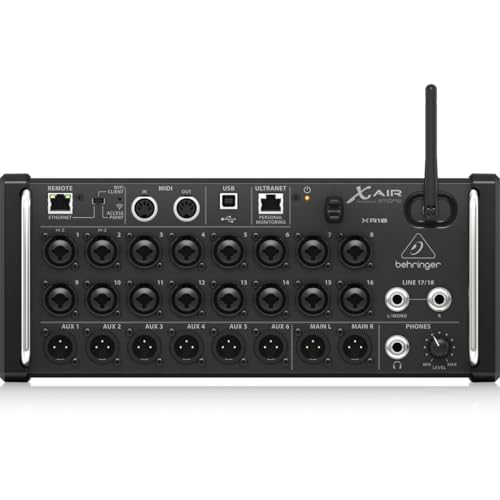
Behringer X AIR XR18 — Best for Installed Racks and Larger Tables
The XR18 is the stage-box mixer that taught an industry to trust tablet control, and in conference rooms its virtues compound: 16 Midas-designed microphone preamps handle the largest boardroom tables or multi-microphone panel setups, six aux buses feed separate speaker zones (front, ceiling, overflow), and the main mix feeds the conferencing computer over its 18×18 USB interface — which also makes it a genuine multitrack recorder for hearings, lectures, and proceedings that must be archived channel by channel.
Strengths
- 16 quality preamps and 6 aux buses for zoned speakers
- Automixing support and multitrack USB recording
- Mature cross-platform apps with access levels
Trade-offs
- Setup complexity rewards professional configuration
- No built-in AEC or physical controls
- Internal Wi-Fi best replaced by building network
| Mic preamps | 16 (Midas-designed) |
| Total inputs | 18 |
| Outputs | 6 aux buses plus mains |
| Extras | 18×18 USB interface, app control |
The app ecosystem is mature across Windows, Mac, iOS, and Android, with per-user access levels that let facilities give a room a simplified view while keeping engineering control. Dugan-style automixing is available in its processing toolkit — the gain-sharing algorithm that opens microphones intelligently is the single most valuable conference feature, and the XR18’s implementation is a big reason these boxes fill boardrooms.
Trade-offs: like the Ui12 it has no surface and no hardware AEC, its built-in Wi-Fi access point is best replaced by the building network in serious installations, and its live-music feature depth means a steeper first setup than a facilities team might expect. Budget the configuration time, or an integrator’s visit, and it becomes infrastructure. Upper-mid tier — check price on Amazon.
Best for: Large boardrooms, council chambers, and recorded proceedings / Not suited for: Small huddle rooms or zero-configuration expectations
Check the current price on Amazon

Allen & Heath CQ-18T — Best Premium Touchscreen Console
The CQ-18T is the answer for rooms that want digital intelligence without surrendering a physical control surface. Its 7-inch touchscreen, tactile encoders, and soft keys sit in a compact desktop format that belongs in a boardroom credenza rather than a road case, and Allen & Heath built speed into it: gain and feedback assistants help a non-engineer set up microphones correctly, and per-channel processing is the company’s usual high standard.
Strengths
- Touchscreen plus physical controls — no tablet dependency
- Setup assistants make microphone gain and feedback control approachable
- Multitrack recording and Bluetooth playback
Trade-offs
- Premium price tier
- More capability than small rooms need
- No built-in AEC
| Mic preamps | 16 |
| Total inputs | 18 |
| Control | 7-inch touchscreen plus encoders |
| Extras | SD/USB multitrack, Bluetooth input |
Eighteen inputs with sixteen preamps cover big tables and panel formats; Bluetooth playback handles the guest laptop moment; multitrack recording to SD or USB archives the meeting. For hybrid rooms that also host presentations, town halls, and events, the CQ-18T’s ability to be both an installed conference mixer and a capable small live console is unique in this guide.
It is a premium-tier purchase and more console than a simple huddle room can justify, and like its rivals it relies on the conferencing platform for AEC. Buy it for the flagship room where the mixer is visible, touched, and expected to feel as considered as the furniture. Check the current price on Amazon.
Best for: Flagship boardrooms and multi-use presentation spaces / Not suited for: Budget rooms or fully hidden installations
Check the current price on Amazon

Yamaha TF1 — Best Full Console for Large Venues
Some “conference rooms” are really small auditoriums: council chambers with public seating, university lecture halls, corporate town-hall spaces, and houses of worship where the meeting is also a production. The TF1 is the full console for those rooms — 16 microphone preamps with Yamaha’s D-PRE design, motorized faders, a touchscreen workflow built around one-knob compression and EQ, and scene memory that lets the room be a lecture hall on Tuesday and a panel venue on Thursday.
Strengths
- Motorized faders and full scene recall
- D-PRE preamps and volunteer-friendly workflow
- Dante expansion for growing venues
Trade-offs
- Large, premium-tier, installation-grade
- Needs a trained operator for events
- Far beyond huddle-room needs
| Mic preamps | 16 (D-PRE) |
| Total inputs | 40 mixing channels |
| Control | Touchscreen plus motorized faders |
| Extras | Scene memory, Dante stage-box expansion |
Yamaha’s design brief for the TF series was approachability at scale: presets written by working engineers for common microphone and source types, a touch-and-turn interface that volunteers can learn, and expansion via a Dante stage box when the input list grows. For institutions, that combination of capability and teachability is the product.
The costs are size, price tier, and a learning curve beyond the app-based boxes — this is furniture, not a credenza gadget, and it wants a trained operator for events. Within its intended rooms, though, nothing else in this guide offers its combination of faders, recall, and expansion. Check price on Amazon and plan installation properly.
Best for: Council chambers, lecture halls, and town-hall spaces / Not suited for: Standard meeting rooms or tight budgets
Check the current price on Amazon
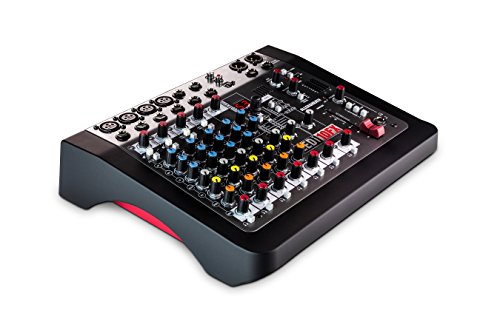
Allen & Heath ZEDi-10FX — Best for Hybrid Small Rooms
Not every conference room needs automixing architecture. A six-person room with two table microphones, a laptop, and a soundbar benefits more from a small, honest mixer with physical controls — and the ZEDi-10FX is the best of that kind. Four GSPre microphone preamps feed a compact analog surface with musical EQ and a set of onboard effects, while its 4×4 USB interface sends the meeting mix to the computer and returns far-end audio independently — the routing hybrid meetings actually need.
Strengths
- Physical controls anyone can operate
- 4×4 USB for proper hybrid-meeting routing
- Quality preamps and EQ in a compact footprint
Trade-offs
- Four mic inputs maximum
- No automixing or echo cancellation
- Analog — no scenes or remote management
| Mic preamps | 4 (GSPre) |
| Total inputs | 10 |
| Connection | 4×4 USB audio interface |
| Extras | Onboard FX, guitar DI inputs |
The analog surface is the feature: anyone can walk in, see the faders, and run the meeting. There is no app, no Wi-Fi, no firmware. Facilities teams in schools, small firms, and community spaces choose exactly this class of device because it cannot be logged out of, updated into a new interface, or locked by a forgotten password.
Its ceiling is scale and smarts: four microphones is the whole table it can serve, there is no automixing or AEC, and bigger rooms will outgrow it. As the hybrid small-room answer at a mid tier, it is excellent and honest — check the current price on Amazon.
Best for: Small meeting rooms and hybrid setups with a few microphones / Not suited for: Large tables or automated rooms
Check the current price on Amazon

Mackie ProFX10v3+ — Best Budget Hybrid Option
The ProFX10v3+ is the budget-conscious way to give a small conference room real microphones. Four Onyx preamps handle a table of four or a presenter-plus-panel format, the USB connection records the meeting and plays back far-end or media audio, and Bluetooth input solves the perennial guest-laptop problem without a cable hunt. Onboard GigFX effects and compression help presentation and event duties that share the room.
Strengths
- Bluetooth playback for guest devices
- Onyx preamps and USB meeting recording
- Effects and compression for presentations
Trade-offs
- Four mic inputs cap room size
- No automixing, AEC, or remote control
- Stereo USB only
| Mic preamps | 4 (Onyx) |
| Total inputs | 10 |
| Connection | USB record/playback plus Bluetooth |
| Extras | GigFX effects engine |
Like the ZEDi, its analog surface is a feature for non-technical users, and Mackie’s build quality at this tier is a known quantity. For training rooms, classrooms, and small boardrooms that also host the occasional all-hands with a microphone and music, it covers more of the calendar than a conferencing-only box would.
Set expectations correctly: four preamps, no automixing, no AEC, no remote management, and USB that serves stereo meeting audio rather than multitrack. At its budget-to-mid tier — check price on Amazon — it is the rational small-room buy when the alternative is a USB speakerphone straining to cover a ten-person table.
Best for: Small boardrooms, classrooms, and training rooms on a budget / Not suited for: Large tables or IT-managed room systems
Check the current price on Amazon
Comparison Table
| Pick | Badge | Key spec | Best for |
|---|---|---|---|
| Soundcraft Ui12 | Best Overall for Most Conference Rooms | 8 mic preamps, Wi-Fi tablet control | Boardrooms and meeting rooms run by facilities or IT |
| Behringer X AIR XR18 | Best for Installed Racks and Larger Tables | 16 preamps, 6 aux, multitrack USB | Large boardrooms, council chambers, and recorded proceedings |
| Allen & Heath CQ-18T | Best Premium Touchscreen Console | 16 preamps, touchscreen console | Flagship boardrooms and multi-use presentation spaces |
| Yamaha TF1 | Best Full Console for Large Venues | 16 preamps, motorized faders, Dante-ready | Council chambers, lecture halls, and town-hall spaces |
| Allen & Heath ZEDi-10FX | Best for Hybrid Small Rooms | 4 preamps, 4×4 USB, analog surface | Small meeting rooms and hybrid setups with a few microphones |
| Mackie ProFX10v3+ | Best Budget Hybrid Option | 4 preamps, Bluetooth, USB | Small boardrooms, classrooms, and training rooms on a budget |
The honest dividing line in this table is architecture, not inputs: app-controlled stage boxes (Ui12, XR18) disappear into the room and scale to big tables; surface consoles (CQ-18T, TF1) serve rooms that run events; compact analog-USB boards (ZEDi-10FX, ProFX10v3+) serve small rooms with human operators. Choose the architecture first.
How to Choose a Conference Room Mixer: Start with the Room, Not the Mixer
Count seats, then count microphones. A workable rule is one microphone per two seats at a table, so a 10-person boardroom wants five or six microphone channels and a 16-person room wants eight — which is why the 8-preamp Ui12 anchors this guide and the 16-preamp XR18 and CQ-18T exist for the big tables. Rooms where participants present standing, pass a handheld, or sit in rows need a different count again: fewer table mics, plus wireless channels for presenters, which consume mixer inputs just the same.
Decide who operates the system. If the answer is “nobody — it should just work,” you need recallable scenes and preferably automixing: the stage-box picks, configured once by someone competent and then left alone. If a facilitator or AV staffer runs meetings, a physical surface earns its place. If IT manages a fleet of rooms, remote access, access levels, and identical configuration across rooms become buying criteria — another point for the app-based architectures.
Map the audio paths before choosing. The mixer must feed: room speakers, the conferencing computer (USB or Dante), possibly a recording or streaming output, and possibly an assistive-listening system. Each destination may need its own mix — the far end should not receive the far end, the recording may want everything, the speakers want the room mix. Aux and bus counts, which look like live-music specs, are exactly what make these paths possible; the XR18’s six auxes are a conferencing feature in disguise.
Finally, be honest about echo cancellation. None of the mixers in this guide performs hardware AEC; they rely on the conferencing platform (Zoom, Teams, Webex) to cancel echo, which modern platforms do well when fed a proper mix-minus signal. Rooms with dedicated codecs or telephone hybrids that lack good AEC need a dedicated conferencing DSP instead of a mixer — a different product class, and recognizing that boundary before purchasing is worth more than any single feature below.
What Is Automixing, and Why Do Conference Rooms Need It?
In a room with eight open microphones, every microphone hears every talker plus the room itself: chairs, paper, HVAC, keyboard clatter. The result is a hollow, noisy far-end feed that gets worse with each mic added. Automixing — specifically gain-sharing automixing of the kind associated with Dan Dugan — solves this by continuously dividing a fixed amount of gain among the microphones: the person speaking gets full gain, idle microphones are attenuated to near silence, and the total noise floor stays constant no matter how many mics are installed.
The audible difference is dramatic and immediate: the far end hears one clear voice at a time, room noise drops away between speakers, and feedback margin improves because the system is never running eight fully open microphones. For panel discussions, council meetings, and boardrooms, automixing is the difference between a system that sounds professional and one that sounds like a speakerphone in a cave.
Implementation varies across this guide. The XR18 offers automixing in its processing; the Ui12 and CQ lines provide the gating and scene tools to approximate disciplined mixing, and their operators lean on per-channel gates; the analog picks have no automixing at all, which is acceptable only when microphone counts are small and an operator rides the faders. If your room has six or more table microphones and no dedicated operator, automixing support should be a hard requirement, not a preference.
Microphone Placement Rules That Matter More Than the Mixer
Every mixer in this guide will fail in a room where the microphones are wrong, so these rules outrank the gear. Keep talkers close: a gooseneck or boundary microphone should be within roughly half a meter of each talker’s mouth position; beyond that, room noise and echo rise faster than any gain can fix. One microphone per two seats, placed between the pair and angled fairly, beats one microphone per four seats at any price.
Keep microphones away from noise and from speakers. A ceiling microphone under an HVAC diffuser records the diffuser; a table microphone in front of a loudspeaker invites feedback and confuses echo cancellation. Ceiling arrays have their place in architecturally sensitive rooms, but they demand more processing and more budget than table microphones delivering the same intelligibility — in most boardrooms, the unglamorous gooseneck wins.
Match the microphone type to the discipline of the room. Goosenecks enforce distance and direction — good for formal rooms. Boundary (flat table) microphones are discreet and forgiving of talkers who lean — good for collaborative tables. Handheld and lapel wireless serve presenters. Whatever you choose, keep the type consistent across the table; a mix of near and far microphones is what makes some seats sound present and others sound like they are calling from the corridor.
Setting Up a Conference Mixer for Hybrid Meetings That Sound Professional
The hybrid meeting is the default now, and its audio has one rule: the remote participants are the audience that matters most, because the people in the room can hear each other anyway. Build the mix for the far end. Start with all table microphones at matched gain, high-pass filters engaged to remove HVAC and table rumble, and gentle compression on presenter channels so quiet and loud talkers arrive at similar levels.
Route carefully: the far end receives the room microphones and any shared content audio — never their own returned voice. The room speakers receive the far end plus, at low level or not at all, the room’s own microphones (in small rooms, amplifying local talkers into local speakers adds feedback risk and little clarity; in large rooms it is essential and must be gain-managed). Save this as the room’s default scene and protect it: most conference audio failures are not failures at all, but settings someone changed for an event and never changed back.
Test the way the far end hears you: join the meeting from a laptop in another room, or record the platform’s cloud recording, and listen. Thirty seconds of honest playback reveals microphone imbalance, echo, and noise that no one in the room itself can hear. Make that test part of commissioning every room, and repeat it whenever furniture, microphones, or the platform changes.
How to Set Up a Conference Room Mixer, from First Cable to First Call
This sequence assumes table microphones, room speakers, a conferencing computer, and any pick from this guide. An afternoon spent here saves a year of complaints.
- Place microphones before touching the mixer. One per two seats, within half a meter of talkers, away from HVAC diffusers, projectors, and the loudspeakers they will feed. Run cables so chairs and laptop bags will not crush them.
- Connect in order: microphones to preamp inputs, mixer main or USB output to the conferencing computer, aux or main outputs to the speaker amplifier, and a separate feed to recording or assistive listening if required.
- Set input gains with real speech. Have a person sit at each seat and speak at meeting volume — not test-test volume — while you set gain for consistent levels across seats. Engage high-pass filters on every speech channel.
- Configure automixing or gates. If the mixer offers gain-sharing automixing, enable it on the table microphones. Otherwise set gentle gates so idle microphones rest quietly. Confirm that one talker sounds clear and that silence between talkers is actually silent.
- Build the mix-minus. The conferencing computer must receive room microphones and content audio, but not its own far-end audio returned. Verify by joining a test call: the remote side should hear the room, and the room should hear the remote side, with no echo on either end.
- Set speaker levels for the room, with far-end audio comfortably clear at the farthest seat and local microphone reinforcement off or minimal in small rooms.
- Save everything as the default scene, protect it with access levels if the platform allows, and label the one control a guest is allowed to touch: volume.
- Run the far-end test: record a cloud meeting or listen from another room. Fix what you hear — that recording is the product everyone remote will judge.
Finish by writing the one-page room card: how to start a meeting, where the volume control is, and the support contact. The best conference installation is the one whose users never learn the mixer’s name.
Conference Mixer vs. Dedicated DSP: Knowing the Boundary
There is a class of product above everything in this guide — the dedicated conferencing DSP from the installed-sound industry — and honesty requires naming when you need it instead. If your room requires hardware acoustic echo cancellation per microphone channel, integration with a legacy video codec or telephone hybrid, camera-tracking automation driven by microphone activity, or a Dante network spanning multiple rooms, you have crossed from mixer territory into DSP territory, and a mixer purchase will disappoint you.
The good news is how much territory the mixers here cover before that boundary: the overwhelming majority of boardrooms, classrooms, chambers, and hybrid meeting spaces run on platform-based conferencing (a room PC running Zoom or Teams), where the platform supplies AEC and the mixer supplies microphones, mixing, automixing, and speaker feeds. That architecture — represented by every pick in this guide — is the modern standard precisely because it works.
A useful test: if your requirements document mentions a mixer’s job in terms of microphones, speakers, and the meeting platform, buy a mixer from this list with confidence. If it mentions per-channel AEC, VoIP telephony integration, or control-system programming, take this guide’s room and microphone advice and hand the electronics decision to an integrator with a DSP design.
Power, Networking, and the Monday-Morning Test
Conference systems are judged at 8:58 on a Monday morning by people who did not install them. The mixers that pass that test share operational traits worth checking before purchase: they power up into their last state or a saved scene without intervention; their control survives a network change because someone documented the static IP or the hotspot fallback; and their everyday operation reduces to one action — a scene button, a tablet shortcut, or simply walking in, because the system is always on.
Build resilience into the installation, whichever pick you choose: label the control tablet and keep it charged and in the room; print a one-page quick-start card with the three things a guest needs (how to start, how to adjust volume, who to call); put the mixer on the same power conditioning as the room PC so one switch or one UPS event treats them as a system; and photograph the working configuration screens for the facilities file.
These are not glamorous criteria, and they decide real-world satisfaction more than preamp specifications do. A conference mixer is infrastructure. Buy and install it like infrastructure, and it will be praised the way infrastructure is praised — by never being mentioned at all.
Budgeting the Whole Room: Where the Money Actually Goes
Facilities teams are often surprised that the mixer is not the largest line in a conference audio budget. Microphones — one per two seats, plus presenter wireless — typically cost as much or more, speakers and their amplification add a second system, and installation, cabling, and configuration labor rivals the hardware. Planning the budget as a system prevents the classic failure: a premium mixer starved by too few, poorly placed microphones.
A sane allocation for a mid-size boardroom puts roughly equal weight on microphones, the mixer, speakers, and installation/configuration combined. Within the mixer line itself, the picks here span budget analog to premium console; the step-ups buy inputs, automixing, recall, and remote management — capabilities, not status. If the budget forces a choice, fund microphone count and placement first, automixing second, and console prestige last.
Ceiling Microphones and Speaker Zoning: The Two Upgrades Rooms Ask For
As rooms get larger or more formal, two requests arrive together: hide the microphones, and make the sound even everywhere. Ceiling microphone arrays answer the first — they keep the table clear for laptops and documents — but they trade away the closeness that makes table microphones sound good, so they demand more from the mixer: more careful EQ, stricter gating or automixing, and realistic expectations in reverberant rooms. A well-installed ceiling array in a treated room can sound excellent; the same array under a noisy HVAC system in a glass box will not, at any mixer tier.
Speaker zoning answers the second request. One loudspeaker loud enough for the back row is painfully loud at the front; several quieter speakers, each covering a zone at modest level, keep every seat in the intelligibility sweet spot. Zoning is where aux and output counts become a conference feature: the XR18’s six aux buses or a console’s matrix outputs feed zones independently, with delay alignment in larger rooms. If your room is long, or has a low ceiling that forces speakers close to listeners, plan the mixer purchase around outputs as much as inputs.
Both upgrades share a moral: they are installation decisions, not shopping decisions. The mixers in this guide support them to different degrees — stage boxes with many buses at the top, compact analog boards not at all — and knowing which side of that line your room sits on is the real buying skill this category teaches.
Common Buying Mistakes
Too few microphones, too far away. One microphone for an eight-person table guarantees the far end hears two people clearly and six people vaguely. Microphone count and placement decide intelligibility; the mixer only delivers what the microphones capture.
Feeding the far end its own voice. Skipping the mix-minus check produces echo that makes meetings unusable. Always test with a real call before declaring the room finished.
Leaving settings unprotected. An event changes the scene, nobody restores it, and Monday’s meeting inherits a wedding reception. Save the default scene, restrict access, and document the restore path.
Buying channels instead of automixing. Twelve open microphones without gain-sharing is a noise machine. For multi-mic rooms, automixing support outranks raw input count.
Ignoring the room itself. Glass walls and a roaring HVAC vent defeat premium electronics. A modest acoustic treatment and a quieter vent setting often improve intelligibility more than a mixer upgrade.
No backup control path. App-controlled mixers need a charged, present, labeled control device — and a plan for the day it is missing. Infrastructure thinking applies to the tablet too.
Final Recommendation
For most conference rooms, the Soundcraft Ui12 is the mixer to buy: it disappears into the room, gives every microphone proper speech processing and feedback protection, recalls a known-good scene, and asks nothing of the people in the meeting. Larger tables and recorded proceedings point to the Behringer XR18 and its automixing and multitrack depth, while flagship rooms that want a real surface should choose the Allen & Heath CQ-18T — or the Yamaha TF1 when the room is really a small auditorium.
Small rooms should not overbuy: the ZEDi-10FX and ProFX10v3+ put a few good microphones on a table with controls anyone can run, at tiers that leave budget for the microphones themselves. In every case, fund placement and microphone count first — in conferencing, that is where intelligibility is actually bought, and it is bought once, in the installation, rather than in a hundred small acts of troubleshooting spread across every meeting the room will ever host for the rest of its long working life, in every stand-up, board session, interview, hearing, and hybrid call that passes through it, week after week and year after year, without exception or drama of any kind whatsoever, which is exactly what everyone in the building quietly wants from it every single working day of the year, in every season, without fail, from the first call of the morning to the last.
Ready to buy? Start with Soundcraft Ui12, Behringer X AIR XR18, Allen & Heath CQ-18T — check the current price on Amazon for each and confirm the exact color and configuration on the listing before you order.
Keep exploring the rest of this cluster: Best Concert Sound Mixers Best 12 Channel Mixers Best Computer Audio Mixers Best Mixers For Podcasting Best Usb Mixers
Frequently Asked Questions
Do conference room mixers need built-in echo cancellation?
Usually not anymore. Modern platforms like Zoom and Teams perform echo cancellation in software and do it well when the mixer feeds them a correct mix-minus signal. Hardware AEC matters with legacy codecs and telephone hybrids — in those installations, a dedicated conferencing DSP, not a mixer, is the right product.
How many microphones does a boardroom need?
Plan on one microphone per two seats, positioned within about half a meter of the talkers. A 12-seat table therefore wants six microphone channels, which is why 8-preamp mixers suit most boardrooms and 16-preamp models serve the largest tables and panel formats.
What is automixing and is it worth it?
Automixing shares gain among microphones so only the active talker’s microphone is fully open, keeping room noise and feedback under control. For rooms with four or more table microphones and no dedicated operator, it is the single most valuable conference feature — worth prioritizing over extra channels or effects.
Can I just use a USB speakerphone instead of a mixer?
In a huddle room for two to four people around one device, yes — that is what speakerphones are for. Beyond that, their single microphone cannot cover a table evenly, and the far end hears it immediately. The small analog picks in this guide exist for exactly the rooms speakerphones outgrow.
Should a conference mixer have physical faders?
Only if a person will operate it during meetings. Rooms that must run themselves are better served by app-controlled mixers with saved scenes and locked settings. Rooms with AV staff or event duties benefit from a surface like the CQ-18T or TF1. The operator model, not preference, should decide.
What should IT check before approving an app-controlled mixer?
Three things: how the mixer joins the network (its own hotspot versus the building Wi-Fi or a wired connection, and whether that fits security policy), how access is controlled (passwords and per-user levels, so a guest cannot reconfigure the room), and how the system recovers from a power cut (it should return to its saved scene untouched). All three are covered for the stage-box picks in this guide when they are installed deliberately rather than plugged in casually.
Can these mixers record meetings?
Yes, in different ways: the Ui12 records stereo over USB, the XR18 and CQ-18T record multitrack (each microphone separately), and the analog picks record the stereo mix over USB. For legal or archival proceedings, multitrack is the safer record because individual speakers can be isolated later.


