Disclosure: airfryerkitchensupply.com is reader-supported. When you buy through links on our site, we may earn an affiliate commission at no extra cost to you.
Where to buy
If you are shopping for the best audio mixers for pc use, start with the shortlist below. Every mixer in this guide is a current model sold through Amazon, which is where we recommend buying desk audio gear: the listing states the exact variant — USB type, channel count, color, bundle or bare unit — and returns are painless if the unit arrives with a noisy pot or a dead channel. Start with the Yamaha AG03MK2 if you are a solo creator, and check the current price on Amazon under the full model name, because several of these models come in two colors and multiple bundle configurations that look identical at a glance.
- Yamaha AG03MK2 — check the current price on Amazon and confirm the exact configuration on the listing before you order.
- Rode Rodecaster Duo — check the current price on Amazon and confirm the exact configuration on the listing before you order.
- Mackie ProFX10v3+ — check the current price on Amazon and confirm the exact configuration on the listing before you order.
- Soundcraft Notepad-8FX — check the current price on Amazon and confirm the exact configuration on the listing before you order.
- Behringer XENYX 302USB — check the current price on Amazon and confirm the exact configuration on the listing before you order.
- Yamaha MG10XU — check the current price on Amazon and confirm the exact configuration on the listing before you order.
The best audio mixers for pc use answer a question that did not exist fifteen years ago: how do I get a real microphone, game sound, chat audio, music, and a second person into and out of a computer, at the same time, without losing my mind? A traditional audio interface handles one or two inputs beautifully and stops there. A PC mixer adds the desk-console layer on top: physical faders and knobs for each source, hardware monitoring with zero latency, loopback so your streaming software hears everything you hear, and — on the best designs — DSP effects and voice processing that happen in the box rather than in CPU-hungry plugins. The six mixers in this guide were chosen for desks, not stages: streamers, podcasters, remote workers who live on calls, musicians recording at home, and anyone whose PC has become their studio, office, and stage at once.
Two honest warnings frame the whole category. First, most of these mixers send a stereo mix to the PC over USB, not every channel separately — for streaming and calls that is exactly right, but if you want multitrack recording for later remixing, only the premium Rodecaster Duo here records and streams its channels with that level of separation, and the buying guide below explains the difference in plain terms. Second, the microphone you already own may decide your mixer for you: low-output dynamic broadcast microphones need substantial clean gain, and the picks below were screened for preamp quality with that reality in mind, because a mixer that hisses when you push it to feed a quiet microphone is a mixer you will replace.
It is also worth saying what a PC mixer is not. It is not a sound card upgrade for gaming alone — a gamer with no microphone ambitions gains little here. It is not a replacement for acoustic common sense: a mixer will faithfully deliver the sound of your room, your keyboard, and your chair, so the cheapest audio upgrade remains a quieter space and a closer microphone. And it is not a commitment to complexity; the budget pick in this guide has five controls that matter, and it transforms a caller’s audio more than a rack of plugins applied to a laptop microphone ever could. The category rewards modest, well-matched purchases.
All six picks were verified as current Amazon listings on 2026-11-20. They range from a pocket-money Behringer that solves the basic problem, through Yamaha’s purpose-built streaming mixers and Mackie’s streamer-friendly console, to the Rodecaster Duo — a broadcast production studio that happens to connect to a PC. Every one of them connects by USB, works with the major streaming and recording applications, and earns its place for a distinct kind of desk.
In this guide
Quick Picks
- Best Overall — Yamaha AG03MK2: a 6-channel loopback streaming mixer with a proper fader, DSP, and USB-C. The solo creator’s default answer.
- Best Premium — Rode Rodecaster Duo: broadcast-grade preamps, APHEX processing, smart pads, and multitrack recording. A production studio for two-person shows.
- Best for Streamers with Guests — Mackie ProFX10v3+: Bluetooth for phone guests, GigFX+ effects, and ten channels of physical control.
- Best Analog Feel — Soundcraft Notepad-8FX: a real small console with Lexicon effects and USB, for musicians who think in faders, not apps.
- Best Budget — Behringer XENYX 302USB: the tiny mixer that fixes PC audio for the price of a game: one good mic preamp, USB, done.
- Best for Many Sources — Yamaha MG10XU: ten inputs, D-PRE preamps, and SPX effects — the desk console for hybrid music and streaming setups.
How These Picks Were Chosen
PC mixing has its own criteria, and we screened for the five that decide daily satisfaction. First, loopback and routing sanity: can the streaming application hear the microphone, the game, and the music at independently controlled levels, and can you hear yourself without hearing the whole stream mix back at you? Second, preamp gain and noise, tested against the reality of popular low-output dynamic microphones — a desk mixer lives or dies on its first channel. Third, hardware monitoring: direct, zero-latency monitoring in your headphones, because monitoring through software adds a delay that makes speaking feel like shouting across a canyon. Fourth, physical control: at a desk, mid-stream, a knob beats a settings window every time, so faders, mute buttons, and monitor controls were weighted heavily. Fifth, connection modernity: USB-C where available, class-compliant behavior, and sane behavior with OBS, Discord, Zoom, Teams, and the major recording applications.
We deliberately spanned formats: two purpose-built streaming mixers from Yamaha’s AG line, a broadcast production console from Rode, two small analog consoles with USB from Mackie and Soundcraft, a classic Yamaha MG desk board, and Behringer’s miniature budget answer. We excluded pure gaming headsets’ control boxes, DJ controllers, and large live consoles whose USB is an afterthought. Every product was cross-checked against Amazon listing data on 2026-11-20 — ASIN, listing title, and variant confirmed before linking — and the spec boxes below are limited to what those listings and the manufacturers’ published formats support. Nothing in this guide was recommended on specifications alone; every pick had to make sense at a real desk, in a real workflow, on an ordinary working day.
The 6 Best Audio Mixers for PC

Yamaha AG03MK2 — Best Overall
The AG03MK2 is the mixer Yamaha designed by watching streamers work: a compact 6-channel loopback mixer with one proper channel fader, a broadcast-style layout, and DSP that lives in the hardware. It suits solo streamers, podcasters, remote professionals, and voice-over artists who run one good microphone and need their PC’s audio world organized on the desk. It does not suit two-host shows — there is one microphone input that matters — or multitrack musicians.
Strengths
- Loopback routing done right: stream alerts, game sound, and your voice reach the broadcast at independent levels, with a dedicated streaming output control.
- Hardware DSP — compressor, EQ, and reverb — polishes your voice with zero CPU load and zero plugin latency.
- A real fader and mute for the microphone channel, plus a footswitch option, make live control physical and silent.
Trade-offs
- One primary microphone input; a co-host means stepping up to the AG06MK2 or another pick here.
- The stereo USB return design is optimized for streaming rather than multitrack production.
- Some DSP depth is configured in the companion app rather than on the panel.
Key specs: 6-channel loopback mixer/USB interface · USB-C · hardware DSP (comp/EQ/reverb) · 48V phantom power · headphone and monitor outputs
What makes the AG03MK2 the overall pick is how completely it understands the solo desk. The layout puts the one control you touch constantly — your microphone — on a fader with a mute, and everything else within a finger’s reach. The loopback implementation avoids the classic beginner trap of streaming your own voice back into your headphones. The DSP chain is the quiet star: a gentle compressor and a touch of EQ in hardware means your voice sounds produced on every platform, including the work call where no plugin chain exists. It ships with Steinberg software for when you do record properly. For the enormous population of one-microphone PC users, this is the mixer that ends the search.
Best for: solo streamers, podcasters, remote workers, voice-over / Not suited for: two-host shows or multitrack recording
Check the current price on Amazon
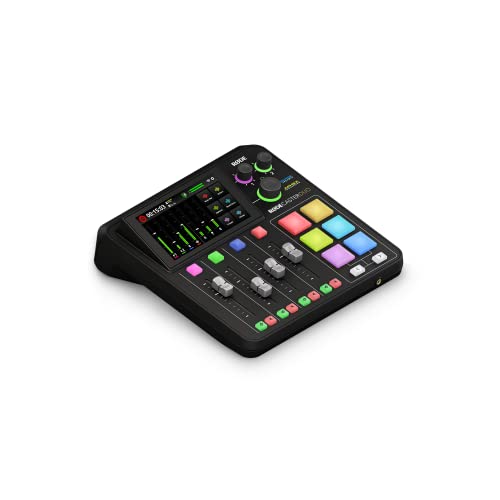
Rode Rodecaster Duo — Best Premium
The Rodecaster Duo is the compact half of Rode’s broadcast console line: two studio-grade preamps, APHEX voice processing, assignable smart pads, and multitrack recording to computer, microSD, or USB storage. It suits serious podcasters, streamers who host a regular guest, and creators who want broadcast polish without a rack of outboard gear. It does not suit buyers who need many line inputs for instruments, or anyone whose budget says the microphone matters more than the console — here, the console is the statement piece.
Strengths
- Revolution preamps are exceptionally quiet with huge gain range — low-output broadcast dynamics are driven cleanly with headroom to spare.
- APHEX processing and studio effects per channel deliver the broadcast voice sound in hardware, on both channels.
- Multitrack recording plus dual USB and Bluetooth connectivity cover podcasting, streaming, and phone guests in one box.
Trade-offs
- Premium pricing — this is the most expensive pick in the guide by a wide margin, though it replaces several devices.
- Two mic channels is the format; larger panels of guests need its bigger sibling or a different architecture.
- The touchscreen-and-encoder workflow rewards setup time; it is not a grab-and-go analog desk.
Key specs: 2 studio preamps · APHEX processing · 8 smart pads (per Amazon listing family) · multitrack recording to PC/microSD/USB · dual USB + Bluetooth
The Duo earns its premium in the first minute of a recording: the noise floor is simply absent. Where lesser mixers make a quiet dynamic microphone hiss at working gain, the Duo stays black behind the voice, and the APHEX chain adds the controlled presence that listeners describe as “radio.” For a two-person show — the dominant podcast format — it collapses the entire technical stack into one reliable unit: record multitrack for editing, stream a processed stereo mix live, drop sounds from the pads, take a phone guest over Bluetooth, all without the PC breaking a sweat. If your PC is your studio and your show is your business, this is the professional tool.
Best for: serious two-person podcasts, pro streamers, broadcast-style creators / Not suited for: tight budgets or many-instrument setups
Check the current price on Amazon

Mackie ProFX10v3+ — Best for Streamers with Guests
The ProFX10v3+ takes Mackie’s small live console and tunes it for the streaming desk: ten channels, Onyx preamps, GigFX+ effects, USB recording, and Bluetooth for bringing a phone into the mix. It suits streamers who host guests in the room, musicians who stream performances, and creators whose desk doubles as a small studio. It does not suit minimalists — it is a real console with a real footprint — or multitrack recordists, since its USB is a stereo mix.
Strengths
- Bluetooth channel makes phone guests and wireless playback painless — no cables, no adapters, no dongles.
- Multiple Onyx mic preamps let a host and guests each have a proper channel with its own EQ and level.
- GigFX+ effects and USB recording cover performance streaming and content capture in one unit.
Trade-offs
- Stereo USB only; individual channels cannot be separated in post.
- Larger and heavier than the streaming-specific picks — measure your desk.
- No loopback-specific streaming output routing of the Yamaha AG kind; you manage the mix more manually.
Key specs: 10 channels · Onyx mic preamps · Bluetooth input · GigFX+ effects · USB recording (stereo)
Group streaming exposes the limits of solo-focused gear: a second and third microphone, a guitar, a phone guest, and game audio all arriving at once. The ProFX10v3+ handles that pile-up the way consoles have always handled it — a channel for everything, a fader under your hand, and EQ per source. The Bluetooth input is the modern masterstroke, because the remote guest over a phone is now a standard segment, and cabling a phone into a mixer has always been an adapter-riddled annoyance. For the creator whose PC desk is also a small stage, this is the flexible center.
Best for: group streams, music streamers, desk studios with guests / Not suited for: minimal desks or multitrack production
Check the current price on Amazon
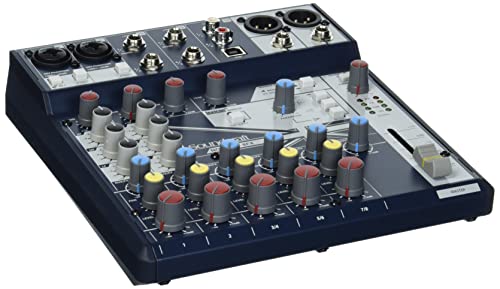
Soundcraft Notepad-8FX — Best Analog Feel
The Notepad-8FX is a small-format analog console with USB I/O and Lexicon effects, built for people who think with their hands. It suits home musicians recording into a PC, podcasters who want a traditional board, and anyone upgrading from an interface who misses knobs. It does not suit streamers who need loopback routing tricks or app-controlled DSP; its charm is precisely that everything is on the panel.
Strengths
- Genuine Lexicon reverbs and delays give vocals and instruments a studio sheen that budget boards rarely manage.
- A traditional console layout with real channel EQ — what you see is what the signal does, no menus.
- Soundcraft preamps and build quality at a small-desk footprint and price.
Trade-offs
- USB is a simple stereo path; no multitrack, no loopback streaming architecture.
- Mic preamp count is modest — plan your sources before buying.
- No dedicated streaming features such as mute-with-cough-drop routing or stream mix-minus.
Key specs: small-format analog console · USB I/O · Lexicon effects · traditional channel EQ and faders
There is a kind of PC user — often a musician first and a streamer second — for whom app-mediated audio feels like a barrier between them and the sound. The Notepad-8FX is their mixer. Plug in a microphone and a guitar, add a Lexicon hall to the voice, balance by ear with the PC simply recording the result: it is the oldest workflow in audio, executed well. The Lexicon effects are not a bullet point here but the reason to buy; at this tier, most onboard effects are tolerated, and these are enjoyed. For a songwriting desk or a music-first podcast, it is the warmest path into the computer.
Best for: home musicians, traditionalists, music-first podcasters / Not suited for: loopback streaming setups
Check the current price on Amazon
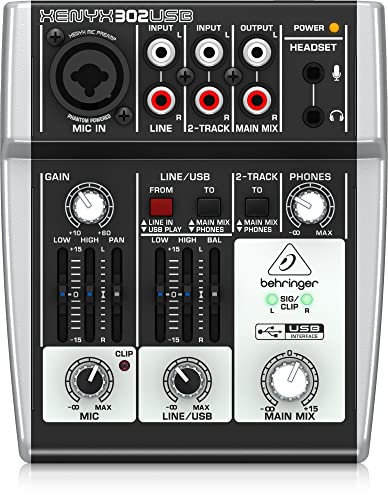
Behringer XENYX 302USB — Best Budget
The 302USB is the smallest, cheapest real answer to PC audio: a 5-input mini mixer with one XENYX microphone preamp, phantom power, and a USB interface, in a unit that fits in a jacket pocket. It suits remote workers who need one good microphone on calls, students, casual streamers, and anyone escaping a laptop’s built-in audio. It does not suit two-microphone shows, low-output broadcast dynamics at their hungriest, or users who will quickly want faders and routing — it is a beginning, honestly priced as one.
Strengths
- One genuinely decent mic preamp with phantom power, so a real XLR microphone — condenser or dynamic — works properly with your PC.
- Separate headphone and main level controls, plus RCA inputs for a phone or media player, cover the daily desk basics.
- Tiny, bus-powered, and cheap enough to be a travel or backup unit even for users who later upgrade.
Trade-offs
- A single mic input and miniature controls; there is no growing room.
- Preamp gain and noise performance are entry-tier — very quiet dynamic microphones will push its limits.
- Plastic construction demands a desk life rather than a gig-bag life.
Key specs: 5-input mini mixer · 1 XENYX mic preamp · phantom power · USB audio interface · bus powered
Judge the 302USB by the problem it solves: a professional-sounding voice on calls and streams for less than the cost of the microphone it serves. The jump from a laptop’s 3.5mm jack or a USB headset to an XLR microphone through this little box is the largest single audio upgrade most PC users ever make, and it costs the least. Its limits are real but they are the limits of its size class, and Behringer is honest about the format — this is the mixer you buy first, learn on, and keep in a drawer as the travel spare when the desk eventually grows into one of the larger picks here.
Best for: remote workers, students, first XLR microphone setups / Not suited for: multi-mic shows or demanding dynamic microphones
Check the current price on Amazon

Yamaha MG10XU — Best for Many Sources
The MG10XU is the desk version of Yamaha’s workhorse MG console: ten inputs with D-PRE preamps, SPX effects, and a USB interface, in a metal chassis that feels like equipment rather than accessory. It suits hybrid desks — a musician-streamer with a microphone, a guitar, a keyboard in stereo, a phone, and the PC all living together — and small podcast setups with up to four microphones. It does not suit loopback-centric streamers as elegantly as the AG line, nor multitrack recordists.
Strengths
- Four D-PRE mic preamps plus stereo line channels swallow a whole hybrid desk’s worth of sources.
- One-knob compressors on the first channels keep voices and instruments controlled with zero expertise.
- Metal chassis and Yamaha reliability make it the buy-once option of the analog picks.
Trade-offs
- USB carries the stereo mix; no per-channel recording.
- No loopback streaming output of the AG kind — stream routing is manual.
- The largest footprint here along with the Mackie; small desks should measure.
Key specs: 10 inputs · 4 D-PRE mic preamps · SPX effects · one-knob compression · USB audio interface · metal chassis
The MG10XU is for the desk that grew organically: first a microphone, then a keyboard “temporarily” plugged in, then a guitar that never leaves, then a second microphone for the co-host. Interfaces force that user into constant replugging; the MG10XU simply gives everything a channel and a knob, permanently. The D-PRE preamps keep the noise floor low enough for serious voice work, the compressors forgive enthusiastic playing, and the whole unit shrugs off the daily knocks of a working desk. It is the least specialized pick here and, for the many-source desk, the most useful.
Best for: hybrid musician-streamer desks, small multi-mic podcasts / Not suited for: loopback streaming purists or multitrack recording
Check the current price on Amazon
Comparison Table
| Pick | Badge | Key spec | Best for |
|---|---|---|---|
| Yamaha AG03MK2 | Best Overall | Loopback streaming mixer, hardware DSP, USB-C | Solo streamers and callers |
| Rode Rodecaster Duo | Best Premium | APHEX processing, multitrack, ultra-quiet preamps | Serious two-person shows |
| Mackie ProFX10v3+ | Best for Streamers with Guests | Bluetooth, 10 channels, GigFX+ | Group and music streams |
| Soundcraft Notepad-8FX | Best Analog Feel | Lexicon effects, traditional console layout | Home musicians |
| Behringer XENYX 302USB | Best Budget | 1 mic preamp, phantom power, pocket size | First XLR setups, calls |
| Yamaha MG10XU | Best for Many Sources | 4 D-PRE preamps, 10 inputs, metal chassis | Hybrid desks |
How to Choose the Best Audio Mixer for Your PC
The first decision is architectural: stereo mix or multitrack. A stereo-mix USB mixer sends the finished blend — your voice, guests, game, music, already balanced by your hands — to the PC as one stereo stream. For live streaming, calls, and any show published as performed, this is not a compromise but the correct design: zero editing, zero sync problems, and levels you control in real time. Multitrack means each channel arrives separately for editing afterward, which is the right choice for produced podcasts and music, and in this guide only the Rodecaster Duo is built around it. Choose by your publishing workflow, not by feature envy.
Second, match the preamp to your microphone. Microphones differ enormously in output: a sensitive condenser needs little gain and any pick here will drive it beautifully, while the popular low-output dynamic broadcast microphones need a lot of clean gain — and “clean” is the operative word, because gain amplifies the mixer’s own noise along with your voice. If you own or plan to own a microphone in that class, the Rodecaster Duo’s preamps are the benchmark, the Yamaha AG and MG lines are comfortably capable, and the budget mini mixers will be working at the top of their range. There is no shame in that pairing for speech at normal levels, but know it before you buy.
Third, understand loopback and monitoring, the two features PC users actually feel daily. Loopback lets your streaming software capture the mixer’s full output — mic, game, music, alerts — as a single source, while you monitor yourself directly in hardware with no delay. Without it, you assemble the same result from multiple software sources and virtual cables, which works until an update rearranges it. If you stream, weight loopback heavily; it is why the Yamaha AG line exists. Monitoring matters just as much: hearing your own voice with even a small software delay is genuinely disorienting, so confirm any mixer you buy offers direct hardware monitoring — every pick here does.
Finally, count your sources in a year, not today. The desk always grows: a second microphone for a guest, a keyboard that becomes permanent, a phone for calls. One spare input of each type is the difference between a mixer that serves for years and one listed for sale by spring. The Mackie and the MG10XU are in this guide precisely for desks on that growth path.
How to Set Up Your PC Mixer for Streaming and Calls
Setup order prevents most PC audio grief. Connect the mixer by USB and let the operating system settle before opening any app; then, in your streaming or recording software, select the mixer explicitly as both input and output rather than trusting defaults. Set the microphone gain first and set it properly: speak at your real streaming volume — the excited voice, not the setup voice — and raise the gain until your loudest moments peak healthily with headroom to spare, then engage a gentle compressor if your mixer offers one in hardware. A voice gained correctly at the mixer needs no heroic processing downstream.
Next, build the monitoring rule that keeps you sane: your headphones carry the direct microphone plus the PC’s return audio at a balance you set once, and the stream hears the full mix. On loopback mixers like the AG03MK2, use the dedicated streaming output control so that what you hear and what the audience hears can differ — most importantly, so you can monitor a guest or a game without your own voice doubling back. Test with a private recording before going live: record thirty seconds of speech plus game plus music, listen on different headphones than your streaming pair if you can, and check for the three classic faults — voice too quiet against the game, a hum that appears only when the game loads, and an echo that means the stream mix is returning into your microphone channel. Each has a routing fix, and all are easier to find in a test than in a chat full of viewers typing “audio??”.
Finish with the physical desk: microphone on a boom or stand so it stays at a consistent distance, because no mixer fixes a voice wandering a foot from the capsule; cables routed so the USB lead is not stretched across the desk where a coffee mug patrols; and a labeled note of your gain settings, because the knob will get bumped and future-you deserves the shortcut.
One last setup habit separates reliable streamers from lucky ones: a thirty-second pre-flight before every session. Headphones on, record a few seconds locally, speak a loud sentence and a quiet one, play the game or the music bed, and listen back. This catches the muted channel, the wrong input selected by an overnight update, the gain knocked during cleaning — the whole bestiary of desk-audio surprises — while the audience is still just you. Professional broadcasters call it a line check and do it before every single program, on equipment worth a hundred times your desk. The habit scales down perfectly.
Common Buying Mistakes
- Buying channels you cannot record separately, expecting multitrack. Most PC mixers send a stereo mix. If your workflow needs per-channel editing, buy the architecture that provides it — here, the Rodecaster Duo.
- Ignoring preamp gain for your microphone. A quiet dynamic microphone on a low-gain budget mixer means hiss on every recording. Match the pair before buying either.
- Monitoring through software. If your setup makes you hear yourself late, you will speak worse and enjoy streaming less. Hardware direct monitoring is non-negotiable.
- Paying for stage features at a desk. Speaker outputs, huge channel counts, and road cases add cost without adding streams. Desk criteria are loopback, monitoring, preamps, and controls.
- Forgetting the second person. Solo gear is cheaper until the first guest episode. If collaboration is even a maybe, one spare mic channel pays for itself immediately.
- Chasing app-controlled everything. Mid-stream, a physical mute beats a settings window. Keep the controls you touch live on the hardware.
Gain Staging at a Desk: Where Audio Quality Is Actually Decided
Every disappointing PC recording we have ever diagnosed traced back to gain staging — the unglamorous business of how loud the signal is at each step. The chain is simple: microphone, mixer preamp, conversion to digital, software. The rule is equally simple: get the level right at the first step and merely preserve it afterward. If the preamp gain is too low, you will raise the level in software later and amplify the noise floor with it; too high, and your loudest laugh clips into distortion that no plugin can un-distort. The working target is a speaking voice that lives comfortably in the middle of your software’s meter and peaks, on emphasis, well short of the top. Every mixer in this guide can achieve that with a normal microphone; the differences are in how much clean gain they offer when a quiet dynamic microphone asks for more.
Distance is the hidden gain control. Halving the distance from mouth to microphone raises the level dramatically and costs nothing, which is why broadcast voices sound intimate and full: the microphone is close, the preamp gain is moderate, and the room barely enters the recording. A mixer cannot rescue a microphone placed across the desk — it can only amplify the room along with the voice. So the setup hierarchy for PC audio is: position first, gain second, processing third. The hardware compressors and DSP in the Yamaha AG, the Rodecaster Duo, and the MG10XU then do their proper job — polishing a well-captured voice rather than performing rescue work on a badly captured one.
Mix-Minus and Headphones: The Call-and-Guest Problem, Solved in Hardware
The moment a second person joins your PC audio — a co-host on a call, a phone guest, a remote interviewee — a routing problem appears that solo users never meet. Your guest must hear you and the program, but must not hear themselves returning with a delay, or conversation collapses into echoing confusion. The broadcast solution is called mix-minus: a feed that contains everything except the guest’s own voice. Purpose-built podcast consoles like the Rodecaster Duo create it automatically on their USB and Bluetooth returns, which is a large part of what their price buys. On simpler mixers you approximate it: keep the guest’s channel out of the feed you send back to them, monitor the full mix yourself, and test with a real call before recording day, because mix-minus errors are invisible until a guest says “I can hear myself.”
Headphones are the other half of the discipline. Every participant in a PC recording should wear them — no exceptions for “my speakers are quiet” — because any speaker in the room re-enters the microphone and prints echo and room onto the recording. Your mixer’s headphone section therefore matters more than its spec suggests: enough clean power for real headphones, a level control independent of the stream mix, and on the better desks here, the ability to choose what the headphones carry. The Rodecaster Duo and the Yamaha AG line both treat headphone monitoring as a primary feature rather than an afterthought, and after your first guest session you will understand why engineers rank it alongside preamp quality when choosing a desk mixer.
The Small Accessories That Make a PC Mixer Desk Work
A mixer assumes a supporting cast, and budgeting for it upfront prevents the classic week of adapters and returns. Start with the microphone cable: a balanced XLR cable of sensible length — long enough to route neatly, short enough to avoid a coil of antenna on the desk. Add a boom arm or a sturdy desk stand, because microphone position is an audio feature, as the gain section above explains, and a microphone that drifts is a level that drifts. Closed-back headphones are the third essential: they keep the program out of the microphone and let you monitor honestly at low volume, which your ears will thank you for across long sessions.
Then the small things that separate a calm desk from a frustrating one. A USB cable of the right type and length for your mixer’s connector — USB-C on the modern Yamaha and Rode units — routed so it is not under tension. A power strip within reach, because several of these mixers use their own supplies and a desk where power requires crawling is a desk where the mixer gets unplugged “temporarily” and never returns. A spare set of batteries is irrelevant here, but a spare cable is not: the one cable you cannot replace at midnight is the one that fails at midnight. Finally, labels. A strip of tape naming each channel — MIC, GAME, PHONE, KEYS — looks humble and functions like a senior engineer standing behind you, especially the first month while the layout is still becoming habit. None of this is expensive; all of it together costs less than the step between mixer tiers, and it improves your daily experience more than that step would.
Final Recommendation
For the solo PC creator, the answer is the Yamaha AG03MK2: purpose-built loopback routing, hardware DSP, and a fader for your voice — the complete solo desk in one small box. If your show has two voices and professional ambitions, the Rode Rodecaster Duo is the premium step that replaces a rack of gear and silences the noise floor entirely. Streamers hosting guests in the room should take the Mackie ProFX10v3+ and its Bluetooth phone channel; musicians who think in faders will be happiest with the Soundcraft Notepad-8FX; hybrid desks with many sources belong on the Yamaha MG10XU; and if the budget is the whole question, the Behringer 302USB gets a real microphone working with your PC today. Match the mixer to your microphone and your publishing workflow, and the PC becomes a studio instead of a compromise. Buy once, set the gain properly, label the channels, and then forget the mixer exists — which is, in the end, the highest compliment desk equipment can earn.
Keep exploring the cluster: Best Audio Mixers For Podcasting · Best Audio Mixers For Podcasting & Music · Best Audio Mixers For Live Performance · Best 2 Channel Mixers · Best Audio Mixers For Recording Voice
Frequently Asked Questions
What is the difference between a mixer and an audio interface for PC?
An interface converts a few inputs to digital with minimal control — you mix in software afterward. A PC mixer adds the physical control layer: per-source faders and knobs, hardware monitoring, effects, and routing such as loopback, mixing before the signal reaches the computer. Streamers and callers feel the difference daily; pure recording workflows may prefer an interface’s multitrack simplicity.
Do I need loopback for streaming?
Loopback lets your streaming software capture everything the mixer hears — voice, game, music, alerts — as one source, while you monitor yourself directly. It is not strictly required, since software routing can imitate it, but it replaces a fragile stack of virtual cables with one hardware feature. If you stream regularly, it is the single most convenience-dense feature in this category, and the reason Yamaha’s AG mixers exist.
Why does my dynamic microphone sound quiet and hissy?
Low-output dynamic microphones need substantial gain, and inexpensive preamps get noisy at the top of their range — the hiss is the mixer, not the microphone. Fixes, in order: get the microphone closer to your mouth, which is free gain; check that you are not padding or double-gaining through software; and if the pairing still struggles, a mixer with quieter, higher-gain preamps — the Rodecaster Duo is the extreme example here — solves it permanently.
Can one mixer handle both streaming and work calls?
Yes, and this is the normal pattern: the mixer appears to the PC as a standard USB audio device, so Zoom, Teams, and Discord use it exactly like streaming software does. Hardware DSP is a particular advantage on calls, because your voice arrives processed — compressed, EQ’d, clear — in applications where you cannot insert plugins. The Yamaha AG03MK2 was practically designed for the streamer-by-night, professional-by-day desk.
Stereo mix or multitrack — which should I choose?
Choose stereo mix if you publish as you perform: live streams, calls, and podcasts recorded and released with minimal editing. Choose multitrack if you edit in post — produced podcasts where each voice gets separate treatment, or music. The honest test is your last five pieces of content: if none of them were remixed afterward, multitrack is a feature you would pay for and never use.
Will these mixers work with a laptop and with Mac?
Yes. All six picks connect over USB as standard audio devices and work with Windows and macOS laptops as readily as with desktops; the Yamaha AG line and the Rodecaster Duo use USB-C connections suited to modern laptops. Bus-powered mini mixers like the Behringer 302USB even run from the laptop’s own power, which makes them natural travel companions for remote work. A laptop plus a compact mixer plus a real microphone is, for many remote professionals, the entire upgrade their working life needed.
Can I use one of these mixers with a two-PC streaming setup?
Yes — dual-PC streaming is one of the classic reasons to buy a hardware mixer at all. The gaming PC sends its audio into the mixer on a line input or a second USB connection, the streaming PC receives the finished mix, and your microphone lives on the mixer where both machines benefit from it. The Rodecaster Duo’s dual USB connections are designed with exactly this architecture in mind, and the Yamaha AG line handles the common single-streaming-PC variant with its loopback routing. The governing principle is the same as everywhere in this guide: the mixer becomes the one place where all audio decisions are made physically, and the computers simply carry out orders.
How long will a PC mixer stay relevant as software changes?
Longer than most PC peripherals, because the job it does is physical rather than computational. USB audio class standards change slowly, operating systems continue to treat these devices as standard audio endpoints, and a fader will still be a fader in a decade. The mixers most exposed to obsolescence are the ones whose core features live in a companion app; the ones whose value sits in preamps, routing, and hardware DSP — the pattern of every pick in this guide — age the way good audio equipment has always aged: slowly, and in service.


