Disclosure: airfryerkitchensupply.com is reader-supported. When you buy through links on our site, we may earn an affiliate commission at no extra cost to you.
Where to buy
If you are shopping for the best alternative windows audio mixers, start with the shortlist below. The ‘alternative’ here is specific: physical USB mixers that give a Windows PC the hands-on audio control its built-in software mixing never quite delivers — a real fader for your microphone, a knob for game-versus-chat balance, hardware monitoring with no delay. Every pick is a current model sold through Amazon, where the listing states the USB and input configuration exactly. Check the current price on Amazon under the full model name, and confirm Windows compatibility on the listing before you order.
- Mackie ProFX10v3+ — check the current price on Amazon and confirm the exact configuration on the listing before you order.
- Yamaha MG10XU — check the current price on Amazon and confirm the exact configuration on the listing before you order.
- Behringer XENYX 302USB — check the current price on Amazon and confirm the exact configuration on the listing before you order.
- CAD Audio MXU2 — check the current price on Amazon and confirm the exact configuration on the listing before you order.
- BOMGE M12 — check the current price on Amazon and confirm the exact configuration on the listing before you order.
- Pyle PMXU128BT — check the current price on Amazon and confirm the exact configuration on the listing before you order.
The best alternative windows audio mixers exist because Windows itself is a mediocre audio mixer. The built-in volume mixer buries per-app levels behind right-clicks, offers nothing for a microphone beyond a slider in a settings page, and gives a streamer, podcaster or gamer no physical control at the moment it matters — mid-game, mid-call, mid-take. Software mixers fill some of the gap and add their own: routing complexity, updates that rearrange your setup, and a mouse hunt every time the doorbell of a Discord call needs your voice louder than the game.
A small USB mixer on the desk is the alternative this guide recommends: your microphone gets a real preamp with a gain knob, your headphones get a hardware monitor mix with zero software delay, and the balance between your voice, the PC’s output and any second source becomes a fader move instead of a settings expedition. Windows sees a standard USB audio device; you see a control surface. The six picks below span that idea from a two-channel desktop puck to a twelve-channel console for multi-microphone desks.
Honesty notes, as always in this series. These are hardware mixers that work with Windows over USB — none of them is a software product, and none replaces Windows’ own routing for separating individual apps; what they replace is the physical experience of controlling the sources that matter. Driver requirements vary by model, from class-compliant plug-and-play to a manufacturer driver install, and each review states the practical position and tells you what to confirm on the listing. Prices are never printed here; each pick is positioned by tier in words.
In this guide
Quick Picks
Mackie ProFX10v3+ — Best Overall for Windows Desks. Onyx preamps, Bluetooth playback and multi-mode USB recording in a board Mackie explicitly aims at streaming and podcasting desks.
Yamaha MG10XU — Best for Reliability-First Streamers. D-PRE preamps, one-knob compressors and SPX effects in Yamaha’s famously dependable format — the board for people whose stream cannot have an off night.
Behringer XENYX 302USB — Best Compact Desktop Mixer. A five-input mini mixer with a XENYX preamp and USB, sized for the corner of a desk: one microphone, the PC, and a phone or player, under physical control.
CAD Audio MXU2 — Best Ultra-Simple USB Mixer. Two XLR combo inputs, 48V phantom power and USB output in a bus-powered box — a microphone interface with mixer manners, from a microphone company.
BOMGE M12 — Best Budget USB Mixer-Interface. A plug-and-play 2-channel USB interface-mixer with 48V phantom power, guitar-friendly input and per-channel gain metering, at the budget tier of this list.
Pyle PMXU128BT — Best for Multi-Microphone Windows Desks. A 12-channel console with eight XLR combo inputs, Bluetooth, DSP effects and USB — for the Windows desk that grew into a small studio or DJ setup.
How These Picks Were Chosen
Models whose Windows or USB position could not be established from the listing were excluded rather than assumed compatible.
Scoring for this specific keyword weights the Windows-desk experience first: how completely the board takes over the jobs Windows does badly — microphone gain and monitoring, headphone level, source balance — followed by preamp quality for the microphones streamers actually use, then input count for second sources (a phone, a console, a second PC), and finally footprint, because a Windows desk is already crowded. Live-PA virtues matter only where a pick doubles for that work.
- USB connection to Windows as the core function, with the driver position stated honestly
- A real microphone preamp with physical gain — the job Windows cannot do at all
- Zero-latency hardware monitoring for headphones while streaming or recording
- Physical control of the voice-versus-PC balance without opening a settings page
- Inputs for the second sources Windows desks accumulate: phone, console, second computer
- Phantom power where condenser microphones are part of the setup
- Footprint suited to a desk that already holds monitors, keyboard and ego
The 6 Best Alternative Windows Audio Mixers

Mackie ProFX10v3+ — Best Overall for Windows Desks
The ProFX10v3+ suits the Windows user whose desk is a small studio: a proper microphone, headphones, PC audio, a phone for calls or music, and recording or streaming on top. It is the most complete single-box takeover of Windows audio duties in this list.
Strengths
- Onyx preamps give gain-hungry streaming microphones clean, quiet level
- Multi-mode USB recording adapts to streaming, capture and playback duties
- Bluetooth input absorbs the phone’s audio without another cable
Trade-offs
- It is a real mixer with a real footprint — measure the desk
- Feature depth means a learning curve beyond a simple interface
- More board than a single-microphone gamer strictly needs
| USB | USB recording and playback, multi-mode |
| Preamps | Onyx mic preamps |
| Wireless | Bluetooth playback input |
| Effects | GigFX+ engine for monitored polish |
The reason this board tops a Windows-specific list is that Mackie designed the v3+ generation around the computer desk rather than adapting a live board to it. The USB modes cover the actual jobs — sending a finished mix to the stream or recorder, capturing a performance, returning PC audio through the board — and the Onyx preamp solves the most common Windows audio complaint, the quiet, hissy dynamic microphone, at the hardware level where it belongs.
Bluetooth is the feature that sounds like garnish and behaves like infrastructure: the phone becomes a source — call audio, reference music, a guest on speakerphone routed properly — without the cable that otherwise lives draped across the keyboard. Combined with proper monitor controls, the desk’s whole audio life consolidates into one surface, which is the entire promise of the alternative this search names.
If your Windows setup is one microphone and nothing else, this is more than you need and the smaller picks below exist for you. If your desk has grown sources the way real desks do, this is the board that organises them.
A desk-layout note that decides daily happiness: place any board in this guide so the microphone gain knob — not the master volume — is the control closest to your dominant hand. In practice you adjust your voice’s input a dozen times for every once you touch anything else, and setups that honour that frequency are the ones that still feel right in month six.
Best for: streamers, podcasters and creators running a multi-source Windows desk / Not suited for: minimal single-mic setups wanting the smallest possible device
Check on Amazon — check the current price on Amazon for the exact variant described here.

Yamaha MG10XU — Best for Reliability-First Streamers
The MG10XU suits the streamer, educator or remote presenter whose Windows mixer is infrastructure: set it once, trust it daily, and let its compressors keep an untrained voice level without software plugins or constant adjustment.
Strengths
- D-PRE preamps: clean gain that flatters speech
- One-knob compressors keep voices even with zero engineering effort
- Yamaha build and consistency — the board most likely to outlast the PC it serves
Trade-offs
- USB is a stereo mix feed, not a multitrack interface
- No Bluetooth; second sources arrive by cable
- Rotary-knob surface is compact but less tactile than faders
| Preamps | D-PRE mic preamps |
| Dynamics | One-knob compression on mic channels |
| Effects | SPX effects processor |
| USB | USB audio interface, stereo recording and playback |
For speech-first Windows work — streaming, teaching, presenting, podcasting — the MG10XU’s virtues align almost perfectly. The D-PRE preamp gives a voice clarity and quiet gain, the one-knob compressor solves the universal amateur problem of the wandering vocal level, and a hint of SPX reverb makes a dry home office sound like a produced space, all before Windows sees a single sample. The computer’s job shrinks to recording or transmitting what the board hands it.
Yamaha’s driver and support ecosystem is the other half of the reliability case: this is a board from a manufacturer whose USB mixers sit in schools, churches and studios worldwide, with documentation and longevity to match. For a desk that must work on a Monday morning in front of an audience, that institutional boringness is a feature money should buy.
Choose it over the Mackie when your sources are microphones and a PC rather than phones and content feeds, and when set-and-forget reliability outranks flexibility. It is the professional’s plain answer to Windows audio, and plain is a compliment here.
For teachers and meeting hosts, the Yamaha pattern generalises: any board with gentle compression and a fixed, labelled setup converts a classroom or office PC from an audio gamble into infrastructure. The presenter’s whole job becomes speaking; the board’s job is everything Windows used to forget between sessions.
Best for: speech-first streamers and presenters wanting set-and-forget reliability / Not suited for: users needing Bluetooth or multitrack USB
Check on Amazon — check the current price on Amazon for the exact variant described here.
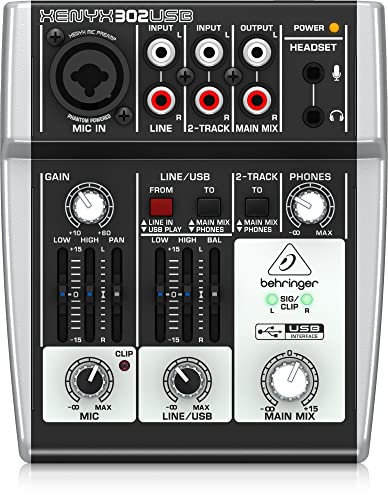
Behringer XENYX 302USB — Best Compact Desktop Mixer
The 302USB suits the single-microphone Windows user — gamer, podcaster, remote worker — who wants the core alternative (real mic gain, hardware monitoring, a balance knob) in the smallest, simplest form that exists.
Strengths
- Genuinely small: it lives beside a keyboard without rearranging the desk
- A proper XENYX mic preamp with phantom power for one microphone
- USB powered and plug-simple — the lightest possible step up from Windows’ own mixer
Trade-offs
- One microphone is the ceiling; a second voice means a different pick
- Mini controls are precise enough, but not luxurious
- No effects or compression — your voice arrives as it is
| Inputs | 5 inputs including 1 XENYX mic preamp |
| USB | USB audio interface, bus powered |
| EQ | British-style EQ on the mic channel |
| Form | Mini desktop format |
Most Windows audio frustration is a one-microphone problem wearing a complicated disguise. The 302USB solves exactly that problem and stops: your microphone gets a real preamp with gain and a musical little EQ, your headphones monitor it directly with no delay, and the PC’s output balances against your voice with a knob. For calls, casual streaming and a first podcast setup, that is the whole requirement, delivered in a box smaller than a paperback.
The discipline of the design is its honesty about scale. Five inputs sounds like a specification; in practice it is one microphone, the computer, and a phone or music player — the complete source list of a normal desk. Buyers who truly have more should not stretch this board; buyers who do not are spared paying for channels that would sit muted for years.
As the entry point to hardware mixing on Windows, it is difficult to beat: it teaches the core ideas — gain, monitoring, balance — in an afternoon, and it remains useful as a travel or second-desk mixer long after a main setup grows.
Gamers should note the social feature hiding in the mini-mixer format: a physical mute or gain dip for your microphone, reachable without alt-tabbing, ends the era of hot-mic incidents and shouted apologies to a squad. Small controls, correctly placed, are a competitive feature in the most literal sense.
Best for: single-mic gamers, podcasters and remote workers with small desks / Not suited for: multi-microphone or multi-guest setups
Check on Amazon — check the current price on Amazon for the exact variant described here.

CAD Audio MXU2 — Best Ultra-Simple USB Mixer
The MXU2 suits the Windows user with one or two microphones and no other sources to manage: a voice-over beginner, a two-person podcast recorded simply, an interviewer with a laptop and a deadline.
Strengths
- Two XLR combo inputs accept microphones or instruments directly
- 48V phantom power runs condenser microphones properly
- Bus powered over USB — no power supply, truly portable with a laptop
Trade-offs
- Two channels is a hard ceiling, with no line-source mixing to speak of
- No onboard effects, compression or EQ depth
- A focused tool: it does the mic-to-Windows job and nothing beyond it
| Inputs | 2 XLR combo inputs |
| USB | USB output for recording and podcasting, bus powered |
| Phantom | +48V phantom power |
| Conversion | 16-bit / 48 kHz USB audio (from listing features) |
CAD Audio makes microphones, and the MXU2 reads like a microphone company’s answer to a simple question: what does a voice actually need between the capsule and Windows? Two proper combo inputs with phantom power, a clean USB path, and nothing else to learn, misconfigure or pay for. For spoken-word work — voice-over, podcasting, interviews, narration — that focus is refreshing, and the bus-powered design means the whole studio is a laptop, this box and a microphone.
The two-input ceiling is the deliberate trade. A two-person podcast fits beautifully; a podcast plus a phone guest plus music does not, and buyers should count their sources with the same honesty this guide applies to channel counts elsewhere. Within its two channels, though, there is no compromise that matters for speech: condensers are powered, dynamics get a proper input, and the recording lands in any Windows software as a standard USB device.
Consider it the alternative for people who found even small mixers over-featured. If your Windows audio life is voices and only voices, this is the shortest path from microphone to recording that still deserves the name mixer.
Two-microphone households — partners who both take calls at one desk, siblings sharing a streaming PC — are the MXU2’s second natural home. Two proper inputs on one small box end the headset-swap ritual, and each voice gets its own gain instead of a compromise setting that suits neither.
Best for: voice-over, simple podcasting and interviews on Windows laptops / Not suited for: desks with phones, consoles or music sources to mix
Check on Amazon — check the current price on Amazon for the exact variant described here.

BOMGE M12 — Best Budget USB Mixer-Interface
The M12 suits the budget-conscious Windows beginner — a first microphone, a guitar, a karaoke or practice setup — who wants the hardware alternative without a hardware-store bill.
Strengths
- Plug-and-play USB positioning aimed squarely at PC recording beginners
- 48V phantom power and an instrument-friendly input cover mic and guitar
- Per-channel gain indication helps beginners set levels correctly
Trade-offs
- Budget tier build and support — set expectations accordingly
- Two channels, like the CAD, with the same ceiling
- A starter tool; serious producers will outgrow its refinement, if not its function
| Inputs | 2 channels: XLR and 3.5mm microphone options |
| USB | USB audio interface for PC recording, plug and play |
| Phantom | 48V phantom power |
| Extras | Gain halo metering per input (from listing features) |
The M12 represents the newest shape of the Windows alternative: the interface-mixer, a small box that presents itself to the computer as a sound card and to the user as a tiny mixer, with knobs for the sources and a headphone output for monitoring. Its beginner-friendly touches are well chosen — visible gain metering teaches the single most important recording skill, and plug-and-play positioning removes the driver anxiety that stops many Windows users at the door.
Functionally it covers the starter map completely: a condenser or dynamic microphone with phantom power when needed, a guitar or bass plugged straight in, and stereo outputs for speakers or recording. Karaoke and practice use — the listing names both — are honest fits: this is a box for making sound at a PC, enjoyably, tonight.
The compromises are the tier’s compromises: materials, refinement and the depth of support behind it. As a first step away from Windows’ built-in audio it is well judged, and its ceiling is clear enough that buyers can choose it with open eyes.
Beginners often ask whether a box like the M12 is a ‘real’ mixer or a toy. The honest test is functional: it preamplifies, it powers condensers, it monitors without delay and it balances sources. That is the complete definition of the job at this scale; everything above it in this list adds capacity and refinement, not a different category of legitimacy.
Best for: beginners adding a first microphone and guitar to a Windows PC / Not suited for: users needing more than two channels or premium build
Check on Amazon — check the current price on Amazon for the exact variant described here.

Pyle PMXU128BT — Best for Multi-Microphone Windows Desks
The PMXU128BT suits the Windows user whose setup outgrew the desktop class: a multi-microphone podcast panel, a DJ or karaoke rig feeding a PC, a small group recording where eight mic inputs stop being a luxury.
Strengths
- Eight XLR combo inputs — the most microphone capacity in this list by far
- Bluetooth, MP3 playback and DSP effects cover DJ and karaoke duties natively
- A sub output and 7-band EQ give it small-PA usefulness beyond the desk
Trade-offs
- Console size: this is furniture, not a desk accessory
- Feature breadth over refinement — the opposite philosophy to the Yamaha pick
- USB provision is for playback and capture duties, not multitrack recording
| Inputs | 12 channels, 8 XLR/combo inputs, +48V phantom |
| Effects | 16 DSP effects; 7-band EQ |
| Wireless / media | Bluetooth; built-in MP3 player; USB-A input |
| Outputs | Main plus sub output |
Every category has a buyer whose problem is simply count, and on a Windows desk that buyer is the panel podcaster, the karaoke host, the DJ recording sets to a laptop, the small choir or class. Eight microphone inputs at this tier is the PMXU128BT’s whole argument, and it is a strong one: no other pick here seats a table of guests without borrowing gear.
Around that count, Pyle wraps the entertainment feature set — Bluetooth for backing tracks, an MP3 player, a spread of DSP effects, a graphic EQ for taming a room — that makes the board a self-contained small-event system which also talks to Windows. The PC becomes the recorder and streamer of an event the board runs, which inverts the usual desk relationship in a way that suits hosts and DJs precisely.
Refinement is where the tier shows: preamps and controls serve energy and coverage rather than studio quiet. Judge it as the multi-source event board that also solves a Windows setup, and it is the only pick that fits its buyer at all — which is its own kind of best.
Event hosts feeding a PC should rehearse the handover: the board runs the room, the PC records the board’s feed, and a phone records backup audio from a seat in the audience. Three cheap layers of redundancy, arranged in ten minutes, are worth more than any single premium component in the chain.
Best for: panel podcasts, karaoke and DJ setups feeding a Windows PC / Not suited for: quiet studio recording or small desks
Check on Amazon — check the current price on Amazon for the exact variant described here.
Comparison Table
Read this table by input count against desk size: the category runs from a two-channel box that vanishes beside a keyboard to a twelve-channel console, and the right answer is the smallest board that covers your real source list. The USB column states what each board actually sends to and receives from Windows.
| Pick | Badge | Key spec | Best for |
|---|---|---|---|
| Mackie ProFX10v3+ | Best Overall for Windows Desks | Onyx preamps, multi-mode USB, Bluetooth | Complete Windows desk audio takeover |
| Yamaha MG10XU | Best for Reliability-First Streamers | D-PRE preamps, compressors, SPX FX, stereo USB | Dependable daily streaming desk |
| Behringer XENYX 302USB | Best Compact Desktop Mixer | 1 mic preamp, USB powered, mini format | The minimal Windows audio upgrade |
| CAD Audio MXU2 | Best Ultra-Simple USB Mixer | 2 combo inputs, 48V phantom, bus powered | Voices only, maximum simplicity |
| BOMGE M12 | Best Budget USB Mixer-Interface | 2-channel USB, 48V, plug and play | Budget first step into hardware mixing |
| Pyle PMXU128BT | Best for Multi-Microphone Windows Desks | 8 XLR inputs, Bluetooth, DSP FX, USB | Maximum inputs for group Windows setups |
How to Choose a Windows Audio Mixer
List your sources as Windows sees your life, not as a studio would. Microphone first — one or two, dynamic or condenser (condensers need the phantom power several picks here provide) — then the PC itself, then the extras your desk has accumulated: a phone, a game console, a second computer for calls, an instrument. The smallest board covering that list, with one spare input, is your board. Every muted extra channel is desk space and money spent on a life you do not live.
Second, decide what the mixer must do to your voice before Windows hears it. If you record or stream speech seriously, preamp quality and a compressor (the Yamaha’s one-knob design is the friendliest form) matter more than channel count. If your voice work is calls and casual streams, any preamp in this list is a revelation compared with a headset plugged into the PC, and simplicity should win.
Third, the driver question, answered plainly: some USB mixers are class-compliant and appear in Windows the moment they are plugged in; others install a manufacturer driver that can offer lower latency or extra routing. Neither is disqualifying. Class compliance wins for shared, borrowed and frequently rebuilt machines; a manufacturer driver is a fair price on a fixed personal desk. Confirm which your chosen model uses, on its listing, before it arrives.
What a Hardware Mixer Fixes That Windows Settings Cannot
Microphone gain is the first fix. Windows can amplify a quiet USB or headset microphone digitally, which raises the noise with the voice; a hardware preamp raises the voice properly, before conversion, which is why the same microphone sounds cleaner through any board in this guide. Phantom power is the second fix — Windows cannot power a condenser microphone at all, and the moment a serious microphone enters your setup, hardware stops being optional.
Monitoring is the third. Hearing yourself through Windows involves the computer’s processing delay; hearing yourself through the mixer’s hardware path is instantaneous, which changes how naturally you speak, sing or play. And balance is the fourth: the ratio of your voice to the game, the call to the music, becomes a physical control you adjust mid-sentence, rather than a settings window you apologise your way through. These four fixes are the entire case for the alternative this search names — and notably, none of them is about recording quality at all.
Setting Up a USB Mixer with Windows, Step by Step in Words
Connect the mixer by USB directly to the PC — not through an unpowered hub — and let Windows enumerate it. In Sound settings, set the mixer as both the output and input device, then open your streaming or recording software and select it there too; most ‘it doesn’t work’ stories are one of these two selections pointing somewhere else. Set the microphone’s gain on the board itself, speaking at your loudest normal level, until your software’s meter lives in its healthy zone without touching the top.
Then build the monitor picture: your voice from the board’s direct path, the PC’s audio returning through the USB channel, blended to taste on physical controls. Turn off any ‘listen to this device’ option in Windows for the microphone — that is the software echo path, and with hardware monitoring it only adds delay and confusion. Finally, rename the device in Windows to something human (‘Desk Mixer’) so future software updates and new apps present a choice you recognise.
Windows Audio, Once More with Feeling: Latency, Drivers and Sample Rates in Plain Terms
Latency is the delay between making a sound and hearing it back, and it is why hardware monitoring matters: any path that travels through Windows and back carries a delay set by buffers and drivers, while the mixer’s direct path carries none. For speech and singing, even small delays feel like speaking over a bad phone line. Every pick here lets you monitor directly; use that path and latency stops being a topic in your life.
Sample rates, by contrast, are a topic you can safely stop worrying about. For streaming, calls, podcasting and game capture, the standard rates every device here supports are fully sufficient, and your microphone, room and gain staging will dominate your sound quality by orders of magnitude. Set the rate once, consistently, in Windows and your software — mismatched rates between apps cause more real-world problems (chipmunk voices, drift) than any rate choice itself.
Drivers deserve the same calm. A class-compliant device trades a little optimisation for total portability; a manufacturer driver trades a five-minute install for polish on a fixed machine. Windows history is full of both working for a decade. What actually breaks setups is changing the chain casually — new hubs, new ports, borrowed cables — so once your desk works, photograph it, label it, and change one thing at a time.
A Word on Headphones, the Other Half of Every Windows Setup
Every mixer in this guide is also a headphone amplifier, and for desk work that half of the product is used more than any other. Your headphones plug into the board, not the PC, so that the monitor mix you build — your voice against the computer against a second source — is what you actually hear while you work. If your current setup has your voice arriving late, quiet or buried under the game, the problem is rarely the headphones themselves; it is that Windows was mixing your monitoring as an afterthought.
When comparing the picks, weigh the headphone path accordingly: a clear, strong headphone output with its own level control is a daily-quality feature, and on the larger boards here it comes with the ability to give a guest or co-host their own feed as well. Podcast pairs and streaming duos should treat a second headphone consideration as a genuine buying criterion, because sharing one monitor mix between two people with different hearing is a compromise that gets older every episode.
Finally, keep the chain short. Mixer to headphones, mixer to PC, microphone to mixer: three cables own your whole audio life. Every adapter, splitter and software reroute added to that triangle is a future troubleshooting session booked in advance. The alternative this guide recommends is, at heart, an argument for the shortest possible path between your voice and your audience, every single day you sit down to work.
How to Set Up Your Windows Desk Mixer for Streaming and Calls
This routine takes a Windows desk from ‘headset plugged into the PC’ to a controlled hardware setup, using any pick in this guide. The order matters: hardware first, software second, polish last.
- Place the mixer within arm’s reach and connect it to the PC by USB; connect your microphone to channel one and your headphones to the mixer’s headphone output — not the PC’s.
- In Windows Sound settings, choose the mixer as the default output and input device. Play music and confirm it arrives through the board and your headphones.
- Set microphone gain on the board: speak the loudest sentence of your typical stream and set the gain so your software meter peaks healthily below maximum. Leave the Windows input volume at a fixed, high setting and never touch it again — gain lives on the board now.
- Balance your monitor mix: your voice from the direct hardware path, PC audio from the USB return, adjusted until you can hear yourself naturally over the game or call.
- If your board has compression or effects, add them now and sparingly: a little compression for level consistency, a touch of reverb only if your content’s style calls for it.
- Open your streaming or call software, select the mixer as its microphone, and record a one-minute test. Listen back on headphones for hiss (gain too low at the board, boosted later), distortion (gain too high), and echo (software monitoring left on somewhere).
- Label the channel and save a photo of the settings. A Windows desk that works is a configuration worth being able to rebuild in five minutes after any update, move or new PC.
From here, the daily discipline is simple: one knob owns your voice level, one owns the PC’s, and Windows’ own mixer is retired from your life. That is the alternative working as intended — the software still runs the computer, but your hands run the sound.
Troubleshooting
Problem: Your stream hears the game twice, or your voice echoes → the PC’s audio is reaching the stream both directly and through the mixer’s return. In your streaming software, monitor-only the sources you should hear privately, and make sure the mixer’s USB return is not being captured as a second desktop-audio source.
Problem: The microphone is quiet in every app despite a healthy board level → an app or Windows itself has its own input volume turned down, undoing the board’s gain. Set the Windows input level for the device high and fixed, control level only at the board, and check the individual app’s input setting last.
Problem: Hiss under your voice on recordings → gain is being added in the wrong place — the board’s gain is low and something downstream is boosting. Raise the board’s gain properly (your loudest speech near the healthy peak), and lower any software input boost to zero.
Problem: Windows stops seeing the mixer after an update or a sleep → USB power management is the usual suspect. Move the mixer to a different USB port, disable USB selective suspend for the device in power settings, and reconnect directly rather than through a hub.
Problem: Condenser microphone produces no signal at all → phantom power is off, or the cable is a phone-style lead rather than a balanced XLR. Switch on the board’s 48V phantom power and use a proper XLR cable; dynamic microphones are unaffected either way.
Common Buying Mistakes
Buying a live-PA mixer for a desk job. Channel count impresses and desk space is finite. Most Windows setups need two to ten well-chosen inputs and controls within reach — the console-sized pick here is for group and event work, not for a solo streamer with a keyboard’s width of free desk.
Expecting a mixer to separate Windows apps. Hardware mixers balance physical sources and the PC’s overall output; separating game from chat from music per-app still belongs to Windows or software routing. Buy the mixer for control of your voice and your sources, with that boundary understood.
Running the microphone through Windows effects and the board’s too. Stacked processing — Windows enhancements, app filters, board EQ — fights itself. Choose one place for voice polish (the board, ideally) and switch the others off for a clean, predictable chain.
Ignoring headphone monitoring when comparing models. The headphone path is where you live while streaming. A board whose monitoring forces your voice through the PC reintroduces the delay the whole purchase was meant to escape; confirm direct hardware monitoring on any model you shortlist.
Plugging everything through a cheap USB hub. Audio devices and hubs are unhappy partners: power dips and enumeration quirks follow. Give the mixer a direct port and let the hub serve the keyboard and webcam.
Final Recommendation
For most Windows desks, the Mackie ProFX10v3+ is the complete answer: preamps that fix the microphone properly, USB modes that match streaming life, and Bluetooth that absorbs the phone. Speech-first users who value reliability over flexibility should take the Yamaha MG10XU, and group or event setups that feed a PC should take the Pyle for its unmatched input count.
The small end of the list is just as deliberate: the Behringer 302USB for the single-microphone desk that wants the core upgrade in miniature, the CAD MXU2 for voices-only simplicity, and the BOMGE M12 for the beginner’s first microphone-and-guitar setup. The alternative to Windows’ own mixing is not one product — it is the decision to put your sound under your hands, at whatever scale your desk actually is.
Whichever scale you choose, set it up once, label it, and then stop thinking about Windows audio entirely — that silence, the absence of a recurring problem, is the product you actually bought.
Start here: Mackie ProFX10v3+, Yamaha MG10XU, Behringer XENYX 302USB — check the current price on Amazon for each before you decide.
Related guides in this series: Best Analog Mixers For Daw; Best Analog And Hybrid Mixers; Best Audio Mixers; Best Audio Mixers For Beginners; Best 2 Mic Mixers For Podcasting; Best Analog Mixers.
Related guides
Frequently Asked Questions
What is a Windows audio mixer alternative, exactly?
In this guide it means a physical USB mixer connected to a Windows PC, taking over the jobs Windows’ built-in mixing does badly: microphone gain and phantom power, zero-latency headphone monitoring, and hands-on balance between your voice, the PC and other sources. The PC still runs your software; the mixer gives your sound a control surface.
Will any USB mixer work with Windows?
Most modern USB mixers present themselves as standard USB audio devices that Windows recognises, some class-compliant with no install, others with a manufacturer driver that adds routing or lower latency. Always confirm the exact model’s Windows position on its listing before buying — every pick in this guide was verified as a current USB model, and the reviews flag where a driver check matters.
Can a hardware mixer separate my game, chat and music like software does?
No — that per-application separation is a software job, and this guide does not pretend otherwise. A hardware mixer balances your physical sources (microphone, phone, console, instrument) against the PC’s combined output. Many users run both: software for app separation, hardware for voice and control, which is the strongest Windows setup of all.
Do I need phantom power for my streaming microphone?
Only if it is a condenser microphone — condensers require 48V phantom power, which several picks here supply, and dynamic microphones neither need it nor are harmed by the switch being on for other channels. Check your microphone’s type before choosing; dynamic owners can ignore the feature entirely.
Why does my USB microphone sound hissy, and will a mixer fix it?
Usually because the microphone’s own preamp or the PC is adding gain digitally, raising noise along with voice. A mixer fixes it at the source: a proper analog preamp raises your voice cleanly before conversion. It is the single most audible upgrade in Windows audio, and the main reason this category exists.
How many inputs does a streaming desk actually need?
Count honestly: one microphone for most, two for a co-host, the PC itself, and one spare for a phone or console covers the large majority of desks — which is why this list spans two-channel boxes to a console, and why the mid-sized picks suit most readers. Buy for your recorded life, not your imagined panel show.


