Disclosure: airfryerkitchensupply.com is reader-supported. When you buy through links on our site, we may earn an affiliate commission at no extra cost to you.
Where to buy
Every pick in this guide to the best affordable recording mixers is sold on Amazon, and that is where we recommend buying. A vocabulary note first, because this search belongs to the audio world: a recording mixer blends microphones and instruments, shapes them with EQ and effects, and sends the result to your computer or recorder. These are studio and live-sound tools, not kitchen appliances, and the six picks below are the affordable boards that home studios, podcasters and small bands actually record through — each one verified through its manufacturer’s own listing. Use the links in this section for the fastest route to each pick, or the Check on Amazon buttons inside each review. Check the current price on Amazon, since studio gear pricing moves with configuration and season.
- Yamaha MG10XU 10-Input Stereo Mixer with Effects — Best Overall: Check the current price on Amazon
- Behringer XENYX X1204USB 12-Input Mixer with USB Interface — Best Home Studio Value: Check the current price on Amazon
- Mackie ProFX10v3 10-Channel Mixer with USB — Best for Bands and Panels: Check the current price on Amazon
- Yamaha MG12XU 12-Input 4-Bus Mixer with Effects — Best for Bigger Sessions: Check the current price on Amazon
- Behringer XENYX 802S 8-Input Mixer with USB Streaming Interface — Best Budget: Check the current price on Amazon
- Mackie Mix8 8-Channel Mixer — Best Analog Front End: Check the current price on Amazon
One limitation belongs at the top of any honest recording mixer guide, and this one is no exception: at the affordable tier, a mixer’s USB connection carries the finished stereo mix to your computer, not a separate track per microphone. That is the right tool for podcasts, demos, livestreams and mix-as-you-go recording — and it is not multitrack production. Every review below is written with that boundary in plain view, and the buying guide explains exactly who should care about it and who should not.
Introduction
The best affordable recording mixers are bought for a sound, and the sound is made or lost at the microphone preamp. Everything a microphone captures passes through that first stage of gain, and a noisy, thin preamp stamps its character on every recording you will ever make through it — no plugin repairs it afterwards. This is why the affordable recording market is dominated by three makers whose preamp designs have earned trust over decades: Yamaha’s D-PRE, Mackie’s Onyx and Behringer’s XENYX. The six boards in this guide all come from those lines, because at this tier the preamp is the product and everything else — EQ, effects, routing — is supporting cast.
Recording also asks a mixer to do two jobs that pull in opposite directions. In the room, it is a live tool: blending voices and instruments, feeding monitors, adding a touch of reverb so performers hear themselves at their best. To the computer, it is a capture device: delivering a clean, balanced stereo mix that needs as little rescue in editing as possible. The boards below were chosen for doing both jobs well at once — channel compressors that tame uneven voices before they reach the recording, EQ that is musical rather than surgical, and effects that serve the performance without printing mud onto the take. Podcasters recording a panel, bands capturing rehearsals and demos, and home studios tracking vocals over backing tracks will each find their board here, badged by session type.
Every pick was verified as a real, currently sold model through the manufacturer’s own listing before writing began, with preamp counts, bus structures and interface details taken from those listings. The reviews give each board its strengths, its trade-offs and a verdict; the buying guide works through the concepts that decide recording quality — gain structure, compression, EQ philosophy, and the stereo-versus-multitrack question in full; the how-to section walks through setting up a recording session that captures clean audio the first time; and the FAQ answers the questions home recordists ask most.
In this guide
Quick Picks
Six recording mixers for six kinds of session, held to one standard: the preamps must be quiet, the mix must be controllable, and the recording must need as little fixing as possible. Here is the short version.
Yamaha MG10XU 10-Input Stereo Mixer with Effects — Best Overall. The benchmark of the affordable class: D-PRE preamps, a USB interface, SPX effects and a metal chassis. It earns the top badge because D-PRE preamps are clean and quiet — the foundation everything else in a recording depends on — and because the whole package covers podcast, studio and small live work in one board. Check on Amazon
Behringer XENYX X1204USB 12-Input Mixer with USB Interface — Best Home Studio Value. Four mic preamps with one-knob compressors, British EQ, a 24-bit effects engine and USB. It earns the studio value badge because per-channel compressors on mic inputs are a genuine step up at this price — the feature that most reduces editing time on voice recordings. Check on Amazon
Mackie ProFX10v3 10-Channel Mixer with USB — Best for Bands and Panels. Four Onyx preamps, GigFX effects and USB recording in a gig-ready body. It earns its badge because four Onyx preamps cover a band’s vocals or a full podcast panel — the threshold where a mixer stops being a personal tool and becomes a group’s. Check on Amazon
Yamaha MG12XU 12-Input 4-Bus Mixer with Effects — Best for Bigger Sessions. Twelve inputs, a 4-bus layout, D-PRE preamps and one-knob compressors for sessions that outgrow ten channels. It earns the bigger-session badge because more mic inputs and a 4-bus layout handle bands and panels the MG10XU cannot, without changing the family’s sound. Check on Amazon
Behringer XENYX 802S 8-Input Mixer with USB Streaming Interface — Best Budget. Two mic preamps and a USB connection at the affordable floor. It earns the budget badge because its USB streaming interface is built in at a budget price, making it the least money that buys a real preamp-led recording front end for one or two voices. Check on Amazon
Mackie Mix8 8-Channel Mixer — Best Analog Front End. A purely analog Mackie: two clean preamps, 3-band EQ and a famously tough metal build, with no interface at all. It earns its badge because Mackie’s build quality at this price is the headline: metal, tight, gig-proof — the front end you pair with an existing interface or recorder when the mixer itself is not the capture device. Check on Amazon
How These Picks Were Chosen
Verification came first: every board confirmed as a current model through the manufacturer’s own listing, with preamp counts, EQ configuration and interface type taken from the listing itself. The affordable brief then excluded flagship consoles and multitrack studio systems — excellent tools that belong to a different budget and a different guide. Within the brief, boards were judged on recording outcomes: preamp noise and headroom, the presence and quality of channel compression, EQ that flatters voices, effects that serve a take without swamping it, and build quality that survives being moved between a desk and a rehearsal room.
Badges follow session types — the solo and duo studio, the panel podcast, the band rehearsal, the bigger live-recording session — because recording mixers are bought for the sessions they will run. One pick, the Mix8, deliberately has no USB: it is included because many home recordists already own an interface or a recorder and need a better analog front end in front of it, and excluding the category’s best affordable analog board on a technicality would serve nobody. Its review and badge state the arrangement plainly so no buyer mistakes it for an all-in-one.
The 6 Best Affordable Recording Mixers

Yamaha MG10XU 10-Input Stereo Mixer with Effects — Best Overall
The MG10XU is the affordable audio mixer benchmark: Yamaha’s D-PRE preamps, a USB interface for recording, built-in SPX effects and a metal chassis in a compact footprint. It suits podcasters with multiple microphones, small bands, streamers and home studios that need one mixer to cover live and recorded work. Solo creators with a single microphone may find the smaller MG06X or a streaming interface simpler.
Strengths
- D-PRE preamps are clean and quiet, the foundation everything else depends on
- USB interface records the stereo mix straight to a computer, no extra hardware
- SPX effects add reverb and polish for vocals without external gear
Trade-offs
- Records the stereo mix over USB, not separate multitrack channels
- Four mic inputs is the real limit for mic-heavy podcast panels
- Effects are applied through a shared design, not a full per-channel studio rack
| Inputs | 10 |
| Preamps | Yamaha D-PRE mic preamps |
| Interface | USB audio interface |
| Effects | Built-in SPX digital effects |
| Build | Metal chassis |
Every mixer decision is really a preamp decision, because the preamp is where a microphone’s signal is most fragile. Yamaha’s D-PRE design is the reason the MG series is recommended so consistently at this price: it is quiet, it has honest headroom, and it does not add the hiss that makes cheap mixer recordings sound cheap no matter what microphone you plug in.
Around that core, the XU configuration is the complete small-studio package — USB for recording, an effects section with Yamaha’s SPX reverbs for live vocals and for giving a recorded voice a sense of space, and a metal chassis that survives being moved between a desk and a gig bag. For a podcaster with two to four microphones, or a small act mixing live and recording demos, this is the affordable mixer against which the rest of this guide is measured.
For recording specifically, its virtue is predictability: set sensible gains, and the board delivers the same clean mix on take one and take twenty, with the effects there when a vocal needs them and silent when it does not. Studios run on that kind of boring reliability, and it is rarer at this price than it should be.
Best for: podcasters, home studios and small acts that record and perform through one board / Not suited for: multitrack production or panels beyond four microphones
Check the current price on Amazon

Behringer XENYX X1204USB 12-Input Mixer with USB Interface — Best Home Studio Value
The X1204USB is the recording-leaning classic of the affordable class: four mic preamps with one-knob compressors, musical British EQ, a 24-bit effects engine and USB for recording the mix. It suits home studios, podcasters who edit, and small bands recording demos. Streamers who want loopback-style routing should compare the streaming-focused models before choosing.
Strengths
- Per-channel compressors on mic inputs are a genuine step up at this price
- British EQ is forgiving and musical for voices and acoustic instruments
- 24-bit effects processor covers reverbs and delays for live and recorded polish
Trade-offs
- USB records the stereo mix, not multitrack — plan editing accordingly
- Long-running design lacks newer streaming-specific features like loopback
- Four mic preamps is the ceiling for panel recording
| Inputs | 12, 2/2-bus |
| Preamps | 4 XENYX mic preamps with compressors |
| EQ | British-style 3-band EQ |
| Effects | 24-bit multi-FX processor |
| Interface | USB audio interface |
Compressors are the feature that separates this mixer from cheaper boards, because they solve the problem every multi-voice recording has: people do not talk at consistent volumes. A one-knob compressor on each mic channel gently reins in the loud moments and lifts the quiet ones, and a podcast recorded through it simply needs less rescue work in editing.
Add the British EQ’s broad, forgiving curves — the style generations of engineers have used to make voices sit well — and a proper effects engine, and the X1204USB remains what it has been for years: the affordable mixer home recordists graduate to when a two-channel box stops being enough. Its USB stereo limitation is the one modern caveat, and for mix-down-as-you-go workflows it barely matters.
The home-studio lens sharpens the value case: studio time is editing time, and every decibel of level chaos the compressors prevent at capture is a minute saved at the desk afterwards. A board that makes recordings arrive pre-tamed is worth more to a working home studio than a longer feature list, and that is precisely this board’s design centre.
Best for: home studios and podcasters who want compression and musical EQ at capture / Not suited for: multitrack workflows or streaming formats that need loopback
Check the current price on Amazon
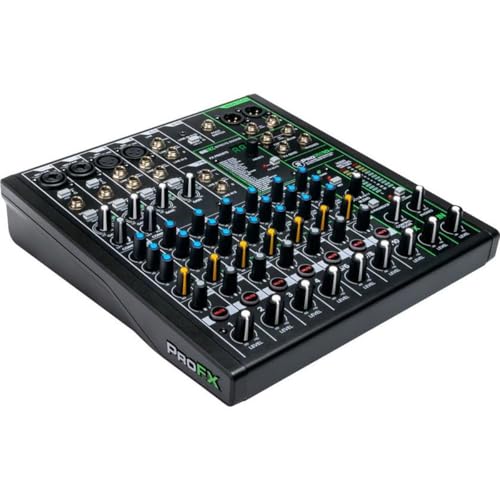
Mackie ProFX10v3 10-Channel Mixer with USB — Best for Bands and Panels
The ProFX10v3 is the small-band and full-panel version of Mackie’s creator line: four Onyx mic preamps, GigFX effects and USB recording in a mixer equally at home at a gig, a rehearsal or a streamed show. It suits bands, podcast panels and houses of worship with modest channel needs. Solo creators get better value from the ProFX6v3+.
Strengths
- Four Onyx preamps cover a band’s vocals or a full podcast panel
- GigFX effects polish live vocals without outboard gear
- USB recording captures the show or the rehearsal for review and release
Trade-offs
- USB is a stereo mix capture, not multitrack recording
- Size and price step up meaningfully from the 6-channel model
- No Bluetooth playback, which the newer v3+ models add
| Channels | 10 |
| Preamps | 4 Onyx mic preamps |
| Effects | GigFX effects engine |
| Interface | USB recording interface |
Four good preamps is the threshold where a mixer stops being a personal tool and becomes a group’s tool, and the ProFX10v3 crosses it with Mackie’s best affordable preamp design. A band can run its vocals and a couple of instruments, a podcast can seat four hosts, and the GigFX engine gives the result the reverb and presence that separates a produced sound from a rehearsal-room capture.
The USB recording is the quiet workhorse feature: record every gig and rehearsal as a stereo mix, review it, post clips from it. It will not replace a multitrack studio setup, and at this price nothing does. As the centre of a small group’s sound, live and online, it is one of the strongest affordable choices here.
Recording a group is a social technology as much as an audio one: the rehearsal tape a band actually listens to, the panel episode that needs no level rescue, the demo that sounds like the gig. Four clean preamps and one-button USB capture make those recordings happen by default rather than by special effort — and recordings that happen by default are the ones that exist.
Best for: bands, podcast panels and small venues recording their sessions as they go / Not suited for: solo creators or multitrack studio production
Check the current price on Amazon

Yamaha MG12XU 12-Input 4-Bus Mixer with Effects — Best for Bigger Sessions
The MG12XU is the step up for groups that outgrew ten inputs: a small band, a church or school setup, or a podcast with a full panel plus playback sources. Its 4-bus design and extra channels suit live sound for small venues as much as recording. Solo and duo creators will pay for channels they never use; the MG10XU is their better buy.
Strengths
- More mic inputs and a 4-bus layout handle bands and panels the MG10XU cannot
- One-knob compressors on mic channels tame uneven voices and performers
- Same D-PRE preamps, SPX effects and USB recording as the smaller XU models
Trade-offs
- Bigger footprint needs a permanent desk or a proper case
- Stereo-mix USB recording, not multitrack, like the rest of the MG-XU line
- Overkill for one or two microphones
| Inputs | 12, 4-bus configuration |
| Preamps | Yamaha D-PRE mic preamps |
| Interface | USB audio interface |
| Effects | Built-in SPX digital effects |
The jump from the MG10XU is about simultaneous sources. A band with drums overheads, two guitars, bass and two vocals, or a podcast panel of four with a co-host on a call and music playback, simply does not fit in ten inputs once stereo sources take their pairs. The MG12XU’s channel count and bus structure absorb that reality, and its one-knob compressors are genuinely useful on live voices, where one speaker whispers and the next projects.
It keeps the family virtues — D-PRE preamps, SPX effects, USB stereo recording, metal build — so nothing about the sound changes as you scale. Buy it when your source list, written down honestly, exceeds the smaller mixer. That list, not ambition, should size your mixer.
For recording, the bus structure is the sleeper feature: subgrouping lets you balance a drum pair or a set of backing voices as one fader against the lead, which is how real sessions stay manageable. Bigger sessions fail from complexity before they fail from sound, and this board’s layout is the affordable answer to that complexity.
Best for: small bands, worship and school setups, and full panels with playback sources / Not suited for: solo and duo creators who will not use the channels
Check the current price on Amazon

Behringer XENYX 802S 8-Input Mixer with USB Streaming Interface — Best Budget
The 802S is Behringer’s affordable all-rounder: two mic preamps, stereo channels for instruments and playback, and a USB streaming interface for recording or broadcasting the mix. It suits podcast duos, home studios and small live setups on a strict budget. Creators needing four or more microphones should count preamps, not inputs, and look at larger models.
Strengths
- USB streaming interface built in at a budget price
- Two proper mic preamps cover the common two-host podcast format
- Compact footprint suits desks and small rehearsal spaces
Trade-offs
- Only two mic preamps despite the eight-input headline
- USB carries the stereo mix, not multitrack channels
- Build is functional plastic-and-metal rather than tour-grade
| Inputs | 8 |
| Preamps | 2 XENYX mic preamps |
| Interface | USB streaming interface |
| EQ | 3-band EQ on channels |
The most common mistake in mixer shopping is counting inputs instead of microphone preamps, and the 802S is a good teacher: eight inputs, but two microphone channels. For the huge number of people whose real setup is two microphones plus a laptop and maybe a keyboard, that is exactly the right allocation, and Behringer prices it accordingly.
The USB streaming interface turns it into a recording and broadcasting front end without a second purchase, which is where the value compounds for podcasters and streamers. Sound quality from the XENYX preamps is respectable and quiet enough for voice work. Buy it with your actual microphone count in mind and it is one of the best-value small mixers here; buy it expecting eight microphones and no mixer at this price would have saved you.
As a recording purchase, it is the honest minimum: two voices recorded cleanly, with EQ to shape them and a stereo channel for the backing track or the call. A home studio that starts here learns gain structure and mixing on real hardware — skills that transfer unchanged when the studio grows.
Best for: solo and duo recordists on a strict budget who need a real preamp front end / Not suited for: sessions with three or more microphones
Check the current price on Amazon

Mackie Mix8 8-Channel Mixer — Best Analog Front End
The Mix8 is the affordable mixer for people who distrust features: two mic preamps, clean stereo channels, 3-band EQ and Mackie’s famously tough metal build, with no interface or effects to complicate anything. It suits rehearsal spaces, small PA work, keyboard submixing and podcasters recording into a separate interface. Creators wanting USB recording in the same box should choose an interface-equipped model.
Strengths
- Mackie’s build quality at this price is the headline: metal, tight, gig-proof
- Dead-simple layout a beginner can learn in one session
- Clean preamps and EQ cover voice and instrument basics without fuss
Trade-offs
- No USB interface and no effects — it is purely an analog mixer
- Two mic preamps cap panel size
- No per-channel compression for unruly voices
| Channels | 8 |
| Preamps | 2 Mackie mic preamps with phantom power |
| EQ | 3-band EQ on mic channels |
| Build | Rugged metal chassis |
Mackie built its name on mixers that survive being dropped, kicked and rained on, and the Mix series carries that DNA into the affordable tier. The Mix8’s metal chassis, solid knobs and sensible layout make it the mixer you hand to a school, a rehearsal room or a volunteer-run venue without a training session or a worry.
Its purity is the point and the limitation. There is no USB and no reverb; it mixes, cleanly and reliably, and recording is someone else’s job. For submixing keyboards, running a small PA, or fronting a separate recording interface, that purity is a virtue. Buy it for the decade of service, not for a feature list.
The recording case for a mixer with no recorder in it is the front-end upgrade: if your interface’s preamps are the weak link, or you record to a standalone recorder or a camera, a clean analog board in front transforms the input while your capture device stays the same. It is the modular way studios have always grown — one honest piece at a time.
Best for: recordists who own an interface or recorder and need a better analog front end / Not suited for: buyers who need USB recording inside the same box
Check the current price on Amazon
Comparison Table
The table compresses the six picks into the facts that decide most recording purchases: the badge, the key specification behind it, and the session each board belongs to. Shortlist here, then read the full reviews.
| Pick | Badge | Key spec | Best for |
|---|---|---|---|
| Yamaha MG10XU 10-Input Stereo Mixer with Effects Check on Amazon | Best Overall | 10 inputs, D-PRE preamps, USB interface, SPX effects | Podcasters, home studios and small acts that record and perform through one board |
| Behringer XENYX X1204USB 12-Input Mixer with USB Interface Check on Amazon | Best Home Studio Value | 4 mic preamps with compressors, British EQ, 24-bit FX, USB interface | Home studios and podcasters who want compression and musical EQ at capture |
| Mackie ProFX10v3 10-Channel Mixer with USB Check on Amazon | Best for Bands and Panels | 10 channels, 4 Onyx preamps, GigFX effects, USB recording | Bands, podcast panels and small venues recording their sessions as they go |
| Yamaha MG12XU 12-Input 4-Bus Mixer with Effects Check on Amazon | Best for Bigger Sessions | 12 inputs, 4-bus, D-PRE preamps, USB, one-knob compressors | Small bands, worship and school setups, and full panels with playback sources |
| Behringer XENYX 802S 8-Input Mixer with USB Streaming Interface Check on Amazon | Best Budget | 8 inputs, 2 XENYX mic preamps, USB streaming interface | Solo and duo recordists on a strict budget who need a real preamp front end |
| Mackie Mix8 8-Channel Mixer Check on Amazon | Best Analog Front End | 8 channels, 2 mic preamps, rugged Mackie build, simple layout | Recordists who own an interface or recorder and need a better analog front end |
How to Choose a Recording Mixer: Gain, Compression and the Multitrack Question
Start with the question that decides the category: do you need separate tracks, or a great stereo mix? Multitrack recording — every microphone on its own editable track — requires a multitrack interface or a much more expensive class of mixer, and it suits producers who mix after the session. A stereo-mix recording mixer suits everyone who mixes during the session: podcasts, demos, livestreams, rehearsals, live albums. Most home recordists genuinely belong to the second group, and for them the boards in this guide are not a compromise — they are the correct tool, with the mix decisions made by ears in the room instead of by mouse afterwards.
Within that decision, three things decide recording quality. Gain structure: set each channel’s gain so the loudest moment stays below clipping with headroom to spare, because a clipped recording is unfixable and a quiet one is merely quiet. The preamp’s job is to make that gain cleanly, which is why the preamp lines in this guide matter more than any other specification. Compression: voices and performers vary in volume, and a gentle one-knob compressor at capture evens them before the recording exists — the X1204USB and MG12XU’s compressors are the hardest-working features in this guide for spoken-word work. EQ: broad, musical EQ shapes a voice at capture so editing becomes optional; surgical EQ belongs in software, afterwards, on the recordings that need it.
Finally, count honestly. Microphones first — that is your preamp requirement — then stereo sources, then the outputs your workflow needs: monitors for performers, a main feed for the room, the USB feed for the computer. Write the session down, channel by channel, and buy the board that fits the written session with one channel to spare. Check the current price on Amazon for the exact board, and put a set of balanced XLR cables in the same order: a recording chain is only as quiet as its cabling.
Stereo Mix Recording: Why It Suits Most Home Studios
There is a quiet truth in home recording: most projects are finished faster, and sound no worse, when the mix is committed during the session. A stereo-mix board forces good decisions early — balances are set by listening, effects are chosen by ear, and the recording that lands on the computer is already a record, needing at most a trim and a level adjustment. Podcasts are the clearest case: an episode recorded through a compressed, well-balanced board can be published the same day, while a multitrack episode waits for an editing session that busy creators postpone. Bands recording demos and rehearsals benefit the same way — the tape exists, immediately, in a form people can actually listen to.
The affordable framing follows. At this tier you are buying preamp quality, compression and control — the things that make a stereo mix sound professional — rather than track count. If your ambitions later grow into full multitrack production, the board you bought here remains useful as a front end and a live mixer, which is more than can be said for most starter gear. Buy for the workflow you will actually finish projects in, and check prices at the time you buy, because studio gear is promoted in waves through the year.
How to Set Up a Recording Session: Clean Takes, First Time
Clean recordings are made in the setup, not in the edit. Run this sequence at the start of every session and the boards in this guide will deliver takes that need almost no rescue.
- Place microphones before touching a knob. Close to the source, off-axis enough to tame plosives and harshness, and away from walls and noisy equipment. Microphone position is the largest single factor in recording quality — larger than the mixer, larger than the microphone itself.
- Set gain per channel, loudest moment first. Have each performer deliver their loudest realistic moment, set gain so that moment peaks with headroom to spare, then leave the gain alone. Balance the mix with faders, not by re-gaining channels mid-session.
- Engage compression gently where voices vary. A one-knob compressor turned up until the loudest phrases just begin to be reined in — and no further — will even a panel or a vocalist without audible pumping. If you can hear it working, it is probably too much.
- EQ subtractively. Cut a little low end to remove room rumble and proximity boom before adding anything. Add presence only if the voice remains dull after placement and gain are right; most dullness is a placement problem wearing an EQ costume.
- Set effects for the room, sparingly for the recording. Performers sing and speak better with a touch of reverb in their monitors. Recorded reverb cannot be removed, so if the take is the product, keep the printed effect subtle — or record the performance with confidence and add space later only if your workflow allows a dry feed.
- Monitor on closed headphones and check a test take. Record thirty seconds, play it back, and listen for hiss, hum, room echo and imbalance. Every one of those is fixable now and expensive later. Check on a second device — a phone — before the session proper begins.
- Label and save the setup. Photograph the board or note the settings for recurring sessions. A podcast or rehearsal that starts from last week’s photograph starts five minutes faster and sounds identical — consistency is a feature your audience can hear.
Follow that sequence and the affordable tier stops sounding affordable, in the best way: the recordings carry the signature of care rather than of budget. That is the entire promise of a good recording mixer — it makes the session’s decisions easy to make well.
Room and Microphone: The Recording Variables a Mixer Cannot Fix
Every recording guide owes its readers this paragraph: the mixer is the third most important thing in the chain. The room is first — a bare, echoing space will print its character on every take through any board in this guide — and a few soft furnishings, a rug and a bookshelf will improve your recordings more than any equipment upgrade at this tier. The microphone and its position are second: close, consistent placement of even a modest dynamic microphone outperforms a fine condenser across the room. The mixer is third, and its job is to not waste what the first two give it — quiet gain, honest EQ, gentle compression.
That ordering is good news for affordable buyers. It means the boards here, which handle the third job properly, are not the bottleneck in a home studio that has handled the first two. Spend your next improvement dollar on the room, the one after on microphone position discipline, and let the mixer you chose from this guide serve while both improve around it.
A Short Note on Session Files and Backups
Recording mixers produce recordings, and recordings deserve the same discipline as the session itself. Copy every session off the computer the same day, keep the board’s settings photograph with the audio files, and name files by date and session rather than by inspiration — future you is a stranger who will not remember which take “final2” was. The stereo-mix workflow in this guide makes this easy: there is one file per session, it is already the record, and backing it up takes less time than the sound check did.
Common Buying Mistakes
Buying a mixer when you needed a multitrack interface
The most expensive mistake in this category is a workflow mismatch: producers who intend to mix every microphone separately after the session buy a stereo-mix board and discover the limitation on their first real project. Decide honestly whether you mix live or mix later. If later, buy the multitrack interface; if live — as most podcasters and demo bands do — the boards here are the right tool and the cheaper one.
Counting inputs instead of preamps
It bears repeating in every mixer guide because it ruins more first purchases than any other error: the input total includes line-level stereo channels that cannot take a microphone properly. Your requirement is the XLR preamp count, stated for every pick in this guide. Match it to your session’s microphone list, with one spare if your format might grow.
Chasing effects while ignoring gain structure
Beginners audition mixers by their reverb and record with their gain staging, and the recordings show it: hiss from gains set too low and ridden up later, or clipping from gains set by hope. A quiet preamp run at proper gain with no effects beats a effects-laden board run badly. Learn the setup sequence in this guide before shopping for polish.
Printing heavy effects onto takes
Reverb and delay recorded onto a take are permanent. Performers may love a wet monitor mix, but the recording should stay close to dry unless the effect is the artistic point of the piece. New recordists routinely drown their first sessions; keep printed effects subtle and your future self, editing, will be grateful.
Skipping the test take
Hum, hiss and a dead channel are all discoverable in thirty seconds of test recording — and undiscoverable afterwards. Sessions that skip the test take donate their best performance to a technical fault several times a year. Make the test take a ritual, on every board, at every session, without exception.
Final Recommendation
For most home recordists, the Yamaha MG10XU — Best Overall Check the current price on Amazon — is the board to buy: quiet D-PRE preamps, USB capture and effects in a metal body that covers podcast, studio and small live work. Studios that edit voices should weigh the Behringer X1204USB — Best Home Studio Value Check the current price on Amazon — for its compressors. Groups should buy preamps: the Mackie ProFX10v3 for four voices, the Yamaha MG12XU — Best for Bigger Sessions Check the current price on Amazon — when the session outgrows ten inputs. Duo recordists on a budget start correctly with the 802S, and interface owners upgrade their front end with the Mix8. Buy the board your session list demands, set it up with care, and record like the take matters — because with these boards, it will sound like it does.
- Yamaha MG10XU 10-Input Stereo Mixer with Effects — Best Overall: Check the current price on Amazon
- Behringer XENYX X1204USB 12-Input Mixer with USB Interface — Best Home Studio Value: Check the current price on Amazon
- Yamaha MG12XU 12-Input 4-Bus Mixer with Effects — Best for Bigger Sessions: Check the current price on Amazon
Related guides in this series: Best Affordable Mixers For Streaming Best Affordable Sound Mixers Best Affordable Mixers Best Affordable Commercial Drink Mixers Best Affordable Electric Mixers
Frequently Asked Questions
Can I record each microphone on its own track with these mixers?
No — the boards in this guide send a finished stereo mix to the computer over USB, which is the standard at the affordable tier. That suits podcasts, demos, livestreams and any mix-as-you-go workflow. If your production method requires editing each microphone separately afterwards, you need a multitrack audio interface or a higher class of mixer, and you should buy that instead.
What makes a recording mixer different from a live mixer?
At this tier, very little in hardware — the same boards do both — and a great deal in emphasis. Recording prioritises preamp quietness, clean gain structure and capture features like USB; live work prioritises outputs, monitor feeds and durability. The picks here were chosen for recording first, which is why preamp quality leads every review, but most of them also work small live gigs comfortably.
How many mic preamps do I need for a podcast?
One per host or guest who will ever be in the room at once — two for a duo, four for a full panel — plus a stereo channel for music and call audio. Remote guests join through the computer on a stereo channel, not a preamp. Count the chairs in your format’s biggest episode and buy for that number, not for the pilot.
Do I need compression on a recording mixer?
For spoken word and live vocals, it is the most useful feature after the preamps themselves, because real voices vary in volume and a gentle compressor at capture saves extensive editing later. Instruments recorded one at a time in a controlled studio need it less. If your recordings involve more than one voice, treat channel compression as close to essential.
Why does my recording hiss, and how do I fix it?
Usually gain structure: the channel gain is set too low and the level is being made up later, which raises the preamp’s noise floor along with the voice. Set gain so the source peaks healthily at the channel, keep cables balanced and away from power supplies, and record a test take to verify. The preamps in this guide are quiet when they are run as designed.
Can these mixers work for recording a full band?
A small band’s rehearsal, demo or live set — yes, with the four-preamp boards and sensible microphone choices: vocals, a couple of instruments, and stereo sources for the rest. A studio production with a fully mic’d drum kit needs more preamps and, usually, multitrack capture. Match the board to the session you actually run; the MG12XU’s session list in its review shows the realistic ceiling at this tier.


